
| AI Summary
SEO CTR shows how often an impression in unpaid search leads to a click. Google Search Console reports this rate by page, query, country and device. A practical audit compares similar searches, checks what people see in the results and estimates which pages have the most room to earn clicks. The first pages to review are those with enough impressions, a lower CTR than comparable pages and a search result the business can improve. |
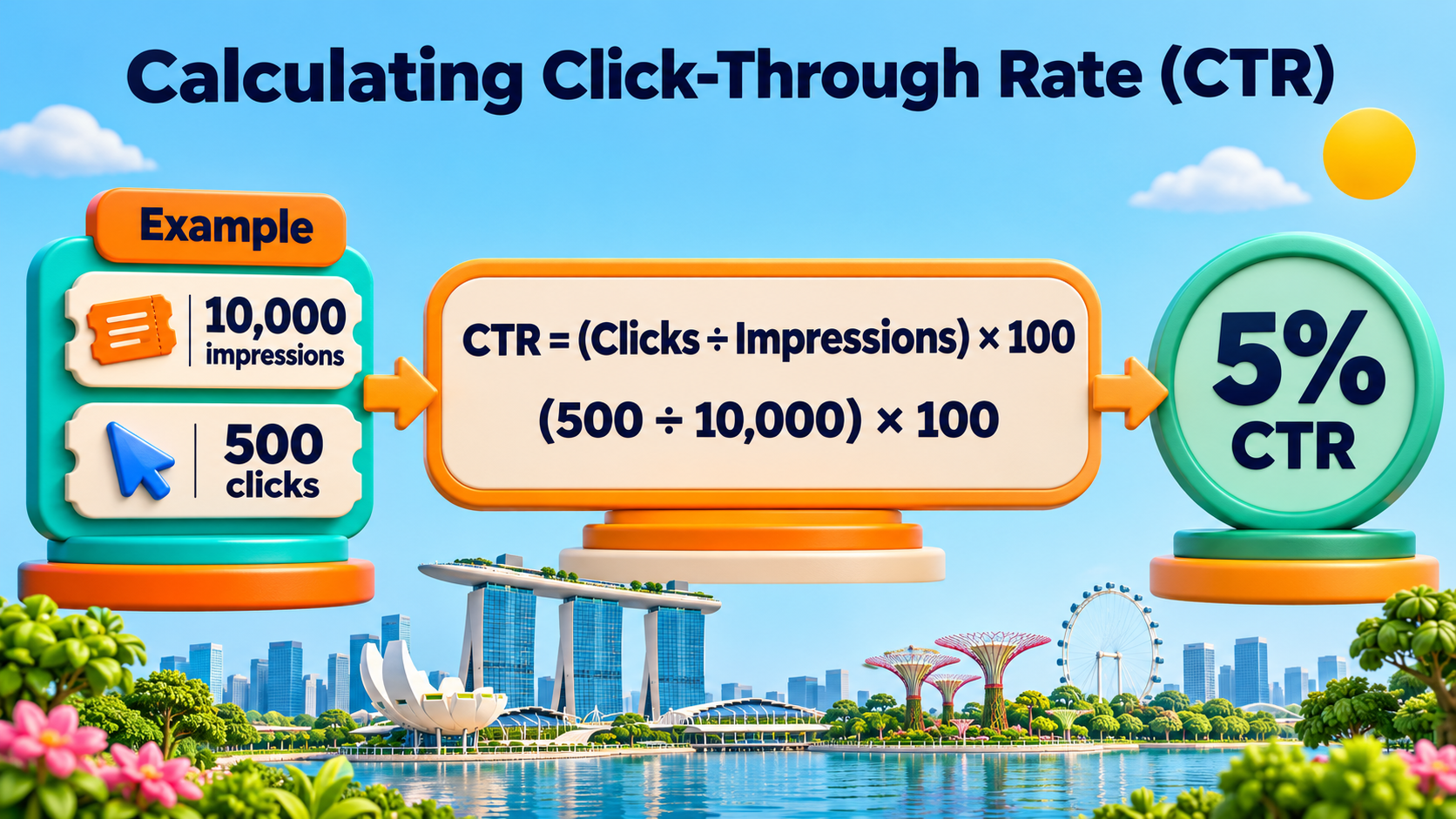
SEO CTR, or organic click-through rate, is the percentage of search impressions that lead to a click. To calculate it, divide organic clicks by impressions and multiply by 100. A page with 500 clicks from 10,000 impressions has a 5% SEO CTR. Google Search Console calculates this rate for the data you select.
Key Takeaways
- A falling CTR can come with more clicks when a page starts appearing for more searches.
- Brand searches and general searches need separate benchmarks because people arrive with different goals.
- A small gap on a page with thousands of impressions may deserve more attention than a large gap on a page with very few.
- A title test is easier to assess when the query, device, country and ranking position stay similar.
- Enquiries, bookings or sales help show whether additional search clicks bring the right people to the site.
A Singapore air-con company appears in Google when someone searches for servicing prices. Its page gets plenty of impressions, but few people click. The owner could rewrite the title straight away. A look at the results might show that the title says only “Our Services”, while nearby listings tell readers what a service includes and what it costs.
That same page might earn a low CTR for another reason, such as appearing lower on mobile or showing up for searches about repairs it does not offer. The work starts with finding out which searches account for the gap. Then the team can decide whether to change the listing, improve the page or investigate a drop in visibility.
How to Calculate SEO CTR in Google Search Console
SEO CTR uses two numbers from the same report. An impression counts when a link meets Google’s rules for appearing in a search result. A click generally counts when someone selects a result that takes them to your site. Some search features have their own counting rules, which Google explains in its definitions of impressions, position and clicks.
The SEO CTR formula
SEO CTR = (organic clicks ÷ organic impressions) × 100
A page with 10,000 impressions and 500 clicks has a CTR of 5%. If it earns 600 clicks from the same number of impressions in the next period, its CTR rises to 6%. That is an increase of 1 percentage point, or a 20% relative increase from the original rate. Percentage points show how far apart two rates are. Relative change shows how much the rate moved compared with where it started.
Where to find CTR in Search Console
The Search results performance report shows total clicks, total impressions, average CTR and average position. For an organic website audit, start with the Web search type. The date range and filters apply to the figures in the report, so check them before sharing a number or exporting it.
- Choose the period. Three complete months can give a small site more data to work with. A shorter period can help when investigating a change on a known date.
- Select all four metrics. Clicks and impressions show the volume behind the rate. Position gives context about where the result appeared.
- Choose a page in the Pages tab. With that page selected, open the Queries tab to see the reported searches that brought up the page.
- Add country and device filters as needed. A Singapore mobile audit should use the same country and device filters for the period you are comparing against.
- Export the table. A spreadsheet lets you keep the original figures, add notes about the results and record what changed.
How to combine CTR from several rows
A combined CTR uses total clicks divided by total impressions. An average of the percentages gives a small row the same weight as a large one. For example, one query with 90 clicks from 900 impressions has a 10% CTR. Another with 1 click from 10 impressions also has a 10% CTR. If the second query goes from one click to zero, averaging the two rates gives 5%, while the combined rate remains close to 10% at 90 clicks from 910 impressions.
Search Console already does the calculation for the totals it reports. If you build your own comparison in a spreadsheet, use the same calculation on the rows in your group. A spreadsheet total based on visible query rows can differ from the property total because Google withholds some queries for privacy. The report totals and the export each answer a different question about the data available to you.
What Is a Good SEO CTR?
A good SEO CTR is one that holds up against a fair comparison. A 3% rate might be strong for a general query where your page appears around position seven. The same rate might call for a closer look when your homepage appears first for your exact brand name. The best starting point is your own Search Console history because it reflects the searches your site actually appears for.
How to build a benchmark from your own data
Start with the page and the query you want to assess. If that pair has enough history, compare it with its own performance over a similar period. A service page for “aircon servicing singapore” gives you a better comparison when both periods cover Singapore, use the same device filter and have similar average positions. Keep any known promotion, price change or seasonal event in the notes.
When a page has little history, group similar pages or queries from the same site. A team reviewing air-con service pages might start with general service queries on mobile and build position bands around 1–3, 4–6 and 7–10. Narrow the bands if there is enough data. Positions four and six can behave differently, so a broad band is an early reference. When several rows supply the benchmark, use combined clicks and impressions.
| What to match | Why it changes the comparison |
| Average position | A result near the top has different visibility from one farther down. |
| Brand vs general search | A person who types the company name may already know which site they want. |
| Search purpose | A price comparison, a booking search and a quick question give people different reasons to click. |
| Device and country | Mobile screens show less at once, and results can vary by location. |
| Page type and date range | Service pages, shops and guides serve different tasks. Promotions and seasonal demand can change the mix of searches. |
This is also a keyword research task. Group queries by what readers want to do. For example, “aircon servicing price singapore” and “aircon servicing packages singapore” can belong together if both bring up pages with prices and package details. A search for an error code belongs in a different group, even if it lands on the same site.
When outside benchmarks help
Studies of organic CTR by position can show why the layout of the results page belongs in an audit. They can also give teams a starting point when a new website has little data. Before using an outside figure, check the study date, country, device and types of searches measured. A percentage from another market is a broad reference for a Singapore business, especially when the study includes a different mix of brand and general searches.
Your own benchmark can change, too. A service page might broaden its reach after the business adds details about new packages. The page could gain impressions from searches it used to miss. Keep a benchmark date in the spreadsheet so the team can see whether a comparison predates a change in the page, the offer or search demand.
Why SEO CTR Changes Even When You Rank Well
Average position is an average across impressions. Two reporting periods can show the same average while the page appears at different positions for the individual searches that make up the total. A report can also stay steady on desktop while moving on mobile. The Search Console query and page filters help you check which group is driving the change.
Search results can answer or redirect a question
Ads, map results, shopping listings, featured snippets and AI Overviews can all change what appears around an organic result. Someone looking for “aircon service near me” might open a map listing. Someone checking how often to clean an air-con filter may get enough information from an answer on Google. Someone comparing a yearly service plan may still want to see the price and terms on a website.
A Pew Research Center study of US browsing activity found that people clicked a traditional search result in 8% of visits to results pages with an AI summary and 15% of visits without one. Those figures describe the study’s US sample from March 2025. For a Singapore audit, check whether your query displays an AI Overview, a map or another feature and record what appeared in that check. Results can vary across searches and over time.
If a map appears prominently on your main service searches, local SEO can help you review business information alongside the website result. The page itself still has a job. A searcher who wants service areas, package details or booking terms needs to see those details after the click.

The title and snippet shape what readers expect
Google’s title link documentation explains how the title element, the main visible heading and other text can influence the title shown in Search. The title tag is the text you set on the page. The title link is the text a searcher sees. Compare the two before testing a rewrite, especially if the listing uses an old name or a heading that makes the page sound broader than it is.
A search snippet can come from the page or its meta description. Google can show different snippets for different queries. If the page title says it covers service prices, a short price section near the top gives readers the promised information and gives Google relevant text to draw from. This is part of on-page SEO, where the listing and the page need to tell the same story.
Does CTR affect Google rankings?
Google says it uses aggregated, anonymised interaction data to help its systems assess relevance. That disclosure gives site owners no benchmark that links a page’s Search Console CTR to a ranking gain. A move from 2% to 4% tells you that a larger share of impressions turned into clicks for the data measured. On its own, it cannot show what caused a ranking change. The business value is in finding out whether the result reaches the right audience and whether those readers take the next step on the site.
How to Audit SEO CTR and Find Pages Losing Clicks
A CTR audit looks for pages with enough visibility to earn more clicks and a specific issue you can investigate. The audit works best at the page-and-query level. A page may do well for its main service search and have low CTR for several broad searches. One sitewide number hides both patterns.
1. Make a shortlist from high-impression pages
Sort the Pages tab by impressions. Start with pages tied to a business goal, such as a quote request, sale or booking. Open each page’s Queries tab and look for a relevant search with a lower CTR than its benchmark. Record the page, query, clicks, impressions, CTR and average position on the same row. A note about the page’s purpose can make the list easier to review with the team.
Low-volume rows can move sharply with one extra click. A page with one click from 20 impressions has a 5% CTR. A second click doubles it. If the subject is important but the row is small, keep it on the list for a later review or extend the date range. Give the first round of work to rows with more data and a reason to expect the search can lead to a visit.
2. Estimate the gap in clicks
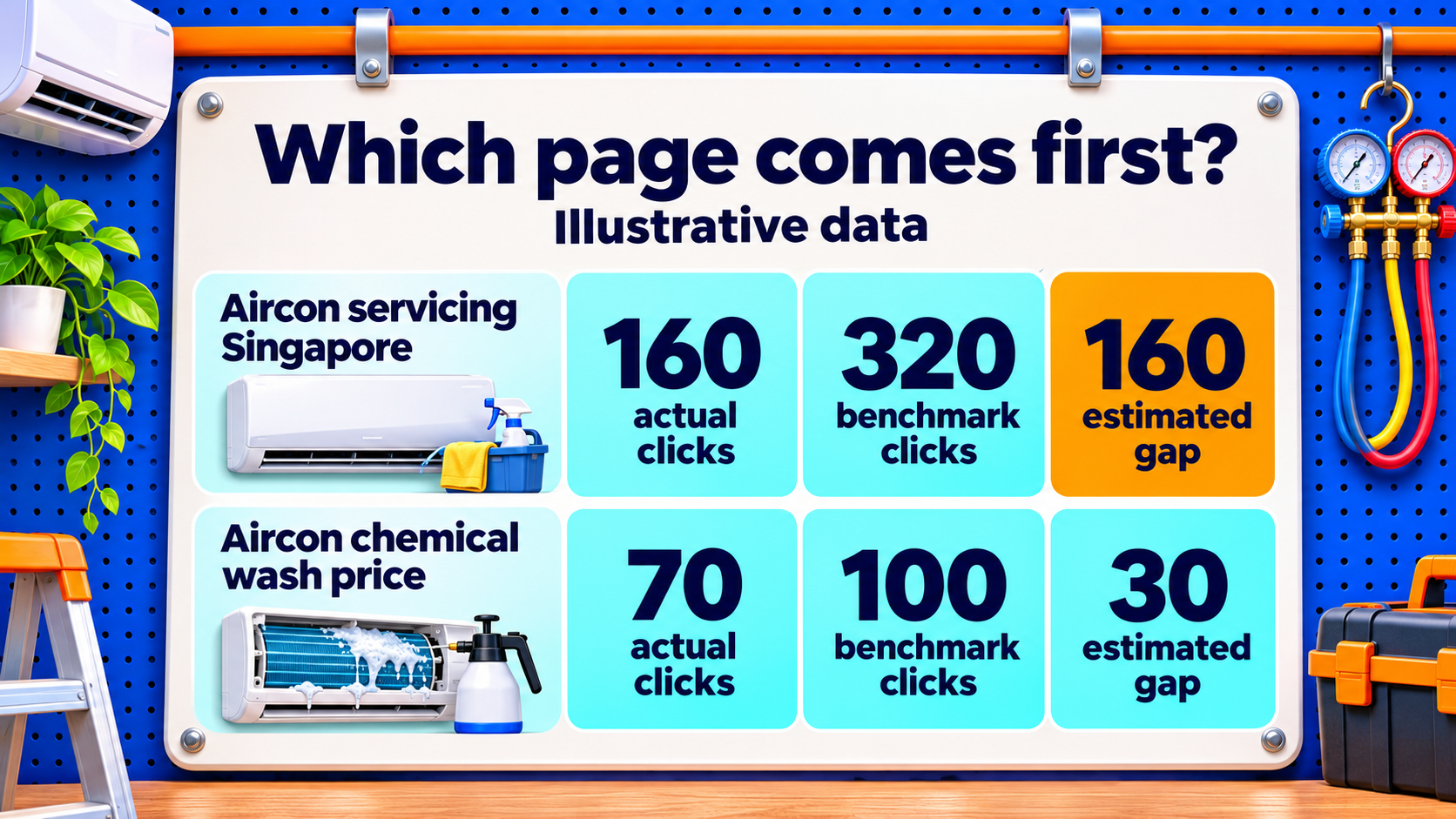
Multiply impressions by the benchmark CTR, then subtract actual clicks. The result estimates the click gap at the current number of impressions. It gives you a way to order the work using the same method across rows.
| Sample query | Impressions | Actual clicks | Actual CTR | Benchmark CTR | Estimated click gap |
| aircon servicing singapore | 8,000 | 160 | 2% | 4% | 160 |
| aircon chemical wash price | 2,000 | 70 | 3.5% | 5% | 30 |
| aircon filter cleaning guide | 400 | 8 | 2% | 5% | 12 |
The figures are illustrative. In the first row, 8,000 impressions multiplied by 4% gives 320 benchmark clicks. The page earned 160 clicks, leaving an estimated gap of 160. The last row has a larger gap in percentage points, but the first row has more room to earn clicks at its current impression volume.
The size of the gap tells you where to look. The search purpose and the page tell you whether the work is worth doing. A smaller gap on a service page that brings in quote requests may still deserve priority over a bigger gap on a broad advice article. Use the same benchmark method in each row and record where the reference rate came from.
3. Check the result before choosing a fix
Search for the query on the relevant device and record what appears. The results you see are a snapshot. Compare that snapshot with the patterns in Search Console and the content on the page. For a search about air-con servicing prices, check whether the page shows prices, explains what they cover and tells the reader how to book.
| What you see | What to check or change |
| The title names a broad service and the search is about price. | If the page has prices, make them easier to find and show what they cover in the title or description. |
| The page earns impressions for a service the business does not offer. | Check why those terms appear on the page and make the service scope more specific. |
| Clicks and impressions fell as average position worsened. | Use Google’s search traffic drop checks to investigate demand, rankings and indexing. |
| Two pages appear for the same search. | Compare their purpose and check which one answers the search better. One may serve a guide query and the other a booking query. |
| The result gets clicks but few visitors enquire. | Review the landing page, the offer and how you measure website traffic and conversions. |
4. Make one change you can track
A title for a page with published prices could change from “Our Aircon Services” to “Aircon Servicing Prices in Singapore”. The first heading and price section should support that wording. When prices vary, the page can explain how the number of units or the service type affects the quote. A price promise in a title needs a price explanation on the page.
Record the old and new wording, the affected URL, the main query and the date of the change. When several parts of the page need work to answer the query, record them together and treat the work as one page update. If the page already answers the question, a title-only test makes it easier to see how that change performs.
5. Check clicks, position and enquiries after the edit
Google needs time to recrawl and process a page change. Check when the revised wording starts appearing and compare periods of equal length once the page gathers enough impressions. Four to six weeks is a reasonable first review window for a page with steady traffic. A page with fewer impressions may need longer. Compare the same page, query, country and device, and check whether position or search demand moved during the test.
For example, suppose the air-con page rises from 160 clicks on 8,000 impressions to 216 clicks on 8,000 impressions. CTR moved from 2% to 2.7%, and the page earned 56 more clicks. If average position and the mix of searches also held steady, the result supports keeping the revised listing. If the page moved up several positions at the same time, both changes could have contributed.
Search Console shows the clicks. Website analytics can show what happens after arrival, including which landing pages lead to enquiries or bookings. A team looking to generate website traffic can use both views when deciding which changes to repeat. For a small business, a handful of relevant quote requests can be a better reason to expand a test than a larger gain in clicks from visitors outside its service area.
Find the Search Results That Could Earn More Clicks
An SEO CTR audit starts with a fair comparison. Use Search Console to match the searches, devices and positions that drive a page’s traffic. Then look at the result people see and use the estimated click gap to decide which page to review first. Clicks and enquiries give you a way to judge the change after it goes live.
At MediaOne, our SEO services help businesses find where search visibility fails to turn into visits or enquiries. If your pages get impressions and you’re unsure which listings to work on first, you can talk to our SEO team about reviewing your Search Console data and prioritising the pages with the most potential.
Frequently Asked Questions
Why does Search Console show a dash for CTR?
A dash can appear when the report has no CTR value for the selected data. Check whether the page or query has any impressions in that date range. With zero impressions, there is no rate to calculate. With impressions and zero clicks, the CTR is 0%. Widening the date range can help you see whether the page has enough data for a review.
Why do Search Console clicks differ from Google Analytics sessions?
A Search Console click records an action in Google Search. A Google Analytics session records a visit measured on the website. Consent settings, analytics setup and repeat clicks within a session can affect the comparison. Use Search Console to assess performance in Google results and analytics to assess activity after people arrive.
Can I combine Web and Image search CTR?
Search Console offers Web and Image as separate search types. A product photo in image results and a category page in Web results serve different browsing habits. For an audit, compare each type with its own history first. That lets you see, for example, whether a product gallery gains attention in image search while the shop’s category page loses clicks in Web search.
Which URL gets the CTR data if the same page has several addresses?
Search Console generally assigns performance data to the canonical URL, the address Google chooses as the main version of a page. If a tracking link or another version shows little data, check the main URL before treating it as a low-CTR page. A spreadsheet that groups several versions without checking Google’s choice can give the team the wrong page to investigate.