An SEO audit checks how well your website can be found, crawled and ranked by search engines. Most Singapore businesses need an SEO audit that leads to action, not a report listing 60 problems. Some providers offer a free check, but a full audit is a paid service.
This guide covers what SEO audit services include, how tiers differ, what drives cost and how to choose a provider – and if you want the service rather than the theory, start with MediaOne’s SEO services in Singapore, which includes audits among its SEO offerings.
Key Takeaways
- An SEO audit is only worth buying if you can act on what it finds.
- Judge any proposal by how many fixes it turns into ranked actions, not by the issue count.
- Score each finding on business impact and effort, then sort it into fix now, schedule, batch or ignore. This is the Audit Action Matrix, explained in full below.
- Ask for a sequenced plan with owners and timelines.
- Check what each pricing tier actually includes – and what Singapore audit prices looked like in 2026.
- Treat provider-reported outcomes as conditional on implementation and time, not as guarantees.
Signs Your Website Is Quietly Losing Rankings
Most ranking losses do not arrive with an alert. They appear as a slow slide in organic traffic that is easy to blame on seasonality until the quarter is over.
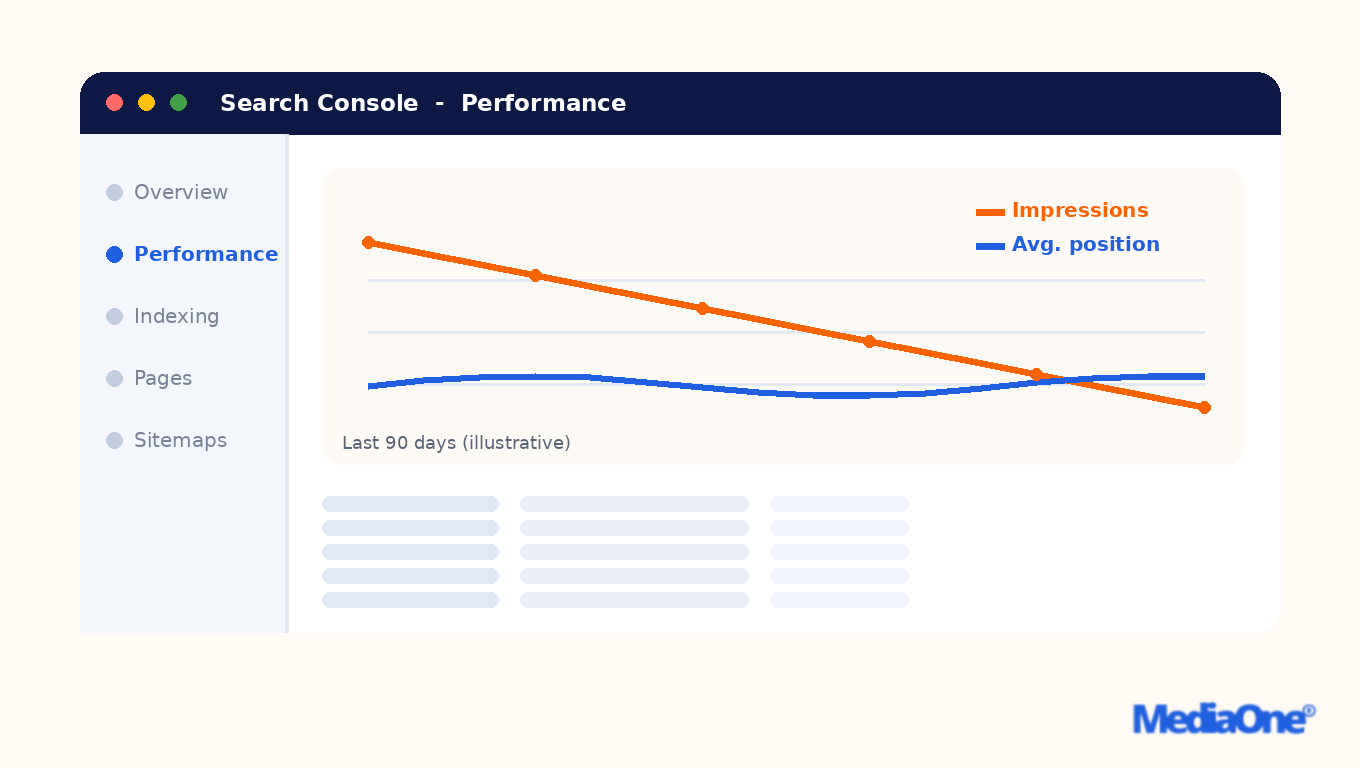
Illustrative Search Console performance report: impressions fall while average position holds steady
Watch for these signals:
- Impressions fall while average position holds steady. Fewer queries may be triggering your pages, a pattern that often shows up first in Search Console reports.
- Clicks slide on your most important pages. Check whether a competitor now owns a featured snippet or the top result in the search engine results.
- Indexed page counts change without a release. A sudden drop can point to a stray noindex tag or robots rule.
- Mobile sessions fall faster than desktop. StatCounter GlobalStats reports mobile at 60.05% of worldwide page views (September 2025-October 2026), so a mobile dip is a serious signal.
- Local pack visibility drops. A fall in Google Business Profile appearances is an early warning, and it matters most for a local SEO strategy in Singapore – if yours needs work, start with setting up and managing your Google Business Profile properly.
When two or more of these appear together, the cause is usually technical or structural, and reviewing on-page SEO and content quality is a sensible starting point. Many teams begin with a free SEO audit to pinpoint the cause, and that is where paid SEO audits start to pay for themselves.
When an Audit Is Worth Paying For, and When It Is Not
An audit is worth buying when you can act on what it finds, and not worth buying if you only want a document to file. Before committing, check:
- Do you have someone who can edit templates, redirects and metadata within a month?
- Do you know which five to ten pages earn most of your leads or sales?
- Have you seen an unexplained change in search engine rankings or traffic in the last six months?
- Will someone own the fix list after delivery?
If you answered no to the first two, a full audit will probably sit unused. Start with a basic review in Google’s Search Console help documentation and revisit once you have an owner for the work.
If you answered yes to most questions, SEO audits are a sound purchase. The next section explains how to tell a good proposal from a poor one.
Audit Types: Basic, Intermediate, Advanced and Behemoth
For a 300-page Singapore SME, the right tier is usually intermediate. It is the most cost-effective tier that names the pages to change and says what to change on each, which is the deliverable a small team can act on within a quarter. Tier labels rarely mean the same thing from one provider to the next, so judge each proposal by what it returns. A free initial scan is a starting point, not a substitute for a full SEO audit.
Several agencies publish Singapore cost ranges, but they vary widely. Confirm prices with each provider, as they depend on site size, number of templates and the depth of Google data review.
|
Tier |
What it includes |
Typical deliverable |
Best fit |
|
Basic |
Automated crawl, flags broken links, missing title tags and slow pages |
List of issues with short explanations |
Sites with fewer than 100 pages and an in-house team to triage |
|
Intermediate |
Basic crawl plus on-page review against target queries, internal linking and comparison with ranking competitors |
Named pages with specific changes for each |
Most Singapore SMEs with a developer or writer available |
|
Advanced |
Intermediate scope plus crawl behaviour, indexation patterns, structured data, rendering and months of Search Console data |
Sequenced plan with effort estimates |
Larger sites, or sites with JavaScript or complex templates |
|
Behemoth |
Multi-domain or large catalogue audit across tens of thousands of URLs |
Year-long roadmap, multiple specialists |
Enterprises and marketplaces with a dedicated execution team |
One provider publishes this exact tier structure openly: SEO-Audits.io prices its audits at GBP 1,499.99 (Basic), GBP 2,999.99 (Intermediate), GBP 4,999.99 (Advanced) and from GBP 7,999.99 (Behemoth) – useful as a scope benchmark, though Singapore quotes will be in SGD. A tier is worth buying only if your team can act on its output. Ask for a sample report before signing and check whether each finding carries a priority and an owner.
What a basic audit covers
A basic audit is a health check. It typically crawls a site, flags technical errors such as broken links, missing title tags and slow pages, and returns a list of issues with short explanations – the kind of issues that can quietly affect rankings for the keywords that drive your traffic.
What a basic audit rarely does is tell you which issues matter. A report might list 200 warnings, most on pages nobody visits. Ask whether the provider can identify which competitors outrank you for priority terms in the search results, since that shapes which fixes come first and how much visibility each fix can recover.
Intermediate and advanced audits
An intermediate audit adds on-page review against target queries, internal linking, and comparison with pages that outrank you. An advanced audit goes further into crawl behaviour, indexation patterns, structured data and, often, months of Search Console data. Advanced work also covers technical SEO in depth, including rendering and JavaScript, and how that affects the content search engines can see on your website.
The difference that matters is the deliverable. An intermediate report should name the pages to change. An advanced report should include a sequenced plan your developer can check. If a provider cannot show that plan in a sample, the advanced label is doing the selling.
Behemoth audits for large and multi-site properties
A behemoth audit covers large e-commerce catalogues, marketplaces, or groups running several domains. These audits take weeks, involve several specialists, and usually end in a year-long roadmap. Most Singapore small and mid-sized businesses will never need this tier. Multi-location firms may need local SEO checks on each branch page instead.
How to match the audit tier to your budget
Work backwards from the number of fixes you can realistically make. A basic audit suits a team that can implement five to ten changes in a quarter. An intermediate or advanced audit suits a business with a developer and a writer for a longer list. A behemoth audit only pays off with a dedicated team to execute it.
The cost per actioned fix is the fairer comparison. Divide the price by the fixes your team will actually ship, not the number listed. A basic report of 200 warnings that gets 8 fixes shipped costs more per fix than an intermediate report of 30 named changes that gets 20 shipped, even at the lower price.
Apply the Audit Action Matrix to any proposal before you sign. For each finding, score business impact (does it touch pages that earn leads or sales, and the content that drives your visibility?) and effort (hours of developer or writer time). Fix-now items are high impact and low effort.
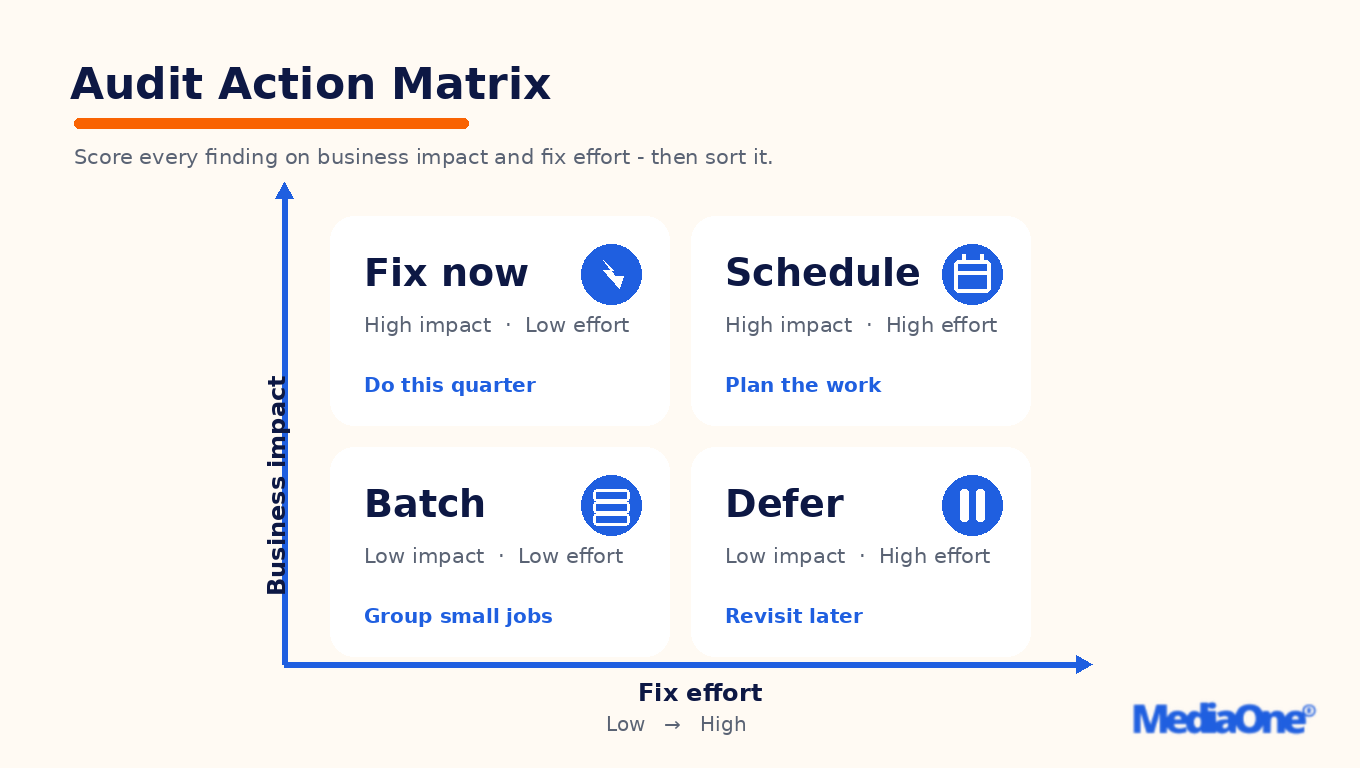
The Audit Action Matrix: every audit finding sorted by business impact and fix effort
|
Finding |
Impact (1-5) |
Effort (1-5, lower is easier) |
Quadrant |
Action |
|
Noindex tag left on the main service page |
5 |
1 |
Fix now |
Remove the tag and resubmit the URL |
|
Heavy hero image on the enquiry landing page |
4 |
2 |
Fix now |
Compress and serve in a modern format |
|
Old unlinked gallery with slow images |
1 |
3 |
Batch |
Compress or remove in a later sprint |
If most findings fall into the ignore-for-now quadrant, the tier costs more than the value it returns.
Technical SEO Checks
Indexing blockers are a common cause of lost visibility, and a page that search engines cannot index cannot rank. The most common culprit is a stray noindex directive left over from a staging build. It can keep an entire service section out of search results for months, unnoticed, because the pages still load fine for visitors. A thorough SEO audit of your website should check for these directives before anything else, and a local SEO review of your key location pages should check them too.
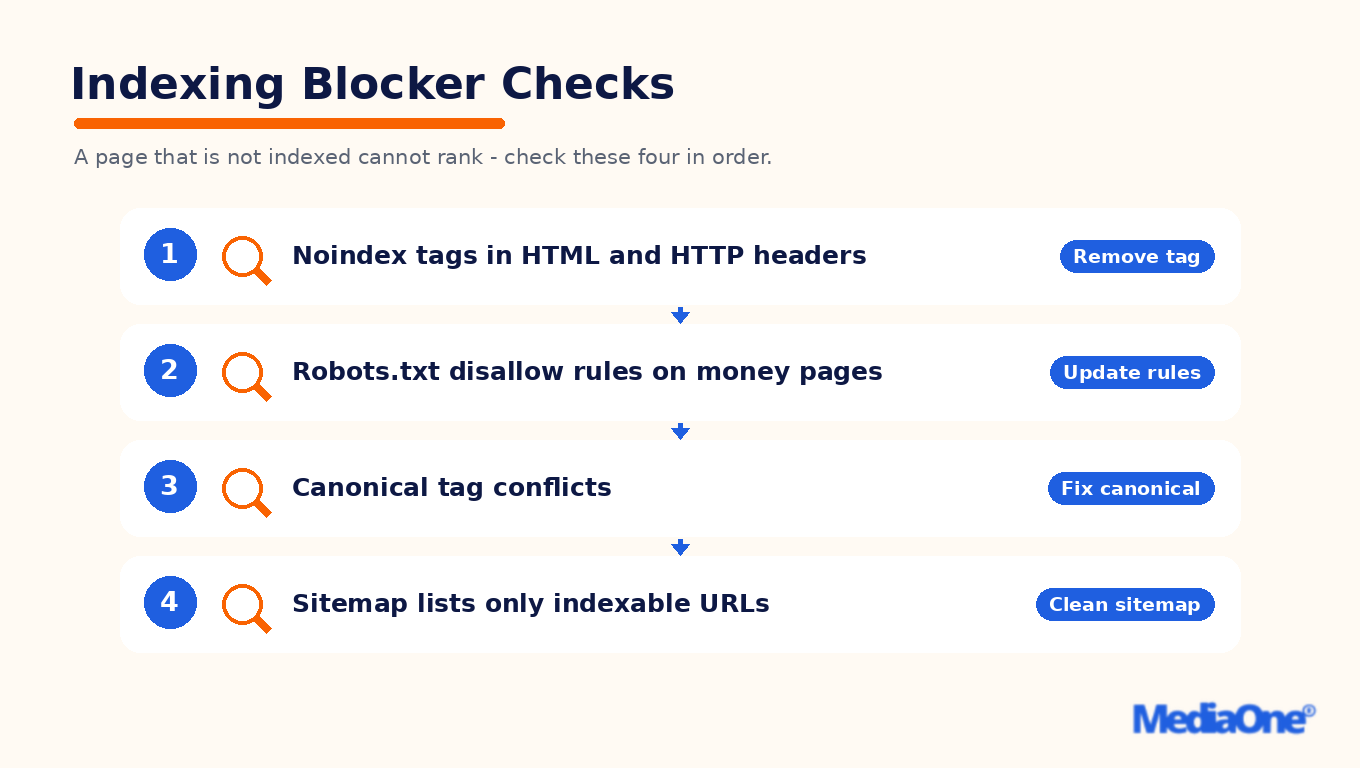
Check four indexing blockers in order – each has a direct fix
Check four things in order:
- Noindex directives: look for noindex in the page HTML and HTTP headers.
- Robots rules: review robots.txt for Disallow rules covering money pages, not just admin folders.
- Canonical tags: inspect canonical tags, which hint to search engines which URL to index. Google may override a canonical if other signals point elsewhere.
- Sitemap contents: confirm the sitemap lists only the pages you want indexed.
Canonical errors are the subtlest. Pointing every product variant at the parent category, or pointing a page at a URL that redirects, sends mixed signals. Google’s Search Central documentation on canonicalisation explains how it chooses the canonical when signals conflict, so an audit should flag conflicts rather than assume the tag is obeyed. Prioritise these blockers above other findings, because each one suppresses rankings on pages that already earn enquiries.
Mobile performance and page speed
Mobile deserves its own check. StatCounter GlobalStats reports mobile at 60.05% of worldwide page views (September 2025-October 2026). An audit should test pages on mobile first, using Google’s PageSpeed Insights for Core Web Vitals data. It should record Largest Contentful Paint (LCP), Interaction to Next Paint (INP) and Cumulative Layout Shift (CLS) for the templates that carry your revenue.
Use Google’s published thresholds as the line, per web.dev: LCP at or under 2.5 seconds, INP at or under 200 milliseconds, and CLS at or under 0.1, measured at the 75th percentile of page loads. Act when a template breaches one of them on mobile. A failing revenue page is a fix-now item, while a failing blog archive is a batch item. Score each speed issue by the commercial value of the page it affects, since a slow enquiry form matters more than a slow blog archive. Where a page’s user experience suffers from these technical issues, treat it as a higher priority. A free first pass with PageSpeed Insights gives a useful starting analysis before any paid engagement, and it shows how your speed compares with that of your competitors on the same queries.
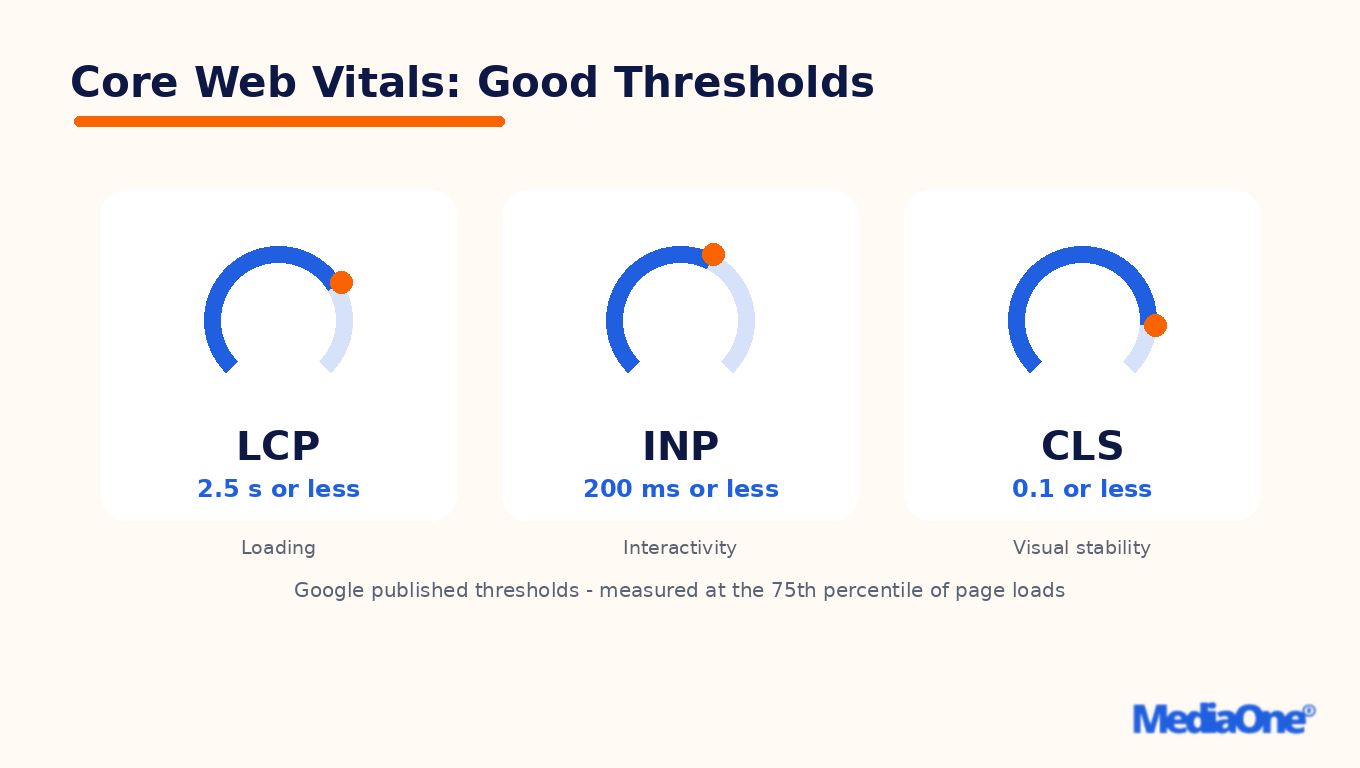
Google’s published Core Web Vitals thresholds, the line an audit should test against
Crawl budget, redirects and broken pages
Crawl budget matters mainly for large sites, and rarely for a site under a few thousand URLs. It is the number of URLs a search engine will crawl on your site within a given period. If a site has thousands of parameter URLs, filtered pages or expired listings, Googlebot can spend its visits on low-value URLs and crawl important ones less often. A good audit reviews crawl stats in Search Console and tests whether faceted or duplicate URLs are being crawled at scale. Treat these as signals to investigate, not guaranteed outcomes.
Redirect chains (A to B to C) slow crawling and weaken signals, so collapse any chain longer than one hop to a single hop. Internal links pointing to 404 pages waste link equity, so update them to the live URL. Fix every internal link that returns an error on a page that earns traffic, and schedule the rest. A list of 400 broken links means little until someone sees that 12 of them sit on pages that drive enquiries.
Singapore businesses weighing up SEO audit services need to know what they are buying, what it should cost and how to tell a useful report from a long list. The rest of this guide covers the mechanics of each audit component and gives a framework for sorting findings by impact and effort.
Content, Links and Keyword Cannibalisation
Content, link and keyword problems usually share one cause: too many pages compete for the same job, or pages do too little work. When you run an SEO audit, score each finding for business impact and fix effort, then sort it into one of four groups: fix now, schedule, batch or defer. This is the Audit Action Matrix used throughout this guide. The matrix is defined once in the section on tiers, and the groups are not repeated here.
A worked example. Take three findings from a 300-page Singapore SME website:
|
Finding |
Business impact (1 to 5) |
Fix effort (1 to 5) |
Group |
|
Two service pages both target ‘SEO audit services’ and split rankings |
5 |
2 |
Fix now |
|
Redirect chain of three hops on the old pricing URL |
3 |
2 |
Batch |
|
Glossary page with 380 words and no search demand |
1 |
4 |
Defer |
The first finding scores highest on impact and is quick to merge, so it goes first. The chain is low impact but cheap to clear, so it joins a batch. The glossary page carries little value and costly effort, so it waits.
Content audits: thin pages, gaps and length
A content audit maps every indexable page against the job it should do. Thin pages, meaning pages with little original text that only partly answer a query, are the first to flag. Review every page during an SEO audit, so that technical SEO and on-page problems are not mistaken for content gaps. Free checks can flag thin pages early, but results need human review before any change is made.
There is no set word count for SEO. Google’s Search Central guidance asks whether a page is helpful, reliable and satisfies the intent behind the query – see its people-first content guidance. A 400-word page that fully answers a narrow question can outperform a longer, padded one. What gets sites penalised is the opposite extreme: pages padded with keywords but no user value, a pattern covered in our guide to keyword stuffing examples and fixes.
Decision thresholds for thin content. Flag a page when it earns impressions but few clicks, or when it answers its query in fewer words than the pages that outperform it. Merge or expand only when the page targets a query with business value.
Gap analysis. Gap analysis asks which queries your business should answer, but no page covers. A missing page about a service you sell is high impact. A missing glossary entry usually is not. Local SEO queries for your service areas often reveal the most valuable gaps – our local SEO audit checklist shows how to test citations, reviews and branch pages – and checking how your visibility compares with that of your competitors on those queries shows where the gaps matter most.
Link audits and manual action risk
A link audit checks the quality and spread of inbound links and looks for patterns that breach Google’s spam policies, such as purchased links and link schemes. Most sites do not need a disavow file, and most unnatural-looking links are simply ignored. The audit’s job is to find the rare cases where risk is real. Anchor text is part of that review – our guide to anchor text optimisation, with examples and an audit method, shows what an over-optimised profile looks like.
One provider’s case study describes a financial comparison site that suffered a 70% traffic drop after a manual action – a penalty applied by a Google reviewer – and then recovered. That figure is provider-reported, not independently verified, so treat it with caution. The directional lesson holds: a manual action can cost far more than any link gained. Check for purchased links, link schemes and sudden spikes from unrelated sites, and rank findings by whether they touch a page that earns leads.
Keyword cannibalisation and query segment analysis
Keyword cannibalisation happens when two or more pages target the same query. Search engines split signals between them, and neither ranks as well as one strong page would. The usual fix is to merge, redirect or re-target the pages, not to write a third one.
Query segment analysis groups search terms by intent (informational, comparison, transactional or local) and shows which page should own each group. In Google Search Console, filter a query to identify which URLs appear for it. Treat cannibalisation as confirmed when two URLs each appear for the same query across a meaningful share of impressions, and track performance after each fix.
Merging two pages that both rank for a money term is high impact and low to moderate effort, so it belongs in the fix-now group. Redirect the weaker page to the stronger one, update internal links, and check that the surviving page answers the query fully. Fix any redirect chain longer than one hop, and check Core Web Vitals after the merge – a heavier page can push LCP and INP past the limits above.
Recovering Lost Traffic and Rankings
A drop in organic traffic is one of the most common reasons businesses commission an SEO audit. A useful report explains why traffic fell and what to fix first: which pages lost visibility, when it happened, and which fixes would plausibly bring them back.
Diagnosing a drop after a core or helpful content update
Start by matching the timing of the drop against Google’s announced updates. A sudden fall that lines up with an update date points to a quality or relevance reassessment. A gradual decline over several months is more often a technical SEO or content problem. Poor user experience and slow pages can also contribute.
Work through these checks in order:
- Confirm the drop is real. Compare impressions and clicks for the same period in Google Search Console, filtering by date to exclude seasonal swings.
- Identify which pages and query groups fell. A drop concentrated on thin or near-duplicate pages suggests a content quality issue. A drop across every section suggests a sitewide signal or a technical blocker.
- Check for manual actions. A manual action needs a different response from an algorithmic drop.
- Look for indexing changes. A noindex tag added during a redesign, or a robots rule blocking a key directory, can remove pages from results within days.
- Compare against pages now ranking above you. If they answer the query more completely, the gap is editorial and no technical fix will close it. Review on-page SEO elements – titles, headings and meta descriptions – on both sets of pages; our guide to how header tags structure your headings for SEO covers the heading side of that comparison.
An audit that cannot place the drop in one of these categories has not diagnosed anything. Ask any provider to show which pages fell, by how much, and why.
Domain migrations and rebrand audits
Changing a domain, moving to HTTPS, restructuring URLs, or rebranding can break the signals search engines hold for your pages. The audit maps every old URL to a new destination and confirms the mapping holds. Where the migration affects local SEO listings, confirm business name, address and phone details are consistent across directories.
A migration audit should cover:
- A complete URL inventory from the old site, matched against the new one.
- Redirect checks: one hop per redirect, correct status codes, no chains or loops.
- Canonical tags, internal linking and sitemaps updated to the new URLs.
- Analytics and Search Console properties set up for both versions before launch.
- A post-launch crawl within the first few days to catch technical issues that only appear once real traffic hits the new URLs.
Most migration losses are preventable, and the usual cause is an incomplete redirect map rather than a penalty. Any old URL with traffic or backlinks needs a live destination before go-live.
Client case studies and what the numbers do and do not show
Provider websites often publish case studies with large percentage gains. SEO-Audits.io states that its clients see an average 300% increase in organic traffic within six months of implementation, and its case studies include a financial comparison site recovering from a manual action after a 70% traffic drop. These are one provider’s own figures, not an independent review.
Read such numbers with three questions in mind:
- Starting point. A 300% gain from a site with little organic traffic is a small absolute change. Ask for the baseline in visits.
- Selection. Case studies show clients who succeeded, not the proportion who did not.
- Causation. The gain depends on who implements the recommendations, how long that takes, and what competitors do in the same period.
Treat any outcome figure as a sign of what a provider can report, not a forecast for your site. Ask to see the full set of client results, including the weak ones, before relying on an average. Some providers offer a free initial review; use it to test whether their diagnosis is specific to your site.
SEO Audit Services Are What Your Business Might Need
An audit only earns its fee when someone acts on it. Sort every finding with the Audit Action Matrix, then fix high-impact, low-effort items first. A report that cannot be sorted this way is a list, not a plan.
Next steps for a Singapore business:
- Ask the provider to sort every finding into the four groups before agreeing to a scope.
- Confirm mobile performance is in scope, with Core Web Vitals tested against Google’s published thresholds on mobile.
- Check that Google Business Profile is reviewed if you serve specific neighbourhoods or the whole island.
- Agree who implements each fix, and by when, before the audit starts.
- Treat outcome promises with caution. Results depend on implementation and time, and provider-reported figures reflect that provider’s own clients, not guaranteed returns.
If you want an audit that ends in a sequenced fix plan rather than a PDF, review MediaOne’s SEO services in Singapore and compare any other quote against the criteria in this guide.
Frequently Asked Questions
How long does an SEO audit take?
A basic technical audit usually takes a few days to a week, while a full review of a larger site can run several weeks. The timeline depends on page count, CMS complexity and access to Search Console, analytics and server logs. Ask for the timeline in writing.
Can I run an SEO audit myself?
Yes, for a small website. Free tools such as Google Search Console and a crawler can flag indexing errors, broken links and missing titles. The harder part is judging which findings matter. Score each issue for business impact and fix effort, then tackle high-impact, low-effort items first. If you want structured training first, see our guide to SEO courses in Singapore, their options and costs.
What should an audit report include?
A useful report lists each finding, the affected URLs, the business impact, the effort to fix and a priority ranking. Be wary of reports that only count issues.
How often should a site be audited?
Most businesses benefit from a full SEO audit yearly and lighter checks quarterly. Run one after any major change, such as a redesign, platform migration or domain move. Heavy publishers may need monthly monitoring.
Do free SEO audit tools replace a paid audit?
No. Free scans are a useful first pass for technical basics, but they cannot judge commercial priority, compare you with ranking competitors, or sequence fixes against your team’s capacity. Use them to decide whether a paid audit is warranted.