| AI SUMMARY
Header tags (H1–H6) are HTML elements that give a page a structural outline for search engines, screen readers and AI search tools. For SEO, they do not act as a ranking switch — Google uses them to understand and segment content, and heading text feeds into the title links it generates. Best practice in 2026 is one H1 per page, a logical H2–H3 hierarchy with no skipped levels, descriptive headings that mirror the questions searchers ask, and sections written to stand alone so AI Overviews and answer engines can lift and cite them. This guide explains the hierarchy rules, keyword placement, and a five-step audit to fix existing pages. |
Header tags in seo are structural markup that tells search engines, AI search tools and assistive technology what each section covers. They help people and machines understand a page, but they are not a ranking switch on their own.

In typical audits, the pages that struggle are rarely short on content. They are usually short on structure: three H1s, an H4 sitting under an H2 with nothing between them, or a section titled “More Information” that could mean anything. This guide explains how header tags work, how to build a hierarchy that holds up, how to write headings that answer real questions, and how to audit an existing page.
It is written for content writers, editors and site owners in Singapore and elsewhere who want their headings to do real work in 2026. Where heading work fits into a full technical programme, we say so — the wider stack is covered in our SEO services practice, and this guide sits inside that cluster.
Key Takeaways
- Headings are structure first, comprehension signal second. Search engines use them to understand what each section covers, but a heading does not earn rankings on its own.
- Use one H1, then build a logical H2 and H3 hierarchy. Each level should describe a real subdivision of the level above, and you should never skip a level to change how text looks.
- Write each heading to answer a specific question the reader is asking. A descriptive heading outperforms a clever one that makes the reader guess.
- Make every section self-contained. AI search tools often lift a single section, so each one should make sense quoted alone.
- Audit existing pages in five steps. Extract the outline, check the H1 and levels, confirm each H2 covers one idea, test headings against intent, and read each section in isolation.
- Treat headings as an accessibility requirement. Screen reader users navigate by heading level, so a correct hierarchy serves assistive technology as well as search.
What Header Tags Actually Do for Search Engines and Readers
The difference between an H1 and a styling choice
An H1 is a structural element in the HTML document. It tells browsers, crawlers and assistive technology that the text inside it is the page’s main subject. A styling choice is a visual treatment applied with CSS, such as larger type, bold weight or a coloured font. The two can look identical on screen while meaning different things to a machine.
To check, view the page source or use the browser’s developer panel and look for an <h1> element. If the large text is only a <p> or a <div> with a class that makes it look large, the page has no heading as far as search engines are concerned. This is common on sites built with page builders, where a “heading” block produces a styled paragraph.
Headings do two jobs that styling cannot. They create a navigable outline for screen reader users and phone readers, and they give machines a labelled map of the document.
How search engines use headings to understand page topics
Google’s Search Central documentation describes headings as a way to help people and Google understand content, and its title links documentation lists heading elements such as <h1> among the sources Google uses when it generates the title link shown in results. The guidance is careful about what it promises: headings aid comprehension, not ranking.
The heading outline gives a crawler labelled segments. The H1 signals the overall subject, each H2 signals a distinct subtopic, and the text beneath is read in that context. A page with H2s reading “Pricing”, “Installation time” and “Warranty terms” shows its subjects in a clear order. A page with H2s reading “Section 1” and “Section 2” tells the crawler almost nothing, even if the paragraphs are excellent.
Descriptive headings tend to help more than clever ones. A heading is one of the few places where an entity, such as a product name, a place or a process, is named explicitly and placed close to the claims made about it.
A persistent belief holds that stuffing a keyword into an H1 or H2 lifts the page for that term. Headings are one signal among many, and Google has said it does not rank pages on heading markup alone. A tidy H1 that does not satisfy the query will not outrank a page that does.
Poor heading markup does not necessarily cost rankings either. Pages can rank well with weak markup because their content and relevance carry the weight. Headings improve how a page is understood and read, which indirectly supports the signals that do move rankings. Treat them as a comprehension and usability tool first, and do not write them to game a ranking — the same principle behind ethical SEO that builds sustainable search rankings.
The Heading Hierarchy: H1 Through H4 Explained
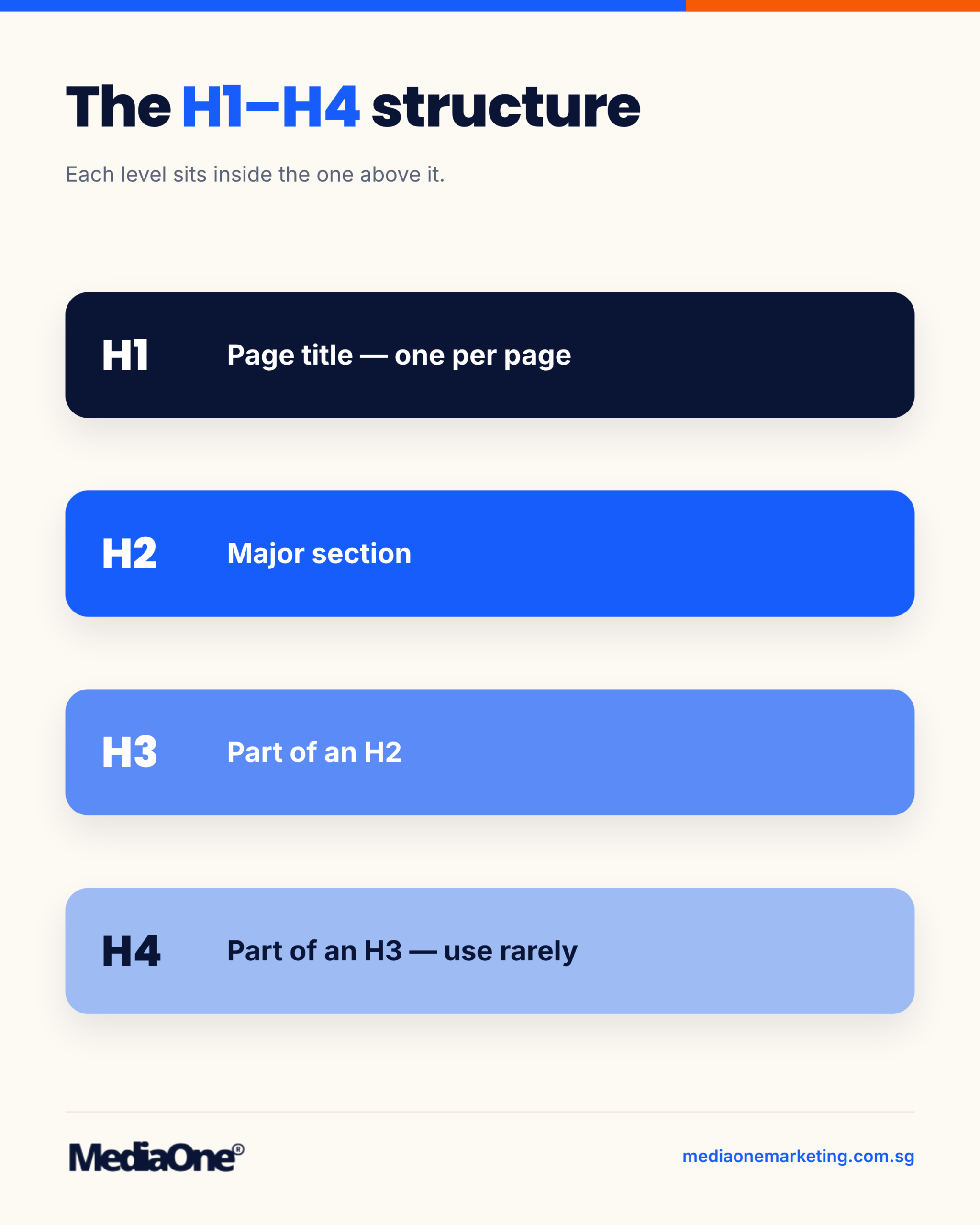
A heading hierarchy is a structural outline built into the page. H1 names the whole page, H2 opens a major section, H3 divides that section into parts, and H4 breaks a part into smaller pieces. When these levels nest cleanly, a reader can skim the outline and grasp the argument before reading a single paragraph. Heading structure is also just one layer of the technical picture; for how it combines with the rest in a local context, see our technical local SEO guide.
The single H1 rule and what belongs in it
Use one H1 per page, and make it the title of the content. It should name the subject in plain language, so that a reader who sees only that line knows what the page covers. For a blog post, this usually means the same wording as the title tag or a close variant of it.
The H1 is not the place for a sales line, a date stamp, a site name or a decorative phrase. If your content management system prints the site name in an H1 in the header, every page carries two H1s, and the real page title competes with the logo for the same role. Check the template, not just the article.
The HTML standard permits multiple H1s, and Google’s John Mueller has said its systems handle them without a problem, so duplication alone is not a penalty. The practical problem is clarity: a single H1 tells readers and machines which idea owns the page. Keep one.
When to use H2s to mark distinct subtopics
An H2 should open a section that covers one distinct idea. A quick check: can you summarise what the section does in one short sentence without the word “and”? If “and” is needed, the section probably holds two ideas and should be split.
H2s also serve as the main scanning points for a reader looking for one answer. Give each H2 a heading that names its subject, so the reader can decide within seconds whether to stop.
Keep H2s parallel in form where possible. If one heading is a question and the next is a noun phrase, the outline reads unevenly. Neither form is wrong, but mixing them without reason makes a page feel assembled rather than written.
Using H3s and H4s without skipping levels
An H3 sits under an H2 and divides it. An H4 sits under an H3. The rule that matters is never to jump levels. Going straight from an H2 to an H4 leaves a gap in the outline, and a screen reader user who navigates by heading level will hear a structure that does not match what they see.

Use an H3 only when a section genuinely has parts. A section with one idea needs no H3. Adding H3s to every section for appearance creates a deep, fragmented outline that is harder to read. Well-structured pages on detailed topics often use a few H3s under each H2, rather than a dozen subheadings in every section.
H4s are rare in blog content. Use one when an H3 contains a list of distinct steps or cases that each need a label. If H4s appear often, the H3 is probably carrying too much and should become its own H2.
The Web Content Accessibility Guidelines, published by the W3C, address this under the info and relationships criterion, WCAG 2.2 success criterion 1.3.1. The guidance is that structure conveyed visually must also be conveyed in code, which is why heading levels must be real markup, not styled text.

Common hierarchy errors and how to fix them
Most heading problems fall into four patterns.
|
Error |
What it looks like |
Fix |
|
Skipped level |
H2 followed directly by H4 |
Insert an H3 or demote the H4 to H3 |
|
Heading used for styling |
Bold text sized up to look like a heading, marked as a paragraph |
Mark it as the correct heading level, and restyle with CSS if needed |
|
Several H1s |
Logo or site name in an H1 plus the article title |
Keep the article title as the only H1 and change the logo markup |
|
Flat outline |
Twelve H2s of equal weight with no grouping |
Merge related H2s and move minor points into H3s |
The most common error is the heading used for appearance. A writer wants a line to stand out, so they make it bold and larger and leave it as a paragraph. The page looks right to a sighted reader, but the structure disappears for search engines and assistive technology. Apply the correct heading tag, then adjust the visual style in the stylesheet.
After drafting, read only the headings from top to bottom. Ask whether they tell the story of the page in order. If the outline makes sense on its own, the hierarchy is doing its job. Correct levels only matter if they also match what the reader is searching for, which is the next question.
Writing Headings That Serve Search Intent
A heading does two jobs. It tells a reader whether the section answers their question, and it tells a search engine or AI system what the section is about. When a heading fails at either job, the rest of the section is rarely read or cited.
Matching the question a searcher is asking
Start with the query, not the topic. A person searching “header tags SEO” is usually asking whether headings affect rankings, how many to use, what a good structure looks like, or how to fix their own. Each question calls for a different heading.
Write the heading so it signals the answer type the searcher expects. If the query is a how-to question, the heading should promise steps. If it is a “does X matter” question, the heading should make the verdict visible.
- Weak: “Heading Considerations”
- Strong: “Do H2 Tags Affect How Google Ranks a Page?”
The second heading mirrors the question and makes the answer easy to lift. Headings that match real questions, drawn from People Also Ask boxes or Search Console query data, tend to earn the most relevant traffic.
Test each heading with one question: could a reader who saw only this line decide whether the section answers them? If not, rewrite it.
Descriptive headings versus clever headings
Clever headings feel good to write and perform poorly. “The Hidden Power of Structure” tells the reader nothing about what follows. “How Heading Structure Affects Page Scanning” does the job at a glance.
Descriptive wording matters for three audiences:
- Skim readers decide in seconds whether to stay, and rely on headings more than body text — a page whose headings fail that scan invites the back button, as our guide to reducing bounce rates explains.
- Screen reader users navigate by heading list. Vague headings are useless when read out of context, a point the W3C Web Accessibility Initiative makes in its guidance on headings.
- AI search tools extract passages and often label a claim with its heading. A vague label gives the system nothing to attribute.
Clever wording is not forbidden, but use it sparingly and only after the descriptive version is in place. If you cannot state the section’s main point in the heading, the section probably covers more than one idea and needs splitting.
Placing primary and secondary keywords without stuffing
Keywords belong in headings where they fit the sentence, not where they fit a keyword list. “Header Tags SEO, Header Tags Ranking and Header Tags Tips” reads as spam and gives both readers and search systems a weaker signal than one natural phrase.
A practical approach:
- Put the primary keyword in the H1 and in one or two H2s where it reads naturally.
- Use secondary keywords, such as “heading hierarchy” or “H1 tag”, in the H2s and H3s that genuinely discuss them.
- Let variants appear in body text, woven into full sentences.
If a heading reads awkwardly with a keyword in it, leave the keyword out. Search engines understand synonyms and related terms.
Density is not the goal. If you can remove a keyword from a heading and the meaning stays the same, it was doing no work there.
Headings as self-contained answers for AI search tools
AI search tools such as Google’s AI Overviews, Perplexity and ChatGPT’s search mode tend to pull a passage that answers a question directly, then attribute it. The heading is the retrieval hook. A heading phrased as a question, followed by a direct answer in the first sentence, gives those systems a clean unit to lift.
Under each heading, the first sentence states the answer, supporting detail follows, and the section names its subject so the passage makes sense when quoted alone. Write “the H1 tag” rather than “it”, and “Google’s documentation” rather than “the documentation”. Claims are tied to a named source in the same section.
A section that depends on the previous one for its meaning will be skipped. Read each section as if someone had pasted only that part into a chat window. If it still answers its heading, it is ready.
Header Tags and AI Search: Why Structure Now Matters More
Answer engines do not read a page the way a person does from top to bottom. They break content into passages, score each one for relevance, and lift the ones that answer a question cleanly. Headings are the map they use to find those passages. A well-built heading hierarchy shapes how a page is read and cited, though it is only one signal among many that search systems weigh.
How answer engines extract passages by heading
Retrieval systems typically split a page into chunks, and headings act as natural boundaries between them. A heading tells the system what the following text is about, so the paragraphs beneath it are indexed under that topic. When a searcher asks a question, the engine matches the question against heading-plus-body passages rather than against the page as a single document.
A vague heading such as “Next steps” or “More details” gives the engine very little to work with. The passage beneath may contain the exact answer, but the label says nothing about its subject. A heading such as “How long does business name registration take?” tells the system precisely what the passage answers, so the passage can be matched to the query.

Each H2 should therefore work as a retrieval label. If you read only the headings of your page, you should be able to tell what each section delivers. The same discipline helps a skim reader, and what helps a person scan usually helps a retrieval system too.
Google’s own guidance points the same way: its AI optimization guide explains that AI Overviews and AI Mode use retrieval-augmented generation grounded in the existing Search index, and that no special markup or structured data is required — which means clear structure still counts. Check current product documentation before relying on any specific mechanism, since these systems change.
Writing quotable, self-contained sections
Answer engines prefer passages that make sense without the rest of the article. A section that opens with “As mentioned above” or “This approach” forces the engine to fetch context it may not have, so the passage is less likely to be cited. A self-contained section names its subject in its first sentence and carries its own conclusion.
Write each section as if someone will quote it alone in a chat window. The first sentence names the subject. The middle gives the mechanism, threshold or figure. The final sentence states the outcome the reader should take away. A section built this way survives being cut from the page and pasted elsewhere, which is what a citing system does.
Keep each section focused on one idea, usually a few hundred words. A section that drifts across three topics produces a passage that answers none of them well. If a heading covers two ideas, split it into two headings.
Connecting claims to named sources within a section
Answer engines are more willing to attribute a claim when it is tied to a named, checkable source. A sentence that says “studies show faster reading” gives the engine nothing to attribute. A sentence that names the organisation and the finding gives it both to credit.
Place the source inside the same section as the claim, not in a footnote or a distant references list. Name the publisher, give the year of the source, and link it where you are confident of the URL. Keep the year attached to each statistic, because a figure from an earlier study should not be presented as current in 2026.
When you cannot find a credible source for a claim, remove the claim or mark it for verification. An unsourced number is both a trust problem for readers and a reason for an answer engine to skip the passage.
A Step-by-Step Framework for Auditing Heading Structure
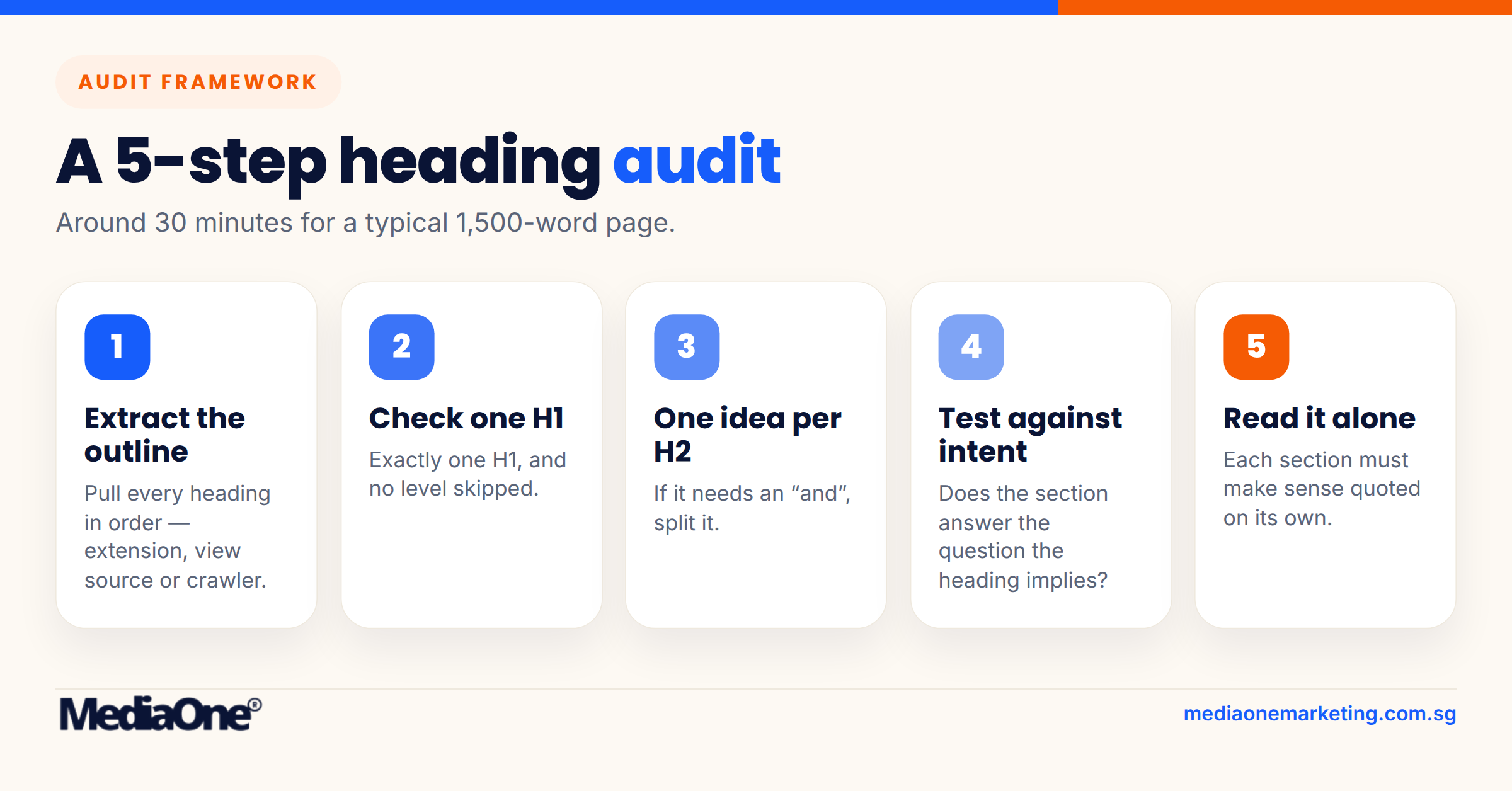
Most heading problems only show up when you look at the outline on its own. A page can read well from top to bottom and still have three H1s, a jump from H2 straight to H4, and an H2 that quietly covers two unrelated ideas. The five steps below catch these issues in a fixed order, so you do not re-check the same thing twice. Expect the full audit to take around 30 minutes for a typical page of roughly 1,500 words.
Step 1: Extract the heading outline from your page
Before you judge a heading, you need the full list of them in order. Reading the rendered page is unreliable, because a heading that looks large may be a styled paragraph, and a small heading may be a real H2. Pull the structure from the source instead.
Use one of these methods:
- Browser extension: The HeadingsMap extension for Chrome and Firefox lists every heading level on the page in a side panel.
- View source: Open the page, press Ctrl+U (Windows) or Cmd+Option+U (Mac), and search for <h1, <h2, <h3 and <h4.
- Crawler export: Screaming Frog SEO Spider reports heading values per URL, and the data can be exported to a spreadsheet.
Paste the results into a single column, indenting each line by its level. You now have a plain outline to check against the rest of the framework.
Step 2: Check for a single H1 and no skipped levels
Two rules cover most structural errors. Each page should have exactly one H1. Levels should step down one at a time: an H2 is followed by an H3 or another H2, never directly by an H4.
Check both in your outline:

- Count the H1 lines. If the count is not one, identify whether a template is injecting a second H1, which is common with site-wide banners or page builders.
- Scan for any level that jumps more than one step deeper than the line above it.
- Where a jump appears, decide whether a missing H3 belongs there, or whether the lower heading should be promoted.
Skipped levels are usually a styling decision in disguise. Someone chose an H4 because it looked the right size. Change the font size in your stylesheet instead, and set the heading level by meaning. The threshold here is simple: any count other than one H1, or any step deeper than one level, fails this check.
Step 3: Confirm each H2 covers one distinct idea
An H2 is a promise about the section beneath it. If that section contains two ideas, a reader scanning the headings will only get one of them. Read each H2 and ask whether you could write a single sentence that summarises everything under it. If you need the word “and” or a semicolon to do it, the section probably covers two ideas.
Signs an H2 holds too much:
- The section runs past roughly 300 words and changes subject partway through.
- Two different searchers would want the section for different reasons.
- You could split the section in two without losing any meaning.
Split it, and give each half its own heading. Signs an H2 holds too little: a section of two or three sentences that could sit as a paragraph under the previous heading. Merge it upward. The working threshold is roughly 300 words per H2, and a section under about three sentences is usually too thin to stand alone.
Step 4: Test each heading against the searcher’s intent
A heading can be accurate and still answer the wrong question. Take each H2 and H3 and write down the question it implies a reader is asking. Then check whether the section answers that question in its first two or three sentences.
Take the heading “Heading length”. It implies the reader wants a rule on how long headings should be. A section that opens with a history of HTML semantics has missed that intent, even if it mentions length later. Reorder the section so the answer comes first, or rewrite the heading to match what the section delivers.
This step shows whether your headings work as navigation for a person. If a reader skimming only the headings could not decide which section solves their problem, the headings need rewriting.
Step 5: Read each section in isolation for self-containment
Copy one section, from its H2 to the next H2, into an empty document. Read it without the rest of the page. Ask three questions: does it answer its own heading, does it define any term it uses, and does it make sense if an AI search tool lifts it out as a passage?
Pronouns are the usual failure. A section beginning “This approach works because it…” depends on the paragraph before it. Replace “this approach” with the approach’s name. Also check that any figure or claim names its source in the same section, not three sections earlier.
Any section that fails the test gets its opening sentence rewritten so the answer and its context sit together. Once all five steps are complete, record the date and the page URL in your audit log so you can see when the structure was last reviewed.
Heading Problems: Symptom, Cause and Fix
Most heading problems show up as something a reader or a crawler notices before the author does. A page jumps from a large title straight to a tiny sub-point, a sidebar appears as a heading in the outline, or a section makes no sense once it is quoted on its own. The table below maps the symptoms we see most often in site reviews to their likely causes and the fix for each. Use it as a first pass, then confirm the cause in the page’s source code before you change anything.
|
Symptom |
Likely cause |
Fix |
|
The page has two or more H1s, or the H1 is missing |
The theme template adds an H1 to the header or logo, or a secondary title has been given H1 markup |
Keep one H1 for the page’s main topic. Demote any other H1 to H2, or move the site logo out of heading markup |
|
A heading jumps from H2 straight to H4 |
Heading level was chosen for its font size, not its place in the outline |
Change the level to match the structure (H3 for a subtopic of an H2). Set size with CSS, not the tag |
|
Headings look bold and large but are plain paragraphs |
Text was styled with bold or font-size settings instead of a header tag |
Wrap the text in the correct heading tag and restyle it in CSS so the look is preserved |
|
Many headings read as “Introduction”, “More Information” or “Details” |
Headings were written as labels, not as the question or claim the section answers |
Rewrite each heading as a specific statement or question the section resolves |
|
An H2 covers two or three unrelated ideas |
Points were combined to save space, so the section cannot answer one question |
Split the section into separate H2s, one idea each |
|
Sidebar, footer or cookie-banner text appears in the heading outline |
Widgets and components use heading tags for their titles |
Change widget titles to non-heading elements, or give them a class that outline tools can ignore |
|
A heading sits over text that does not match it |
Sections were reordered or edited without updating the headings |
Re-read each section against its heading and either rewrite the heading or move the text |
|
Keyword-stuffed headings that read awkwardly |
Heading copy was written for the crawler, not the reader |
Rewrite the heading to state the answer plainly, and keep the keyword only where it fits naturally |
|
Accessibility checker flags “empty heading” |
A heading tag wraps an image, icon or empty container |
Put real text inside the heading, or remove the tag and use a styled element |
Two patterns cause most of the rest. The first is choosing heading levels by appearance: an author wants smaller text, so they pick H4, and the outline breaks. The second is treating the heading as a label rather than an answer, which makes sections hard to scan and difficult for AI search tools to cite. Fix the structure first, then the wording, because a well-written heading placed at the wrong level still fails the reader and the assistive technology that depends on the outline.
Comparing Header Tag Approaches Across Page Types
The same heading rules do not produce the same result on every page. A blog post is read from top to bottom and mined for answers, a product page is scanned for specifications, and a landing page must hold attention for a few seconds before a visitor decides to act. Applying one template to all four wastes the structure each page type needs.
The comparison below sets out how four common page types differ in their heading goals, typical H2 count and the way their headings are read by search engines and AI search tools.
|
Page type |
Primary heading goal |
Typical H2 count |
H3 use |
How headings are read |
Common mistake |
|
Blog post |
Answer a question or teach a process in full |
5 to 9 |
Subdivides long H2 sections |
Passage by passage, often lifted into AI answers |
Vague headings like “Some thoughts” that say nothing about the answer |
|
Product page |
Let the buyer compare features and check specifications |
3 to 6 |
Groups specs, variants and warranty |
Scanned for attributes and matching terms |
Marketing slogans in H2s instead of product attributes |
|
Service page |
Show what the service covers, who it suits and what happens next |
4 to 7 |
Breaks a service into named stages or deliverables |
Matched against “who does X in Y” queries |
Headings that describe the company rather than the outcome |
|
Landing page |
Keep one offer in focus and move the visitor to a single action |
2 to 4 |
Rarely needed |
Skimmed in seconds, with the H1 carrying most of the weight |
Several competing offers, each with its own H2 |
The pattern is clear. The more a page must persuade quickly, the fewer headings it needs and the more the H1 and first H2 must carry. The more a page must explain, the more H2s and H3s it can support.
Blog posts: depth and self-contained sections
A blog post is the one page type where every heading can earn its place as a standalone answer. Readers arrive with a question, and the heading tells them whether a section holds the answer. Aim for one idea per H2 and keep each section short enough that an AI tool can lift a single section without losing its meaning. The business blogging guide covers how heading structure fits into the wider craft of writing posts that earn traffic.
Product pages: attributes, not adjectives
On a product page, headings should name what a buyer compares: materials, dimensions, compatibility, delivery and returns. A heading such as “Built for everyday wear” is pleasant but gives a search engine nothing to match. “Materials and care” gives both the reader and the crawler a clear signal.
Service pages: outcomes and process
Service pages work best when their H2s follow the buyer’s path: what the service includes, who it is for, how it is delivered and how pricing is set. Naming the stages of a process as H3s under a “How it works” H2 helps readers and search engines understand the sequence.
Landing pages: one job, one heading structure
A landing page exists to convert one audience on one offer. Keep the H1 aligned with the advert or link that brought the visitor there, use two to four H2s to address objections or confirm value, and avoid H3s unless a short list of benefits needs them. Multiple competing H2s split attention and weaken the single action the page is built to drive. For the page-level work that pairs with a tight heading outline, see our landing page optimisation guide for Singapore.
Choosing the right structure for your page
Before writing headings, decide what the reader must do after reading. If the answer is “understand something”, build a blog-style hierarchy. If it is “compare options”, build a product or service hierarchy around attributes or stages. If it is “act now”, keep the structure minimal and let the H1 and first H2 do the persuading. Matching the heading structure to that decision separates a page that ranks and converts from one that only looks organised.
Conclusion
Headings do three jobs at once: they tell search engines what a page is about, they let readers scan to the part they need, and they give AI search tools clean, self-contained passages to lift. A single H1, a logical H2 and H3 hierarchy with no skipped levels, and headings that match the question a searcher is asking cover most of what matters. Get those right and the rest of the page has something solid to stand on.
Start with the page you publish most often. Pull its outline using a browser extension or a simple list of the heading tags, then run the five-step audit described earlier in this guide. Fix the worst offender first, usually a missing H1 or a section that covers two ideas under one H2, and re-check the outline once the changes are live. Structure is rarely a one-off job, so schedule the same check each time you publish a new article. And if you would rather have the whole technical programme — headings, site architecture and local visibility — handled together, that is exactly what our SEO services team does day to day.
Frequently Asked Questions
Header tags do not rank a page on their own. They help Google understand what each section covers, which lets it match sections to queries. Google’s guidance on headings in its Search Central documentation describes them as aids to understanding structure. A clear outline also makes the page easier to use, which indirectly supports engagement. Treat headings as a clarity tool, not a keyword shortcut.
How many H2 headings should a blog post have?
There is no fixed number. Let the topic decide. Each H2 should mark one distinct subtopic a reader might want to jump to. A longer post often has five to nine H2s, while a shorter post may need only three or four. Merge two H2s that cover the same idea. Split a section that runs past about 300 words and covers several separate points.
Can I use more than one H1 on a page?
The HTML standard allows multiple H1 elements, and Google has said it can handle them. For SEO and accessibility, use one H1 per page. It states the main topic and keeps the outline unambiguous for search engines, screen readers and AI search tools. If your template generates several H1s, such as a site-wide logo heading plus a page title, change the logo to a non-heading element.
Should I include my primary keyword in every heading?
No. Forcing the exact keyword into every heading reads as stuffing and rarely improves rankings. Use the primary keyword where it fits naturally, usually in the H1 and in one or two H2s. Let other headings describe their sections in plain language. The test is whether a reader would write that heading themselves.
They matter because AI search tools often extract a passage together with the heading above it. An H3 that names a specific question or claim gives the extracted passage its context. H4s are rarely needed and should appear only when a subsection genuinely subdivides an H3. Keep the hierarchy intact, since skipped levels make it harder for an AI system to place a passage within the page’s logic.
Is it acceptable to style text as a heading without using a header tag?
It may look the same on screen, but it is not acceptable for SEO or accessibility. Text styled to look like a heading, using bold paragraphs or large font classes, gives search engines and screen readers no structural signal. Assistive technology users who navigate by headings will miss the section entirely. Use a real heading element and control its appearance with CSS.