| AI Summary
The best generative AI tools in 2026 depend on your business needs. ChatGPT leads for general tasks, Claude for document analysis, Gemini for Google workflows, and GitHub Copilot for coding. Canva, Synthesia, and ElevenLabs serve specialised creative needs. Singapore businesses should compare pricing, output quality, data privacy, and integration before subscribing. A two-week pilot can help identify which tools deliver measurable value. |
ChatGPT is our first recommendation for Singapore businesses seeking one versatile generative AI tool. It supports drafting, document analysis, research assistance and image creation without requiring separate subscriptions for every task. Developers should compare GitHub Copilot first, while design teams may gain greater value from Canva or Adobe Firefly.

However, the most popular platform is not automatically the best purchase. We recommend choosing according to recurring work, privacy requirements and the time needed to correct its outputs. This guide compares 12 options, identifies subscriptions worth postponing and gives Singapore teams a practical method for deciding what to buy.
Key Takeaways
- Start with one use case. A useful generative AI subscription should solve an identifiable problem, not duplicate existing software.
- Match specialist tools to specialist work. GitHub Copilot suits coding; Synthesia serves avatar-led training; ElevenLabs focuses on generated speech.
- Check billing terms carefully. Annual discounts, usage credits and per-seat charges can change the real price substantially.
- Protect company information. Review training settings, retention, access controls and Singapore’s data protection obligations before uploading files.
- Measure results. Include editing, verification and approval time when calculating whether a tool saves money.
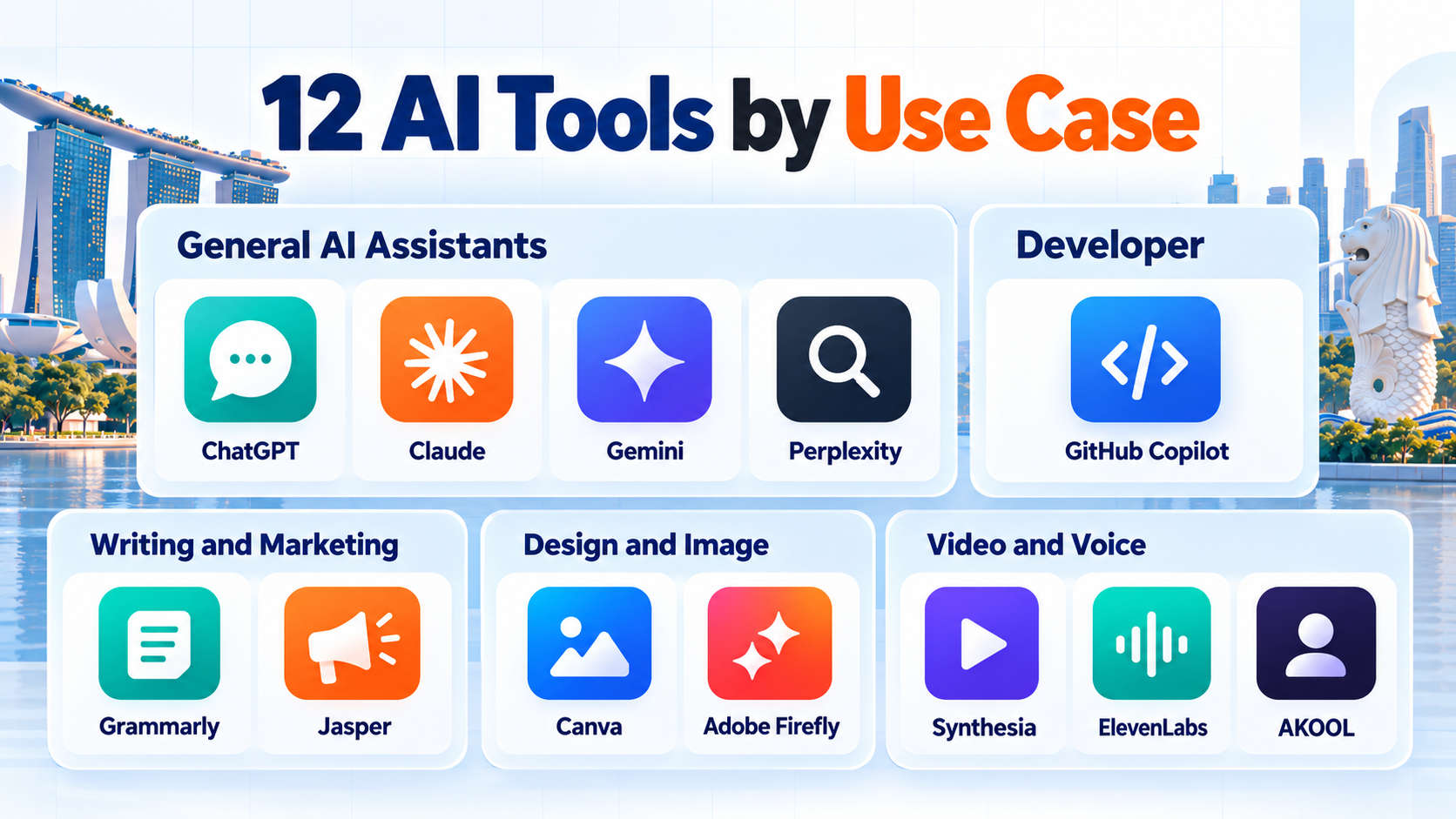
The 12 Generative AI Tools We Would Shortlist in 2026
Our ranking reflects breadth of practical use, cost transparency and suitability for common business workflows. It is an editorial shortlist based on published documentation, not a claim that MediaOne independently benchmarked all 12 products.
| Rank | Tool | Best use | Entry paid plan in USD | Approximate SGD |
| 1 | ChatGPT | General business work | $20/month | S$25.59 |
| 2 | Claude | Long-form analysis and writing | $20/month | S$25.59 |
| 3 | Gemini | Google-oriented workflows | $19.99/month | S$25.58 |
| 4 | Perplexity | Source-led research | $20/month | S$25.59 |
| 5 | GitHub Copilot | Coding inside development tools | $10/month | S$12.80 |
| 6 | Grammarly | Editing existing writing | $12/month, billed annually | S$15.36 |
| 7 | Canva | Everyday marketing designs | $180/year | S$230.35/year |
| 8 | Adobe Firefly | Generative visual production | $9.99/month | S$12.78 |
| 9 | Jasper | Repeatable branded marketing copy | $69/month | S$88.30 |
| 10 | Synthesia | Presenter-led training video | $18/month, billed annually | S$23.03 |
| 11 | ElevenLabs | AI voiceovers and dubbing | $6/month | S$7.68 |
| 12 | AKOOL | Specialist avatar and video experiments | $12/month, billed annually | S$15.36 |
Pricing checked against vendor pages in October 2026. Conversions use an indicative rate of US1=S1.27972 on 19 October 2026, rounded for planning. They are not Singapore checkout quotations. Confirm local pricing, Goods and Services Tax (GST), card conversion charges and usage allowances before subscribing.
1. ChatGPT: Best Overall Starting Point
Best for: General drafting, structured planning, file analysis and research preparation. Platforms: Web and mobile, with desktop access. Free option: Yes, subject to limits.
ChatGPT Plus costs US$20 monthly. The product combines writing assistance, image generation and document workflows, making it a sensible first test for a small team with varied needs. Ask it to summarise customer feedback, structure an article brief or analyse a non-sensitive spreadsheet.
Its limitations remain important. Responses can contain incorrect facts, fabricated sources or inconsistent calculations. Long instructions sometimes require careful checking. We would not treat generated research as verified simply because the wording sounds confident.
Advantages: Broad task coverage, accessible interface and useful file-based workflows. Drawbacks: Review time, variable usage limits and consumer-data settings that need attention.
Compared with Claude, ChatGPT is our broader default. Select a business workspace rather than assuming an individual subscription provides equivalent organisational controls. OpenAI explains the distinction.
2. Claude: Best for Document-Heavy Knowledge Work
Best for: Editing substantial drafts, reviewing complex documents and developing structured explanations. Platforms: Web, desktop and mobile. Free option: Yes, with usage limits.
Claude Pro costs US$20 per month. It is a strong alternative when work involves long briefs, policies or repeated revisions. We would test it on a genuine document set and assess whether it preserves instructions across the complete response.

Claude is not a substitute for source verification. Its summaries can omit material qualifications. Heavy usage may also justify a different plan, while separate application programming interface (API) charges can apply to custom software integrations.
Advantages: Useful long-document workflows, readable prose and structured analysis. Drawbacks: Usage restrictions, verification requirements and possible overlap with ChatGPT.
Our recommendation is straightforward: do not pay for both assistants automatically. Give each the same five representative tasks, then retain the one that produces fewer substantive corrections. Check Anthropic’s consumer training choices before entering sensitive material.
3. Gemini: Best for Google-Centred Teams
Best for: Research assistance, drafting and work connected to Google’s productivity ecosystem. Platforms: Web and mobile; integration varies by product and subscription. Free option: Yes.
Google AI Pro is listed at US$19.99 monthly. Its appeal is particularly clear when staff already spend their day in Google services. Yet Gemini’s consumer subscription and business Google Workspace offerings have different features, administration and data commitments.
We would ask staff to test an existing workflow, such as preparing a meeting brief from permitted documents. Check which features actually work in the organisation’s Workspace edition and country before approving the purchase.
Advantages: Familiar Google environment, multimodal capabilities and accessible entry tier. Drawbacks: Product-plan complexity, feature availability differences and potential duplication of existing Workspace AI features.

Choose Gemini over ChatGPT when proven integration saves substantial switching time. Otherwise, compare output quality before making Google’s ecosystem the deciding factor.
4. Perplexity: Best for Research With Inspectable Sources
Best for: Early-stage topic research, competitor discovery and gathering links for verification. Platforms: Web and mobile. Free option: Yes.
Perplexity Pro costs US$20 monthly. It emphasises web-connected answers with citations, making it useful when marketers need to trace claims back to publications or official documents. A source link is valuable, but it does not guarantee that the cited page supports the sentence beside it.
We would use Perplexity to locate possible evidence, then open the original sources before publishing. For Singapore policy claims, that means reviewing the relevant government document rather than relying on an AI summary.
Advantages: Convenient source discovery, linked answers and research-oriented tools. Drawbacks: Citations can be misinterpreted, original sources still require review and functionality overlaps with other assistants. Choose it ahead of another general chatbot only when research and source discovery dominate your workload.
5. GitHub Copilot: Best for Developers Working in an Editor
Best for: Code suggestions, test scaffolding and developer assistance. Platforms: Supported coding editors, GitHub workflows and related tools. Free option: Yes, with allowances.
GitHub Copilot Pro starts at US$10 monthly, while business plans have separate administration and governance features. Unlike general chatbots, its principal advantage is that assistance appears close to the code developers are already writing.
A suggestion that compiles may still introduce insecure logic or incorrect business rules. We recommend evaluating generated tests, review effort and security findings alongside development speed. Developers should understand how repository permissions and organisational policies affect tool access.
Advantages: Editor integration, coding-specific assistance and a free entry point. Drawbacks: Variable code quality, potential security problems and additional consumption limits for advanced features. We would choose Copilot before adding a general writing tool for a developer whose principal bottleneck is repetitive code work.
6. Grammarly: Best for Polishing Human-Written Copy
Best for: Grammar, clarity, tone and editing across routine communications. Platforms: Browser, supported applications and writing interfaces. Free option: Yes.
Grammarly Pro costs USD 12 per user per month with annual billing, or USD 30 with monthly billing. The lower rate requires an annual commitment. Grammarly is most useful when a draft already exists and the writer needs targeted editing suggestions.
For proposals, customer emails and technical copy, that control can be preferable to asking a chatbot for a full rewrite. However, automated edits can change meaning or erase distinctive brand language. Human approval remains essential.
Advantages: Inline feedback, straightforward learning curve and a useful free version. Drawbacks: Expensive monthly flexibility, occasional inappropriate suggestions and overlap with built-in editors. We recommend Grammarly for frequent editors, not teams that primarily need original campaign concepts.
7. Canva: Best for Everyday Marketing Design
Best for: Social posts, presentations, simple campaign visuals and template-based assets. Platforms: Web, desktop and mobile. Free option: Yes.
Canva Pro is listed at US$180 annually, equivalent to US$15 monthly before tax. Generative features sit alongside layout tools, brand assets and design templates. That combination can help a small marketing team produce routine visuals without opening several applications.
Canva is less suitable for demanding image retouching or highly original visual systems. Its AI usage allowances and any paid add-ons also deserve scrutiny. Teams should check asset licensing and whether the output is sufficiently distinctive for a commercial campaign.
Advantages: Accessible design workflow, templates and convenient brand features. Drawbacks: Template sameness, AI quotas and limitations on detailed image work. Choose Canva rather than a dedicated image generator when staff must finish, resize and publish designs in one environment.
8. Adobe Firefly: Best for Generative Image Editing
Best for: Concept visuals, background changes and image-led creative production. Platforms: Web and supported Adobe creative applications. Free option: Limited access is available.
Firefly Standard costs US$9.99 monthly, with 2,000 generative credits advertised on the plan. Different functions consume credits differently. Premium video or audio generation can use an allowance far faster than ordinary image adjustments.
We would test Firefly with existing brand photography before subscribing. It can support image variations, but generated details may look unnatural and still require professional review. Businesses should check the applicable commercial-use terms for the chosen model and content.
Advantages: Visual-editing focus, Adobe workflow connections and a relatively accessible entry price. Drawbacks: Credit complexity, uneven generated details and dependence on creative skill. Firefly is preferable to Canva for image-specific experimentation; Canva remains stronger for complete everyday layouts.
9. Jasper: Best for Established Marketing Production Systems
Best for: Repeatable branded copy across campaigns and content teams. Platforms: Primarily web-based marketing workflows. Free option: Seven-day trial, rather than a permanent free plan.
Jasper Pro costs USD 69 per month with monthly billing, or USD 59 per month with annual billing. Its brand voice features, knowledge assets, and marketing workflows help teams maintain consistent content. These features are useful when multiple contributors need to follow the same approved messaging.
For an occasional blog post, the subscription is difficult to justify against ChatGPT or Claude. Jasper also cannot establish whether an unsupported promotional claim is true. Editorial checks remain necessary, particularly for regulated industries.
Advantages: Marketing-specific setup, reusable brand context and structured production. Drawbacks: Higher price, setup effort and limited value for infrequent publishing. We would pilot Jasper only when the organisation already has documented brand guidance and sufficient monthly content volume.
10. Synthesia: Best for Training and Explainer Videos
Best for: Presenter-led tutorials, onboarding and internal training. Platforms: Browser-based video production. Free option: Basic plan available.
Synthesia Starter costs USD 18 per month with annual billing, or USD 29 per month with monthly billing. The company revised its pricing plans on 1 October 2026, including changes to shared usage allowances. Older comparison articles may therefore contain outdated plan names or usage limits.
AI avatars help when a presenter-led video needs frequent script updates. They are less persuasive for authentic customer testimonials, documentary footage or product demonstrations requiring accurate physical detail.
Advantages: Repeatable avatar videos, convenient script updates and multilingual options. Drawbacks: Usage accounting, potentially artificial delivery and limited suitability for real-world footage. Choose Synthesia over AKOOL when the primary output is a structured training programme, not experimental advertising visuals.
11. ElevenLabs: Best for Generated Voiceovers
Best for: Narration, synthetic speech and permitted dubbing workflows. Platforms: Web tools and developer APIs. Free option: Yes, with limited credits.
ElevenLabs Starter is normally US$6 monthly, with a commercial licence listed among its paid-plan benefits. Promotions may reduce the first invoice, so compare the continuing rate rather than the introductory offer.
Synthetic speech can be effective for product explainers or multilingual narration. Yet pronunciation, emotional tone and local accents must be checked. Voice cloning requires appropriate consent and rights; a technically convincing result is not permission to imitate someone.
Advantages: Specialised voice features, low initial subscription cost and dubbing possibilities. Drawbacks: Credit limits, pronunciation revisions and substantial consent considerations. We would choose ElevenLabs instead of an avatar-video subscription when audio is the final deliverable.
12. AKOOL: Best Reserved for Specialist Video Experiments
Best for: Testing avatar, face-swap and AI video concepts. Platforms: Web-based creative tools. Free option: Check available trial credits and account conditions.
AKOOL lists an entry Starter plan at US$12 monthly when billed annually. Its tiers involve credit limits, access differences and licensing conditions. Crucially, the published Starter and Pro descriptions identify a personal licence, while a Business tier specifies business licensing.
That distinction makes the lowest price a poor default for commercial client production. Verify permitted uses in writing before producing advertisements, likeness-based videos or customer material. We would also assess render consistency and the number of credits needed for usable clips.
Advantages: Specialist experimentation, varied video options and tiered access. Drawbacks: Licensing restrictions, credit consumption and increased likeness-related risk. For ordinary SME communications, start with Synthesia or conventional video tools instead.
Which Generative AI Subscriptions Are Not Worth Buying Yet?
Some products are useful but unsuitable as a first purchase. We would postpone additional chatbot subscriptions until one has demonstrably improved a recurring workflow. Two broad assistants can create duplicate costs while forcing staff to maintain separate histories and instructions.
We would also delay a specialist marketing suite for teams without standard briefs or approval procedures. Copy.ai now emphasises go-to-market workflows as well as chat, while Writesonic offers AI-search visibility monitoring alongside content tools. Both warrant a proper use-case assessment rather than being treated as interchangeable low-cost copywriters.
AI detectors deserve separate caution. They cannot reliably establish who wrote a passage. False positives can unfairly affect employees or students. Do not purchase detection software as a substitute for editorial review or transparent authorship policies.
How We Evaluate Generative AI Tools for Business Use
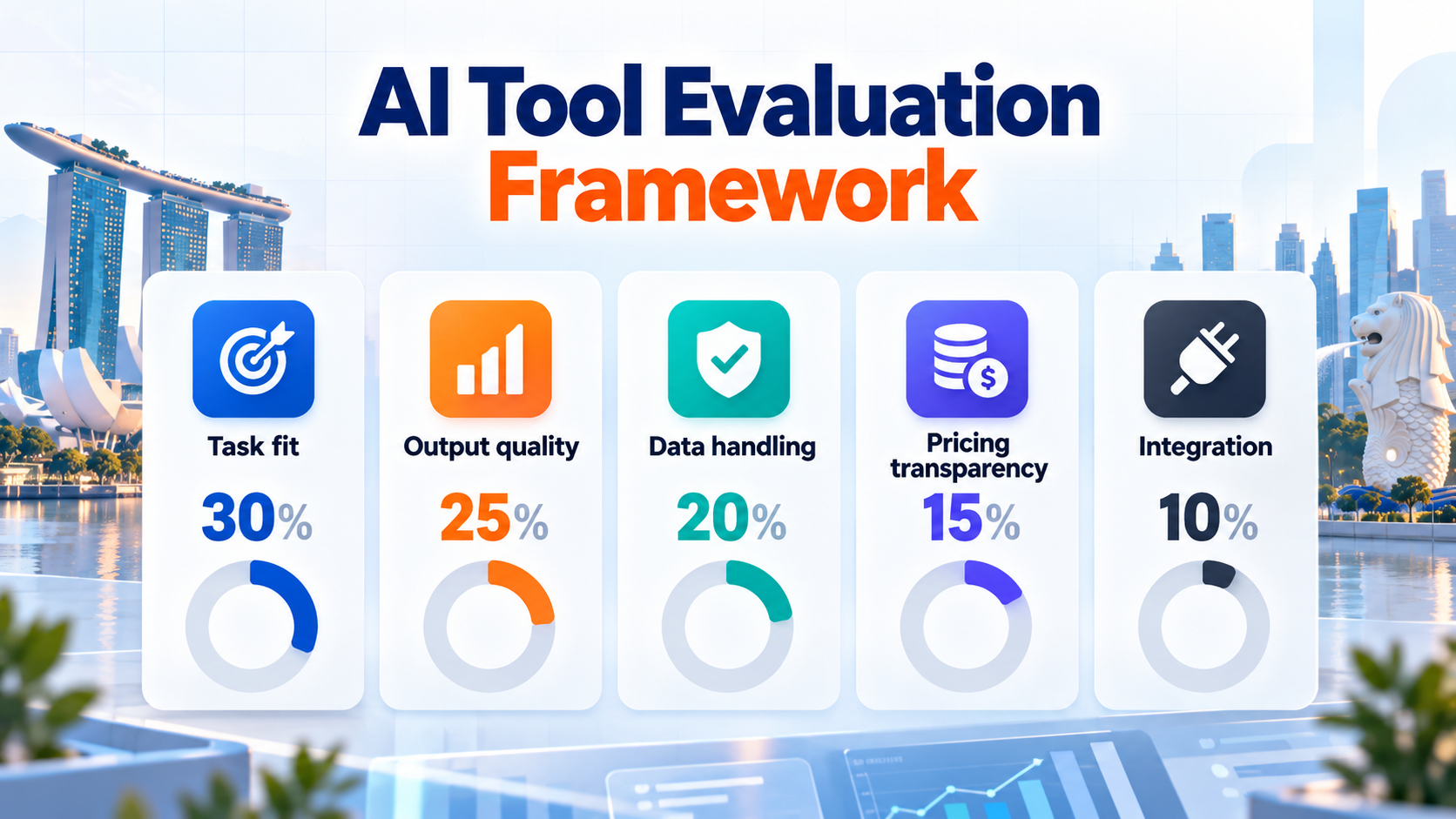
We use five weighted criteria to guide a pilot. These are proposed evaluation weights, not laboratory results or independently verified performance scores. Adapt them to your organisation’s actual risks.
| Criterion | Weight | Question to ask |
| Task fit | 30% | Does it complete our real recurring task? |
| Output quality | 25% | How much correction does the result require? |
| Data handling | 20% | Are confidentiality and administrative controls adequate? |
| Pricing transparency | 15% | Can we predict the full cost of use? |
| Integration | 10% | Does it work within existing approved systems? |
Score each area from one to five. Multiply by its decimal weight and add the results for a total out of five. For example, task fit of four contributes 1.2 points. A high total merits investigation, but it does not override unacceptable privacy or licensing risks.
We recommend comparing candidates against identical inputs and checking outputs without seeing which tool produced them. Record repeated errors instead of rewarding an especially impressive demonstration. These practices help prevent brand familiarity from determining the result.
Calculate the True Cost in Singapore Dollars
Subscription prices exclude several costs that can exceed the advertised fee. These include additional employee seats, exchange-rate fluctuations, taxes, usage credits and editing time. A USD 20 subscription costs approximately SGD 25.59 at the indicative exchange rate above, excluding applicable charges.
Consider an employee earning SGD 30 per hour. If an AI tool saves 90 minutes of drafting each week but requires 30 minutes of review, the net saving is one hour per week. Over four weeks, that represents SGD 120 in labour savings before subscription costs. This is an illustrative calculation, not a guaranteed return on investment.
Use the same approach for visual work. Measure the time spent fixing hands, text, layouts and brand inconsistencies in generated images. For video, include script changes, regeneration credits, voice corrections and approval rounds. Pay for the output you can use, not the volume a service can generate.
Singapore Data Privacy and AI Governance Checks
Singapore organisations should assess generative AI tools against the Personal Data Protection Act (PDPA) and their contractual confidentiality obligations. The Personal Data Protection Commission published guidance on personal data in generative AI in July 2026, addressing responsibilities across development, deployment and later handling of individual requests. The guidance does not make every public AI service suitable for confidential records.

Before approving a tool, document the types of information employees may enter. Remove customer identifiers where possible. Confirm the vendor’s training settings, retention arrangements, user permissions and cross-border data terms. Check whether business-level controls are necessary for your use case.
Singapore’s Model AI Governance Framework for Generative AI also highlights accountability, testing and security. For agentic systems capable of taking actions, the 2026 agentic AI framework reinforces meaningful human oversight.
Our baseline rule is simple: no unapproved customer data, passwords, employee records or confidential contracts in consumer tools. A training opt-out alone does not resolve every retention, access or contractual concern.
Run a Two-Week Pilot Before You Subscribe
A short, controlled test is often enough to expose costly weaknesses. Begin with one process, such as turning an approved product brief into three campaign variations. Use only approved, non-sensitive material.
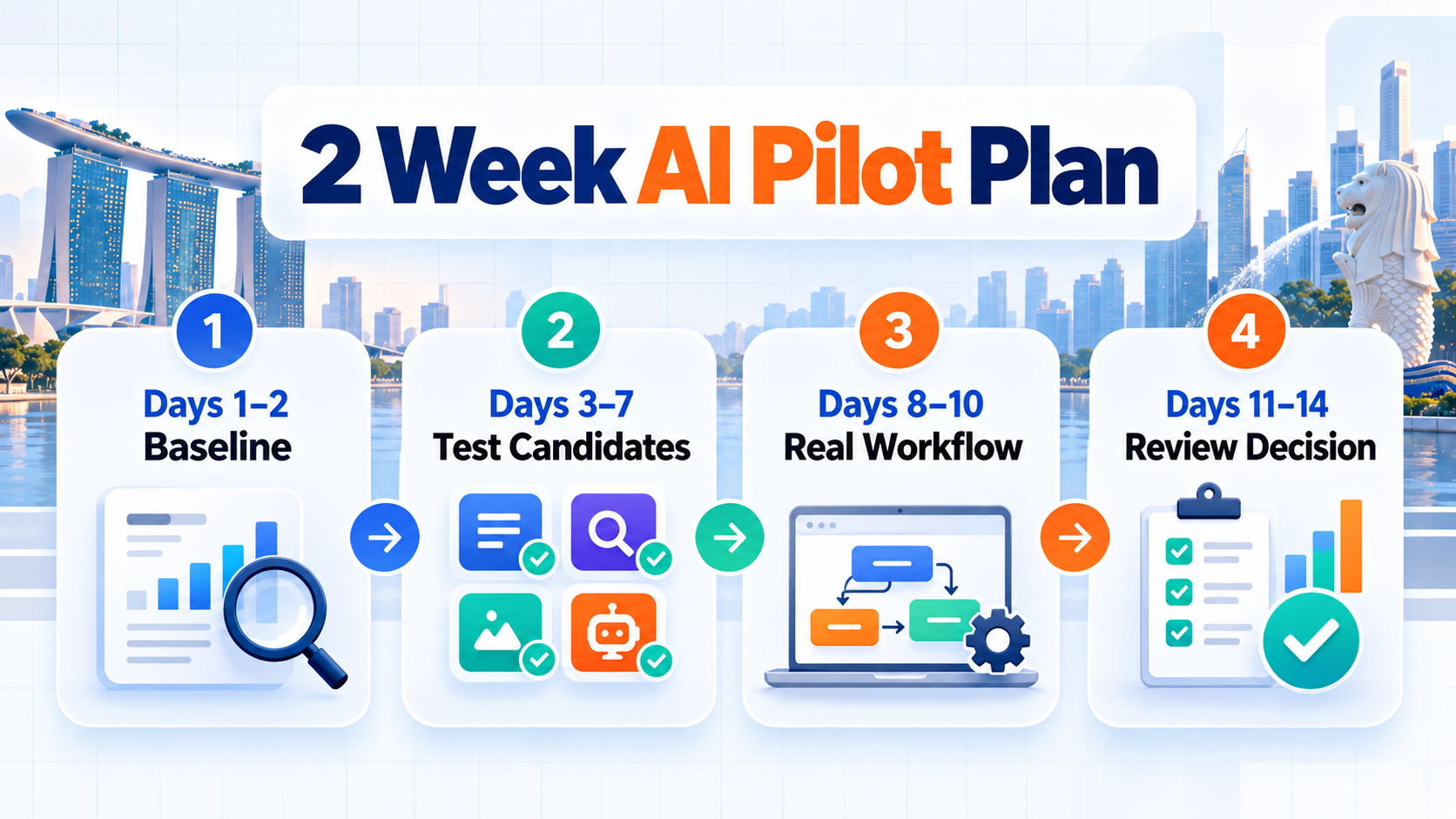
Days 1–2: Establish the baseline. Record how long staff take without AI. Define acceptable accuracy, brand tone, formats and reviewer responsibilities. Keep examples of approved outputs.
Days 3–7: Test up to three candidates. Use comparable prompts and the same source material. Record generation time, manual edits, unusable outputs and factual mistakes. Note any credit consumption or usage caps.
Days 8–10: Repeat under normal conditions. Let actual users perform the work with realistic interruptions and approval requirements. Test integrations and export formats, not just response quality.
Days 11–14: Review the business case. Calculate net time saved, total monthly spend and outstanding risks. Choose one tool, extend the pilot or abandon the purchase if results do not justify it.
Assign a staff member to approve every customer-facing output. Record which sources informed any factual claims. Keep the original human-approved brief available so the reviewer can spot unsupported additions.
Choose Generative AI Tools That Earn Their Place in Your Workflow
Our first choice for a general-purpose pilot is ChatGPT. We would shortlist Claude for intensive document work, Gemini for proven Google integration and Perplexity for research discovery. Developers should consider GitHub Copilot, while marketing production teams should choose specialist visual, video or voice software only when there is sufficient demand.
A good decision leaves your team with fewer unnecessary subscriptions and a clear process for verifying outputs. For businesses using AI to support website content, visibility and customer acquisition, our SEO services guidance explains how to assess work against meaningful search and commercial outcomes.
Select one recurring task this week. Run the two-week pilot, record the net saving and renew only if the results justify the expense.

Frequently Asked Questions
What are generative AI tools?
Generative AI tools create text, images, audio, video or code in response to instructions. Their output is generated from learned patterns and may require factual, technical or creative review before publication.
Which generative AI tool is best for a Singapore small business?
We recommend starting with ChatGPT for varied office tasks, then considering a specialist such as Canva or GitHub Copilot if the work demands it. The best purchase depends on verified output quality, data protection and total cost.
Are free generative AI tools suitable for commercial work?
Free plans can support early experiments, but usage limits and licensing terms vary. Do not assume a free plan authorises every commercial use or provides business-grade confidentiality.
Can generative AI tools produce SEO content automatically?
They can assist with outlines, drafts and editing, but search intent, original information and factual accuracy still need human input. We recommend reviewing AI-assisted articles using the same quality standards applied to any other content.
How much should a small team spend on AI subscriptions?
Start with one approved tool and a controlled budget rather than purchasing several overlapping plans. Include taxes, exchange-rate effects, team seats and review time in your calculations.
Can AI-generated content be trusted without checking?
No. Plausible answers can include invented citations, outdated details or misleading summaries. Verify important claims against primary sources, especially when legal, financial or customer decisions are involved.