| AI Summary
Learn how to boost Facebook posts in Singapore to reach the right audience, increase engagement and generate leads. This guide covers choosing posts, setting budgets, targeting customers and measuring results. Discover when to use Meta Ads Manager and how to avoid common boosting mistakes that waste advertising spend. |
To boost Facebook posts effectively in Singapore, start with a useful Page post, choose one clear advertising goal, target the people most likely to respond, and set a budget you can afford to test. Then measure enquiries, visits or purchases rather than assuming extra likes mean extra sales. Boosting is convenient, but it works best when the content and business offer are already persuasive.

For a first test, we recommend selecting a relevant post with encouraging organic results and running a controlled campaign of around S10–S20 per day for three to five days, if that spend is commercially sensible. These are planning figures, not Meta minimums or guaranteed performance benchmarks.
Key Takeaways
- Choose a business goal first. A post promoting an appointment should generate enquiries, not simply reactions.
- Use organic performance as evidence. Compare saves, comments, clicks and enquiries with similar recent posts. Meta does not require a 6% engagement rate.
- Start with a defined test budget. Check your account’s actual minimum, selected currency and final payment amount before publishing.
- Target the area you serve. Singapore-wide targeting rarely makes sense for a neighbourhood-only business.
- Move to Ads Manager when necessary. Advanced sales optimisation, retargeting, detailed testing and conversion measurement need a fuller campaign setup.
What Does It Mean to Boost Facebook Posts?
A boosted Facebook post is an existing post from a business Page that you pay Meta to distribute as an advertisement. You use the original content, then select an advertising goal, audience, budget and duration. The post can reach people who do not already follow your Page, subject to the settings and placements available.
This is different from merely publishing an organic post. Organic distribution depends on factors such as audience interest and interaction. A boost purchases additional ad delivery through Meta’s advertising system. However, paying does not guarantee bookings, sales or positive feedback.
Meta’s Business Suite guidance recommends identifying posts that perform well before promoting them. We agree with that approach, although a new offer can sometimes justify a small test even without much organic history.
Facebook boost post versus Meta Ads Manager
The Boost button is designed for a quicker setup. It generally works well for straightforward visibility, engagement, messages or website visits, depending on the options shown in your account. You can usually reuse an existing post and manage its promotion without creating a complex campaign.
Meta Ads Manager gives advertisers more detailed campaign objectives and controls. It is usually preferable when you want to optimise for sales, build retargeting audiences, test multiple creatives or evaluate website conversions through appropriate measurement tools. Certain audience features can also be available in boost workflows, so it is inaccurate to say that every custom audience or lead option is impossible when boosting.
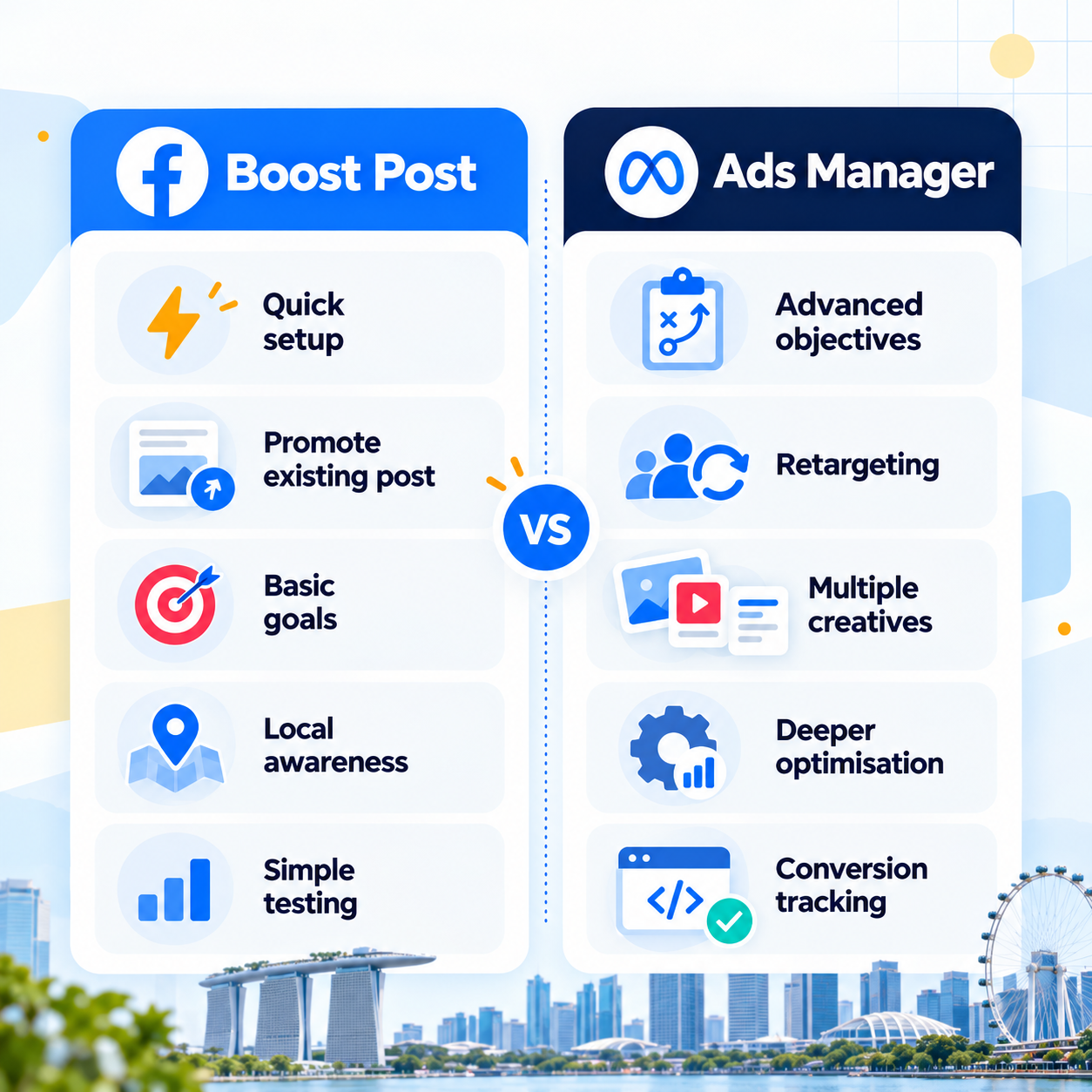
Our recommendation is simple: choose boosting when the intended action can be measured reliably with the available setup. Choose Ads Manager when the business outcome requires advanced optimisation or a structured advertising programme.
When Should a Singapore Business Boost a Facebook Post?
Boost content when it has a credible reason to appeal to a broader audience. A local café might promote a well-received weekday lunch offer. A tuition centre could publicise an upcoming open house. A home-service company might extend the reach of a useful demonstration showing how its service works.
We look for evidence of interest that matches the post’s purpose. For educational content, meaningful comments and shares may matter. For an appointment offer, direct messages or booking-page clicks carry greater weight. Engagement figures must be interpreted in context.
Check organic results without relying on a fixed percentage
There is no official Meta rule requiring posts to reach 6% organic engagement before boosting. Such a fixed threshold is unreliable across content types, industries and audience sizes.
You can calculate a basic engagement-by-reach rate using interactions ÷ organic reach × 100. Suppose a post reaches 1,200 people and records 60 relevant interactions. Its rate is 5%. That figure becomes useful when compared with other posts measured using the same interaction definition.
Review at least five recent comparable posts if you have them. A post with fewer reactions but several genuine enquiries may be a stronger candidate than a popular meme that brings no customers.
Know when not to boost
Avoid spending on a post with an unclear offer, broken destination, unverified claim or poor-quality visual. A highly engaging post can still be commercially unsuitable if people misunderstand what is being sold.
Do not boost simply because organic reach seems low. First check whether the content answers a customer question, identifies who should respond and explains the next step. If those basics are missing, improve the post before paying for distribution.
Use Our Boost Fit Score Before Spending
We use the Boost Fit Score as a practical editorial decision tool. It is our own framework, not an official Meta rating or a scientifically validated prediction of campaign results. Score each factor from zero to two for a maximum of ten points.

| Factor | 0 points | 1 point | 2 points |
| Post relevance | Unclear or irrelevant | Some audience interest | Clear value and encouraging relevant responses |
| Business objective | No defined result | Broad goal | One specific, measurable action |
| Audience fit | Wrong or undefined area | Broad but plausible | Strong match to service area and customers |
| Action readiness | No usable next step | Some friction | Clear offer and working destination or messaging process |
| Budget and measurement | No limit or tracking | Budget set, weak tracking | Affordable cap and defined success metric |
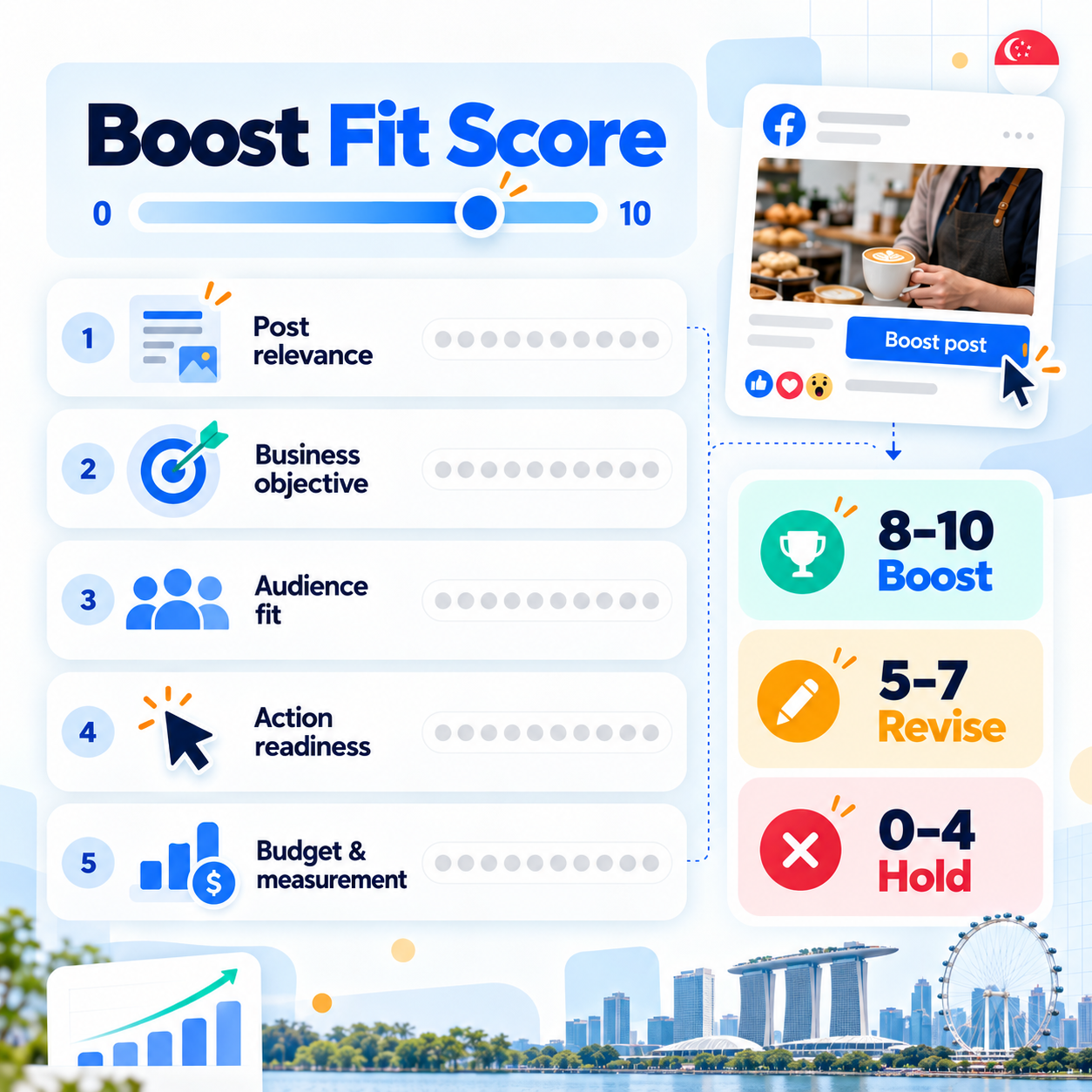
A score of 8–10 indicates a reasonable boost candidate, provided the content meets Meta’s advertising rules. A score of 5–7 means revise weak areas before testing; Ads Manager is an option if more campaign control would address the problem. A score of 0–4 means hold the spend and improve the post or offer first.
For example, a bakery post with strong customer interest, a clear preorder offer, a suitable delivery zone, an easy ordering route and an affordable tracking plan scores 10/10. A polished post with no ordering instructions might score 8/10 if every other factor is strong. We would still fix its call to action before running it.
A high score never overrides a policy issue. Restricted products, misleading claims or unavailable placements must be resolved regardless of the total.
Step-by-Step: How to Boost Facebook Posts in Singapore
The exact labels vary across Page experiences, devices and account settings. The workflow below covers the main decisions that matter in 2026. You will need a Facebook Page, suitable advertising access and an available payment method.
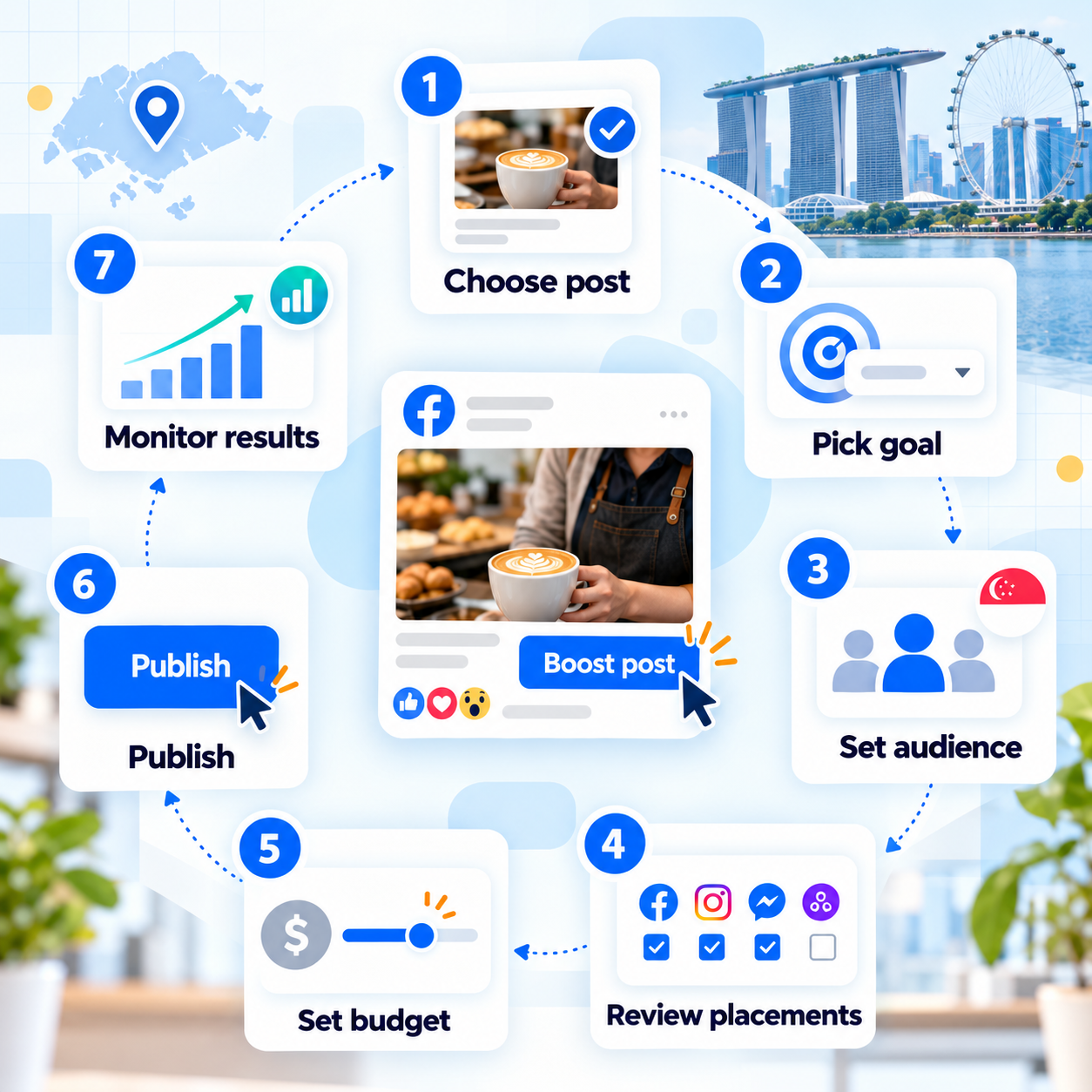
Step 1: Select an eligible post from your business Page
Open your Page or Meta Business Suite and locate the published post you want to promote. Choose Boost post or the equivalent promotion option. Review the original post before proceeding. Make sure prices, dates, opening hours and booking conditions are current. Check that the visual belongs to your business or has appropriate commercial rights. If the Boost button is unavailable, investigate eligibility instead of assuming a payment problem.
Step 2: Choose the goal that matches customer action
Select the closest available goal to your intended outcome. Depending on the Page and campaign flow, options may involve engagement, messages, website visits or other results. Do not assume every account presents the same menu.

For a restaurant taking reservations through Messenger, a messaging goal may be appropriate. For a blog article intended to introduce a service, website visits might fit. For an ecommerce store seeking tracked purchases, we generally recommend a Sales campaign in Ads Manager rather than optimising a boost for clicks.
Step 3: Set a realistic Singapore audience
Define who can actually buy, visit or book. A physiotherapy clinic operating in Bedok may need customers nearby, while a Singapore-wide online retailer could reasonably reach the whole country. Review location settings carefully because a wider geographic area is not automatically better.
Add age or interest criteria only where justified and permitted. Start broad enough to reach realistic prospective customers, then use enquiry quality to refine your audience.
Step 4: Review placements and the mobile experience
Check which placements your setup makes available. Facebook and Instagram may both be possible, but availability depends on the post format, account connections, ad rules and selected goal. Do not assume that a Facebook post automatically appears on Instagram.
Preview the creative at mobile size. Ensure the headline is legible, the important message is visible and the call to action is obvious.
Step 5: Set the budget and campaign duration
Enter a daily or total budget as supported by your setup. For a small Singapore business, S10–S20 per day over three to five days can be a manageable initial experiment, but it may produce limited data in competitive categories. A S$15 daily budget for four days represents S$60 in planned ad spend.
The interface shows the amount to be charged and may provide estimated results. Treat reach estimates as forecasts, not promises. We do not recommend a universal S$1 minimum because account, billing and campaign conditions can vary.
If you boost through the Facebook or Instagram iOS app, check for an additional Apple service fee. Meta has explained that purchasing boosts through a browser can avoid the 30% Apple fee associated with eligible in-app transactions. See Meta’s explanation and confirm the total shown before payment.
Step 6: Check the ad and publish
Confirm the goal, audience, currency, budget, duration and payment details. Read the post as a first-time customer would. Is the offer understandable without visiting your Page or scrolling through old posts?
Submit the promotion for review. Meta assesses ads against its advertising policies, and approval is not guaranteed. Once the boost is active, record its start date, intended result and maximum allowable cost for that result.
Step 7: Monitor results and respond promptly
Check delivery and customer responses during the campaign. If you are paying for messages, somebody must be available to answer them. Delayed replies can turn otherwise promising enquiries into wasted expenditure.
How Much Should You Spend to Boost Facebook Posts?
Your budget should follow the value of the action you want, not a generic industry average. Start by calculating the contribution a new customer makes after direct delivery costs. Then consider how many qualified enquiries typically become customers. This gives you a rough ceiling for acquisition spending.
Example: A Singapore café testing a lunch offer
Consider a hypothetical cafe spending S$60 on a four-day boost. Assume the campaign generates 120 link clicks, 12 tracked voucher redemptions and S$12 contribution per redeemed order, after the direct cost of providing that order.
The cost per link click is S60÷120=S0.50. The cost per redemption is S60÷12=S5. Contribution from those orders is 12 × S12=S144. After deducting advertising spend, the campaign leaves S$84 in contribution before other overheads.
These numbers are illustrations, not actual MediaOne campaign results. They also assume every recorded redemption is attributable to the offer. The café should consider repeat customers, staff capacity and whether some redemptions would have happened without advertising.
Example: A service company measuring enquiries
A cleaning company spends S$90 on a Facebook boost and receives 15 messages, costing S$6 per message. However, only five enquiries are relevant, and two result in confirmed bookings. The cost per qualified enquiry is S$18, while the advertising cost per booking is S$45.
This is why we distinguish platform results from commercial outcomes. If Meta optimises for messages, it may generate conversations, but the business must assess their quality and eventual value independently.
How to Measure Whether a Facebook Boost Worked
Compare each promotion with the business goal you chose before launch. Meta Business Suite can show post and advertising insights, while Ads Manager offers additional reporting options. We suggest maintaining a simple record of the post, audience, budget, dates, spend and results.
Understand the important metrics
- Reach: estimated number of distinct people who saw your content. Useful for awareness, but not proof of demand.
- Impressions: number of times the ad appeared. One person can generate several impressions.
- Engagement: interactions with the content. Interpret these alongside comments and customer intent.
- Link clicks: clicks on qualifying links in the ad. These do not necessarily mean a website finished loading.
- Cost per result: spend divided by the result counted for the selected goal. Different goals produce different result types.
- Qualified leads and sales: actions you confirm through your own business process. These are often the most useful measures of commercial value.
Meta explains several common ad metrics in its advertising measurement guidance. Check the specific metric definition shown in your reporting interface before comparing figures.
Compare like with like
Suppose one boost generated 2,000 views and another produced 10 appointment enquiries. You cannot conclude that the larger number represents better performance. Instead, compare messaging campaigns by qualified enquiries, traffic campaigns by meaningful website activity and sales campaigns by verified orders. Account for seasonal changes, offer differences and audience size before deciding that one creative is superior.
Know when to stop or scale
Pause a boost if it attracts the wrong enquiries, exceeds your cost ceiling or produces clear complaints about the offer. Improve the creative when viewers misunderstand your message. Revisit targeting when the audience appears irrelevant.
If the campaign generates profitable, repeatable results, consider another controlled run or a more structured Ads Manager campaign. Increase spending gradually and keep watching cost per qualified outcome. Results at S15perdaydonotnecessarilyremainconstantatS150.
Common Facebook Boosting Mistakes to Avoid
Boosting every post automatically
A posting calendar contains different types of content. Some posts build familiarity, while others invite an immediate action. Paying to amplify everything makes it harder to understand which messages contribute to business results.
We recommend promoting selectively. Reserve a defined test budget for content tied to a current offer, useful customer insight or relevant event.
Selecting an audience that cannot realistically buy
A local salon has little reason to spend on people outside its practical travel radius unless it offers a destination service. Even within Singapore, relevance can vary significantly by neighbourhood and transport convenience. Match geography to how customers actually behave, rather than selecting the whole island by default.
Mistaking cheap engagement for strong demand
A post can attract dozens of entertaining comments without generating one serious buyer. Conversely, a niche business may receive only a few enquiries, each worth substantial revenue.
Look at the words people use in messages and comments. Questions about availability, price and booking often reveal stronger commercial intent than generic reactions.
Overlooking advertising policy and customer privacy
Meta’s Advertising Standards address misleading practices, prohibited content and restrictions affecting particular ad categories. Rejection is not simply a profanity issue. Check claims, imagery, landing pages and any special-category declarations.
For lead collection in Singapore, review the Personal Data Protection Commission’s guidance on consent and personal data. Tell people why you are collecting their information and handle marketing follow-ups lawfully. Do not upload customer details into advertising audiences without a proper basis.


Turn Your Next Facebook Boost Into a Measurable Business Result
The best reason to boost Facebook posts is a clear opportunity to reach people who may genuinely need what you sell. Start with relevant content, set a realistic audience and choose one action that matters to your business. Use the Boost Fit Score to identify weaknesses before spending, then judge your test by customer outcomes.
If the goal is straightforward awareness or customer interaction, a small boost may be enough. If you need reliable sales attribution, retargeting or sustained lead generation, build a fuller paid-social strategy in Ads Manager instead. At MediaOne, we recommend connecting paid distribution with strong content, a clear offer and practical conversion measurement so every advertising decision has a commercial purpose.
Frequently Asked Questions
Is boosting a Facebook post worth it for a small business in Singapore?
Yes, when it helps reach relevant potential customers and generates outcomes that justify the spend. We recommend treating it as a controlled test rather than a guaranteed sales method.
How much does it cost to boost Facebook posts?
There is no single universal cost because budgets, auction prices and account minimums vary. A S10–S20 daily test is one optional starting budget, not an official requirement.
How long should I boost a Facebook post?
Three to five days is a convenient initial testing window for some small campaigns, not a Meta rule. Longer campaigns may be appropriate when you need sufficient data or are promoting an extended event.
Can I boost a Facebook post on Instagram too?
Sometimes. Eligible Facebook boosts may offer Instagram placements, but this depends on the post format, account setup and available controls; boosting an Instagram-native post is a separate action.
Why can’t I boost a particular Facebook post?
The post or account may be ineligible, lack the necessary advertising permissions or need changes to meet policy requirements. Check the notice shown by Meta and review your Page’s advertising access before trying again.
Why was my boosted post rejected?
Possible causes include restricted content, misleading claims, problematic landing pages or special-category issues. Check the specific rejection reason and Meta’s Advertising Standards before editing or requesting review.
Can boosting Facebook posts guarantee sales?
No. Boosting pays for ad delivery, while purchases depend on demand, offer quality, trust and the customer’s buying experience. Measure conversions independently whenever possible.