

| AI Summary
B2B social media helps Singapore businesses reach the people who recommend, assess and approve purchases. A practical strategy starts with one sales or customer goal, then uses buyer questions to choose platforms, plan content and guide replies. LinkedIn is a starting point when buyers use it for work. Teams can measure progress by tracking qualified enquiries, meetings and sales conversations where buyers mention a post. |
B2B social media is the use of social platforms to reach people who buy products or services for a business. A B2B social media strategy sets a goal, identifies the buying team, chooses a platform and shares content that answers buyer questions. It also tracks enquiries, meetings and other actions that support sales.
Key Takeaways
- A buyer’s job helps determine what to post. Operations may need an installation plan, while finance may need a cost breakdown.
- Company pages can keep official resources easy to find. Staff posts can explain how the work happens.
- A public reply can answer a question for everyone reading. A private reply gives the team room to handle account details.
- A campaign report should record which posts opened conversations and which helped buyers who were already talking to sales.
A facilities manager looking for a new office system has a practical question. Can the supplier install it while the office stays open? A post showing how one floor can stay in use during installation gives the manager something to share with colleagues before asking for a quote.
For a Singapore business selling to other companies, that is a good job for social media. A post can answer one question well enough to help the buyer take the next step.
What Is B2B Social Media Marketing?
B2B social media marketing helps a business reach people who buy on behalf of an organisation. A supplier can use it to explain a service, show how a product works or answer questions that come up during a sale. The work supports a wider B2B marketing strategy, which may also include events, email and conversations with the sales team.
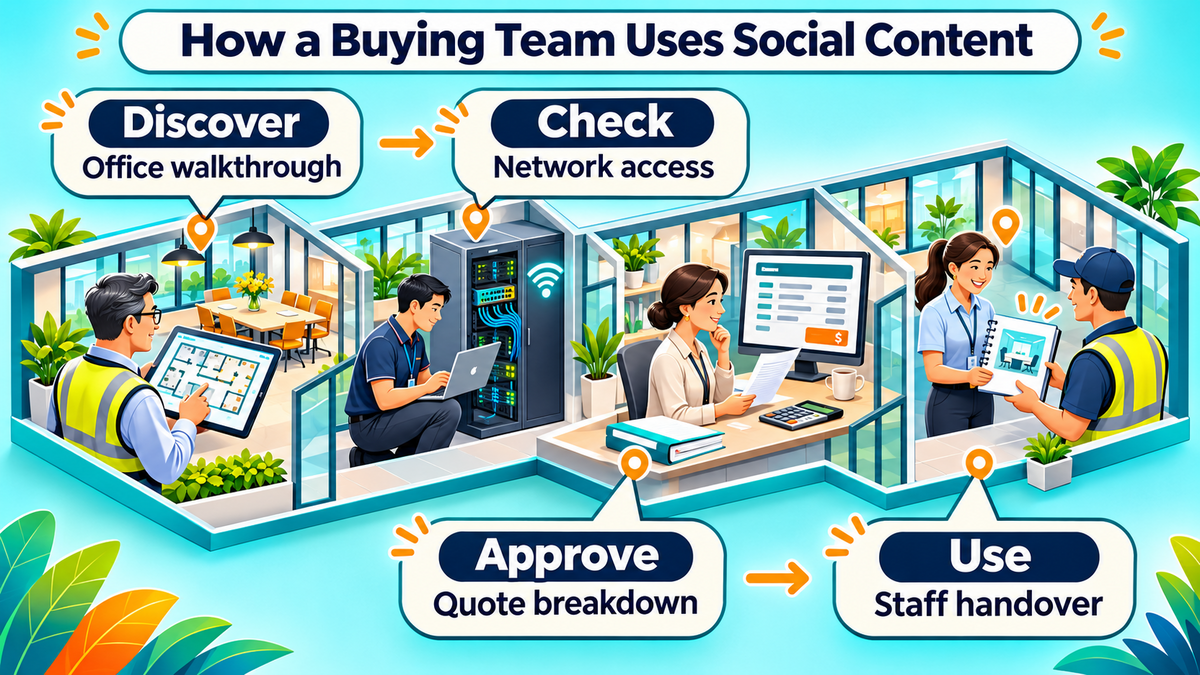
A buying team may see a post at several points in a purchase. A facilities manager may first notice a walkthrough of an office upgrade. An IT colleague may later check how the system connects to the office network. After installation, the person running the site may need a handover guide for staff.
The 2026 Edelman–LinkedIn B2B Thought Leadership Impact Report examines how business content supports discovery, supplier evaluation and customer relationships. It also discusses how people share ideas in private conversations. A buyer may forward a post to a colleague, so some of the most relevant activity can happen away from the public comment thread.
What makes a business post worth sharing
A post is easier to pass along when it answers a question the next person is likely to ask. A checklist on planning an office installation can give operations a starting point for dates and give IT a list of items to review. A post about the same service can serve a different purpose if it explains what the quote includes.
A buyer should be able to tell who wrote the post, what situation it covers and which details may vary. A named project lead can explain how the team checks a site before work begins. The company page can keep the full service details and contact information easy to find.
Set a Goal for B2B Social Media
A social media goal gives marketing and sales a shared way to judge the work. A supplier entering a new sector might focus on being seen by buyers in that sector. A team with an offer that already gets attention might focus on site assessments or sales meetings. An account team may use posts to help current customers get more from a service.
How to choose what to measure
One primary goal per quarter gives the team time to see how its posts, replies and offers work together. A small office systems supplier could spend a quarter getting more office managers to request an assessment. The team can then design posts around the questions people ask before agreeing to a visit.
| Business goal | Early sign | Later outcome |
| Awareness | People in target roles see or interact with a post | Prospects mention the business in sales conversations |
| Sales pipeline | A buyer at a target company asks about the offer | Sales holds a qualified meeting or opens an opportunity |
| Customer retention | An existing customer asks about a feature or shares a guide | The customer uses the service again, renews or makes a referral |
A sales pipeline is the list of deals a team is working on. A qualified meeting is a conversation with a buyer whose company and needs match what the business can serve. Marketing and sales can agree on that definition before a campaign starts. For an office upgrade supplier, a match could mean a commercial site in its service area and a buyer with a project it can support.
The early signs in the table give the team something to review while deals are still open. The later outcomes help the team decide where to spend time and money next. A customer renewal, for example, may also depend on service quality, price and support. The social report can record the customer’s use of a guide alongside the work of the account team.
Map the People Involved in the Purchase
A B2B audience starts with the company you want to reach and the people who can move a purchase forward. In a small business, the owner may cover several roles. At a larger firm, operations, IT and finance may each ask for different information. The person who first sees a post can be the one who passes it to the person who approves the spend.
What each buyer needs to know
Recent sales calls are a good place to find the questions each person asks. A sales rep can look at an enquiry that became a sale, one that stalled and one that went to another supplier. The questions that appeared across those conversations can help shape the next month of content.
| Buying role | Question they might ask | Post that can help |
| Operations or facilities | Can we stay open during installation? | A floor-by-floor work plan |
| IT or technical team | What access will the installer need? | A checklist for the first site visit |
| Finance or procurement | What does the quote cover? | A breakdown of equipment, labour and support |
| Site staff | What changes after installation? | A walkthrough of the handover |
A buyer’s job title gives you a starting point. Their own words help you decide what to write. If prospects keep asking about after-hours work, a post on how to plan evening access gives them a more specific answer than a general message about flexible installation.
Where buyers talk about the problem
Buyer research can include questions from sales calls, feedback from customer service and public conversations around trade events. A short social media listening routine helps the team spot the same question across several places. For example, a supplier might see operations managers discussing access for contractors and hear the same concern during a site visit.
An audience map can also include people outside the buyer’s company. A fit-out consultant or property manager may recommend suppliers before procurement gets involved. A checklist that helps those partners brief their clients can give the supplier a place in the conversation early.
Choose the Right B2B Social Media Platforms
LinkedIn is a starting point if the people you sell to discuss work there. The LinkedIn B2B Marketing Benchmark identifies video, visual content and expert articles among the formats B2B marketers use. A Singapore team can use those findings to choose formats to test and use its own buyer research to decide where to publish.
| Platform | When it suits the business | Example post |
| Buyers or partners discuss work, suppliers or industry events there | A project lead explains how to plan an office upgrade in stages | |
| X | Buyers, analysts or reporters follow industry news there | A specialist explains what an industry update means for buyers |
| Buyers or partners want to see finished work, equipment or demonstrations | A short video shows how a meeting room setup works |
When a second platform earns time
A second channel makes sense when it reaches buyers or partners the first channel misses and the team can produce something suited to it. A supplier may publish an installation checklist on LinkedIn and use its Instagram content plan to show designers what the finished rooms look like. Meta describes Instagram Reels as a format for creating and sharing short videos.
A team can test a second platform around one event, project or question. If a few posts bring enquiries from design partners, that gives the team a reason to keep testing. If the account draws mostly job seekers and the campaign goal is site assessments, the team can use the channel for hiring when needed and put sales content elsewhere.
How organic posts and paid ads work together
Organic posts are unpaid. They give employees and the company page room to explain the work, answer questions and see which topics bring a response from the right audience. Paid ads give a business a way to place a specific offer in front of a selected audience.
A paid test works best when the offer and follow-up are ready. An office supplier might use LinkedIn advertising to invite facilities teams to request a site assessment. LinkedIn Lead Gen Forms let advertisers collect enquiries through a form on the platform. A short form can ask for the work contact and details the sales team needs to check whether it can serve the project.
Before spending, the team can set a budget limit, name the person who will respond and agree on what counts as a qualified request. That makes the test easier to review even if it produces few enquiries.
Build a B2B Social Media Content Plan
A B2B content plan gives the team a few topics it can return to from different angles. Each topic should come from work the team knows well or a question buyers ask often. A social media content calendar can connect those topics to the person who will write, check and publish each post.
Three topics a small team can sustain
A supplier can start with three topics that cover how to buy, how the work happens and how to use the service. Each topic can produce short posts, slides or videos without requiring the team to start research from scratch each week.
- Buying questions. The team explains what goes into a quote, what it needs for a site assessment or how buyers can compare service options.
- Work in practice. A project lead walks through one decision, such as which floor goes first when the office stays open.
- After the sale. A service colleague explains how staff get trained, how to report a fault or what to prepare before maintenance.
One buyer question can also become a longer business blog post when the answer needs diagrams, steps or examples. The social post can cover one part of the answer, such as what the facilities manager needs to have ready on the day of the site visit.
What the company page and employees can publish
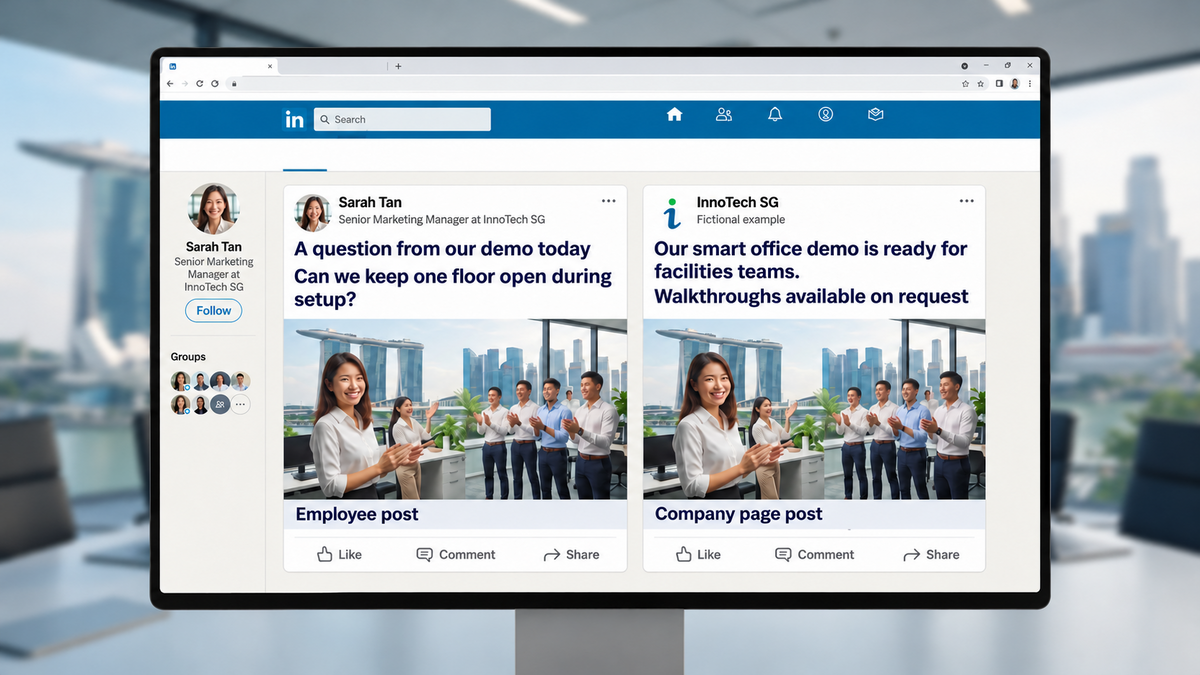
The company page can share official launch details, event dates and resources. Employees can explain the decisions they made or the questions they heard. Both can use the same project photo if the captions serve different readers.
In a fictional office systems launch, Sarah Tan’s employee post shares a question from the demo: “Can we keep one floor open during setup?” The InnoTech SG company post announces the smart office demo and invites buyers to request a walkthrough. The employee post opens a discussion about installation. The company post gives interested buyers a next step.
What a four-week schedule looks like
A small team can start with one planned post each week and add a second when it has time to check drafts and answer replies. A shared calendar should record the buyer question, post owner and intended next step. A simple month could look like this.
| Week | Main post | Follow-up |
| 1 | Checklist for a first site visit | The project lead answers technical questions |
| 2 | Short walkthrough of an installation sequence | The team notes questions about office access |
| 3 | Breakdown of what a quote covers | Sales shares it when prospects ask about costs |
| 4 | Staff handover tip | Customer support flags questions for next month |
At the end of the month, the team can review both the posts and the conversations they started. A checklist with few public reactions can still earn another slot if a salesperson used it to answer several enquiries. A post with many reactions can serve an awareness goal even when it produces few sales conversations.
Manage Replies and Turn Interest Into Conversations
B2B community management includes answering comments, looking after messages and getting questions to the right person. A named owner can check the page each working day and ask a colleague for help when a question needs technical knowledge. A reply can give the buyer a time to expect an answer if the team needs to check the details.
When to reply in public or private
A public reply works when the answer could help other readers. If someone asks whether an office can stay open during installation, the team can explain that work can be planned in stages where the layout and access allow. A private message makes sense when the conversation turns to the buyer’s floor plan, contact details or quote.
A public reply also gives the team a chance to clarify something the original post left out. If several readers ask whether a checklist applies to shared office buildings, the team can update the resource to explain when building management needs to be involved.
How to pass an enquiry to sales
An enquiry is ready for sales when the buyer asks to discuss a project, requests a quote or wants to book a meeting. The person who manages the inbox can share the original question and the details the buyer already supplied. That gives the sales rep a place to start and saves the buyer from repeating the same information.
- Public question. The page owner answers what applies to most readers.
- Project details. The owner moves the discussion to a private channel when needed.
- Sales handover. The sales rep gets the buyer’s request, the post that started the conversation and any next step already agreed.
Track Results Beyond Likes
A useful report ties each result to the campaign goal. LinkedIn’s campaign reporting guide describes how advertisers can choose measures for awareness, engagement or conversions. Sales records can then show which enquiries led to meetings or deals. The two records answer different questions about the same campaign.
How to record where enquiries came from
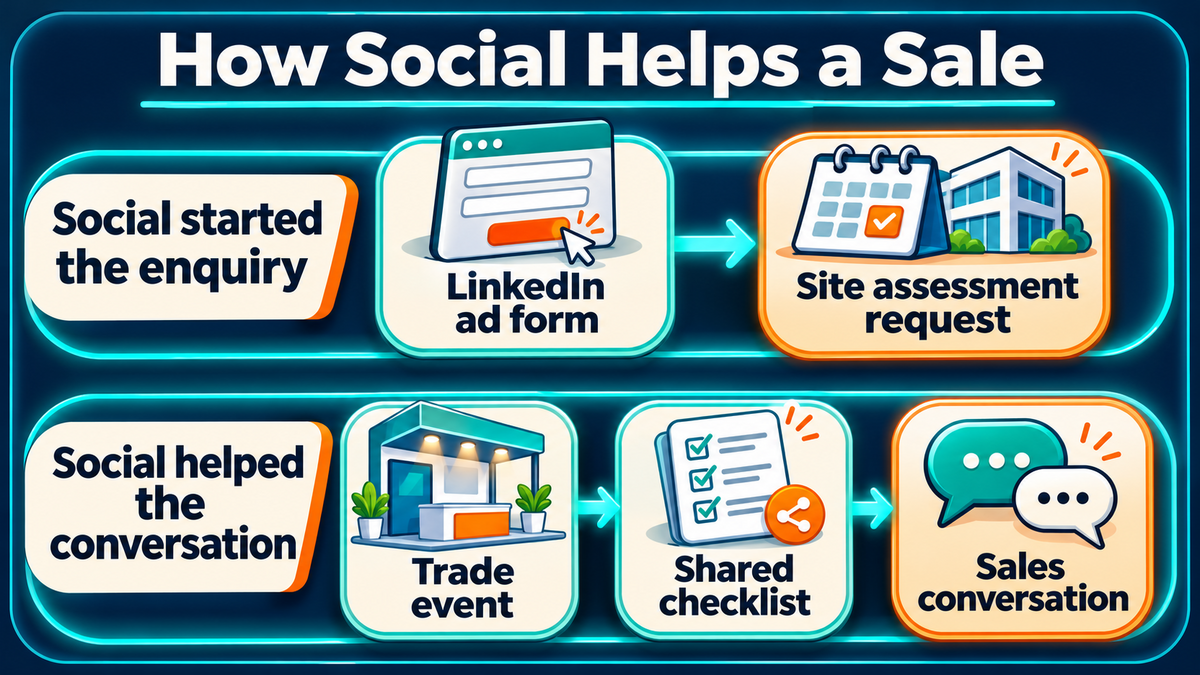
A tagged campaign link can show which post or ad sent someone to the website. Google Analytics campaign parameters help identify those visits in traffic reports. A sales rep can also ask where the buyer first heard about the company and record any posts, events or referrals the buyer mentions.
A buyer who requests an assessment through an ad form can be logged as a social enquiry. A buyer who first heard about the supplier at a trade event and later shared its installation checklist can be logged as a deal where social helped. A simple record can capture both the first known source and the later touchpoints. That gives the team more context when it reviews social media return on investment.
What a monthly review can tell you
A monthly review can focus on a few decisions the team can act on. If posts reach the intended companies but few people ask questions, the next test might offer a checklist or answer a specific buying concern. If enquiries come in but sales finds few qualified projects, the team can review the wording of the offer and who sees it.
A paid campaign that brings several qualified requests may still need time to show results in sales. The team can review whether meetings took place, whether buyers needed another person involved and what each deal is waiting for. Those details help the business decide whether to continue the campaign, change the offer or improve its follow-up.
Build a B2B Social Media Plan That Supports Sales
One month of posts can start with a question that came up in a real sales call. A project lead can answer it in a post, a page owner can handle replies and a salesperson can note when a buyer brings it up again. That gives the business a piece of content and a way to see where buyers used it.
MediaOne’s social media marketing services can help Singapore teams plan content and campaigns around the buyers they want to reach. A recent enquiry, a list of common sales questions or a campaign report can provide a starting point for the discussion.
FAQs About B2B Social Media
Yes. A business can show how it approaches a problem through a sample workflow, a product demonstration or a checklist from its own team. A fictional example should carry a label so buyers can tell it from client work. A new supplier can also explain what happens during an assessment, which gives prospects something concrete to review before making an enquiry.
Should a B2B company publish in more than one language?
A second language can help when buyers or regional partners already use it in sales and service conversations. The business can start by translating an event invitation, demo caption or resource that the audience has asked for. A colleague who knows the service and the language can check technical terms before the post goes live.
Who should own the company page when an employee leaves?
The business should assign page access to current staff and keep a record of who can publish, reply or run ads. An offboarding checklist can cover page permissions, scheduled posts, open messages and any agency access. Personal profiles stay with their owners, so the company page is a good home for resources buyers will need over time.
How should a company handle an old post with outdated details?
A company can correct an old post when the platform allows edits, especially if buyers still use it to check a service or event. A dated note can point readers to the current version of a guide or offer. When a post lists an old price or a service the business has stopped offering, the page owner can review whether to remove the post and update any pages that link to it.