Facebook remains one of the most influential platforms for business marketing worldwide.



Central to leveraging its full potential is the Meta Business Suite, a powerful tool designed to simplify and amplify your social media management across Facebook and Instagram.
This comprehensive guide will walk you through the essential features of Meta Business Suite and demonstrate how to use it effectively to boost your business presence in Singapore.
Key Takeaways
- Meta Business Suite centralises Facebook and Instagram marketing tools into one dashboard, simplifying management and saving time.
- Scheduling posts at optimal times through Meta Business Suite can boost engagement by up to 60%.
- The unified inbox accelerates customer interaction, improving satisfaction and loyalty.
- Real-time analytics and ad management allow data-driven decisions that increase ROI.
- Understanding the differences between Meta Business Suite, Facebook Business Manager, and third-party tools helps you pick the best fit for your business needs.
What Is Meta Business Suite?
Meta Business Suite is an all-in-one platform that enables you to manage your Facebook and Instagram accounts seamlessly from a single dashboard.
It offers tools to schedule posts, respond to messages, track analytics, run ads, and more — all designed to help your business engage with its audience efficiently and strategically.
By centralising these tasks, Meta Business Suite removes the complexity of juggling multiple apps or platforms.
This enables you to maintain consistent communication with your audience while optimising your marketing efforts across both platforms simultaneously.
Meta Business Suite vs Facebook Business Manager vs Third-Party Tools
| Feature | Meta Business Suite | Facebook Business Manager | Third-Party Tools (e.g., Hootsuite, Buffer) |
| Platform Integration |
|
|
|
| User Interface |
|
|
|
| Scheduling & Publishing |
|
|
|
| Ads Management |
|
|
|
| Analytics & Insights |
|
|
|
| Cost |
|
|
|
| Team Collaboration |
|
|
|
Choosing Meta Business Suite means prioritising simplicity and integrated management for Facebook and Instagram.

This approach is ideal for Singapore businesses focused on these channels, especially when building strong social media content marketing strategies.
Why Use Meta Business Suite for Facebook Marketing?
Facebook marketing can be highly effective but requires careful planning, timely execution, and monitoring. The Meta Business Suite supports these needs by providing:
- Unified Management: Manage Facebook and Instagram pages, messages, notifications, and ads in one place with Meta Business Suite’s integrated interface.
- Scheduling and Publishing: Plan your content calendar with ease and automate posts, ensuring consistency that keeps your audience engaged.
- Insights and Analytics: Access real-time data within Meta Business Suite to understand your audience and content performance, making informed marketing decisions.
- Ad Management: Create, monitor, and optimise ad campaigns directly in Meta Business Suite without juggling multiple platforms.
- Inbox Management: Respond quickly to customer messages and comments, centralised in Meta Business Suite, enhancing engagement and customer experience.
Businesses in Singapore benefit from these capabilities by staying relevant, timely, and connected to their target customers without the administrative overhead of switching between multiple platforms.
Setting Up Meta Business Suite: Step-by-Step Guide
You want to manage Facebook and Instagram like a pro without bouncing between apps. Meta Business Suite puts all your social marketing essentials into one dashboard, but only if you set it up right.
Follow these steps precisely and you’ll unlock streamlined management, better insights, and more time for strategy.
Step 1: Confirm Your Facebook Business Page and Instagram Business Account

Before you dive into Meta Business Suite, make sure you have:
- A Facebook Business Page (not a personal profile). If you haven’t created one, do it now — it’s free and mandatory.
- An Instagram Business or Creator Account linked to your Facebook Page. Personal Instagram profiles won’t work here.
If you need to convert your Instagram account, go to your Instagram settings > Account > Switch to Professional Account > Business.
Step 2: Access Meta Business Suite

Go to business.facebook.com and log in with your Facebook credentials linked to your business page.
If you’re already logged in on Facebook, it might take you straight to your Meta Business Suite dashboard.
Step 3: Connect Your Instagram Account (If Not Already Connected)
In the dashboard:
- Navigate to Settings (bottom left menu).
- Click Instagram.
- Follow prompts to log in and link your Instagram business account.
This sync enables cross-platform content posting, messaging, and unified analytics.
Step 4: Add Team Members and Assign Roles

Collaboration matters. To bring in your marketing team or agency:
- In Settings > People, add team members by entering their email addresses.
- Assign roles based on responsibility:
- Admin: Full access.
- Editor: Can create content and ads.
- Moderator: Can respond to messages and comments.
Role assignments keep your accounts secure and workflows clear.
Step 5: Set Up Your Business Details and Preferences
Still under Settings, review and update:
- Business Info: Address, contact details, business category.
- Notifications: Control what alerts you receive.
- Connected Accounts: Confirm all linked assets like Pages and Ad Accounts.
Getting these right ensures smooth communication and account integrity.
Step 6: Start Publishing and Scheduling Content

Image Credit: Facebook
Return to the dashboard’s main screen:
- Click Create Post.
- Choose to post on Facebook, Instagram, or both.
- Write your message, upload visuals or videos.
- Either publish immediately or schedule for a later date/time.
Scheduling keeps your content consistent — crucial for audience engagement.
Step 7: Explore Insights and Ads Manager
Finally, leverage Meta Business Suite’s powerful analytics:
- Click Insights to track engagement, reach, and follower growth.
Use Ads to create, monitor, and optimise ad campaigns without leaving the platform.
Data-driven decisions come from regularly checking these tools.
Quick Recap: Meta Business Suite Setup Essentials
| Step | Purpose | Where to Find |
| Facebook Page Ready | Foundation for business presence | facebook.com/pages |
| Instagram Business Account | Cross-platform marketing | Instagram app settings |
| Access Meta Business Suite | Central dashboard | business.facebook.com |
| Connect Instagram | Unified messaging & publishing | Settings > Instagram |
| Add Team Members | Secure collaboration | Settings > People |
| Update Business Info | Ensure accurate profiles | Settings > Business Info |
| Create/Schedule Posts | Consistent audience engagement | Dashboard > Create Post |
| Monitor Performance | Data-driven marketing optimisation | Insights & Ads tabs |
Setting up Meta Business Suite isn’t just ticking boxes. It’s about building a solid foundation for your digital marketing that saves time and powers smart decision-making.
When done right, you’ll be able to focus on what moves the needle for your business.
5 Effective Facebook Marketing Strategies Using Meta Business Suite
You already know Facebook isn’t just a social network — it’s a business powerhouse when wielded correctly. But most marketers miss out by treating it as just another posting platform.
The Meta Business Suite changes that game by centralising control and insights for your Facebook and Instagram marketing — but only if you use it strategically.
Why You Can’t Afford to Treat Facebook Marketing Like a Side Hustle
In 2025, Facebook boasts 3.07 billion monthly active users worldwide, meaning your potential customers are there, scrolling, engaging, and deciding who to buy from.
But here’s the catch: Facebook’s algorithm prioritises meaningful interactions and relevancy, not random blasts.
Using Meta Business Suite correctly puts you in the driver’s seat to deliver content that resonates, engage in real-time, and adapt campaigns quickly — all vital if you want to outpace your competitors.
1. Precision Scheduling and Content Calendar Management

Meta Business Suite lets you schedule posts for both Facebook and Instagram on one platform. But it’s not just about convenience. The secret is in timing.
- Analyse your audience’s active hours via Meta’s Insights tab.
- Schedule posts during peak times to maximise organic reach.
- Diversify post types: mix videos, images, and polls.
- Repurpose top-performing content for extended reach.
2. Unified Inbox for Faster Customer Engagement

Prompt customer response isn’t optional; it’s expected. Meta Business Suite’s unified inbox aggregates messages and comments from Facebook and Instagram — so you never miss a lead or complaint.
- Set up automated responses for FAQs to save time.
- Prioritise direct inquiries for personalised replies.
- Track response time trends to ensure your team is performing.
3. Data-Driven Ad Campaign Management

Creating Facebook ads without Meta Business Suite is like flying blind. The platform provides real-time metrics and easy A/B testing capabilities.
- Define target audiences based on demographics, interests, and behaviours.
- Test different creatives and copy to identify winners.
- Use conversion tracking to measure ROI precisely.
- Adjust budgets dynamically based on campaign performance.
| Metric | Meta Business Suite Benefit | Impact |
| Audience Reach |
|
|
| Ad Spend Efficiency |
|
|
| Campaign Insights |
|
|
4. Leverage Cross-Platform Insights

Facebook and Instagram audiences overlap but behave differently. Meta Business Suite gives you comparative insights so you can tailor content per platform.
- Analyse which content formats work best on each channel.
- Identify audience segments unique to each platform.
- Tailor messaging tone and visuals accordingly.
5. Collaborate Smarter with Team Roles and Permissions
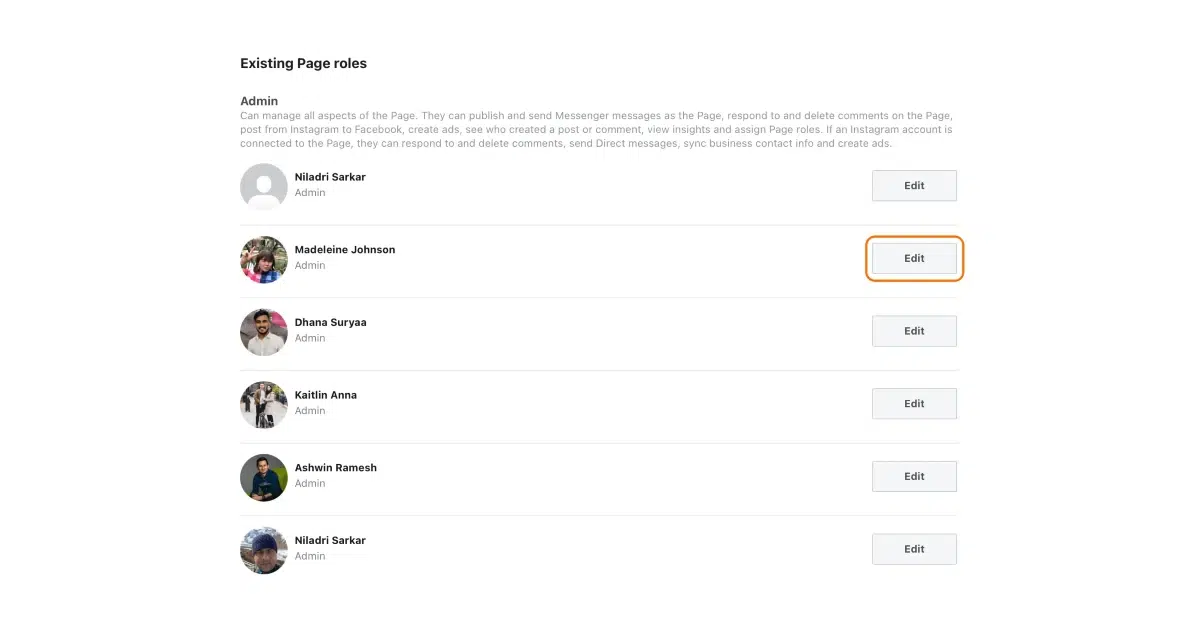
Image Credit: Synup
If you work with a team, Meta Business Suite lets you assign roles with specific permissions, so everyone stays aligned without risking account security.
- Assign content creators, advertisers, and analysts different access levels.
- Review activity logs to track contributions.
- Improve accountability and workflow efficiency.
Avoid These Common Pitfalls
- Ignoring insights: Don’t just collect data; act on it.
- Overposting: Flooding your audience leads to unfollows. Keep a balanced schedule.
- Neglecting engagement: Content without interaction is wasted effort.
What are Meta Business Suite’s Features?
If you’re serious about Facebook and Instagram marketing, Meta Business Suite is your command centre — but only if you know how to unlock its full potential.
Many businesses in Singapore log in, post, and forget. That’s a mistake that costs visibility, engagement, and ultimately revenue.
Meta Business Suite isn’t just a dashboard. It’s your competitive advantage—when used right. Here’s why you need to maximise its features and how to do it with precision:
- Unified Inbox for Speed and Personalisation: Respond to comments and messages across Facebook and Instagram in one place. Fast response times build trust. Sprout Social found 79% of consumers expect responses within 24 hours. Use this feature to assign team members and never miss a conversation.
- Content Scheduling With Data-Backed Timing: Meta Business Suite provides performance data for past posts, helping you pinpoint when your audience is most active. Schedule content accordingly to maximise reach and engagement. Hootsuite’s analysis confirms posts published at optimal times see more engagement.
- Audience Insights to Sharpen Targeting: Beyond basic demographics, dive into behavioural data—what your audience clicks, reacts to, and comments on. Meta Business Suite’s insights let you create hyper-targeted ads or personalised content that resonates locally.
- Ad Creation and Management Within the Suite: Don’t juggle separate tools. From campaign creation to budget tracking, Meta Business Suite handles it all. You can launch, pause, or tweak ads based on real-time data — keeping your campaigns lean and ROI-focused.
- Collaborative Tools for Teams: If you’re managing social media across departments or agencies, Meta Business Suite’s roles and permissions simplify workflow. Assign tasks, control access, and keep your team aligned on goals.
Your Roadmap to Mastery: A Quick Checklist
| Feature | Actionable Tip | Benefit |
| Unified Inbox |
|
|
| Scheduling |
|
|
| Audience Insights |
|
|
| Ad Management |
|
|
| Collaboration |
|
|
TL; DR: Don’t Just Use Meta Business Suite. Master It.
Using Meta Business Suite as a basic scheduler means you’re operating at a fraction of its power. The difference between your business and your competitor’s could be in the data-driven decisions you make from the platform.
Start tracking, analysing, and optimising every post and ad.

Common Challenges and How Meta Business Suite Helps Overcome Them
- Time Constraints: Scheduling posts and automating responses save time.
- Disjointed Management: One dashboard integrates multiple accounts, removing operational friction.
- Tracking ROI: Real-time insights allow for quick pivoting of campaigns to maximise returns.
- Ad Complexity: Simplified ad creation and management streamline marketing efforts.
Integrating Meta Business Suite in Your Marketing Strategy

Image Credit: Facebook
Mastering Meta Business Suite empowers Singapore businesses to streamline their Facebook and Instagram marketing efforts with greater efficiency and insight.
By consolidating content creation, scheduling, customer engagement, and advertising into one platform, companies can focus on crafting meaningful connections with their audience.
To further elevate your digital marketing strategy, consider MediaOne’s comprehensive services, which integrate SEO, social media management, and paid advertising into tailored solutions designed for your business goals.
Visit MediaOne to learn how we can help you leverage Meta Business Suite and other digital marketing tools for success.
Frequently Asked Questions
Can I use Meta Business Suite if I only manage one Facebook Page?
Absolutely. Whether you have one Facebook Page or several, Meta Business Suite is designed to scale with your business.
It gives you the tools to manage multiple pages and Instagram accounts from a single interface, simplifying your workflow even if your social media presence grows.
Is Meta Business Suite free to use?
Yes, the platform itself is completely free, making it accessible to businesses of all sizes. However, running ads through Meta Business Suite requires a budget that you set based on your campaign goals.
This pay-to-play model ensures you only spend what you plan to, with detailed control over your ad expenses.
Can I schedule Instagram Stories through Meta Business Suite?
Currently, Meta Business Suite allows scheduling of Instagram feed posts and IGTV videos but does not support automated scheduling for Stories.
However, it sends timely reminders to help you post Stories manually at the right moments to keep your audience engaged.
Does Meta Business Suite offer analytics on competitor pages?
No, the analytics provided by Meta Business Suite focus exclusively on your own Facebook and Instagram accounts.
For competitor analysis, you might consider dedicated market research tools or third-party platforms designed for competitive benchmarking.
How does Meta Business Suite handle multiple team members?
Meta Business Suite allows you to add team members and assign specific roles such as Admin, Editor, or Moderator.
This granular permission control ensures your team members can collaborate effectively without risking account security or workflow confusion.