
A website audit report is a decision document: it earns its cost only when it ends in a ranked, owned list of fixes.
Most website audit reports stay in shared folders. A typical one lists 300 issues with warning icons and leaves the team unsure where to start, so nothing gets fixed and the next audit repeats the same findings.
This guide shows how to build a website audit report that works as a decision document. It covers the five audit types and their owners, a priority matrix, a step-by-step checklist, and post-fix measurement, starting with a free SEO audit tool or free website crawl. Marketing teams can use these audit tools to turn raw findings into a ranked action list.
Key Takeaways
- A website audit report is only useful when it ends in a prioritized, owned action list.
- Score each finding on business impact, fix effort and evidence strength, then sort it into fix now, schedule, verify first or log only.
- Assign each finding to its decision owner (technical, on-page, content or UX).
- Trust findings confirmed in Search Console or analytics over crawler warnings alone.
- Weight mobile usability heavily, since over 60% of searches happen on mobile devices, according to DevEbyte.
- Re-audit smaller sites every 6 to 12 months and run weekly checks on larger, dynamic ones, per AgencyAnalytics.
How audits connect to search visibility and conversion
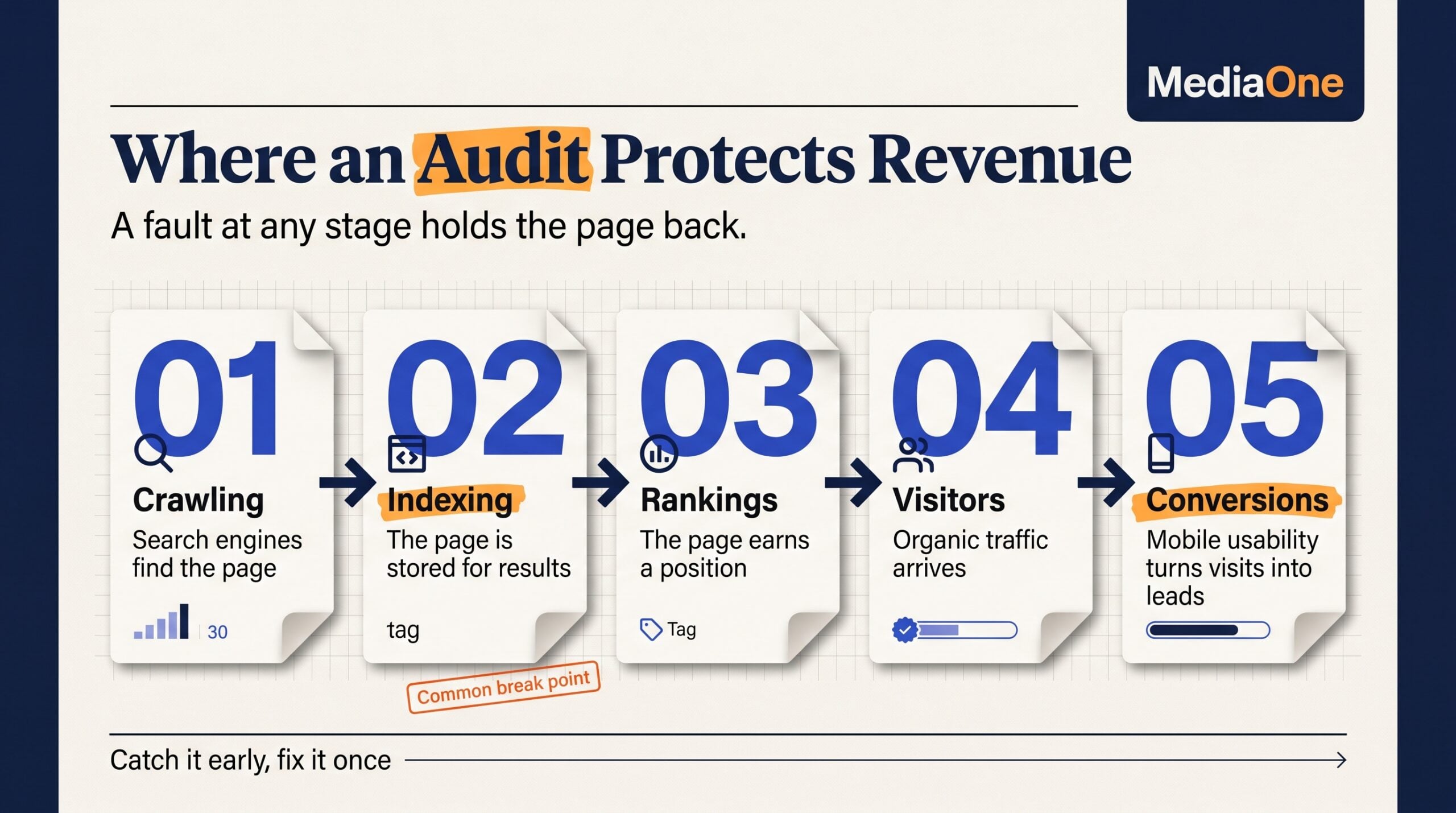
Search engines discover, crawl, index and rank pages, and they weigh page experience signals such as load speed and mobile usability. A problem at any stage can hold a page back, and a regular website audit report helps catch these issues early. Mobile matters most: over 60% of searches happen on mobile devices, according to DevEbyte. A broken mobile layout hurts both visibility and conversions, and a keyword-focused analysis can show which pages need that fixing first. A free marketing review can also help flag these gaps before they cost traffic.
Why small faults compound on large sites
On a few dozen pages, a misconfigured canonical tag affects one page. A canonical tag tells search engines which version of a page is preferred. On a large site with tens of thousands of pages, the same template error repeats across every product URL.
This wastes crawl budget, the number of pages a search engine will fetch from your site, and spreads ranking signals thinly. Regular SEO audits on large sites catch these template-level errors before they compound. A website audit report should group findings by template and root cause, not list each affected URL separately, following marketing and analysis best practices.
Route each finding to the team that can fix it: technical issues to developers, on-page issues to content or SEO staff, and UX issues to design. Reports that mix all five in one pile stall because no one owns the hand-off. A free website audit tool can surface these findings, but the grouping and routing still require human analysis.
The Five Types of Website Audit and What Each Covers
Technical audits: crawling, indexing, sitemaps and robots.txt
A technical audit checks whether search engines can reach, read and index your pages. Start with the robots.txt file, the plain-text file that tells crawlers which paths they may visit. One misplaced disallow rule can block an entire revenue section.
Next, check sitemaps. An XML sitemap lists the URLs you want search engines to find. Compare those URLs against the pages marked as indexed in Google Search Console. Large gaps usually point to blocked pages, noindex tags (instructions that keep a page out of the index) or thin content that Google has skipped.
Crawling is when a search engine fetches a page. Indexing is when it stores the page for search results. A page can be crawled and still not indexed, so check both in your report. Many teams pair a free tool such as Screaming Frog with Google Search Console to catch these gaps early. A free SEO audit built on these two tools is a practical starting point for most sites.
On-page checks confirm that each URL has one clear target topic, a unique title tag, a single H1 and a meta description that ends with a call to action. The title tag is the page’s headline in search results. The H1 is the main heading on the page. Google may rewrite a meta description, and displayed length depends on pixel width rather than a fixed character count, so treat any character guideline as a rough target.
Map each page to the search intent it serves, meaning the reason someone searches, such as wanting information or wanting to buy. A product page ranking for an informational query is a mismatch to flag, not a win to celebrate.
Off-page audits and backlink analysis
Off-page work reviews the quality of referring domains, unusual link spikes and anchor text distribution. Anchor text is the clickable words of a link. Flag patterns that look manufactured, such as a sudden cluster of exact-match anchors from unrelated sites. Base disavow decisions on evidence, not on a third-party toxicity score alone. A disavow file tells Google to ignore specific links.
Content audits: duplicate and thin content
Content audits find near-duplicate templates, such as filtered category pages repeating the same copy, and pages with little unique value. Each finding ends in one of four decisions: consolidate, redirect, expand or remove. Base the choice on whether the page earns traffic or links, not on word count.
UX and mobile usability audits
Mobile usability is now the baseline. According to DevEbyte, over 60% of searches happen on mobile devices. Google’s mobile-first indexing documentation explains that Google primarily uses the mobile version of a page for indexing and ranking.
Test tap target sizes, text legibility and navigation depth on a real handset. A good user experience on mobile is what keeps visitors engaged long enough to convert. Weight mobile findings more heavily, because they affect the largest share of visitors. Paid traffic from channels such as google ads also lands on these mobile pages, so a poor mobile experience wastes that spend too.
Core Web Vitals: LCP, INP and CLS
Core Web Vitals measure how a page loads, responds and holds its layout:
- Largest Contentful Paint (LCP): how long the main content takes to appear. A good score is 2.5 seconds or less.
- Interaction to Next Paint (INP): how quickly the page responds after a tap or click. A good score is 200 milliseconds or less.
- Cumulative Layout Shift (CLS): how much content jumps while loading. A good score is 0.1 or less.
Poor LCP often comes from large uncompressed hero images or slow server responses. Poor INP usually comes from heavy JavaScript. Poor CLS often comes from images or ads without reserved space. Fixes include compressing images, deferring non-essential scripts and setting width and height on media. Improving speed on these three metrics is often the fastest route to a better experience.
Field data comes from real visitors. Lab data comes from a controlled test. Lab data helps with debugging, but field data shows what users actually experience, so treat it as the final judgment.
Broken links, redirect chains and internal linking depth
Broken links return error pages and waste user patience and link equity. Redirect chains occur when URL A redirects to B, which redirects to C. Point redirects straight to the final destination. Internal linking depth measures how many clicks it takes to reach a page from the homepage. Important pages should sit within a few clicks.
| Issue | Why it matters | Recommended action |
|---|---|---|
| Broken internal link | Users hit an error page | Update or remove the link |
| Redirect chain | Slows loading, dilutes signals | Point redirect to the final URL |
| Deep orphan page | Hard for users and crawlers to reach | Link from a relevant hub page |
| Redirect loop | Page never loads | Fix the conflicting rule |
| Broken external link | Poor user trust | Replace with a working source |
Benefits of a Website Audit and When to Schedule One
A website audit pays off in three measurable ways:
- Recovered visibility: fixing indexing errors often restores traffic hidden from search engines rather than lost. A technical SEO review is often where these errors surface, and it is a core part of effective digital marketing. Teams that run regular seo audits and follow best practices catch these problems earlier.
- Higher conversion: fixing usability friction, such as slow mobile pages or confusing checkout steps, lifts conversion on pages that already attract visitors. Over 60% of searches happen on mobile devices.
- Efficient crawling: removing redirect loops, duplicate templates and low-value URLs stops search engines spending crawl budget on pages that earn nothing.
Tie each benefit to a number in the report, such as organic sessions, conversion rate or pages crawled. Audit findings should also feed into on-page SEO work, including title tags and meta descriptions. A free website audit or free SEO audit tool can give a first baseline before committing to a full review. Paid search results from google ads can also reveal landing page problems that an audit should address.
How often to audit
AgencyAnalytics suggests a smaller website may need an audit every 6 to 12 months. A larger, dynamic site may benefit from a weekly SEO check and a quarterly UX audit.
Triggers for an unscheduled audit
- A site migration or domain change
- A redesign or CMS replacement
- A drop in organic search traffic
- A new analytics or tag installation, which can break event tracking silently
Run the audit before the change where possible, so you have a baseline to compare against afterward. Each audit should include a clear analysis of the results to guide the next steps.
The Website Audit Checklist and Step-by-Step Process
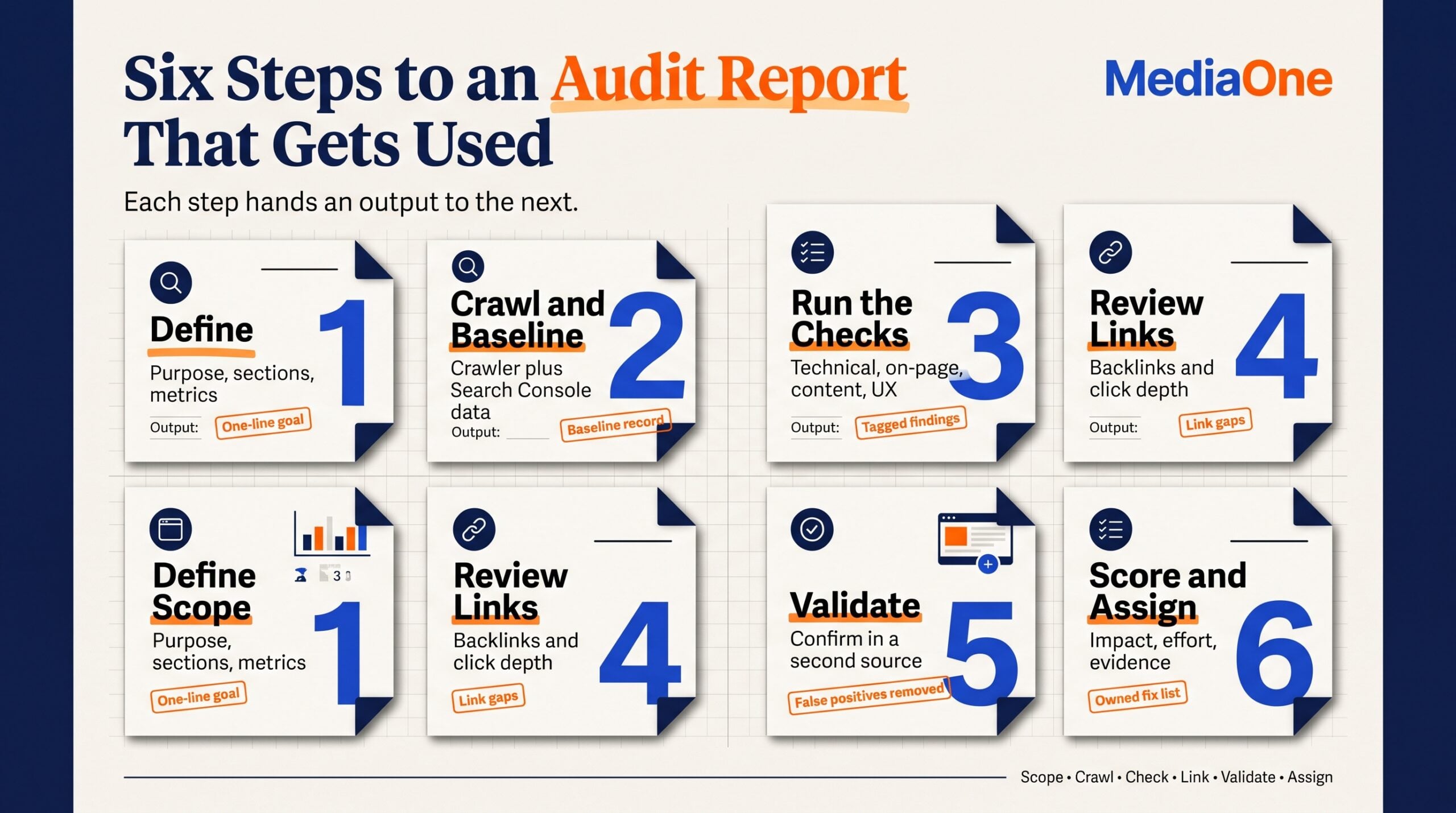
A website audit works best with a written scope, a crawl, validated findings and a scored list of fixes with named owners. Most audits fail before the crawl starts, because nobody agreed what the audit was for. Work through these six steps in order and the audit report will arrive with owners, priorities and evidence attached. Teams running a free SEO audit or a broader review of technical SEO and user experience can use the same sequence, since the workflow stays consistent across scopes. Teams that also run a Google Ads account can compare paid landing page performance against organic results during the same review.
Step 1: Define scope, goals and success metrics
Write the audit’s purpose in one sentence, such as “recover non-branded organic traffic to product category pages.” List the sections in scope, the metrics that will prove success, and the team that will act on each area. Agree early whether the work supports wider marketing goals, so the findings can be prioritized against them.
Step 2: Crawl the site and collect baseline data
Run a crawler across the website and pull matching data from Google Search Console and your analytics platform. Record the baseline now so you can measure change after fixes. A crawler is software that visits pages the way a search engine does. Free tools such as Screaming Frog can handle smaller sites, though larger sites usually need a paid plan.
Step 3: Run technical, on-page, content and UX checks
Work through the five audit types covered earlier, checking crawl access, titles, duplicate templates, mobile usability and the user experience of key templates. Tag each finding with its owning team. Keyword mapping belongs here too, so each page’s targeted keyword is checked against its title and content. Include an on-page SEO review of headings, meta descriptions and internal anchor text for each priority template.
Step 4: Analyze backlinks and internal linking structure
Review referring domains, anchor text (the clickable words of a link) and click depth, the number of clicks needed to reach a page from the homepage. Flag pages with few internal links, as they are often the ones that never rank. Include an analysis of which referring domains send the most qualified traffic.
Step 5: Validate findings and remove false positives
Confirm each finding in a second source before it enters the report. A crawler warning backed by a Search Console error is strong evidence. A crawler warning alone is a lead to verify, not a fix to schedule.
Step 6: Score, prioritize and assign owners
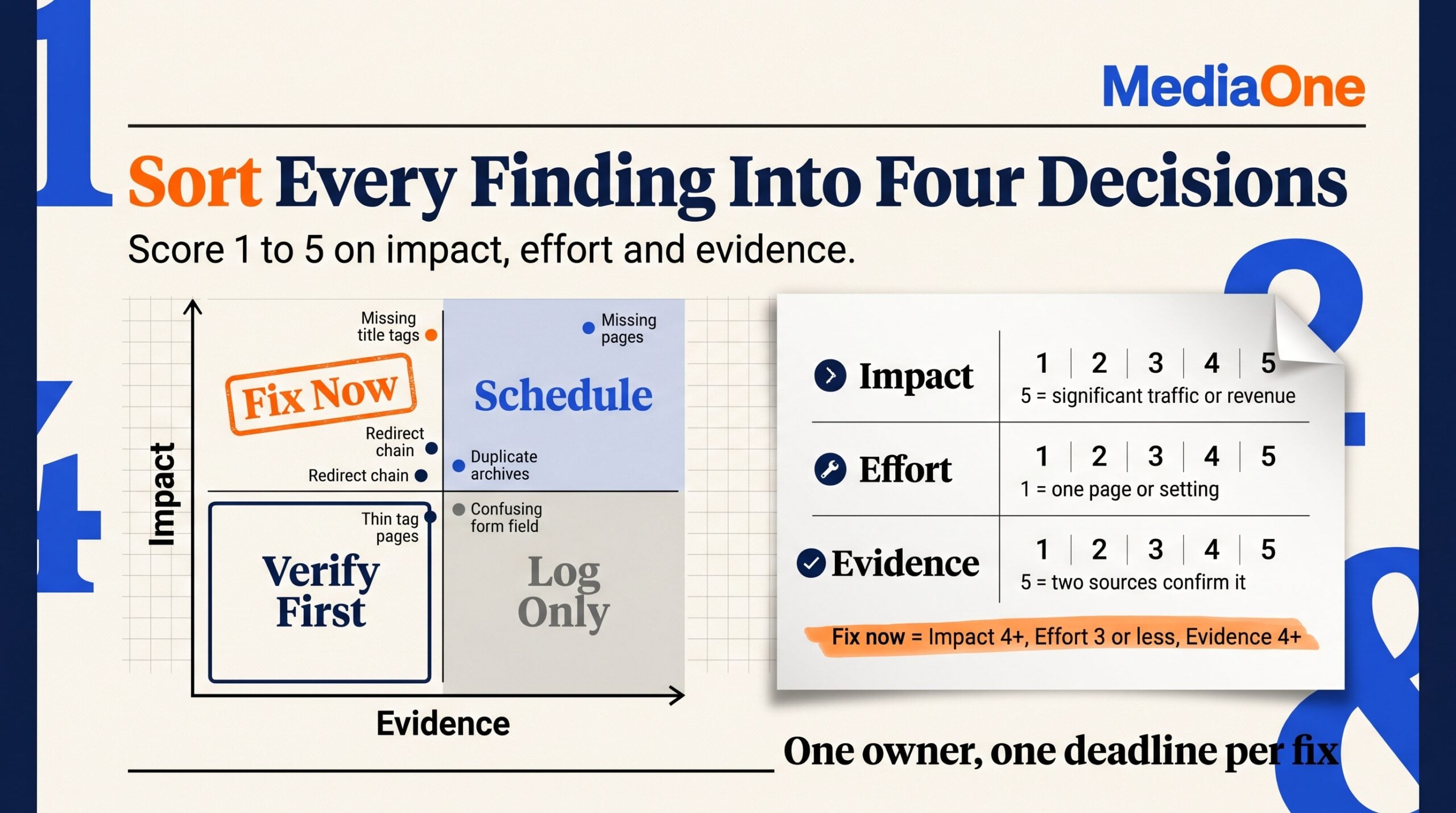
Score every validated finding from 1 to 5 on business impact, fix effort and evidence strength, then place it in the matrix. Assign one named owner and one deadline to each item in the top quadrant.
Scoring rubric.
- Impact: 5 means significant traffic or revenue; 3 means a secondary goal; 1 means almost no earnings.
- Effort: 1 means one page or setting; 3 means a template or several pages; 5 means a platform change or rebuild.
- Evidence: 5 means two independent sources confirm the issue; 3 means one source; 1 means a hunch or unverified warning.
Findings with Impact of 4 or more, Effort of 3 or less and Evidence of 4 or more go to “Fix now.” Strong evidence with low impact goes to “Schedule,” and weak evidence goes to “Verify first.”
Worked example.
| Finding | Impact | Effort | Evidence | Quadrant |
|---|---|---|---|---|
| Category pages missing title tags | 5 | 2 | 5 | Fix now |
| Redirect chain on a top landing page | 4 | 2 | 4 | Fix now |
| Duplicate blog archive pages | 2 | 3 | 4 | Schedule |
| Thin tag pages with no traffic | 1 | 2 | 2 | Log only |
| Heatmap shows a form field confusing | 3 | 4 | 2 | Verify first |
The first two findings rose to the front of the queue because they combined high impact, strong data and modest effort. The heatmap finding became a verification task once its weak evidence was weighed.
- Set scope, goals and metrics.
- Crawl and collect baseline data.
- Run the five check groups.
- Review backlinks and internal links.
- Validate and strip false positives.
- Score, prioritize and assign owners.
Essential Tools for Website Audits
Every audit depends on data, and the tools you choose decide which problems you can see. Teams often treat a crawler warning as proof and a traffic dip as a mystery. A structured SEO audit separaterates verified issues from noise, and each tool category gives a different view of the same website.
Analytics platforms and Google Search Console
Google Search Console shows which queries and pages earn impressions and clicks, and which URLs Google has indexed or excluded. It costs nothing to set up. Your analytics platform shows what visitors did after they arrived. Before prioritizing any technical finding, check whether it touches a page that already receives search traffic or conversions. A broken canonical on a page with no traffic is a low-priority fix. The same error on a top-converting landing page moves to the front of the queue.
Crawlers and SEO suites
A crawler such as Screaming Frog reads your website the way a search engine does and surfaces broken links, redirect chains, missing titles and duplicate content. For a small brochure site, a desktop crawler is usually enough. For a large catalog, you need a cloud crawler or an SEO suite that can handle tens of thousands of URLs and combine crawl data with backlink and ranking data. Suites are costly for small teams, so weigh their backlink and keyword features against what you will actually use.
Heatmaps and session recording
Tools such as Hotjar and Pendo show where visitors click, scroll and abandon forms, which is valuable evidence for UX findings. They also carry a privacy cost. These tools set cookies that persist user identifiers, and Hotjar’s hjSessionUser cookie lasts a whole year. Check your consent banner and privacy disclosures before installing them. Visitors who decline cookies will be missing from your recordings, so treat heatmap output as a sample, not a census.
Comparison table of tool categories
| Tool category | Best for | Limitation |
|---|---|---|
| Crawler | Technical and on-page errors | Does not show user behavior |
| SEO suite | Backlinks, rankings, keyword gaps | Costly for small teams |
| Analytics and Search Console | Traffic and indexing reality | Reflects only what is measured |
| Heatmaps | UX friction | Sample-based, needs consent review |
Use crawl data to find candidate problems, search data to confirm which ones matter, and behavior data to explain why users struggle. A finding supported by all three earns a place in the fix-now quadrant of your priority matrix.
Conclusion: Turning Audit Insight Into Action
A website audit report earns its cost only when findings lead to action. Every finding needs a named owner and a clear next step, whether a developer fixing a redirect chain or a content editor consolidating thin pages. A finding without an owner is just a warning nobody reads twice.
Start with the “fix now” quadrant. Assign two or three high-impact, well-evidenced issues and set a date. Re-run the same analysis after fixes ship, using the same tools, so results compare directly.
Frequently Asked Questions
What should a website audit report include?
A useful website audit report opens with a one-page executive summary listing the decisions needed and the expected business impact. Each finding gets a severity tier, its evidence (a screenshot, URL list and data source), an owner and a deadline, plus Impact, Effort and Evidence scores. A report without owners or scores is a data dump, not a decision tool.
How long does a website audit take?
It depends on site size and depth. A small brochure site may take a few hours, while a large catalog can take days or weeks. Validating findings in Search Console or analytics takes most of the time, so the timeline is confirmed once the scope is known.
How often should a website audit be done?
According to AgencyAnalytics, a smaller site may need an audit every 6 to 12 months. A larger, dynamic site may benefit from a weekly SEO check and a quarterly UX audit. Run an unscheduled audit after a migration, redesign, sudden traffic drop or new tracking install.
What is the difference between a website audit and an SEO audit?
An SEO audit covers only factors affecting search visibility, such as crawlability, indexation, on-page signals and backlinks. A broader website audit also covers user experience, accessibility, content quality and conversion friction. An SEO audit is usually one part of a full website audit.
Which tools are needed for a website audit?
At minimum, you need Google Search Console, an analytics platform and a crawler. Google’s PageSpeed Insights covers page speed and Core Web Vitals. Backlink tools and heatmaps are useful for specific questions but not essential. Check consent requirements before installing session recording tools.
How do you prioritize issues in an audit report?
Score each finding from 1 to 5 on business impact, fix effort and evidence strength. High impact, low effort and strong evidence goes to “fix now”. High impact with weak evidence goes to “verify first”. Low impact with high effort goes to “log only”. Mobile usability findings deserve extra weight, since DevEbyte notes that over 60% of searches happen on mobile devices.