| AI Summary
Shopify SEO helps Singapore retailers improve their online store’s visibility on search engines, attract relevant organic traffic, and increase sales. By optimising product and collection pages, conducting keyword research, improving site speed, creating helpful content, and building quality backlinks, businesses can strengthen their search rankings and customer experience. With consistent SEO efforts and performance monitoring, Shopify store owners can build a sustainable strategy for long-term e-commerce growth. |
If you’ve launched a Shopify store expecting its built-in SEO features to drive organic traffic automatically, you’re not alone.

Shopify provides a solid technical foundation, including XML sitemaps, mobile-responsive themes and product structured data. However, these features don’t choose your keywords, build your website’s authority or help you outperform competitors on their own.
Ranking in search results requires a strategy beyond Shopify’s default settings.
This guide explains what Shopify SEO does well, where the platform falls short and how to prioritise the work that can make the biggest difference to your organic visibility.
If you’re selling in Singapore or expanding into international markets, you’ll also learn how to approach localisation, technical optimisation, content strategy and local search.
1. What Shopify SEO Is and Why It Matters for Singapore Retailers
Shopify SEO is the process of optimising a Shopify store to improve its visibility in unpaid search results.
The platform handles several technical fundamentals, including sitemap generation, responsive themes and certain types of structured data. These features help search engines discover and understand your pages.
However, being technically accessible to search engines doesn’t guarantee that your store will rank well.

You still need to optimise your product titles, meta descriptions, collection pages, internal links and supporting content. You also need to demonstrate why your store deserves to rank above competing websites.
Why Shopify SEO matters in Singapore

For Singapore retailers, organic search can become a valuable source of qualified traffic without requiring payment for every click. Businesses looking to improve their organic visibility can explore SEO services in Singapore for support with search strategy, technical optimisation and keyword targeting.
However, competing in Singapore’s e-commerce market means addressing more than the basics.
Depending on your business, your SEO strategy may need to account for:
- Local search intent and Singapore-specific keywords.
- Accurate SGD pricing and delivery information.
- English and other relevant language versions of your store.
- Customer reviews and local business information.
- Clear privacy policies, transparent pricing and appropriate consumer disclosures.
The objective is to make your store relevant to the people you want to reach, wherever they are searching from.
2. The SEO Challenges Specific to Shopify
Shopify simplifies many technical tasks, but store owners still need to address several recurring SEO challenges.
2.1 Duplicate content and URL management
Products may appear in multiple collections, while variants and URL parameters can create additional URLs.
Shopify handles some of these situations through its default URL and canonicalisation behaviour, but themes and third-party apps can introduce complications.
What to do: Check your important product URLs in Google Search Console and investigate unexpected duplicate or alternative URLs.
2.2 App-induced code bloat
Shopify apps can add JavaScript, CSS, tracking scripts and other resources to your storefront.
Too many poorly optimised apps can slow down pages and affect the user experience, particularly on mobile devices.
What to do: Review your installed apps, remove redundant functionality and test your store’s performance before and after significant changes.
2.3 Missing content strategy
Shopify doesn’t tell you which keywords your customers use, which products deserve priority or what information shoppers need before buying. For stores that need a more specialised approach, MediaOne provides ecommerce SEO services focused on improving the organic visibility of online stores.
Those decisions require research and a clear content plan.
Your strategy should combine:
- Product and collection page optimisation.
- Helpful buying guides and educational content.
- Internal links that connect related pages.
- Relevant external links that strengthen your website’s credibility.
Action step: Audit your installed apps and identify your five to ten most commercially important products. Start by improving the pages most likely to contribute to revenue.
3. Why Shopify’s Built-in SEO Tools Aren’t Enough
Shopify’s native features provide a foundation for search visibility, but they don’t replace a competitive SEO strategy.
Built-in tools handle the basics
Shopify supports essential technical functions such as:
- Automatic XML sitemap generation.
- Responsive storefront themes.
- Editable page titles and meta descriptions.
- Product URLs and redirect management.
- Product structured data, depending on your theme and installed apps.
These features help search engines access and interpret your store.
Competitive rankings require more
Your competitors may have more detailed product descriptions, stronger category pages, more relevant backlinks or better alignment with customer search intent.
Consider two Shopify stores selling similar products.
Both may have technically sound websites. However, one publishes detailed buying guides, answers customer questions and connects its content through useful internal links. The other relies on short manufacturer descriptions.
The first store has more opportunities to demonstrate relevance and attract visitors through informational searches.
Technical SEO is only one part of the picture
Page speed, crawlability and indexing matter, but they work alongside content quality, relevance, links and other ranking signals.
Action step: Compare your store with the top three organic results for one of your most valuable keywords. Identify differences in content depth, page structure, product information and search intent. Use those gaps to prioritise your next improvements.
4. How Shopify SEO Differs from Custom-Built Stores
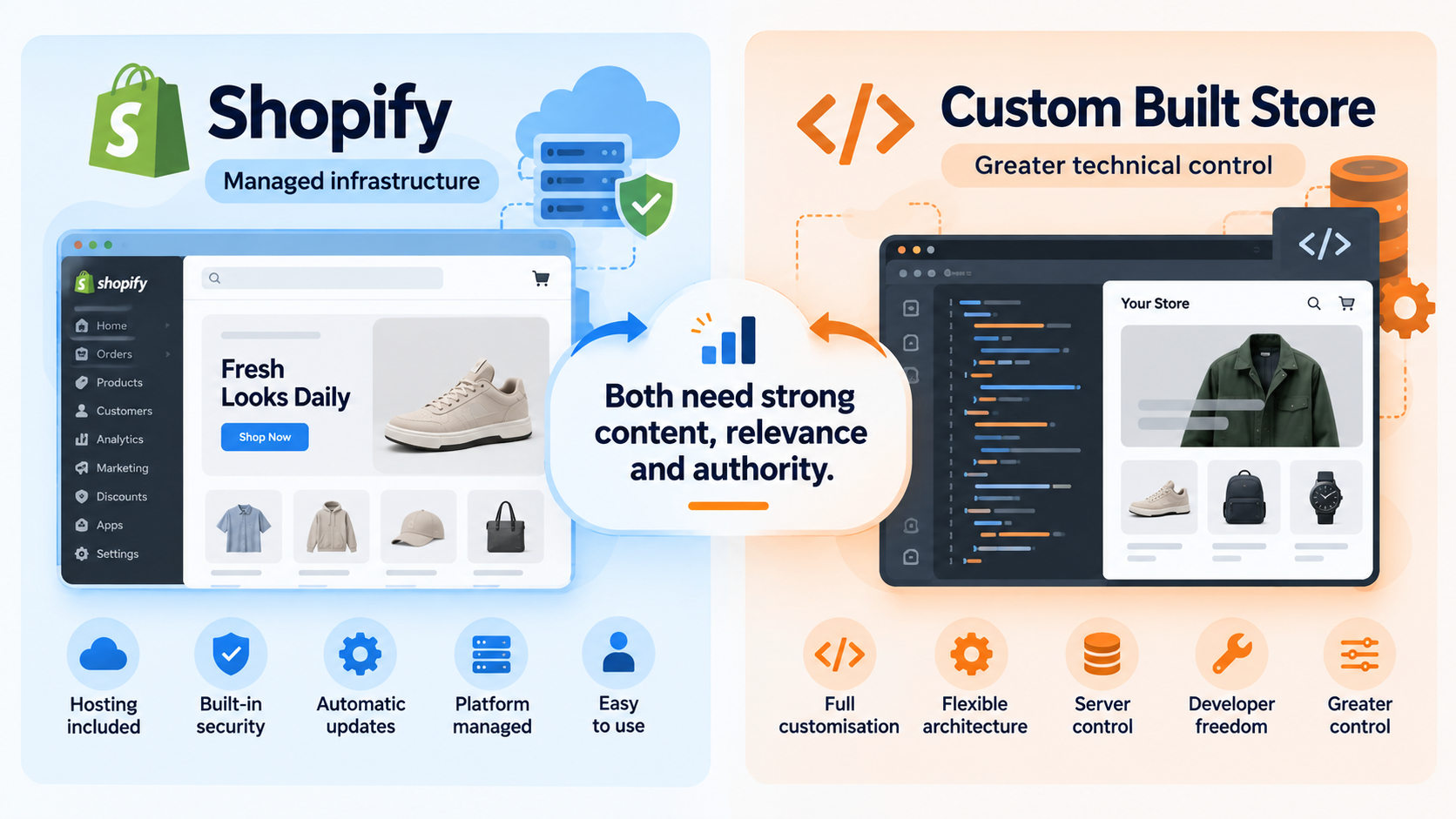
Shopify trades some technical flexibility for convenience.
A custom-built store may offer more control over server configuration, rendering, caching and URL architecture. However, that flexibility also requires more development expertise and ongoing maintenance.
| Factor | Shopify | Custom-built store |
|---|---|---|
| Setup and maintenance | Many technical functions are managed by the platform | More responsibility for the site owner and developer |
| Server configuration | Limited direct control | Greater control |
| Page performance | Influenced by theme, images and apps | Can be customised across the stack |
| Structured data | Depends on Shopify, the theme and apps | Can be tailored through development |
| URL structure | Follows Shopify’s platform conventions | More flexibility |
| Redirect management | Available through Shopify’s admin and supported mechanisms | Configured through the site’s routing or server |
| SEO strategy | Requires keyword research, content and authority building | Requires the same, alongside technical implementation |
Neither platform automatically ranks better than the other.
For Singapore retailers, the right choice depends on your budget, technical resources, business model and competitive landscape. If your store also needs development support, review ecommerce web development services to explore options for building and improving an online store.
Action step: Define your competitive advantage. Are you more knowledgeable about your product category, better at answering customer questions or able to provide a stronger buying experience? Build your SEO strategy around those strengths.

5. Shopify’s Native SEO Capabilities in 2026
Shopify automates several foundational SEO tasks. Understanding what the platform handles, and what still requires your attention, helps you avoid unnecessary work.
5.1 Automatic XML sitemaps and robots.txt
Shopify generates an XML sitemap at /sitemap.xml and maintains it as your store changes.
According to Google’s sitemap documentation, Sitemaps help search engines discover eligible pages, including products, collections and other supported content.
Shopify also generates a robots.txt file with default crawling rules.
What you should do:
- Open Google Search Console and verify your website.
- Submit your sitemap at
yourdomain.com/sitemap.xml. - Inspect important product and collection URLs.
- Investigate indexing errors and unexpected crawling restrictions.
Remember that submitting a sitemap doesn’t guarantee that Google will index every URL.
5.2 Mobile responsiveness and Core Web Vitals
Shopify themes are generally designed to work across desktop and mobile devices. However, mobile responsiveness doesn’t guarantee strong performance.
Your store’s speed can be affected by image sizes, theme customisations, third-party apps and other resources.
Google’s Core Web Vitals include three key measurements:
- Largest Contentful Paint (LCP): Measures how quickly the main content appears. Target: 2.5 seconds or less.
- Interaction to Next Paint (INP): Measures responsiveness to user interactions. Target: 200 milliseconds or less.
- Cumulative Layout Shift (CLS): Measures unexpected layout movement. Target: 0.1 or less.
These are the recommended thresholds for a good user experience.
What you should do:
- Test important product and collection pages with Google PageSpeed Insights.
- Identify oversized images and unnecessary scripts.
- Review apps that add significant front-end resources.
- Retest after making changes.
Use Google PageSpeed Insights to assess performance and identify potential improvements.
5.3 Built-in structured data
According to Google’s e-commerce structured data guidelines, structured data helps search engines interpret information about your products and business.
Depending on your theme and apps, your Shopify store may include product information such as:
- Product name and description.
- Product image.
- Price and currency.
- Availability.
- Review information, when supported and correctly implemented.
Additional structured data, such as FAQ or local business markup, may require separate implementation.
What you should do:

- Test a representative product page with Google’s Rich Results Test.
- Review any errors or warnings.
- Check whether review apps or theme customisations generate conflicting markup.
- Correct invalid or duplicated structured data.
Structured data can make a page eligible for certain search enhancements, but it doesn’t guarantee that those enhancements will appear.
5.4 URL structure and redirects
Shopify uses standard URL patterns for products, collections and other page types.
You can usually customise a page’s URL handle through the Shopify admin. When you change an existing URL, check that an appropriate redirect is in place.
Before changing an established URL:
- Record its current organic traffic and search performance.
- Identify any valuable external links pointing to it.
- Create or verify the redirect to the most relevant replacement page.
- Update internal links to use the new URL.
- Monitor the page in Google Search Console.
For multilingual stores, review your Shopify Markets and language configuration to ensure the appropriate language versions and international targeting signals are implemented.
For additional guidance, refer to Google’s ecommerce URL structure recommendations when planning URL patterns for products and categories.
Shopify’s native SEO capabilities at a glance
| Feature | What Shopify helps with | What you still need to do |
|---|---|---|
| XML sitemap | Automatic sitemap generation | Submit and monitor it |
| Mobile responsiveness | Responsive themes | Test performance on mobile |
| Structured data | Some native product markup | Validate and resolve conflicts |
| URL management | Editable handles and redirect support | Plan URL changes carefully |
| International storefronts | Market and language tools | Verify language targeting and localisation |
Key takeaway: Shopify’s defaults help establish technical readiness. Your next priority is improving relevance, content quality and the overall buying experience.
6. On-Page SEO Strategy for Shopify Stores
On-page SEO helps search engines understand your pages and helps shoppers decide whether your products meet their needs.
Start with product and collection pages, then expand into supporting content.
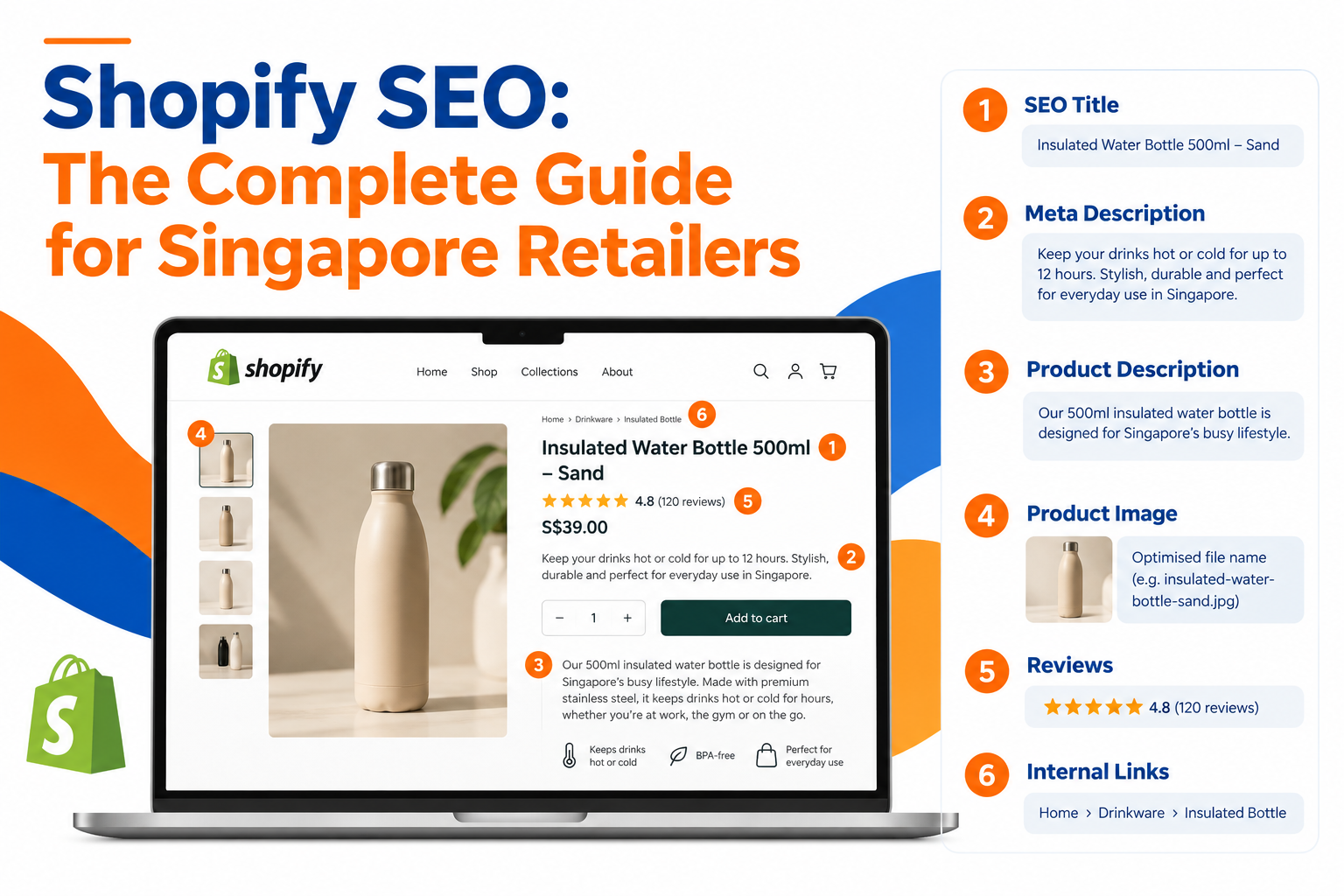
6.1 Optimise product titles and meta descriptions
Your product page needs to communicate its value clearly in search results.
Product titles
Include the primary keyword naturally, alongside a useful product attribute or differentiator.
For example:
- Weak: “Matcha Powder”
- Stronger: “Organic Ceremonial Matcha from Kyoto”
The stronger example gives shoppers more information without relying on repetitive keywords.
In Shopify, look for the search engine listing settings associated with the product. The SEO title can differ from the product’s displayed name.
As a practical starting point, aim for a concise title that communicates the product and its main differentiator. Search engines may truncate titles depending on their display width.
Meta descriptions
Meta descriptions aren’t a direct Google ranking factor, but they can help communicate relevance and encourage clicks.
For example:
- Weak: “Matcha powder, organic, ceremonial grade, Japanese matcha, green tea.”
- Stronger: “Discover organic ceremonial matcha from Kyoto, with a smooth flavour and vibrant green colour. Explore delivery options for Singapore.”
The stronger version reads naturally and gives potential customers a reason to explore the page.
6.2 Write useful product descriptions
Avoid relying entirely on short manufacturer descriptions.
Your product page should answer the questions shoppers need resolved before making a purchase.
Consider covering:
- What is the product?
- What makes it different from alternatives?
- How is it used?
- What features or benefits matter most?
- Who is it suitable for?
- What are the dimensions, ingredients, materials or specifications?
- What should customers know about delivery, care or returns?
Use short paragraphs, descriptive subheadings and bullet points where appropriate.
There is no universal word count that guarantees rankings. Focus on providing enough original, accurate information to help customers make an informed decision.
6.3 Improve collection page content
Shopify calls product categories “collections”. These pages can target relevant category-level searches while helping customers browse.
A collection page should do more than display a product grid.
Add a concise introduction that explains:
- What the collection contains.
- How the products differ.
- Which customer needs the collection serves.
- How shoppers can choose between available options.
For example, a ceremonial matcha collection might explain the difference between ceremonial and culinary grades, the flavour profile and the intended preparation method.
Keep the content helpful rather than adding paragraphs solely to increase word count.
Internal linking tip: Link to relevant collections and featured products using descriptive anchor text. Avoid generic phrases such as “click here” when a more informative description would be natural.
6.4 Use your blog to build topical relevance
Shopify’s blog can attract shoppers who are researching a product category before they are ready to purchase. A well-planned content marketing strategy can help organise useful articles around customer questions and different stages of the buying journey.
For example, a matcha retailer might publish:
- How to prepare matcha at home.
- Ceremonial vs. culinary matcha: What’s the difference?
- How to store matcha to preserve freshness.
- What to look for when buying matcha powder.
Each article should address a distinct search intent and link to relevant products or collections when appropriate.
A practical starting plan:
- Find questions customers ask before buying your products.
- Group related topics into a content plan.
- Publish useful, original articles consistently.
- Link each article to relevant commercial pages.
- Review impressions, clicks and search queries in Google Search Console.
Prioritise topics that support your products and answer genuine customer questions rather than publishing articles simply to meet a quota.
7. Keyword Targeting Without Cannibalisation
Keyword cannibalisation occurs when multiple pages on your site compete for the same search intent.
For example, a matcha store might have three product pages targeting “best matcha powder Singapore”. If those pages offer very similar products and content, Google may struggle to identify the most relevant page for the query.
Assign a primary keyword to each page
Create a simple keyword map for your most important products.
| Page | Primary keyword | Supporting content |
|---|---|---|
| Ceremonial matcha | Ceremonial matcha Singapore | Brewing and grade comparison guide |
| Culinary matcha | Matcha powder for lattes | Matcha latte recipe |
| Matcha starter kit | Matcha kit for beginners | Beginner’s preparation guide |
The goal isn’t to restrict a page to one keyword. It’s to give every important page a clear primary purpose.
Manage product variants carefully
If the same product is available in different sizes or colours, consider whether those options should be variants on one product page rather than separate product listings.
Separate pages may be appropriate when the products have distinct search intent or genuinely different content. Avoid creating near-identical pages solely to target minor keyword variations.
Use internal links to reinforce page relationships
Link related blog posts and collections to the product page that best satisfies the relevant search intent.
For example, a beginner’s guide to matcha preparation could link to your starter kit, while a detailed article on ceremonial-grade tea could link to your ceremonial matcha collection.
Audit your top products
Start with your five to twenty most commercially important products.
For each page:
- Record the primary keyword.
- Review its search impressions, clicks and landing-page performance.
- Check whether other pages target the same intent.
- Improve internal links and consolidate genuinely redundant pages where appropriate.
- Monitor changes over time.
Use Google Search Console to identify patterns before making structural changes. Multiple pages appearing for related queries isn’t automatically a problem; the goal is to ensure each page serves a distinct purpose.
8. Technical SEO Requirements for Shopify Store Owners
Shopify manages much of the underlying infrastructure, but technical issues can still emerge as your catalogue and app ecosystem grow.
The most useful areas to review are crawlability, indexing, duplicate URLs, site performance and structured data.
8.1 Pagination and filtered collection URLs
Collection pages may offer pagination and product filters. Depending on how your theme and apps implement these features, they can generate additional URLs.
Not every additional URL is harmful. The problem arises when search engines spend time crawling low-value URLs instead of discovering or refreshing important content.
What to do:
- Review your collection filters and identify combinations with little user value.
- Check Google Search Console for unexpected indexed URLs.
- Verify canonical tags and pagination behaviour.
- Keep important product and collection links accessible.
- Avoid blocking URLs without understanding how that could affect discovery or indexing.
Don’t automatically canonicalise every paginated page to page one. Each page may contain products that aren’t present on the first page, and the correct approach depends on the site’s structure.
8.2 Duplicate content and canonical URLs
Duplicate or near-duplicate pages can arise from product variants, collection paths, URL parameters and third-party apps.
Shopify generally uses canonical URLs to indicate a preferred version of a page, but you should verify the implementation if you have customised your theme.
Audit checklist:
- Check canonical tags on important product pages.
- Confirm that collection links point to the intended product URLs.
- Review unexpected URL variants in Search Console.
- Investigate duplicate pages created by apps or custom routing.
- Test redirects after changing URLs.
Canonical tags are signals rather than absolute instructions, so ensure your internal links, redirects and sitemap entries are consistent with your preferred URLs.
8.3 Improve site speed
Large images, heavy scripts and unnecessary apps can affect the speed of your Shopify storefront.
Begin by testing key landing pages rather than assuming the entire site performs identically.
Prioritise these improvements:
- Compress large product and banner images before uploading.
- Remove redundant apps and unused theme features.
- Review third-party scripts that delay rendering.
- Ensure images have appropriate dimensions to reduce layout shifts.
- Load below-the-fold images efficiently without delaying critical above-the-fold content.
- Retest after changes.
Use Google PageSpeed Insights to identify issues affecting Core Web Vitals.
8.4 Check crawlability and structured data
Third-party apps may introduce conflicting structured data or interfere with page rendering.
To investigate:
- Test product pages with Google’s Rich Results Test.
- Inspect important URLs using Google Search Console.
- Review whether search engines can access the main product content and images.
- Investigate errors introduced by theme changes or newly installed apps.
If a page is indexed incorrectly, diagnose the underlying cause before adding more apps or code.
9. Building Authority Through Content and Link Strategy
Technical optimisation helps search engines access your pages. Useful content and credible references can help establish why your store deserves to be considered for relevant searches.
For Singapore retailers, a practical approach combines educational content, internal links, relevant industry relationships and authentic customer feedback.
9.1 Align content with buyer intent
Create content for shoppers at different stages of their buying journey.
Informational content
Examples include care guides, product explainers and how-to articles.
These pages answer early-stage questions and introduce potential customers to your brand.
Commercial investigation content
Examples include product comparisons, buying guides and category roundups.
These help shoppers evaluate their options.
Transactional content
Product and collection pages should make it easy for shoppers to compare specifications, understand pricing and complete a purchase.
Connect these content types through relevant internal links so readers can move naturally from research to product discovery.
For Singapore audiences, consider relevant local occasions and shopping needs, such as Lunar New Year gifting, Deepavali promotions, local delivery expectations and region-specific product advice.
9.2 Build a clear internal linking structure
A useful starting structure is:
Homepage → Collection pages → Product pages
Support this hierarchy with contextual links from blog articles and related products.
For example:
- A buying guide links to a relevant collection.
- The collection links to its featured products.
- A product page links to complementary items.
- Related articles link to one another where doing so helps readers.
Use descriptive anchor text and make sure links provide genuine value to the reader.
9.3 Earn relevant links from Singapore sources
External links can help search engines discover pages and assess their relevance and reputation.
Focus on genuine relationships rather than purchasing bulk links or pursuing arbitrary authority scores.
Potential opportunities include:
- Relevant trade associations and industry directories.
- Local media and lifestyle publications.
- Suppliers, distributors and complementary businesses.
- Local events and community organisations.
- Genuine product reviews and editorial features.
Prioritise relevance, editorial quality and audience fit. A link from a relevant source can be more useful than a large number of unrelated links.
9.4 Encourage authentic customer reviews
Reviews can help shoppers evaluate your products and build confidence before purchasing.
Consider implementing a post-purchase email asking customers to share honest feedback.
Make it easy for customers to leave a review, respond constructively to complaints and avoid conditioning incentives on positive ratings.
If you use a third-party review app, verify that the review content and any structured data are implemented correctly.
For multilingual audiences, consider whether your review experience supports the languages your customers actually use.
10. Singapore-Specific Shopify SEO Considerations
Singapore retailers need to align their storefronts with local customer expectations while ensuring that their technical setup accurately reflects the markets they serve.
10.1 Localisation and language targeting
If your store serves customers in multiple languages or countries, make sure each version has appropriate content and clear language signals.
For example, separate English and Simplified Chinese product pages should provide genuinely useful content in their respective languages.
Where appropriate, configure Shopify Markets and language settings, then verify the resulting URLs and hreflang annotations.
Checklist:
- Ensure each language version is accessible at a consistent URL.
- Use accurate language metadata.
- Check that translated pages link to the corresponding versions.
- Avoid automatically redirecting all visitors based solely on their presumed language or location.
- Review international targeting and indexing in Search Console.
Singapore’s multilingual environment doesn’t mean every store needs four language versions. Prioritise the languages your customers use and your business can support properly.
10.2 Currency, payment and delivery information
Make your prices and delivery policies clear to shoppers.
For Singapore-facing stores, review:
- Whether product prices are displayed in SGD where appropriate.
- Whether structured data accurately reflects the displayed price and currency.
- Whether delivery fees and estimated delivery times are easy to find.
- Whether stock availability matches what customers can purchase.
- Whether payment options are clearly explained.
For example, product structured data should reflect the actual offer and use the appropriate currency code, such as SGD.
Don’t assume that adding currency or payment logos directly improves rankings. The main objective is to provide accurate information, improve the buying experience and ensure that any structured data matches the visible page.
10.3 Local search and Google Business Profile
Google Business Profile is most relevant to businesses that qualify under Google’s eligibility requirements, such as retailers with a genuine customer-facing location or eligible service-area operations.
An online-only store without an eligible in-person customer interaction shouldn’t create a profile solely to pursue local rankings.
If your business qualifies, make sure your business information is accurate and consistent.
Consider:
- Keeping business hours and contact information current.
- Providing accurate location or service-area details.
- Linking to your website.
- Responding to customer feedback.
- Maintaining consistent business details across relevant directories.
10.4 Privacy and consumer information
Singapore retailers should make sure their website provides clear and accurate information about the business and its policies.
Depending on your operations, this may include:
- A privacy policy that explains relevant personal-data practices and aligns with applicable requirements under Singapore’s Personal Data Protection Act (PDPA). The Personal Data Protection Commission Singapore (PDPC) provides guidance on organisations’ data protection obligations.
- Clear shipping, return and refund policies.
- Accurate pricing and product information.
- Appropriate disclosures for promotions and other commercial terms.
- Compliance with applicable Singapore privacy and consumer protection requirements.
These practices help establish customer trust. They should be treated as operational and compliance requirements, not as guaranteed direct ranking factors.
11. A Practical Six-Week Shopify SEO Action Plan
Rather than attempting to fix everything at once, work through the following sequence.
Week 1: Establish your baseline
- Set up Google Search Console and Google Analytics 4.
- Submit your sitemap.
- Identify your top five to twenty products by commercial importance.
- Record current organic clicks, impressions and key landing pages.
Week 2: Optimise product pages
- Rewrite titles and meta descriptions.
- Improve thin or duplicated product descriptions.
- Check image quality and descriptive alt text.
- Verify pricing, availability and relevant product information.
Week 3: Improve collection pages
- Prioritise collections with meaningful search demand.
- Add useful introductory copy.
- Improve links to featured products.
- Review filters and unexpected URL variations.
Week 4: Resolve technical issues
- Test Core Web Vitals.
- Review apps that add unnecessary scripts.
- Check canonical tags and redirects.
- Validate product structured data.
Week 5: Build supporting content
- Publish a useful buying guide or educational article.
- Link it to relevant products and collections.
- Review existing content for gaps and outdated information.
- Identify relevant local partnership opportunities.
Week 6: Measure and refine
- Compare search performance against your baseline.
- Review new queries and landing-page trends.
- Check for indexing issues after technical changes.
- Prioritise the next improvements based on evidence.
SEO results rarely follow a fixed timetable. Use the six weeks to establish a repeatable process, then continue measuring and refining your strategy.
Build a Stronger Shopify SEO Strategy for Sustainable Growth
Shopify SEO is about more than enabling the platform’s built-in features. To improve your store’s organic visibility, you need a well-rounded strategy that combines keyword research, optimised product and collection pages, technical SEO, helpful content and relevant backlinks. For Singapore retailers, accurate local information, appropriate language targeting and a trustworthy shopping experience can further support your efforts to reach the right customers.
The key is to prioritise improvements that make the biggest difference to your business. Start with your best-selling products, resolve technical issues that affect search visibility, and create content that answers your customers’ questions. Use Google Search Console and Google Analytics 4 to measure performance, identify opportunities and refine your strategy over time. Consistent optimisation can help build a stronger foundation for sustainable organic traffic and long-term e-commerce growth.
Ready to take your Shopify SEO to the next level? MediaOne offers SEO services to help businesses improve search visibility, identify growth opportunities and attract more relevant traffic. Explore MediaOne’s SEO services to learn how a tailored SEO strategy can support your business goals and help your Shopify store compete more effectively in Singapore’s digital marketplace.
Frequently Asked Questions
Is Shopify good for SEO?
Yes, Shopify is good for SEO because it includes essential features such as editable title tags, meta descriptions, custom URLs, XML sitemaps and mobile-friendly themes. However, achieving strong rankings still requires keyword research, optimised content, quality backlinks and regular technical SEO improvements.
How long does Shopify SEO take to show results?
Shopify SEO typically takes three to six months to show noticeable improvements, although some websites may take longer. The timeline depends on your site’s current condition, competition, content quality, backlink profile and the consistency of your SEO efforts.
How do I optimise my Shopify product pages for SEO?
Optimise Shopify product pages by including relevant keywords in product titles, descriptions, title tags, meta descriptions and image alt text. Use unique, helpful product descriptions, compress images for faster loading, add product structured data where appropriate, and include clear internal links to related products and collections.
Do I need a blog to improve Shopify SEO?
No, a blog is not essential for Shopify SEO, but it can help attract organic traffic by answering customers’ questions and targeting informational keywords. Prioritise well-optimised product and collection pages first, then publish relevant blog content to support your customers’ buying journey.
How can Singapore retailers improve Shopify SEO?
Singapore retailers can improve Shopify SEO by targeting relevant local keywords, optimising product and collection pages, improving website speed and mobile usability, and earning quality backlinks. They should also maintain accurate business information and create location-specific content when relevant to their products and target customers.