Most Singapore advertisers have seen this pattern. You look at a sofa on a furniture site, close the tab, and for the next two weeks that same sofa follows you across news pages, video apps and your social feed. Some of that is retargeting working as intended. Much of it is spent on people who were never close to buying, or who already bought and are being shown the product they just paid for.

Retargeting shows ads to people who have already interacted with your business. Used well, it can be an efficient part of a paid media budget. Used carelessly, it quietly absorbs spend. The difference usually comes down to three things: who you target, how often they see an ad, and whether you stop once they have moved on.
This guide explains how retargeting works, what it costs in Singapore, and how to set it up so your budget reaches people who still need a nudge. It sits alongside our SEM services and PPC management, and the paid-placement mechanics tie into programmatic advertising.
Key Takeaways
- Retargeting is a layer, not a discovery channel. It shows ads to people who already visited your site or engaged with your brand. It is best used on people already close to buying, not to find new customers.
- Worth testing, but manage it deliberately. In Singapore’s price-comparing market, returns depend on frequency control and stage-based messages rather than on how many visitors you follow.
- Use a four-rung Audience Ladder. Each rung – browsed a category, viewed a product or pricing page, added to cart or started a form, converted – gets its own lookback window, frequency cap and message.
- Always exclude recent buyers. Showing a buyer another ad for the product they just bought is the most common way retargeting wastes budget.
- Judge results by incremental lift, not platform-reported conversions. Platforms credit themselves for sales that would have happened anyway, so holdout tests are the only reliable check.
- Check audience size before committing. Small niches may not produce a reliable pool, so widen the window or lean on owned channels.
Defining Retargeting in Plain Terms
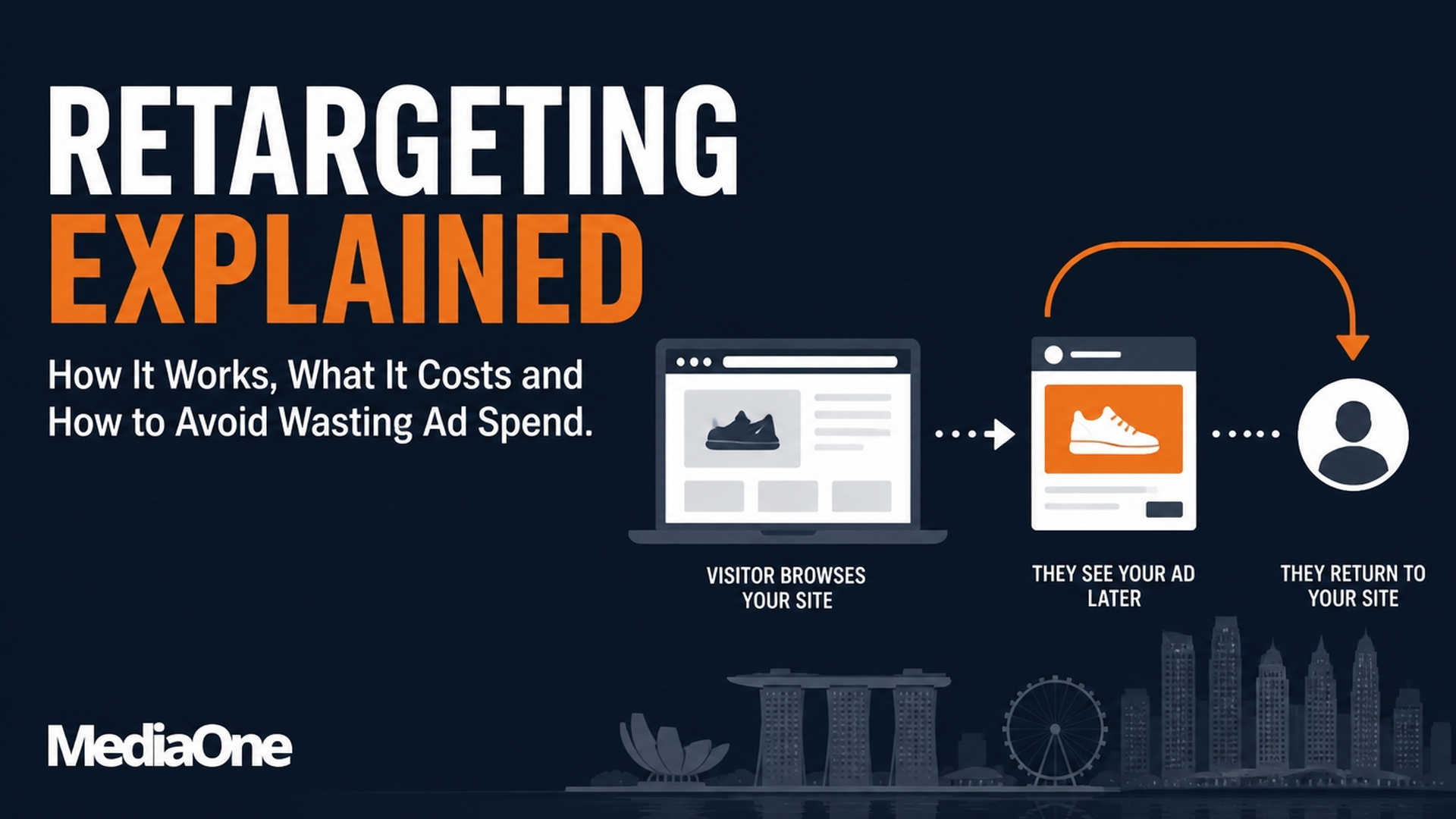
Retargeting is advertising shown to people who have already interacted with your business. A visitor browses your site, leaves without buying, and later sees your ads on other websites, apps or social feeds. The ads exist to bring them back.
The mechanism is simple. Your website carries a small piece of tracking code, often called a pixel or tag, that records which pages a visitor viewed. The ad platform places that visitor in an audience list. When you run a campaign aimed at that list, the platform shows your ads to those people as they browse elsewhere.
What separates retargeting from ordinary advertising is the starting point. A prospecting campaign begins with strangers. A retargeting campaign begins with people who have already shown interest, which is why it often produces a lower cost per click and a higher conversion rate than prospecting. That advantage is also why it is oversold. Someone who has just bought, or never intended to buy, can still be served ads, and the spend looks effective on paper even when little of it changed the outcome.
For a Singapore business, warm does not mean ready. Treat retargeting as something to manage by audience stage, frequency and exclusions, not something to switch on and leave running.
Retargeting Versus Remarketing: Does the Terminology Matter?
In everyday marketing conversations, the two terms are used interchangeably, and the difference is mostly one of usage. Retargeting usually refers to display and social ads that follow a visitor across the web. Remarketing is the broader word Google has long used for its audience-based campaigns, including lists built from website visits, app activity and customer uploads. It often covers search ads too.
The terminology matters for two practical reasons. First, when you read platform documentation or brief an agency, you need to know whether someone means ads served across other websites or ads triggered within a search campaign. These can use different audience rules, minimum list sizes and reporting. Second, the label can hide what is being sold. A remarketing list in a search account, a website custom audience on a social platform, and a programmatic display audience are all “retargeting” in casual speech, but they behave differently.
Ask for the specific audience definition and channel rather than debating the word. If someone says “we do remarketing”, ask which list, what window, and where the ads appear. Those answers will tell you more about likely results than the label.
One naming change is worth knowing about, because it affects what you will see in the interface. Google has renamed “remarketing” to “your data” in Google Ads audience reporting, and “audience types” are now called “audience segments”. If you are following older documentation, that is the reason the menu labels no longer match.
Where Retargeting Sits in a Paid Media Funnel
Paid media is often sketched as a funnel, with awareness at the top and conversion at the bottom. Retargeting belongs in the middle and lower sections, and it works best as a layer on top of prospecting rather than a replacement for it.
Prospecting campaigns fill the top of the funnel. They target people who match your customer profile but have never visited your site. Retargeting then works on the people those campaigns, along with organic search, email and direct visits, have brought in. It pulls back the visitors who did not convert on their first visit.
This relationship has a consequence many advertisers miss. If you stop prospecting, your retargeting audiences shrink, because the pool of recent visitors depends on new traffic. If you run prospecting with no retargeting, you lose the chance to recover people who were close to buying. In a healthy setup, the two budgets are linked: prospecting feeds the audience, and retargeting converts part of it.
Creative should reflect where the visitor is. A retargeted visitor has already looked and stepped away, so a reminder of what they viewed, a clear price, or a stock message usually does more than a general brand statement. The decision is partly made, and what is missing is a reason to return.
How Retargeting Works Under the Hood
Retargeting depends on three mechanisms: pixels and tags, customer list matching, and the browser changes that now limit both. Each one affects how large and how accurate your audience will be.
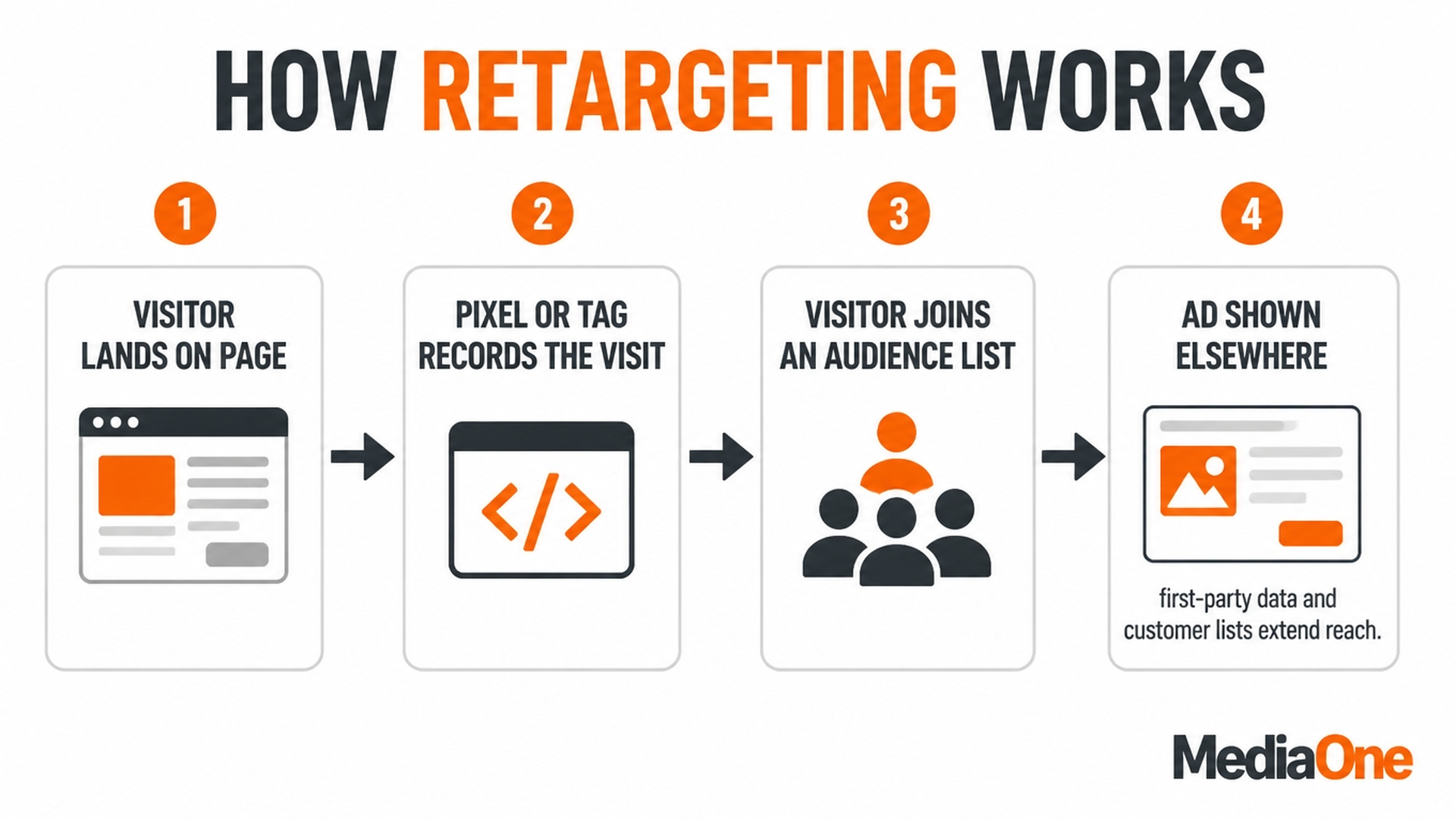
Figure 2: How retargeting works – from page visit to ad served elsewhere
Pixels, Tags and Cookie-Based Audience Building
A pixel is a snippet of code on your pages. When a visitor loads a page, the pixel sends a signal to the platform. The platform then adds that browser to an audience based on the rules you set, such as “viewed product page in the last 30 days”. Historically, this relied on third-party cookies, which let a platform recognise the same browser across different websites.
Browser restrictions have weakened that ability, and the situation is more settled in 2026 than it was for several years. Two facts now define the landscape:
- Safari and Firefox block third-party cookies by default. Safari has done so since 2017 and Firefox since 2019, which together account for a substantial share of web traffic. Any retargeting plan that assumes cross-site cookie matching works everywhere is already inaccurate.
- Chrome is not removing third-party cookies. Google announced on 22 July 2024 that it would not deprecate third-party cookies in Chrome as originally planned, and reconfirmed its current approach in April 2025. So the multi-year deprecation cliff that dominated planning conversations has been called off – but it was never the whole story, because Chrome was only ever the last browser to hold out.
The practical consequence is that cross-site matching is less reliable than it once was, and it is not going to get simpler.
Customer List Matching and First-Party Data
You can also upload a list of customer email addresses or phone numbers. The platform converts these into hashed identifiers, which are scrambled versions of the data, and matches them against its own users. The match rate is the share of your list that the platform can link to an account.
This route has become the more dependable one, because it does not depend on a third-party cookie surviving a cross-site request. It is also why first-party data collection – an email list, a logged-in account, a consented newsletter signup – is now a paid media concern rather than just a CRM concern.
Why Browser Changes Have Reshaped Audience Size and Accuracy
Browser and operating system changes now limit how much tracking data reaches ad platforms. As a result, some conversions are attributed through modelled estimates rather than direct observation. The platform shows ads to users in the audience it can identify, and the reported results can differ from what actually happened.
This is why an audience looks smaller than your site traffic suggests, and why results need checking against holdouts.
One important correction to older advice on this topic. Much of the guidance written between 2022 and 2024 told advertisers to prepare for Google’s Privacy Sandbox as the replacement for third-party cookies. That plan no longer applies. On 17 October 2025, Google announced it is retiring most Privacy Sandbox technologies after low adoption, including the Attribution Reporting API, Protected Audience and Topics across Chrome and Android. Only a small set survives, notably CHIPS, FedCM and Private State Tokens. If a consultant is still selling a Privacy Sandbox migration roadmap, that is a sign their material is out of date.
Common Retargeting Channels Used in Singapore
Retargeting is delivered through several channels, and each reaches people at a different point in their journey. The right channel depends on where your past visitors spend time, how large an audience you can build, and how much control you need over frequency. Most Singapore advertisers work with the four channels below.
Display and Programmatic Networks
Display retargeting places image or video ads on websites and apps that take part in an ad exchange. A tag on your site drops a cookie or device identifier on each visitor. The ad network then serves your ads to those identifiers as they browse other sites. Programmatic buying automates this decision in real time, so one visitor can be bid on across thousands of publishers.
This channel has the widest reach of the four, which is both its strength and its risk. Impressions can land on pages far from your category, and placement quality varies widely. Set a frequency cap for each audience rung, exclude publishers or categories you do not want, and review placement reports for low-quality inventory. Because the audience relies on cookies and device signals, reach shrinks as browsers restrict third-party tracking.
Social Platform Audiences
Social platforms let you build retargeting audiences from website visitors, app users and customer lists. Ads then appear in feeds and stories. The platform already knows the user, so matching is generally stronger than display cookies. Advertisers can also build audiences from engagement, such as people who watched a video or interacted with a post.
Social retargeting suits visual products where a reminder helps, such as fashion, home goods, food delivery and travel. The main constraint is audience size. Platforms usually need a minimum pool before ads deliver reliably, and small Singapore niches may fall below it. When that happens, widen the lookback window, combine related audiences, or use engagement audiences, which reach people who showed interest without visiting your checkout. Match rates also vary by market, and reporting is partly modelled.
Search: Remarketing Lists for Search Ads
Remarketing lists for search ads (RLSA) let you bid higher, or show a tailored text ad, when someone who previously visited your site searches for relevant terms. The searcher is already signalling intent by typing a query, so this channel usually sits closest to the point of purchase.
Its reach is limited to people who search, which makes it precise but narrow. It works well alongside a broad keyword strategy. A shopper who browsed your product page and later searches for a comparison term can see a message reinforcing your price or availability. Use bid adjustments rather than separate campaigns where possible, and keep converters out of the list so you do not pay a premium to reach people who have already bought.

Email and On-Site Personalisation as Adjacent Tactics
Email follow-ups and on-site personalisation are not paid media in the same sense, but they serve the same purpose. An abandoned-cart email reaches someone who gave you their address. A banner on your site can show a returning visitor the product they last viewed. These tactics are often cheaper per impression than paid retargeting, and they give you more control over the message.
Their limitation is reach. You can only contact people who gave you an email address or who return to your site. Treat them as a complement to paid channels, not a substitute. Run an email sequence for opted-in shoppers, and use paid retargeting for everyone else. Exclude converters from both, so neither channel repeats the message after a sale.
Comparison: Retargeting Channels at a Glance
Each channel reaches a different share of past visitors and needs a different minimum pool of people before it can deliver. The table below sets them side by side so you can match a channel to the rung of your Audience Ladder it serves best.
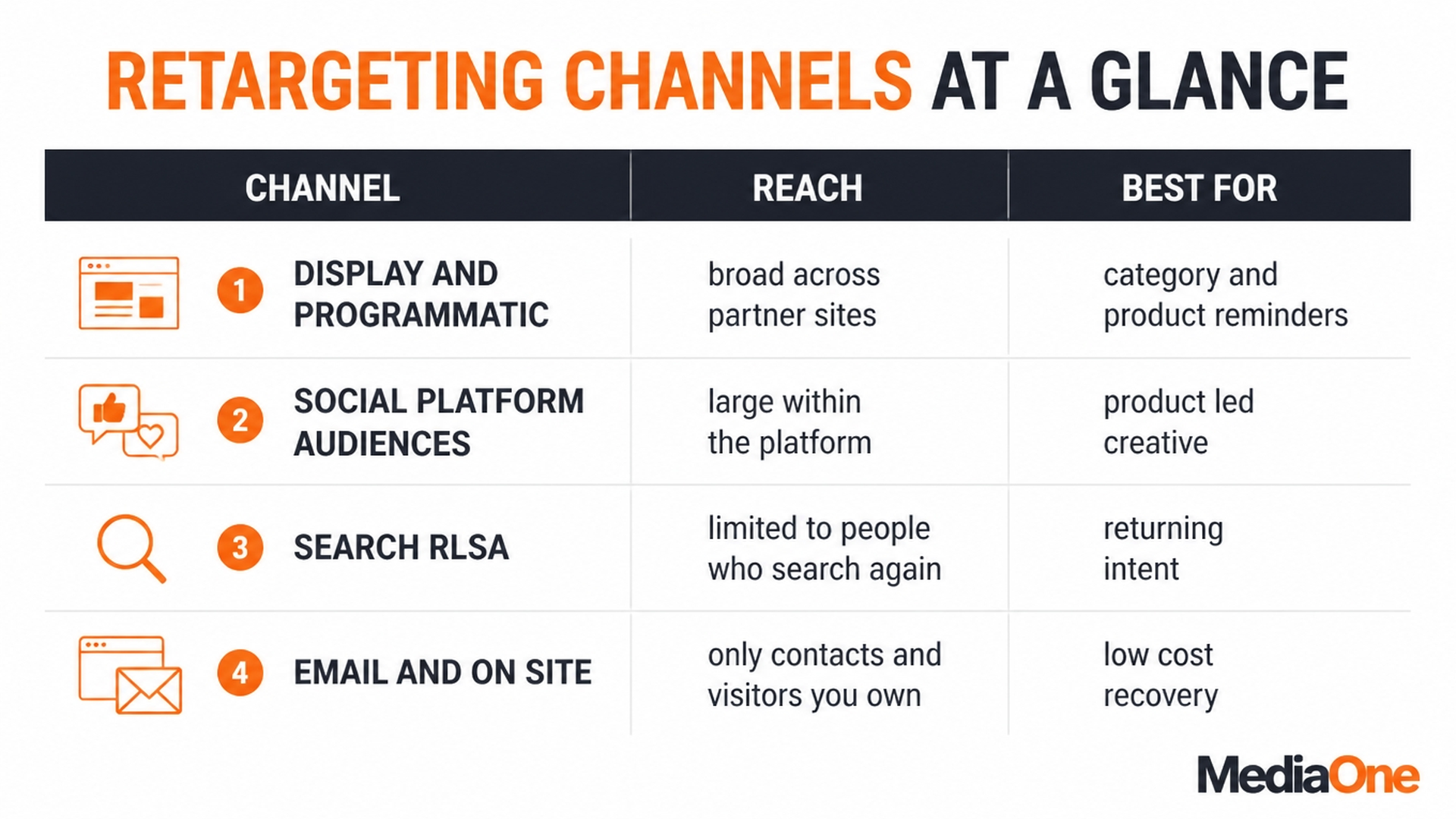
Figure 2: Retargeting channels at a glance
How to read the table. Reach and measurement reliability often pull in opposite directions. Display gives the widest coverage but the weakest proof of impact. Owned channels give the cleanest measurement but reach only people who already gave you their details or visited your site.
For most Singapore businesses with modest traffic, a sensible start is social audiences for rungs 2 and 3, search lists to protect high-intent buyers, and email for rung 3 recovery. Add display once you have a stable frequency cap and a holdout group to test against.

Treat every platform-reported conversion as a claim to check, not a fact. Run a holdout group on each channel before deciding how much budget it deserves.
Audience Minimums Have Fallen Sharply
The numbers that govern whether a channel is even available to you have changed substantially, and most older guides are wrong about them.
Google’s own documentation states the current requirement: Google Display Network, Google Search Network and YouTube each “must have a minimum of 100 active visitors or users within the last 30 days”, and customer lists carry the same eligibility. That figure was lowered from 1,000, and it only applies to lists uploaded or refreshed after 1 February 2024 – any list uploaded before that date must still meet the old threshold of 1,000 matched users.
This matters directly for Singapore SMEs. A boutique retailer with a few hundred monthly visitors can now meet the minimum audience size for display and search retargeting, where previously it could not. Niche B2B advertisers in narrow categories can often activate audiences that were out of reach two years ago. It is worth re-testing channels you ruled out on size grounds before this change.

One adjacent setting worth knowing: Google applies a default membership duration of 30 days on both Display and Search, with a maximum of 540 days. Longer windows are useful for considered purchases, but a 540-day window on a cheap repeat-purchase product mostly pays to show ads to people who have long since moved on.
Social platforms set their own floors. Meta, for example, requires a minimum audience for custom audiences to deliver and recommends customer lists of 1,000 or more in its own upload guidance, so the practical floor there is higher than Google’s.
Setting Up a Retargeting Campaign, Step by Step
Most retargeting campaigns fail at setup, not at bidding. The audience is too broad, the tracking is half-working, and the same ad runs to everyone for weeks. The six steps below follow a sequence that ties each decision to a number you can write down before you spend anything.
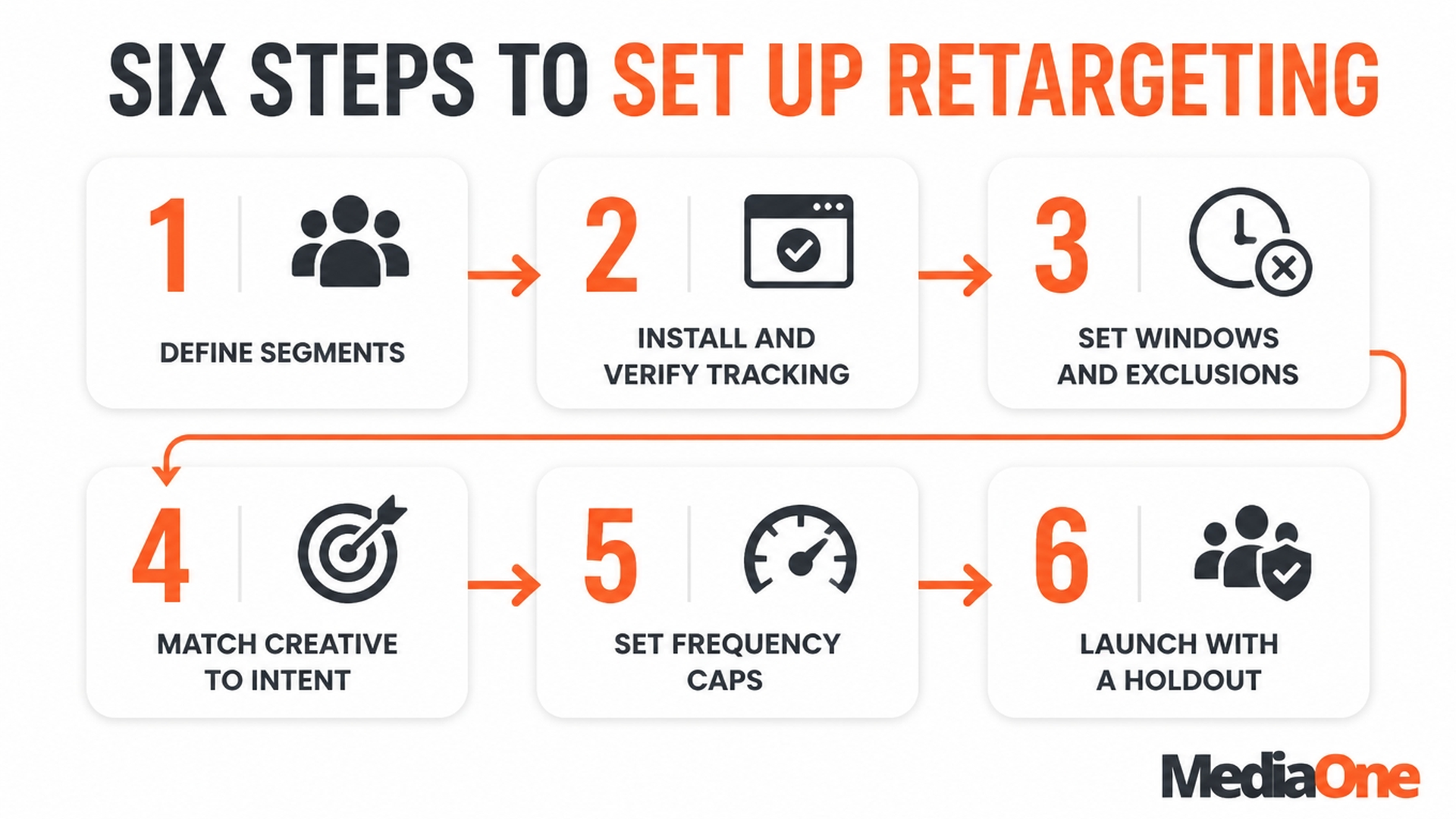
Figure 3: Six steps to set up a retargeting campaign
Step 1: Define the Audience Segments That Matter
Start by sorting past visitors into the four rungs of the Retargeting Audience Ladder. Each rung shows a different level of intent, so each needs its own audience.
Write a one-line planning worksheet for each rung:

- Rung: which behaviour defines the audience
- Window: how many days back the rung looks (for example, 7, 14 or 30)
- Frequency cap: the maximum impressions per person per week
- Exit condition: the event that removes the person from this rung
If you cannot name the exit condition for a rung, the audience is not defined yet. Shoppers in Singapore often see several advertisers in the same category. A segment without a clear exit keeps serving ads to people who have already moved on.
Step 2: Install Tracking and Verify It Fires Correctly
Install your pixel or tag on every page that matters: category, product, pricing, cart, form and the confirmation page. Then verify it before you build any audience.
Use the platform’s own debugging tool or a browser tag checker, and walk through the path yourself. Confirm that:
- Each page fires the expected event once, not several times
- The confirmation page fires a purchase or lead event with the right value
- The event does not fire on error pages or on your own test orders without a filter
A misfiring confirmation event is the most common reason converters land in retargeting audiences. Fix it here, because every later step depends on it. Google’s tag verification guidance sits in its Google Ads help centre, Meta’s pixel setup in the Meta Business Help Centre, and TikTok’s tracking documentation in the TikTok Business Help Center.
Step 3: Build Audience Windows and Exclusion Rules
Build each rung with the window you wrote down in Step 1. Then add exclusions, which most guides skip and which is where much wasted spend sits.
For every rung, exclude people who have moved to a higher rung or converted. A visitor who bought yesterday should not see a “still thinking?” cart ad today. Set the purchase exclusion to a period that matches your product. A same-day exclusion works for a low-cost item. A furniture or travel buyer may need a longer post-purchase window before the next ad is useful.
Check the pool size before you launch. Platforms need a minimum number of matched users before delivery is reliable, and if a Singapore niche is too small for a 7-day cart audience, widen the window to 14 or 30 days rather than running an audience that cannot deliver.
Step 4: Write Creative for the Stage of Intent
Generic “come back” messaging wastes the rung structure. Match the message to where the person stopped:
|
Rung |
What the person has done |
Message that fits |
|
1: Browsed a category |
Looked around, no product in mind |
Range, range benefits, a reason to return |
|
2: Viewed a product or pricing |
Has a product in mind |
Product detail, comparison, social proof |
|
3: Added to cart or started a form |
Close to a decision |
Price, stock or delivery reassurance, a clear next step |
|
4: Converted |
Already bought |
Post-purchase content, accessories or a referral ask, not the original product |
Singapore buyers often compare prices across marketplaces and retailers before they commit. For rung 3, a message about current price, stock or delivery timing usually does more work than a brand reminder. Keep these claims accurate, because an out-of-date price or stock message will undermine trust faster than no ad at all.
Step 5: Set Frequency Caps and Budgets
Set a frequency cap per rung, not one cap for the whole account. A reasonable starting point for a higher-intent rung is a lower weekly cap, because each impression carries more weight. Browsers in rung 1 can tolerate more exposure, but cap them too.
Budget by rung rather than by channel alone. Give the closest rung a larger share, because those visitors are the most likely to convert. Keep each rung small enough that the cap, not the budget, sets the limit. If a rung spends its whole budget on a few hundred people, the cap is too loose, or the audience is too small.
Cost per click varies by platform and category, so compare your own figures against live auction data in your account rather than a generic industry average. Record the starting numbers in the worksheet so you can compare them with results later.
Step 6: Launch, Monitor and Iterate
Launch with one creative per rung and leave it running long enough to read the results, rather than changing it daily. Check three things each week:
- Frequency: is any rung above its cap, or sitting well below it?
- Response: is click-through or conversion rate falling while frequency rises? That is fatigue, and the fix is a new creative, not a higher budget.
- Exclusions: are converters still appearing in retargeting reports? If so, the purchase event or the exclusion window needs attention.
When a rung’s response drops, rotate in a fresh creative with the same stage-appropriate message before you widen the audience. Change the window or budget only once the numbers give you a clear reason. Treat each change as a test, and write down what you changed so you can tell later what worked.
Run a holdout group from day one – a share of the audience that does not see your ads, so you can measure incremental lift. After four to six weeks, compare conversion rates between the exposed and holdout groups. The gap is your incremental result.
Retargeting is Part of the Journey
Retargeting earns its place when it is run as a sequencing and frequency discipline, not a volume tactic. Four parts of the framework protect the budget from different kinds of waste.
First, sort past visitors into the Retargeting Audience Ladder. Rung 1 holds people who browsed a category. Rung 2 holds people who viewed a product or pricing page. Rung 3 holds people who added to cart or started a form. Rung 4 holds people who have already bought. Each rung is a separate audience with its own recency window, so a shopper who viewed a product last week is not treated like someone who browsed a category three months ago.
Second, give every rung a frequency cap and a message that fits its stage. A Rung 2 visitor usually needs reassurance or a reason to compare. A Rung 3 visitor may need a price, a stock note or a delivery promise. Showing the same generic ad to every rung is the most common reason response falls off.
Third, apply exclusion rules that remove people once they move up or buy. Converters are the most expensive people to keep in a retargeting pool, because the business pays for them twice. Excluding them, and moving visitors out of a lower rung as soon as they reach a higher one, is where much recoverable spend sits.
Fourth, judge the whole system by incremental results, not platform-reported conversions. Platforms tend to credit themselves with sales that would have happened anyway. A holdout group is the only reliable way to see whether retargeting adds sales or simply takes credit for them.
Use the ladder as a one-page planning worksheet. For each rung, write down the audience definition, the lookback window, the weekly frequency cap, the creative theme and the exit condition that moves the person out. A rung that cannot be filled in usually means its audience is not yet well defined.
Next steps for a first campaign. A first campaign does not need to be large. Confirm your tracking before spending anything: install the pixel or tag, complete a test purchase and check that page views, add-to-cart events and purchases all register. Start with two rungs, not four – Rung 2 and Rung 3 carry the clearest intent and need the simplest creative. Set conservative windows and caps, build the exclusion rules before launch, write one creative per rung, hold back a control group of perhaps 10 to 20 per cent, and review on a fixed fortnightly schedule.
Retargeting sits on top of acquisition and does not replace it. If the holdout test shows little difference between exposed and unexposed visitors, narrow the audience and improve the creative rather than increasing spend. Where a business has ecommerce or lead generation goals that need the audience pool refilled, that usually means reviewing the prospecting mix alongside the retargeting layer. If you would like that reviewed together, talk to our team.
Frequently Asked Questions
Is retargeting still effective after privacy changes?
Yes, but it works differently now. Safari and Firefox have blocked third-party cookies by default for years, so audiences are smaller and less precise than they once were – even though Chrome ultimately decided not to remove third-party cookies. Retargeting still performs well with first-party data: website visits captured through a consented pixel, customer lists and logged-in platform activity. Build fewer, better-defined audiences, rely on your own data where you can, and measure with incrementality tests rather than trusting platform-reported conversions.
How long should my audience lookback window be?
Match the window to your purchase cycle. For impulse goods with a short decision time, 7 to 14 days is usually enough. For higher-value or considered purchases such as furniture, electronics or services, 30 days or more may be justified. Set separate windows for each stage of intent: a shorter one for people who added to cart, and a longer one for people who only browsed a category. Google applies a 30-day default membership duration on Display and Search with a maximum of 540 days, so the platform default is a starting point rather than a recommendation. Review the windows after a few weeks and shorten them if response drops well before they end.
How much budget should I put into retargeting in Singapore?
There is no universal split, and any guide that quotes a fixed percentage or a specific cost per click for Singapore is guessing. Set it from your own data: what share of your conversions come from returning visitors, and what the holdout test shows the campaign adds. A common planning approach keeps retargeting a minority share of total paid media, with most budget going to prospecting so the audience pool keeps refilling. Calculate your target cost per acquisition first and work backwards from your margins and average order value.
What is the difference between retargeting and remarketing?
In everyday use, the two terms overlap. Retargeting usually refers to showing ads to people who visited your website or app, typically through display or social advertising. Remarketing is often used more broadly, covering re-engagement through ads, email and search lists. Platforms also define the terms differently, so read how each one describes its audience types in its own help pages before you set up a campaign. In Google Ads specifically, the term “remarketing” has now been renamed “your data” in audience reporting.
How do I know if retargeting is actually adding sales?
Platform dashboards tend to credit retargeting with conversions that would have happened anyway, because the people targeted were already close to buying. To find the true effect, run an incrementality test. Hold back a randomly selected group of eligible visitors from seeing ads, then compare conversion rates between the exposed and holdout groups. The difference is the number of sales the campaign genuinely added. Track cost per incremental acquisition alongside return on ad spend to judge whether the spend is justified.
Can small businesses use retargeting?
More easily than they could a few years ago. Google lowered the minimum audience size to 100 active users in the last 30 days across Search, Display and YouTube, down from 1,000, and the same threshold applies to customer lists uploaded or refreshed after 1 February 2024. A small site that previously could not build a viable audience can often run one now. If a niche is still too thin, a longer window or owned channels such as email may work better first.
What should I exclude from my retargeting audiences?
Exclude recent buyers, people who have already converted through another channel where you can identify them, and staff or test accounts. Excluding recent buyers is the most important, because it avoids paying to show people products they already bought. Exclude higher-rung visitors from lower-rung audiences too, so the same person does not receive two competing messages.
How often should someone see a retargeting ad?
Set a frequency cap for each rung and start low, then adjust from results. Showing the same ad too often wastes spend and irritates visitors. If frequency rises while response falls, that is fatigue: rotate the creative or lower the cap before adding budget.