
Keyword cannibalisation is when two or more of your pages compete for the same search intent. Most overlap is harmless, and only a small share is worth fixing.
Search Console often shows two of your URLs under one query, which can look alarming. Most overlaps are harmless. In one site audit reported by Smartsites, about 10% of queries returned two or more of the site’s own URLs, but only about 0.3% were material splits worth fixing. This guide shows how to spot overlap, judge its impact, and choose a fix.
Key Takeaways
- Overlap between your pages is common but mostly harmless: one audit found about 10% of queries showed two or more URLs, with only about 0.3% being material splits.
- Fix a split only when the second URL gets at least 20% of the top URL’s impressions and neither page ranks in the top 3. This is one practitioner’s guideline, not an official standard.
- Separate true keyword cannibalisation from intent differences, such as a product page and a guide targeting the same term.
- Triage each overlapping query, then consolidate, redirect, canonicalise, relink or leave alone.
- When consolidating, 301 redirects the weaker URL to the stronger one, and verify gains against your own data.
- Keep a keyword map that assigns one primary URL per intent to catch overlap before new content goes live.
When Two of Your Pages Compete for the Same Query
Overlap between your URLs is usually harmless. In the Smartsites audit, 4,613 queries returned two or more of the site’s own URLs, carrying 39% of impressions. Only 244 were material splits, where the second URL took at least 20% of the top URL’s impressions on a query with at least 100 impressions. That is about 0.3% of queries. The rest was mostly noise from related pages sharing a broad term, while each ranked for its intent.
The useful skill is separating the few splits worth fixing from the many that are not. Chasing every shared query wastes effort and can break useful pages.
By the end, you should be able to measure your site’s overlap in Google Search Console, apply a triage rule to decide which keyword to act on, and choose the right fix: consolidating, redirecting, canonicalising or relinking.
What Keyword Cannibalisation Is, and What It Is Not
Keyword cannibalisation occurs when two or more URLs on your own website compete for the same search intent across multiple pages. Search engines then have to choose between them, which can split rankings across pages that would otherwise reinforce each other. The real issue is intent: if two pages answer the same question for the same searcher, neither has a clear claim to the result. Marketing teams often discover this only after tracking shows a single query fluctuating between several of their own URLs.
To test for it, search the query yourself and note which of your URLs appear in the search results. If a searcher would be equally well served by either, you have overlap. If each URL serves a different need, you do not. A keyword list exported from your analytics tool can help you spot queries that several pages are chasing at once.
Cannibalisation, content overlap and intent overlap compared
| Term | What overlaps | Typical example |
|---|---|---|
| Keyword cannibalisation | A specific target query | Two blog posts both aiming at “keyword mapping tool” |
| Content cannibalisation | A topic or subject area | Several articles covering the same broad subject from similar angles |
| Search intent overlap | The need behind the query | A product page and a buying guide both matching “best CRM software” |
Keyword cannibalisation is the narrowest and most measurable of the three. Pages can share keywords yet satisfy different intents, a situation many sites mistake for a problem.
Cannibalisation and duplicate content are different problems
Duplicate content means substantially identical text appears at more than one URL, such as printer-friendly versions, and is usually fixed technically. Google’s guidance on duplicate and similar content covers canonical tags and redirects. Cannibalisation can exist even when every page is written from scratch, so treat the two as different diagnoses.
When overlap is not a problem
Some overlap is intentional and should be left alone.
Different locations. A business serving Singapore and Malaysia may run separate pages for each market with near-identical terms. Search engines use location and language signals to decide which page suits each searcher. Check performance in a Search Console property set to each country before merging anything.
Genuinely different intents. A product page aimed at buyers and a guide aimed at researchers can both appear for the same term. If each URL ranks for the intent it was built for, the split is working.
Why It Happens and What It Costs
Most cannibalisation comes from good intentions. A team publishes a page on a topic, then later publishes another post that answers the same question slightly differently. It often surfaces only when Search Console shows two URLs competing for one query. Three causes account for most cases.
Poor keyword mapping. Nobody has decided which URL owns which target keyword, so two writers may target “email marketing tools” with two pages.
Lack of content focus. Pages are written around broad themes rather than specific search intents, so neither competing page is clearly the best answer.
Site architecture issues. Category pages, tag archives, paginated lists and unretired campaign pages can all surface for the same query. Weak internal linking makes the problem harder to untangle.
What does the overlap do
- Rankings and traffic. Split impressions may keep neither URL at the position a single consolidated page would reach.
- Page authority. Links and anchor text spread across both pages instead of reinforcing one.
- Conversion rates. A visitor landing on the less relevant page may leave before reaching a call to action.
- Crawl budget. This matters mainly on large sites.
Is it actually harmful?
Short answer: usually not, unless the overlap is material and one of your pages is stuck below the top 3. Cannibalisation is not a Google penalty. The damage is lost ranking strength, measurable only when the overlap is material. Section 3 gives the test.
Backlinko reported a 466% year-over-year traffic increase in the eight weeks after consolidating competing pages. That is one case from one site, so check your own data rather than expect the same result.
The counterpoint matters. In one sample audit reported by Smartsites, about 10% of queries showed two or more URLs, but only about 0.3% were splits worth fixing. To check your own site, pull a query-by-page report from Search Console, count queries where two or more of your URLs appear, and apply the 20% and top-3 test to each. Map each of your keywords to one owning URL across multiple pages so that pages competing for the same keyword are caught early.
Finding Cannibalisation on Your Own Site
Overlap is common and usually harmless, so start with diagnosis. A reliable check takes about an hour and starts with data you already have. Three methods work well, from fastest to most thorough. Keyword cannibalisation is easiest to spot when you compare what your website already ranks for, and a blog post that competes with a service page is a typical example. When several pages compete for the same query, multiple pages can split the signals that drive rankings, so the check is worth making.
Method 1: Google Search Console query-by-page analysis
Open Google Search Console, go to the Performance report, filter by a query and switch to the Pages tab. If two or more of your URLs appear under the same query, you have overlap to examine. Check your highest-impression queries first. Google’s Search Console Performance report documentation explains how these figures are calculated.
If you run a Singapore business, set the country filter to Singapore. Otherwise, pages serving Singapore readers can be hidden inside global figures.
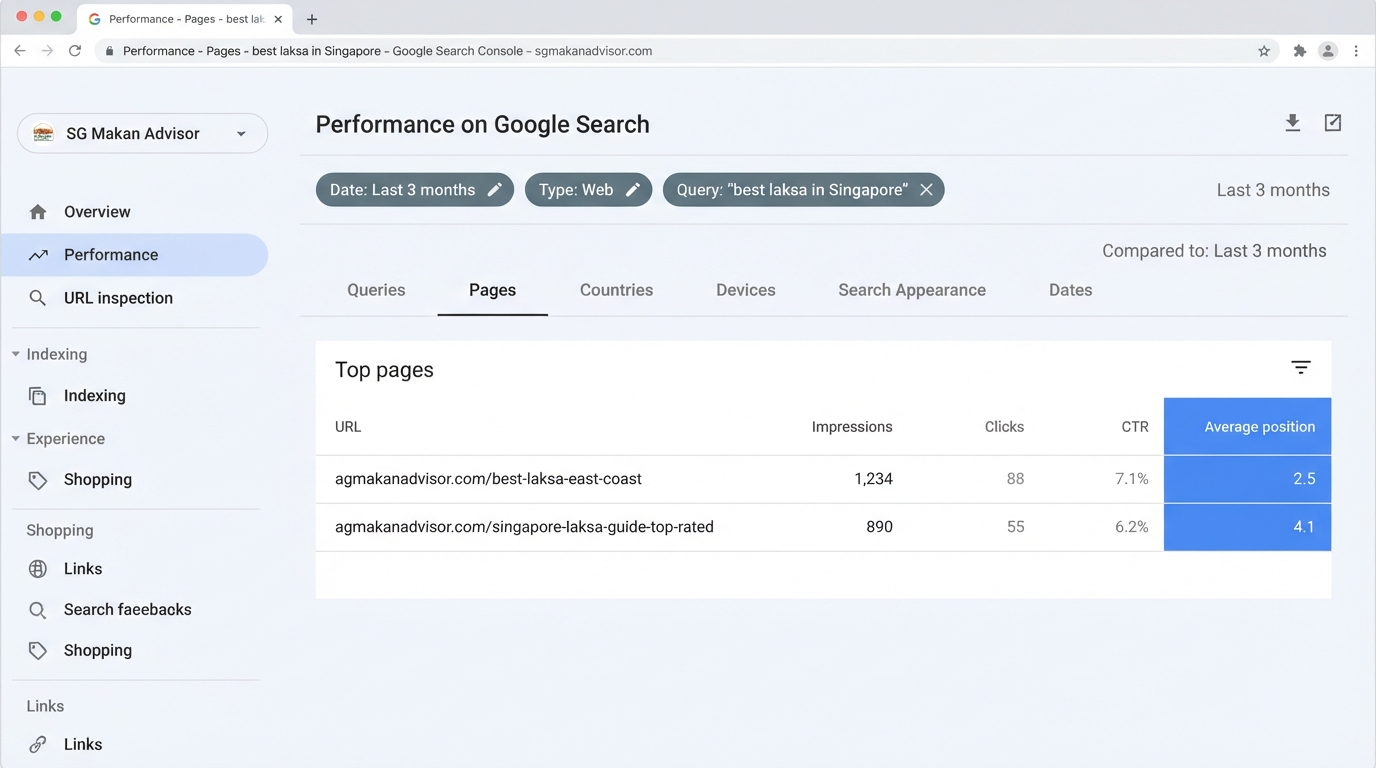
Keep a simple sheet with the query, URL, impressions, average position and page type so you can see which kinds of URLs compete.
Method 2: Site search and manual SERP checks
Run a site search, such as site:yourdomain.com “target phrase,” to see which of your pages Google has indexed that phrase. Then search the phrase without the operator and note which of your URLs appear and where. Manual checks show what a searcher actually sees, which Search Console averages can hide.
Method 3: SEO tools and automated detection
Dedicated SEO platforms flag overlapping URLs automatically and pay off once you manage more than a few hundred ranking keywords. On a smaller budget, a free Semrush account tracks up to 10 keywords, according to Backlinko’s guide to keyword cannibalisation. Check Semrush’s current pricing page before relying on that limit, as free-tier terms change.
Detection shows that overlap exists. The decision rule shows whether it deserves action. Divide the second URL’s impressions by the top URL’s impressions for the query, then check the best ranking position of either URL.
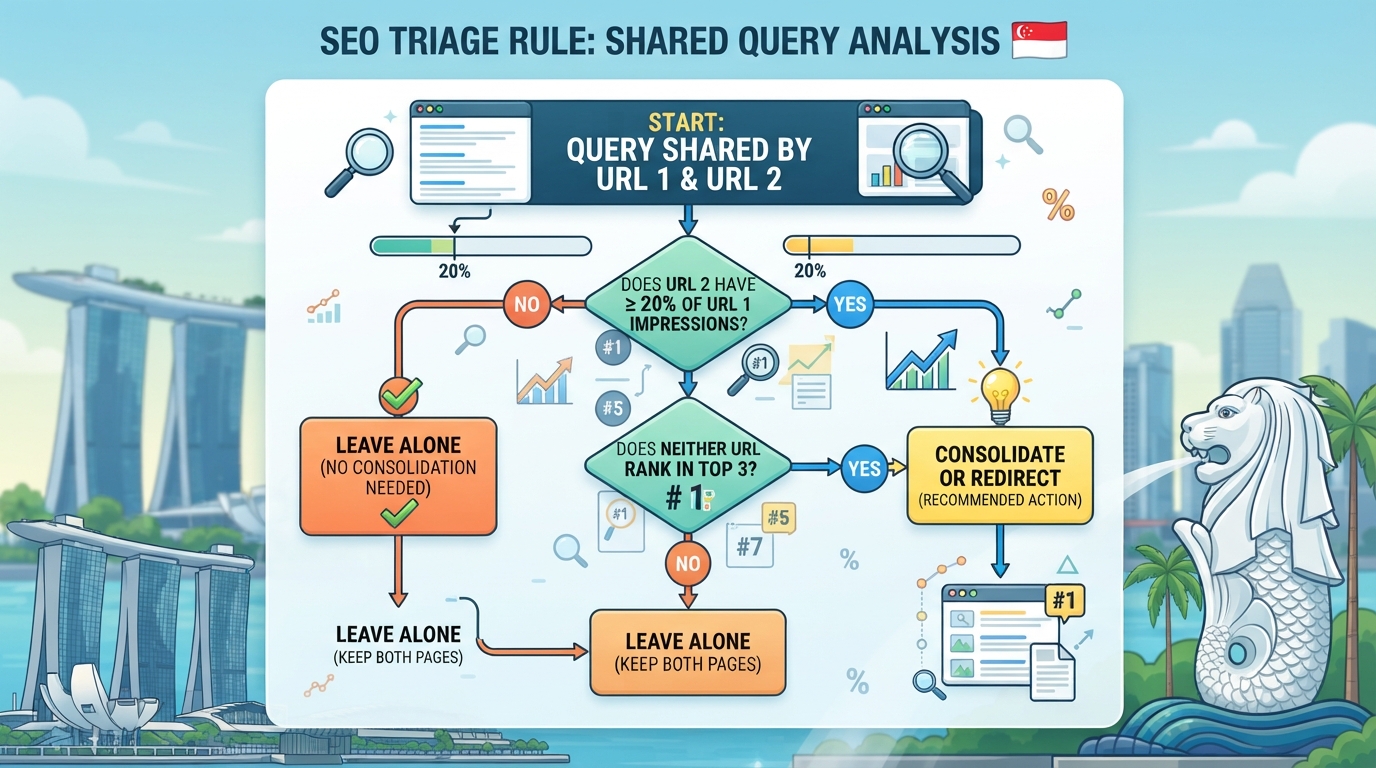
Fix the split when the second URL receives at least 20% of the top URL’s impressions, and neither URL ranks in the top 3. This threshold comes from the Smartsites analysis. It is one practitioner’s rule of thumb, not an official search engine standard, so adjust it if your volumes differ sharply. Once the rule flags a pair, internal linking between the two pages can help clarify which one should lead.
Worked example: from 10% overlap to 0.3% worth fixing
The Smartsites sample audit covered one site, and these figures are for that site’s, not a benchmark. About 10% of its queries (4,613) showed two or more URLs receiving impressions and accounted for 39% of all impressions. Most of this was harmless. Filtering for material splits left 244 queries, about 0.3%.
Reproduce the check on your own data: export query-by-page data, count queries where two or more URLs get impressions, then apply the 20% and top-3 filters.
Take one of those 244 as a test. The top URL gets 1,000 impressions, and the second gets 300, a 30% share, with neither URL in the top 3. The query passes the rule. The fix is a 301 permanent redirect from the weaker URL to the stronger one, after merging in the weaker page’s useful content. The other overlapping queries stay on a watch list.
Fixing It: Consolidate, Redirect, Canonicalise or Re-link
Once a query lands in the “fix now” cell of the triage matrix, you have four tools. Each does a different job, and the wrong choice wastes effort or sends mixed signals. The right one depends on whether the second page should still exist, since keyword cannibalization within multiple pages can split your rankings and dilute your marketing.
| Fix | Use it when | Result |
|---|---|---|
| Consolidate and 301 redirect | Two pages serve the same intent | Weaker URL retired, signals move to the winner |
| Canonical tag | Both pages must stay live | Preferred version suggested, other URL kept |
| Internal links | Both pages must stay live and you want one to lead | Relevance signalled through linking |
| Restructure architecture | The split comes from how sections were planned | Duplicate pages merged into one hub |
Consolidating content and setting up 301 redirects
Consolidation is usually the most effective fix when two pages serve the same intent. Merge the useful material from the weaker page into the stronger one, then set up a 301 permanent redirect from the weaker URL to the winner. This moves link equity, the ranking value that other sites’ links pass, to the new address.
Check that the winning page covers what the weaker page did before redirecting. A redirect to a page that answers a different question simply loses the visitor. Choose the best-performing page as the winner, not the newest.
A canonical tag (rel=”canonical”) tells search engines which version you prefer without removing the other URL. Use it when both pages must stay live, such as a filtered product listing. Google’s guidance on duplicate content and canonicalisation explains how it chooses a canonical, though it focuses on exact or near-exact duplicates.
A canonical is a hint, not a directive, and search engines may ignore it when the pages differ too much. A 301 is a stronger signal because it removes the weaker URL from the index. Pointing a canonical at an unrelated page quietly keeps the split alive.
Optimising internal links toward high-impact pages
If both pages must remain, internal linking can settle the question. Point links from related articles, navigation and footers toward the page you want to rank, using descriptive anchor text such as “keyword map template” rather than “click here”. Links from your strongest pages carry the most weight. Relinking is the lightest and most reversible step, so it suits “monitor” cells in the matrix.
Restructuring site architecture to retire cannibalised pages
Sometimes the root cause is structural. Two sections of your website, built without a plan, each produced a blog post on the same topic, and both now compete in the search results for the same query. Retiring those pages means merging them into one authoritative hub, updating navigation, and redirecting every retired URL. Treat this as a project, not a quick fix.
Verify the result in Search Console’s Performance report over several weeks. One reported case saw a 466% rise in traffic over eight weeks after consolidation, according to Backlinko. That is a single site’s outcome, and results vary. Your own data is the only reliable measure.
Preventing It with Keyword Maps and Clusters
Most cannibalisation comes from two people, or two months, working on the same query without knowing the other had started. Prevention is mostly a planning problem. A shared map answers one question before anyone writes: which URL owns this intent?
Building a keyword map that assigns one primary URL per intent
A keyword map is a spreadsheet with one row per URL, covering the target keyword, search intent, cluster and secondary keywords. Each intent gets one primary URL. If a second page serves a genuinely different intent, such as a product page and a how-to guide on the same term, record that difference so no one reads it as a duplicate. Multiple pages can coexist this way, but only when each has a distinct purpose in the map.
| Cluster | Primary URL | Search intent | Secondary URLs |
|---|---|---|---|
| Keyword cannibalisation basics | /keyword-cannibalisation/ | Learn | /what-is-cannibalisation/ (definition only) |
| Redirect setup | /301-redirects/ | Do | /redirect-checklist/ (checklist only) |
Build the map in four steps:
- Export every ranking URL and its top queries from Google Search Console.
- Group queries by the intent they serve (buy, compare, learn, locate).
- Assign one primary URL per intent group and mark it in the map.
- Flag any second URL targeting the same group, then merge it or give it a distinct intent.
Keyword clusters and an editorial checklist for new content
A keyword cluster is a primary topic page plus supporting pages that answer narrower questions, each linking back to the primary page through internal links. This gives search engines a clear hierarchy, rather than pages competing for the same keyword.
Before any new page goes live, check:
- Does a URL already target this primary keyword or intent? If yes, update that page instead.
- Can you state, in one sentence, how its intent differs from every existing page?
- Does it link to the cluster’s primary page with descriptive anchor text?
- Is it recorded in the keyword map?
Scheduling recurring audits with SEO tools
Maps drift as content ages. Quarterly reviews suit most sites, and monthly reviews suit heavy publishers. Use a tool to flag any query where two or more of your URLs appear, then apply the triage rule from earlier in this article.
Semrush and Ahrefs both report ranking URLs per keyword. Log each audit date beside the map so you can see which splits recur.
Conclusion: Fix the Splits That Matter
Most overlap between your own pages is harmless. In the Smartsites sample audit, about 10% of queries returned two or more URLs from the same website, but only about 0.3% were material splits worth fixing.
For each overlapping query, check keyword cannibalisation: if the second URL holds at least 20% of the top URL’s impressions and neither ranks in the top 3, fix it now. If one page is already in the top 3, please monitor it. Below the 20% line, leave it alone. Start with the highest-impression queries.
Treat any traffic gain after consolidation as a result to verify in your own Search Console data, not as a promise. Filter the Singapore country view to find shared queries.
Frequently Asked Questions
Is keyword cannibalisation a penalty from Google?
No. Google does not penalise keyword cannibalisation. When several of your pages compete for one query, Google may split signals such as links and clicks between them, which usually weakens the page you care about most. A manual action notice in Google Search Console is a separate issue. Google’s guidance on duplicate and similar content explains how it chooses which page to show.
How many pages targeting the same keyword is too many?
There is no fixed number. One practitioner’s rule of thumb is that a second page taking 20% or more of the top URL’s impressions, while neither page ranks in the top 3, signals a problem. This is not an official search engine standard. Below that threshold, the overlap is usually harmless.
Should I use a 301 redirect or a canonical tag?
Use a 301 redirect when the weaker page should be merged into a stronger one, so most ranking signals move to the new URL. Use a canonical tag when both pages must stay live, such as a filtered product listing that duplicates a category page. A canonical tag is a hint, not a directive, so search engines can ignore it.
Can cannibalisation exist between pages for different locations?
Usually not. A Singapore page and a Malaysia page for the same product serve different buyers, currencies and service areas, so both should normally stay. Check each page’s language, currency and hreflang signals. Only consolidate location pages if they are near-identical and aimed at the same market.
Which SEO tools find cannibalisation fastest?
Google Search Console is the fastest free starting point. Filter the performance report by query and look for queries that return more than one URL. Digimetrics.ai and Ahrefs automate this process across larger sites. A free Semrush account lets you track up to 10 keywords. Check each tool’s pricing page for current limits, as plans change.
Does fixing cannibalisation always increase traffic?
No. One published case recorded a 466% year-over-year rise in clicks after cleaning up overlapping pages over eight weeks. That was a single site, so results will differ. Confirm any gain in your own Search Console data. Some fixes change little because the split was never costing you rankings.