
A website can show different content to returning visitors and still generate exactly the same number of sales. The change may improve clicks without improving business results. To personalise website experiences effectively, Singapore teams need a clear conversion goal and evidence that each variation helps the visitor complete it.
Visitor data creates another decision. A saved language preference can make a site easier to use, while tracking someone across sessions raises questions about purpose, consent and data handling. The appropriate approach depends on the signal and the way it is used.
Start with one high-value page, use information you can justify collecting and compare the tailored experience against an unchanged version. This article explains how to select tactics, test results, assess costs and decide which changes deserve a permanent place on your website.
Key Takeaways
- Start with a measurable business outcome, such as qualified enquiries or completed orders, before choosing personalisation software.
- Separate visitor-controlled customisation, group-based segmentation and individual-level personalisation so each uses suitable data.
- Use the Personalisation Readiness and Impact Matrix to prioritise ideas supported by available signals and commercial value.
- Check the lawful basis and declared purpose for personal-data use under Singapore’s PDPA instead of assuming every cookie needs the same consent treatment.
- Estimate the sample size before testing and compare eligible visitors with a randomised holdout group.
- Evaluate incremental profit against implementation and maintenance costs, and protect site speed and accessibility throughout the test.
What Personalising a Website Actually Means
Website personalisation changes what a visitor sees based on information about their context, stated preferences or previous behaviour. Examples include a saved language choice, a relevant product recommendation and an industry-specific call to action. The useful question is which signal supports the change and how that change helps the visitor.
The term covers techniques with very different levels of complexity. A local pricing label is often a straightforward content rule. A recommendation engine that learns from repeat purchases can require account data, reliable event tracking and a way to assess if its choices help customers buy.
Personalisation, Customisation and Segmentation
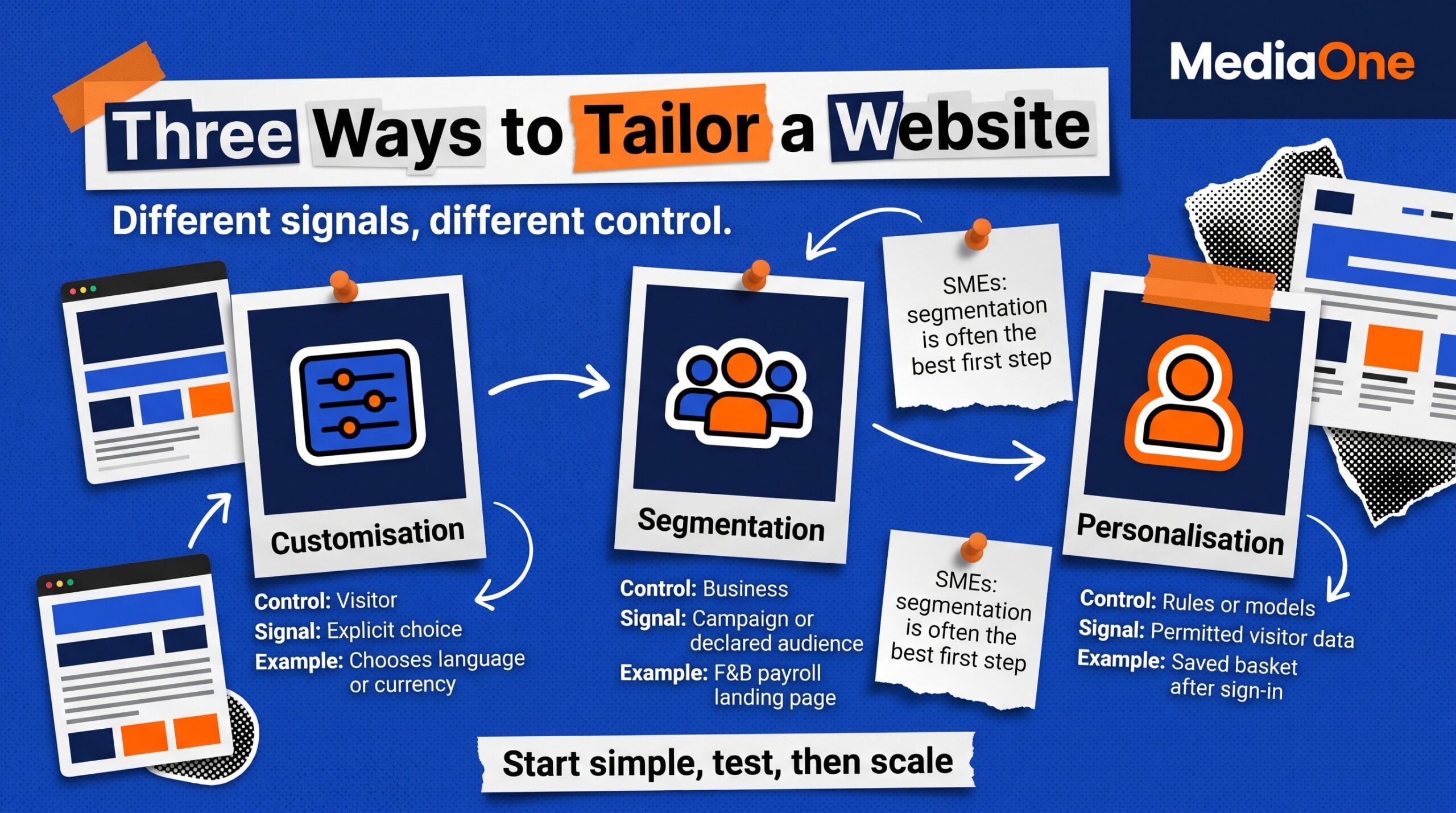
Customisation begins with the visitor’s choice. Someone selects English or Chinese, changes the display currency or saves a preferred product category. The website remembers that preference where it is permitted to do so, without trying to infer what the person wants next.
Segmentation begins with groups defined by the business. A software company might create one landing page for F&B operators and another for logistics teams, based on the campaign or topic bringing them to the site. Everyone in a segment gets the same message, making the approach easier to explain and maintain.
Individual-level personalisation responds to a visitor’s own signals. A logged-in shopper might see previously viewed products or an account holder might receive a reorder shortcut. The site needs an appropriate way to associate the signal with the current visitor, plus a sensible fallback when that information is unavailable.
| Approach | Who Controls the Experience | Signal Used | Practical Example |
|---|---|---|---|
| Customisation | Visitor | Explicit selection | Customer chooses a language or currency |
| Segmentation | Business | Campaign, topic or declared audience | Payroll landing page tailored to F&B businesses |
| Personalisation | Website rules or models | Permitted visitor or account data | Signed-in shopper sees their saved basket |
For an SME without much recorded customer behaviour, segmentation often offers a useful first step. A relevant landing page can address a defined audience without requiring a complex individual profile. Our conversion rate optimisation service applies the same principle of starting with the page’s commercial purpose and testing changes against outcomes.
Rules, Behavioural Signals and Predictive Models
Rule-based personalisation follows conditions written by a team. A visitor entering through a campaign for restaurant payroll software sees a headline about shift scheduling, while other visitors see the standard product message. The rule is easy to inspect and can be disabled when it stops serving its purpose.
Behaviour-led personalisation responds to actions such as product views, site searches or an abandoned basket. It can be useful for returning shoppers, although a viewed product does not always signal purchase intent. The business should account for shared devices, visitors who change interests and people who decline tracking where consent is needed.
Predictive models attempt to estimate the item or offer a visitor is likely to find useful. They need suitable training data and ongoing checks for poor recommendations. Their complexity makes sense only when the product range, transaction volume and expected commercial gain justify the work.
A simpler rule can beat a predictive approach for a narrow catalogue or a low-traffic B2B website. That is a planning judgement, not a universal performance claim. Start with the clearest available signal and increase complexity after a controlled test demonstrates a reason to do so.
Keep the Default Experience Useful
A personalisation plan needs a standard page that works for first-time visitors and people with limited tracking. Important product details, navigation and contact information should remain accessible without a saved profile. A visitor should never need to surrender personal data merely to understand what the business sells.
A reliable default also helps with quality checks. When a browser blocks cookies, a device changes or an account session expires, the website can return to a clear message. Treat that baseline as a product experience worth improving in its own right.
When Website Personalisation Pays Off
Personalisation has a business case when relevant visitors receive a useful change and the improvement outweighs its cost. Conversion rate, lead quality and revenue per visitor may offer different answers, so choose the primary measure before implementation. Clicks on a recommendation are useful diagnostic data, but clicks alone cannot establish a commercial return.
The expected gain depends on the page. An expensive B2B purchase may need fewer qualified enquiries to justify a test. An online shop with a small basket value may need more incremental orders to cover its development and subscription expenses.
Traffic and Conversion Volume
Every audience split reduces the number of people available to evaluate a variation. A site with 5,000 monthly sessions may have far fewer eligible visitors on a particular service page, and fewer still after dividing by device, language or industry. A broad site-wide traffic number cannot establish that one personalised treatment is testable.
Session-count shortcuts such as 5,000 and 20,000 sessions per month lack a universal statistical basis. They can start a planning discussion. The real requirement comes from the baseline conversion rate, the smallest useful improvement and the statistical test. Avoid making a purchase decision from a general traffic threshold alone.
Use this screening table before building variants:
| Condition | Sensible First Action | Main Limitation |
|---|---|---|
| Low traffic on the target page | Improve clarity and test one change for all visitors | Segments may be too small |
| Regular traffic but few conversions | Measure lead quality and consider a larger change | Small lifts take longer to detect |
| Strong eligible traffic and steady conversions | Test one targeted treatment against a holdout | Requires stable assignment and tracking |
| Large catalogue and dependable purchase history | Compare rules with predictive recommendations | Added integration and data governance costs |
Do not assume a small site has no reason to tailor content. A visitor choosing a language or viewing an industry-specific landing page can still get a useful experience. The limitation concerns proving small incremental effects with split testing, especially when the audience is divided repeatedly.
Calculate the Visitors Needed for a Test
Define a baseline and a minimum detectable effect before launching the test. Suppose a page converts 2% of eligible visitors and the smallest worthwhile increase is to 2.4%. This is a 0.4 percentage-point increase, equivalent to a 20% relative lift.
For two equally sized groups, a two-sided 5% significance test with 80% statistical power requires approximately 21,100 visitors per group under a conventional two-proportion calculation. A page with 3,000 eligible visitors a week split evenly would need about 14 weeks to reach that sample, excluding any additional time needed for delayed conversions. These are illustrative numbers and assume independent observations and stable allocation.
You can reproduce the calculation using the two-sample proportion power method and its proportion effect-size function. A change from 2% to 3% needs substantially fewer visitors than one from 2% to 2.4%, so the commercial size of the effect is part of the decision.
Predefine the test end, the eligible population and the success measure. Checking the result each day and stopping as soon as it looks significant can increase the chance of a misleading finding with conventional fixed-sample tests. If the expected sample is impractical, simplify the experiment, use a more valuable primary outcome or treat a small trial as exploratory.
Use Holdouts to Measure Real Lift
A before-and-after report cannot isolate personalisation from changes in seasonal demand or traffic sources. A randomised holdout compares visitors who see the tailored treatment with similar visitors who see the unchanged page during the same period. That makes the outcome more useful for a budget decision.
For a basic experiment, assign eligible visitors 50:50 to the control and treatment groups and keep their assignment consistent across visits. Count conversions using the same window and definition for both groups. If a visitor can move between variants on each page load, the comparison becomes harder to interpret.
A sensible review covers the difference in conversion rate, its uncertainty and any negative effects elsewhere. Compare qualified leads, revenue per visitor and support complaints if they are relevant to the objective. Report the result as an estimate from the test population, not a promise that every future visitor will respond the same way.
Measure Financial Return in Singapore Dollars
Consider a hypothetical Singapore shop with 2,000 eligible visitors a month and a baseline purchase rate of 2%. If a tested change moves the rate to 2.2%, it would represent about four additional orders in that monthly volume. This is arithmetic for planning, not evidence that the experiment caused the increase.
At an average order value of S$120 and a 40% contribution margin before personalisation costs, those four extra orders would provide around S$192 of monthly contribution. A variant costing S$300 a month to operate would fail that simple financial check. The team should revisit its cost or prioritise a treatment with a larger plausible effect.
Calculate incremental contribution as additional orders multiplied by contribution per order. Then deduct experiment delivery, content upkeep and platform costs for the same period. For lead-generation sites, use the expected profit from qualified leads that progress to customers, with the sales lag stated clearly.
Data You Need Before You Start
A good personalisation idea can fail when the supporting records are unreliable. CRM entries may describe old interests, website events may fire twice and logged-in data may belong to a shared household account. Begin by checking the source, freshness and permitted use of each proposed signal.
First-party data means information your organisation receives directly from its visitors or customers. That relationship gives you context about the collection, but it does not automatically establish accuracy or permission for every new use. Keep the purpose attached to the data when planning a tailored experience.
First-Party Data Sources and Limitations
Four sources cover common website projects. Review each one for the specific question it can answer, and exclude fields that do not help the decision.
- Web analytics: Landing page, traffic source and recorded interactions can describe audience patterns. Validate your tracking and recognise that reports may be incomplete when visitors decline collection.
- CRM records: Enquiry topics, industry, customer status and previous transactions can support account-level messages. Check dates and correct duplicate customer records before using them.
- Logged-in preferences: Saved language, account details and previous orders can support useful shortcuts. Let account holders update preferences that are no longer accurate.
- On-site activity: Search terms, product views and basket changes can provide current intent signals. Treat a single browse action as a clue, not a fixed description of the person.
For a Singapore B2B site, campaign topic and a visitor-selected industry may provide enough context to display a relevant case study. A retail shop with returning account holders may have a reason to use saved wishlists. Neither example requires buying third-party audience profiles.
Define Identity, Freshness and Data Access
Decide if each rule applies to a browser session, a signed-in account or a group defined by a campaign. These are different identities. A returning browser may be used by several people, while an account can appear on several devices.
Set expiry periods for weaker signals. Someone who looked at nursery products six months ago may now be shopping for office supplies. Use a recent action when relevance is short-lived and fall back to popular or manually selected content when confidence is low.
Limit access to people maintaining the programme, and document the fields available to each website tool. Test how records change after account deletion, consent withdrawal or a corrected customer preference. A useful personalisation rule must also behave predictably when the data disappears.
Apply Singapore’s PDPA to Each Purpose
The PDPC’s guidance on online activities and cookies explains that the PDPA applies when cookies collect, use or disclose personal data. Cookies that do not collect personal data do not require PDPA consent for that reason alone. Some functions requested by the visitor may also rely on deemed consent, subject to the circumstances.
Singapore’s rules therefore do not make an explicit opt-in banner mandatory for every cookie or website interaction. The question is which personal data is involved, the purpose of its use and the applicable consent basis or exception. The PDPC also discusses a business improvement exception with conditions that can apply to personalisation activities, so teams should not assume consent is the only possible legal basis.
For advertising targeting using personal data through cookies, the PDPC states that consent is required. Its guidance recommends letting visitors set relevant cookie preferences. A banner and privacy notice should accurately reflect the site’s real data flows, including analytics tags, recommendation tools and advertising partners.
Use a simple purpose inventory for each data field:
| Signal | Intended Use | Review Before Launch |
|---|---|---|
| Selected language | Show preferred content language | Can the visitor change the setting? |
| Search or browse history | Suggest relevant products | Is it linked to an identifiable visitor? |
| CRM industry | Show an appropriate B2B example | Was the record collected for a compatible purpose? |
| Advertising identifier | Target or measure advertising | Is the required consent and tag behaviour in place? |
This is editorial guidance, not a finding that a particular client’s site complies with the PDPA. A company with customers across borders should also assess the rules applicable to those visitors. Review overseas transfers, retention arrangements and vendor contracts with the person responsible for data protection.
Keep Consent Settings Connected to Tags
A cookie preference interface must match what tracking code actually does. If a visitor declines a category, verify the relevant scripts behave according to that choice. Displaying a banner while marketing tags run unchanged defeats the purpose of the control.
Google’s consent mode setup instructions distinguish basic and advanced implementations. Under basic mode, Google tags are blocked until the required interaction. Advanced mode can send cookieless signals while consent is denied. The correct implementation depends on applicable law, business choices and the wider technology setup, so a Google setting alone does not resolve legal compliance.
On Shopify, the Customer Privacy API documentation provides methods to check permitted processing and register visitor choices. It also warns against recording consent automatically on a visitor’s behalf. For other platforms, confirm that the consent tool controls all connected tags and survives theme or plugin updates.
Do not send names, email addresses or other personally identifiable information to Google Analytics. Google’s Analytics data collection rules specifically warn against transmitting those details through event parameters, page URLs and site-search data. Keep identifiable customer records in an appropriately governed system outside GA4.
A Step-by-Step Personalisation Launch Plan
The fastest responsible pilot uses one audience, one page and a clear business outcome. A plan written before development reduces the temptation to add variants simply because a tool supports them. The steps below apply a readiness and impact framework while making the work easier to assign.
Step 1: Select the Commercial Outcome
Choose a page that already receives relevant visitors and has a business function. For a service firm, that may be a demo request or a qualified enquiry. For a retailer, it may be completed orders or contribution per eligible visitor.
Write down the default page’s performance, the target audience and the reason the audience might respond to a different message. Avoid measuring a newsletter click as success when the business needs booked consultations. If the final sale happens offline, decide how sales data will be reconciled before the test starts.
Step 2: Score Readiness and Impact
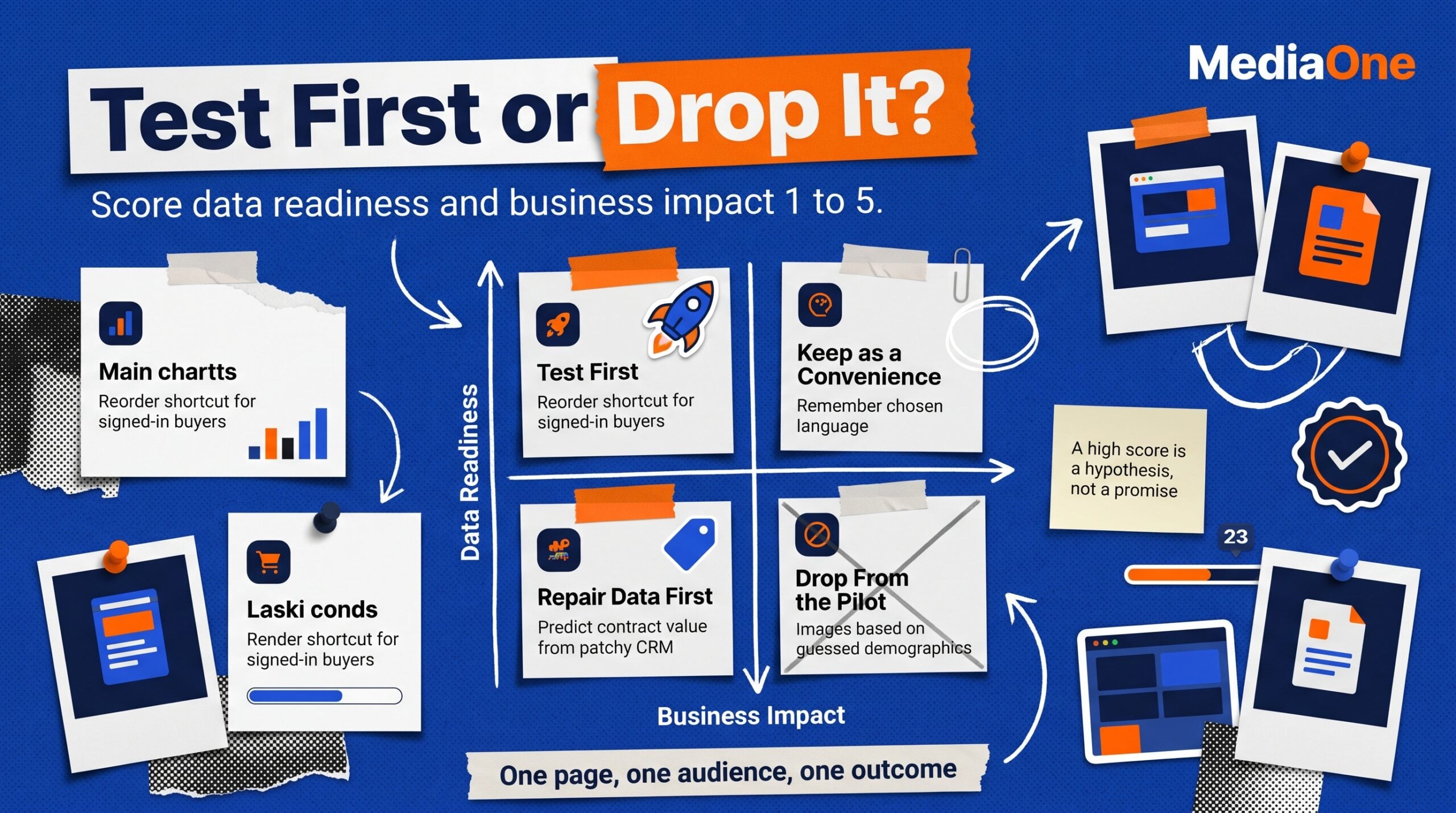
Use the Personalisation Readiness and Impact Matrix to compare ideas. Rate data readiness from 1 to 5 based on reliability, permitted use and availability. Rate business impact from 1 to 5 based on the likely value of the outcome and the number of eligible visitors.
| Data Readiness | Business Impact | Decision | Illustrative Candidate |
|---|---|---|---|
| High | High | Test first | Signed-in buyers see an existing reorder shortcut |
| High | Low | Maintain as a convenience | Remember the visitor’s chosen display language |
| Low | High | Repair data or choose a simpler proxy | Predict contract value using incomplete CRM fields |
| Low | Low | Drop from the pilot | Change homepage images using guessed demographic labels |
The matrix is a prioritisation framework, not a numerical proof of likely lift. A high score identifies a sensible hypothesis to test. It does not guarantee that the tailored page will perform better.
Step 3: Map Data and Visitor Choices
For each candidate, specify the signal, the page element it controls and the fallback when the signal is missing. Name the owner of the data and the person responsible for checking its permitted use. Agree when the rule expires and how users can update saved preferences.
Build a short data-flow diagram internally if several vendors are involved, but keep it out of public marketing copy. Check that consent categories, data destinations and retention settings match the real implementation. This work is easier to complete for one pilot than after multiple departments have built their own variations.
Step 4: Create the Control and Treatment
Keep the test focused. A landing page could compare the standard hero message with a version based on declared industry. Hold product price, navigation and the enquiry form constant unless those elements are the actual subject of the experiment.
Use one definition of eligibility and random assignment for both arms. Decide what happens when a visitor returns, moves between devices or signs into an account mid-test. Record exclusions in advance, such as internal traffic and test orders, so they cannot be changed selectively after results appear.
Step 5: Check Tracking and Site Quality
Confirm that an eligible visitor is assigned once, sees the intended experience and generates the expected event only when the action occurs. Test on mobile and desktop, including slow connections and visitors who decline tracking. Check accessibility, page stability and what happens when a recommendation has no suitable items.
GA4 lets teams mark suitable interactions as key events, according to Google’s key event guidance. A key event still needs a sound business definition. A completed lead form and a successfully qualified customer are different outcomes, so use CRM data to assess lead quality when relevant.
Step 6: Analyse the Holdout and Costs
Run the experiment until the planned sample and measurement window have been reached. Compare the primary outcome with the control and inspect uncertainty, audience balance and any quality concerns. Review conversion delays before declaring a treatment successful.
Calculate the monthly contribution associated with the estimated lift and compare it with platform fees, content production, implementation and ongoing governance. A change that improves a headline conversion rate while hurting fulfilment margin or increasing support demand may be a poor financial choice.
Step 7: Decide What to Keep
Keep a change when the evidence is persuasive, its cost is justified and the experience remains clear for visitors outside the target audience. If the result is uncertain, document what the pilot taught you and revisit a larger test or a stronger hypothesis. Do not quietly relabel an inconclusive result as a win.
Assign a review date after rollout. Product ranges, campaign messages and customer expectations change, so rules should have an owner and a way to be retired. Use the same process when extending a successful treatment to other pages or audience groups.
Choosing the Right Personalisation Approach
Choose a tool after defining the pilot, its data requirements and the traffic available for testing. Features in a sales demonstration may look useful without improving the page’s primary outcome. A team that can operate two reliable rules has a stronger starting position than one maintaining dozens of unexplained variants.
Rule-Based Tools and Predictive Platforms
Rule-based systems are a practical match for clear conditions, such as campaign source, selected language or logged-in customer status. The team can review each rule before launch and explain which visitors are eligible. The trade-off is the ongoing work of reviewing rules and preventing conflicts.
Predictive platforms can consider larger sets of signals and rank recommendations dynamically. They may suit retailers with broad catalogues and repeat purchases, although a vendor still needs to show how recommendations are tested and how poor results are handled. Ask for evidence from a comparable use case before paying for predictive capability.
| Criterion | Rule-Based Approach | Predictive Approach |
|---|---|---|
| Data requirements | Clear conditions and dependable inputs | Suitable history for modelling and evaluation |
| Explanation | Team can inspect the rule | Model logic and outputs need additional review |
| Maintenance | Update conditions and content | Monitor model quality, data and recommendations |
| Practical starting point | Defined visitor segments and limited variants | Large, varied catalogue with repeated activity |
Build or Buy for Singapore Teams
The decision depends on the existing stack and the people responsible for it. WordPress and WooCommerce sites may be able to use a tested extension, while businesses with proprietary customer portals may prefer a controlled internal implementation. A native integration can reduce development work but still creates an obligation to maintain the tool.
For WooCommerce, the official Product Recommendations extension documentation describes rule-based placement and measurement. It also identifies compatibility considerations for some block themes. Test theme and caching behaviour before deciding that an extension will work unchanged on a production store.
Compare options using a three-year view of total cost in S$. Include licensing, development, analytics work, variant creation, privacy review and the time spent monitoring results. Add the cost of removing the system if a vendor changes its terms or the business moves platform.
A useful scoring approach weights data control and platform compatibility highly, followed by team capacity and ease of testing. Record the score and its reason for each candidate. No numerical weighting is universally correct, so agree it with the people who will use and maintain the system.
Troubleshoot Poor Results Before Replacing Tools
| Symptom | First Diagnostic Check | Practical Response |
|---|---|---|
| Lift is unclear | Eligible sample and event quality | Review test power and tracking |
| Repeat visitors see stale offers | Expiry and suppression settings | Stop outdated messages after purchase |
| Pages show inconsistent pricing | Location and currency rules | Keep one clear source for displayed prices |
| Recommendations delay loading | Script timing and cache behaviour | Reduce blocking work and check the fallback |
| More clicks but no extra orders | Primary metric and checkout path | Judge total revenue or qualified leads |
| Visitors see different menus | Variant overlap | Keep navigation stable during the pilot |
Page performance belongs in the decision. Google’s Core Web Vitals guidance identifies loading performance, responsiveness and visual stability as important user-experience measures. Monitor them before and after adding scripts, especially on lower-powered phones and slower mobile connections.
Google Optimize is no longer a current testing option. It closed on 30 September 2023, as confirmed in Google’s retirement notice. Choose a supported experimentation tool, validate its GA4 integration and plan how your team will export or retain test records.
Personalisation Tactics by Page Type
The best change depends on the task a page serves. A category page helps visitors compare products, while a checkout page helps them finish a transaction. Tailoring should reduce effort at that stage without hiding essential information or creating different promises across visits.
Homepage and Landing Page Personalisation
A returning account holder may benefit from a shortcut to the product category or service they recently used. For new visitors, a clear overview can work better than a guess about their interests. Test the returning-customer message against the normal homepage and measure a meaningful action beyond the banner click.
Campaign-based landing pages offer another starting point. A Singapore payroll software company advertising to restaurant operators can show rostering-related examples, while a logistics audience sees examples involving warehouse shifts. Keep the underlying price and capabilities accurate for every audience. Our website design service covers landing-page clarity and conversion-oriented design as related work.
Product and Category Page Personalisation
Product recommendations should help customers find complementary or previously viewed items. Start with rules based on the current product category, basket contents or recorded purchases where those signals are available and permitted. Avoid recommendations that contradict stock availability or repeatedly promote an item someone already bought.
Measure revenue per eligible visitor and completed orders, alongside add-to-cart activity. A recommendation block can generate more clicks while taking attention away from a higher-value product. Where the catalogue changes frequently, assign responsibility for excluding discontinued and unsuitable items.
For location-related content, show correct delivery coverage and a clearly labelled currency. Let visitors override an inferred country or region, since IP-based estimates can be wrong. Do not change individual prices invisibly based on a guessed visitor profile.
Content and Blog Page Personalisation
Content pages can display related reading based on the current topic or a visitor’s stated interest. A reader researching SEO for a Singapore clinic may benefit from a healthcare-focused case study, while someone reading about ecommerce can see product merchandising advice. A contextual recommendation based on the current page can work without constructing a long-term visitor history.
Keep discovery open. Recommending only previously read topics can narrow what readers see and make the site feel repetitive. Reserve space for recent or editorially selected material, then compare useful outcomes such as return visits and qualified enquiries. Our Singapore marketing tools overview can help teams assess the wider software setup.
Checkout and Account Page Personalisation
An account page can display saved orders, reorder options and preferences that a customer expects to find after signing in. At checkout, a correct delivery address or an appropriate shipping estimate can reduce repeated typing. These improvements still need careful checks for shared devices and outdated saved information.
Keep payment details, final price and delivery conditions transparent. Do not add a personalised promotion that disappears between basket and payment, or show a payment method that the customer cannot use. Track completed purchases, payment failures and support requests as guardrails alongside conversion rate.
Protect Search Visibility and Accessibility
Personalised content must remain usable when scripts fail or tracking is unavailable. Important page information should be present in an accessible default state, and controls should work with keyboards and assistive technology. A treatment that obscures navigation or shifts buttons during loading creates avoidable friction.
Google’s A/B testing guidance for Search warns against cloaking, recommends canonical signals for alternate test URLs and advises temporary redirects where redirects are needed. Serve a meaningful default page to crawlers and users, and remove obsolete testing pages when the experiment ends.
Compare Tactics Against Business Outcomes
| Page | First Tactic to Consider | Supporting Signal | Primary Outcome |
|---|---|---|---|
| Homepage | Returning-account shortcut | Login or saved preference | Qualified enquiry or order |
| Landing page | Audience-relevant case study | Campaign context | Qualified lead rate |
| Product page | Related-product suggestion | Product or basket contents | Revenue per eligible visitor |
| Blog page | Topic-related next read | Current article topic | Relevant next action |
| Account page | Reorder or saved preference | Signed-in history | Repeat purchase completion |
| Checkout | Accurate saved delivery option | Customer-confirmed address | Completed purchases |
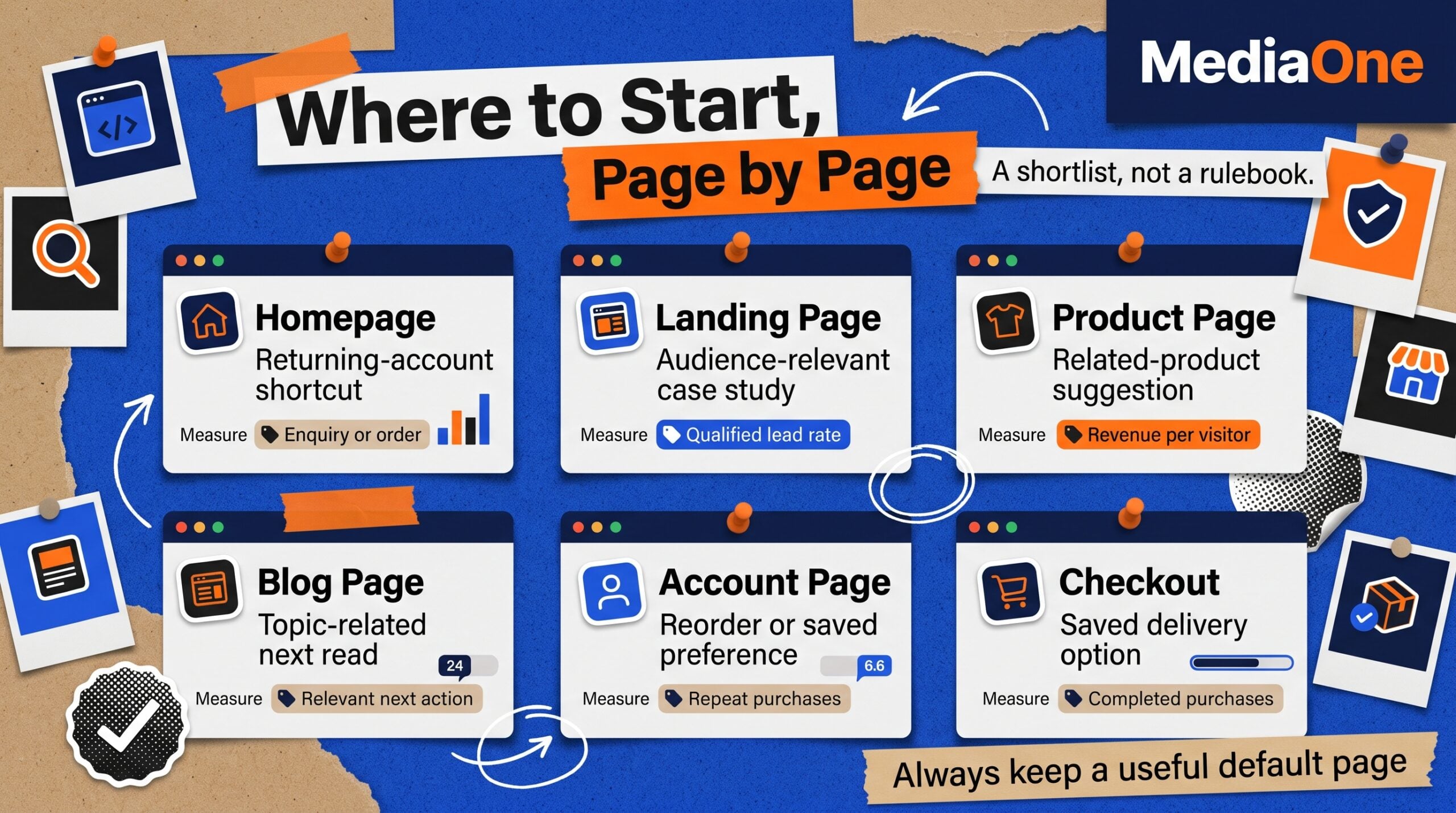
The table is a shortlist, not a requirement to personalise every page. Pick the highest-scoring opportunity from the readiness matrix and test it where the audience is large enough to support a decision. Scale only after the evidence covers both customer experience and business value.
Conclusion and Next Steps
A useful personalisation programme begins with an identifiable visitor need and ends with a measured business decision. Start with existing first-party or contextual signals, check their permitted use and compare one change with a stable control. When results are uncertain, improve the test design before expanding the toolset.
This week, choose one important page, score its proposed changes on data readiness and business impact, then calculate the eligible sample needed for a test. At MediaOne, we can help assess the measurement setup and prioritise experiments. Document what the test earns after costs before rolling the treatment across more pages.
Frequently Asked Questions
How much traffic do I need for personalisation?
There is no universal session threshold. Estimate the sample required from your current conversion rate, the smallest commercially useful change and your chosen statistical method. Then calculate how much traffic the eligible audience receives. If a segmented test would take too long, improve the standard page or run a simpler experiment with a broader audience first.
What is the difference between personalisation and A/B testing?
Personalisation determines which experience a visitor receives using context, preferences or permitted behaviour signals. A/B testing compares alternatives to estimate their effect. The two approaches can work together by randomly assigning some eligible visitors to a default page and others to a tailored one. That controlled comparison helps separate genuine improvement from changing traffic conditions.
Can I personalise a WordPress or Shopify website?
Yes, both environments can support tailored content, although the available features depend on themes, extensions and integrations. Start with a simple landing-page rule or an account preference before adding behavioural tracking. On Shopify, review customer privacy controls and app permissions. On WordPress, check extension compatibility, cache behaviour and the effect of extra scripts on page performance.
No. Singapore’s PDPA rules depend on the data collected, the intended use and the applicable legal basis. PDPC guidance says cookies that do not collect personal data do not need PDPA consent for that reason alone. Personal-data uses can require consent or meet a relevant exception. Review advertising targeting and overseas visitors separately before choosing a banner design.
How do I measure personalisation ROI?
Compare outcomes from a randomly selected control group and the treatment group over the same period. Estimate additional qualified customers or orders, convert the change into contribution profit and deduct implementation and ongoing costs. State the test’s uncertainty and any conversion delay. A higher click-through rate on a recommendation does not by itself establish a financial return.
When should I choose predictive recommendations?
Consider predictive tools when the website has a varied catalogue, consistent behaviour data and enough eligible visitors to evaluate the model against simpler rules. Ask how the system handles missing information, consent changes and unsuitable suggestions. Compare its incremental profit with licensing and maintenance costs. For limited traffic or a narrow offer, a transparent rule-based approach is often easier to manage