| AI Summary
Appearing in Google AI Overviews, AI Mode and ChatGPT Search on WordPress starts with four fundamentals, fixed in order. These are crawler access, indexability, extractability and trust. This guide shows how to check that Googlebot and OAI-SearchBot can reach your pages, and how permalinks, plugins, themes, speed and internal links affect visibility. It also explains why llms.txt and special schema are unnecessary for Google, and how original evidence and MediaOne’s data can help your pages earn the citation as well as the ranking. |
WordPress does not need an “AI SEO” plugin to appear in AI search.

It needs something much less exciting and much more important: crawlers must be able to reach the site, Search needs to identify the correct page, the content has to be understandable, and the page needs to offer information worth using.
That is the foundation whether you are trying to appear in Google AI Overviews, AI Mode or ChatGPT Search.
MediaOne has audited more than 1,400 WordPress websites since 2018. Across 40 WordPress audits in the most recent 12-month period covered by our internal data, roughly one in three page-one rankings sat below an AI Overview that cited another source.
That creates an interesting problem.
Your page can rank.
Your traditional technical SEO can look healthy.
And another page can still become the source displayed inside the AI-generated answer.
The response should not be to abandon SEO and replace it with a collection of GEO hacks. Google’s 2026 guidance for optimising for generative AI Search says its generative AI experiences still rely on the core Search ranking and quality systems. In Google’s words, SEO remains relevant.
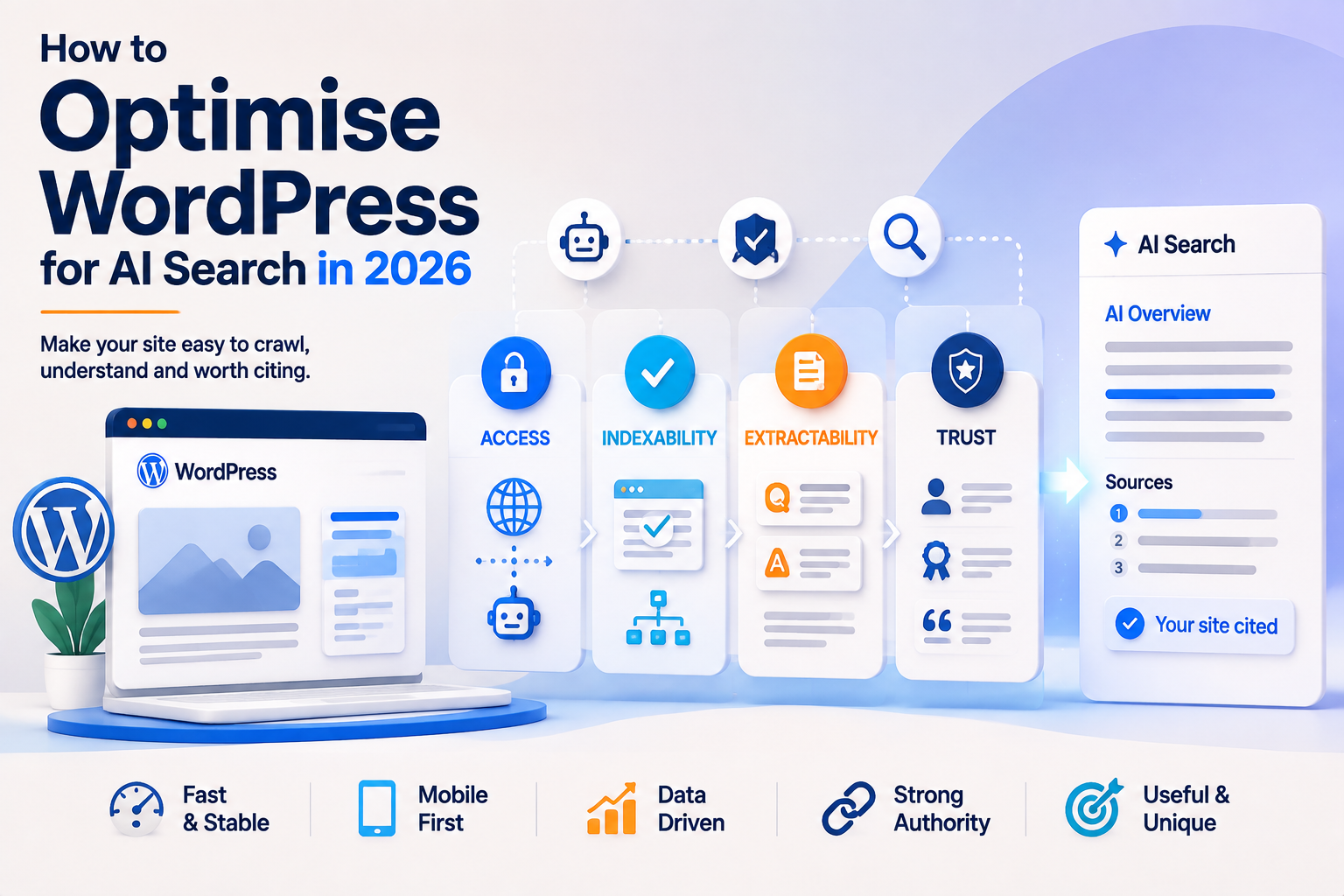
For WordPress, we organise that foundation into four gates:
Access → Indexability → Extractability → Trust
Fix them in that order.
Key Takeaways
- Start with crawler access. Cloudflare, Wordfence, WAFs and bot protection can block AI search before content optimisation matters.
- You do not need llms.txt to rank in Google’s AI search experiences.
- Use one well-configured WordPress SEO plugin. Plugin overlap creates more problems than plugin count alone.
- Theme choice matters because it sets a performance baseline. MediaOne’s internal 2025 migration data put remediation costs at roughly S4,800–S6,200 when theme decisions went wrong.
- MediaOne’s internal URL study found descriptive post-name URLs associated with roughly 2.1× the AI citation rate of numeric URLs, at very similar organic positions. Treat that as MediaOne correlation data, not a universal Google ranking factor.
- Answer-first content performed better internally. The detailed MediaOne dataset shows about 1.9× as many citations when the answer appeared within the first 60 words versus after 180+ words.
- Speed correlated strongly with citations in MediaOne’s dataset: pages below 1.5 seconds recorded 24.1 citations per 100 eligible queries versus 4.2 for pages over 3.5 seconds.
- Treat those figures as internal observations, not proof that URL format, speed, or answer position directly causes an AI citation.
The Four Gates of WordPress AI Search Visibility
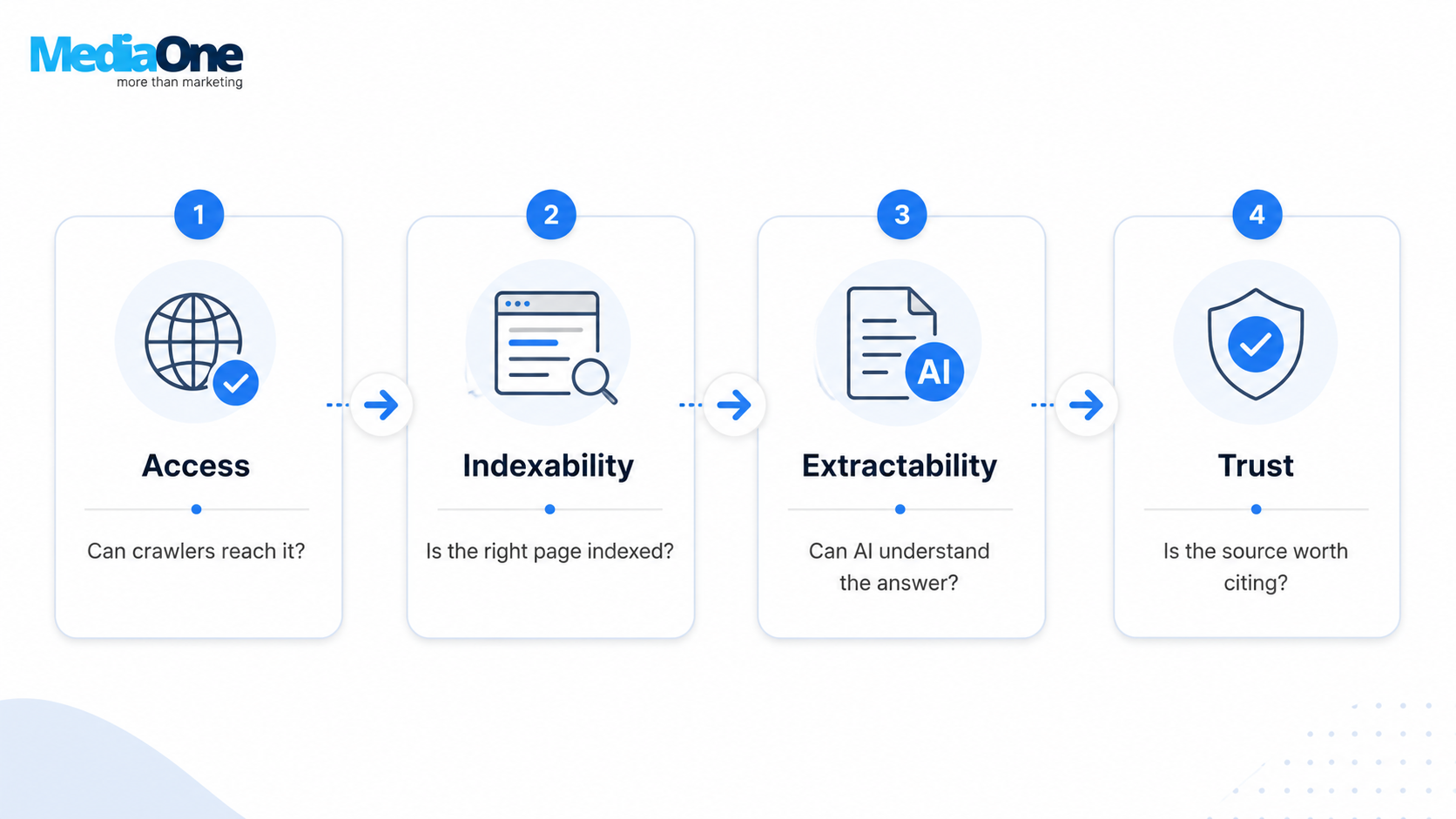
| Gate | Question | Typical WordPress Failure |
| Access | Can the crawler fetch it? | WAF, CDN, security plugin, CAPTCHA |
| Indexability | Is the correct URL available to Search? | noindex, bad canonical, duplicate archives |
| Extractability | Can the answer be understood quickly? | Buried answers, vague headings, JS-only content |
| Trust | Is the source worth citing? | Generic copy, anonymous author, no evidence |
If the site is not being crawled properly, fix Access before worrying about citation formatting.
1. Check Crawler Access Before Touching the Content
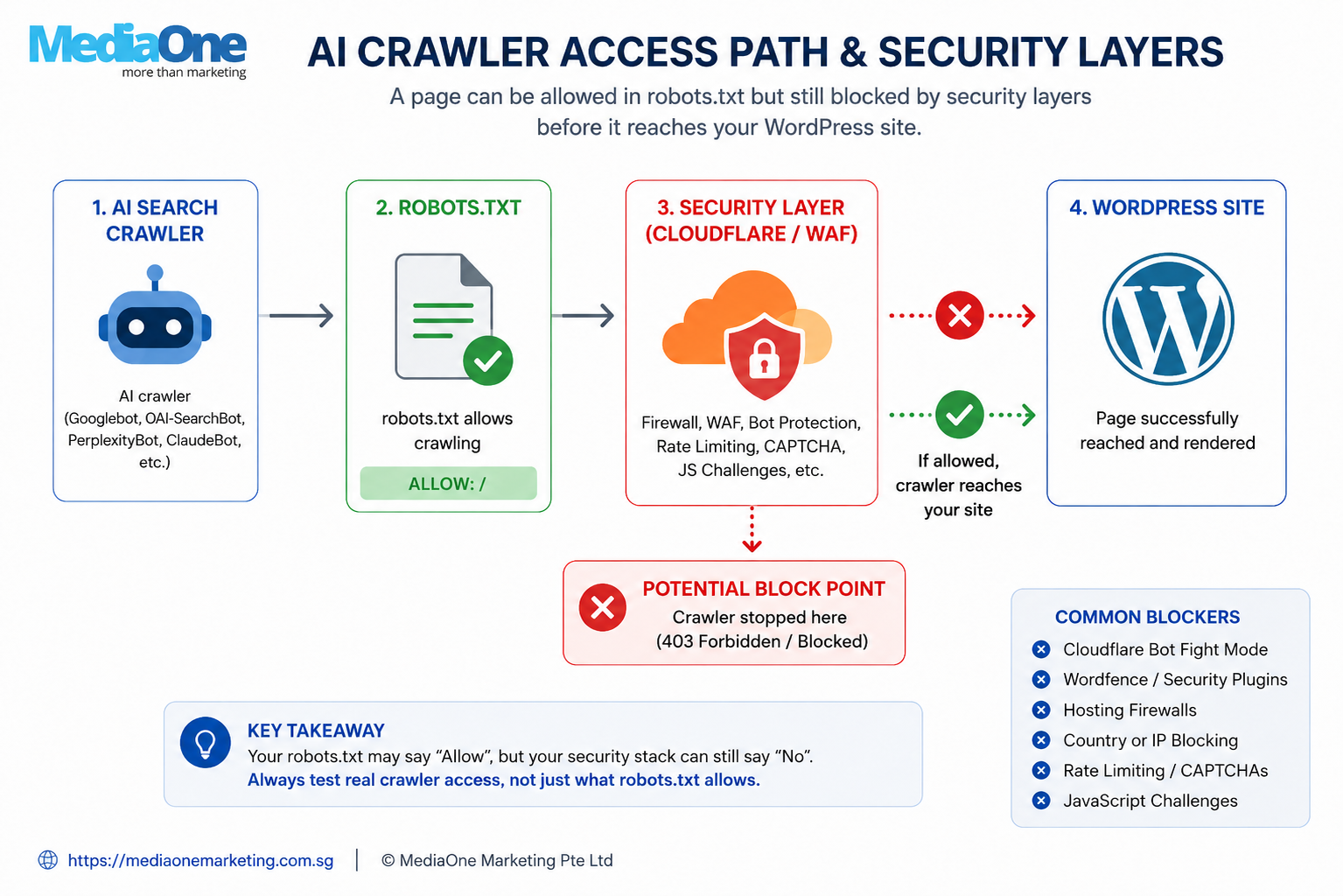
A WordPress page can work perfectly in your browser while an automated crawler receives something completely different.
This happens more often than most content teams realise.
The block may sit in WordPress, but it can also happen before a request ever reaches WordPress.
Cloudflare, Wordfence, hosting firewalls, bot mitigation, rate limiting, CAPTCHAs and JavaScript challenges can all intervene.
Your robots.txt might say:
User-agent: *
Allow: /
while your WAF quietly returns:
403 Forbidden
That is why checking robots.txt alone is not enough.
Google AI Search Still Uses the Normal Search Foundation
There is no secret Google AI crawler setting to enable.
Google’s guidance for AI features in Search states that the normal SEO best practices still apply to AI Overviews and AI Mode and that there are no additional technical requirements or special optimisations required to appear in them.

The page still needs to be crawlable, indexed and eligible to appear in Search.
So before changing the article, check whether Googlebot can actually reach it.
Check OAI-SearchBot Separately for ChatGPT Search
ChatGPT Search requires a separate check.
If you want your public pages to be discoverable and included in summaries or snippets, OpenAI recommends making sure OAI-SearchBot is not blocked.
Do not assume GPTBot and OAI-SearchBot are interchangeable controls.
For a WordPress site, check the entire access path:
robots.txt → CDN/WAF → hosting → security plugin → WordPress
A 403 or 429 response anywhere along that chain matters more than another AI optimisation plugin.
2. Check Indexability and WordPress URL Settings
Once the site can be crawled, make sure Search is being shown the URL you actually want indexed.
Start in WordPress:
Settings → Reading → Search Engine Visibility
The WordPress documentation for the Search Engine Visibility setting explains that enabling “Discourage search engines from indexing this site” generates a noindex,nofollow robots directive when the theme is configured correctly.
On a live production website that should be indexed, make sure this has not accidentally been left enabled after development.
Then check the rest of the site:
- canonical URLs
- XML sitemaps
- tag and category archives
- author archives
- pagination
- attachment URLs
- parameter-based duplicates
WordPress makes publishing simple.
It also makes producing several URLs around essentially the same content surprisingly easy.
The objective is to make the preferred page obvious.
3. Use Descriptive Permalinks, but Do Not Migrate Good URLs for AI
For new WordPress sites, descriptive permalinks are usually the cleaner choice.
Compare:
/optimise-wordpress-for-ai-search/
with:
/?p=8472
The first gives both a user and a search system some immediate context.
WordPress’s own permalink documentation describes readable permalink structures as easier for people and search engines to understand, while Google recommends descriptive URLs with readable words rather than unnecessary identifiers where practical.
MediaOne’s internal 2026 analysis found a similar pattern.
Across 1,200 URLs on eight client sites:
| URL Type | AI Citations / 100 Eligible Queries | Average Organic Position |
| Descriptive post-name URLs | 17.8 | 3.2 |
| Numeric URLs | 8.6 | 3.3 |
Descriptive URLs received roughly 2.1 times the citation rate despite very similar organic positions.
Do not turn that into a universal Google ranking factor.
This is MediaOne correlation data. Cleaner URLs may coexist with better architecture, stronger publishing practices or other variables.
The practical rule is simpler.
Use descriptive URLs from the beginning.
If an established URL already ranks and earns links, do not change it casually just to make it look more “AI optimised”.
4. Ignore the AI SEO Hacks Google Says You Do Not Need
This is one of the biggest 2026 updates to the article.
There is now enough direct guidance from Google to stop treating every AEO or GEO theory as something WordPress publishers need to implement.
Google’s generative AI Search optimisation guide explicitly addresses several of the most common myths.
You Do Not Need llms.txt for Google Search
Google says it does not use llms.txt for Google Search, including its generative AI capabilities.
Creating one for another platform is fine, but Google says it will neither help nor hurt your Search visibility.
That means installing a WordPress plugin solely because it promises an “AI-friendly llms.txt file” is not a sensible Google optimisation strategy.
You Do Not Need to Break Every Article Into Tiny Chunks
Another common recommendation is to split content into very small blocks because AI systems supposedly need “extractable chunks”.
Google directly says there is no such requirement.
Its systems can understand nuance across several topics on one page, and there is no ideal page length for generative AI Search.
That does not mean structure is unimportant.
It means structure should serve the reader.
A simple question may need 700 words.
A technical WordPress guide may genuinely need 3,000.
Do not pad the short one or chop the long one purely because somebody invented an AI word-count formula.
You Do Not Need a Separate AI Writing Style
Google also says publishers do not need to rewrite content specifically for generative AI systems or create pages targeting every possible long-tail variation.
Its systems can understand synonyms and general meaning without requiring exact phrasing.
So do not create five WordPress articles for:
“WordPress AI SEO”
“AI SEO WordPress”
“optimise WordPress for AI”
“WordPress AI search optimisation”
if they all solve the same problem.
Build the strongest page for the underlying intent.
5. Use One SEO Plugin Properly
Yoast, Rank Math and SEOPress can all handle the basic technical SEO work most WordPress sites need.
That might include sitemaps, canonicals, breadcrumbs, robots controls, redirects and structured data.
The plugin is rarely the strategic advantage.
Configuration is.
Problems begin when several tools control the same output.
Two SEO plugins, multiple schema plugins or overlapping caching tools can create duplicate metadata, conflicting canonicals, duplicate schema or unpredictable rendering.
MediaOne has audited WordPress installations running more than 40 plugins with healthy performance and much smaller installations with serious technical problems.
Plugin count alone is not the useful metric.
Overlap is.
Before installing something new, ask:
What does this plugin actually do?
Is it still needed?
Is another plugin already doing the same thing?
Do Not Write for Yoast’s Green Light
MediaOne tracked 340 pages between November 2025 and April 2026 and found that pages with red Yoast scores performed slightly better on average in both organic rankings and AI citations than pages with green scores.
That does not mean red is better.
It means the traffic light is not Google’s algorithm.
Use plugin recommendations as checks.
Do not rewrite natural copy into awkward copy simply to make a keyword-density indicator turn green.
6. Structured Data Is Useful, but It Is Not an AI Citation Switch
This section needs a major update from older AI SEO advice.
Google’s current generative AI Search guidance explicitly says there is no special schema.org markup required for AI search.
Structured data still has legitimate SEO uses.
Article markup should accurately describe an article.
Product markup belongs on genuine product pages.
LocalBusiness markup belongs where the page genuinely represents a local business.
But adding more schema does not automatically make the page more attractive to AI systems.
Google also deprecated FAQ rich results in May 2026 as part of its continuing simplification of Search features.
A genuine FAQ can still be useful to readers.
What changed is the reason for having it.
Do not create FAQs because an old optimisation checklist promises a special SERP treatment.
Use them because users genuinely have those questions.
7. Put the Answer Where Readers Can Find It
Google says you do not need artificially small content chunks.
That does not mean burying the answer is good writing.
MediaOne analysed 340 pages between November 2025 and May 2026 and found that pages answering their target question within the first 60 words recorded 18.3 citations per 100 eligible queries.
Pages taking more than 180 words to reach the answer recorded 9.7.
That is roughly 1.9 times the citation rate in this dataset.
Again, it is correlation.
It is not a rule that every section must contain a complete answer in sentence one.
The more useful editorial lesson is:
Do not make readers fight through four paragraphs of generic introduction before answering a simple question.
For example:
Does WordPress Need llms.txt for Google AI Search?
Start with:
No. Google does not use llms.txt for Google Search or its generative AI capabilities.
Then explain the nuance.
That is good communication before it is AI optimisation.
8. Use Headings That Actually Describe the Section
Avoid headings such as:
“Overview”
“Things to Know”
“Other Considerations”
They tell the reader almost nothing.
Compare them with:
“How Can Cloudflare Block AI Crawlers?”
“Does WordPress Need llms.txt?”
“Should You Change an Existing WordPress Permalink?”
MediaOne’s March 2026 analysis of 280 pages found that descriptive and action-oriented headings were associated with stronger citation rates and scroll depth than generic labels.
That is another internal correlation rather than a Google ranking rule.
But the writing principle is useful regardless:
A reader should understand what a section contains before reading it.
Be specific about entities too.
Say “Rank Math” when Rank Math matters.
Say “Cloudflare” when you mean Cloudflare.
Specific nouns remove ambiguity.
9. Build an Internal Link Network, Not an Internal Link Quota
Internal links help establish relationships between WordPress pages.
What they should not become is another arbitrary number.
MediaOne’s January 2026 internal analysis covered 12,400 pages across 28 client sites. Pages with stronger contextual internal linking tended to perform better, while excessive link volume showed diminishing returns.
That does not mean:
Every article needs eight internal links.
The right number depends on what the article contains.
A short article might naturally need three.
A large guide could justify 15.
Link when another page genuinely helps the reader go deeper.
Use descriptive anchor text.
Make commercial and pillar pages accessible.
Connect genuinely related cluster content.
And fix orphaned pages.
The network matters more than hitting a quota.
10. Choose the WordPress Theme Before You Inherit Its Problems
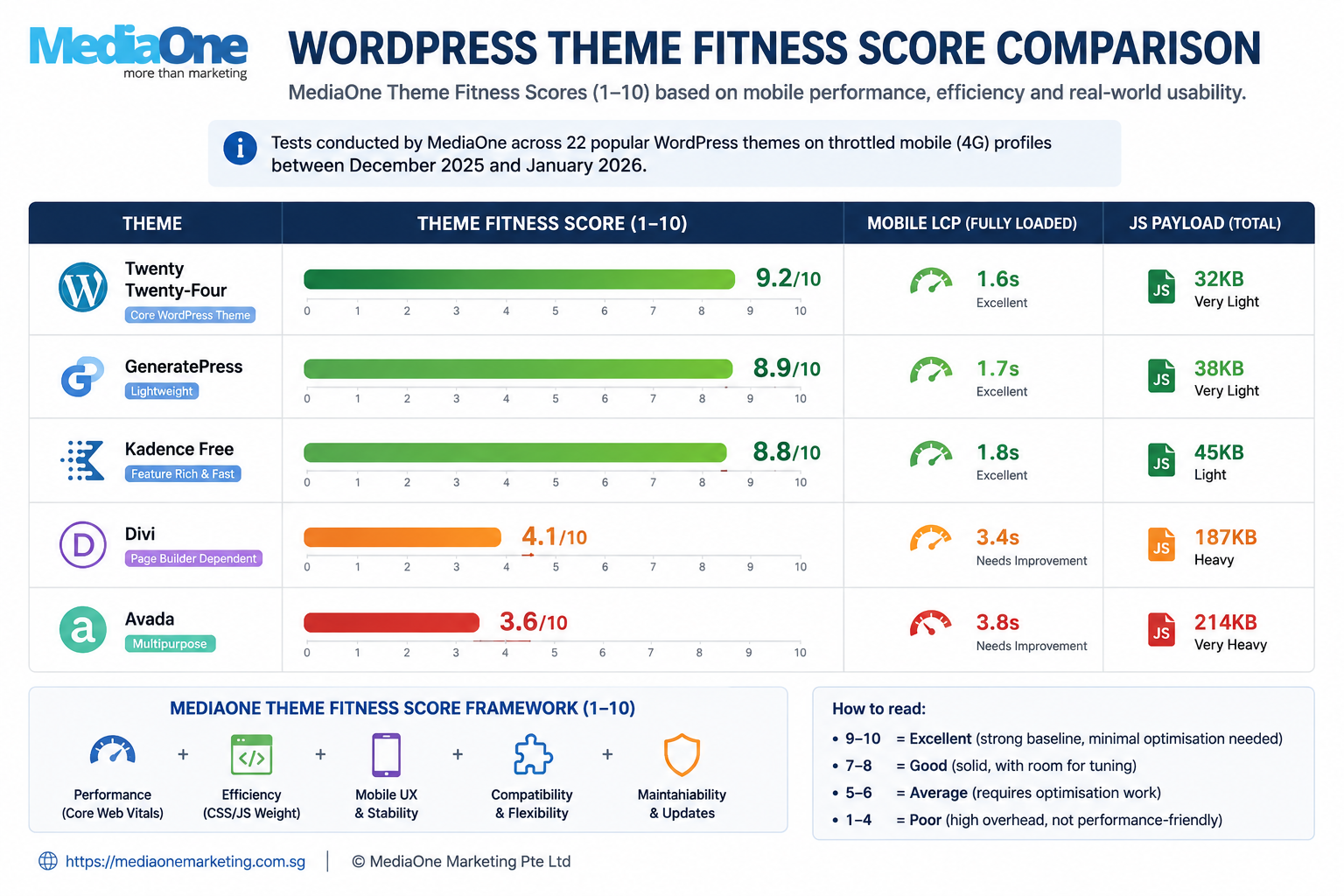
Your theme sets a technical baseline.
It affects CSS, JavaScript, DOM complexity, layout stability, Core Web Vitals, page-builder dependency and eventually how much development work is required to optimise the site.
MediaOne tested 22 popular WordPress themes between December 2025 and January 2026 using throttled mobile profiles. Only four passed all three Core Web Vitals thresholds without additional tuning.
Among the tested results:
| Theme | MediaOne Theme Fitness Score | LCP |
| Twenty Twenty-Four | 9.2/10 | 1.6s |
| GeneratePress | 8.9/10 | 1.7s |
| Kadence Free | 8.8/10 | 1.8s |
| Divi | 4.1/10 | 3.4s |
| Avada | 3.6/10 | 3.8s |
These are MediaOne test-environment results.
They are not permanent benchmarks for every installation.
Hosting, plugins, WooCommerce, images, custom development and the way the theme is configured can completely change the outcome.
What matters is the decision process.
Test the theme using the type of website you are actually building.
For WooCommerce, test product, category, cart and checkout templates.
For editorial sites, test real article pages.
For lead-generation sites, include forms, analytics and the scripts that will actually run in production.
A beautiful empty theme demo tells you very little.
Changing the Theme Later Is More Expensive
Across 22 theme migrations MediaOne supervised in 2025, internal project data recorded an average total cost of approximately S$4,800 to S$6,200 per migration.
Broken layouts, shortcodes, custom fields and plugin reconfiguration were among the recurring problems.
That is MediaOne project data, not a Singapore-wide market benchmark.
But it illustrates why theme selection deserves technical due diligence before hundreds of pages depend on it.
11. Treat Performance as Part of AI Search, Not a Separate Project
Fast sites are better for users.
Google also includes good page experience in its technical recommendations for generative AI Search and continues to recommend considering the overall page experience rather than obsessing over one performance metric.
What we should not do is turn that into:
“Loading in under 1.5 seconds gives you an AI ranking boost.”
MediaOne’s January 2026 internal speed study covered 420 pages across 14 client domains.
| Load Time | AI Citations / 100 Eligible Queries | Average Organic Position |
| Under 1.5s | 24.1 | 3.8 |
| 1.5–2.5s | 17.3 | 4.2 |
| 2.5–3.5s | 9.7 | 4.1 |
| Over 3.5s | 4.2 | 4.3 |
The fastest group recorded roughly 5.7 times the citation frequency of the slowest group.
Again, correlation.
Faster websites may also have better engineering, stronger UX and cleaner templates.
The useful takeaway is simply that performance should not be ignored when optimising a WordPress site for search visibility.
The biggest WordPress performance problems usually come from themes, page builders, oversized imagery, unnecessary JavaScript, third-party scripts, caching and slow server response.
MediaOne’s guide to improving Core Web Vitals without chasing a perfect PageSpeed score goes deeper into troubleshooting LCP, INP and CLS.
12. Optimise Images for People First
Images should not be treated as decoration or keyword containers.
Use appropriate dimensions and compression.
Use WebP or AVIF where they fit the production workflow.
Keep the important visual relevant to the page.
And write alt text for accessibility.
Google’s 2026 guidance also recommends supporting useful text with relevant high-quality images and video where those formats improve the experience.
The alt-text rule is simple:
Describe what the image communicates to somebody who cannot see it.
If the target phrase genuinely belongs in that description, include it naturally.
If it does not, leave it out.
Do not turn every WordPress image into another place to stuff the target keyword.
13. Give AI Search Something Generic Content Cannot Reproduce
This is probably the most important part of the entire article.
Technical SEO gets the page into the competition.
It does not make the page worth selecting.
Google’s generative AI optimisation guidance puts particular emphasis on unique, non-commodity content and warns against merely recycling information that already exists everywhere else.
Twenty websites can install Yoast.
Twenty websites can add Article schema.
Twenty sites can use the same keyword in their H1.
They cannot all have the same first-hand evidence.
That is where information gain comes from.
Useful original material might include:
- internal data
- real client examples
- screenshots
- expert commentary
- tested processes
- original comparisons
- documented mistakes
- primary-source synthesis
If you publish internal research, explain enough of the methodology for the reader to judge it.
Give the sample size.
Give the time period.
Explain what was measured.
Say whether it is correlation or a controlled result.
“Our data shows” is not enough.
14. A Singapore Client Ranked #2 but Still Lost the AI Citation
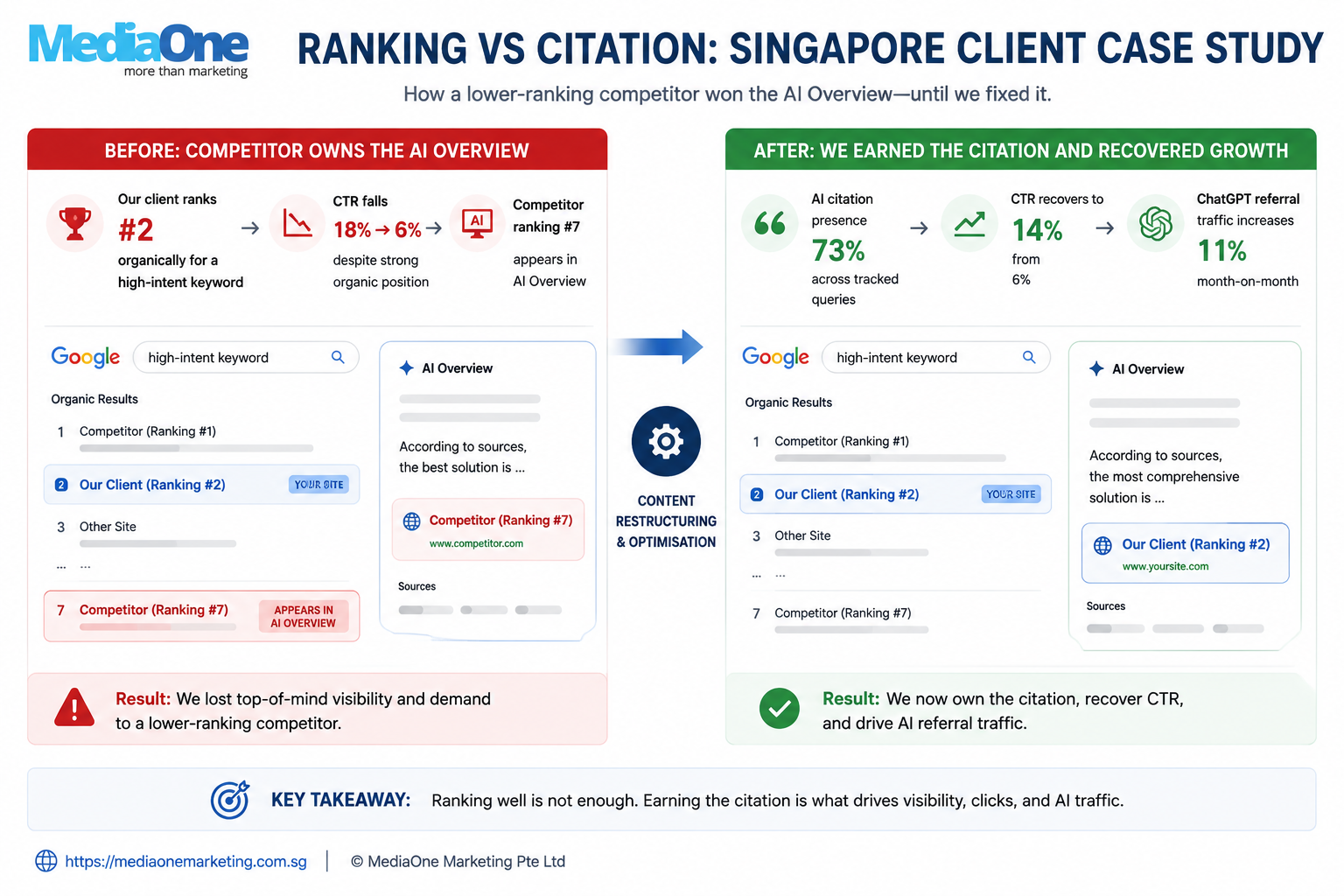
MediaOne’s own client data illustrates why rankings and AI visibility should not be assumed to be identical.
A Singapore professional-services company came to MediaOne in late 2025 while ranking #2 for “corporate secretarial services Singapore”.
Its organic CTR had fallen from 18% in June 2025 to 6% by October.
At the same time, a competitor page ranking around #7 was appearing in the AI Overview.
MediaOne restructured the client page around clearer answers and stronger source signals.
Within eight weeks, the page appeared in the AI Overview citation set in 73% of MediaOne’s tracked tests.
Organic CTR recovered from 6% to 14%, while ChatGPT referral traffic accounted for 11% of reported organic sessions by January 2026.
Those results belong to one client.
They are not a benchmark.
The broader lesson is:
A WordPress page can rank strongly and still lose a separate visibility opportunity inside an AI-generated result.
That is why it makes sense to measure both.
15. Measure Generative AI Visibility in Search Console
This is one of the most important new 2026 additions.
In June 2026, Google introduced dedicated Generative AI performance reports in Search Console for visibility in experiences such as AI Overviews and AI Mode. Google initially rolled the reporting out to a subset of sites while testing the feature.
The report includes data such as impressions, pages, countries, devices and dates.
That gives publishers a much better way to evaluate AI visibility than manually checking a collection of prompts every week.
If the report is available for your property, compare generative AI exposure with the rest of your Search performance.
Ask:
Are more URLs appearing?
Are impressions increasing?
Which page types are being surfaced?
Does that visibility eventually contribute to useful traffic or conversions?
Do not reduce the entire programme to:
“How many citations did we get?”
Visibility is useful.
Commercial outcomes still matter more.
16. Make Trust Visible
Every important WordPress article should make three things easy to answer:

Who wrote this?
Why should the reader trust them?
Where did the claims come from?
That does not require filling the article with badges and credentials.
It means having a named author, relevant expertise, accurate dates and sources attached directly to factual claims.
If the claim came from Google, link Google naturally in the sentence.
If the number came from MediaOne internal data, call it MediaOne internal data.
If a client result is not representative of everybody, say so.
No schema plugin can manufacture that kind of transparency.
17. WordPress Is Only the On-Site Part of AI Visibility
Your CMS is not the entire information environment around the brand.
AI-enabled search experiences can encounter businesses through independent publications, reviews, forums, videos, comparison pages and third-party commentary.
That does not mean you should manufacture mentions.
Google specifically warns against pursuing inauthentic mentions as a generative AI tactic because its spam and quality systems continue to apply.
Use forums to understand what customers actually ask.
Participate when the business genuinely has something useful to contribute.
Earn coverage where possible.
Do not create fake “recommendations” because an AI visibility consultant told you Reddit is a ranking factor.
How We Would Optimise an Existing WordPress Site
If MediaOne were reviewing an established WordPress site tomorrow, we would not begin by installing an AI plugin.
We would begin with crawler access and indexability.
Then we would check URLs, canonicals and duplicate pages.
We would remove technical overlap in the plugin stack.
We would make important answers easier for users to find.
We would improve internal linking, performance and useful media.
Then we would strengthen the pages with evidence competitors cannot simply reproduce.
Only after those fundamentals were healthy would we spend time experimenting with genuinely new AI-specific technologies.
That order prevents an SEO team from solving an imaginary GEO problem while Cloudflare is still returning 403s.
Optimise WordPress for Both Rankings and Citations
Do not choose between SEO and AI search optimisation.
Build one strong page capable of doing both.
Start with:
Access → Indexability → Extractability → Trust
Then use WordPress decisions, theme, URLs, plugins, internal linking, performance and media, to remove friction around those four gates.

Most importantly, give the page something generic competitors cannot reproduce.
MediaOne’s own data makes the broader lesson clear: a page can rank well while another source wins the citation.
The goal is not to install more AI plugins.
The goal is to make your WordPress page easy to discover, easy to understand and worth selecting.
If those gaps are difficult to separate on an established site, MediaOne’s SEO and GEO team can assess whether the bottleneck sits in crawler access, WordPress configuration, content structure, authority or a combination of them.
Frequently Asked Questions
How do I optimise WordPress for AI search?

Start with crawler access and indexability, then improve content structure, WordPress performance and authority. Make sure AI/search crawlers can reach the site before spending time on citation-focused content changes.
Does WordPress need llms.txt for Google AI Search?
No. Google does not require llms.txt for Google Search or AI Overviews. Treat it as optional for platforms that may choose to support it, not as a Google ranking shortcut.
Should OAI-SearchBot be allowed?
If you want your pages to be discoverable through ChatGPT Search, review OpenAI’s OAI-SearchBot crawler rules and make sure your firewall or CDN is not unintentionally blocking it.
Do descriptive WordPress URLs improve AI citations?
MediaOne’s internal 2026 study found descriptive post-name URLs receiving about 2.1× the citation rate of numeric URLs across 1,200 URLs on eight client sites, with similar average organic positions. That is a correlation within MediaOne’s dataset, not proof of a universal Google AI ranking factor.
Does page speed affect AI citations?
MediaOne’s internal 420-page study found pages loading under 1.5 seconds receiving substantially more AI citations than pages over 3.5 seconds, including a roughly 5.7× difference between the two groups. Treat this as correlation, not evidence that speed alone causes AI citations.
Should every answer appear in the first 60 words?
No. Use answer-first structure where it genuinely helps the reader. MediaOne’s detailed internal dataset found 18.3 versus 9.7 citations per 100 queries for answers appearing within 60 words versus after 180+ words, about 1.9×.
Can a WordPress page rank #1 or #2 and still miss AI Overviews?
Yes. The existing MediaOne client case shows exactly that. Organic ranking can remain strong while a lower-ranking source is selected for the AI-generated answer.