
A negative SEO attack is a deliberate attempt to lower another site’s search rankings by manipulating the signals search engines use to judge it. For Singapore firms in finance, property, food and beverage and e-commerce, the first sign is usually a sudden, unexplained drop in organic traffic — a drop that looks like a fundamental business problem but often isn’t.

Sometimes the cause is internal: an algorithm update, a technical fault or your own site changes. Often, though, it is a deliberate attack by a rival or a former employee manipulating the signals Google uses to assess your site. This guide is written for the people who have to respond: in-house marketers, founders, agency leads and webmasters. It covers how these attacks work, how to tell an attack apart from an algorithm update or an ordinary decline, and a step-by-step plan for stopping the damage and recovering. It also sets out the legal and reporting routes available in Singapore and the hardening steps that make your site a harder target.
Key Takeaways
- Most traffic drops are not attacks. Before you disavow anything or contact a lawyer, rule out algorithm updates, technical faults, seasonal demand and your own site changes. Negative SEO causes only a minority of ranking losses.
- Toxic backlinks are the most common tactic, but rarely the most damaging. A sudden spike of low-quality links from unrelated domains is a warning sign, not proof. Check the link pattern in Google Search Console before assuming the links are the problem.
- Hacked pages and injected content do more harm than links. Spam pages, cloaked redirects and hidden text can trigger manual actions and deindexing, so a security check should come before any link clean-up.
- Record the evidence first. Export your Search Console data, screenshot rankings and save the offending URLs with timestamps before you change anything. This record is what you will need for a disavow request, a platform report or a civil claim.
- Use the disavow tool with care. Disavow only links you have classified as harmful and cannot get removed. Over-disavowing can strip out links that were helping you.
- Expect recovery to take weeks to months. Google must recrawl, reprocess and reassess your site, so a well-run response still produces slow, uneven results. Set expectations with your leadership team early.
What a Negative SEO Attack Is — and Who Gets Targeted
A negative SEO attack is a deliberate attempt to lower another site’s search rankings by manipulating the signals search engines use to assess it. The attacker does not improve their own position. They push yours down, often by pointing low-quality links at your domain, hijacking pages, copying your content elsewhere, or flooding your brand queries with fake signals.
Rankings fall for many innocent reasons too. A core algorithm update, a slow page, thin content, a competitor who published something better, or a fault on your own site can each cause a drop. Google’s Search Central spam policies state that its systems generally ignore most low-value links rather than penalising the site receiving them — so attacks that cause real damage usually combine visible spam with an existing weakness, not links alone. The diagnostic framework later in this guide shows how to separate an attack from an ordinary decline.
The attacker profile: competitors, disgruntled staff and opportunists
Three types of people run negative SEO campaigns, and each leaves different traces.
- Competitors are the most common source. A rival in the same keyword market gains the most from your drop and knows which queries matter. Their campaigns are usually patient and targeted, often aimed at your commercial pages and the keywords that bring in enquiries.
- Disgruntled current or former staff are the highest-risk profile. They may hold passwords, content management system logins, hosting accounts, or Google Business Profile controls. The attack can come from inside your trusted access, and it can include deleting content, changing redirects or altering business listings. Access reviews, covered in the prevention section, address this risk directly.
- Opportunists are low-skill actors running automated tools or buying cheap services from link brokers. They target many sites at once and produce generic spam: scraped content, comment spam and bulk backlinks from hacked sites. Their work is noisy and easier to spot, but it can still damage a site that is already fragile.
Knowing which profile you face shapes your response. A competitor campaign calls for evidence and possibly legal action. A staff-driven attack calls for access control and an internal review. An opportunistic spam wave usually calls for a clean-up and a disavow file.
Why Singapore businesses in competitive sectors are exposed
Exposure depends on how much a ranking is worth. In Singapore, several sectors combine high-value search terms with heavy competition, which makes them attractive targets.
- Finance is the clearest case. Queries for loans, insurance, credit cards and investment products carry high customer lifetime values, so one ranking position can be worth a great deal. Financial firms also face strict rules on advertising and public statements, which can limit how quickly they respond publicly.
- Property follows the same pattern. Agency websites, condominium marketing pages and property portals compete for terms tied to large transactions, and many firms depend heavily on organic search for leads. Listings are also widely copied, which makes scraping and duplicate content a routine problem.
- Food and beverage is exposed through local search and reviews. Restaurants depend on Google Business Profile visibility, star ratings and “near me” queries. Fake reviews and profile manipulation can hurt a small business within days, because it has little organic traffic to fall back on.
E-commerce combines several risks: many near-identical product pages that invite scraping, large catalogues that are hard to monitor, and heavy reliance on product-level rankings. Marketplace listings and cloned storefronts add further exposure.
Singapore’s small, densely competitive market matters too. Many firms chase the same few keywords, and a rival who loses a ranking to you has a clear incentive to reverse it. A business with strong rankings in a crowded sector should assume it will eventually be targeted and plan its monitoring accordingly.
How Negative SEO Attacks Work in Practice
Negative SEO rarely looks like a single dramatic event. It is usually a set of quiet, mechanical actions that exploit how search engines weigh links, content and reviews. Most campaigns use one or more of the four tactics below, and each leaves a different trail in your data — and needs a different response.

Tactic 1: Toxic backlink campaigns and link farms
The most common tactic is a toxic backlink campaign, where an attacker buys or builds large numbers of low-quality links pointing at your domain — from link farms, scraped directories, pharmacy or gambling sites, and auto-generated blogs. The aim is to make your link profile look manipulative.
Link farms are networks of sites that exist only to sell or trade links. They share telltale signs:
- Thin or machine-written content on unrelated topics
- Unnatural anchor text, such as exact-match commercial phrases
- Clusters of new domains that all appear within days of each other
- Links concentrated on a few target URLs rather than spread across the site
- Links from unrelated niches — gambling or adult sites pointing at a financial or property page, for example
In practice, most attacks of this kind have limited effect on a healthy site: Google often ignores spam links rather than penalising the target. Its SpamBrain system, an AI-based spam detector, is designed to neutralise such links. The exception is a site already weakened by thin content, poor technical health or a thin brand footprint, where a large spam spike adds noise to an existing problem. Measure any spike against your normal link growth rather than reacting to the raw count.

Tactic 2: Hacked pages, injected content and cloaked redirects
Hacking is the more damaging tactic because it changes what Google sees on your domain. Attackers exploit outdated content management systems, weak admin passwords, vulnerable plugins and compromised hosting credentials. Once inside, they commonly inject hidden spam pages into a sub-folder, add hidden text or spam links to existing templates, and set up cloaked redirects.
Cloaking shows one version of a page to Googlebot and another to ordinary visitors — a serious violation of Google’s spam policies. A common pattern serves gambling or pharmaceutical content to search crawlers and sends human visitors arriving from search results to a different domain. The redirect depends on the user agent (the software identifying the visitor) or the referrer (the page the visitor came from), so the site owner may browse the homepage and see nothing unusual.
Warning signs:
- New URLs on your site that you did not create, often in an unfamiliar sub-folder — sometimes Japanese or pharmaceutical keyword pages
- Pages that show spam content when searched for on Google but look normal in a browser
- Security warnings or browser alerts for your domain
- Manual action or security issue notices in Search Console
Detection steps should follow this order: check Search Console for security issues and manual actions, search your domain for new pages with a site: query, then inspect the live versions of key URLs as Googlebot sees them using the URL Inspection tool’s rendered view. Google’s guide to fixing hacked sites walks through the full clean-up.
Tactic 3: Content scraping and duplicate content dilution
Scrapers copy your articles, product descriptions and images and republish them on other domains, often automatically. Duplicate content on its own rarely causes a penalty — Google’s duplicate content guidance explains that duplicate pages are typically filtered rather than punished.
The real risk is dilution: a copy outranking the original for your own headlines. This happens when the copy is indexed first or sits on a stronger domain, and it can divert the links and traffic that should come to you. Check for it by searching a distinctive sentence from your article in quotation marks. If scraped copies appear above your original, you have a dilution problem that needs a takedown request, not a disavow. Watch for:
- Your articles appearing word for word on unfamiliar domains
- Your product descriptions or property listings reproduced across many sites
- A drop on pages that were previously well ranked for their own titles
Tactic 4: Fake reviews, Google Business Profile abuse and brand-query manipulation
Local businesses face a different set of tactics. Attackers post fake negative reviews on Google Business Profiles, create bogus duplicate listings, and change listing details such as category, phone number or opening hours. Some run brand-query manipulation, where bots or paid users repeatedly search your brand name alongside negative terms such as “scam” or “complaints”, hoping those terms surface in autocomplete and “people also search for” suggestions.
Review manipulation affects local pack ranking and customer trust because review volume, rating, and recency feed local search visibility. The practical signal is a cluster of one- or two-star reviews from accounts with no other activity, posted in a short window, often describing a service you never provided. Other warning signs:
- Reviews that mention services you do not offer or locations you do not operate in
- Unexpected edits to your business name, hours, phone number or category
- Duplicate or cloned listings that appear for your business name
Document each review with a screenshot and timestamp before reporting it — removal decisions depend on the evidence you can show. Use the review’s report (flag) option in Google Business Profile and choose the reason that best describes the breach, such as spam, conflict of interest, or content posted by someone with no genuine experience of the business.
For profile edits, use the suggested-edit or report tools within the profile. Keep a record of every report — date, reason, reference number — and note that decisions are not guaranteed; reports can take days to weeks, and rejections are common when evidence is thin. A clear, dated record of the pattern lets you escalate a rejected report through the platform’s appeal route and strengthens any later legal action.
Diagnostic Framework: Is It an Attack or Something Else?
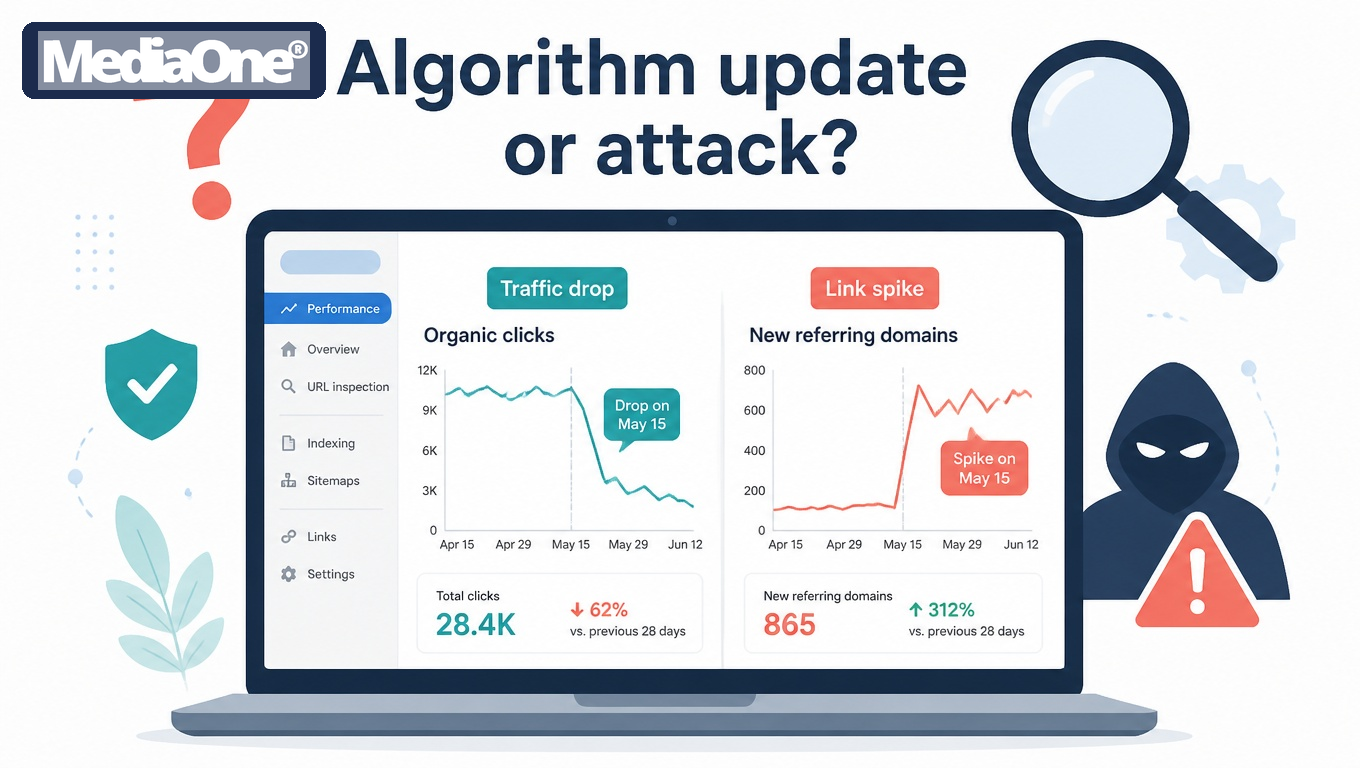
Diagnosis comes before any response. Changing links or filing reports before you know the cause can waste time and, in the case of disavow files, damage your own profile. Most traffic drops are not attacks: algorithm updates, seasonal demand shifts, broken templates, lost links and cannibalising content all cause the same symptom — fewer clicks. Rule out the ordinary causes first.
Symptom-to-cause table for traffic drops
Match what you see in your analytics against the table. A single symptom rarely settles the question, so look for two or three signals pointing the same way.
|
Symptom |
Most likely cause |
Attack indicator? |
First check |
|
Sharp drop across all pages on a specific date |
Core algorithm update |
No, unless a link spike appears the same week |
Compare the drop date against Google’s published update history |
|
Drop concentrated on a few commercial pages |
Ranking loss from a competitor or content change |
Possibly |
Check whether the same queries show a new competitor in the top 10 |
|
Sudden flood of new referring domains with exact-match anchor text |
Toxic backlink campaign |
Yes, strong signal |
Export backlinks sorted by first-seen date |
|
Unknown pages or Japanese keyword pages appearing in the index |
Hacked site or injected content |
Yes, strong signal |
Run a site: search and check for pages you did not publish |
|
Duplicate copies of your articles on other domains |
Content scraping |
Yes, but dilution is usually minor |
Search a distinctive sentence in quotes |
|
Brand search impressions fall while brand clicks stay flat |
Brand-query or SERP manipulation |
Possibly |
Check Google Business Profile reviews and sitelinks |
|
Gradual decline over several months with no spike |
Thin content, technical decay or competitor growth |
Unlikely |
Crawl the site and review Core Web Vitals |
|
Sudden drop after a site migration or redesign |
Self-inflicted (redirects, noindex, robots.txt) |
No |
Check the coverage report for newly excluded URLs |
|
Spike in one-star reviews or profile edits |
Fake reviews or profile abuse |
Yes, for local businesses |
Review the Business Profile activity and reviews list |
The strongest evidence of an attack is a change with no internal explanation: a sudden link spike you did not earn, pages you did not create, or a manual action you did not trigger.
Checking Google Search Console for manual actions and link spikes
Google Search Console is the authoritative first stop, because it reports what Google itself has detected. Work through these three areas in order.
- Manual actions. Open Security & Manual Actions → Manual Actions. A “No issues detected” message means Google has not applied a manual penalty. If a manual action is listed, read the reason carefully. An “Unnatural links to your site” notice can follow a link attack, but it can also reflect links you built or bought yourself, so check your own link history first.
- Security issues. The same section reports hacked content and malware. Treat any entry here as urgent and move straight to the hardening steps in the response plan.
- Links report. Under Links, review Top linking sites and Most linked pages. Export the list and compare it against the previous quarter. A new cluster of domains that appeared within a few weeks, pointing to money pages with commercial anchor text, is the pattern to investigate.
- Record the date you exported the data. Search Console keeps roughly 16 months of performance data, and there is a reporting delay — a link spike may appear days after it started — so your dated exports are the only reliable baseline if you need to prove timing later. Export on a regular schedule.
Separating algorithm updates from targeted attacks
Algorithm updates and attacks can both cause a drop in the same week, so timing alone does not separate them. Use four tests.
- Scope test. An update usually moves many sites in the same niche; an attack hits one site or a small group of pages. Check whether competitors dropped on the same date using a rank tracker.
- Page-type test. Core updates tend to affect whole content categories. Attacks often target pages with commercial queries and the backlink profile that feeds them.
- Source test. A link spike from unrelated foreign sites, adult or gambling domains, or scraper sites is a stronger attack indicator than a drop on its own.
- Recovery test. After a genuine update, rankings usually shift within a window and then settle. A targeted attack tends to keep pressure on the affected pages until the links are addressed.
Google’s Search Status Dashboard lists confirmed ranking updates with dates. Cross-check your drop date against it before you conclude anything. If the drop is isolated to your site, sits on specific queries or URLs, and coincides with unexplained link or content changes, an attack becomes the more plausible explanation — especially if competitors gained where you fell.
Tools for backlink and crawl analysis, with trade-offs
No single tool sees the whole web, so most investigations combine two or three SEO tools. The point is not to collect tools but to know which source to trust for which question.
|
Tool |
Strength |
Trade-off |
|
Google Search Console |
Free and authoritative for what Google indexes and flags |
Limited historical depth, incomplete link data, reporting delays |
|
Large backlink indexes with first-seen dates |
Paid subscriptions; index coverage differs from Google’s |
|
|
Screaming Frog SEO Spider |
Full crawl of your own site; detects injected pages and redirects |
Desktop tool with a free limit of 500 URLs |
|
Bing Webmaster Tools |
Free second link report and a useful check on indexing |
Smaller data set than Google |
Use Search Console as your source of truth for what Google has detected, and a paid index to find links Google may not yet show. When the two disagree, do not assume the paid tool is wrong: treat a link that appears in both sources as confirmed, and a link that appears in only one as a candidate for review. Record which tool produced each finding.
Step-by-Step Response Plan
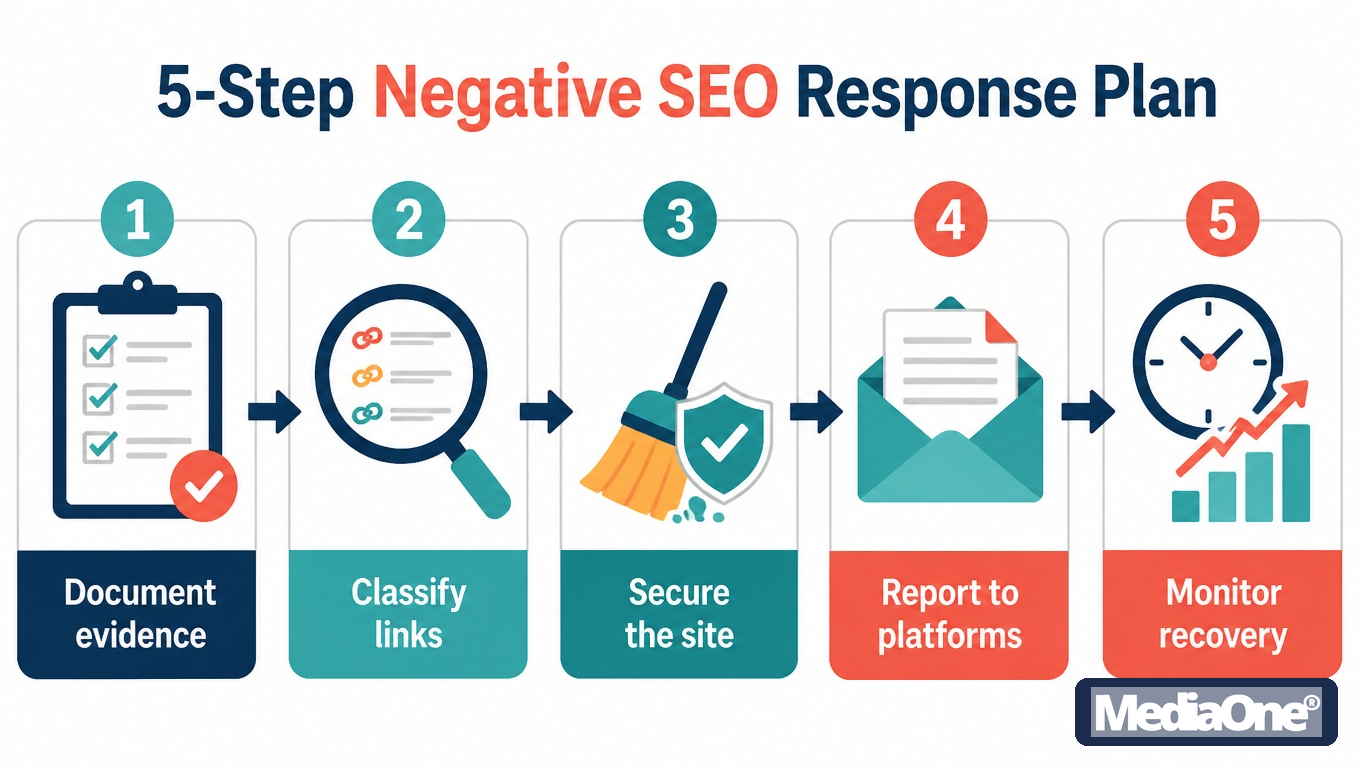
When a traffic drop looks like an attack, the instinct is to act fast: disavow everything, change the site, file a complaint. That instinct usually makes recovery slower. Sites that recover fastest spend the first few days collecting evidence and making no changes at all. The steps below run in that order for a reason: evidence before action, security before link clean-up.
Step 1: Document the evidence before changing anything
Capture the state of the site as it is now. Every fix you make will overwrite something you may later need to prove the attack happened. Record the following before touching anything:
- Rankings and traffic: export Search Console performance data for the last 90 days, filtered by query and by page.
- Backlink profile: export the links report from Search Console and at least one third-party crawler (Ahrefs, Semrush or Majestic). Save each file with a date in its name.
- Indexed pages: run a site:yourdomain.com search and note the count. Sudden growth in indexed pages, especially with foreign-language or gambling terms, is a strong signal of injection.
- Reviews and profile changes: screenshot your Google Business Profile reviews and insights, and note any new reviews posted in a short window.
- Scraped copies: search distinctive sentences from your key pages in quotation marks to find duplicates.
- Server and CMS logs: keep access logs and login records. These show whether anyone accessed admin areas or uploaded files.
Store everything in one folder with a written timeline. Google’s own documentation on manual actions and spam policies makes clear that decisions depend on what is visible in your reports, so your record should match what Search Console shows on the day you took it.
Step 2: Audit and classify the links before disavowing
Not every bad link is an attack, and disavowing legitimate links can cost you real domain authority. Classify each suspicious domain before deciding anything:
|
Category |
Typical signals |
Action |
|
Spam or link farm |
Hundreds of links from unrelated sites, exact-match anchor text, thin or auto-generated pages |
Disavow the domain |
|
Hacked or injected site |
The linking page contains pharma, casino or unrelated content |
Disavow the domain or specific URLs |
|
Scraper site |
Copies your content, links back with no context |
Disavow only if the links carry manipulative anchors; otherwise pursue a takedown first |
|
Legitimate but weak |
A real site, relevant topic, one or two links |
Leave alone |
|
Your own partner or customer |
Known business relationship |
Leave alone |
Look for a sudden spike rather than a steady trickle. A burst of several hundred links from new domains within a few weeks, with identical anchor text, is the pattern most often linked to a deliberate campaign. Check the first-seen dates in your crawler export to confirm it. Be cautious about domain-level disavows for large, respectable sites — once a domain is disavowed, every link from it is ignored, including the good ones.
Step 3: Building and submitting a disavow file correctly
The disavow file is a plain text file, uploaded through the disavow links tool in Google Search Console. Google processes it with its own crawl and index cycle, so changes are not immediate. Format it as follows:
- One entry per line.
- domain:example.com disavows an entire domain.
- A full URL disavows a single page.
- Lines beginning with # are comments and are ignored by Google — use them to note your reasons and dates.
Before you submit, check these points:
- The file is UTF-8 encoded with no hidden characters.
- Every domain is spelt correctly. A typo disavows nothing, and you will not see an error.
- You have kept a copy of the previous file, so you can reverse a mistake.
- You are uploading the complete list each time. Each upload replaces the previous file, so a partial upload removes earlier entries.
Expect a delay of several weeks before the effect shows. Google’s documentation notes that disavowing is a signal rather than an instant command, and recrawling is required before the change takes effect. Set a date to review results — track impressions and average position weekly in Search Console before deciding on further action.
Step 4: Securing the site against injection and hacking
If the audit found injected pages or spam URLs in your index, the attack is ongoing until you close the entry point. Disavowing links does nothing about a site that keeps generating new spam pages. Work through this list:
- Change all admin and FTP passwords, then revoke active sessions.
- Update the CMS core, themes and every plugin, and remove any that are unused or unmaintained.
- Check for unknown admin users and delete any you cannot account for.
- Scan for injected code using a file-integrity tool or your host’s malware scanner. Search your files for strings such as eval(base64_decode or unfamiliar <script> tags.
- Restore affected pages from a clean backup dated before the injection, then confirm the backup is clean.
- Request a review in Search Console once the site is clean — the Security Issues report tells you what Google detected.
- Add security headers such as Content-Security-Policy and HSTS, and restrict admin access by IP where your team allows it.
The Cyber Security Agency of Singapore publishes practical guidance for small organisations on securing websites and managing credentials, which is a reasonable reference for internal policy.
Step 5: Reporting scraped content and fake reviews through official channels
Some attacks are not on your site at all. Scraped copies and fake reviews sit on platforms you do not control, so you need to use each platform’s own reporting route.
For scraped content:
- Identify the host and registrar using a WHOIS lookup.
- Send a takedown notice to the host under its copyright or DMCA-style process, quoting the original URL and the copied URL.
- If the scraper is in Google’s results, use the copyright removal request form in Google Search Central.
- Keep copies of every notice and response.
- You can also file a search quality user report to flag the violating site to Google directly.
For fake reviews on Google Business Profile: follow the reporting flow in the tactics section above — flag each review with the correct policy reason, keep dated screenshots, and escalate rejections with the evidence file from Step 1.
Legal and Reporting Options in Singapore
Most negative SEO attacks end in a Google Search Console submission and a quiet clean-up, not a courtroom. But some cases involve hacked servers, stolen customer records or fraud, and those carry legal weight. Knowing which route fits which situation saves weeks of wasted effort. Taking legal or reporting steps does not replace the technical response — it stops the attack and creates a record.
When to involve the police and the Cyber Security Agency of Singapore
Report to the police when the attack crosses into criminal conduct. Unauthorised access to a computer system and interference with data are offences under the Computer Misuse Act in Singapore. Hacking your CMS to inject spam pages, defacing your site or planting malware are the clearest examples. Fake reviews are harder to pin on a criminal charge, but depending on the facts, they may involve fraud or false statements, so the police can assess them.
Report to the Cyber Security Agency of Singapore (CSA) when the incident is technical and may affect others. CSA can advise on containment, especially if a compromised site is hosting malware that could reach visitors. Use the reporting channels listed on the CSA website, and ask for a reference number for every report — insurers, regulators and lawyers will ask for it later.
A simple rule: if the attack gained access to your systems, report to police and CSA. If it only involved public signals such as links or reviews, use platform reporting first, and escalate to police only if the pattern is persistent, organised or accompanied by threats.
Personal Data Protection Commission considerations where customer data is affected
The Personal Data Protection Act 2012 (PDPA) applies once an attack exposes personal data you hold. Under the PDPA, organisations must notify the Personal Data Protection Commission (PDPC) and affected individuals where a data breach is likely to result in significant harm or is of significant scale. The PDPC sets out the notifiable threshold and the timeline on its website — check the current guidance rather than relying on memory, since the regime is updated over time.
An SEO-specific point matters here. A hacked site that serves injected pages may also have exposed a customer database, a contact form or login credentials. Treat the SEO clean-up and the data investigation as two separate tracks: preserve logs, determine what data was accessible, and decide on notification with legal advice if the answer is unclear.
Evidence standards for a civil claim and when to engage a lawyer
A civil claim — for defamation, malicious falsehood, passing off or breach of contract with an agency — depends on proof. Courts want to see a clear chain from the act to the harm. Keep the following:
- Dated screenshots and full-page captures of the defamatory or spam content, with URLs visible.
- Search Console and analytics exports showing the traffic or ranking loss, with dates.
- Server and CMS logs showing unauthorised access or injection events.
- Your own record of every report made, including reference numbers and responses.
- A written timeline linking the attack to the loss, with alternative causes noted and ruled out.
Engage a lawyer when any of these apply: the attacker is identifiable, and you want to demand takedown or compensation; a data breach notification decision is uncertain; a competitor’s conduct may amount to unlawful interference; or a demand letter may be needed. A lawyer can also help preserve evidence before it disappears — hosting logs are often rotated within days. For a first consultation, bring the evidence file described above, not just a summary of what happened. This guide does not constitute legal advice.
Prevention: Hardening Your Site and Monitoring Continuously
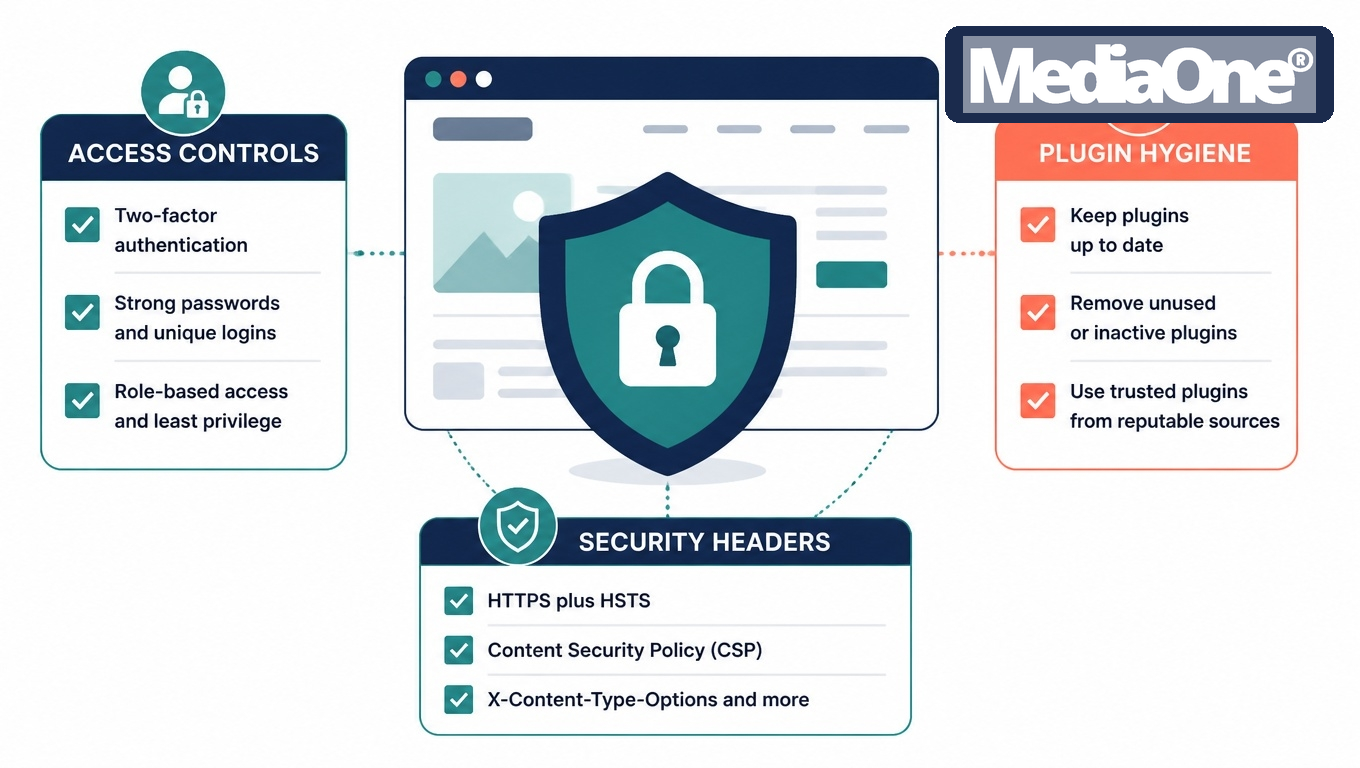

Most businesses only check their backlinks and rankings after a traffic drop. By then, a toxic link campaign or a hidden injection may have run for weeks. Prevention is cheaper than recovery because it shortens the window between an attack starting and someone noticing it. The aim is not to make your site unattackable — no site is — but to detect changes within days instead of months and to make the cheapest attacks fail.
Monitoring checklist: backlinks, rankings, reviews and indexed pages
Monitor four surfaces, each on a fixed schedule:
- Backlinks, weekly. Export new referring domains from Search Console’s Links report and a third-party index such as Ahrefs or Semrush. Flag new referring domains above your baseline of [X] per week, any domain with a spam-like profile, and any exact-match anchor text on commercial terms.
- Rankings and impressions, weekly. Track your primary and branded queries in Search Console’s Performance report. A sudden fall confined to one page or one query cluster points to a targeted problem; a site-wide fall points more often to a technical fault or an update.
- Reviews and Google Business Profile, weekly. Check review velocity and star distribution. A run of one-star reviews from accounts with no other activity, or a sudden change to your listing’s category or phone number, needs investigation the same day.
- Indexed pages, monthly. Run a site: query and compare the count with your sitemap. Pages you never published appearing in the index are a strong sign of injected content or scraping; Search Console’s Pages report shows the same thing with less noise.
Keep the log in a shared spreadsheet with a date, the metric, the value and the change. A baseline you can compare against turns a vague feeling into evidence.
Technical hardening: access controls, plugin hygiene and security headers
Most injected spam pages and cloaked redirects enter through the content management system, not through Google. Hardening the platform removes the easiest route in.
- Access controls. Give each staff member their own account with the minimum role needed. Remove accounts of former staff and contractors on the day they leave. Enforce two-factor authentication for every admin login, and restrict the admin area by IP address where your team works from fixed locations.
- Plugin and theme hygiene. Delete plugins and themes you no longer use, rather than just deactivating them. Update on a fixed cycle and subscribe to the vendor’s security notices — abandoned plugins are a common entry point because nobody patches them.
- File integrity. Use a file-integrity monitor or your host’s malware scanner to alert you when core files change. Review the list of administrator accounts monthly.
- Security headers. Set HTTPS with HSTS, a Content Security Policy that limits where scripts can load from, and X-Frame-Options or frame-ancestors to stop your pages being embedded maliciously. These do not stop every attack, but they close off several common injection techniques.
- Backups. Keep dated, off-site backups and test restoring them. A clean restore point is often faster than cleaning an infected site by hand.
The Cyber Security Agency of Singapore publishes guidance on securing websites and web applications, which is a sound baseline to check your setup against. Review these controls at least once a year.
Alert thresholds and who in the team owns each response
An alert only helps if someone knows what to do with it. Set thresholds in advance and assign an owner to each. The table below uses placeholders: replace [X] with your own baseline after the first quarter of data.
|
Signal |
Worked threshold example |
First response |
Owner |
|
New referring domains |
More than [X] new domains in a week, against a baseline of [Y] |
Log and classify within 2 working days |
SEO lead |
|
Organic traffic to one page |
Drop of more than [Z]% over 7 days |
Check Search Console for manual actions and recent link spikes |
SEO lead |
|
Site-wide organic traffic |
Drop of more than [Z]% over 7 days |
Check for outages, crawl errors and algorithm update timing before assuming an attack |
SEO lead with web developer |
|
Indexed page count |
Growth of more than [N] pages without a publishing event |
Search for the unknown URLs and check for injection |
Web developer |
|
Review velocity or rating |
More than [M] one-star reviews in 7 days |
Report suspicious reviews and document them |
Marketing manager |
|
Admin login from a new location |
Any |
Lock the account and reset credentials |
IT or web administrator |
Set your own numbers after the first quarter of data — a site that gains many referring domains from a genuine press campaign needs a different line from one that gains a handful a month.
Name a single person as the decision-maker for any suspected attack. Shared ownership usually means nobody acts for three weeks. The decision-maker should have authority to change credentials, pause paid campaigns and contact the host without waiting for approval, and the escalation path should be agreed in advance. The full response sequence, including disavow decisions and evidence capture, is set out in the Step-by-Step Response Plan.
Conclusion and Summary
Negative SEO is rarely a single dramatic event. It usually appears as a slow decline in visibility, a spike of spammy links, or a Google Business Profile full of reviews that do not match real customers. Businesses recover fastest when they treat it as an operational problem with a clear sequence of steps: confirm the symptoms against other possible causes, document the evidence before changing anything, audit and classify the hostile links and disavow only what you cannot have removed, close the security gaps that let attackers in, report scraped content and fake reviews through the official channels, and allow recovery the time it needs — a disavow file and a recrawl are measured in weeks, not days.
If your team cannot handle the situation internally, bring in SEO specialists early rather than after months of stalled recovery. The goal is not to win an argument with an attacker — it is to put your site back in a state where Google can evaluate it on its merits again. If the damage is hard to quantify, a professional SEO audit will show what the attack actually cost you.

Frequently Asked Questions
Can a competitor really hurt my rankings with backlinks?
Yes, but usually less than the attack’s reputation suggests. Google’s documentation on spam policies states that it generally ignores links it considers spam, so the target site is rarely penalised for them. The real risk comes from volume and pattern: a sudden surge of links from link farms, adult sites or hacked pages can trigger a manual action or dilute trust signals, particularly for a small site with a thin link profile. Check the Links report and Manual Actions section in Google Search Console before assuming the link spike is the cause.
How do I know if my site has been hacked for SEO spam?
Look for signs that visitors and Google see different things. Search for site:yourdomain.com and scan the results for pages, product names or Japanese or pharmaceutical keywords you never published. Check Search Console for a “Security issues” notice, then open a few pages in a private browser window and use the URL Inspection tool’s rendered view. Redirects that only fire for search traffic, hidden text and unknown admin users are classic indicators. If you find them, take the affected sections offline, change all admin and hosting passwords, and clean the infection before requesting a review.
Should I always use the disavow tool after a link attack?
No. Google’s guidance is that the disavow tool suits cases where you have a manual action for unnatural links, or where you are confident spammy links are causing harm and you cannot get them removed. For most attacks, Google’s systems already ignore the links, so a disavow file adds risk if you list genuine links by mistake. Audit first, request removal from the worst linking sites, and disavow only what remains and what you can justify. Record each decision so you can explain it if you later need a reconsideration request.
Can fake reviews affect my Google Business Profile ranking, and how do I report them?
Fake reviews can affect local visibility and click-through, and a sudden run of one-star reviews can suppress trust in your listing. To report them, open the review on Google Maps, select the menu beside it and choose the option to flag it as inappropriate. Google’s Business Profile Help documentation describes the policies a review must break, such as conflicts of interest, spam or content about a place the reviewer has not visited. Keep screenshots and dates, because removal is not guaranteed and reports can take days to weeks to process.
How long does it take to recover from a negative SEO attack?
Recovery usually takes weeks to several months. You can disavow links or clean a hack quickly, but Google must recrawl affected URLs and reprocess link signals before rankings move. Manual actions add a review step after you submit a reconsideration request, and responses can take a few weeks. Expect a gradual curve rather than an instant rebound, and track impressions and average position weekly in Search Console to see whether the trend is turning.
Is negative SEO a crime in Singapore?
It can be, depending on what the attacker did. Gaining unauthorised access to a website or its admin accounts can be an offence under Singapore’s Computer Misuse Act. Fraud, defamation or harassment may also apply if fake content or reviews were used to deceive or damage your business. Prosecuting a large volume of low-quality links is harder because it may not involve unauthorised access, which is why evidence of intrusion matters. Preserve logs, screenshots and timestamps, and speak to the police or a lawyer if you believe a criminal offence has occurred.