Local SEO is the practice of optimising your online presence to rank in location-based search results: the Google Maps pack, local business listings, and “near me” queries. In Singapore, where mobile is the primary search channel for location-based queries, appearing in local results directly translates to foot traffic and phone calls for your business.
Unlike national SEO, which targets Singapore-wide keywords like “best restaurant Singapore”, local SEO serves people searching within or near specific neighbourhoods: Clementi, Bukit Timah, Tampines, Jurong East. A hawker stall optimised for local search captures customers five minutes away. Without it, you’re invisible to them, even if your business is excellent.
Singapore’s compact geography means local optimisation reaches ready-to-visit customers faster than national campaigns. A 5 km radius covers multiple planning areas. Mobile users dominate the search landscape, with most local searches happening on the move, when customers are ready to visit immediately.
Quick Summary
Local SEO drives foot traffic by making your business visible in location-based searches. This guide covers everything Singapore business owners need to know: why local SEO matters in a mobile-first, densely populated market; how to optimise your Google Business Profile and citations; the role of reviews and trust signals; and how to measure real business outcomes like foot traffic and phone calls. This guide covers actionable steps, common mistakes to avoid, and industry-specific strategies for restaurants, clinics, retail, and tradespersons.
Why Local SEO Matters for Singapore Businesses
Three forces make local SEO non-negotiable here.
Mobile-First Search Behaviour
Singaporeans search for services while commuting or between tasks. Queries like “best coffee near me”, “car park MRT stations”, and “dental clinic Orchard” spike during lunch and evening hours. Google’s algorithm prioritises local results for mobile searches. If you’re not optimised, competitors appear instead.
Businesses in the local pack (the three map results at the top of search results) get clicked significantly more often than those ranked lower, regardless of whether they are the highest-ranked organic result. This intent-driven traffic converts well. Someone searching “plumber Yishun” right now is more likely to call you immediately than someone reading a 5,000-word article about plumbing solutions.
Mobile is the primary search channel for Singapore users. Google’s algorithm recognises local intent and serves local results by default for mobile queries. A mobile user searching “dentist near me” at 6 pm expects results within 1-2 km, ready to call or visit. If your site takes five seconds to load on 4G, you lose that user before they see your business name.
High Population Density and Foot-Traffic Competition
Singapore has one of the world’s highest population densities. A single neighbourhood might have 50 restaurants, 20 salons, 15 clinics. Local SEO separates the visible from the lost.
Ranking first in Google Maps or the local pack typically correlates with increased walk-in traffic. Users click the top result more often than those ranked lower. Each position down the rankings receives significantly fewer clicks. Being invisible in local results costs you real customers daily.
The gap between rank 1 and rank 5 in local search is visible, measurable, and costs real revenue.
Google’s Local Algorithm Preferences
Google’s local ranking factors reward businesses that signal legitimacy and proximity. These factors are measurable and actionable:
- Google Business Profile completeness and accuracy
- Review volume and star rating
- Local citations (verified business mentions on other websites)
- Recency of updates and fresh content
- Distance from the searcher
- Prominence on the web (backlinks and mentions)
Businesses ignoring these lose to those actively optimising them.
Google Business Profile: The Foundation of Local SEO
Your Google Business Profile (the free business listing on Google Maps) is the control centre of local SEO in Singapore. It appears in the Google Maps pack, knowledge panel, and local search results. Incomplete or inaccurate profiles rank lower and lose customer trust.
Claim and Complete Your Profile First
If you haven’t claimed your Google Business Profile yet, do this before any other SEO work. Unclaimed profiles often contain outdated or incorrect information that confuses potential customers and damages Google’s trust in your data.
Visit business.google.com, search for your business name, and verify or claim it. You’ll receive a verification postcard at your business address within 1-2 weeks. Some businesses can verify via phone or email, particularly newer or less-established ones.
Ensure Business Name, Address, and Phone Consistency
Ensure consistency across your website, Google Business Profile, and all directory listings. A mismatch confuses Google’s algorithm and damages your credibility.
For example, if your ACRA registration lists “Clementi Dental Clinic Pte Ltd” but your Google Business Profile says “Clementi Dental Clinic” and your website says “Clementi Dental”, Google struggles to connect these references and may treat them as separate businesses.
Use your full legal business name everywhere. Format phone numbers identically: “+65 6123 4567” not “6123 4567” or “+6561234567”. Use consistent postcode format, for example, always “Singapore 129736”, not “S129736”.
Define Service Areas and Categories
If you’re a tradesperson, plumber, or delivery service serving multiple HDB estates or planning areas, list all service areas explicitly in Google Business Profile. Do not just enter your office postcode and hope.
Choose primary and secondary categories with precision. A restaurant might be “Restaurant” (primary) and “Hawker Centre” (secondary). A salon might be “Hair Salon” (primary) and “Beauty Salon” (secondary). Vague categories like “Business” reduce relevance and confuse the algorithm.
Update Hours and Add Attributes
Update opening hours immediately for major public holidays. Singapore sees closures for Chinese New Year, Hari Raya, Deepavali, and Christmas. Frustrated customers who show up to a closed door leave negative reviews and search elsewhere.
Add attributes that match user intent: “Takeaway”, “Dine-in”, “Wheelchair Accessible”, “Parking Available”, “Accepts Cards”, “WIFI Available”. Each attribute increases relevance for specific searches.
Upload Photos and Videos
Upload 20 or more high-quality photos showing your space, team, products, and customers. Include storefront or entrance, interior or workspace, product or service in action, team members, customer photos (with permission), and recent updates or seasonal changes.
Videos typically improve engagement compared to photos alone. Authenticity matters more than production quality.
Write a Specific Local Business Description
Write a 750-character business description that includes local landmarks or HDB blocks you serve. Avoid generic boilerplate.
Instead of “We provide quality dental care”, try “Clementi Dental Clinic is 3 minutes from Clementi MRT station, serving residents of Clementi, Sunset View, and Bukit Timah for 15 years. We offer same-day appointments for emergencies and accept all major insurance plans. Wheelchair accessible, ample carpark.”
Specific, local descriptions increase click-through rates and signal authority to Google.
Manage Reviews Systematically
Review volume and star rating directly influence local ranking. A business with 50 reviews and a 4.3-star rating ranks higher than one with 5 reviews and a perfect 5-star rating.
Respond to all reviews within 7 days. Thank positive reviewers by name. For negative reviews, apologise, take the conversation offline (provide a direct phone number or email), and explain what you’ll do differently.
Public responses to negative reviews demonstrate accountability and improve trust more than deleting the review would. Google’s algorithm recognises this engagement.
Generate Steady Review Flow
Post-Purchase Email Strategy
Send an automated email 2-3 days after purchase. Include a direct link to your Google Business Profile review page. Emails with a direct link see higher review response rates than generic requests.
QR Code at Checkout
Display a QR code at checkout or on receipts linking to your review page. Caption it: “Help us improve. Rate your experience.” Response rates are higher for QR codes than links in emails.
SMS Reminders
SMS has high open rates. Send a text 1-2 days after purchase with a short message and review link. SMS response rates exceed email response rates.
Staff Training
Train staff to verbally request reviews during checkout: “If you’re happy with your visit, we’d love a quick Google review. Here’s the link.” Verbal requests combined with a QR code see the highest conversion.
Incentivise Reviews Correctly
You may offer a discount or entry into a prize draw for customers who leave a review. Ensure compliance with Google policies and consult legal counsel before incentivising reviews. Offer the same incentive regardless of rating, and make this clear: “Leave a review and you’re entered to win.”
Local Citations and Business Listings in Singapore
A citation is any mention of your business name, address, and phone number (NAP) on external websites. Google uses citations to verify legitimacy and improve local ranking. Each citation acts like a vote of confidence from another website.
Top Singapore Business Directories (by Official Credibility and Reach)
| Directory | Purpose | Key Details |
|---|---|---|
| ACRA Business Search (www.acra.gov.sg) | Official corporate registry | Most authoritative citation source. Ensure company name and address match your legal registration. |
| Google Maps (maps.google.com.sg) | Primary local platform | Your Google Business Profile creates a citation influencing every local search result. |
| Singapore Yellow Pages (www.yellowpages.com.sg) | Industry-specific directory | Claim your listing and ensure NAP consistency. |
| Facebook Business Page | Social platform citation | Keep updated and ensure consistency with other platforms. |
| PropertyGuru (www.propertyguru.com.sg) | Real estate directory | Primary for property-related services. |
| Hungrygowhere (www.hungrygowhere.com) | Food and beverage reviews | Dominant platform for F&B in Singapore. |
| Singapore Dental Council Directory | Medical directory | Essential for dental clinics. |
| Ministry of Health Clinic Register | Medical directory | Primary for medical services. |
Submit to 10-15 High-Authority Directories
Submit your business to at least 10-15 directories, prioritising ACRA, Google Maps, Yellow Pages, and Facebook. Ensure NAP consistency across all platforms.
Even a small variation breaks the citation’s value. “Singapore 123456” versus “S123456” versus “Singapore 123456” in the postcode field tells Google these might be different businesses. Use identical formatting everywhere.
Use your full business name consistently. If you’re registered as “Clementi Salon & Spa Pte Ltd”, use this everywhere. Do not abbreviate to “Clementi Salon” on some listings.
Avoid citation farms (mass submission services that blast your information to dozens of low-quality directories). These actually harm your credibility. Focus on 10-15 established, high-authority Singapore directories instead of 100 low-quality ones.
Audit Citation Consistency
Use manual searches to check consistency. Search your business name in Google: “[Your Business Name]” “[Your Address]”. Note any variations in how your information appears.
Tools like Yext (www.yext.com) and BrightLocal (www.brightlocal.com) automate citation audits and flag inconsistencies, though they charge monthly fees. For a small business, manual audits every three months work fine.
If you find a listing with incorrect information, contact the directory directly to request an update. Most directories respond within 1-2 weeks.
Local Keywords and Search Intent in Singapore
Local SEO keywords differ from national ones. Effective local keywords combine a service, location, and intent.
Local Keyword Patterns and Intent
| Keyword Type | Example | Search Intent | Business Action |
|---|---|---|---|
| Neighbourhood + service | “dentist Clementi” | Find a nearby service, ready to visit | Rank locally for your neighbourhood |
| Nearby modifier | “F&B near Bugis MRT” | Searching on mobile, need immediacy | Optimise for “near [landmark]” variants |
| Review-seeking | “best hawker Tiong Bahru” | Quality signal, comparison shopping | Build reviews and local authority |
| Service area | “plumber Yishun HDB” | Local tradesperson for home repair | Create service-area landing pages |
| Postcode search | “gym 228216” | Explicit location targeting | Include postcodes in schema and content |
Research Local Keywords That Drive Revenue
Google Maps search bar autocomplete reveals high-intent local keywords people are actually searching. Type “dentist near” and note what Google suggests. These are real, high-intent queries.
Google Search Console shows what local keywords already drive traffic to your site. Log in, go to Performance, and filter by country (Singapore) and device (Mobile). Sort by impressions. You’ll see the local keywords you’re already ranking for, even if not in the top 3.
Check competitor websites. If the top-ranked dental clinic in Clementi targets “dentist Clementi”, “best dentist near Clementi”, and “paediatric dentist Clementi”, these are proven keywords worth targeting.
Use Google Trends (trends.google.com) to identify seasonal local demand. “Best hawker Tiong Bahru” might spike during lunch hours or weekends. Time content releases accordingly.
Avoid Keyword Stuffing and Location Mistakes
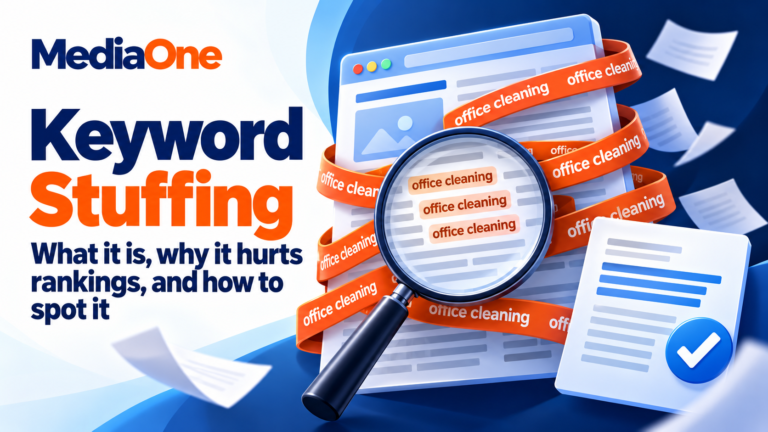
Do not stuff multiple locations into your homepage: “Dentist Clementi | Dentist Tiong Bahru | Best Dentist Singapore | Dentist Jurong”. This confuses users and signals low quality to Google.
Instead, target one primary location per page. Create separate service-area pages for secondary locations:
- Homepage: primary location (for example, Clementi)
- /clementi-dentist: Secondary coverage with local content
- /tiong-bahru-dentist: Secondary coverage with local content
Each page targets 2-4 local keywords naturally, without repetition.
On-Site Optimisation for Local Search
Your website content must reinforce your local relevance. Google’s algorithm reads on-page signals to validate what your Google Business Profile claims.
Add LocalBusiness Schema Markup
Add structured data (schema markup) to your homepage or footer so Google instantly recognises your business, address, and type.
{
“@context”: “https://schema.org”,
“@type”: “LocalBusiness”,
“name”: “Clementi Dental Clinic”,
“address”: {
“@type”: “PostalAddress”,
“streetAddress”: “123 Clementi Road”,
“addressLocality”: “Singapore”,
“postalCode”: “129736”
},
“telephone”: “+65 6123 4567”,
“url”: “https://clementi-dental.sg”
}
This tells Google your business name, exact address, phone, and website URL without relying on page content alone. Google uses this structured data in local search results and voice search responses.
Test your schema with <a href=”https://search.google.com/test/rich-results”>Google’s Rich Results Test</a>.
Display NAP Prominently
Include your full business name, address, and phone number prominently on your homepage header or footer. Make the address clickable and map-linked. This signals to Google that you control this location.
Users also expect this information to be immediately visible. Hiding it in a buried “Contact Us” page frustrates users and weakens local relevance signals.
Create Local Content Reinforcing Your Coverage
Write about local landmarks, HDB estates, or transport links you serve. A salon in Jurong East might write “Hair colour near Jurong East MRT” or “Perms available in Jurong, 5 mins from station.”
A clinic in Bukit Timah serving nearby areas might create content like “Paediatric clinic near Bukit Timah, Thomson, and Novena” with a paragraph about transport and parking near each area.
This content targets local keywords naturally while signalling to Google which areas you serve.
Build Service-Area Pages for Multi-Location Coverage
If you serve multiple neighbourhoods, create individual pages for each major area. Each page targets local keywords and reinforces coverage to Google.
Structure: /clementi, /tiong-bahru, /bukit-timah
Each page should have 500 or more unique words with local content specific to that neighbourhood: transport options, landmarks, local customer testimonials, or area-specific services.
Do not duplicate the same generic content across service-area pages. This is treated as thin content and damages ranking.
Optimise Meta Titles and Descriptions
Include location in your meta title: “Dentist Clementi | Same-Day Appointments | [Brand]”
Meta description should mention service area: “Clementi Dental Clinic near MRT. Same-day emergency appointments. Serving Clementi, Sunset View, Bukit Timah. Open weekends.”
These appear in search results and influence click-through rates. Users searching “dentist Clementi” click more readily on a title mentioning Clementi than a generic title.
Building Local Backlinks and Authority in Singapore
Backlinks (links from other websites to yours) signal authority to Google. Local backlinks, links from Singapore-based websites, carry extra weight for local search ranking.
High-Value Local Link Sources
Local business directories and chambers
Singapore Chinese Chamber of Commerce, Singapore Indian Chamber of Commerce, Singapore Malay Chamber of Commerce, industry associations. Many have directories of member businesses. Membership often includes a backlink.
Community websites
HDB Estate community portals, neighbourhood blogs, local lifestyle sites. Links from community sites signal local relevance strongly.
Local media and news
The Straits Times, Business Times, Channel NewsAsia, AsiaOne. A mention in local news is rare but extremely valuable.
Industry bodies
Law Society Singapore, Singapore Medical Council, Singapore Institute of Architects, Real Estate Development Board. These sites link to accredited practitioners and specialists.
Local partner businesses
Other non-competing local businesses you collaborate with. A florist links to a wedding venue. A catering company links to event planners. Partnerships create mutual benefit and backlinks.
Practical Local Link-Building Tactics
Sponsor local events (school sports days, estate carnivals, charity runs) and request a mention and link from the event website or local Facebook pages.
Create local guides (for example, “Best cafés within 500m of Tiong Bahru MRT”) that local bloggers and community websites naturally want to link to.
Publish case studies or success stories featuring real local clients. Reach out to relevant local media for coverage.
Partner with complementary businesses for co-marketing and mutual linking. A salon and a day spa refer clients and link to each other. This builds local authority for both.
Apply to local award programmes (“Singapore Best Salon”, “Sustainability Champion”, “Community Excellence Award”). Winners often receive links and media coverage.
Avoid low-quality links from link farms or foreign directories irrelevant to Singapore. One link from a local authority site is worth 50 links from spam directories.
Reviews, Ratings, and Trust Signals in Local Search
Review volume and star rating directly influence local ranking and user behaviour. Businesses with more reviews typically rank higher than those with fewer reviews, all else equal. Users also rely on reviews to make decisions: 90% of consumers read reviews before visiting a local business.
Respond to Every Review Within Seven Days
Respond to all reviews, positive or negative, within 7 days. Unanswered reviews signal that you do not monitor or care about feedback.
Thank positive reviewers by name and highlight specific compliments: “Thank you, Priya. We’re glad our 30-minute service impressed you.”
For negative reviews, apologise, take the conversation offline (provide a phone number or email), and explain what you’ll improve. Public responses to negative reviews increase trust more than silence or deletion would.
Example response to a negative review:
“We’re sorry your experience wasn’t up to standard. We’ve retrained our team on [specific issue] and would welcome a second chance. Please call us at +65 6123 4567 to discuss.”
Expand Beyond Google Reviews
While Google reviews are primary, also encourage reviews on Facebook, Hungrygowhere (dominant for F&B in Singapore), CarParkSG (parking services), and industry-specific sites.
Aggregate star ratings across platforms boost overall perceived authority. A business with 50 Google reviews, 20 Facebook reviews, and 15 Hungrygowhere reviews appears more established than one with 50 Google reviews alone.
Mobile Optimisation for Local Search
Mobile is the primary search channel for Singapore users. Google’s algorithm prioritises mobile-friendly sites for ranking, especially for local searches. A business that is fast and easy to use on mobile ranks higher than a slower competitor, all else equal.
Ensure Fast Mobile Page Speed
Mobile pages should load in under 3 seconds on a 4G connection. Test with <a href=”https://pagespeed.web.dev”>Google PageSpeed Insights</a>.
Optimisation tactics include compressing images without losing quality (use WebP format if possible), enabling lazy loading (images load as user scrolls), using a Content Delivery Network (CDN) to serve images from Singapore-based servers, minimising JavaScript and CSS files, and disabling auto-playing videos (they drain bandwidth and slow load).
A mobile page that takes 5 or more seconds to load loses 40% of users before it finishes loading.
Use Mobile-Responsive Design
Your site must adapt to phone screens (320px-480px width) without horizontal scrolling. Google tests this automatically. Use <a href=”https://search.google.com/test/mobile-friendly”>Google’s Mobile-Friendly Test</a> to identify issues.
Add Click-to-Call Buttons
Make phone numbers clickable on mobile using <a href="tel:+6561234567">+65 6123 4567</a>. When tapped, it triggers a call directly from the phone. Users searching “plumber near me” should be one tap away from calling you.
Embed Google Maps
Embed your Google Business Profile map on your contact page so mobile users can instantly navigate to you using their default maps app. Use the embed code from Google Business Profile itself.
Format Content for Mobile Scanning
Mobile users scan content quickly. Use short paragraphs (3-4 sentences max), bulleted lists instead of dense prose, clear headings (H2, H3), short sentences (under 18 words average), and white space between sections.
A wall of text loses mobile users immediately.
Local SEO Tools and Monitoring for Singapore Businesses
Effective local SEO requires regular monitoring and iteration. These tools give you visibility into how customers find you and where to improve.
Essential Monitoring Tools
Google Business Profile Insights (free, built-in)
Shows how locals find you: search queries typed, actions taken (phone calls, website clicks, direction requests), and foot traffic patterns. Review this monthly. If you’re getting search impressions but low click rates, your title or description needs improvement.
Google Search Console (free)
Shows ranking keywords, click-through rates (CTR), and indexing issues. Filter by location to see local search performance. A keyword with 500 impressions but 2% CTR is underperforming; improve the title and description.
Google Analytics 4 (free)
Track user behaviour, conversions, and foot-traffic via location data. Set up conversion tracking for phone calls (use Google Call Tracking) and online bookings.
BrightLocal (paid, approximately SGD 30-100 per month)
Monitors your local rank versus competitors for tracked keywords. Shows citation consistency and reviews across platforms. Useful if you want automated rank tracking.
SEMrush or Ahrefs (paid, approximately SGD 100-400 per month)
Track backlinks, competitor analysis, and local SEO audit. Overkill for most small businesses but useful if you have significant competition.
HubSpot or Mailchimp (free tier available)
Automate review request emails. Set up a workflow that sends a review request email 2-3 days after a customer purchase or transaction.
Monthly Monitoring Checklist
- Update hours for upcoming public holidays (Chinese New Year in Jan/Feb, Hari Raya in Mar/Apr, Deepavali in Oct/Nov, Christmas in Dec)
- Respond to all new reviews within 7 days
- Check Google Search Console for new local ranking opportunities. Are there keywords with 100 or more impressions but 2-3% CTR? Improve your title and description
- Spot-check 3-5 directory listings for NAP accuracy. Ensure no typos or formatting changes
- Monitor top 3 competitors’ review counts, rating, and new photos. Are they gaining reviews faster than you?
- Publish a local blog post or update. Examples: “New MRT Line Impact on Our Location”, “August Public Holidays Hours Update”, “Customer Spotlight: Local Hero”
Quarterly Review and Adjustment
Every 3 months, review performance trends:
- Are phone calls increasing? (Check Google Business Profile call data.)
- Is foot traffic increasing? (Check foot-traffic analytics if you use a door counter.)
- Are new reviews coming in at a consistent rate? (Aim for 5-10 per month for steady growth.)
- Have competitor positions shifted?
- Are any local keywords dropping?
Based on this analysis, adjust strategy. Maybe boost review requests if volume is low. Maybe create more local content if competitors are outranking you on secondary keywords. Maybe expand service areas if you’re capturing demand you’re not yet serving.
Common Local SEO Mistakes in Singapore
Inconsistent NAP Across Platforms
Different postcode formats or phone number styles confuse Google’s algorithm. “Clementi Dental, 123 Clementi Rd, Singapore 129736, 6123 4567” and “Clementi Dental Clinic, Clementi Road, S129736, +65 61234567” are treated as potentially different businesses.
Standardise immediately. Use one format everywhere: full business name, street address, Singapore, postcode, full phone number with country code (+65).
Ignoring Public Holidays
Businesses that do not update hours for Chinese New Year, Hari Raya, Deepavali, or year-end closures frustrate users who show up to a closed door. Closed businesses also receive negative reviews (“No one answered the phone”, “Showed up and it was closed”).
Update hours 2 weeks in advance. Set a calendar reminder for major holidays.
Underestimating Mobile Optimisation
A 5-second mobile load time loses mobile-first users mid-search. Singaporeans are impatient on mobile; faster competitors win. Test your site on <a href=”https://pagespeed.web.dev”>PageSpeed Insights</a> monthly.
Operating Without a Review Strategy
Passive review accumulation loses to competitors actively requesting them. A business with 5 reviews will rank lower than one with 50 if the competitor’s reviews come in steadily over time and yours stall.
Treat reviews as a monthly target: aim for 5-10 new reviews per month for ongoing improvement.
Keyword Stuffing Location Names
“Dentist Clementi | Dentist Tiong Bahru | Dentist Jurong” on your homepage signals low quality to Google and looks spammy to users. Create separate location pages instead.
Ignoring Competitor Citations
If competitors are listed on 20 directories and you’re on 5, their authority outweighs yours. Audit competitor citations using manual Google searches: “[Competitor Name]” “Singapore”. Note directories they appear in. Match their coverage.
Overlooking Schema Markup
Without LocalBusiness schema, Google must infer your location and business type from page content alone. Schema markup removes ambiguity. Add it to your homepage footer.
Neglecting Review Platform Diversity
Relying only on Google reviews leaves you vulnerable. If a platform changes its algorithm or removes your reviews, you lose credibility. Diversify: encourage reviews on Google, Facebook, Hungrygowhere, and industry-specific sites.
Troubleshooting Common Local SEO Issues
| Common Issue | Likely Reason | How To Fix |
|---|---|---|
| Low click-through rate from local pack | Weak title or description; missing location keywords | Add location to meta title and description. Include neighbourhood name, MRT station, or nearby landmark |
| Inconsistent ranking positions week-to-week | Incomplete or inconsistent NAP data across citations | Audit all citations for exact name, address, phone format. Update Google Business Profile and top 5 directories immediately |
| Low review volume despite many customers | No systematic review request process | Implement email, QR code, SMS, and staff verbal requests. Aim for 5-10 reviews per month |
| Mobile page speed over 5 seconds | Uncompressed images, excess JavaScript, unoptimised assets | Use PageSpeed Insights. Compress images, enable lazy loading, minimise code, use CDN for image serving |
| Competitors appearing above you despite older business | Competitors have more reviews, better citations, or fresher content | Build reviews aggressively, add more citations, publish local blog posts monthly, keep photos/hours updated |
| Phone number not clickable on mobile | Missing tel: link formatting | Wrap phone numbers in <a href="tel:+65XXXXXXXX">+65 XXXX XXXX</a> throughout website |
Local SEO Strategy for Different Singapore Business Types
Different business types require tailored approaches.
Restaurants, Hawkers, and Cafés
Optimise for “food delivery near [MRT]”, “best [cuisine] [estate]”, and “hawker [location]”. Food photos and ratings are top decision drivers, so encourage customers to post photos of meals.
Build presence on Hungrygowhere (dominant for F&B in Singapore) and Facebook. Update menu and hours frequently. Use delivery platforms (GrabFood, Foodpanda) as citation sources; ensure NAP consistency across them.
Retail (Fashion, Electronics, Supermarkets)
Highlight “in stock” status and promotions for specific locations. Create location pages for major shopping malls (Takashimaya, Orchard Central, JEM Jurong East, Eastpoint).
Encourage customer photos of products in use. Enable user-generated content on Facebook and Instagram; tag your location.
Professional Services (Lawyers, Accountants, Consultants)
Build local links from industry associations and professional bodies. Create local case studies (without breaching confidentiality). Quality reviews from recognised clients carry more weight than quantity.
Ensure you’re listed in Singapore Bar Association, Law Society, or relevant professional directories with consistent NAP.
Medical (Clinics, Dentists, Therapists)
Comply with medical advertising regulations; avoid overstated claims. Use schema markup for appointment booking. Highlight health board accreditation and specialist qualifications.
Address common health queries with location context: “Paediatric clinic near Bukit Timah with evening hours”, “Women’s health clinic Clementi”, “Physiotherapy Tiong Bahru”.
Tradespersons (Plumbers, Electricians, HVAC)
Optimise for service-area queries: “plumber Yishun”, “electrician HDB”, “aircon repair Jurong”. Build citations on ServiceSingapore and trade directories. Use before-and-after photos to build trust.
Enable phone calls and SMS booking. Respond to inquiries within hours to win same-day jobs.
Local SEO and Voice Search in Singapore
Voice search adoption in Singapore is growing. Queries like “Where’s the nearest hawker centre?” and “Call a plumber in Clementi” are now common via Google Assistant, Siri, and smart speakers.
Optimise for Conversational Queries
Voice searches are longer and more conversational than text searches. “Where is the nearest dentist that accepts my insurance” is voice; “dentist near me” is text.
Phrase your content to answer questions naturally. “We’re located 5 minutes from Clementi MRT station” is voice-friendly. Keyword stuffing like “dentist Clementi near MRT” is not.
Use FAQ schema to structure common questions and answers. Voice assistants cite FAQ blocks. Structure questions as users would ask them: “Are you open Sundays?” not “Sunday Hours”.
Ensure Google Business Profile Completeness
Voice assistants pull directly from Google Business Profile: hours, phone number, address, website. An incomplete profile means voice results are incomplete or absent.
Ensure your business name, address, phone, hours, and categories are correct. Voice results also rely on reviews; encourage enough reviews that your rating appears in voice results.
Frequently Asked Questions
How long does local SEO take to show results?
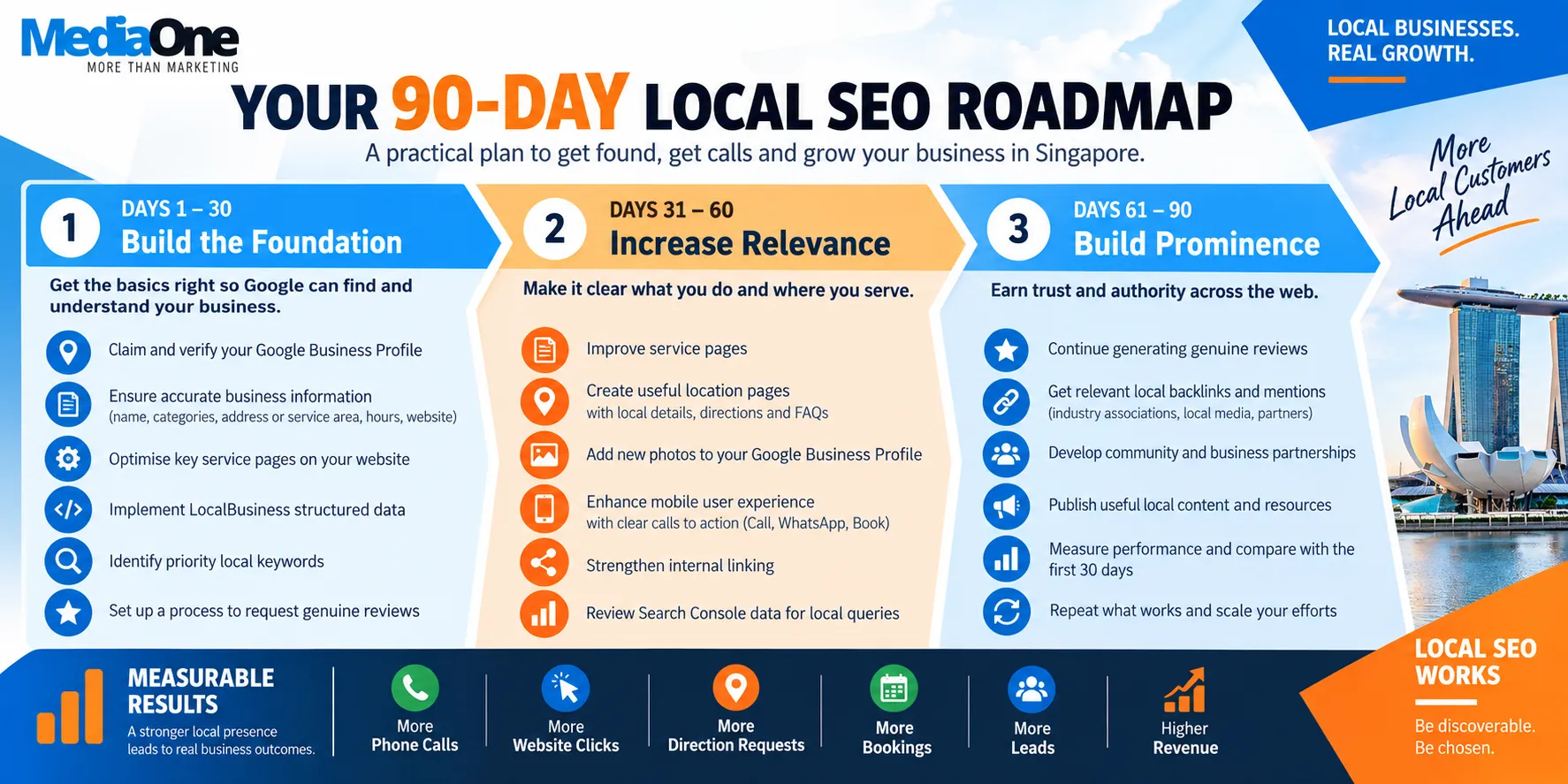
Results vary by industry, location, and competition; timelines are not guaranteed. Most businesses see movement within 4-12 weeks of consistent optimisation. Initial improvements typically come from Google Business Profile completeness and review generation. Ranking gains accelerate after 3-6 months as citations accumulate and backlinks build. Compound results (top 3 positions) often take 6 or more months in competitive neighbourhoods.
Can I optimise for multiple locations from one website?
Yes, but not from your homepage. Create separate service-area pages for each location, each with unique local content (500 or more words). Your homepage should focus on your primary location. This structure tells Google you intentionally serve each area, not that you’re keyword-stuffing.
What’s the difference between local SEO and paid local ads?
Local SEO is organic (unpaid) ranking in Google Maps, local pack, and search results. Paid local ads (Google Local Services Ads, local search ads) appear above organic results. They’re complementary: run paid ads for immediate visibility while building organic ranking. As organic ranking improves, allocate budget away from ads.
Should I create a separate Google Business Profile for each neighbourhood I serve?
No. One profile with multiple service areas listed is correct. Multiple profiles for one business can trigger Google’s duplicate-business detection and result in suspension or profile mergers, losing ranking history.
How do I respond to fake or unfair reviews?
Request removal through Google if the review violates its policies (spam, abuse, or off-topic content). If removal is denied, respond professionally and publicly, correcting any misinformation. Google’s algorithm favours businesses that respond calmly to negative reviews; public professionalism increases user trust more than silence does.
What’s the minimum number of citations I need to rank locally?
There’s no minimum, but 10-15 high-authority citations typically outperform 5 citations or 50 low-quality ones. Prioritise ACRA, Google Maps, Facebook, Yellow Pages, and industry-specific directories. Quality beats quantity.
How often should I update my Google Business ProfileHow often should I update my Google Business Profile?**
Update core information (hours, phone, address, categories) when anything changes. Refresh photos and add posts monthly. Seasonal updates (holiday hours, menu changes, promotions) should go live 2 weeks before they take effect.
Does my website need to be in English for local SEO?
No. Google ranks local results based on location signals and business relevance, not language. A Chinese-language salon website ranking in Clementi local results is common and expected. Tailor language to your customer base.
Can I pay for higher local rankings?
No. Only paid ads (Google Local Services Ads, search ads) guarantee paid placement. Organic local ranking is earned through Google Business Profile optimisation, citations, reviews, and website quality. Any service promising paid local ranking improvement is a scam.
How do I measure local SEO ROI?
Track phone calls through Google Business Profile (shows call volume and caller location). Monitor foot-traffic data if you use door counters or foot-traffic analytics software. Set up Google Analytics conversion tracking for online bookings or contact form submissions. Compare phone calls and foot traffic month-to-month. A 20% increase in foot traffic after 3 months of local SEO optimisation indicates strong ROI.
Is local SEO different for multi-location businesses?
Yes. Multi-location businesses need one Google Business Profile per physical location, each with unique address, phone, and hours. Create separate local landing pages for each location on your main website. Build local citations for each location independently. Manage reviews separately for each location. Use location-specific content and imagery. Centralised management tools like Yext help coordinate across multiple profiles while maintaining location-specific accuracy.
What happens if my business moves to a new location?
Update your Google Business Profile address immediately. Request a new verification postcard if required (usually needed only for the first time). Update all citations across directories with the new address. Create a redirect from your old location page to the new one if you’re changing URLs. Inform existing customers via email, SMS, and social media. Add a notice on your old website stating the new location. The ranking transition typically takes 4-8 weeks as Google updates its local index.
How do I compete with chain restaurants or large retailers in my neighbourhood?
Build deeper local authority through hyperlocal content. A single-location salon can outrank a chain by having more reviews, stronger community presence, and neighbourhood-specific content. Create content about local residents, HDB estates you serve, and local events you sponsor. Build relationships with local bloggers and community sites for backlinks. Encourage customer testimonials featuring local language or neighbourhood references. Chains often centralise content, making local businesses more authentic to Google’s algorithm and users.
Should I focus on Google Business Profile or my website first?
Start with Google Business Profile. It has faster ranking impact and requires less technical knowledge. A complete, optimised profile with reviews typically shows results within 4-8 weeks. Build your website foundation simultaneously, ensuring mobile optimisation and NAP consistency. Once your profile is strong, invest in website content and backlinks for sustained, compound growth. Do not delay website work, but prioritise the profile first for quicker initial visibility.
What role do social media profiles play in local SEO?
Social media profiles (Facebook, Instagram) act as local citations and trust signals. They do not directly influence Google local ranking but contribute to overall authority. Facebook and Instagram business pages with address, phone, and hours count as citations. Engagement signals (likes, comments, shares) may have indirect ranking effects. Social profiles also capture local reviews and customer content, strengthening perceived authority. Maintain consistent NAP across all social platforms.
How do I get my business on Google Maps if it’s not already there?
Visit business.google.com and search for your business name. If it does not appear, click “Create a new business” and enter your details. Provide an address (home-based businesses must use their actual address). Submit the form. Google will send a verification postcard to your business address within 1-2 weeks. Some newer or remote businesses can verify by phone or email. Once verified, your business appears on Google Maps and in local search results.
Can I rank for local keywords if I operate from home?
Yes. Home-based businesses can rank locally but must list their actual residential address in Google Business Profile. They cannot use a generic, shared address or virtual office unless they physically work there. Service-area businesses (plumbers, electricians, consultants) serving multiple locations are ideal for home-based operations. Google allows them to list multiple service areas without physical offices in each one. Ensure your address is accurate and your service-area selection reflects where you actually work.
What should I do if a competitor has claimed my business listing?
Go to business.google.com, search your business, and click “This is your business?” or “Claim this business”. Google will ask you to verify ownership via postcard or phone. If the competitor has verified the listing, you’ll need to request access from them through the Google Business Profile interface, or contact Google Support to report the issue. Have documentation ready (business registration, utility bill, domain registration). Google reviews evidence to determine rightful ownership.
How does Google determine which business ranks first in the local pack?
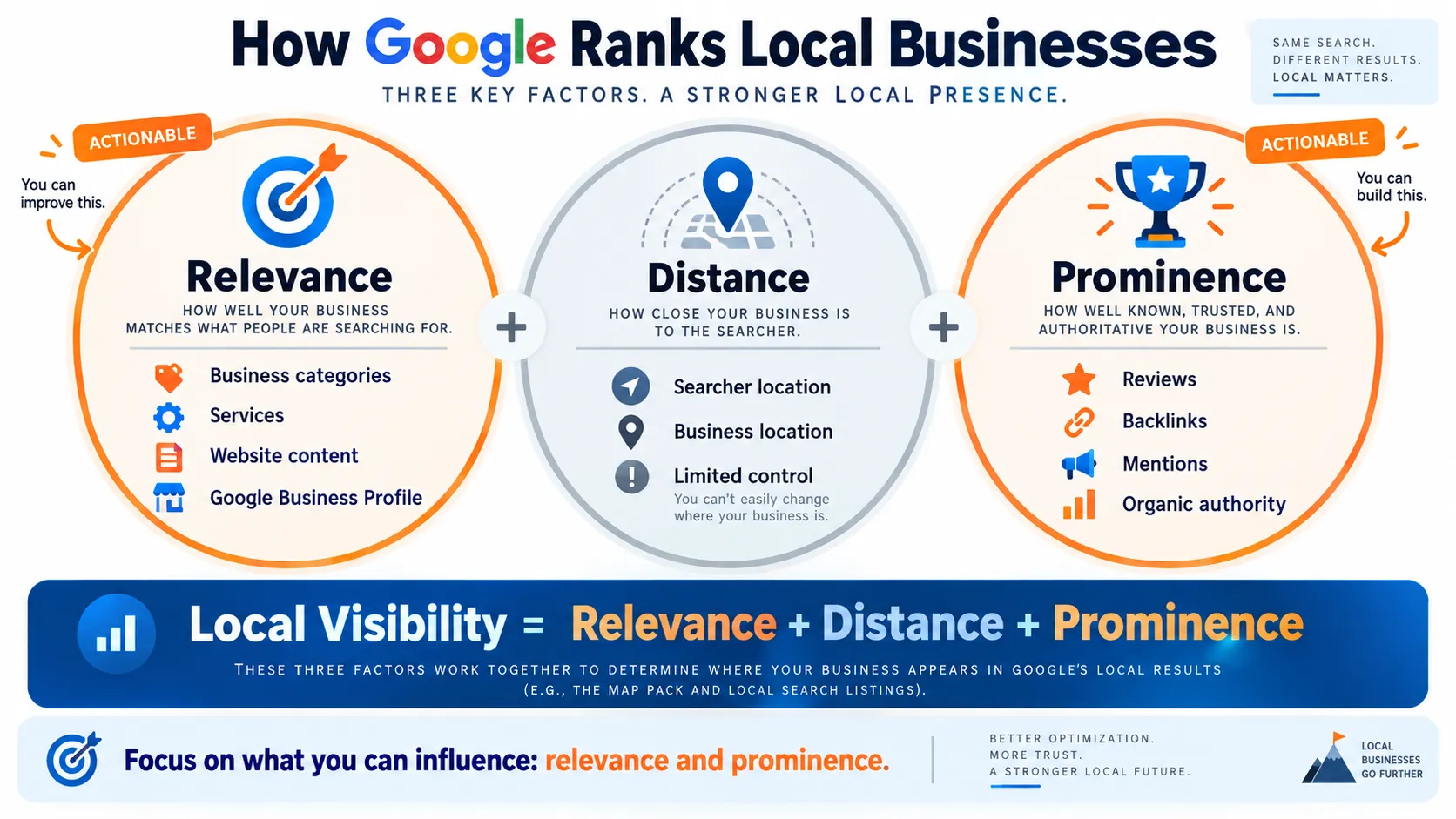
Google uses three main ranking factors: relevance (does your business match the search intent), distance (how far are you from the searcher), and prominence (your online authority, reviews, citations). All three influence ranking. Relevance comes from Google Business Profile accuracy and website content. Distance is automatic based on searcher location. Prominence comes from review count and rating, citation consistency, backlinks, and recency of updates. You cannot change distance, but you control relevance and prominence through active optimisation.
Should I respond to reviews written in languages other than English?
Yes. Respond in the same language the reviewer used if possible. This shows customers you engage with your full community and builds trust across language groups. If you cannot write fluently, use a translation tool and have a native speaker review it for tone. Responding in the reviewer’s language increases perceived authenticity and demonstrates care. It also signals to multilingual searchers that you serve their community.
What are review platforms most Singaporeans actually use?
Google Reviews is primary for search-based discovery. Facebook Reviews are used widely for casual recommendations. Hungrygowhere dominates for food and beverage. CarParkSG is essential for parking services. Industry-specific sites matter by sector: PropertyGuru for real estate, Singapore Dental Council for clinics, Ministry of Health for medical services. Strategically build presence on the 3-4 platforms most relevant to your business type. Do not spread too thin across irrelevant platforms.
Can I remove negative reviews from my Google Business Profile?
You cannot delete reviews yourself. You can request Google remove a review if it violates Google’s policies: spam, off-topic content, personal attacks, or commercial solicitation. Go to your review, click the three-dot menu, and select “Flag as inappropriate”. Google reviews your request and decides within a few days. If denied, respond professionally to the review instead. Public, measured responses to negative feedback build more trust than deletion would.
How do local SEO and Google Ads work together?
They are separate but complementary. Google Ads (paid search) shows your ads above organic results; local SEO (organic) improves your natural ranking. Running both provides maximum visibility: ad at top + organic listing below. Use Ads for immediate traffic while building organic ranking. As organic ranking improves, reduce ad spend and allocate budget elsewhere. Track which channel (Ads vs organic) drives better-quality traffic and conversions for your business.
What is the fastest way to improve local rankings?
The fastest visible improvements come from Google Business Profile optimisation (completeness, accuracy, photos) combined with an aggressive review strategy. These can show results within 4-8 weeks. Simultaneously, audit and submit to 10-15 high-authority citations. These three steps (profile, reviews, citations) account for 70-80% of local ranking factors. Website optimisation and backlinks take longer (3-6 months) but compound the results. Do all three in parallel for fastest overall improvement.
How do I know if my local SEO strategy is working?
Monitor these metrics monthly: Google Business Profile impressions and actions (clicks, calls, direction requests), Google Search Console local keyword rankings and click-through rates, new review volume, website traffic from local keywords, phone call volume, and foot-traffic data. Set targets: aim for 20-30% monthly growth in impressions and actions in the first 3 months. After 3 months, track whether you’ve moved into the top 3 local rankings for your primary keyword. Declining metrics signal strategy adjustments are needed.