| AI Summary
Email hosting gives businesses custom-domain email, stronger security, backups, administrative controls, and compliance features compared with free consumer email. The right option depends on team size, sending volume, data residency requirements, IT resources, and regulatory needs. Businesses should compare uptime guarantees, security, storage, mobile access, archiving, integrations, migration support, and data portability before choosing a provider. |
Most business owners treat email as a sideline. They sign up for Gmail, add their company domain, and consider the solution complete. But that approach results in inefficiency and exposes your business to real risk.


Email hosting is different from free consumer email. It gives you dedicated infrastructure, legal compliance tools, and support that scales with your business. If you send invoices, handle client data, or need to prove you deleted something for legal reasons, email hosting is essential.
This guide covers what email hosting actually does, how it differs from Gmail and Outlook, and which type fits your operation. You will see real pricing, learn how to migrate without losing a message, and understand the security and compliance features that matter for your industry.
Key Takeaways
- Email hosting lets you use your own domain (you@company.sg instead of free accounts), with guaranteed uptime, backup and security controls included.
- Hosted email costs SGD 4-27 per user per month depending on features; Microsoft 365, Google Workspace, Zoho Mail and Rackspace are market leaders in 2024.
- Shared hosting suits small teams; dedicated servers, cloud platforms and on-premises options exist for high-volume senders and heavily regulated industries.
- Security essentials to verify: TLS encryption, spam filtering, two-factor authentication, SPF/DKIM/DMARC authentication and compliance certifications (ISO 27001, SOC 2).
- Migration is straightforward with IMAP sync, but plan for DNS changes, user testing and 30 days of overlap with your old host to catch missed mail.
- Singapore organisations must verify data centre location, obtain a Data Protection Agreement from their host and comply with Personal Data Protection Act (PDPC) requirements.
- Avoid vendor lock-in: choose a host that supports IMAP/POP3, allows data export and offers flexible contract terms.
What Email Hosting Services Do
Email hosting runs your mail servers. You pay a provider to manage the infrastructure, security, backups and delivery of your email. In return, you get a professional address on your own domain (john@yourcompany.sg), higher deliverability than free services, and control over your own data.
This is different from Gmail or Outlook, which are consumer-grade free services. Those work fine for personal use. But for a business, they create three problems: you look unprofessional (your address reads company@gmail.com, not company@yourcompany.sg); you have almost no control over security or data retention; and if Google or Microsoft flags your account, they can lock you out with minimal warning.
Email hosting solves all three. You own the account. Your data lives on servers you control, or at least on servers run by a provider you contract with. You can set security policies, enforce two-factor authentication, archive mail for compliance, and move to a different provider without losing anything.
The trade-off is cost. Typically SGD 4-27 per user per month, depending on features. But for any organisation with more than a handful of staff, or any business handling sensitive client data, that cost is insurance. One security breach or compliance fine will cost far more.
The core difference: dedicated infrastructure vs. consumer email
When you sign up for Gmail, you get a free mailbox on Google’s shared infrastructure. Your email address is tied to that Gmail account. You own the mailbox, but not the domain it sits on.
Shared multi-tenant infrastructure reduces isolation and control. There is no performance guarantee. If Google’s infrastructure is congested, free users have no recourse.
Email hosting changes who controls what. You own a registered domain (such as company.sg), and your email host assigns you mailboxes under that domain. Your email address reads you@company.sg, not you@gmail.com. That distinction carries weight in professional contexts.
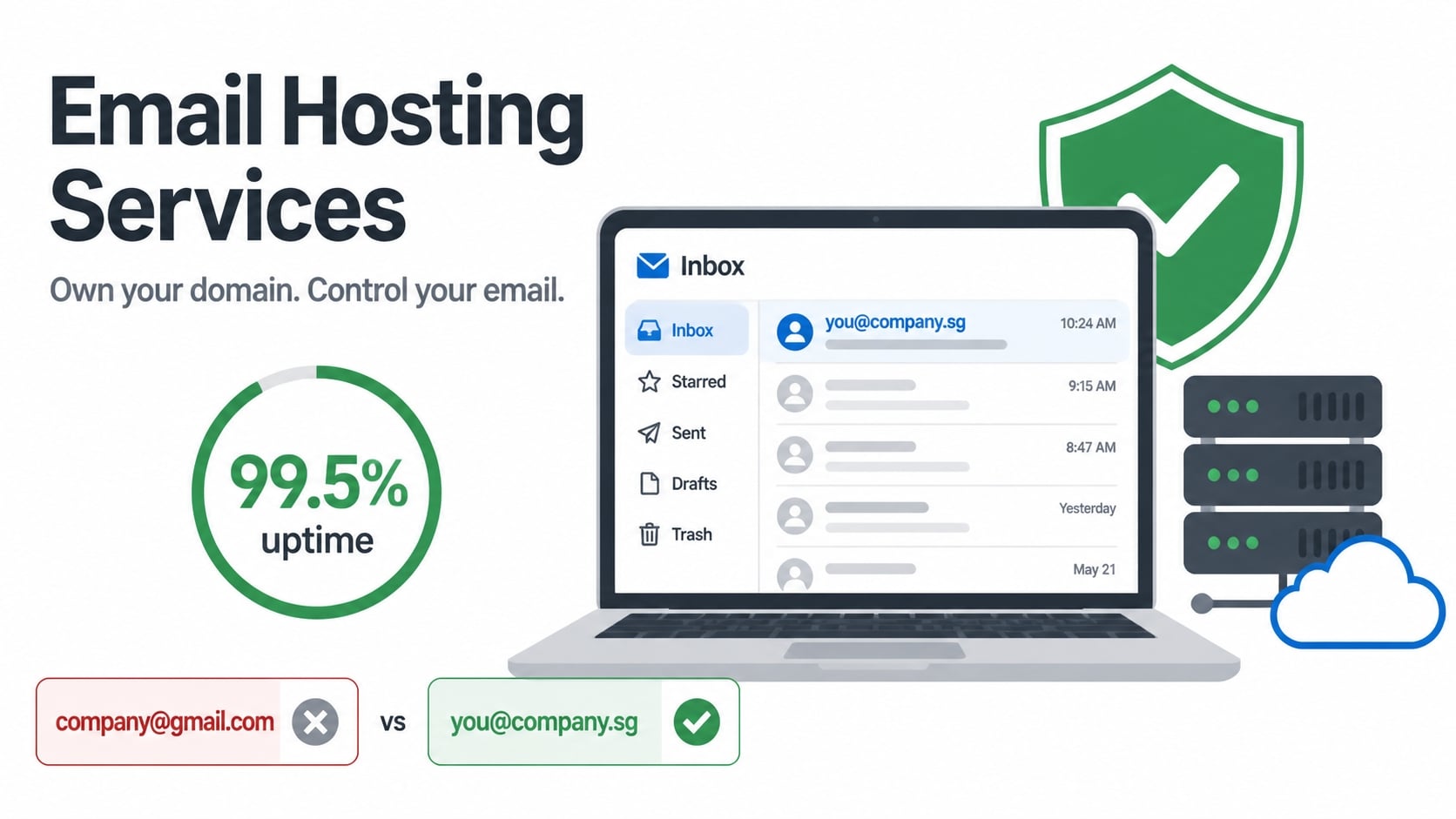
The infrastructure difference is equally important. Hosted email typically runs on dedicated or semi-dedicated servers. Your host allocates resources (processing power, bandwidth, storage) with an agreed performance level, often backed by an uptime promise. Common SLA levels specify uptime guarantees (such as 99.5% availability, which allows approximately 22 minutes monthly downtime; verify actual SLA with your chosen provider). Gmail makes no such promise for free accounts.
Uptime promises are contracts. They define what happens if the host fails to deliver: service credits, account credits, or termination rights. A law firm or e-commerce business needs this accountability. A personal Gmail account does not.
Advanced security and compliance controls come standard with hosted email. Your host can enforce two-factor authentication across all users, apply data-loss prevention policies to block sensitive information from leaving your domain, and maintain detailed audit logs of who accessed what and when. Gmail’s free tier offers two-factor authentication, but no organisational controls. You cannot force an employee to use it, nor can you search across all company mailboxes for compliance purposes.
Mailbox management and storage limits
Consumer email services give minimal storage. As of 2024, Gmail provides 15 GB free (shared across Gmail, Google Drive and Google Photos). Outlook.com typically gives 5 GB. Paid tiers cost extra.
Email hosting providers typically include far more. A basic plan might offer 25 GB per mailbox; mid-tier plans offer 50-100 GB; enterprise plans offer unlimited or terabyte-scale storage. As your organisation grows and archives years of correspondence, this becomes critical. You do not want to hit a quota and lose the ability to send or receive mail.
Storage is only useful if backed up. Email hosting providers handle this automatically. Most providers back up all mailboxes daily and store multiple copies in different geographic regions. If a server fails or a user accidentally deletes a message, you can restore it. This is disaster recovery built in.
That automatic backup also protects you legally. If you are subject to Singapore’s Personal Data Protection Act (PDPC) or industry rules, you must prove you have kept certain business communications. A backup proves that record existed on a given date, even if the user later deleted it from their mailbox.
Who needs a dedicated email host
Dedicated email hosting is not for everyone. A solo freelancer with a Gmail account works fine. A business with a registered domain and multiple employees needs a different answer.
Small businesses with 5-50 staff benefit immediately. Instead of asking team members to use a generic email account and forward everything, you give each person a branded address. Customers see professionalism. Support inquiries arrive in a central mailbox. If someone leaves, you can transfer their mail history to a successor without losing context.
Professional services (law firms, accountancies, healthcare practices, financial advisers) typically require email encryption in transit and at rest. Audit trails should prove who handled client data and when. Compliance certifications (such as ISO 27001) are often essential. Gmail does not offer these features. Hosted email providers do, often as standard.
E-commerce and online marketplaces need transactional email reliability. Order confirmations, shipping notifications and refund notices must reach customers reliably, not land in spam folders. A domain-based hosted email system has better sender reputation and deliverability than sending transactional mail from a shared Gmail account.
Non-profits and charities manage donor relationships. A custom domain with dedicated hosting signals stability and legitimacy. Donors trust an email from hello@mycharityname.org more than myorgname@gmail.com. Hosted email also scales affordably as you add volunteers and staff.
Remote and hybrid teams benefit from real-time synchronisation across devices. Calendar invites, contact lists and mailbox state sync instantly across phone, tablet and desktop. Most hosted providers include this as standard; free consumer email offers limited sync in some cases.
The decision is straightforward. If you have a registered domain and more than one person using email for your business, hosted email is cheaper than the cost of lost mail, compliance fines, or security breaches caused by inadequate infrastructure.
Email Hosting vs. Free Email Providers
Deliverability and sender reputation
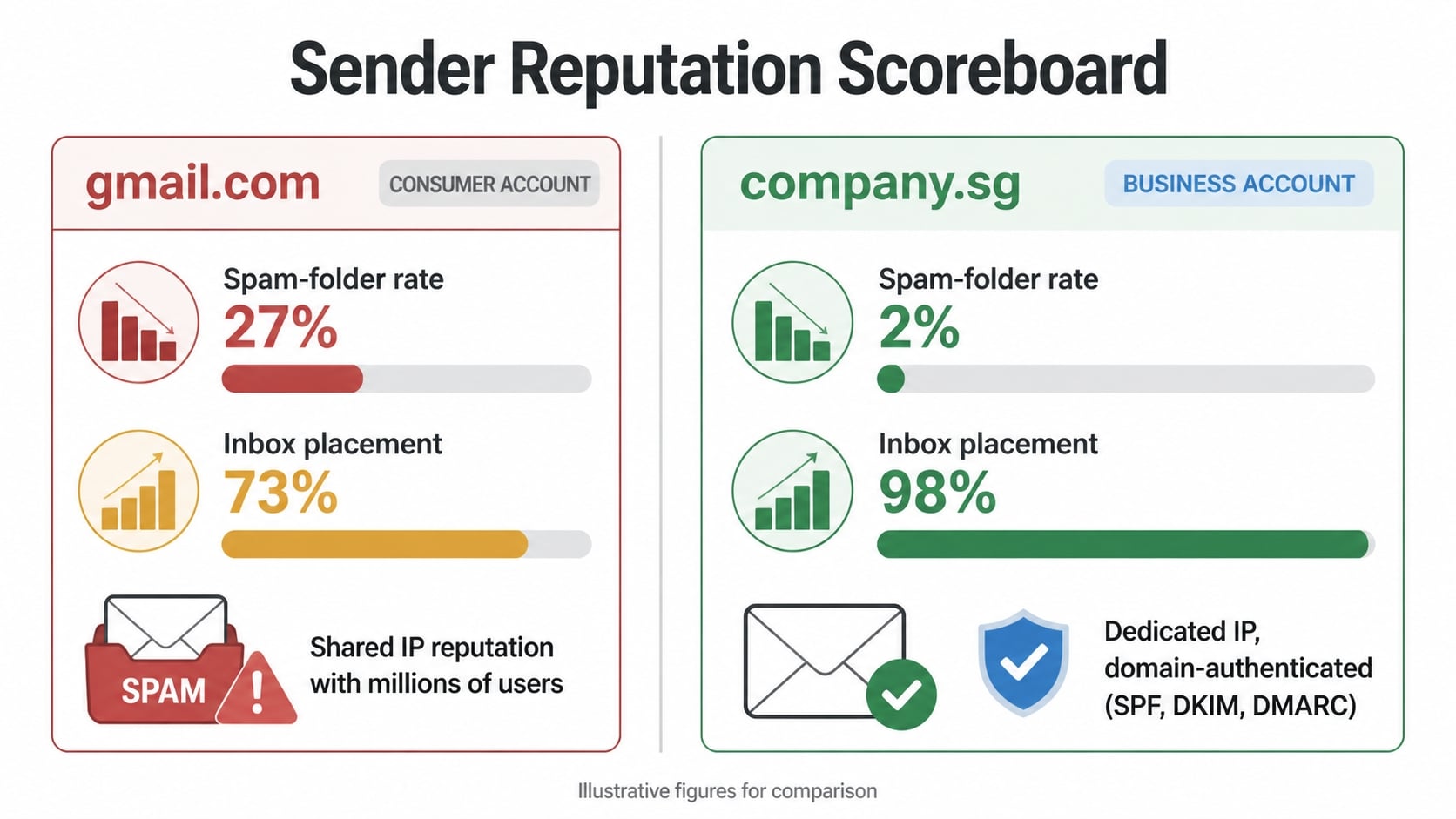
Free email services such as Gmail and Outlook.com face deliverability challenges. They operate on shared infrastructure. If other users on the same servers send spam, mail filters may penalise your legitimate messages. Your sender reputation (how mail servers trust you) is tied to the entire shared network, not just your account.
Hosted email providers give you dedicated or semi-dedicated sending infrastructure. Your sender reputation builds on your own domain and sending patterns, not those of thousands of other users. Mail servers recognise you@yourcompany.sg as more trustworthy than you@gmail.com, especially if your domain has historical sending activity.
Authentication protocols strengthen deliverability. Hosted providers help you implement SPF (Sender Policy Framework), DKIM (DomainKeys Identified Mail) and DMARC (Domain-based Message Authentication, Reporting and Conformance). These are technical standards that prove you own the domain and authorise the mail being sent. Free consumer email services do not prioritise this setup.
The result is measurable. Transactional mail (order confirmations, password resets) and marketing mail sent from hosted email achieves higher inbox placement rates than the same mail sent from Gmail or Outlook. For businesses relying on email to reach customers, this difference is significant.
Security and data ownership
Free services use shared infrastructure. That means your data lives alongside millions of other users’ data. If a breach occurs, the exposure is massive. You have no direct relationship with the provider beyond the terms of service.
Hosted email providers offer data protection contracts (Data Protection Agreements or DPAs). These define how your data is stored, who can access it, how long it is kept, and what happens if it is breached. For Singapore organisations handling customer data, a DPA is essential to comply with the Personal Data Protection Act (PDPC). Free services do not offer these.
Encryption is another difference. Hosted email should encrypt mail in transit (TLS encryption between your device and the server, and between servers) and at rest (encrypted storage on the provider’s disks). Free consumer services often do not guarantee this.
You also own your data with hosted email. If you leave the provider, you can export all your mail, contacts and calendar data in standard formats (IMAP, CSV). Free email accounts are locked to the platform. If Google or Microsoft suspends your account, you lose access immediately. Recovery can take days to weeks and is not guaranteed.
Custom branding and professional perception
Your email address is part of your brand. you@company.sg signals a professional, established business. you@gmail.com signals a freelancer or individual. Customers, partners and regulators make assumptions based on email domain.
This matters for trust. A law firm, accountancy or financial services provider using Gmail.com would face client confidence issues. A non-profit or charity using a custom domain appears more legitimate to donors. An e-commerce business using a branded domain appears more trustworthy to customers.
Email hosting also lets you create branded addresses for specific functions: support@company.sg, billing@company.sg, hello@company.sg. You can route these to the appropriate person or team without exposing individual names. Free email does not offer this flexibility.
Cost and features
Free email (Gmail, Outlook.com) costs nothing. You get what you pay for: limited storage, no support, no compliance tools, no uptime guarantee.
Hosted email typically costs SGD 4-27 per user per month. This covers storage (usually 25-100 GB per mailbox), uptime guarantees, backup and recovery, spam and virus filtering, two-factor authentication, and basic support. Higher tiers add advanced features: data loss prevention, advanced audit logs, eDiscovery (searching for specific mail across the entire organisation), mobile device management and integration with tools like Microsoft Teams or Slack.
For a small business with 5 staff, hosted email costs SGD 20-135 per month. That is cheaper than one security breach, one lost customer due to missed mail, or one compliance fine.
Email Hosting vs. Free Email Providers
Deliverability and sender reputation
When you send a marketing email from hello@company.gmail.com, receiving mail servers see a consumer account, not a business. Gmail, Yahoo and Outlook.com are mass-market services. Receiving servers know these platforms often host compromised accounts or spam campaigns.
The result: emails from free accounts land in spam folders far more often than mail from dedicated hosts. This matters most for transactional email: invoices, password resets, order confirmations. A missed delivery becomes a lost customer.
Dedicated email hosts operate their own IP addresses and maintain sender reputation separately from consumer users. When you send from hello@company.sg on a dedicated host, that IP builds a clean sending history. Mail servers whitelist it over time.
Critical business mail cannot risk spam folder delivery. Compliance notifications and legal updates require reliable inbox placement. If you send more than a handful of emails per day, a free account becomes a liability.
Security and data ownership
When you use Gmail or Outlook.com, Google or Microsoft owns your account. They own your messages, your contact list, your calendar. You hold a license to use them; they can revoke it at any time.
Free accounts can be suspended instantly. A competitor files a false abuse report. An automated security system flags unusual login patterns. Your email vanishes, and customer replies bounce back.
Hosted email inverts this relationship. You own the account. The provider manages servers on your behalf. You set the password. You control who has admin access. If the host closes, you export your mail via IMAP and move on.
Encrypted backups are standard with reputable hosts. Your messages are copied to geographically distant data centres. If a server fails, your mail is restored within hours.
Data ownership becomes critical under Singapore’s Personal Data Protection Act (PDPC). Your organisation must retain control of personal data. Free email accounts blur this responsibility. Regulatory auditors will flag the gap during compliance reviews.
Hosted email with a data protection contract clarifies who owns what and how long data is retained. Healthcare providers, financial advisers and law firms require HIPAA-compliant, SOC 2 Type II certified, or ISO 27001 registered hosts. These providers publish security policies and undergo annual audits. Free services do not.
Custom branding and professional perception
An email address signals trust. jane@consultingfirm.sg signals a real business. jane@gmail.com signals a solo operator using personal email for work.
In professional sectors, this distinction carries real consequences. A law firm that emails clients from Gmail creates security risks. A healthcare clinic emailing patients from Yahoo invites complaints. A financial adviser using Outlook.com may trigger compliance concerns from the Monetary Authority of Singapore (MAS) or sector regulators.
Even in less regulated fields, psychology matters. A recruiter receiving a CV from candidate@myname.sg perceives professionalism and commitment. The same CV from candidate.myname@gmail.com signals amateurism or personal account reuse.
Your domain is your brand asset. When someone sees it in an email, they see consistency. Your website says company.sg. Your email says firstname@company.sg. Your business cards say the same. That repetition builds recognition and trust.
Free accounts give you none of that. You share infrastructure with millions of other users. Your sender reputation becomes tangled with theirs.
Cost and features
Free email is cheap because you are the product. Advertisers pay for your attention. Google scans your inbox to serve targeted ads. You see ads; they profit.
Free accounts also come with hard limits. Gmail typically offers 15 GB of storage. Both Gmail and Outlook.com cap forwarding rules and automation.
Hosted email costs money but includes features that free accounts do not. A typical plan at SGD 8–15 per user per month includes:
- Unlimited or high-volume storage (25 GB to 1 TB per mailbox)
- Shared calendars and resource booking for meeting rooms and equipment
- Contact management with custom fields
- Mobile sync via ActiveSync (real-time push on iPhone and Android)
- Admin controls: bulk user creation, password resets, account suspension
- Audit logs showing who accessed what and when
- Advanced spam filtering tuned to your domain
At SGD 150 per month for 20 users, that costs less than one part-time IT person for a week. If that email host prevents one security breach, one day of downtime, or helps you pass a compliance audit, it has paid for itself.
Free accounts force you to improvise. You use third-party calendar apps, third-party contact sync, third-party admin tools. You add friction to your workflow and fragmentation to your data.
For a business, hosted email is not a cost. It is a tool that costs less than the problems it prevents.
Comparison: Free vs. hosted email
| Factor | Free Email (Gmail, Outlook.com, Yahoo) | Dedicated Hosted Email |
|---|---|---|
| Sender Reputation | Shared with millions; high spam folder risk | Dedicated IP; lower spam folder rates |
| Data Ownership | Provider owns account and messages | You own account; provider manages infrastructure |
| Account Security | Can be suspended without clear recourse | You control access; data recovery via IMAP |
| Storage Limits | Typically 15 GB (Gmail) or 1 TB (Yahoo) | 25 GB to 1 TB per mailbox |
| Mobile Sync | Available but limited on some accounts | Real-time push sync via ActiveSync |
| Compliance Support | No data protection contract | Data protection agreements included |
| Cost per User/Month | Free | SGD 8–15 |
Common misconceptions
“Free email is secure enough for small business.”
Free accounts lack data ownership safeguards and are targets for phishing. Regulatory bodies and auditors expect dedicated email infrastructure for any organisation handling customer or employee data.
“Free email storage is unlimited.”
Gmail offers 15 GB shared across Gmail, Google Drive and Photos. Yahoo Mail offers 1 TB but has phased out IMAP access for some users. Limits apply.
“Custom domain email requires expensive hosting.”
Hosted email at SGD 8–15 per user per month includes domain email, calendars, contacts and mobile sync. This costs less than the productivity loss from fragmented tools.
Types of Email Hosting: Choosing Your Delivery Model
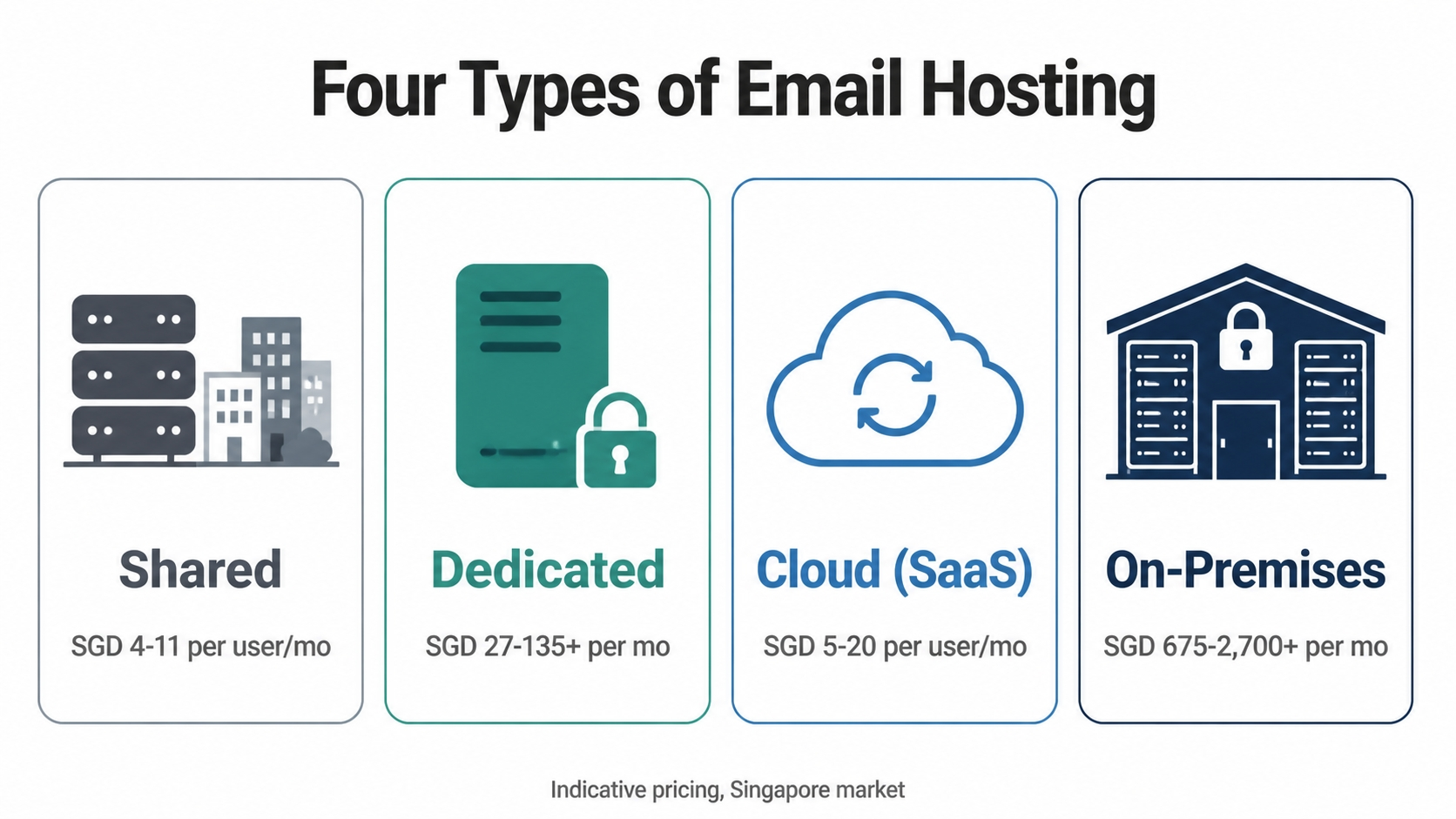
Not all email hosting is the same. The delivery model you choose affects cost, scalability, control and the technical expertise you need in-house. Most organisations fall into one of four categories. Understanding each helps you avoid paying for capability you don’t need or selecting something too limited that fails when you scale.
Shared hosting runs your email on servers alongside dozens or hundreds of other organisations. Your mailbox sits next to multiple other businesses on shared multi-tenant infrastructure, which reduces isolation and control. The host manages all hardware, backups and security updates. You pay only for what you use.
Cost: SGD 4 to SGD 11 per user per month (indicative; varies by provider and region).
What you get: Automated backups, spam filtering, mobile sync via IMAP or ActiveSync, and basic admin controls such as creating users and resetting passwords. Storage typically ranges from 25 GB to 100 GB per user.
Fair use limits: Most shared hosts impose sending volume caps. You might be allowed to send 300 emails per hour or 10,000 per day. This prevents one organisation from damaging shared IP reputation. If you regularly send bulk newsletters or transactional mail such as order confirmations and invoices, verify the limit before signing up.
Best for: Startups, small teams (under 50 users), non-profits and professional service firms where team size is stable. Shared hosting gives you enterprise-class uptime and features without enterprise-class overhead.
A 10-person accountancy using shared hosting at SGD 6 per user per month (SGD 60 per month) gains a professional domain (accounts@firm.sg), encrypted backups and compliance with Singapore’s Personal Data Protection Act requirements. The cost per employee is modest; the professionalism gain is substantial.
Dedicated Server Hosting
Dedicated hosting reserves an entire physical or virtual server for your organisation alone. No sharing. Your IP addresses, server resources and backup infrastructure belong to you.
Cost: SGD 27 to SGD 135+ per month depending on server specification and provider (indicative).
What you get: No sending volume limits. You control server configuration including mailbox size, retention policies and security rules. Some hosts allow custom mail server software such as Postfix or Microsoft Exchange. Redundant storage and failover to a backup server are standard.
IP reputation advantage: Your server’s IP address is yours alone. Reputation builds faster for marketing and transactional mail. You avoid penalties from a neighbour’s spam activity.
Trade-off: You pay more, but you own the resource. If you send 100,000 emails per day such as an e-commerce or software company might, shared hosting would throttle you. Dedicated hosting does not.
Best for: High-volume senders including e-commerce platforms, SaaS businesses and agencies sending client mail; organisations with strict data residency rules; and teams needing custom mail server setup. If your business depends on outbound email deliverability, dedicated hosting provides greater assurance.
You or a support contract must monitor server health, apply security patches and respond to mail flow issues. This delivery model usually requires or benefits from IT oversight.
Cloud-Based Managed Hosting (SaaS)
Cloud hosting (SaaS) blurs the line between dedicated and shared. Servers are managed by the provider (you do not patch or maintain anything), but your account scales on demand. You pay for users and features, not hardware.
Cost: SGD 5 to SGD 20 per user per month (indicative; scales automatically as you add users).
Examples: Microsoft 365 (Outlook), Google Workspace (Gmail), Zoho Mail, Proton Mail for Business.
What you get: Automatic scaling with no server capacity planning, seamless mobile sync, and integrated collaboration tools such as calendar, file storage and video conferencing depending on the provider. Uptime is typically 99.5% (a common SLA level allowing approximately 22 minutes of monthly downtime; verify the actual SLA with your chosen provider). Backups and disaster recovery are handled transparently.
Flexibility: No long-term commitment to hardware. Create 10 new user accounts in 5 minutes. Remove a user and stop paying next month. This suits remote teams, seasonal workforces and rapidly growing startups.
Global redundancy built in: Your email is replicated across multiple data centres automatically. If one centre fails, mail still flows. The provider manages this; you do not.
Best for: Remote teams, organisations with no IT staff, and businesses wanting predictable costs that scale with headcount. If your team is spread across time zones and you value simplicity over customisation, SaaS is the most practical choice.
A 50-person digital marketing agency using Google Workspace at SGD 13 per user per month (SGD 650 per month total) gains Gmail, shared calendars, Google Drive storage, Google Meet and collaborative Docs. Setting this up on dedicated servers would cost more and require an IT person to manage it.
On-Premises (Self-Hosted) Mail Servers
On-premises means you run a mail server on your own hardware such as physical servers in your office or a private cloud you rent from a provider like AWS or Azure.
Cost: SGD 675 to SGD 6,750+ upfront for hardware. SGD 675 to SGD 2,700 per month for a managed service provider to maintain it. Software licences such as Microsoft Exchange add further costs.
What you get: Complete control. Your data remains on your chosen infrastructure. You decide security policy, retention rules, encryption methods and server configuration.


Compliance advantage: For highly regulated industries such as banking, healthcare and law, on-premises gives the highest assurance of data residency and control. You can demonstrate to auditors exactly where data lives and who can access it. In Singapore, compliance with the Personal Data Protection Act and the Monetary Authority of Singapore (MAS) requirements for financial institutions may mandate on-premises deployment in certain circumstances.
Trade-off: You own the responsibility. If the server crashes at 2 a.m., someone in your team or a paid support provider must fix it. Security patches must be applied regularly. Backups are your job to orchestrate and verify.
IT overhead: You need either an IT person on staff or a managed service provider contract. That cost often exceeds the hardware cost. A 50-person organisation might pay SGD 2,025 per month for a managed on-premises setup. That is more expensive than cloud, but compliance requirements may justify it.
Best for: Banks, healthcare providers and law firms with strict data residency rules or multi-regional compliance needs. Organisations in countries where local data residency is mandated by law. Not recommended for small teams or startups unless compliance is a core business requirement.
A law firm in Singapore runs Exchange Server on a virtual machine hosted in a Singapore data centre. Client data remains within Singapore jurisdiction, meeting the requirements of the Personal Data Protection Act and professional regulatory obligations. The firm pays a provider SGD 2,430 per month to manage backups, security, uptime and support. The complexity is justified by client confidentiality concerns and regulatory requirements.
Comparison: Which model fits your situation?
| Factor | Shared | Dedicated | Cloud (SaaS) | On-Premises |
|---|---|---|---|---|
| Cost per user per month | SGD 4–11 | SGD 27–135+ | SGD 5–20 | SGD 675–2,700+ per month (managed) |
| Scalability | Limited (fair use caps) | High (no sending limits) | Automatic (pay-as-you-go) | Manual (add hardware or upgrade contract) |
| Uptime SLA | 99.5% typical | 99.5–99.9% | 99.5–99.9% | Depends on support contract |
| IT overhead | Minimal | Moderate to high | None | High (unless managed service) |
| Data control | Provider-managed | Full control | Shared infrastructure, you control policies | Full control |
| Data residency | May not guarantee Singapore location | Customisable | Varies by provider (check terms) | You choose location |
| Setup time | Hours | Days to weeks | Hours | Weeks to months |
| Best for | Startups, SMEs, stable teams | High-volume senders, custom needs | Remote teams, fast growth, simplicity | Banking, healthcare, law, compliance-heavy |
How to choose between models
Ask yourself these questions in order.
- Do I need guaranteed data residency in Singapore or a specific region? If yes, on-premises or a cloud provider with explicit regional hosting and a data processing agreement that confirms data location. Verify the provider’s commitment to Singapore data residency or your required jurisdiction.
- Do I send high volumes of mail (over 100,000 per day)? If yes, consider dedicated or high-end SaaS options such as Microsoft 365 or Rackspace. Shared hosting will typically restrict you through fair use caps.
- Do I have an IT team or budget for a managed service provider? If no, cloud SaaS is the practical answer. If yes, dedicated or on-premises becomes viable.
- Am I growing fast or is my team size stable? Fast growth favours cloud because of automatic scaling. A stable team size favours shared hosting because costs remain fixed. High growth at high volume favours dedicated hosting.
- Is regulatory compliance mandatory? Check what each provider certifies. In Singapore, many cloud providers confirm compliance with the Personal Data Protection Act and can sign a data processing agreement. On-premises gives the highest assurance.
Most organisations start with shared or cloud SaaS and graduate to dedicated hosting or on-premises only when business drivers force the move. Beginning with overkill such as on-premises for a five-person team wastes budget. Outgrowing shared hosting such as suddenly being unable to send invoices because you hit fair use limits creates crisis. Match the model to your current need, with a documented upgrade path for 12 months ahead.
Key Features to Evaluate Before You Sign Up
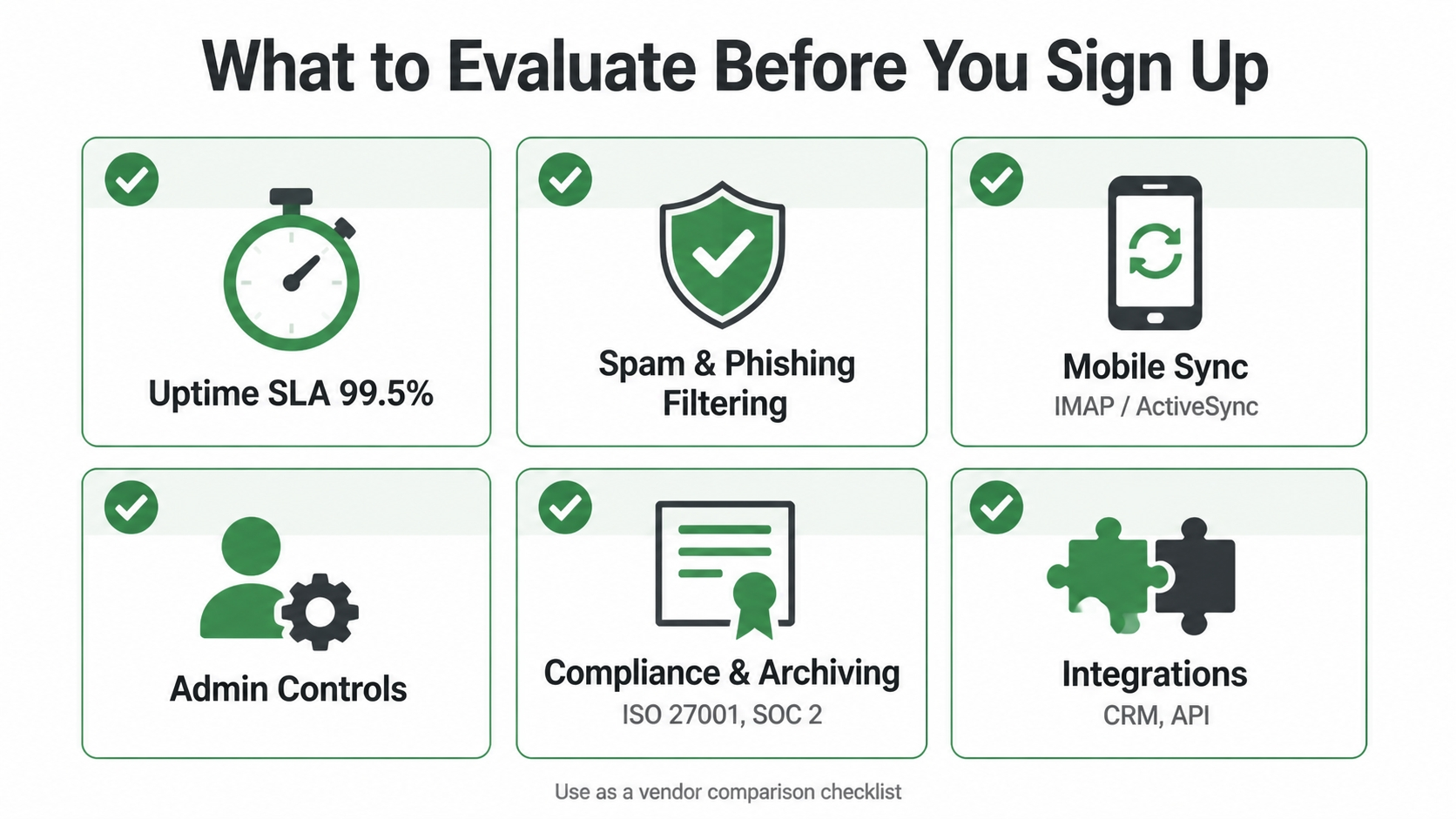
When choosing an email host, price is only one variable. The features you actually need depend on your team size, compliance obligations and how email fits into your broader workflow. This section walks through six critical evaluation areas. Use this checklist when comparing providers.
Uptime guarantees and backup systems
Your email is essential infrastructure. If it goes down, you cannot send invoices, receive orders or respond to clients.
Look for a Service Level Agreement (SLA) that guarantees 99.5% uptime or higher. A common SLA level of 99.5% allows approximately 22 minutes of unplanned downtime per month; verify the actual SLA with your chosen provider. Most reputable providers offer this standard. Anything below 99% is a warning sign. The SLA should also include a refund or service credit if the provider misses the target, usually 10% of your monthly fee per 0.1% shortfall.
Backups are separate from uptime. A host can have 99.9% uptime but lose your data in a hardware failure if backups are weak. Ask these questions:
- Are backups automated and run daily at minimum?
- Are backups stored in a different geographic data centre?
- What is the Recovery Time Objective (RTO): how long until a full restore is possible?
- Can you restore a single message, or only the entire mailbox?
Premium hosts offer recovery measured in hours. Budget hosts may require 24-48 hours. If you handle time-sensitive communications, faster recovery affects your business directly.
Check whether the host keeps backups in multiple regions. If all backups are stored in the same data centre, a fire, flood or ransomware attack could destroy both live mail and backup copies. Redundancy across at least two data centres is standard for hosts certified under ISO 27001 information security standards.
Spam filtering, virus protection and phishing detection
Spam clogs inboxes, wastes employee time and carries malware. The best email host catches junk before it reaches your users.
Inbound filtering protects your team. The host scans incoming mail for known malware signatures, zero-day exploits, phishing links (URLs designed to mimic your bank, payment platform or credentials page), spoofed sender addresses and bulk spam such as unwanted newsletters and advance-fee scams.
Machine-learning systems improve over time. They learn from user feedback: when a user marks a message as spam, the filter refines its rules. Ask whether the host uses heuristic analysis, which uses pattern-matching beyond signatures, or only signature-based detection. Heuristic filtering catches new threats that have not yet been catalogued.
Quarantine is important. Messages flagged as suspected spam should not be automatically deleted. They should go into a quarantine folder where an admin or the recipient can review them. This prevents legitimate mail from disappearing silently.
Outbound filtering is equally important. This protects your domain’s reputation and your recipients. Outbound filtering prevents phishing campaigns sent from compromised user accounts, your domain being used to send spam to third parties, and malware spreading from your network to others. It works by blocking bulk emails that contain malware signatures or URLs known for phishing. It also enforces authentication through SPF, DKIM and DMARC protocols, which verify that emails claiming to be from your domain genuinely come from your server.
When comparing hosts, ask whether spam filtering is included in the base plan or is an add-on. Premium filtering solutions can double the cost per user, but they are typically necessary if you receive high-volume email or work in a targeted industry such as finance, healthcare or law.
Mobile access and calendar and contacts sync
Email is accessed from multiple devices, not only desktops. Your team works from home, client sites, public transport and cafés. The email host must synchronise mail, calendar and contacts across devices seamlessly.
Two protocols enable this functionality:
- IMAP (Internet Message Access Protocol): Standard, open protocol used by nearly all email clients including Outlook, Apple Mail, Thunderbird and the Gmail app. Messages stay on the server; your device downloads a copy. When you delete a message on your phone, it is deleted on your computer too.
- POP3 (Post Office Protocol): Older protocol that downloads mail from the server to your device, then deletes it from the server. Once mail leaves the server, it is harder to sync across multiple devices. Most hosts support it for legacy reasons, but IMAP is preferable.
Check whether the host supports IMAP. If it does not, do not proceed with that provider.

For real-time sync with iPhone and Android, the host should offer ActiveSync. This is Microsoft’s protocol for synchronising mail, calendar and contacts across devices. It is industry-standard for smartphones. Some budget hosts disable ActiveSync to reduce server resources; if you need mobile email, this is essential.
Calendar and contacts should sync with the same real-time behaviour. When you add a contact on your phone, it should appear on your desktop within seconds. When you accept a meeting invite on your laptop, your phone calendar should update immediately. Test this during a trial period; some hosts batch-sync contacts every 30 minutes, which creates noticeable delay.
Also verify whether the host supports “send as” or “send on behalf of”. If you manage multiple email addresses such as you@company.sg and billing@company.sg, you should compose from either address without switching accounts.
User administration and permissions
As your organisation grows, you will manage dozens or hundreds of users. The host should make it easy to add, remove and manage access without requiring dedicated IT resources.
Look for these admin features:
- Bulk user creation: Upload a CSV file to add 50 staff members at once instead of filling in a form repeatedly.
- Automated provisioning: When you create a user in the host’s admin panel, their mailbox, calendar and contacts folder are set up automatically.
- Group distribution lists: A single email address such as sales@company.sg forwards to all sales staff. When a new salesperson joins, add them to the group; they automatically receive emails sent to the group address.
- Resource calendars: A meeting room can have its own calendar. Staff book it by sending a meeting invite to the room’s email address.
- Delegated admin roles: Different staff members have different permissions. A department manager can reset passwords for their team; a compliance officer can run audit reports; a finance person can manage subscriptions. Avoid giving everyone full admin access.
Ask whether the host charges extra for these features. Some hosts bundle them; others charge per distribution list or per admin role. For a 50-person organisation with multiple departments, these costs accumulate.
Permissions should follow the principle of least privilege: each user has only the access they need. You should be able to prevent general staff from seeing the admin panel. You should be able to allow one person to manage user accounts without viewing mailbox contents. These controls matter for both security and compliance.
Archive, eDiscovery and compliance tools
If your industry requires you to retain email for a fixed period (financial services typically require 6 years; healthcare often 8 years; legal firms indefinite), the email host must support retention policies and archiving.
Ask whether the host offers:
- Automatic retention policies: Delete or archive emails older than a set date, such as “delete all mail older than 7 years”.
- Legal hold: If a staff member is involved in a lawsuit, their email becomes subject to legal hold. All messages in their mailbox are preserved indefinitely, even if your normal retention policy would delete them. The host should allow you to place a legal hold on a user with a single action.
- eDiscovery: Search across all mailboxes in your organisation for keywords, dates, sender or recipient. Compliance auditors often request, “Show us all emails from this person in 2023 that mention ‘invoice’.” The host should return results in minutes, not hours.
- Immutable audit logs: A record of all admin actions such as who created an account, who changed a password, who accessed which mailbox. These logs should be write-once: once written, they cannot be edited or deleted, even by an admin. This prevents tampering.
Compliance certifications indicate the host has been audited by third parties. Look for:
- ISO 27001: Information security management system certified by an independent auditor.
- SOC 2 Type II: System and Organisation Controls audit; proves the host has robust security and availability controls over a full year.
- HIPAA (Health Insurance Portability and Accountability Act): Required if you handle US healthcare data.
- Data Protection Contract: The host has signed a contract addendum covering compliance obligations, data processing details and data residency requirements under Singapore’s Personal Data Protection Act (PDPC).
A host with SOC 2 Type II certification has been audited by an independent firm. Their security claims are verified, not marketing statements. Ask for a summary of the audit report; the full report is usually restricted, but a summary should be available.
In Singapore, data protection is governed by the Personal Data Protection Act administered by the Personal Data Protection Commission (PDPC). Ensure your chosen host commits to storing customer data within Singapore or has a documented data processing agreement that complies with PDPC requirements.
Integration with your existing tools
Email does not exist in isolation. It connects to your customer relationship management (CRM) system, invoicing software, helpdesk ticketing system and calendar applications.
When evaluating a host, check:
- Native integrations: Does the provider offer a built-in connector to Salesforce, Pipedrive, HubSpot or your CRM of choice? If yes, setup takes minutes. If not, you may need custom code.
- API availability: Can you build your own integration? A REST or GraphQL API lets developers pull mail, contacts and calendar data to sync with custom systems.
- No-code integration platforms: Zapier and Make connect hundreds of business software tools without requiring code. Check whether your email host is supported. For example, you can set up a workflow like: “When I receive an email from a customer, create a new lead in Salesforce.”
Integration saves manual work. A common workflow involves automatically logging invoice emails in your accounting software with the amount extracted. A host with a direct API to your accounting system, or compatibility with Zapier, makes this automatic. Without it, you manually copy data between systems, which results in inefficiency.
Ask whether integrations are included in the base plan or cost extra. Some hosts offer API access only with premium tiers.
Also test during a trial whether you can export your contacts and calendar to a standard format such as CSV or iCalendar. This ensures you are not locked into the host’s proprietary format. If you decide to change providers, you should be able to take your data with you.
How to Choose an Email Hosting Provider: A Selection Framework
Use this evaluation framework when comparing providers. Build a comparison table with six key areas: uptime guarantee, spam and phishing protection, mobile access, user administration controls, compliance and archiving tools, and third-party integrations.
Score each provider on a scale of 1-5 for each feature. Weight your scores by business priority. A law firm should prioritise compliance tools; a startup should prioritise cost efficiency.
Do not commit without a free trial. Test the mobile interface and admin panel with your team before signing up. This hands-on assessment reveals usability gaps that feature lists alone cannot show.