Your email bounce rate is the share of sent emails that a receiving server refuses to deliver. To calculate it, divide your bounces by your total sends and multiply by 100: 150 bounces from 10,000 sends gives 1.5%. Keep the total under 2%.
A high rate usually starts with the list itself, so check where your addresses came from before you change anything else. If your email bounce rate exceeds 2%, remove hard bounces immediately and verify contacts from any underperforming source. Sound list hygiene – regular verification and suppression of invalid addresses – keeps delivery on track. And if you want a partner on the acquisition side, MediaOne Marketing’s digital marketing services cover the channels that feed your list.
Key Takeaways
- Email bounce rate = bounces / sends x 100. Keep total bounces under 2%.
- Fix hard and soft bounces differently: hard bounces should sit near zero; soft bounces under 1%.
- Most bounces start at capture. Validate addresses at signup and prune decayed contacts.
- Audit bounces by type and source to find which list needs cleaning first.
- Google and Microsoft now weigh bounce behaviour and authentication at the domain level, so a clean list protects every send.
Definition: What Email Bounce Rate Measures
Email bounce rate measures how many of your emails fail to reach an inbox. A hard bounce is a permanent failure, usually because the address does not exist. A soft bounce is temporary, such as a full inbox or an unavailable server. Track them separately, as each needs a different response.
The receiving server replies with an SMTP response code. A 5xx code is a permanent rejection (hard bounce), so suppress that address immediately. A 4xx code is a temporary deferral (soft bounce), and the sender retries.
Example: 150 bounces out of 10,000 sent gives (150 / 10,000) x 100 = 1.5%. Compare your result with email marketing benchmarks for your sector, since acceptable levels depend on your list quality and regular list hygiene.
Email Bounce Rate Benchmarks: What Counts as Good?
Campaigner’s guide to bounce rates puts a good email bounce rate below 2%, with industry consensus placing the acceptable range between 0.5% and 2% and top-performing senders staying well under 1%. For the split targets, Mailshake’s 2026 bounce benchmark guide puts hard bounces below 0.5% and soft bounces under 1%.
Bounce thresholds vary by sector and list source, so compare against your own history. The trend matters more than any single reading: a climb from 0.8% to 2.5% over two months is a stronger warning than a steady 1.8%. Record the bounce count for each email send so you can spot changes consistently over time.
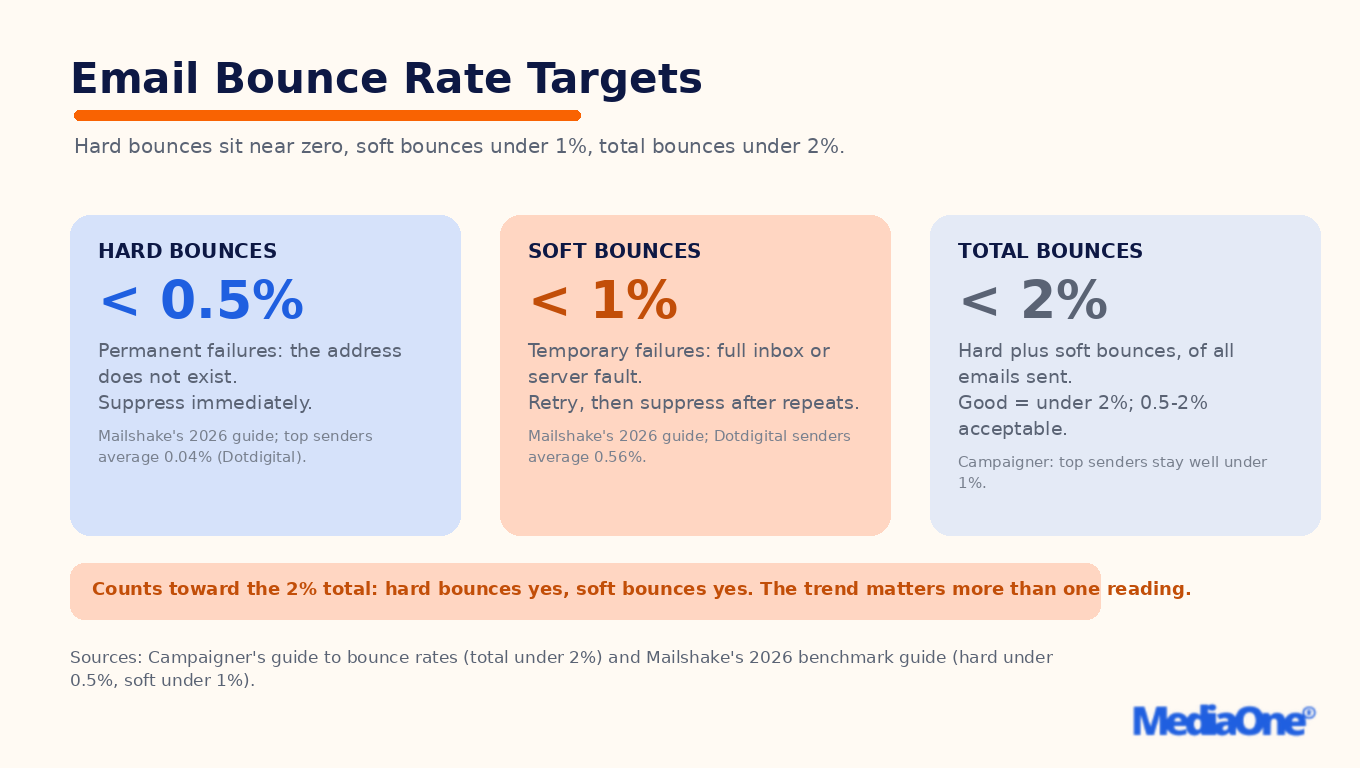
Figure 2: Email bounce rate targets: hard, soft and total bounces
|
Bounce type |
Target |
Counts toward the 2% total? |
|
Hard bounces |
Under 0.5% (near zero) |
Yes |
|
Soft bounces |
Under 1% |
Yes |
|
Total bounces |
Under 2% |
Not applicable |
A sender can have a total under 2% and still need action on soft bounces alone. At 10,000 emails sent, 150 bounces (1.5%) is acceptable; 300 bounces (3%) needs immediate attention. Repeated soft bounces to the same address often become hard bounces, so do not leave them to pile up – most email platforms suppress an address automatically after a defined number of consecutive soft bounces.
What Delivery Rate Benchmarks Show
Benchmarks also show what clean lists achieve at the top end. Dotdigital’s 2026 Americas benchmark study recorded a total bounce rate of 0.06% alongside a 99.4% delivery rate – soft bounces at 0.56% and hard bounces at 0.04%. These are averaged results from over a billion real campaign sends, so treat them as directional evidence of what good list hygiene delivers, not a guarantee.
Reputation is tracked per sending domain, so monitor each one separately: mailbox providers judge every domain on its own record, and spam complaints and bounces both affect deliverability. A clean domain is worth protecting.
Why Acquisition Drives Bounces
Most bounce problems start before the first send. Purchased lists and unchecked signup addresses cause high bounce rates regardless of campaign quality, so the fix sits at capture and in list upkeep. Validating addresses at signup and cleaning the list regularly keeps email bounces from building up and stops invalid email addresses from reaching your sending domain.
Some teams blame sending practice instead – volume spikes, weak authentication or poor timing. That can be true, and a missing SPF or DKIM record causes rejections regardless of list quality. The test is the source split: if one acquisition source bounces well above the rest on the same setup, capture is the cause; if every source bounces at the same rate, look at sending practice, and compare the number of emails each source sends against published rate benchmarks.
The sources you choose decide this in advance – our guide to marketing strategies for SME growth covers how acquisition channels shape list quality from the start.
Mailbox providers treat bounces as a list-quality signal
Microsoft’s new sender requirements for Outlook.com, Hotmail and Live addresses took effect on 5 May 2025: domains sending more than 5,000 emails a day must pass SPF, DKIM and DMARC checks. Google’s bulk-sender guidance goes further on bounce behaviour: the email sender guidelines tell senders to reduce sending volume while messages bounce or defer, and to keep spam complaints under 0.3%. A rising bounce rate therefore hurts inbox placement and damages your sender reputation across the whole list, and emails that land in spam are harder to recover over time.
Authentication and Warm-Up Protect Against Bounces
Authentication (SPF, DKIM and DMARC) proves your domain is legitimate, reducing outright rejections. DMARC tells receiving servers what to do with mail that fails those checks, and its reports show which sources send on your behalf. For a new domain or IP, start with small batches to your most engaged, verified contacts, then increase volume gradually. Review the process before every major send.
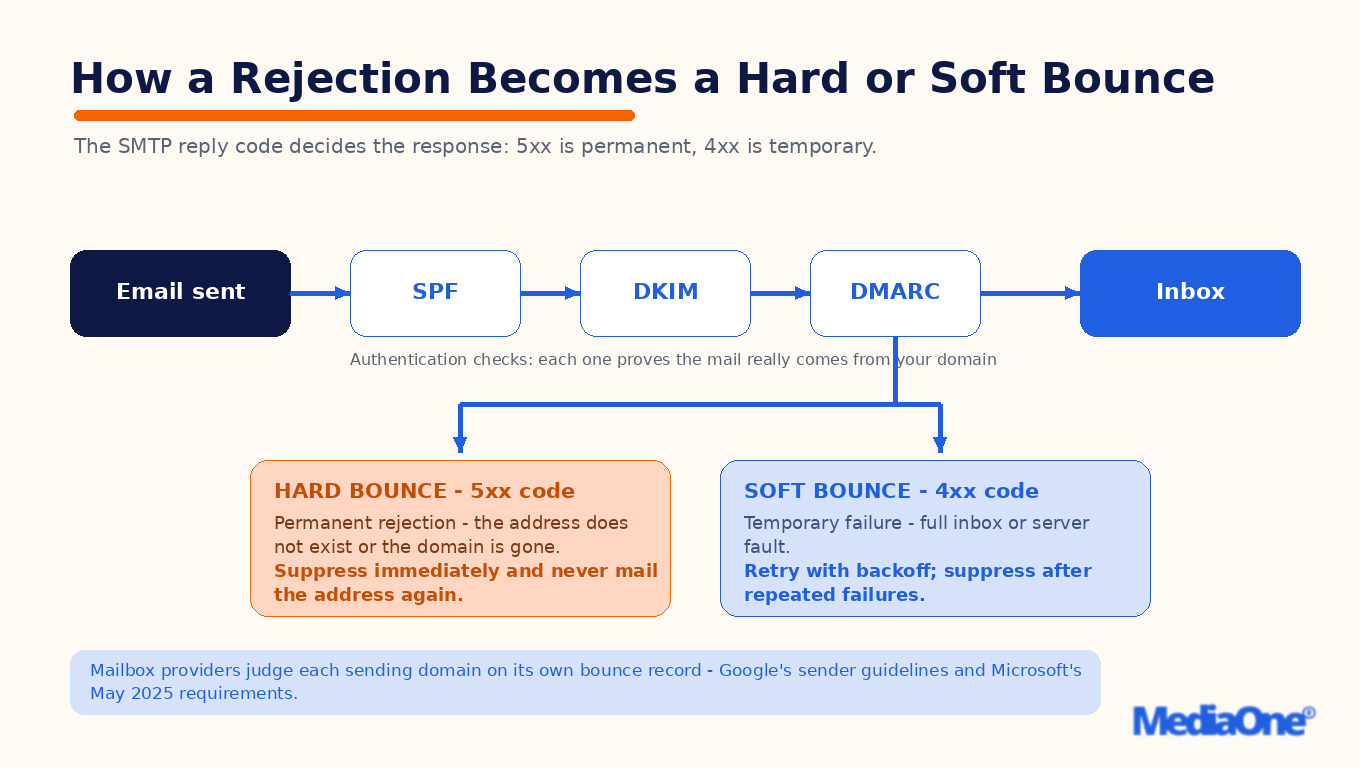
Figure 3: How an SMTP rejection becomes a hard or soft bounce
How to Reduce Your Email Bounce Rate
Bounces mostly come from addresses collected or kept without checks, so prevention at the point of capture matters most. Industry practice treats list hygiene as the cheapest control available: clean lists protect deliverability across every email you send, and reducing invalid email addresses at the source matters more than fixing bounces after the send.
Validate Email Addresses at Signup
Verify each email address when it is entered. Format checks catch typos such as missing @ signs, and verification services confirm that the domain can receive mail. Stopping an invalid address at the form costs nothing; removing it later means a bounce has already hit your sending domain. Our guide to online marketing tools for Singapore businesses covers the verification and form-tool categories worth comparing.
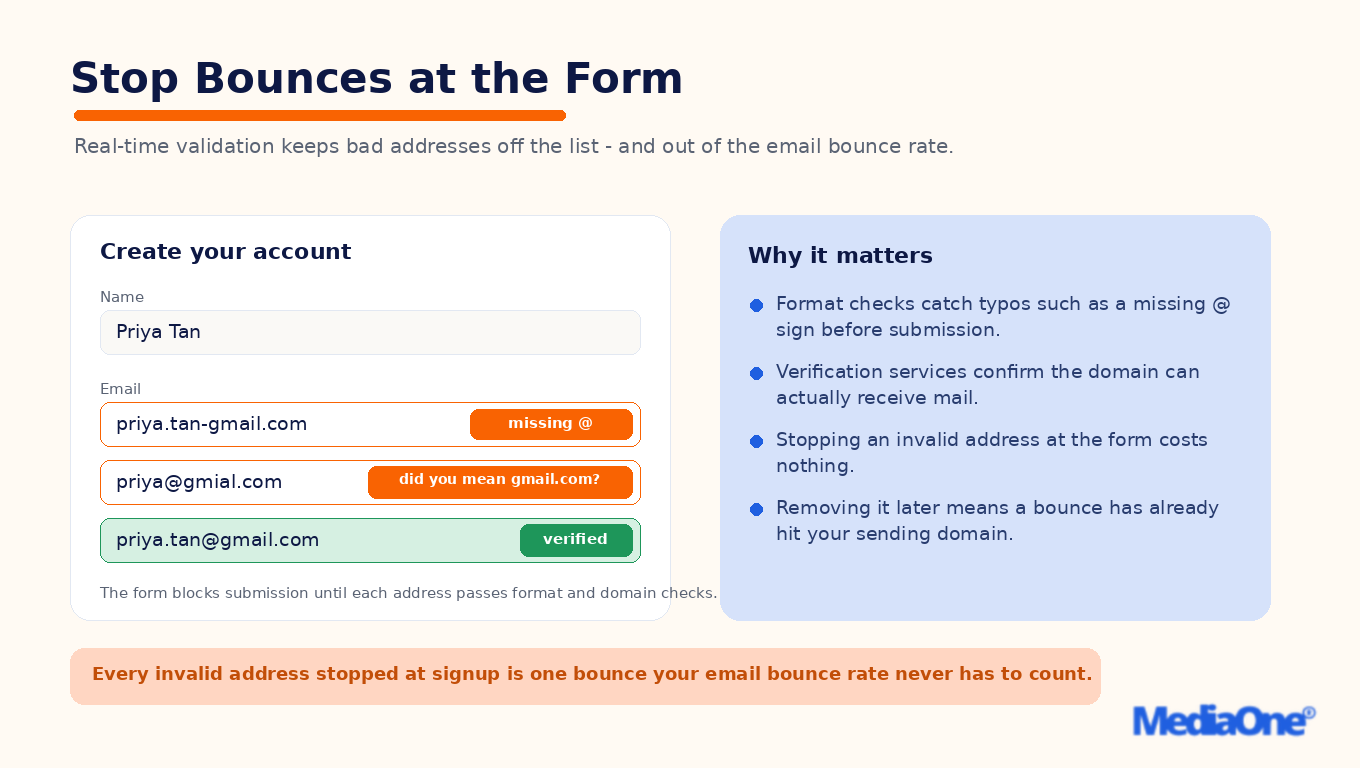
Figure 4: Real-time email validation at signup
Clean Your List and Maintain Suppression Lists
Contact data decays at roughly 2% per month – HubSpot’s database decay analysis puts it at 2.1% per month, about 22.5% a year – as people change jobs and companies close. Re-verify older contacts before each major send. Keep a suppression list of hard-bounced addresses so they are never mailed again, and review how you handle invalid addresses each quarter. Sending to old, unverified emails is a common source of spam complaints as well as bounces, and the number of emails flagged this way tends to grow with list age.
The Bounce Source Audit
Use this process to diagnose your own data:
|
Acquisition source |
Sent |
Hard bounces |
Soft bounces |
Bounce rate |
Decision rule |
|
Signup form |
6,000 |
20 |
40 |
1% |
Below 2%: keep and monitor |
|
CRM import |
4,000 |
50 |
40 |
2.25% |
Above 2%: verify the file before the next send |
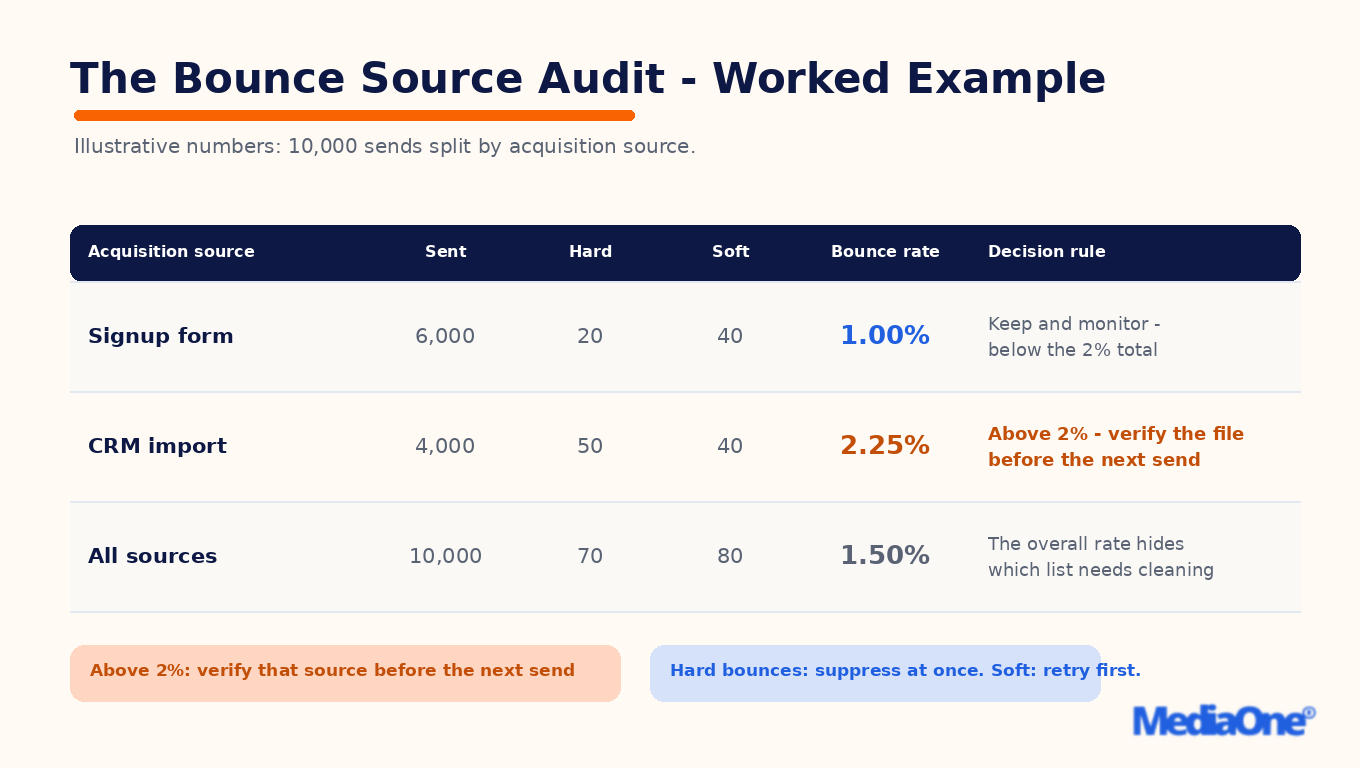
Figure 5: The bounce source audit, worked example
- Export the bounce log for your last three sends, with each address’s bounce type (hard or soft) and acquisition source.
- Calculate the rate per source: bounces / sends from that source x 100.
- Apply the decision rule: verify any source above 2%, suppress hard bounces at once, and retry soft bounces before suppressing them.
Worked example: of 10,000 sends, 6,000 came from a signup form and 4,000 from a CRM import. If 60 bounces trace to signup and 90 to the import, the signup rate is 1%, and the import rate is 2.25%. The overall 1.5% hides the problem, so verify the import file before the next send. The numbers are illustrative, not a dataset from real sends. If your CRM is the weak source, our guide to customer relationship management for SMEs covers keeping contact records clean at the source.
Common Causes of High Bounce Rates and How to Fix Them
|
Symptom |
Likely cause |
Fix |
|
Hard bounces spike after an import |
Purchased or old CRM data |
Verify the file before sending |
|
Soft bounces rise steadily |
Full inboxes or temporary server faults |
Retry, then suppress after repeated failures |
|
Bounces cluster in one domain |
Typo or retired domain |
Correct or remove those addresses |
A Step-by-Step Checklist for Lowering Bounces
- Verify email addresses at signup and at every import.
- Suppress hard bounces immediately, and queue soft bounces for retry.
- Calculate the bounce rate per acquisition source: bounces / sends x 100.
- Re-verify any source running above 2% before the next send.
- Re-verify the full list every few months, and confirm each recipient’s consent before adding them to your email list.
For a wider view of how each acquisition channel – signup forms, CRM imports and lead sources – feeds your list, see MediaOne Marketing’s digital marketing services.
Keep the Total Email Bounce Rate Under 2%, Fix the Source First
Email bounce rate usually starts upstream, in how addresses were collected and kept unchecked. Run the bounce source audit: split hard from soft bounces, tag each by acquisition source, and assign one action per source. Keep total bounces under 2%, hard bounces near zero and soft bounces under 1%.
The fixes compound: validation at signup stops new bad addresses, suppression stops old ones, and authentication keeps the rest out of the spam folder. If you would rather have a team own the capture and hygiene side, review MediaOne Marketing’s digital marketing services and hold it to the same standard: verified capture, quarterly cleaning and a bounce log you actually read.
Frequently Asked Questions
What is a good email bounce rate?
A good email bounce rate is below 2%, with an acceptable range of 0.5% to 2%, according to Campaigner’s guide to bounce rates. Senders under 1% usually have the cleanest lists.
How is email bounce rate calculated?
Divide bounced emails by total emails sent, then multiply by 100. Fifty bounces from 1,000 sends gives 5%.
What is the difference between a hard bounce and a soft bounce?
A hard bounce is a permanent failure, usually a non-existent address. A soft bounce is temporary, such as a full inbox. Remove hard bounces at once.
Can a high bounce rate hurt my deliverability?
Yes. Repeated bounces signal poor list quality to mailbox providers, who then filter or block your mail – Google and Microsoft both weigh bounce and authentication signals at the domain level.
How often should I clean my email list?
Clean it at least every quarter, since contact data decays by roughly 2% per month – HubSpot puts it at 2.1%, about 22.5% a year.
How do I lower my email bounce rate quickly?
Suppress hard bounces from your next send, validate addresses at signup, and remove any contact that has bounced twice.