
| AI Summary
A content management system gives staff a place to edit, review and publish website content. Singapore businesses can choose among traditional, decoupled and headless setups by looking at where they publish, who approves changes and who maintains the site. A pilot with real content helps compare platforms before committing to a build. |
A content management system (CMS) is software that lets teams create, store, edit and publish digital content without writing code for each update. A traditional CMS manages content and displays it on a website. A headless CMS sends content to websites, apps or other channels through an API.
Key Takeaways
- A CMS demo should show how a member of staff completes an everyday task, such as updating opening hours or correcting a service price.
- A traditional CMS often suits a business that publishes mainly to one website. A headless CMS is worth testing when several channels need the same content and a developer can support them.
- Publishing rights, translation updates and form delivery are easier to assess with a sample page and real staff accounts.
- A three-year budget should include the build, subscriptions, hosting, support and the time staff spend managing content.
- A CMS should give the business a way to export its content and recover it from a backup. Both tasks belong in the pilot.
A content management system can turn a price change into a task a marketing assistant finishes before lunch. The same change can take longer when it needs approval, appears on two websites or has to reach an app before customers see it. The right CMS depends on what happens between the first edit and the moment a customer sees it.
This guide follows that process. It explains the three main CMS setups, compares WordPress, Strapi and Storyblok, and shows how a Singapore business can test a platform before signing a contract.
How Does a Content Management System Work?
Where editors make changes
A CMS stores content such as service descriptions, opening hours, product photos and articles. Staff sign in to a dashboard, open an entry and edit the parts they have permission to change. The platform can store a draft while a colleague checks the details. The public page changes after someone with publishing rights approves and publishes the edit.
A Singapore clinic, for example, might keep Saturday opening hours in a branch entry. A staff member changes the hours, checks how they look in the page preview and sends the update to the branch manager. The manager checks the date and publishes the update. The clinic’s website template controls how the hours appear next to the address and contact details.
How a template turns an entry into a page
A template is a reusable page layout. Each branch entry might have fields for a name, address, opening hours and booking link. The template puts those details in the same order on every branch page, which helps customers find what they need. A designer can update the layout once and apply it to all pages that use that template.
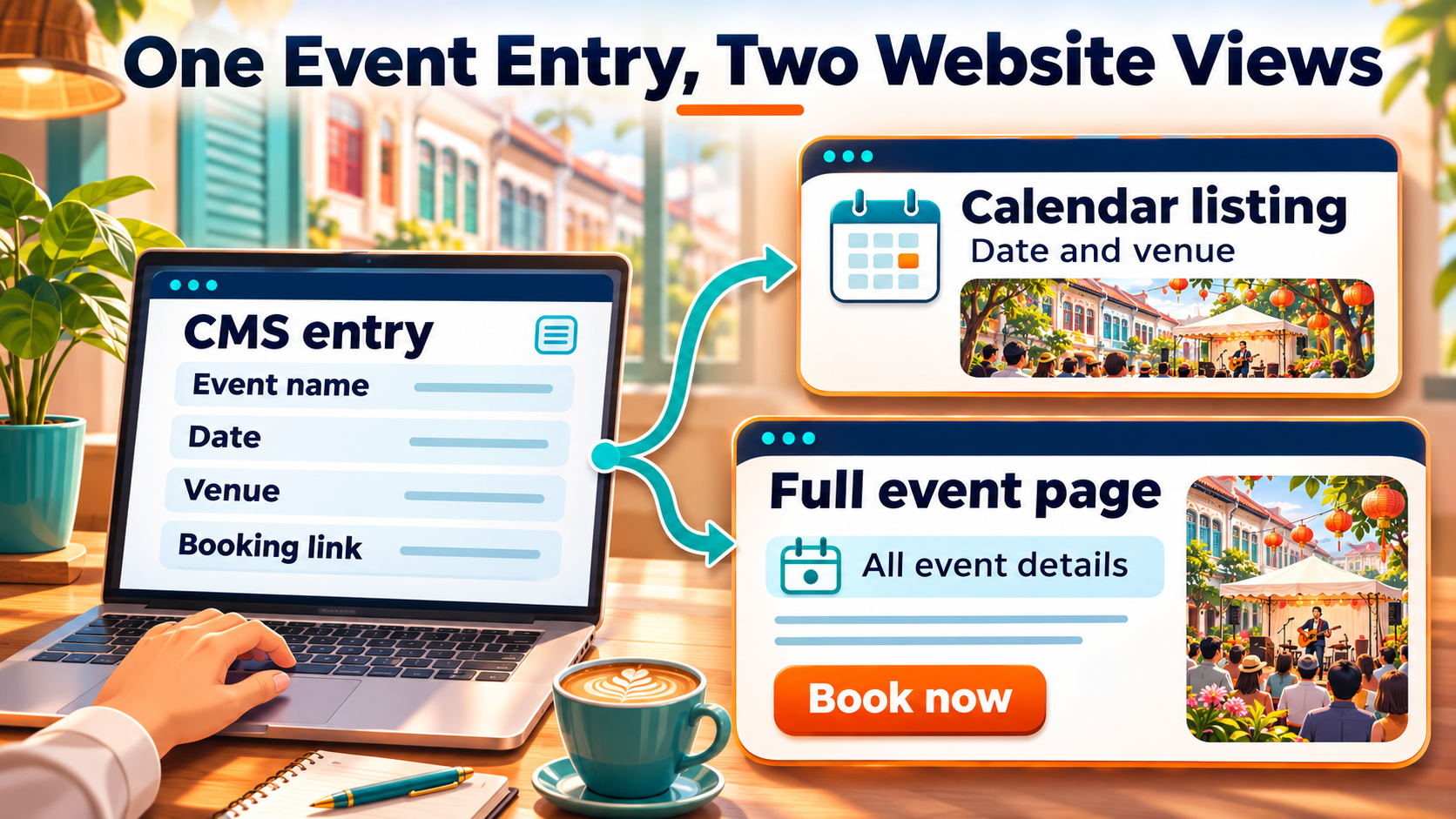
The same idea works for event listings. An organiser can enter the event name, date, venue and booking link in separate fields. A website calendar can show the date and venue, while the full event page displays the full entry. A change to a shared field can appear in both places when both views pull from that entry.
What Can a CMS Do for Your Team?
Give staff control over routine edits
A CMS lets trained staff handle changes such as updating a staff profile, replacing a menu PDF or correcting a service description. A hosted website builder can be a practical starting point when the business wants one provider to supply the page editor and hosting. The quote should identify which tasks staff can handle and which need paid support.
The time saved depends on the work the team does often. A training company that adds course dates every week gains more from a reusable course template than from a large collection of homepage designs. During a demo, an editor should try adding the next course date, changing the booking link and checking the published page on a phone.
Give each person the right access
CMS roles help a business decide who can draft, edit, approve or publish. A freelance writer might prepare an article while an editor checks the wording and a manager approves it. The person who handles website updates may need a separate administrator account. WordPress, for example, uses roles and capabilities to control the actions each account can take.
A revision history can also help when a page changes by mistake. The team should check whether it can see who made the change, compare versions and restore an earlier one. Approval rights and revision history solve different problems. One controls who can make a change live, while the other helps the team work out what changed and recover the earlier content.
Keep translated pages connected
A CMS can link different language versions of the same page. A business with English and Chinese service pages, for example, can use that link to find the translation when the English booking terms change. The person who owns the translation still needs to update the copy and check the form and booking button in that language.
A trial should include a change to the source page after the translation goes live. The team can then see whether the CMS flags the translation for review or whether staff need to track it separately. Separate language URLs also let the site identify localised versions of a page for Google Search.
Traditional, Decoupled, and Headless CMS Compared
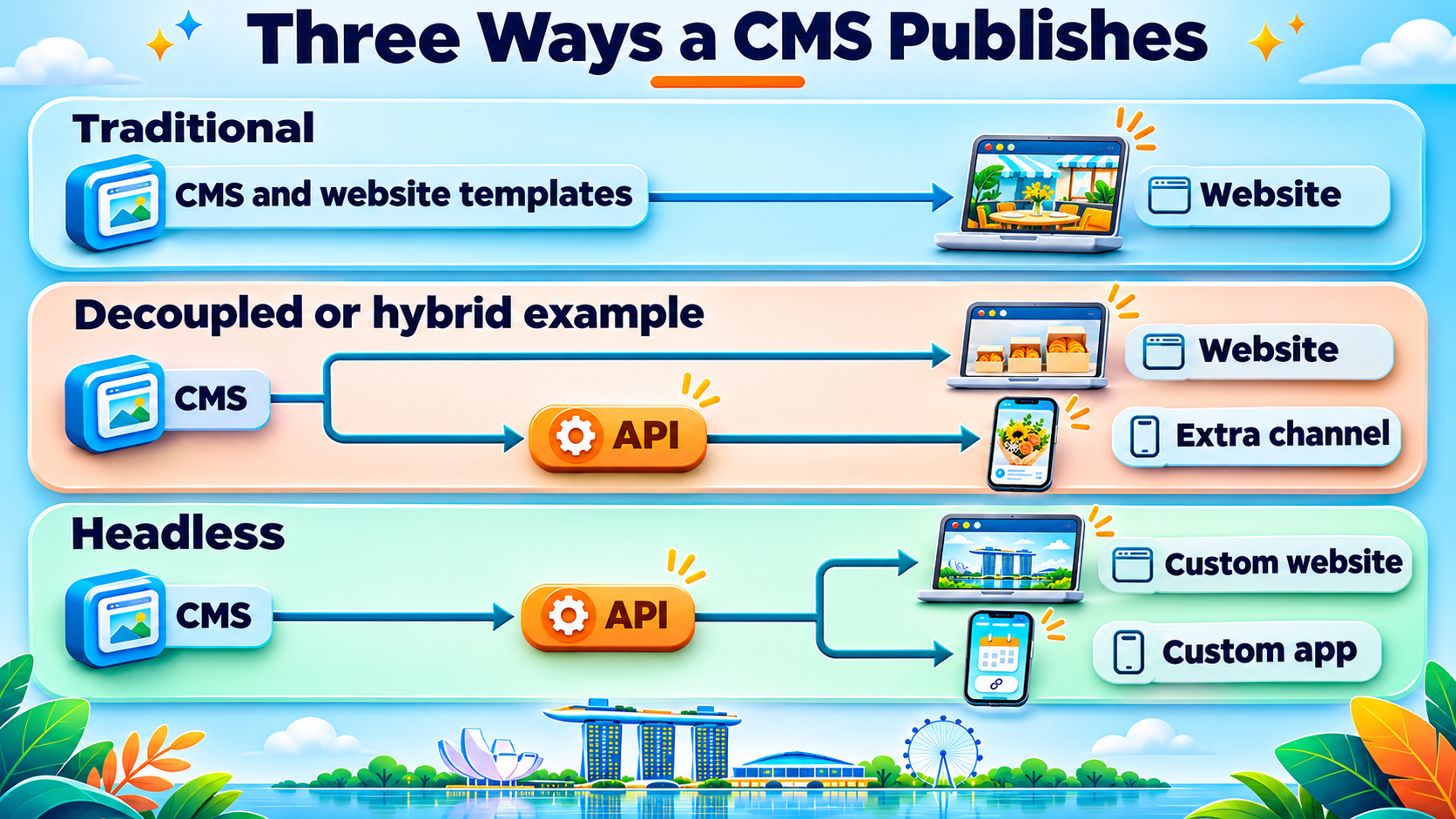
The three CMS types differ in how stored content reaches a customer. The front end is the part customers see, such as a website page or app screen. An API lets another system request content, such as a catalogue app fetching a product name and photo.
| CMS type | How it publishes | When to consider it | What the team needs to check |
| Traditional | The CMS manages the content and uses its own templates to display it. | One main website with regular edits by staff. | Who maintains the site, templates and extensions? |
| Decoupled | The CMS manages content separately from the website display. Some setups offer a ready website and an API for other channels. | An established website with a specific need to share selected content elsewhere. | What website tools come with the setup, and which connections need a build? |
| Headless | The CMS provides content through an API. The website or app has its own display layer. | Several channels need the same structured content and the business has development support. | Who builds and maintains each channel, its preview and its publishing process? |
Traditional CMS
A traditional CMS gives editors a dashboard and a website that uses the same system to display pages. A tuition centre might use it to add course dates, post school holiday notices and update its enquiry form. A theme can give the centre a starting design. Hosting and ongoing maintenance depend on how the site is set up and what the service includes.
The best test is a task the team already does. If the centre changes class times each term, the editor should make that change on a sample page and check the mobile view. The demo should also show what happens if the centre adds a second branch with its own timetable and contact details.
Decoupled or hybrid CMS
Vendors use “decoupled” and “hybrid” in different ways. The demo should show the parts the business will actually get. A retailer might keep its main website and send product care instructions to a separate customer support site through an API. The team needs to see how editors preview a change in both places and who maintains the connection.
One channel can also need different wording. A product guide on the website may have room for photos and detailed steps, while the support site may need a shorter version. The CMS should make it easy to see which fields are shared and which belong to a single channel.
Headless CMS
A headless CMS gives a team one place to store content that different websites, apps or screens can use. A retailer could share a product name, photo and care details between its website and its app. Each channel decides how to display the fields. Prices, stock and orders can stay in the commerce system that manages them. MediaOne’s ecommerce web development services cover the store functions a retail build may also need.
A headless build gives developers more control over each display. It also gives them more to maintain, including website templates, app screens and the way search engines receive public pages. A content preview and the published page should both form part of the demo. Those checks are especially relevant to headless CMS SEO.
CMS Features to Test Before You Buy
Editing, approval, and accessibility
The team’s usual editor should build a sample page during the demo. A service page with a heading, an image, a fee and an enquiry form is enough to show how much work the editor can do alone. A second person can check the draft and request a change before it goes live. A mobile preview helps both people catch a crowded heading or a button that is hard to tap.
- Editing: The editor can find the right entry, reuse a page layout and preview the draft.
- Approvals: The reviewer can see what changed and send the draft back with a comment.
- Accessibility: The editor can add image alt text and use headings in the right order. A keyboard user can reach the links, buttons and form fields on the published page.
- Media: The team can find an existing image, see where it appears and replace it when needed.
Search settings and website speed
A CMS comparison should include a published sample because settings in a dashboard only help when the site uses them. The team should check that the sample displays the right page title and description, uses the intended URL and appears in the sitemap. If the team moves a page, the old address should take customers to the right replacement. A detailed CMS comparison for SEO can help the team identify which controls belong in the demo.
A product or business page may also need structured data, which labels details for search engines. The build team should check the published output on a real page. The same page can serve as a test for website page speed once it contains normal images, forms and other features the business plans to use.
Enquiry forms, analytics, and other tools
A CMS may connect to the system that stores leads, sends emails or manages bookings. A test enquiry should travel from the published form to the right inbox or customer record. The person who handles leads should check which details arrived and whether the confirmation message tells the customer what happens next.
Analytics should record the action the business wants to measure. A service company might track completed enquiries, while a training provider might track confirmed bookings. A team can test this by submitting one form and checking that the reporting tool records one completion. If the form collects personal details, the business should also check who can see submissions, where copies are stored and how they are removed. Singapore’s PDPC covers these issues in its data protection practices for ICT systems.
WordPress, Strapi, and Storyblok Compared
These three platforms offer different starting points. Each one should get the same demo brief, with the same page, approval task and publishing check. That makes it easier to compare the work staff and developers will have to do.
| Platform | What it offers | What to test first |
| WordPress | Open-source software with a page editor, themes and plugins. | An editor builds a service page and checks it on mobile. |
| Strapi | An open-source headless CMS that delivers content through an API. | A developer connects one content entry to the website or app. |
| Storyblok | A headless CMS with a visual editing interface. | An editor previews and changes a page in the proposed website layout. |
WordPress
WordPress features include publishing tools, themes and plugins. A small business can use a standard template for service and contact pages, then add functions such as a booking form as needed. The team should check who updates each plugin, who tests the site after changes and what the hosting provider includes. MediaOne’s WordPress website design service is one option when the business wants help with the build.
Strapi
Strapi’s documentation describes an open-source headless CMS with APIs. A developer can define the fields an entry needs, such as the model name, photo and care instructions for a product. The team should ask for a demo with those fields in a real display. That shows which updates editors can handle in Strapi and which changes require work on the website or app.
Storyblok
Storyblok’s Visual Editor lets editors work with a preview of their content. The preview still needs to connect to the business’s front end. A marketer should test moving a page section, replacing an image and previewing a draft on mobile. The quote should state which page sections the build includes and who adds new ones later.
How to Budget for and Maintain a CMS
Compare the three-year cost in Singapore dollars
A platform fee covers one part of the project. A fair comparison includes the cost of getting the site online, keeping it running and making the changes staff expect over the next three years. The figures below are budget items to request from vendors. The actual amounts depend on the build and support package.
| Budget item | What the quote should cover |
| Set-up | Design, templates, integrations, training and content transfer. |
| Running costs | Hosting, licences, paid extensions, editor seats and any charges tied to usage. |
| Support | Software updates, monitoring, backups and response times for urgent issues. |
| Staff time | Publishing, approvals, translation, page checks and onboarding new editors. |
| Future changes | Adding a branch, a language or another channel, plus the cost of exporting content if the business moves. |
Quotes are easier to compare when they use the same assumptions. For example, both vendors should price the same number of editors and language versions. Each quote should show the currency, billing cycle and whether GST applies. A support package should spell out what happens when an enquiry form stops working and what the vendor charges to add a new page layout.
Assign security and backup tasks
The support agreement should name the person or provider responsible for updates, backups and user accounts. The team should also know whom to contact if the website goes down. The WordPress security handbook covers practical steps such as keeping software updated and backing up the site. The same ownership questions apply when a business hires a provider to handle that work.
- Updates: The support owner applies updates and checks that key pages and forms still work.
- Access: Staff use individual accounts, and administrator accounts use two-factor authentication where available. The account owner removes access when someone leaves.
- Backups: The team confirms how often backups run and which data they include. A test restore shows whether the team can recover a page and its images.
- Recovery: The contract names the first contact, the expected response time and who can approve a restore.
How to Run a CMS Pilot Before Signing
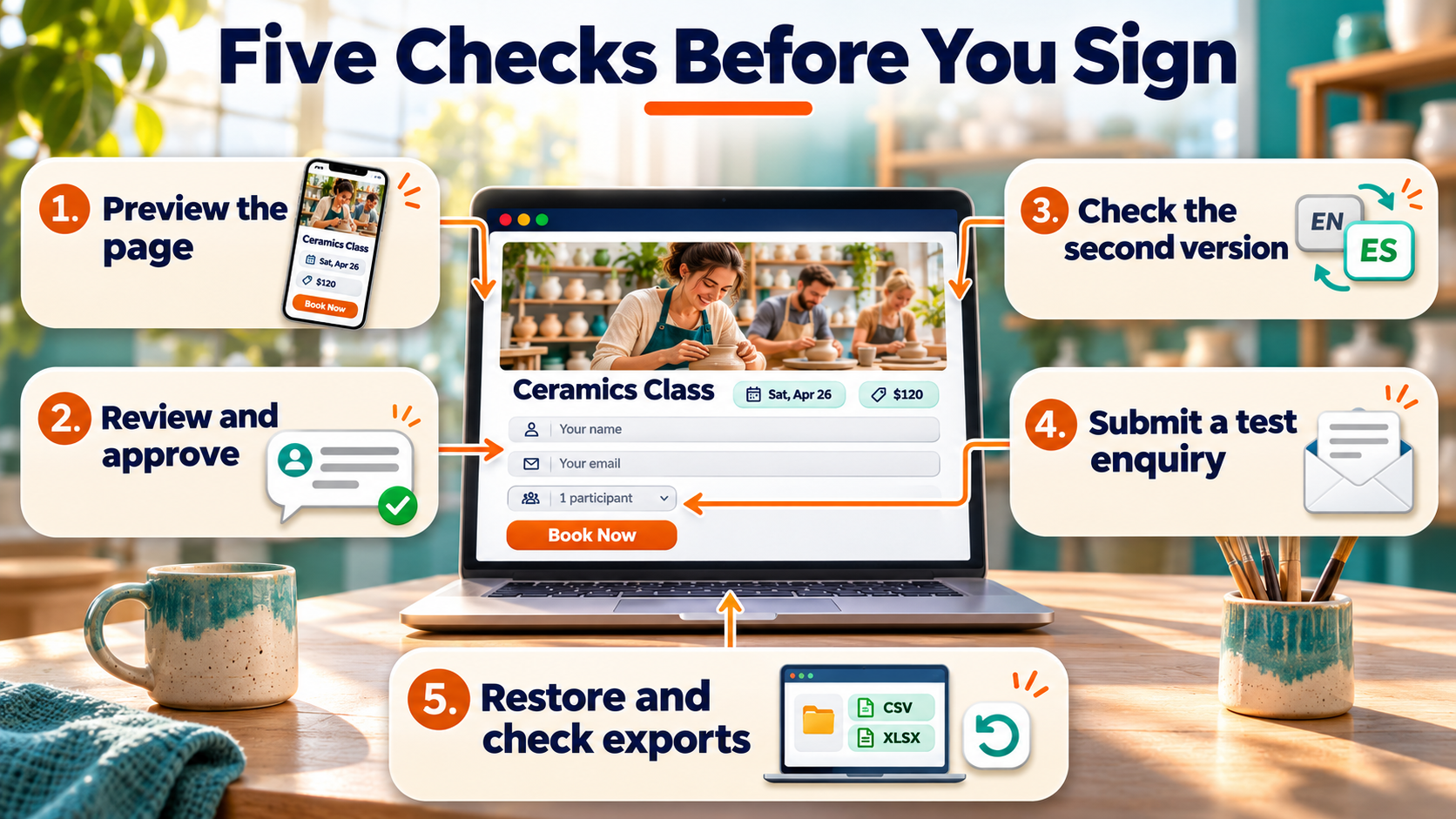
A CMS pilot can use one service page that the business needs to update often. For example, a training provider could choose a course page with a price, a date and a booking form. That page gives an editor, a reviewer and a developer a shared task with a visible result.
- The editor builds and previews the page. A staff member creates the draft from a template and checks how it looks on a phone.
- The reviewer sends it back once. A colleague flags a price correction. The editor makes the change and sends it back for approval before it goes live.
- The team tests a second version where needed. A bilingual team can update a translation. A team with an app can check whether the same date reaches the app screen.
- The enquiry owner checks the form. A test submission reaches the right inbox or customer record, and the customer sees the expected confirmation.
- The support owner tests recovery. The team restores an earlier page version and checks what the platform can export, including images and any translated entries.
A business moving an existing site can also test a page with a new URL. The Google Search Central site-move documentation covers mapping old addresses to their new destinations. In the pilot, a click on the old address should take the tester to the correct new page, where the booking form still works.
The team can record each task as passed, needs work or needs outside support. A failed form test should have an owner and a date for a second test. The result gives the business a basis for comparing quotes and agreeing what the vendor will deliver.
Choose a CMS Your Team Can Run
A CMS earns its place when staff can make the changes customers rely on and know who to call when something breaks. Before approving a build, the business should have a working sample page, a three-year quote and a named owner for maintenance. Any gaps the pilot uncovers can go into the scope with a due date and a way to check the result.
MediaOne’s website design and development service can help Singapore businesses plan a new site or rebuild. A brief with one sample page, the team’s approval steps and the systems that need to connect gives the project a practical starting point.
FAQs About Content Management Systems
Is a CMS the same as website hosting?
A CMS manages pages and other content. Website hosting keeps the site online so customers can reach it. Some providers bundle both in one plan. A self-hosted setup gives the business a separate hosting account, which may have its own bills, backups and support terms.
Can a business keep its domain when it changes CMS?
A business can usually keep its domain if it controls the registration and can update the settings that connect the domain to the website. The domain account should be in the business’s name or under an account it controls. A move can also affect email if the wrong domain settings are changed, so the handover should identify who manages them.
Does a CMS need to store every image and video?
A CMS can store some files itself and display others from a separate media service. A small site may keep photos in its media library and embed videos from a video host. The team should check who owns the media account and what happens to the page if a file is moved or deleted.
Can a website run without a CMS?
A developer can build a small site as a set of pages and update the files directly. That can work for a site with a few pages that rarely change. A CMS becomes practical when staff need to make regular updates, publish new pages or share editing work.
Can a CMS be used for a staff-only site?
Some platforms support private pages or can connect to a company’s sign-in system. A staff-only site needs controls for both the pages and any attached files. A test with a signed-out browser can show whether a link to a document still opens after the page itself has been restricted.
Who owns content created in a CMS?
The contract should state who owns the copy, images and other materials, along with any limits set by third-party licences. It should also name who controls the platform account and can authorise an export. Ownership of the content and permission to reuse a theme, stock photo or plugin may come from different agreements.