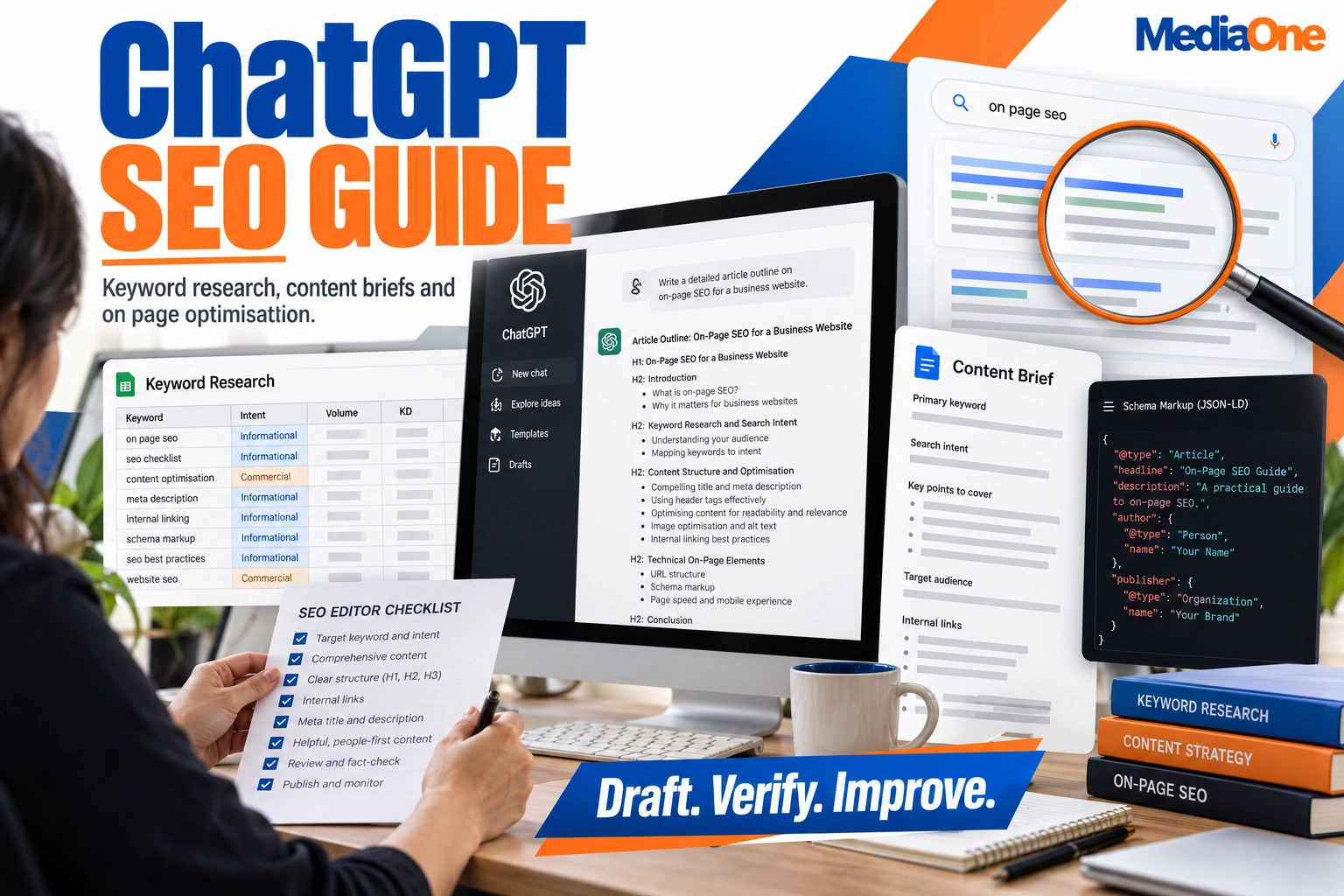
ChatGPT can speed up SEO work. It can sort keyword lists, draft title tags and outline content briefs. It cannot tell you what people search for this month, what ranks on page one today or whether a keyword is worth targeting. Use it to generate drafts and analysis, and check every claim against search data before you publish.

This guide shows where ChatGPT saves time, where it fails and how to build a check into each task. Used well, it supports your content strategy so output serves readers, not just the calendar. Organic visibility depends on keywords chosen with real data, not on what a model guesses.
Key Takeaways
- ChatGPT is a drafting and analysis tool, not a search data source. Verify every metric before acting on it.
- Delegate low-risk tasks. Spelling checks, spreadsheet parsing and first-draft meta descriptions are quick to review.
- Keep high-stakes work human-led. Keyword selection, competitor claims and final copy need checking against real data.
- Give the model your inputs. Supply the query, audience, search intent and page data.
- Watch for invented specifics. Plausible but fabricated statistics, volumes and schema properties are common.
- Verify, then publish. Check the output against live data and add first-hand expertise before going live.
The SEO Task Suitability Matrix
Score each SEO task on two questions: does it need live or verified data, and is a mistake easy to catch? The answers sort the work into three groups.
| Task | Needs live data? | Easy to catch a mistake? | Verdict |
|---|---|---|---|
| Spelling and consistency checks | No | Yes | Delegate |
| Spreadsheet parsing | No | Yes | Delegate |
| Title and meta drafts | Low | Yes | Delegate, then review |
| Schema markup drafts | Low | Moderate | Delegate, then validate |
| FAQ drafting from real questions | Yes | Yes | Assist only |
| Keyword volumes | Yes | No | Assist only |
| Keyword intent and SERP analysis | Yes | Moderate | Assist only |
| Full-page drafting | Yes | No | Human-led |
Delegate tasks require little data and can be checked quickly. Assist-only tasks need live data, so the model proposes, and a tool confirms. Human-led tasks are high-stakes, so a person owns the decision.
What ChatGPT SEO Means and Why It Matters
What ChatGPT Is and Why SEO Teams Adopted It

ChatGPT is a large language model from OpenAI that generates text from a written prompt. SEO teams use it to create repetitive campaign work such as title tags, article outlines, grouped keywords and reformatted data. It saves time on slow but straightforward tasks, and each output still needs a person to check it. Adoption has grown as teams look for ways to improve optimization in routine production work.
Its base model cannot look things up on its own. OpenAI’s ChatGPT Search feature browses the web for current answers, but availability depends on your plan, so check the help page. Keyword volumes and rankings still need confirming in your search tools.
The Difference Between Using AI for SEO and Using It Well
Using AI for SEO means pasting a prompt and publishing the answer. Using it well means treating the output as a draft to verify. Verification covers three checks: confirm keyword volumes in a search tool, check competitor claims against live results, and have a person review the final page for accuracy. A technical review should also confirm elements such as crawlability and structured data rather than assume them. Teams should apply the same review standard to AI-generated content as to any other draft.
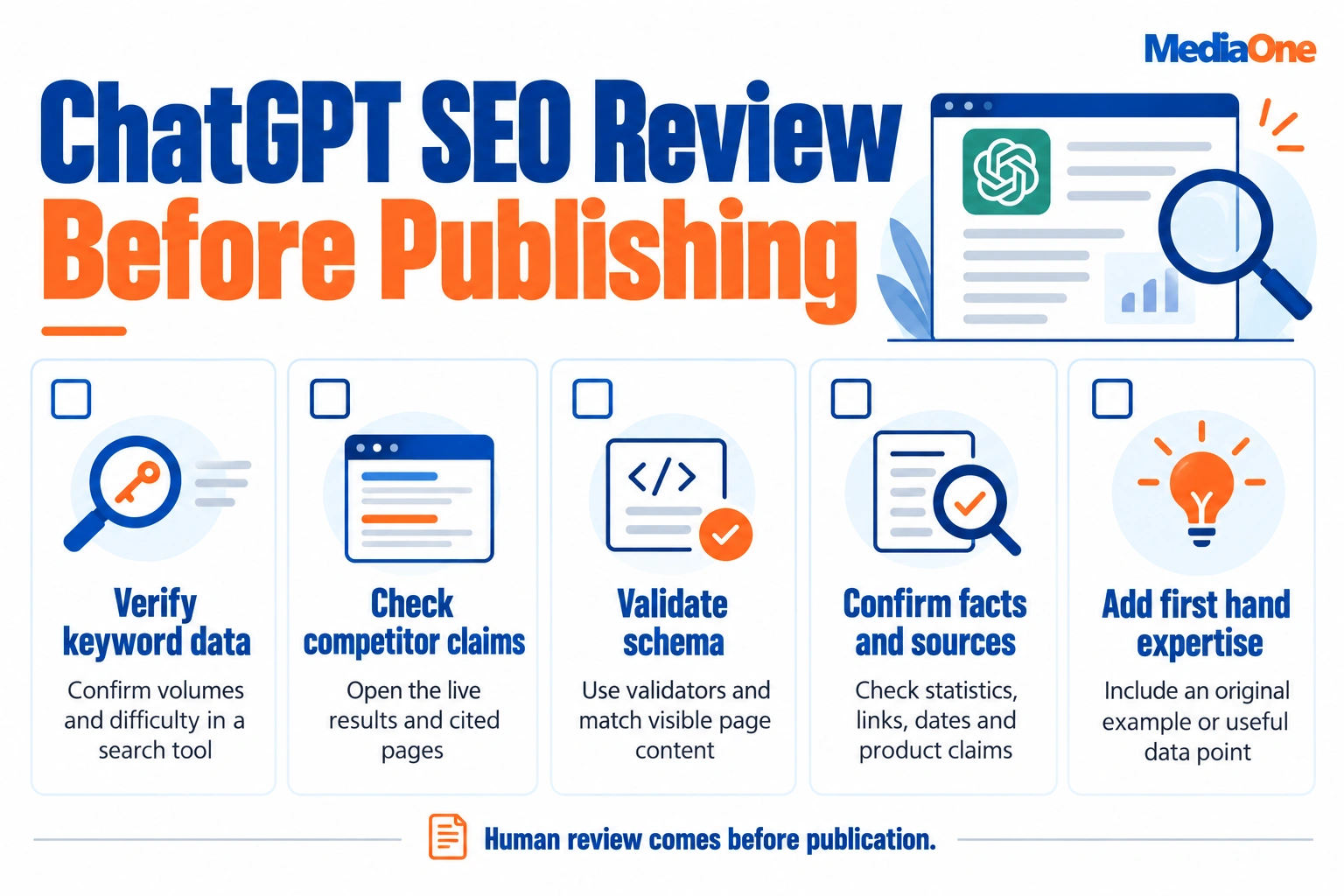
Teams that skip these steps publish plausible but invented figures, such as search volumes or schema properties that do not exist. Teams that run the checks maintain speed and avoid risk. The business case for AI-assisted content depends on that discipline, not on output volume.

Who This Guide Is For
This guide is for SEO specialists, content managers and small marketing teams who already know the basics. It provides specific prompts, a task suitability matrix and a review checklist.
Keyword Research with ChatGPT
Keyword research is where most teams first try ChatGPT and where it is easiest to over-trust. It speeds up keyword thinking and can help generate prompts that expose gaps in your target keywords. It does not replace search data that shows what people actually type.
Building Keyword Lists Grouped by Search Intent
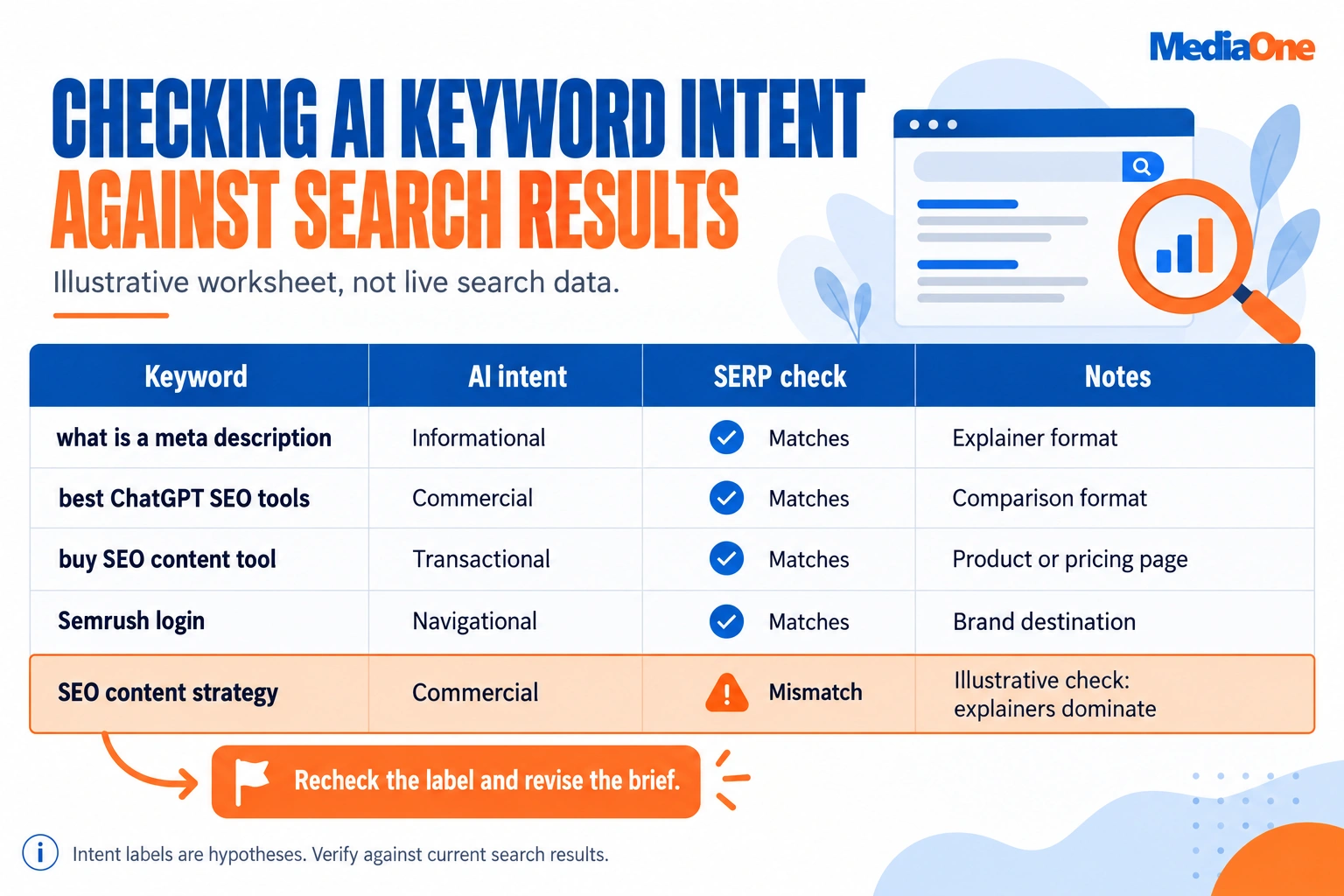
Ask ChatGPT to sort a raw list by intent before checking volumes. Request four groups: informational, commercial investigation, transactional and navigational.
For example: “Group these keywords by search intent: best ChatGPT SEO tools, what is a meta description, buy SEO content tool, Semrush login. Return four groups with one line of reasoning each. “A good output places “best ChatGPT SEO tools” under commercial investigation, which calls for a comparison page. A weak output might label a brand term as informational.
Treat the groups as a hypothesis. The model sorts by wording, not by what ranks, so verify each group against live results. One check showed a “commercial” group returning mostly explainers, and the brief was rewritten before writing began. Teams that skip this step often publish pages that never gain visibility because the format doesn’t match what searchers expect. Verifying each group also helps teams create briefs that match what searchers and ranking pages actually reward.
Checking Intent Before You Commit to a Keyword
Search the keyword in Google and read the top ten results. Mostly product pages mean a guide will struggle to rank. Mostly long explainers mean a short sales page will struggle. Search results reveal intent more reliably than any model’s guess.
Use this rule: if ChatGPT calls a keyword commercial but at least six of the top ten results are informational, reject the label and rebrief the page as an explainer. Record the mismatch so the brief reflects what Google rewards, and so the marketing team can align later campaigns with the same intent. Keeping that record also supports ongoing optimization of the brief, since search results change over time.
Generating Ideas Tied to Real Search Demand
ChatGPT produces topic lists quickly, but a list is not proof of demand. Before committing to a topic, check each idea in a tool such as Google Search Console, Google Trends or a keyword platform. Confirm that people search the phrase and that the results show pages like the one you plan to write, since that is what drives search visibility.
Ask for twenty angles, then cut hard. Please discard any ideas that are not supported by your data.
Turning Keywords into Outlines and Content Briefs
Please provide the target keyword, audience, search intent, the URLs of the top three ranking pages, and the sections you need. For example, a prompt naming “ChatGPT SEO”, a marketing manager as the reader and three ranking URLs returns a usable brief for content creation. Weak briefs list generic subtopics that none of the ranking pages covers.
Check that headings match the keyword’s intent and that no subtopic was invented to fill space.
Building Content Clusters Around a Core Topic
ChatGPT can map a core topic into a cluster of supporting pages grouped by intent. Link each supporting page back to the pillar page with descriptive anchor text, and confirm that each page has search demand before building it.
Writing and Optimizing On-Page Elements with ChatGPT
Title Tags and Meta Descriptions: A Repeatable Process
ChatGPT drafts title tags and meta descriptions quickly, but speed is not the goal. Give it the target keyword, the page’s main angle, the audience and the length limits. A common practice is to keep titles between 50 and 65 characters, though Google does not publish these figures as a guideline, and display truncation varies by device and query. Google’s title link guidance describes how titles are chosen. Descriptions are typically around 150 to 160 characters. Generate five options and pick the one that matches what the page delivers. Please reject any draft that promises something outside the page’s coverage. Strong titles and descriptions improve click-through and search visibility, but only when they reflect the page accurately. Clear, well-written prompts help the model return drafts that need less editing.
On-Page Recommendations and How to Audit Them
Ask ChatGPT to review a page’s headings, intro and internal links against a target query. Please paste the page text, as the model may not be able to read live pages. Treat its recommendations as a checklist to test. Confirm each suggestion in a crawler or in Google Search Console before acting on it, since technical checks catch problems a model cannot see. In one audit, a suggested heading change looked right on paper but reduced the page’s match to the query, and crawl data caught it before publishing.
Writing Complete Pages and Posts Without Losing Quality
Full-page drafts are the highest-risk use. A draft can read well while containing invented statistics, vague claims or generic examples. Use ChatGPT to create structure and first passes, then add first-hand detail, sourced figures and a clear perspective. Good content creation still depends on editorial judgement. Google’s guidance on helpful content asks whether a page serves the reader, so your editing decides the result.
Schema Markup, FAQs and Structured Data
Generating Schema Markup and Validating It
ChatGPT can generate JSON-LD for types such as Article, FAQPage, Product, or LocalBusiness, saving time on repetitive templates. Models often invent properties, use deprecated types, or mark up content that does not appear on the page, so treat the code as a draft that needs review.
Use this process before any markup goes live.
- Ask for JSON-LD using the schema.org vocabulary, and state the exact page type.
- Please confirm that every property name matches the schema.org documentation.
- Run the code through the Schema Markup Validator and Google’s Rich Results Test.
- Check that each marked-up value appears word for word on the visible page.
Google’s structured data guidelines require markup to match page content. Markup describing hidden or invented information can lose eligibility for rich results.
Creating FAQ Sections That Answer Real Questions
FAQ sections work best when the questions reflect real demand. Pull them from Google’s “People also ask” boxes, the Search Console query report, or support tickets, then give ChatGPT those questions rather than asking it to invent them. Marketing teams can use the same questions to shape different landing pages.
Keep each answer to 40 to 60 words, lead with the direct answer, and do not restate the question. Add FAQPage markup only if the questions and answers are visible on the page. Google restricts FAQ-rich results to eligible sites, so markup alone will not earn a display.
Worked example. Paste five real questions from a support inbox and ask for a 50-word answer to each, using only facts from the product page. Then check each answer against that page and delete any feature the page does not mention.
Working with Spreadsheets, Data and Quality Checks
Keyword exports, rank reports and crawl files are where ChatGPT SEO saves the most time. Paste a CSV or copied table and ask for a specific output, such as grouping rows by intent, flagging duplicate target URLs, or turning a list into an importable two-column sheet. State the column headers and expected format in the same prompt, or the model will guess at the structure.
Treat its arithmetic and sorting as a starting point. Spot-check about ten rows against the original file, recalculate totals in a spreadsheet, and confirm the row count, since large pasted tables can be truncated.
Parsing Spreadsheet and Table Data
Use the model for mechanical tasks: deduplicating keywords, normalizing capitalization, splitting combined columns, or extracting URLs. Ask it to return only changed rows so you can compare them with the source. Clean data helps your content perform in search engines, so keep the output tidy enough to import directly.
Spelling, Grammar and Consistency Checks
ChatGPT SEO workflows also benefit from catching typos, inconsistent product names and mixed spelling across meta titles or drafts. Give it a style rule to enforce, such as US English or fixed brand capitalization, so it flags deviations rather than rewriting freely. Review every suggestion, since it can alter technical terms or quoted text that should stay as written. Consistent wording across your content supports clearer content creation and search-ready pages.
Limitations of ChatGPT for SEO
ChatGPT is a strong drafting and analysis assistant, but it has real blind spots for SEO work. Treat its output as a first draft that needs checking, and be wary of anything that reads as generate-ready copy without verification. A language model predicts plausible text, so its fluency can hide errors in a page’s technical or SEO detail.

Hallucinated Facts, Stale Data and Missing Search Data
The base model does not browse the web or pull current keyword volumes. Asked for search volumes, difficulty scores or “the top three pages” for a query, it can produce figures that look precise but are invented. The same applies to non-existent schema properties and untraceable statistics. Its training data also has a cut-off, so recent algorithm changes or current pricing may be out of date. A plausible answer is not the same as a verified one, and this risk grows with AI-generated content produced at scale.
Google’s guidance on helpful content applies regardless of how content was produced, so a model’s confident tone is no proof of accuracy. Check every factual claim before it reaches a reader.
Why Human Editing and Verification Still Matter
Check every number, claim and recommendation against a trusted source, such as your keyword tool, Google Search Console or the published guidance from Google Search Central. Editorial judgement covers what a model cannot supply: first-hand experience, client results and a clear perspective. Readers reward that experience, and a generic draft rarely shows it.
Prompt Patterns That Supply Your Own Data
The model is far more useful when you feed it your inputs. Use a fill-in template like this one:
Target keyword: not provided. Page URL: not provided. Top three ranking pages: not provided. Target audience: working professionals. Search intent: not provided. Required sections: not provided.
Filling in the brackets gives the model the context it lacks and provides you with a review checklist. Once the fields are complete, confirm every keyword volume and competitor claim in your SEO tool before publishing.
A Practical Review Checklist Before Publishing
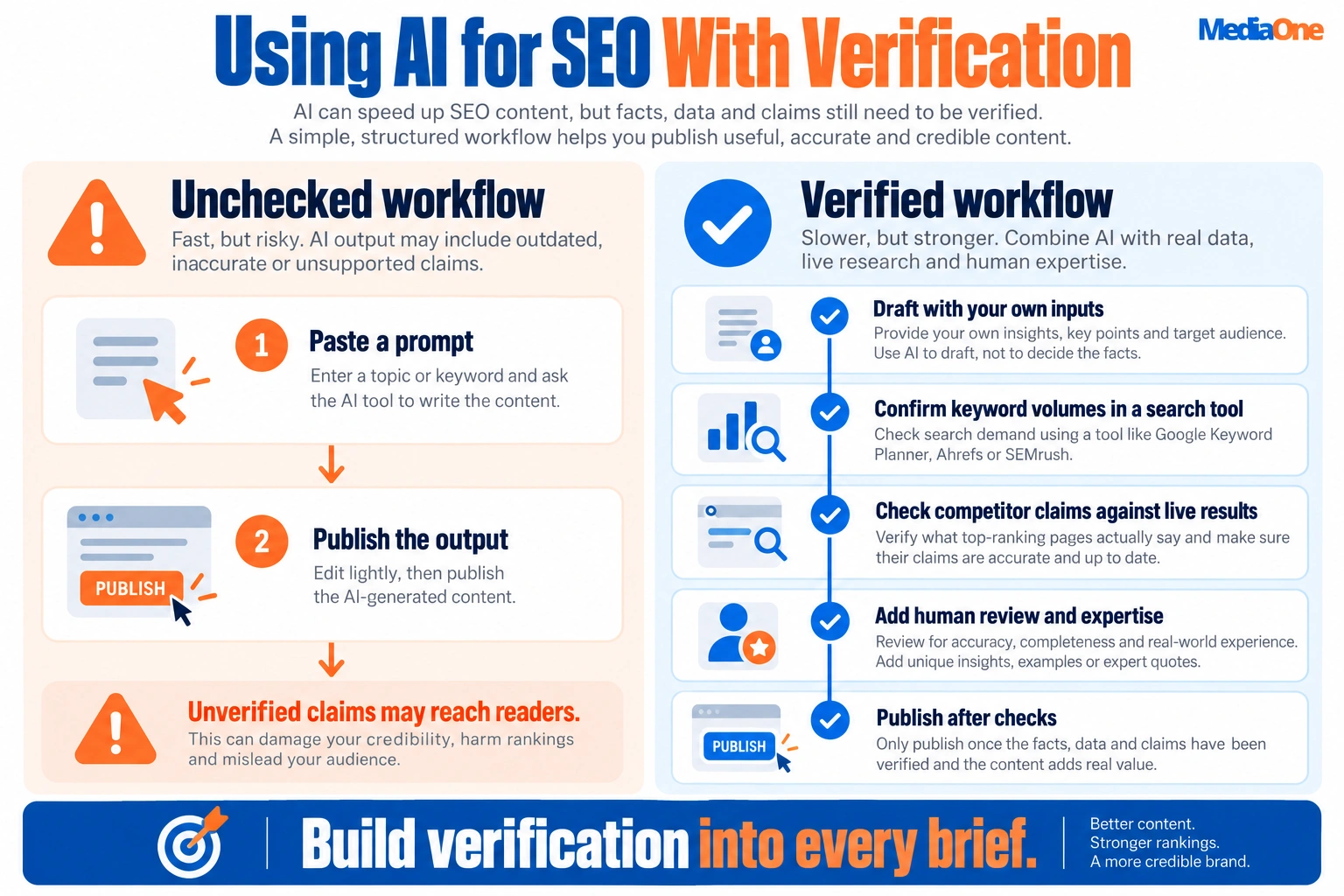
- Confirm every keyword volume and difficulty score in your keyword tool.
- Open each ranking page the draft refers to and verify its claims.
- Check that every statistic has a named source, a link and a date.
- Validate any schema markup with Google’s Rich Results Test.
- Remove any product, feature or policy the model described without a source.
- Add at least one first-hand example, screenshot or data point.
- Read the piece aloud to catch generic phrasing and filler.
Conclusion and Next Steps
ChatGPT works best as a drafting and analysis assistant in an SEO workflow. It does not replace keyword data, live search results or editorial judgment. Use it to generate draft content and analyze existing material, then check results against verified data before publishing.
Start with one low-risk task, such as drafting title tags for a page you know well. Run it through the SEO Task Suitability Matrix from this guide. Delegate low-data, straightforward-to-check tasks. Keep live-data tasks assist-only, and keep a person in charge of high-stakes work.
Build a verification step into every brief. Confirm keyword volumes in your research tool, check competitor claims against live results, and test schema in a validator. Log errors so future prompts can be tighter and align each prompt with your broader content strategy for the business.
Frequently Asked Questions
Can ChatGPT replace a keyword research tool?
No. The base model has no live access to search volumes, keyword difficulty or current search results, so its figures can be plausible but wrong. Use it to group, expand and label keyword lists you already have, then confirm volumes in a dedicated tool before acting on them.
Is content written with ChatGPT penalized by Google?
Google’s guidance focuses on whether content is helpful and written for people, not on how it was produced. The real risk is pages that add little original value, rely on unverified claims or exist to manipulate rankings. Add first-hand experience, verified facts and real examples before publishing.
Which ChatGPT version is best for SEO work?
It depends on the task and your plan, and model names change often, so check the current options in your account. A more capable model suits data analysis, structured briefs and long-document editing. A faster model is often enough for title variants or spelling checks.
How do I check whether ChatGPT’s SEO advice is accurate?
Treat every specific claim as unverified until checked. Confirm statistics against their original source, test technical recommendations in a staging environment and compare search claims with live results. Keep a short log of what was checked and by whom.
Can ChatGPT generate valid schema markup?
It can draft JSON-LD for common types such as Article, FAQPage and Product, but it sometimes invents properties or uses mismatched types. Validate every output with Google’s Rich Results Test and the Schema.org validator, and confirm each marked-up detail appears on the page.