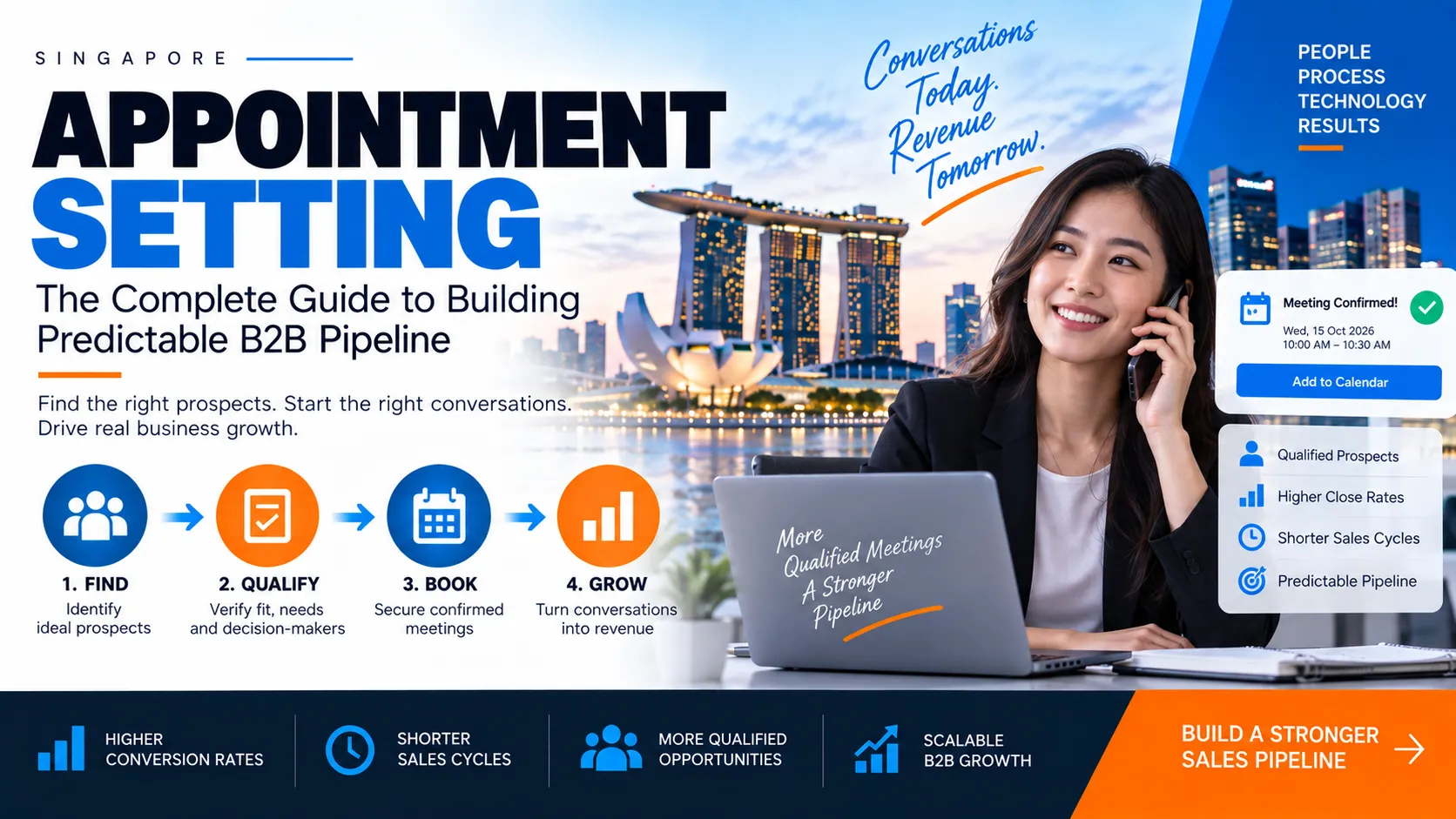
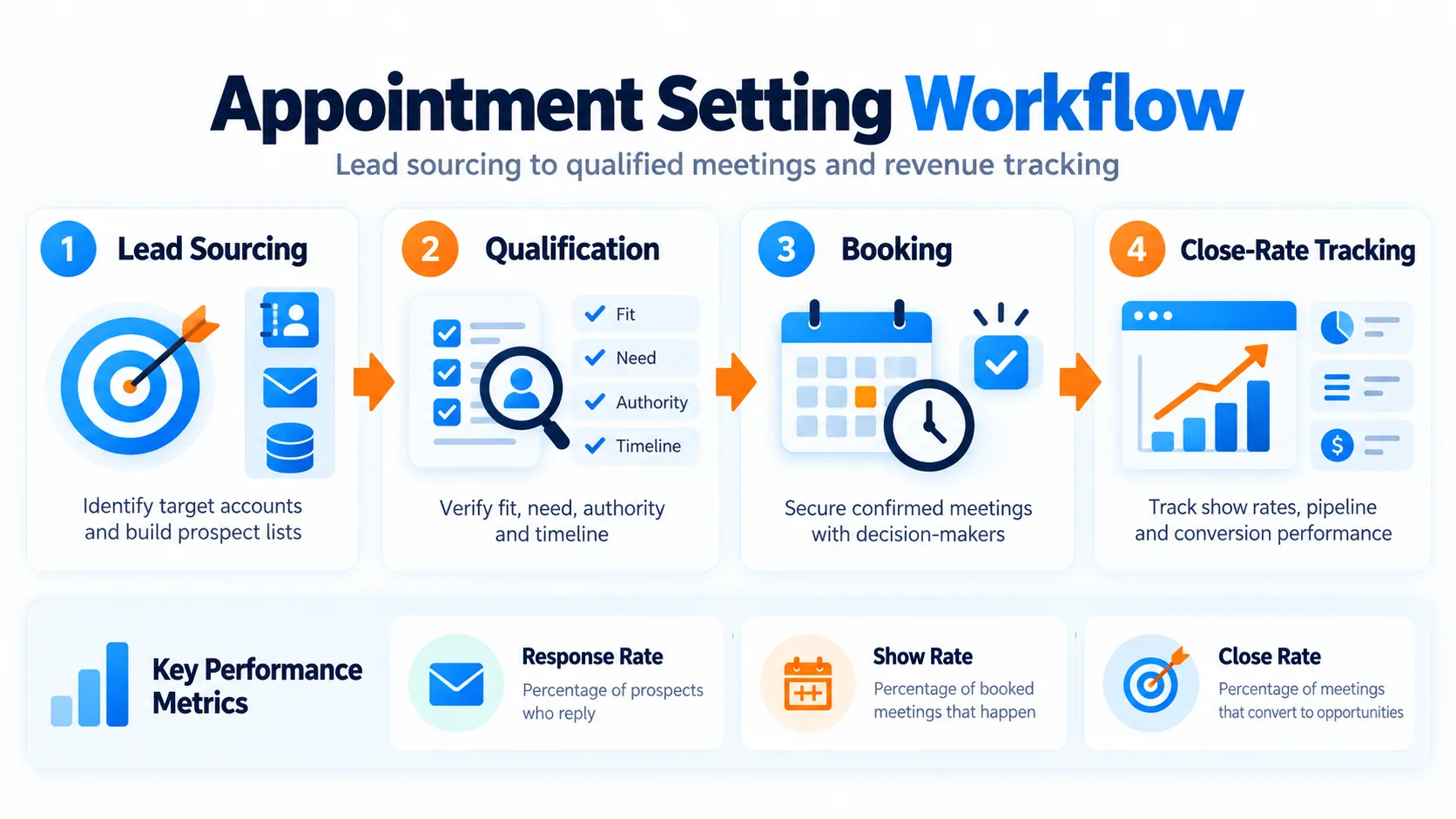
Appointment setting is the discipline of identifying qualified prospects and securing confirmed meetings with decision-makers. It sits between lead generation and sales. This is often where high-performing teams separate themselves through systematic processes, measurable outputs, and continuous feedback.
The confusion begins here: appointment setting is not the same as lead generation. Lead generation finds names; appointment setting qualifies them and books time. A salesperson who receives 10 unqualified leads wastes energy. A salesperson with two qualified meetings with budget authority is productive.
Most B2B sales teams treat appointment setting as a clerical task, a volume play where success comes from dialling more numbers and sending more emails. High-performing teams treat it as a system with defined inputs, measurable outputs, and continuous feedback loops. They ask: How many dials does it take to reach a real person? Of those conversations, how many convert to meetings? Of those meetings, how many lead to the pipeline?
This guide covers the methods, tools, processes, and trade-offs you need to build or improve appointment setting that delivers qualified meetings and protects your salespeople’s time. Whether you are running a small in-house team, vetting outsourced vendors, or auditing your current approach, the frameworks here apply.
Key Takeaways
Appointment setting is a measurable discipline with direct ROI. Systematic processes reduce sales-cycle friction compared to ad hoc outreach.
Phone, email, and LinkedIn each serve different buyer personas and deal sizes. The highest-performing teams combine channels rather than choosing one.
Response rates follow observable benchmarks (typically 20 to 40 dials per appointment, 100 to 150 emails per meeting), which let you diagnose bottlenecks and track improvement week to week.
Qualification before booking prevents wasted salesforce time and improves show rates significantly.
In-house teams take 3 to 6 months to reach full productivity. Outsourced vendors typically cost SGD 5 to SGD 20 per appointment but trade control for speed and scale.
What Is Appointment Setting and Why It Matters
Appointment setting is the act of securing a confirmed meeting between a prospect and a salesperson. It sits between lead generation (finding names) and sales qualification (confirming fit). The discipline ends when both parties have a calendar invite; the salesperson is not responsible for reconfirming or chasing the prospect.
Many teams conflate appointment setting with lead generation. A lead is a contact who matches your ideal customer profile. An appointment is that contact who has been vetted and has agreed to talk. A lead with zero response has no immediate value. An appointment with a 70% show rate has direct sales value.
Why This Distinction Matters for Revenue
A salesperson chasing unqualified appointments wastes 3 to 5 hours per week on no-shows, poor-fit calls, and re-prospecting. A systematic appointment-setting function absorbs that friction upstream. The result: salespeople spend 80% of their time on deals, not hunting.
Reported case studies across B2B teams show:
- Appointment quality lifts close rate from 15% to 22% when you pre-qualify on pain and timeline.
- Reducing no-shows by improving confirmation protocols doubles the effective pipeline without increasing outreach volume.
- A single salesperson’s productivity gain (removing 10 hours per week of dead-end prospecting) generates significant carried revenue value.
A typical mid-market company setting 50 to 100 appointments per month that improves appointment-to-close conversion by 5% adds meaningful revenue without incremental sales headcount.
Common Misconceptions About Appointment Setting
Misconception 1: It is low-value, transactional work.
Appointment setting requires strategy. List quality, targeting precision, and qualification rigour all feed into close rates. Better appointment quality improves pipeline velocity.
Misconception 2: Tools solve it.
A dialler or email platform is a multiplier, not a solution. Without a repeatable process (targeting, script, objection handling, qualification), technology amplifies existing problems.
Misconception 3: You can outsource it without oversight.
Outsourced vendors will execute dials and emails. They need weekly feedback loops and quality-assurance audits to maintain brand consistency and refine messaging.
Misconception 4: Cold outreach response rates are fixed.
A/B testing on timing, subject lines, value propositions, and list segments can improve response rates significantly within 4 to 6 weeks. Testing is essential for continuous improvement.
Core Appointment Setting Methods and Channels
Each channel has different response economics and fits different buyer personas. High-performing teams layer all three together rather than choosing one.
How Does Phone-Based Appointment Setting Work?
Phone calling remains the highest-conversion cold-outreach channel for B2B, particularly for deal sizes above SGD 16,500. It is also the highest-effort and lowest-volume method.
Response rates reported by practitioners: Typically 1 appointment per 20 to 40 dials, assuming a clean list of active decision-makers, a 30- to 60-second pitch that triggers genuine interest, and proper objection handling on the first call.
Best for: Enterprise or high-deal-size B2B, complex sales with multiple stakeholders, situations where email response is under 2 per cent, and when you need to map a buying committee quickly.
Script structure that works:
- Hook (10 seconds): Name, company, and one-sentence reason for the call tied to a recognisable business outcome. Example: “Hi Sarah, this is David from [example company Sales Ops Co]. I’m reaching out to Operations Directors at mid-market SaaS because high-performing teams I’ve worked with have cut their sales-cycle time from 90 to 60 days. Do you have 30 seconds?”
- Diagnosis (20 seconds): Ask one open question about their current state or frustration. Example: “Are you currently managing your sales pipeline in-house or outsourcing any part of it?” Listen for the answer; it determines the next move.
- Value statement (15 seconds): If they answer, connect your solution to their world. Example: “The reason I mention it is that most teams report being stretched thin on admin around scheduling and no-shows. Would it make sense to grab a brief call with our product person to explore whether we could help?”
- Call-to-action (CTA) (10 seconds): Direct close to the calendar. Example: “Does Thursday or Friday work better for you? I’m thinking 2:30 or 3 p.m. SGT.” Specific time slots remove friction.
Objection handling (do not transfer to email or promise to follow up later):
- “I’m not interested”: Response: “I understand. Most people I talk to aren’t until they realise how much admin time they’re spending. Is it timing, or does the topic not resonate?” Pause and listen. If still a no, thank them and move on.
- “Send me an email”: Response: “Happy to. But an email lands in your inbox with 50 others. The reason for the call is to see if it’s even worth your time. Quick yes or no: is the project something your team is working on?” Force a real signal.
- “I do not have time”: Response: “Totally fair. Is there a better time this week or next?” Book it there, even if it is 10 days out.
Singapore and APAC etiquette:
- Calling outside core meeting hours (early morning or late afternoon) often yields better connection rates. Mid-morning is typically when prospects are in scheduled meetings.
- Use formal titles (Mr., Ms., Dr.) on first touch unless explicitly invited to use first names.
- Reference a warm introduction or prior company interaction if possible. Cold calling in Singapore’s dense B2B market works best when you state a reason beyond “I purchased a list.”
- Allow longer silence for decision-making. Buyers in Australia and Singapore often pause 3 to 4 seconds before answering a direct question; silence does not indicate disinterest.
What Response Rates Should You Expect From Email Sequences?
Email is the highest-volume, lowest-conversion channel. Single emails typically generate response rates below 0.5 per cent. Sequences using 3 to 5 touches over 10 to 14 days commonly move response rates to 1 to 2 per cent.
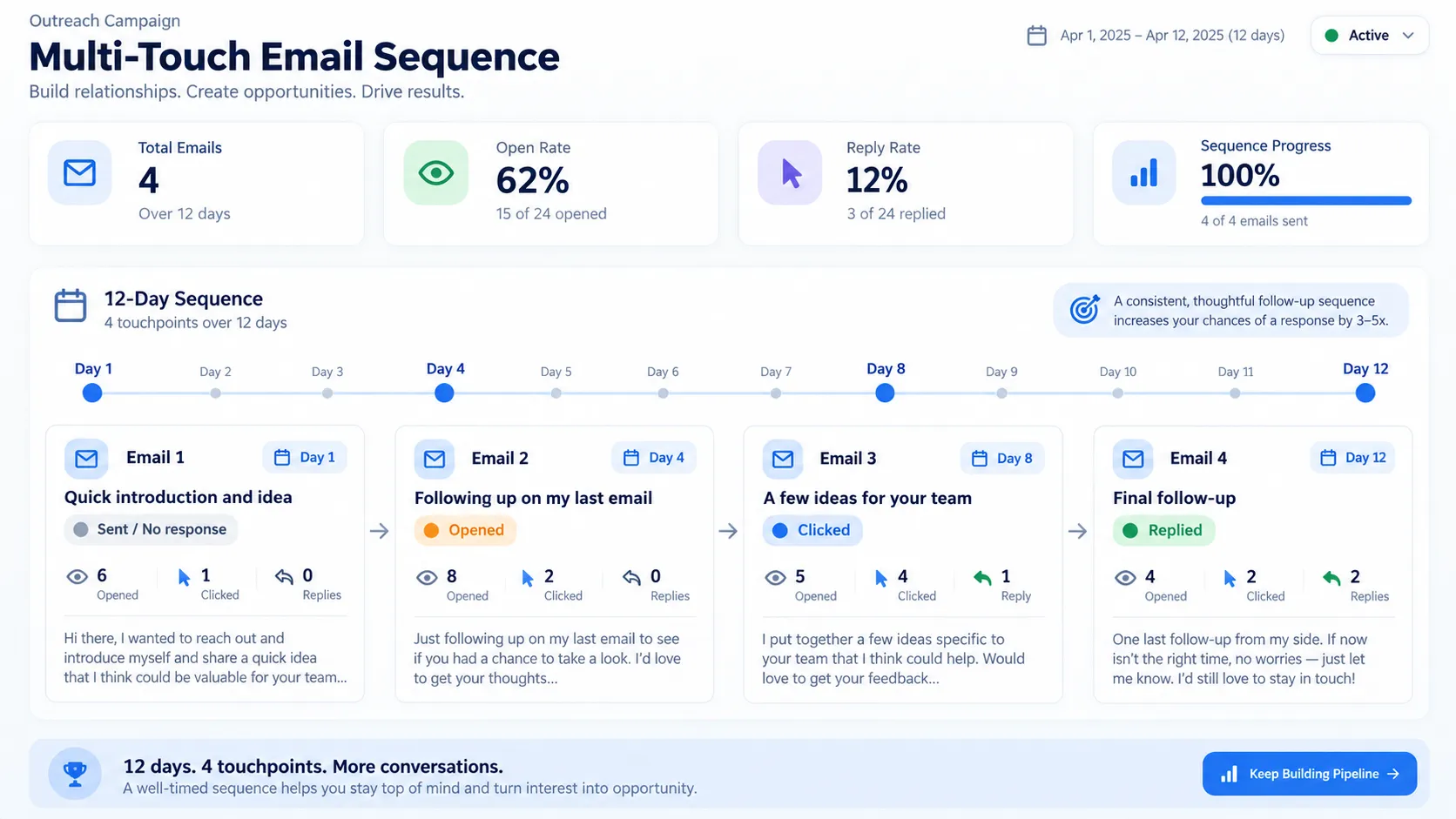
Response rates reported by practitioners: Typically 1 appointment per 100 to 150 emails in a full sequence, varying widely by list quality and industry. A cold email to a warm list (referral, content download, webinar attendee) converts 3 to 5 times higher.
What makes an appointment-setting email work:
- Subject line (the critical decision point):
- Test 1: “Quick question about [Company Name]’s [specific process]” (curiosity, no hype)
- Test 2: “[Your name] from [mutual contact]’s recommendation” (social proof)
- Test 3: “Are you responsible for [specific job]?” (role confirmation, low barrier)
- Avoid urgency words (Limited Time, Act Now), emojis, and all capitals. These reduce open rates.
- Opening line (first 15 words determine click-through):
Specific to role or company: “Hi Sarah, I was reviewing Acme Corp’s recent Series B announcement and noticed you led the operations restructure.” This demonstrates research, not a mass email.
- Value proposition (one sentence, benefit-first):
- Avoid: “We provide sales pipeline management software with real-time analytics.”
- Use: “We helped your competitor [industry name] cut their sales cycle by 30 days while their ops team stopped spending 10 hours a week on scheduling.” This connects to their world and shows precedent.
- Social proof (optional, if available):
“High-performing teams report cutting their appointment no-show rate from 25 per cent to 8 per cent through our approach.” Specific and measurable.
- Call-to-action (crystal clear):
“Would it make sense to spend 20 minutes exploring whether the same approach could work for your team?” Include two specific time options: “I’m thinking Tuesday 2 p.m. or Wednesday 10 a.m. SGT. Does one of those work?”
- Signature (professional, no spam signals):
Your name, title, company, and phone number. Avoid generic footers with multiple logos or unverified claims.
Multi-touch sequence structure (7- to 10-day cadence):
- Email 1 (Day 1): The main pitch email outlined above.
- Email 2 (Day 4): No response assumed. Restart with a different angle. Example: “I noticed you’ve been at Acme for 5 years, so I’m guessing you’ve seen the shift in how reps spend their time. Quick thought on that…” Adds new detail, shows persistence, removes “standard pitch” feel.
- Email 3 (Day 7): Final touch. Example: “One last thought before I let you go. We’re working with [similar company in your space] on exactly this. Might be worth a conversation.” Adds credibility and opens a door to learning if they are not ready to talk.
Do not exceed 3 to 4 touches to cold contacts. After that, you risk being flagged as spam; move to the next list segment instead.
Response tracking: Use email tracking tools to monitor opens and clicks. If subject line A achieves a 15 per cent open rate and subject line B achieves 8 per cent, increase investment in line A and eliminate line B immediately.
How Does LinkedIn Social Selling Build Appointment Pipelines?
LinkedIn works because it is permission-based (the prospect invited you to the platform) and rich in context (you can see their job history, endorsements, and recent activity).
Response rates reported by practitioners: Typically 1 appointment per 50 to 100 connection requests plus 3 to 5 InMails, depending on profile strength and message relevance.
Best for: B2B roles where prospects are active on LinkedIn (executives, managers, and operations professionals), tech and software sectors, and situations where you need to establish credibility before a call.
Strategy 1: Connection-first approach (free, slower):
- Find your ideal prospect on LinkedIn using LinkedIn Sales Navigator (approximately SGD 1,320 to 1,980 annually; cost-effective if you are setting 50+ appointments per month).
- View their profile and look for recent activity or job changes (your hook).
- Send a personalised connection request: “Hi Sarah, I noticed you just joined Acme as VP Operations. I work with several ops teams to cut sales-cycle time by reducing admin. It would be great to connect.” Avoid generic requests like “Let’s connect!”
- After they accept (typically 24 to 72 hours), wait 2 to 3 days, then message: “Thanks for connecting. I’m working with [similar company] on exactly the challenge you’re likely facing now. Open to a quick call sometime?”
- If no response, send one follow-up after 1 week. Then move on to the next prospect.
Strategy 2: InMail approach (faster, paid):
InMails (LinkedIn’s native messaging to non-connections) have higher response rates (8 to 12 per cent) because they land in a separate inbox with high visibility. Cost is approximately SGD 2.50 to 5 per InMail at scale. Message structure remains the same: hook, one-sentence value proposition, specific ask, and calendar link. Best used on high-value targets (deal size above SGD 82,500) where the conversion maths justifies the cost.
Optimising your profile for credibility:
- Headline: Avoid using only your job title. Use instead: “Sales Ops | Help B2B teams cut their sales cycle by 40 per cent | Ex-Salesforce.”
- About section: Write 3 to 4 sentences showing outcomes, not features. Example: “I’ve worked with 50+ SaaS companies to eliminate appointment-setting chaos. The result: teams save 8 hours per week and close 25 per cent more deals.”
- Content and engagement: Post or share once per week on topics your prospects care about (sales efficiency, pipeline management, common hiring mistakes). This builds visibility and establishes experience.
- Endorsements: Ask your network to endorse skills directly tied to the value you deliver, not generic tools.
Common LinkedIn mistakes:
- Generic connection request. Response rate: 2 to 5 per cent.
- Pitching in the connection request. Prospects typically avoid sales messages before accepting a request.
- Waiting a week after they accept your connection before messaging. Message them on LinkedIn within 2 to 3 days.
What Is a Hybrid Appointment-Setting Approach?
High-performing appointment-setting teams use all three channels in sequence, not as alternatives. Phone generates the fastest response (1 to 2 days) but the lowest volume (30 to 50 calls per day per person). Email reaches scale (500 to 1,000 per day) but has a slower average response (7 to 10 days). LinkedIn sits in the middle: it builds credibility and warms the prospect before the call or email lands.
Recommended sequence for a new list:
| Day | Action | Rationale |
|---|---|---|
| Day 1 | LinkedIn: Send connection request or view profile | Initiates a warm touch; they see you in their “Who Viewed You” notification. |
| Day 2 | Email 1: Main pitch | Lands while your profile is fresh in their mind. |
| Day 3 | Phone call (if connected on LinkedIn) | Warmer than a pure cold call; you can reference the connection. |
| Day 5 | Email 2: New angle | If no response to email 1, introduce a different hook. |
| Day 8 | InMail or final email | Last touch before archiving the lead. |
Decision criteria for which channel to lead with:
| Buyer Profile | Lead Channel | Rationale |
|---|---|---|
| C-suite or VP | Phone | Executives screen calls; they rarely engage in cold email. A 60-second pitch from a credible source gets through gatekeepers better. |
| Manager or Director, busy | LinkedIn + Email | They live in email but check LinkedIn daily. A connection plus email combo feels less cold than email alone. |
| Lower deal size (under SGD 8,250) | Email sequence | Volume play; the phone does not justify the time cost. |
| Warm lead or referral | Phone immediately | Momentum is high; call within 24 hours of referral. |
| High-deal-size, complex | Phone + LinkedIn + Email together | Use LinkedIn to establish credibility, email to provide proof points, phone to explore fit and map stakeholders. |
Building and Running an Appointment-Setting Process
A repeatable system separates scaling appointment-setting teams from those that plateau. This section covers the five-step workflow that transforms tactics into results.
Defining Your Ideal Prospect Profile (IPP)
An Ideal Prospect Profile is a detailed description of the company, role, and situation that correlates with a closed deal. It is a forensic map of your best customers, not a wish list.
A tight IPP significantly raises conversion rates. Phone calls to perfect-fit prospects convert at higher rates than calls to marginal prospects. The difference in engagement quality justifies the effort to define one accurately.
How to build an accurate IPP:
- Audit your last 20 closed deals. For each, document company size (employees, revenue, growth rate), industry or vertical, the prospect’s job title and level, what pain or situation triggered the sale, how long the sales cycle lasted, and why they chose you over competitors or inaction.
- Cluster by similarity. You will see 2–3 distinct customer archetypes. Example: Archetype A is mid-market (50–300 employees), SaaS, VP Operations role, expanding team, 60-day sales cycle. Archetype B is enterprise (1,000+ employees), hybrid (SaaS plus services), Director of Sales Ops role, system replacement, 120-day sales cycle.
- Quantify buying signals. For each archetype, identify what indicates readiness to buy now:
a. Company signals: recent funding, new hire in relevant role, public expansion announcement, acquisition
b. Role signals: New to role (high likelihood of immediate change priorities), inherited broken process
c. Timing signals: Industry shift (regulation change, new competitor, budget cycle change) - Assign a score. Rate prospects 1–10 on fit: 9–10 is a perfect fit; call immediately. 7–8 is a good fit; call this week. 5–6 is a marginal fit; skip unless the pipeline is thin. Below 5 is a poor fit; skip.
Example IPP statement for a sales operations software company:
“We close best with mid-market SaaS companies (50–300 employees) that have hired a dedicated VP Operations or Director of Sales Ops in the past 6 months. They are typically at the point where manual scheduling and pipeline tracking slow the team. Deals close in 45–75 days; deal size is SGD 41,000–124,000 ARR. Red flags: companies still managed by a founder (no process rigour), early-stage companies below SGD 3.3 million ARR (no budget), and services firms (different workflow needs).”
Use this statement as your filtering lens. Every list you build and every call you make should skew heavily toward prospects matching this profile.
Lead List Building and Data Quality
A clean list is half the battle. Dirty lists (wrong email, outdated job title, defunct companies) become sinkholes for effort.
Where to source clean B2B contact data:
LinkedIn Sales Navigator (SGD 1,300–2,000 annually) lets you search by job title, company size, industry, and location. See recent job changes within the past 6 months and activity level. Email verification is offered but requires external validation to be reliable. It is best for high-touch prospecting, executive outreach, and complex sales.
Third-party databases with APAC coverage: Apollo.io, Hunter.io, Clearbit, and ZoomInfo. Apollo costs SGD 100–250 per month with email accuracy reported at 85–92%; it integrates with outreach platforms. Hunter.io costs SGD 80–800 per month and is strong on startup and SMB data. Clearbit is API-based at SGD 660–2,500 per month for prospecting with high accuracy. Cost and accuracy vary; test with 100-prospect samples before committing to a full list.
Singapore-specific sources: The ACRA (Accounting and Corporate Regulatory Authority) public registry is free but requires manual lookup. It provides company contact information, though not direct email addresses. LinkedIn manual lookup is slow but accurate for Singapore’s tight business community. Warm introductions convert at higher rates than cold outreach; Singapore’s B2B market is relationship-driven.
In-house research: Google search “[Company] careers” or “[Company] team page” to find direct emails. Company websites often list team members and email addresses in the About, leadership, or Newsroom sections. Use this method only for high-priority accounts, as it takes 10–15 minutes per person.
Data quality checklist before outreach:
- Email address is current (no longer than 6 months old). Flag generic inboxes (info@, hello@); these have lower engagement rates.
- Job title matches your IPP. Verify role seniority; an Operations Manager reporting to Finance differs from one reporting to Sales.
- The phone number is present if the phone is your lead channel. Verify format; a UK number starting with +44 for a Singapore prospect suggests data errors.
- Company name and URL are correct. Mismatched names indicate list consolidation errors or acquisition; verify the target is the holding company or subsidiary.
- List segment matches your IPP. Do not mix verticals or company sizes; they convert at different rates and confuse your metrics.
Compliance: Singapore Personal Data Protection Act
Singapore’s Personal Data Protection Act governs how you collect, use, and store personal data. For appointment setting, key obligations are:
You can contact prospects if they have already engaged with you (webinar, content download, referral) or if you have a legitimate business reason and a clear opt-out mechanism. Cold calling without prior interaction is legally permissible but increasingly flagged as spam.
Every email and message must include a clear unsubscribe link. Respect opt-outs immediately; ignoring them is a violation and a brand liability.
Store prospect data securely using encryption and access controls. Do not share with third parties without explicit consent.
Disclose who you are and why you are contacting them within the first sentence.
Practical impact: Build your list from consent-based sources, such as LinkedIn, referrals, and webinar attendees, where possible. If cold outreach is necessary, include a one-line explanation of why you are reaching out and a clear unsubscribe option.
Qualification Criteria Before Booking
Unqualified appointments waste sales time, damage conversion metrics, and erode trust in the appointment-setting function. Qualify on the call or email exchange before booking. This takes 2–5 minutes and cuts no-shows and poor-fit meetings significantly.
BANT framework adapted for appointment setting:
Budget: Ask whether a budget is allocated for the problem area this year. If no budget exists, do not book. If unsure, ask what it would take to free up budget. Vague answers signal low seriousness.
Authority: Ask whether the prospect is the final decision-maker or if others are involved. If they are not the decision-maker, ask who else should be included and include those people in the meeting. Meetings with non-decision-makers waste time.
Need: Ask about the biggest challenge their team faces around the problem area you solve. Their answer reveals whether they have the pain you solve. Different problems indicate a targeting issue. Real pain justifies moving forward.
Timeline: Ask when they would need to solve this. Vague timelines like “sometime next year” signal lack of qualification. Specific timelines like “next quarter” are positive. Ask what would trigger the conversation: budget approval, new hire, or fiscal year start.
Full qualification script (30–60 seconds, used after your initial pitch):
“Before we grab time on the calendar, a few quick things: first, is there a budget allocated for this area this year, or would it be a 2025 conversation? Second, are you the decision-maker, or is there a team involved? Third, what is the biggest pain you are facing right now? Finally, what is the realistic timeline you are working toward?”
Red flags that signal a bad fit and warrant declining to book:
- Exploring three competitors with a 6-month decision timeline
- Pain does not match your core offering
- No budget allocated or budget is discretionary
- The prospect is not a decision-maker and refuses to include one
- The company is in heavy churn or acquisition mode
Green flags that signal high-quality appointments and warrant immediate booking:
- Explicit pain statement tied to your solution
- Budget is committed for the current quarter
- The decision-maker is on the call or agrees to attend the meeting
- Timeline is 30–90 days
- Prospect asks a product question
The Appointment-Setting Script and Talk Track
A script sounds robotic. A talk track is a set of anchors and opening lines to lean on. You do not read word-for-word; you stay flexible. Consistency improves results: without structure, different team members pitch differently. Some find pain quickly. Others ramble. Rambling versions convert significantly lower because prospects become lost.
Talk track for phone (60 seconds):
Opening (15 seconds): “Hi [First Name], this is [Your Name] from [Company]. I am reaching out because we work with [customer type] teams to [outcome]. Do you have a quick 30 seconds?”
Example: “Hi Sarah, this is David from Sales Ops Co. I am reaching out because we work with mid-market SaaS ops teams to cut their sales cycle from 90 to 60 days. Do you have a quick 30 seconds?
If the prospect declines: “Not a problem, totally understand. Would it be better to catch you another time? I will send you a note with context. Best email?”
Diagnosis (25 seconds): “The reason I am calling is that most operations leaders we talk to are drowning in administration around scheduling and prospect data. How are you currently managing your appointment scheduling and pipeline visibility?”
Wait for the answer. Do not interrupt. Their response will tell you if they are a fit.
Bridge (10 seconds): If they describe pain: “The reason I ask is we have helped teams like [similar customer name] cut that administration time significantly. Would it make sense to explore whether a similar approach could work for your team?”
If they describe no pain: “Got it, sounds like you have a solid process. Is there anything around [secondary problem] that is on your roadmap?” Pivot to a secondary value proposition. If nothing resonates, politely exit.
Call to action (10 seconds): “Great. Let’s grab 20 minutes next week. I am thinking Tuesday at 2 p.m. SGT or Wednesday at 10 a.m. SGT. What works better?”
Offer specific time slots rather than open-ended questions. Specific slots increase appointment acceptance significantly.
Talk track for email (subject plus body):
Subject: “Quick question about your ops model at [Company Name]”
Body:
“Hi [First Name],
I came across [Company Name] and noticed [specific detail: recent hire, job posting, news, common pain]. I work with operations teams to [outcome], and several clients faced exactly [problem] before we helped them [result].
Would it be worth a quick 20-minute conversation to see if any of that applies to your situation? I am free Tuesday at 2 p.m. SGT or Wednesday at 10 a.m. SGT.
Best,
[Your Name]
[Phone]”
Always include your phone number. Make your ask specific and time-bounded. Prospects respond better to concrete options than open-ended requests.
Script Examples by Context
Appointment-Setting Script Structure
A strong opener takes 30 to 60 seconds and accomplishes three things: introduction, value proposition, and the ask.
Example for VP or Director (standard template):
“Hi [Name], this is [Your Name] from [Company]. I work with [industry] companies to [specific outcome: reduce sales-cycle length by 25%, cut admin time, accelerate close rates]. I’m calling because we recently helped [similar company] cut their sales cycle by 20 days, freeing up 15% more capacity for new business. Does that sound relevant?”
Pause. Let them respond. If yes: “Perfect. Do you have 20 minutes next Tuesday or Wednesday?”
If no or hedging: Move to objection handling (below).
Time slot anchoring increases acceptance. Offer two specific options rather than “Do you have time next week?” Example: “Does Tuesday at 2 p.m. or Thursday at 10 a.m. work better?” Specificity removes friction.
Adapting Language by Seniority Level
C-suite (CEO, CFO, CRO)
Keep the opener to 15 seconds or less. Lead with business outcome, not process. Expect objections and do not over-explain.
Example: “I work with high-growth SaaS companies to cut sales-cycle length by 25%, which frees up 15% more capacity. Worth exploring for 20 minutes?”
VP or Director
Use the standard script above. This group has authority and cares about both outcomes and process efficiency. They are typically responsive to data and benchmarks.
Manager
Extend the diagnosis slightly because managers are closer to day-to-day pain. Focus on team efficiency and stress reduction.
Example: “I work with [industry] teams to cut the time their reps spend on admin and follow-up. Most teams we talk to don’t realise how much time they lose until they measure it. Are you seeing that on your team?”
Handling Objections (Email and Social Channels)
“Not interested”
Response: “No problem. Many teams do not realise the time cost until they measure it. If that changes, let me know.”
This is a graceful exit. Some teams add, “Quick question: would a 20-minute conversation cost you more than it would save?” This forces them to think about the math, though it can feel pushy.
“Send me an email / info”
Do not delay. Push back respectfully.
Response: “Happy to. But info typically gets buried in inboxes. Quick yes or no: is cutting sales-cycle admin something your team is working on right now?”
Force a real signal. Either they care (and will take the meeting) or they do not (and the email will be ignored).
“I’m the wrong person.”
Response: “Got it. Who should I talk to? I can reach out to them directly.”
Get the name and email address. Do not ask them to forward the information. Most forwards do not happen.
Appointment-Setting Tools and Technology
Tools amplify a strong process and expose weaknesses in a weak one. This section covers which categories matter and what to look for. Most teams start with one specific pain point: manual email follow-ups that consume hours each week, or calendars that double-book meetings. That is a reasonable starting point, but tools without process discipline fail to deliver value.
Outreach Automation and Email Platforms
These platforms orchestrate multi-touch email sequences, track engagement signals, and log all activity automatically in your CRM.
What they do:
- Automate email sequences (3 to 5 touches over 10 to 14 days)
- Track engagement (open, click, reply) per prospect
- Log activity in your CRM automatically so sales representatives see the full touch history
- A/B test subject lines and body copy
- Integrate with your CRM and calendar tools (Salesforce, HubSpot, Outlook, Gmail)
Popular platforms:
| Platform | Cost | Best For | Learning Curve |
|---|---|---|---|
| Apollo.io | SGD 100–250/month | Prospecting plus email sequences; includes contact database | Low (1–2 days) |
| Outreach | SGD 2,500–6,600+/month | Enterprise sales teams; deep CRM integration, advanced reporting | High (2–4 weeks) |
| HubSpot Sales Hub | SGD 580–1,980/month | Mid-market SMB; bundled with CRM; sequences plus automation plus reporting | Medium (1 week) |
| Mailchimp / ConvertKit | SGD 33–495/month | Low-volume outreach; less sales-specific. Use if budget is under SGD 80 and prospecting is not complex. | Low (1 day) |
When to use a simple email tool versus a dedicated platform:
Use a simple email tool (Mailchimp, Gmail templates) if you are setting fewer than 100 appointments per month, your team is small, and you do not need deep CRM integration. Cost: SGD 0–80 per month. Trade-off: no sequence automation or engagement tracking.
Use a dedicated outreach platform (Apollo, Outreach) if you are sending 50+ appointment-setting emails per week, you want multi-touch sequences automated, you need engagement signals (opens, clicks) to prioritise follow-up, and you require all activity logged in your CRM. Cost: SGD 100–6,600+ per month. ROI assessment: if each appointment is worth SGD 330+ in conversion value, the platform pays for itself at 10–20 appointments booked per month.
Implementation checklist:
- Does it integrate with your CRM (Salesforce, HubSpot)? Manual data entry wastes 3–4 hours weekly.
- Does it auto-log activities (emails, opens, clicks) to contact records? Without this, your CRM becomes incomplete.
- Can you create sequences and define when emails send (based on triggers or cadence)? Automation is the primary advantage.
- Can you test subject lines and track which perform best? Without A/B testing, typical ranges reported by practitioners suggest you are leaving 15–40% response potential untested.
- Does it include warm calendar sync (Calendly, Outlook)? Double-booking damages your reputation; automation prevents it.
Phone Systems and Call Recording
What they do:
- Provide virtual phone numbers (allows calling from a dedicated line tied to your brand or company)
- Record calls (for training, compliance, and dispute resolution)
- Track call metrics (dials, connected calls, conversation length, recording quality)
- Integrate with outreach platforms and CRM
Popular systems:
| System | Cost | Best For | Key Features |
|---|---|---|---|
| RingCentral / Vonage | SGD 60–100/user/month | Small-to-mid teams | Full phone system (voicemail, transfers, auto-attendant). Integrates with Salesforce and HubSpot. |
| Dialpad | SGD 50–100/user/month | Mid-market | Clean interface, strong call recording. |
| Five9 | SGD 85–250+/user/month | Larger contact centres | Advanced IVR and analytics, predictive dialling, and workforce management. |
Why call recording matters:
Reviewing one recorded call per week as a team often lifts appointment rates by 10–15% within a month. Common patterns emerge: Do representatives consistently miss the value proposition? Are objections handled consistently? Are closing questions asked?
Compliance note:
In the UK and EU, call recording requires explicit prior consent. In Singapore, the Personal Data Protection Act requires prior notification. Announce clearly: “This call may be recorded for training and quality assurance purposes.” Some jurisdictions (for example, certain US states) require two-party consent; others require one-party notification. Verify your legal position before deploying recording.
Cost: A basic VoIP system with recording runs SGD 35–165 per user per month. AI transcription and coaching add SGD 50–330 per user per month.
CRM Integration and Calendar Synchronisation
A common bottleneck occurs when an appointment is set in your outreach tool, but the salesperson’s calendar is in Outlook, and the CRM record is never updated. The prospect receives two conflicting calendar invitations. The salesperson misses the meeting.
Calendar synchronisation (Outlook, Google Calendar) prevents this. When an appointment setter books a meeting, the system automatically creates a calendar event, adds the salesperson, sends the prospect a confirmation, and logs the activity in the CRM.
Tools that perform this function well:
Calendly (SGD 13–41/month): Simple one-way sync. Prospect books a time slot from your available calendar; the event auto-syncs to Outlook/Google and your CRM. Best for high-volume, low-friction appointment collection (webinar registrations, free consultations).
Outreach Calendar Link (built into Outreach platform): Two-way sync. The appointment setter embeds a calendar link in email; the prospect clicks and books; the system blocks time, notifies all parties, and logs the action in the CRM. No double-booking is possible.
HubSpot Meetings Tool (included with Sales Hub): Simple sync. Schedule a meeting directly from HubSpot; automatically syncs to Outlook/Google Calendar and logs in the contact record.
Non-negotiables for calendar integration:
- Two-way sync with your primary calendar (Outlook or Google Calendar). If you book in the CRM but it does not sync to your calendar, double-booking occurs.
- Automatic availability checking. The system must know your actual availability, not just generic time blocks, and must block time when appointments are confirmed.
- Timezone awareness. If your team is distributed across time zones (UK, Singapore, Sydney), the system must display prospect times in their time zone and convert to your team’s time zone upon confirmation.
- Confirmation and reminder emails. The prospect receives a confirmation with a calendar attachment (ICS format) within 10 minutes of booking. Your salesperson receives a prep notification 15 minutes before the meeting.
Lead Scoring and Prioritisation Tools
Not all appointments deliver equal value. Call a prospect rated 9/10 fit today. A 5/10 fit should be emailed, not dialled. Lead scoring tools help you prioritise effort.
What they do:
- Assign a numeric or behavioural score to each prospect based on profile data (company size, industry, location, job title) and engagement signals (email opens, clicks, website visits, LinkedIn profile views)
- Surface the highest-scoring prospects first
- Integrate with CRM and outreach tools
Popular tools:
| Tool | Cost | Strengths | Trade-offs |
|---|---|---|---|
| HubSpot Lead Scoring | Free to SGD 5,300+/month | Automatically scores leads based on predefined criteria (company fit, engagement) | Requires you to build scoring rules; out-of-the-box scores are generic |
| Outreach Opportunity Detection | Part of the Outreach platform (SGD 2,500+/month) | AI-powered. Analyses engagement patterns, buying signals, and industry trends | Higher accuracy, higher cost |
| Clearbit | SGD 650–2,500+/month | Adds company and person data (funding, technology stack, headcount growth) to CRM | Not a pure scoring tool; enrichment helps build more accurate IPP-based rules |
Implementation approach:
- Define your IPP criteria as scoring weights. If company size matters most, weight it 40%. If industry matters, weight it 30%. Job title and seniority: 20%. Engagement signals (opens, clicks), 10%.
- Set a threshold. Anything 8+/10 gets dialled (phone is high-effort). 6–7 gets emailed and LinkedIn messaged. Below 5 gets archived.
- Review scoring accuracy monthly. If you are dialling many 8/10s that do not book appointments, adjust your weighting; recalibrate and re-score the list.
Key Metrics and Benchmarks
You cannot improve what you do not measure. This section defines the metrics that matter and benchmarks you should track weekly.
Core Appointment-Setting KPIs
| Metric | Definition | Typical Range | How to Improve |
|---|---|---|---|
| Dials per Appointment (Phone) | Total calls made divided by confirmed appointments booked | 20–40 dials per appointment (varies by list quality) | Improve list quality, tighten IPP, refine value proposition, practise objection handling |
| Email-to-Appointment Rate | Total emails sent (across the full sequence) divided by appointments booked | 100–150 emails per appointment (cold list); 30–50 for warm lists | A/B test subject lines and value propositions. Shorten sequences if the response drops after an email. 2. Segment by industry or role. |
| Response Rate | Prospects who reply (yes, no, or maybe) divided by total contacts attempted | Phone: 40–60% of dials result in a conversation. Email: 3–8% of cold emails get a response; 10–25% for warm lists | Improve timing (test calls outside peak working hours). Personalise emails with company-specific hooks. Use LinkedIn to warm prospects before email. |
| Appointment Show Rate | Confirmed appointments that happen (prospect attends) divided by total appointments booked | 50–60% for unqualified appointments; 70–85% for qualified appointments | Improve qualification before booking. Send a reminder 24 hours before. Call the prospect 10 minutes before if high-value deal. |
| Conversion to Pipeline | Appointments that turn into a qualified opportunity (in your CRM pipeline) divided by total appointments held | 50–70% (depends on how rigorous sales qualification is) | Ensure the appointment setter qualifies on pain and timeline before booking. Share feedback from salespeople back to the appointment-setting team. |
| Cost per Appointment | Total cost (salaries, tools, outsourcing fees) divided by appointments set | In-house: SGD 25–80 per appointment. Outsourced: SGD 5–20 per appointment | Optimise list quality to reduce dials needed. Use email and LinkedIn before phone to qualify. Use outsourced vendors for high-volume, low-complexity campaigns. |
Note: These figures represent commonly reported ranges observed across practitioners and assume a clean list, clear value proposition, and solid execution. A weak script, dirty data, or poor targeting can reduce these rates by 50% or more. If your metrics fall below these ranges, debug targeting (IPP) and list quality first, not the script.
Weekly Tracking Dashboard
Build a simple spreadsheet or use a business intelligence tool (Tableau, Looker, or Power BI) to track core metrics weekly. Update every Friday.
| Week of | Dials | Conversations | Appointments Booked | Show Rate | Cost per Appointment | Notes |
|---|---|---|---|---|---|---|
| 1 Jan | 500 | 210 (42%) | 18 | 72% | SGD 28 | List quality improved after cleaning. Show rate up due to better qualification. |
| 8 Jan | 480 | 180 (37%) | 16 | 68% | SGD 32 | New list segment (different industry). Lower conversion rate; value proposition needs adjustment. |
| 15 Jan | 520 | 205 (39%) | 19 | 74% | SGD 26 | A/B tested the new subject line. Opens up 18%. Adding to all emails. |
Benchmarking by Channel
| Channel | Typical Response Rate | Appointment Rate | Show Rate | Cost Efficiency | Best For |
|---|---|---|---|---|---|
| Phone (cold) | 40–60% answer rate | 1 per 20–40 dials | 65–75% | High effort, highest show rate | Warm introductions, qualified prospects |
| Email (cold, 3-touch) | 3–8% response rate | 1 per 100–150 emails | 50–65% | Scalable, requires testing | High-volume list building |
| Email (warm) | 10–25% response rate | 1 per 30–50 emails | 70–80% | Best ROI | Referrals, webinar attendees |
| LinkedIn (connection + message) | 5–15% response rate | 1 per 50–100 attempts | 60–70% | Medium effort, builds credibility | Target-specific audiences, relationship building |
| LinkedIn (InMail) | 8–15% response rate | 1 per 40–70 InMails | 70–80% | Higher cost (SGD 2.50–5 per InMail) but higher-quality appointments | Enterprise prospects, cold outreach at scale |
Troubleshooting Common Appointment-Setting Issues
| Problem | Root Cause | Recommended Action |
|---|---|---|
| Low response rate to cold emails | Poor targeting (wrong list), weak subject line, unclear value proposition, or sender reputation issue | Audit your IPP; test new subject lines; verify domain reputation (use MXToolbox). A/B test value proposition with 50 test contacts. |
| High dial-to-appointment ratio (60+ dials per appointment) | List quality is poor, or the value proposition does not resonate with the audience. | Stop dialling and rebuild the list. Check company size, industry, and role match against IPP. Rewrite the opener based on feedback from recent calls. |
| Booked appointments do not show up (show rate under 50%). | Weak qualification before booking, or the prospect was not genuinely interested | Tighten qualification questions before sending the calendar invite. Confirm via phone 24 hours before. If it’s a high-value deal, call 10 minutes before the meeting. |
| Calendar double-booking or missed meetings | Calendar sync not working, or no automated reminder system | Verify two-way calendar integration is enabled. Set up automatic reminders to the sales representative (15 minutes before) and prospect (24 hours before). |
| Appointments do not convert to pipeline (low conversion rate). | The appointment setter is booking poor-fit prospects, or the sales team is not qualifying properly. | Share feedback loop: ask sales reps which appointments converted and why. Adjust qualification questions based on feedback. Add deal-size or timeline questions before booking. |
| High cost per appointment | Tool overhead, poor list quality, or excessive follow-up sequences | Audit tool is spent monthly. Clean list quarterly. Shorten email sequences if a response drops after an email. 2. Test phone + single email combo before multi-touch sequences. |
Frequently Asked Questions
What is the typical cost of setting up an in-house appointment-setting function?
Initial setup ranges from SGD 2,000 to 15,000 (salaries, platform subscriptions, training) in the first month. Monthly recurring cost is SGD 2,000–8,000 depending on team size and tools. Outsourced appointment-setting typically costs SGD 5–20 per appointment booked, making it more variable and scalable.
Is appointment setting the same as lead generation?
No. Lead generation builds a list of prospects and establishes initial contact. Appointment setting takes that prospect relationship further and converts interest into a confirmed meeting with a decision-maker. Appointment setting is more targeted, personalised, and conversation-based than broad lead generation.
How long does it take to see results from appointment-setting?
Most teams report measurable traction within 2–3 weeks (assuming consistent outreach). Full pipeline impact takes 6–8 weeks because it depends on your sales cycle length. Weeks 1–2 focus on refining the list and script. In weeks 3–4, response rates and conversion rates stabilise. Weeks 5–8: appointments begin converting to deals.
What is the biggest misconception about appointment setting?
Many teams believe that better scripts solve poor results. In reality, 70% of appointment-setting performance comes from list quality and IPP accuracy. A great script cannot fix a bad list. Audit targeting first, not messaging.
How do I know if an outsourced appointment-setting vendor is legitimate and worth the cost?
Ask for references and request a small pilot campaign (100–200 dials or emails). Track metrics: response rate, appointment rate, show rate, and cost per appointment. Compare against benchmarks above. Legitimate vendors should guarantee a minimum show rate (60%+) or refund part of the fees.
What should I do if appointment show rates are dropping month over month?
Show rate degradation usually signals one of three issues: (1) qualification is weakening (you are booking less-engaged prospects), (2) confirmation process is breaking down (reminders not being sent), or (3) market conditions are shifting (your IPP is becoming less accurate). Investigate qualification questions first, then the confirmation process, then list freshness.
Can appointment setting work in regulated industries (finance, healthcare)?
Yes, but with compliance overhead. In finance, compliance teams must approve scripts and email templates. In healthcare under HIPAA or similar regimes, personally identifiable information handling is restricted. Plan for 2–4 weeks of compliance review. Budget an extra SGD 5–10 per appointment to account for slower outreach cycles.
Should I use a phone, email, or LinkedIn to set appointments?
Use a blended approach. Phone is the highest-effort and highest-show-rate (best for warm prospects or high-value deals). Email is scalable and lowest-cost (best for list building and filtering). LinkedIn warms prospects before phone or email. Start with email and LinkedIn to filter, then phone the top 20% of responders.
What happens if a prospect books but then cancels or no-shows?
Log the cancellation reason in your CRM. If the pattern emerges (certain company types or industries cancel frequently), adjust qualification. If the no-show rate is high on a specific day or time, please consider adjusting the scheduling. If the issue is a one-time occurrence, please follow up with a voicemail acknowledging the cancellation and offering to reschedule.
How often should I refresh my prospect list?
Quarterly. After 90 days of outreach, response rates typically decline by 20–30%. Add new firmographic segments or update company data (headcount, funding, technology). Remove hard bounces and unresponsive prospects (after 2–3 touches with no reply). Refresh keeps cost per appointment stable.