| AI Summary
YouTube advertising works best when you match the ad format, audience and bidding strategy to one clear campaign goal. Start with a narrow audience (custom intent keywords plus one affinity group), a budget of about SGD 300-500 a month, and conversion tracking in place before launch. Hook viewers in the first three seconds, follow a hook-problem-solution-proof-call-to-action script, and use view-through rate to diagnose creative and click-through rate to diagnose the offer. Judge success by ROAS and cost per acquisition, then scale budget by 20-30% a week while watching for rising costs. |
YouTube is a powerful advertising platform with one of the world’s largest video audiences. Yet many advertisers underutilise it or lose money through poor targeting and weak creative. These YouTube advertising tips provide practical tactics for building campaigns that convert.

Whether you’re launching your first campaign or scaling an existing one, you’ll find actionable frameworks for choosing bidding strategies, avoiding common budget-killers, structuring creative for skippable ads, and measuring what matters. This guide also includes practical thresholds and decision frameworks to help you move from theory to results.
Important disclaimer: Campaign success depends on product-market fit, creative quality, and audience targeting. Results are not guaranteed and vary widely by industry, market and execution.
Key Takeaways
Before you dive into setting up your first campaign, here’s what matters most:

- Budget reality: You don’t need to spend thousands to test YouTube ads. Many advertisers report meaningful signal gathering at GBP 300+ monthly (approximately SGD 500 equivalent); adjust this based on your industry and audience size. Below GBP 300 monthly, results become too noisy to trust. Above GBP 2,000 monthly, you can afford to test multiple audience segments and creative variants in parallel.
- Hook in three seconds or lose them: YouTube’s skippable ad format means viewers decide whether to watch or skip within the first three seconds. Your opening shot must trigger curiosity or show immediate value. Ads that ignore the skip button tend to fail.
- Targeting breadth vs. narrow targeting: Most advertisers over-target, assuming precision is always better. A broad audience of 5 million with strong creative often outperforms a narrow 50,000 if your message doesn’t resonate. Test broad first, then narrow once you see which viewer intent actually converts.
- Completion rate and click-through rate tell different stories: Completion rate shows whether your creative engages viewers. Click-through rate (CTR) shows whether your landing page promise matches the ad. A 50% completion rate with 0.3% CTR often suggests your video hooks viewers, but your offer doesn’t convert. This pattern may also indicate landing page friction or audience mismatch. Fix the offer, not necessarily the video.
- ROAS is the primary metric for profit-focused campaigns: Views, clicks and impressions do not directly impact profitability. Track return on ad spend (ROAS) obsessively. If you’re spending GBP 100 per day and generating GBP 250 in revenue, that’s 2.5:1 ROAS, which is profitable for most e-commerce and SaaS businesses. Below 1.5:1, your campaign is likely losing money or breaking even. Note: ROAS benchmarks vary widely by industry and business model; consult your own financial data.
- Mobile viewing dominates: Mobile viewing is dominant across major markets including Singapore, Australia, the UK and the US. If your landing page isn’t mobile-optimised, you’re wasting clicks. Test this on your own phone before launching any campaign.
- Test different ad formats for different goals: Skippable in-stream ads are cost-effective for awareness and consideration. Discovery ads work better for direct response and clicks. Bumper ads (6-second, non-skippable) drive brand recall but have a higher cost per thousand impressions (CPM). Choose based on your objective, not just budget.
How YouTube Advertising Works (and Why It Matters)
YouTube’s advertising model differs fundamentally from search or static display ads. Your video plays within or alongside content your audience is already watching. The platform’s algorithm then learns from engagement signals (watch time, clicks, conversions) and optimises future placements automatically.
This feedback loop means a poorly targeted campaign wastes budget fast. It also means a well-structured one compounds over time as the algorithm refines its audience predictions.
Ad Formats: Where They Play and How You Pay
YouTube listed three core ad formats, each with different skippability rules and pricing models:
| Ad Format | Skippable? | Where It Plays | Best For | Typical Cost |
|---|---|---|---|---|
| Skippable In-Stream | Yes, after 5 seconds | Before, during or after video content | Awareness, consideration, conversions | CPV: GBP 0.05–0.25 |
| Non-Skippable In-Stream | No, fixed 15–20 seconds | Before, during or after video content | Direct response, short offers | CPV: GBP 0.15–0.60 |
| Bumper Ads | No, max 6 seconds | Before, during or after video content | Brand recall, short messaging | CPM: GBP 1–4 per 1,000 views |
| Discovery Ads | Not applicable | YouTube search, suggested videos | High-intent users searching | CPC or CPM based on placement |
Cost model: You pay per video view (CPV), per thousand impressions (CPM), or per click (CPC). Rates vary by competition and region; the ranges above are typical for 2026.
Skippable in-stream dominates because it lets viewers opt out after five seconds. This forces creative honesty: if your hook doesn’t land in three seconds, viewers leave, and you don’t pay. Non-skippable ads guarantee viewership but may carry higher viewer dissatisfaction than skippable formats. Discovery ads perform well for lead generation because they appear next to search intent signals.
How YouTube’s Algorithm Matches Your Ads to Viewers
YouTube uses a machine-learning system that balances three priorities: your campaign objectives (views, clicks, conversions), viewer context (content, search history, device), and advertiser performance history.
When you define an audience and set a bid, the algorithm tests placement options daily. It measures which ones drive your desired action at the lowest cost. Over time, it learns to avoid placements that generate clicks but no conversions, or views with low watch time. For more detail, see <a href=”https://support.google.com/google-ads/answer/6095821″>Google’s guide to bidding and optimisation</a>.
Poor audience setup trains the algorithm poorly from day one.

Why YouTube Outperforms Traditional Media
YouTube offers precision targeting unavailable on traditional broadcast or cable. You can target users based on search behaviour, past website visits, and engagement with competitor content. You pay only for engagement (or impressions on high-intent Discovery placements), not wasted reach.
Additionally, YouTube’s video format carries higher engagement rates than static display ads. Reported view-through rates typically range from 20–30%, though this varies significantly by industry, compared to 1–3% for static display banners.
In consideration and awareness campaigns, YouTube has delivered lower cost per acquisition (CPA) for some verticals compared to display or search. Performance varies by product, audience and execution.
Setting Up Your First YouTube Ad Campaign: Step by Step
A campaign needs four decisions: where to build it, what goal to pursue, who to target, and how much to bid. Each decision compounds; poor audience targeting, for example, wastes a good bid strategy.
Choosing Between Google Ads and YouTube Studio
You set up YouTube ads in one of two places: Google Ads (the primary platform) or YouTube Studio (if you already have a channel).
Google Ads is the full-featured environment. It lets you create campaigns across YouTube, Google Search, the Google Display Network and Shopping. You can access advanced audience tools, run A/B tests across video variants, apply conversion tracking to sales and leads, and use automation features like Performance Max. Use Google Ads if:
- You’re new to YouTube advertising
- You want to test multiple ad formats in one interface
- You have e-commerce, lead-capture or app-download goals
- Your conversion tracking relies on pixels or API integration
YouTube Studio is simpler. If you have a YouTube channel, you can promote your own videos directly to viewers. The setup is minimal, and you can launch a campaign in minutes. Use YouTube Studio only if:
- You’re promoting your own video content
- You’re testing YouTube with a small budget (under SGD 500 per month)
- You want one-click campaign creation without audience setup
For serious campaigns, use Google Ads. YouTube Studio is convenient for channel owners but lacks the audience-targeting and conversion-tracking depth that profitable campaigns require.
Defining Your Campaign Objective and Budget
Every campaign begins with an objective. YouTube’s campaign-creation flow forces you to choose one, and it determines which bidding options, audience types and measurement metrics are available.
The main objectives are:
- Sales: You want conversions (purchases, form submissions, app installs)
- Leads: You want contact information (email, phone, enquiry form)
- Website traffic: You want clicks to your site
- Product and brand consideration: You want engagement with your content (video views, clicks, shares)
- Brand awareness and reach: You want impressions at the lowest cost
Choose the objective that maps to your immediate business need, not a vanity metric. If you’re an e-commerce store, choose “Sales” even if your secondary goal is awareness. If you’re a SaaS company capturing leads, choose “Leads”. YouTube’s optimisation algorithm performs best when its target is specific.
Set a realistic budget. A minimum daily budget of SGD 20–30 allows the algorithm to gather enough data to optimise. Many advertisers report meaningful signal gathering at SGD 300–500 monthly; adjust based on your industry and competitive environment. Geographic scope and sector competition affect how quickly the algorithm learns. If your budget is under SGD 300 per month, YouTube advertising will struggle to accumulate data; a Google Search campaign or Facebook targeting may be more efficient for your context.
Define a campaign duration. Most campaigns run continuously, but seasonal businesses should define a start and end date. This helps you compare year-on-year performance cleanly.
Audience Targeting: Intent, Keywords and Placements
Audience choice makes or breaks campaigns. Choose wrong, and you waste budget fast. YouTube offers four targeting layers.
Keyword targeting matches your ad to videos about specific topics. If you sell yoga mats, you target keywords like “yoga flow”, “beginner yoga”, “home yoga routines”. YouTube finds videos tagged with these terms and places your ad before them. Keyword targeting works best when:
- Your product category has clear, high-volume search terms
- You want to reach existing demand
- You’re in B2C or retail (not B2B)
Interest and affinity categories group viewers by broader behaviours. YouTube might have a “Fitness Enthusiasts” affinity group (people who watch fitness content regularly, visit fitness websites, follow fitness creators). You select these, and YouTube serves your ad across all of YouTube. This reaches more people than keyword targeting but with looser intent matching. Use affinity targeting when:
- Your product appeals to a lifestyle or passion (not a specific product category)
- You’re running awareness or consideration campaigns
- You have a moderate-to-large budget (SGD 3,000 or more per month)
Placement targeting lets you specify exact channels or videos where your ads appear. If you sell pet products, you can place ads directly on cat tutorial channels. This gives absolute control but requires research.
Custom intent audiences are lists of keywords you provide. YouTube finds viewers who’ve recently searched those terms on Google, then serves your ad to them. This bridges keyword intent and video targeting. Use custom intent when:
- You’re targeting high-intent purchase keywords (e.g., “buy running shoes”, “best CRM software”)
- You have a specific audience, but no category-wide interest group exists
- You’re running a lead or sales campaign
For your first campaign, combine keyword targeting with one affinity group. Example: target keywords like “home office setup” and “ergonomic desk reviews”, and add an affinity group like “Office Professionals”. This balances intent with reach.
Avoid broad targeting (e.g., “People interested in shopping” or “Technology”) on your first campaign. It inflates impressions but wastes budget on non-buyers.
Creating Your Ad Group and Choosing a Bid Strategy
An ad group bundles videos, keywords and placements with a bid amount. One campaign can have multiple ad groups, letting you test different creative or budgets against the same audience.
Create one ad group per audience segment or creative test. If you’re testing two different 60-second videos, create two ad groups (one per video), each with the same audience but different bids. This isolates performance data.
For bid strategy, choose one of the following:
- Maximise clicks (CPC, Cost Per Click): You pay only when someone clicks your video or CTA overlay. Safe for beginners with predictable costs. Downside: clicks do not directly translate to conversions.
- Target cost per view (CPV): You set a price you’re willing to pay per view (e.g., SGD 0.30). YouTube keeps you near that target. Best for awareness campaigns.
- Maximise conversions (CPA, Cost Per Action): YouTube optimises for conversions (sales, leads, app installs) at a target cost you set. Requires conversion tracking. Ideal for sales campaigns with 50 or more conversions per month.
- Target return on ad spend (ROAS): Available for e-commerce and app installs. You specify a target ROAS (e.g., SGD 4 revenue for every SGD 1 ad spend), and YouTube optimises toward it. ROAS benchmarks vary widely by industry and business model; consult your own financial data.
For a first campaign with a small budget (under SGD 2,000 per month), use “Maximise clicks” or “Target cost per view”. These bid strategies are predictable and do not require conversion tracking. Once you have accumulated data and configured conversion tracking, move to “Maximise conversions”.
Important disclaimer: Campaign success depends on product-market fit, creative quality, and audience targeting. Results are not guaranteed and vary significantly by industry, competitive environment and execution quality.
Audience Targeting Strategies That Actually Convert
Targeting strategy separates profitable campaigns from wasted spending. A well-targeted campaign at SGD 50 per day outperforms a poorly targeted campaign at SGD 500 per day. Audience choice makes or breaks campaigns. Choose poorly, and you waste budget fast.
Intent-Based Targeting: Reach People Ready to Buy
Intent-based targeting means finding people actively in the research or buying phase for your product, not merely interested in the category.
This works on YouTube through three signals: recent search history, past purchase history, and website-visitor lists.
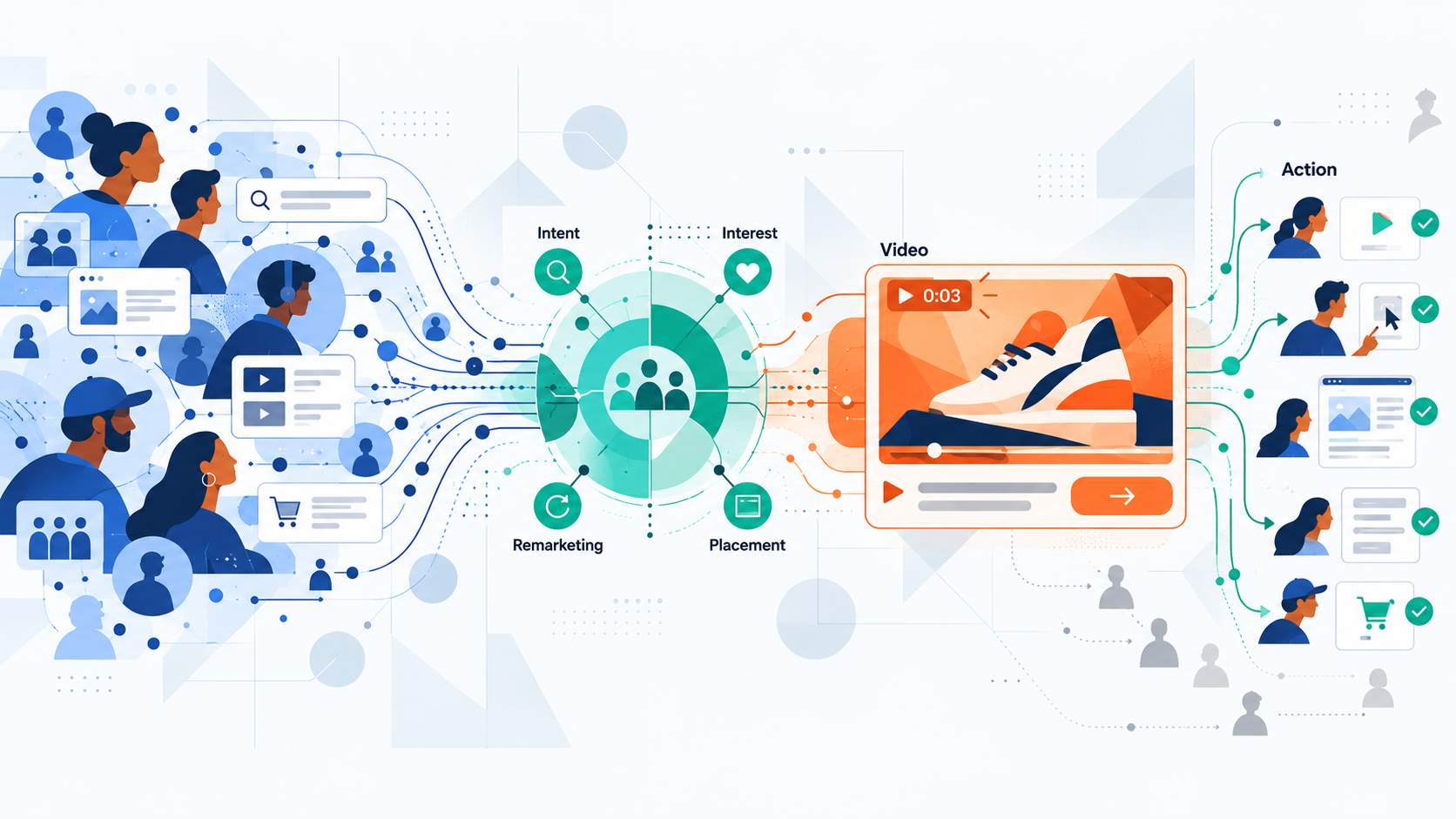
Recent search intent is the strongest signal. If someone searches “buy office chair” on Google, they are ready to buy, not browsing. YouTube can identify these searchers and show your office-chair ad within hours. To set this up:
- Go to your campaign in Google Ads.
- Navigate to “Audiences” and select “Custom Intent”.
- Add keywords matching high-intent searches for your product (for example, “buy + product name”, “best + product name”, “pricing for + product name”).
- YouTube will target people who have searched those terms recently.
This audience is smaller than keyword or interest targeting, but conversion rates are typically 2-3 times higher. Use it for:
- E-commerce campaigns (direct sales)
- Lead-generation campaigns (B2B SaaS, services)
- Products with clear purchase intent keywords
Past purchase history reaches people who have already bought from competitors or similar brands. Google infers purchase intent from Gmail transactional data, Shopping data and first-party website data. This is automatic if you have linked your Google Ads account to your e-commerce platform. Target past purchasers when:
- You want to reach warm audiences (familiar with the product category)
- You are selling against competitors directly
- Your product is a repeat purchase (subscriptions, consumables)
Website visitor lists (remarketing audiences) reach people who have already visited your site. They have shown explicit intent by clicking through. Use these for second-touch campaigns (follow-up ads after initial awareness).
Action: For your first sales or lead campaign, create a custom intent audience with 5-10 high-intent keywords. Example keywords for an e-commerce furniture store: “buy wooden desk online”, “ergonomic office chair price”, “home office furniture UK”, “standing desk reviews 2026”.
Lookalike Audiences: Finding Customers Like Your Best Ones
A lookalike audience is a group of YouTube viewers who share characteristics with your existing customers. If your best customers are 30-45-year-old professionals in finance who live in London, YouTube can find similar people and serve them your ad.
Lookalike audiences scale reach whilst maintaining conversion intent. Your existing customers converted; lookalikes are statistically more likely to convert than random audiences.
To create a lookalike audience:
- Build a source audience: This is your list of existing customers (emails, phone numbers or user IDs). Upload this to Google Ads under “Audiences” > “Customer Match”.
- Create the lookalike: In Google Ads, select “Similar audiences” or “Lookalike audiences”. YouTube finds users with similar behaviours, device usage and demographics.
- Add to campaign: Add the lookalike audience to your YouTube campaign as a separate ad group or audience layer.
Lookalike audiences typically yield 10-50% lower conversion costs than cold audiences, but volume is smaller. Use them when:
- You have 1,000 or more existing customers (minimum for reliable lookalikes)
- You want to scale beyond your warm audience
- Your product has a long sales cycle (B2B, high-ticket items)
Run lookalike audiences alongside intent-based audiences, not instead of them. This balances scale with intention.
Remarketing to Viewers Who’ve Already Engaged With You
Remarketing (also called retargeting) shows ads to people who have previously interacted with your brand: visited your website, watched your YouTube video, or clicked a previous ad.
Remarketing audiences convert at 3-8 times the rate of cold audiences because they have already shown interest. They are in the consideration or decision phase.
Website visitors: Create a remarketing audience of people who visited your site in the last 30 days but did not convert. Show them a second ad with different creative, emphasising urgency, social proof, or a discount. This typically costs 40-60% less per conversion than cold campaigns.
To set up:
- Ensure your website has the Google Ads conversion tracking pixel installed.
- Go to Google Ads > “Audiences” > “Website visitors”.
- Create an audience (for example, “Visited site, did not purchase, last 30 days”).
- Add to your YouTube campaign.
Video viewers: If you run YouTube ads, you can remarket to people who watched your previous videos. Create an audience of “watched 50% of my video” or “watched to completion”, then show them a follow-up ad or direct them to a landing page.
Engagement-based: Remarket to people who clicked your ad, visited your landing page, or engaged with a call-to-action overlay. This is the warmest audience; conversion rates are often 5-10%.
Action: Launch a dedicated remarketing campaign with 30-50% of your budget. If your total YouTube budget is SGD 100 per week, allocate SGD 30-50 per week to remarketing. This yields faster return on investment than cold audiences alone.
Testing Broad vs. Narrow Targeting
Broad targeting reaches many people; narrow targeting reaches fewer, higher-intent people. Neither is universally better. The choice depends on your goal and budget.
Narrow targeting includes custom intent (high-intent keywords only), specific placements (named channels only), narrow interest (one affinity group), and small geographic areas (specific cities or postcodes).
Narrow targeting advantages:
- Higher conversion rate
- Lower cost per conversion
- Predictable performance
Narrow targeting disadvantages:
- Smaller audience
- Slower scaling
- Limited growth beyond your defined segment
Use narrow targeting when:
- Your budget is under SGD 2,000 per month
- You are in a niche market
- You have very clear customer intent signals
- You are optimising for conversions, not volume
Broad targeting includes multiple interest and affinity groups, large geographic areas, all placements (not specifying channels), and multiple keyword groups.
Broad targeting advantages:
- Larger audience
- Faster scaling
- Algorithm can find unexpected high-performing segments
Broad targeting disadvantages:
- Higher wasted spend
- Lower conversion rates
- Harder to diagnose underperformance
Use broad targeting when:
- Your budget is over SGD 5,000 per month
- You want volume and brand awareness (not just conversions)
- You are confident your product appeals to a wide demographic
- You have strong conversion tracking (so Google Ads can optimise automatically)
Most effective approach: Start narrow, test, then expand.
- Launch with a narrow audience (custom intent + one affinity group, one region).
- Let it run for 7-14 days and gather 100-200 conversions or engagement events.
- Check performance (cost per conversion, return on ad spend).
- If profitable, expand: add more affinity groups, broaden geography, add lookalike audiences.
- Keep the original narrow campaign running as a baseline.
This isolates what is working before you scale spend.
Video Ad Creative: What Makes Viewers Stop Scrolling
An audience perfectly matched to your product will not convert if your creative is weak. YouTube’s skippable format means you have three to five seconds to convince a viewer not to skip. This constraint forces clarity.
Hook Your Viewer in the First Three Seconds
The first three seconds determine whether a viewer skips or watches. Ads with a visual hook in the first second perform significantly better than ads without one.
A hook is something surprising, relatable or visually arresting that makes a viewer pause. It is not always a product shot; often, it is a problem the viewer recognises.
Effective hooks include the following:
- Problem statement: “You are paying too much for your phone plan.” (Immediate relevance; viewer recognises themselves.)
- Curiosity: “We built a coffee maker that does this…” (Cut to unexpected feature or demonstration.)
- Visual contrast: An everyday scene disrupted by the product. (Person struggling with broken luggage, then your suitcase appears.)
- Specific statistic or question: “Did you know that remote workers report back pain?” (Specificity creates intrigue.)
- Brand moment: A recognisable character, sound or visual associated with your brand. (Instant credibility if you are established.)
Weak hooks include the following:
- Logos or brand name alone
- Company mission statement
- Generic language such as “Hey, have you heard of our product?”
- Music montage with no visual anchor
If your product is complex (B2B software, high-end services), the first three seconds should establish why the viewer should care: “Your sales team is missing opportunities.” Then explain what you do in seconds three to fifteen.
Test multiple hooks in your first campaign. Create three 60-second videos, each with a different opening. YouTube’s campaign tools let you upload multiple videos to a single ad group; Google Ads will test them and favour the highest-performing one.
Script Structure: Hook, Problem, Solution, Proof, Action
According to YouTube, the most effective YouTube ad scripts follow a straightforward structure: hook, problem, solution, proof, call-to-action. This approach emphasises clarity.
Hook (0–3 seconds): Surprise, problem or question.
Problem (3–10 seconds): Expand on the pain point. Make it specific.
Example (B2B project management): “Your team uses email, Slack and multiple spreadsheets to track projects. It is disorganised.”
Solution (10–30 seconds): Show your product in action. Demonstrate the core feature that solves the problem.
Example: “With Monday.com, projects, tasks and deadlines are all in one place. Your team sees exactly what is due and who is responsible.”
Proof (30–50 seconds): Build trust using testimonials, customer logos, statistics or before-and-after examples. Choose the proof type most credible to your audience. For SaaS, logos of known brands work well. For e-commerce, before-and-after examples work well. For services, real customer quotes work well.
Example: Show three to four quick screens of the software in use, overlaid with text: “Used by thousands of teams.”
Call-to-action (50–60 seconds): Tell viewers what to do next. Be specific and direct.
Weak call-to-action: “Learn more or buy now.”
Strong call-to-action: “Start a free trial. No credit card required.” (Or “Book a demo” for B2B, “Shop now” for e-commerce.)
This structure mirrors how people think: notice a problem, consider a solution, check if it is credible, then decide to act.
Captions and Sound Design for Silent Viewing
A significant proportion of YouTube video views occur with sound off. Your ad must communicate without audio.
Add captions to every ad. YouTube Studio offers auto-captioning; it is not perfect but provides a starting point. Manually review and edit captions to ensure accuracy.
Position captions at the lower third or bottom of the screen, not the centre (which obscures product or people). Use sans-serif fonts in white or light colours with dark outlines for legibility.
Sound design matters for viewers watching with sound on. Use music and sound effects that reinforce your message, not distract from it. A SaaS product demonstration works well with minimal, modern background music (no lyrical vocals, which compete for attention). A fitness product might use energetic, upbeat music. A financial-services product might use calm, neutral tones.
Avoid generic stock music, which audiences recognise as low-quality. Invest in music from libraries such as Epidemic Sound or Artlist; the cost is modest and vastly improves perceived quality.
Call-to-Action Placement: Timing and Clarity
Your call-to-action should appear twice in a 60-second ad: once at 35–40 seconds (reinforcement) and again at 55–60 seconds (final prompt).
Place call-to-actions as text overlays, voice-over, or both. If you use an overlay call-to-action button, position it in the bottom right to avoid covering your product or key visuals.
Reinforcement example (35–40 seconds): Text overlay: “Visit our site for a free guide.”
Final prompt example (55–60 seconds): Voice-over plus text overlay: “Start your free trial today at monday.com. No credit card required. Link in the description.”
If your ad is under 30 seconds, use one strong call-to-action at the end.
Keep call-to-actions action-oriented. Avoid passive language:
- Weak: “You might want to consider downloading our app.”
- Strong: “Download the app. Get 50% off your first order.”
Test call-to-action messaging. Some audiences respond to urgency (“Offer ends Sunday”), others to risk reduction (“30-day money-back guarantee”), others to simplicity (“Click here”).
Bidding Strategies and Budget Allocation
Your bid strategy determines how much you pay and how Google Ads optimises your budget. Strong creative with a poor bid strategy will underperform. Mediocre creative with an excellent bid strategy will often surprise you.
Understanding Cost Per View and Cost Per Mille
Cost Per View (CPV) means you pay when a viewer watches at least 30 seconds of your in-stream ad (or the full video if it is shorter). You do not pay if someone skips before 30 seconds.
CPV is the standard metric for in-stream campaigns. Typical CPV ranges vary by region and industry:
- E-commerce (consumer products): SGD 0.08–0.25 per view
- SaaS (B2B software): SGD 0.25–0.80 per view
- Services (consulting, real estate): SGD 0.12–0.40 per view
- Financial services: SGD 0.30–1.00 per view
These ranges reflect typical market conditions; actual costs depend on competition, season and audience specificity. If your CPV exceeds the typical range for your industry, either your targeting is too broad (reaching non-buyers) or your creative is not compelling (high skip rate). Diagnose by checking your view-through rate (VTR). A VTR above 30% is solid; below 15% indicates weak creative.
Cost Per Mille (CPM) means you pay per 1,000 impressions, whether the viewer watches or not. CPM is used for bumper ads (six-second, non-skippable) and discovery ads.
Typical CPM ranges include the following:
- Display and bumper ads: SGD 2–8 per 1,000 impressions
- Premium video placements: SGD 5–15 per 1,000 impressions
CPM is useful for brand awareness (you want maximum reach) but inefficient for conversion campaigns (many impressions are wasted on people who do not watch).
When CPV is better: Conversion campaigns, sales, lead generation, product-focused messaging.
When CPM is better: Awareness campaigns, bumper ads, frequency caps (showing your ad multiple times to the same audience).
For a first campaign focused on sales or leads, use CPV bidding, not CPM.
Manual Bidding vs. Automated Strategies
Manual bidding (Cost Per View, Cost Per Click): You set the bid amount yourself. You pay only up to that amount per view or click. You control spending, but you must monitor and adjust bids regularly.
Advantages: Predictable cost, full control, good for beginners.
Disadvantages: Requires ongoing optimisation, often leaves ROI on the table.
Use manual bidding when:
- You have a limited, fixed budget
- You are testing multiple audiences and need to compare cost fairly
- You are new to YouTube and want to understand what you are paying
Automated bidding (Maximise Conversions, Target ROAS, Maximise Clicks): Google’s algorithm adjusts your bids automatically to meet a goal you define (conversions, revenue, clicks). You set a target (for example, SGD 15 cost per conversion) and Google keeps you near it.
Advantages: Hands-off optimisation, often yields lower cost per conversion than manual bidding, scales efficiently.
Disadvantages: Requires conversion tracking, needs minimum data (20–30 conversions) to start, less transparent.
Use automated bidding when:
- You have conversion tracking set up (sales, leads, app installs)
- You are willing to run the campaign for seven to 14 days before judging performance
- You have a budget of SGD 2,000 or more per month (enough for the algorithm to learn)
| Scenario | Bid Strategy |
|---|---|
| First campaign, small budget (less than SGD 1,000 per month) | Manual CPC or CPV |
| Testing multiple audiences simultaneously | Manual CPV (compare on equal footing) |
| Conversion-focused, mature conversion tracking | Maximise Conversions |
| E-commerce with reliable conversion data | Target ROAS |
| Awareness campaign, no conversions tracked | Manual CPM or Maximise Clicks |
Daily Budget vs. Lifetime Budget
Daily budget: You specify an average daily spend (for example, SGD 50 per day). Google Ads spends up to that amount per day, adjusting slightly based on daily fluctuations. Campaigns run continuously until you pause them.
Use daily budgets when:
- You want consistent, ongoing campaigns (not tied to a deadline)
- You are scaling spend and want flexibility to adjust weekly
- You are testing multiple ad groups and want to allocate spend dynamically
Lifetime budget: You set a total amount for a defined period (for example, SGD 1,000 over 30 days). Google Ads optimises daily spend to use that total over the exact period.
Use lifetime budgets when:
- You are running a seasonal campaign (holiday sales, back-to-school, launch window)
- You have a fixed overall budget
- You want Google to find the best days and times to spend more
For most campaigns, use a daily budget. It is more flexible. If a campaign underperforms, you can pause it without losing unused budget. If it overperforms, you can increase the daily spend. Use lifetime budget only for time-bound events (a launch date, a sale ending on a specific day, a conference).
How to Scale Without Killing Your ROI
Scaling means increasing budget while maintaining profitability. Aggressive scaling often kills ROI because higher budgets force you into less-targeted audiences and higher costs per conversion.
Follow this safe scaling approach:
- Establish a baseline. Run your campaign for seven to 14 days at your planned daily budget (for example, SGD 50 per day). Track cost per conversion and ROAS. Let Google Ads accumulate 50–100 conversions.
- Identify your profitable segments. In Google Ads reporting, filter by audience, placement or device. Which segments are most profitable? You might find mobile users have twice the ROAS of desktop users.
- Increase budget incrementally. Raise daily budget by 20–30% weekly, not 100% overnight. Example: Week 1, SGD 50 per day. Week 2: SGD 65 per day. Week 3, SGD 85 per day.
- Monitor for cost creep. As the daily budget rises, check cost per conversion weekly. If it rises above your target by more than 20%, pause the increase and diagnose (is Google reaching broader, lower-intent audiences?).
- Scale profitable segments aggressively; pause underperforming ones. If certain placements or audiences are 50% cheaper per conversion, increase budget there. If others are 50% more expensive, reduce or pause them.
- Refresh targeting every two to three weeks. As spending increases, refresh your audience selection. Remove underperforming keywords, add new intent keywords, refresh lookalike audiences.
Performance Metrics That Matter (Beyond Views)
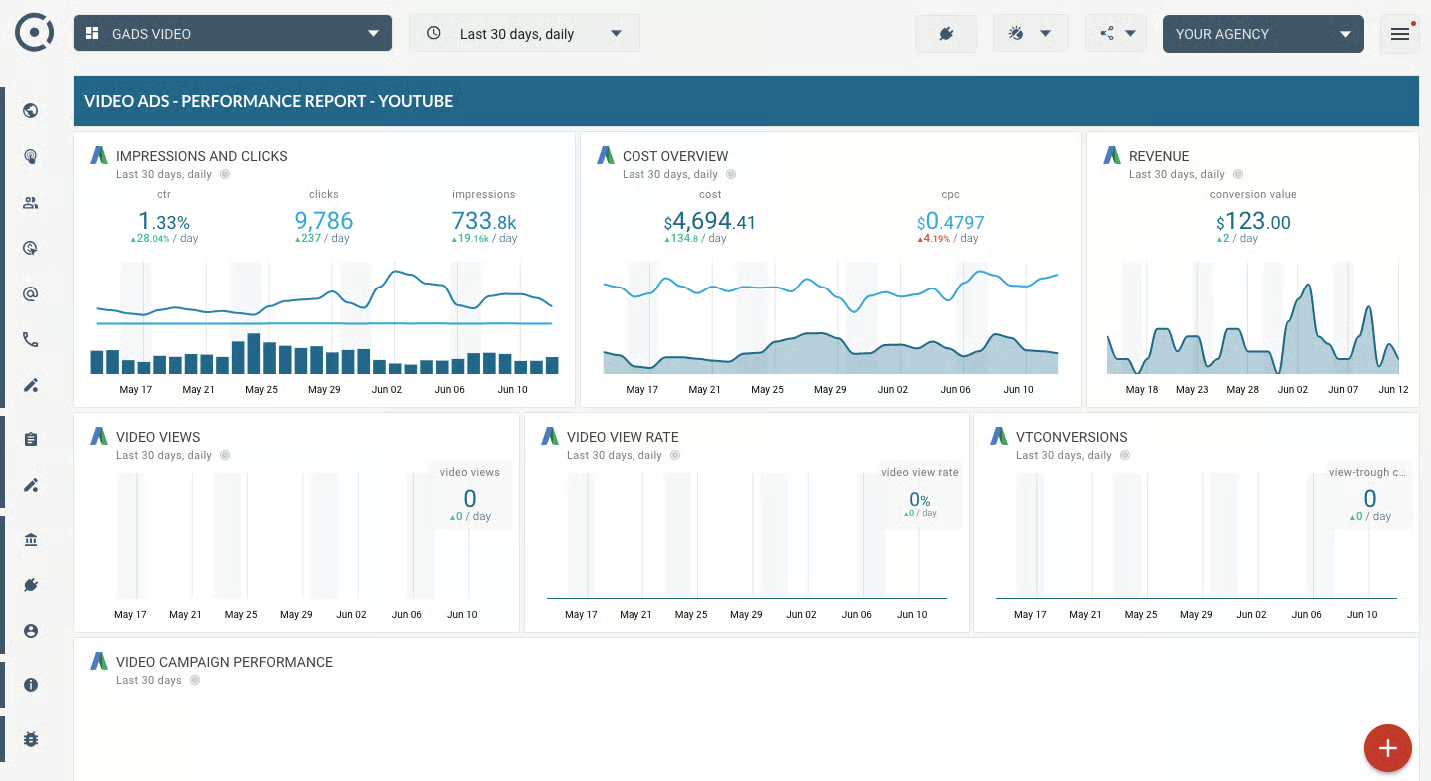
YouTube campaigns generate dozens of metrics to analyse your video ads performance. Most are vanity; a few predict profit. Focus on the right ones.
View-Through Rate (VTR) and Why It’s Not Enough
View-through rate is the percentage of impressions that resulted in a 30-second view (or full video watch). A 30% VTR means three out of every ten people who saw your ad watched at least 30 seconds.

VTR is useful for diagnosing creative problems. A 40% VTR suggests your hook works. A 10% VTR suggests your opening is weak; viewers skip immediately.
But a high VTR does not guarantee conversions. Someone can watch your entire ad and never click or buy.
Use VTR to improve creative, not to judge campaign success. If VTR is low, test new hooks. If VTR is high but conversions are low, your landing page or offer is the problem, not the video.
Click-Through Rate (CTR) and What It Reveals
Click-through rate is the percentage of people who clicked your ad and arrived at your landing page. A 0.5% CTR means five of every 1,000 viewers clicked.
CTR is a better success signal than VTR because it shows intent: the viewer was interested enough to act. However, CTR also depends on your call-to-action (CTA) placement and clarity, not just creative quality.
A high VTR (50%+) with a low CTR (0.2%) often suggests the video engages viewers, but your CTA is weak or unclear. Other factors, such as landing page friction or audience mismatch, may also contribute.
Typical CTR benchmarks by industry:
- E-commerce: 0.3–0.8%
- SaaS/B2B: 0.5–1.5%
- Services: 0.4–1.0%
- Discovery ads: 1–3% (higher because users actively searched)
If your CTR is below the benchmark for your industry, test stronger CTAs, clearer value propositions, or more prominent CTA placement.
Cost Per View (CPV) and Cost Per Action (CPA)
CPV tracks what you are paying for each watched ad. CPA tracks what you are paying for each conversion, such as a sale, lead, or app install.
CPV is a proxy for audience quality and creative appeal. A low CPV (under SGD 0.15 for e-commerce) suggests your targeting is tight and your creative resonates. A high CPV (over SGD 0.50) suggests either weak targeting or low-engagement creative.
CPA is the metric that matters most for profitability. A CPA of SGD 25 per lead means you acquire each customer inquiry for SGD 25. If your average lead converts to a SGD 300 sale with a 30% close rate, each lead is worth SGD 90 in expected revenue. A CPA of SGD 25 is profitable.
To calculate your target CPA, work backwards:
Average order value × Expected close rate ÷ Desired profit margin = Target CPA
Example: SGD 500 average order × 25% close rate ÷ 2 (meaning you want to spend half of the deal value on acquisition) = Target CPA of SGD 62.50 per lead.
Return on Ad Spend (ROAS) and Profitability
ROAS is the total revenue generated divided by the total ad spend. A ROAS of 3:1 means for every SGD 1 spent on ads, you generate SGD 3 in revenue.
ROAS is the primary metric for profit-focused campaigns because it accounts for all downstream effects. A campaign may have high clicks but low ROAS if those clicks convert poorly. Conversely, a campaign with low clicks but high-quality clicks can have an excellent ROAS.
Profitable ROAS thresholds by business type:
- E-commerce (direct sales): 2.5:1 or higher (accounts for cost of goods sold, shipping, returns)
- SaaS (monthly subscription): 3:1 or higher (takes longer to recoup customer acquisition)
- Services (high-margin): 2:1 or higher
- Lead generation: Varies by lead value; typically target 1.5:1 to 2:1
Below 1.5:1 ROAS, most campaigns lose money or break even. If you consistently fall below this threshold, either your targeting is too broad (reaching non-buyers), your offer lacks appeal, or your landing page experience needs improvement.
Important: ROAS benchmarks vary widely by industry and business model. Consult your own financial data and margins to set realistic targets for your sector.
Track ROAS weekly. If it trends downward week-on-week, pause the campaign and diagnose before scaling budget.
Attribution: Understanding What Actually Converted
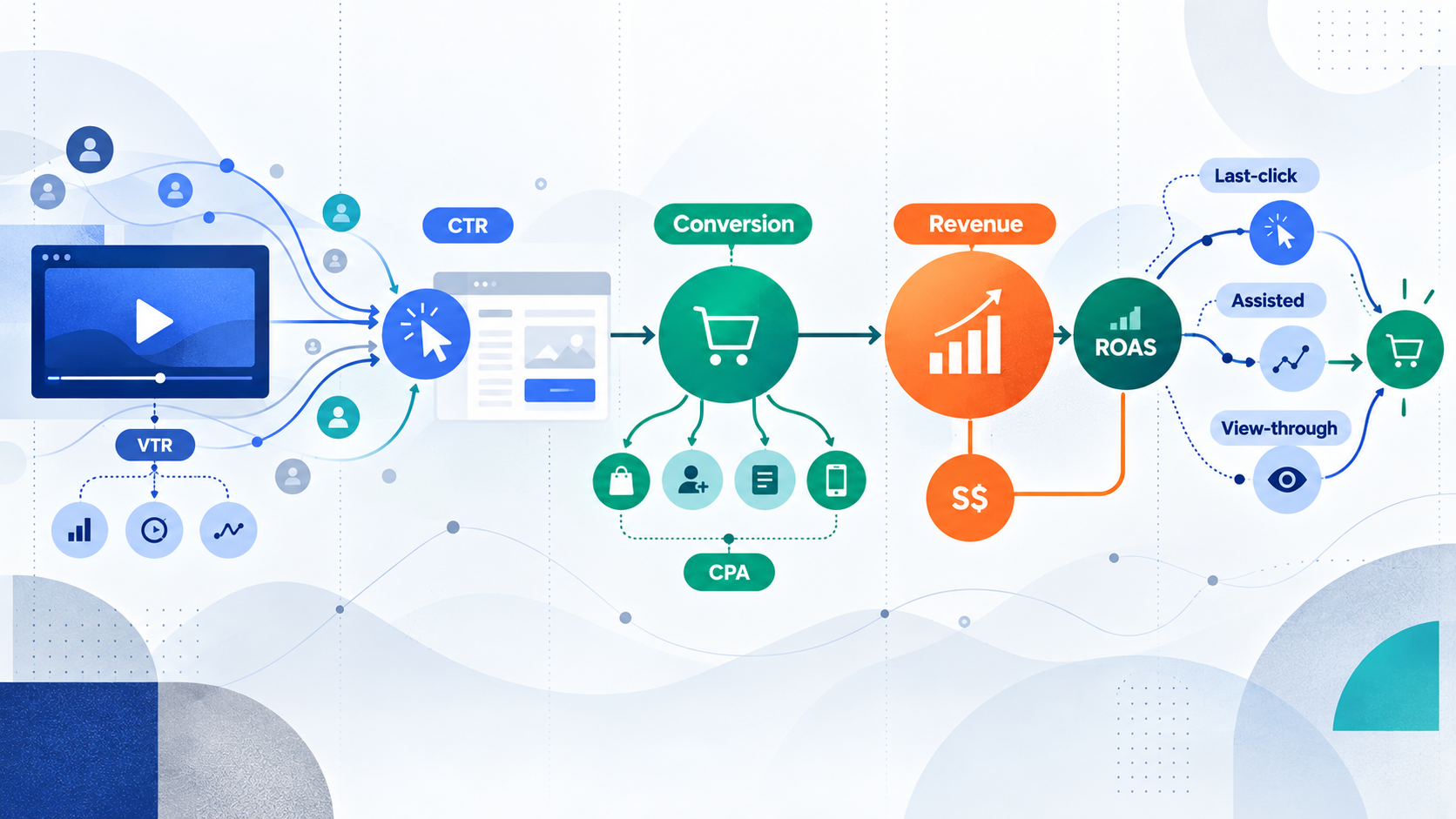
Attribution is the process of crediting a sale or lead to the touchpoint that triggered it. YouTube ads can contribute to a conversion in multiple ways:
- Last-click: The viewer clicked the ad and immediately converted. YouTube gets full credit.
- Assisted: The viewer watched the ad but did not click, then later searched your brand on Google or visited your site directly and converted. YouTube assisted but was not the final touch.
- View-through: The viewer watched the ad without clicking, then within 24 hours converted on the website. YouTube’s ad exposure influenced the conversion without a click.
Google Ads attribution models let you assign credit differently. Most platforms default to “last-click” attribution, which undervalues awareness campaigns because they do not directly drive the final click.
For YouTube, which drives both awareness and direct response, use “data-driven” attribution (if available) to credit YouTube fairly for assisted and view-through conversions. This reveals YouTube’s true impact on revenue.
Action: Set up conversion tracking in Google Ads and configure your attribution model within the first week. Without it, you are flying blind.
Troubleshooting Common Campaign Problems
| Symptom | Likely Cause | Recommended Action |
|---|---|---|
| High CPV, low VTR (viewers skip immediately) | Weak creative hook. Opening does not grab attention or feels irrelevant. | Test a new opening (problem statement, curiosity, visual contrast). A/B test three different hooks. Identify which VTR improves. |
| High VTR, low CTR (viewers watch but do not click) | Weak call-to-action or unclear landing page promise. Viewers are not convinced to act after watching. | Strengthen CTA messaging (“Start free trial, no card required” instead of “Learn more”). Test different CTA placements and timing. Review landing page alignment. |
| High clicks, low conversions (visitors arrive but do not buy) | Landing page mismatch. Ad promises one thing; landing page delivers another. Or the page is not optimised for mobile. | Check landing page on mobile. Ensure headline and offer match the ad. Simplify the form or checkout process. Test a shorter, more direct landing page. |
| High cost per view (CPV above your target range) | Broad targeting reaching non-intent audiences. Or the algorithm has not learned yet (insufficient data). | Narrow audience targeting temporarily (custom intent only, one affinity group). Let campaign run 7–10 days (minimum 50–100 views). Check if CPV stabilises. If not, pause and revise creative. |
| No conversions after 200+ clicks | Either: (1) Audience is wrong. (2) Landing page is broken. (3) Conversion tracking is not configured. | Check conversion tracking pixel is firing (use Google Tag Manager debugger). Test landing page on multiple devices. Review audience targeting; narrow if needed. Extend test duration to 14 days. |
| Budget exhausting without results | Audience too broad. Algorithm optimising for volume, not quality. Or conversion tracking misconfigured. | Pause broad campaigns immediately. Implement audience narrowing (intent keywords, specific placements). Verify conversion tracking. Start with daily budget cap (for example, SGD 30 per day) while diagnosing. |
FAQ
How much should I budget for YouTube advertising as a beginner?
Many advertisers recommend starting with SGD 300–500 per month to gather enough data for meaningful diagnosis. This typically allows for 100+ views or 20+ conversions, sufficient to identify what is working without risking a large budget. Below SGD 300 per month, results become too noisy to trust. Budget adequacy depends on your industry and audience size. Once you have achieved a profitable ROAS at your starting level, increase budget incrementally (20–30% per week).
Is YouTube advertising better than Facebook ads for my e-commerce business?

It depends on your product and audience. YouTube works well for consideration and awareness; Facebook excels at impulse purchases and retargeting. Many e-commerce businesses use both. Start by testing YouTube with a narrow audience (custom intent or lookalike) and compare ROAS to your Facebook baseline. If YouTube ROAS is 20% higher, allocate more budget there. If Facebook outperforms, focus there. Your data, not conventional wisdom, should determine the answer.
Do I need conversion tracking set up before launching my first campaign?
Yes. Without conversion tracking, you cannot measure whether clicks turn into sales or leads. Set up your conversion pixel (in Google Ads or Google Tag Manager) before your first ad goes live. This takes 15–20 minutes and is non-negotiable if you want accurate ROAS or CPA data.
What is a “good” click-through rate for YouTube ads?
Industry benchmarks vary: e-commerce typically sees 0.3–0.8%, SaaS 0.5–1.5%, and services 0.4–1.0%. Discovery ads (where users actively searched) often reach 1–3%. Your benchmark depends on your vertical. Compare your CTR to others in your sector, not to an arbitrary standard. A 0.5% CTR in a highly competitive market may be above average.
My VTR is 40%, but my ROAS is negative. What is wrong?
A high view-through rate shows your creative hook works. A negative ROAS means your conversions do not justify your ad spend. The problem is downstream: either your landing page does not match the ad promise, your offer is not compelling, the page is poorly optimised for mobile, or your audience is too broad. Test landing page changes first (headline, form length, mobile responsiveness) before concluding your video is at fault.
How do I know if I am targeting the right audience?
Test with a narrow audience (custom intent keywords only, one affinity group) for 7–10 days. If CPV drops and VTR improves, your targeting was too broad. If CPV stays high and VTR remains low, your creative is the problem, not the targeting. Narrow targeting trains the algorithm faster because every view comes from a high-intent user.
What should I do if my campaign stops converting after two weeks?
This often means the algorithm has exhausted your narrow audience or ad fatigue has set in. Expand your audience slightly (add a second affinity group or lookalike segment) and refresh your creative (new hook, different value proposition). Do not simply increase budget; you will throw money at a problem that creative or audience changes can fix.
Is a 3:1 ROAS guaranteed if I follow this guide?
No. Campaign success depends on product-market fit, creative quality and audience targeting; results are not guaranteed. A 3:1 ROAS is achievable for many businesses but is not universal. Your margins, industry competitiveness, and execution determine realistic targets. Use benchmarks as guides, not promises.
What happens if my video ad violates YouTube’s policies?
Your ad will be disapproved and will not run. If your account accumulates multiple violations, YouTube may suspend your advertising privileges entirely. Before launching, review YouTube’s advertising policies (which cover deceptive claims, restricted content, and brand safety). Test your video with a small audience first to catch issues early.
How do I decide between skippable and non-skippable ad formats?
Skippable ads (viewers can skip after 5 seconds) typically cost less per view and generate better view-through rates because only engaged viewers watch. Non-skippable ads guarantee full viewership but may carry higher viewer dissatisfaction than skippable formats. For awareness, use non-skippable. For direct response (sales, leads), use skippable and optimise your hook to earn the full 30-second watch.
How do I know if I should pause a campaign or keep testing?
Pause if you have accumulated 50–100 views (or 20+ conversions) with no sign of improvement in ROAS or CTR. If metrics are stable but unprofitable, test new creative or audience segments. Do not pause after just 10 views; the algorithm needs 50+ to learn. Track ROAS weekly; if it declines for two consecutive weeks, pause and diagnose.
Should I focus on CPV or ROAS?
Focus on ROAS. CPV is a diagnostic tool (it tells you whether your targeting and creative are attracting the right viewers), but ROAS is the business metric. A low CPV with low ROAS means your targeting is working, but your offer is not. A high CPV with high ROAS means you are spending more per view, but those viewers convert profitably. Always optimise for ROAS, not CPV alone.