What is SEO? SEO, or search engine optimization, is the practice of making a website easy for search engines to crawl, understand and trust, and matching its content to what people search for. It combines technical housekeeping, useful writing and links from other sites that build the site’s authority. Businesses use it to make their services easier to find, and to present accurate information to people actively looking for them.
This guide is for working professionals in marketing, small business ownership and content roles. No coding is required.
Contrarian thesis: Beginners should audit indexability before they research keywords. A page that search engines cannot store cannot rank, however well its keywords are chosen. The evidence in this guide supports checking access first, then relevance.
Key Takeaways
- What is SEO? It is a continuous process of making a website easy to crawl, understand and trust, and matching search intent.
- Check the Visibility Chain in order: crawlable, indexable, relevant, intent-matched, trustworthy. Fix the weakest link first.
- Check indexability before keywords. A stray noindex tag or blocked crawl path can make a page invisible, and no keyword change will fix that.
- Use one H1 and a logical H2 to H6 hierarchy, as Simplilearn’s SEO tutorial explains.
- Voice search is growing. Google reports 41% of adults and 55% of teens use it daily.
- Measure in Google Search Console. Review clicks and impressions monthly to see which fixes improve results.
Table of Contents
- SEO Definition and Fundamentals
- How Search Engines Work
- The Visibility Chain: Why a Fully Optimized Page Can Still Be Invisible
- Who Controls What: Separating Search Engine Factors from Your Own
- Building a Clear Heading Structure
- Finding the Keywords Your Audience Uses
- Worked Example: Auditing a Small Business Page
- Creating Content That Answers Real Questions
- Measuring Results and Business Impact
- Conclusion and Summary
- Frequently Asked Questions
SEO Definition and Fundamentals
The Core Definition of Search Engine Optimization
Search engine optimization (SEO) is the practice of helping a website’s pages appear in search results for the searches they are meant to answer. It makes a site easier for search engines to crawl, understand and trust. Straight North’s overview of what SEO means and Collaborada’s explanation frame it the same way. “Optimization” here does not mean gaming a ranking formula. It means fixing what blocks visibility, structuring content so its topic is clear, and showing that the page deserves to be shown.
Organic search results are unpaid listings ranked by relevance and quality. Paid results are advertisements bought per click, and they stop when the budget stops. An organic listing can keep earning visits for months or years. A Lyfe Marketing case study reports $302,375.59 in revenue from organic traffic for one client. That is one agency’s reported result, not a benchmark.
The Three Pillars: Technical, Content, and Authority
SEO rests on three pillars that depend on each other.
| Pillar | What it covers | Question it answers |
|---|---|---|
| Technical SEO | Crawling, indexing, site speed, mobile usability, URL structure | Can search engines reach and read the page? |
| On-page content | Titles, headings, body copy, internal links, images | Does the page clearly match a specific query? |
| Off-page SEO | Links from other sites, mentions, reputation | Do other sources vouch for the website? |
Technical SEO is the foundation, since a page that cannot be crawled cannot rank. On-page content signals what a page is about. Off-page SEO, mainly links from credible sites, builds authority. Weakness in one pillar limits results, even when the others are strong.
Where SEO Sits Within Digital Marketing
SEO is one channel alongside paid search, social media, email and content marketing. Unlike paid search, it takes longer to show results but does not charge per visit. The same pages that earn organic results can be shared on social media and used to qualify leads. For many businesses, a clear strategy uses the information SEO gathers to guide decisions across all of these channels, and the same principles apply to the services they offer.
How Search Engines Work
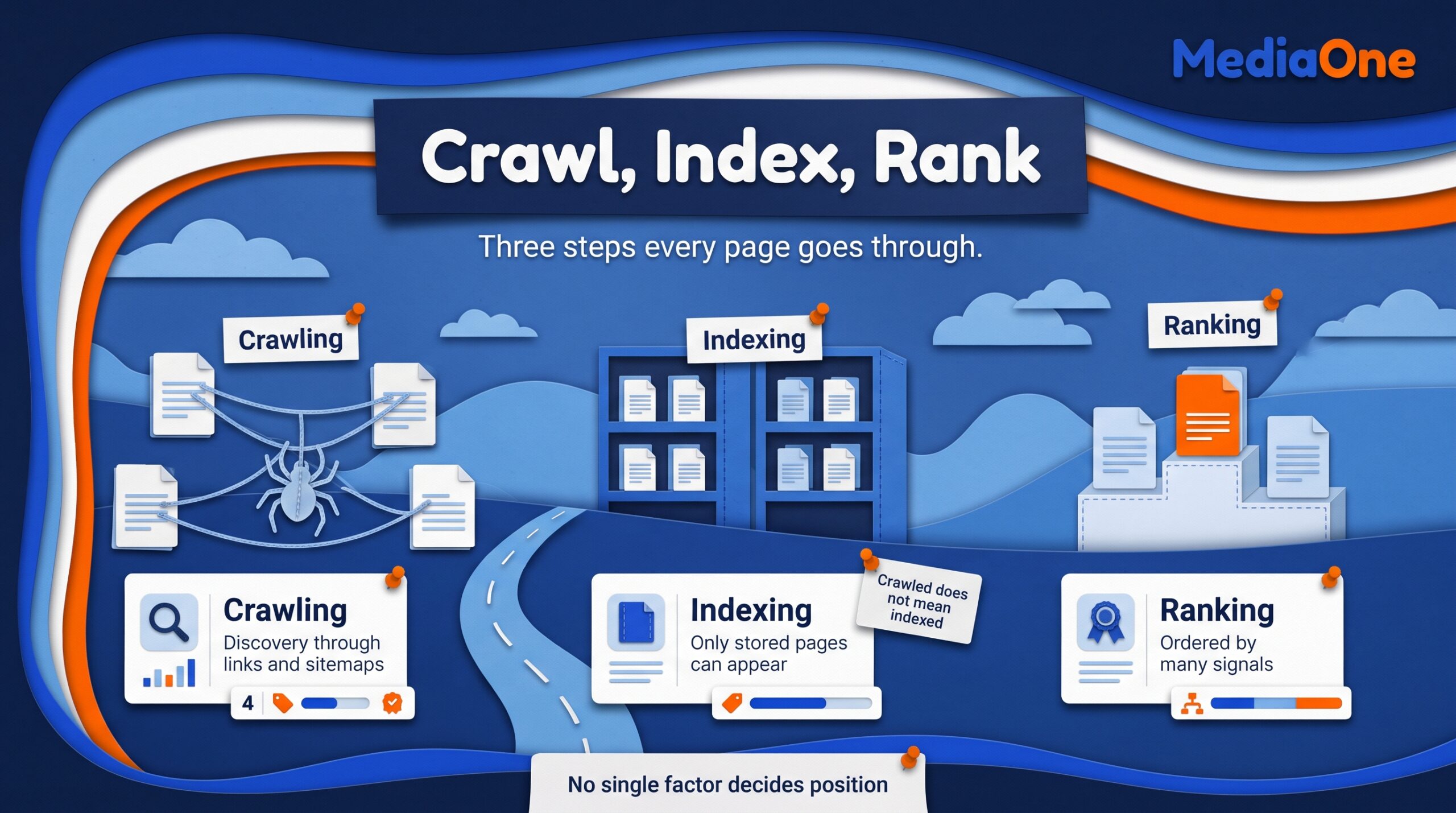
Search engines run three processes, in order: crawling, indexing and ranking.
Crawling
Crawling is discovery. Crawlers follow links between pages and sites, and XML sitemaps you submit in Google Search Console. Google’s Search Central documentation on crawling describes this process.
Indexing
Indexing is storage. The engine processes a crawled page, extracts its information, and decides whether to store it in its index. Only indexed pages can appear in results. Google’s documentation on how Search works covers these steps.
Ranking
Ranking is ordering. The engine picks indexed pages that match a query and orders them by many signals, including off-page SEO factors such as links from other sites, and signals of user experience. Google’s ranking systems documentation explains the approach. Google does not publish a complete formula, and no single factor decides position. A well-structured website with clear, crawlable pages gives the engine more to evaluate, and a sound content strategy helps those pages earn their place in the search engine results.
The Visibility Chain: Why a Fully Optimized Page Can Still Be Invisible
Every page’s visibility depends on five links in sequence. This guide calls this sequence the Visibility Chain. It is this guide’s own model, not an official Google framework. Work through it in order, because a weak early link wastes effort spent on later ones.
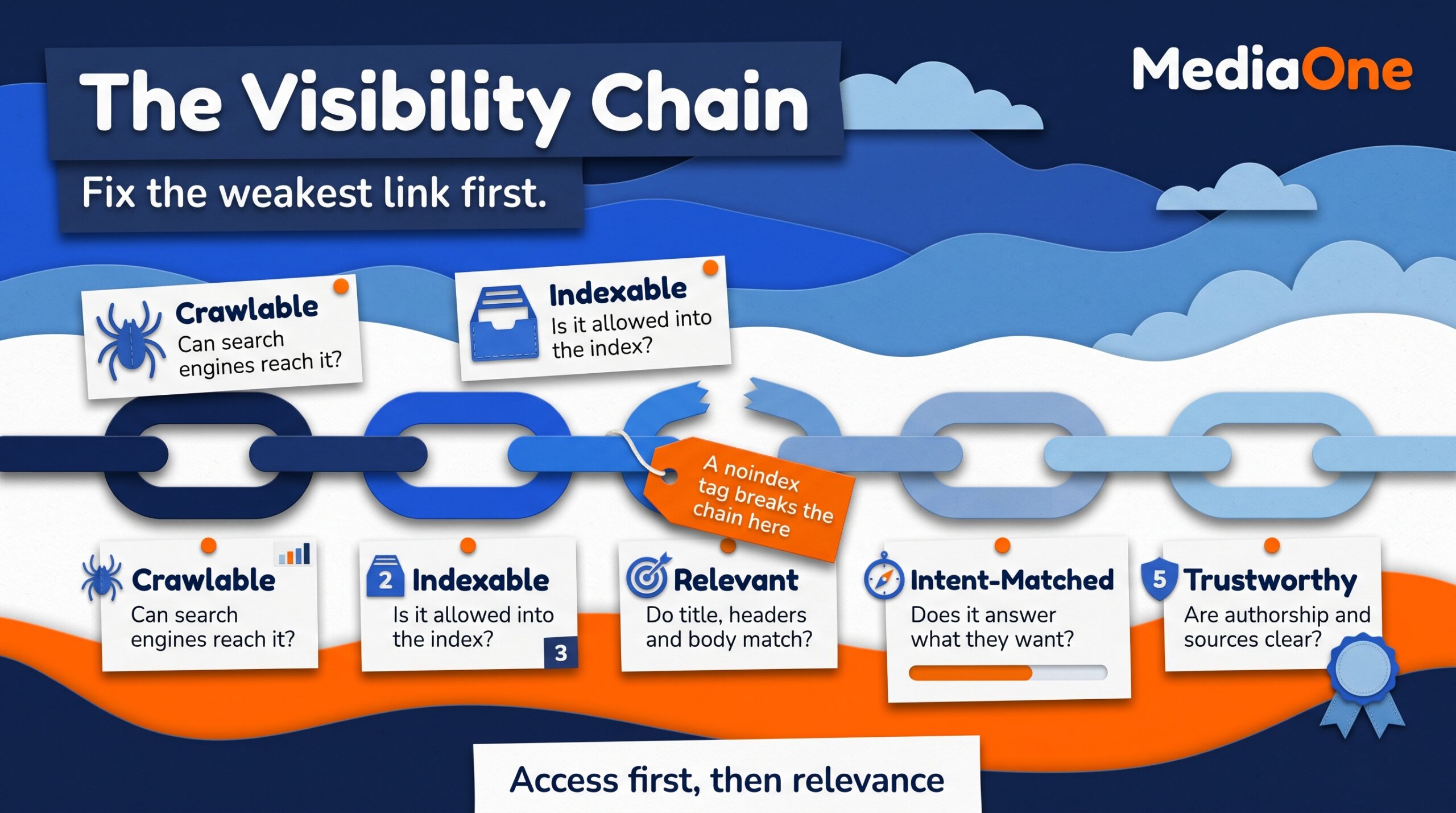
- Crawlable: can search engines reach the page?
- Indexable: is the page allowed into the index?
- Relevant: do the title, headers, URL and body match a specific query?
- Intent-matched: does the page answer what the searcher wants to do (inform, compare or buy)?
- Trustworthy: are authorship, sourcing and site quality clear?
A break at any link limits visibility. A page with strong copy but a noindex tag scores zero at link two, however good link three looks. Fix the weakest link first. Strong on-page SEO cannot make up for a page that search engines are never allowed to store. That is why a sound digital marketing plan checks technical access before polishing copy. A clear strategy starts by confirming that the page’s information can be reached and stored, so that visitors arriving from search actually find the page. Each of the services described on a website deserves the same check, since an unreachable service page earns no traffic however well it is written.
Crawlability: Blocked Paths and Orphaned Pages
Two common failures hide pages completely:
- Blocked pages: a robots.txt rule or a password wall stops the crawler.
- Orphaned pages: no internal link points to the page, so the crawler has no path to it, even if it appears in your sitemap.
Crawl budget is the attention a crawler spends on your site in a given period. Google describes it as the number of URLs Googlebot can and wants to crawl. It rarely matters for small sites. On sites with thousands of URLs, wasted crawls on duplicate or broken pages can leave important pages waiting. Large businesses with extensive catalogs should monitor this closely.
Indexability: What Gets Stored and Why
Crawling and indexing are separate steps. A page is crawled when a bot fetches it, and indexed only when the engine stores it and makes it eligible to appear in results. Common reasons a page is left out:
- A noindex tag left over from a staging environment. Google’s guidance on noindex explains how it works.
- Thin content or duplicate content that repeats another URL
- A soft 404, where a page looks empty but returns a success code
- Canonical tags pointing to a different URL
Google’s Page Indexing report in Search Console shows which URLs are indexed and why others are excluded. “Crawled, currently not indexed” often signals a content quality problem, but not always. The page may be new, duplicated or still being evaluated. Check the page’s content and internal links before rewriting it.
Relevance, Intent and Trust
Once indexed, a page competes on relevance, intent and trust. Ask these questions of each page:
| Check | What it asks | Practical test |
|---|---|---|
| Relevant | Does the page match the query’s topic and terms? | Do the title, H1 and opening paragraph address the query directly? |
| Intent-matched | Does the format fit what the searcher wants? | Does the top result use the same format you chose? |
| Trustworthy | Is the content accurate, sourced and written by someone credible? | Are claims cited, and is the author’s expertise visible? |
Before rewriting a page that does not rank, confirm it is crawlable and indexable. Fixing a blocked page is faster than rewriting content search engines never see.
Who Controls What: Separating Search Engine Factors from Your Own
You control titles, meta descriptions, headers, URLs, internal links, page speed, robots rules, sitemaps, content depth and author details. You do not control competitors, engine weightings, algorithm updates or external links. Focus effort on what you control.
Building a Clear Heading Structure
Headings tell search engines and readers what a page is about. They are not styling tools. Simplilearn’s SEO tutorial describes the heading hierarchy as running from H1 to H6. Use it to reflect the real structure of the content, so the website communicates its information clearly, following SEO best practices.
- One H1 states the page’s main topic and usually matches the primary keyword.
- H2s mark major sections, each answering one question.
- H3s subdivide an H2 only where a section has genuine parts.
- Avoid skipping levels. Never choose a heading size for its appearance.
Write headings as questions, such as “How long does SEO take?” A question heading lets each section stand alone as an answer. This supports on-page SEO and organic search visibility. Clear headings are a core part of any SEO strategy, and they help readers and search engines navigate the site. The same logic applies to a wider digital marketing plan, where clear structure helps every page do more work. Many professional SEO services start with a heading audit like this.
Finding the Keywords Your Audience Uses
Keyword research shows the words people type into a search box. A keyword reveals how a person frames their problem. Group keywords by search intent before writing, because each page should serve one clear intent. A grouped list is more useful than a long, unsorted one.
Start with seed terms: broad, short phrases that describe what your business sells or explains, such as “accounting software.” Modifiers narrow them with a location, a price word or a use case. Long-tail queries are longer, specific phrases, often shaped like questions. Each brings fewer searches, but together they make up much of what people look for. They also convert better, because the searcher knows what they want. Reviewing the search engine results for each phrase shows which formats and competitors already serve that need. Businesses that map each phrase to one page avoid competing with their own content.
Keyword research workflow
Begin by listing the terms people use for your offer. Then expand those terms and check them against real data. Keep the steps below in order.
- List 10 to 20 seed terms that describe what your website offers.
- Expand each seed with modifiers: location, price, audience and use case.
- Pull suggestions from Google’s autocomplete and “People also ask” boxes.
- Check the Google Search Console performance report for queries already bringing impressions to your website.
- Record monthly search volume and rough difficulty in a spreadsheet, noting where you already rank.
- Group terms by the question each one answers, not by spelling variation.
- Assign one primary keyword per page, plus two or three secondary keywords.
Checklist before you assign a keyword to a page
- Does the phrase describe one clear need?
- Can one page fully answer it?
- Does another page on your site already cover it? If so, merge or redirect rather than compete with yourself.
Matching Content to Search Intent
Search intent is the reason behind a query. Two pages can target the same topic and still fail if one answers a question the reader did not ask. Most queries fall into four types:
- Informational: the reader wants to learn (“what is a 401k”).
- Navigational: the reader wants a specific site or page (“Gmail login”).
- Commercial: the reader is comparing options before buying (“best CRM for small business”).
- Transactional: the reader is ready to act (“buy running shoes size 10”).
| Intent type | Typical query pattern | Content format that fits |
|---|---|---|
| Informational | “what is,” “how to,” “why does” | Guide, tutorial, explainer with headings and FAQs |
| Navigational | Brand or site name | Homepage or the specific destination page |
| Commercial | “best,” “vs,” “review,” “top” | Comparison table, buyer’s guide, honest review |
| Transactional | “buy,” “price,” “near me,” “order” | Product or service page with price and a clear action |
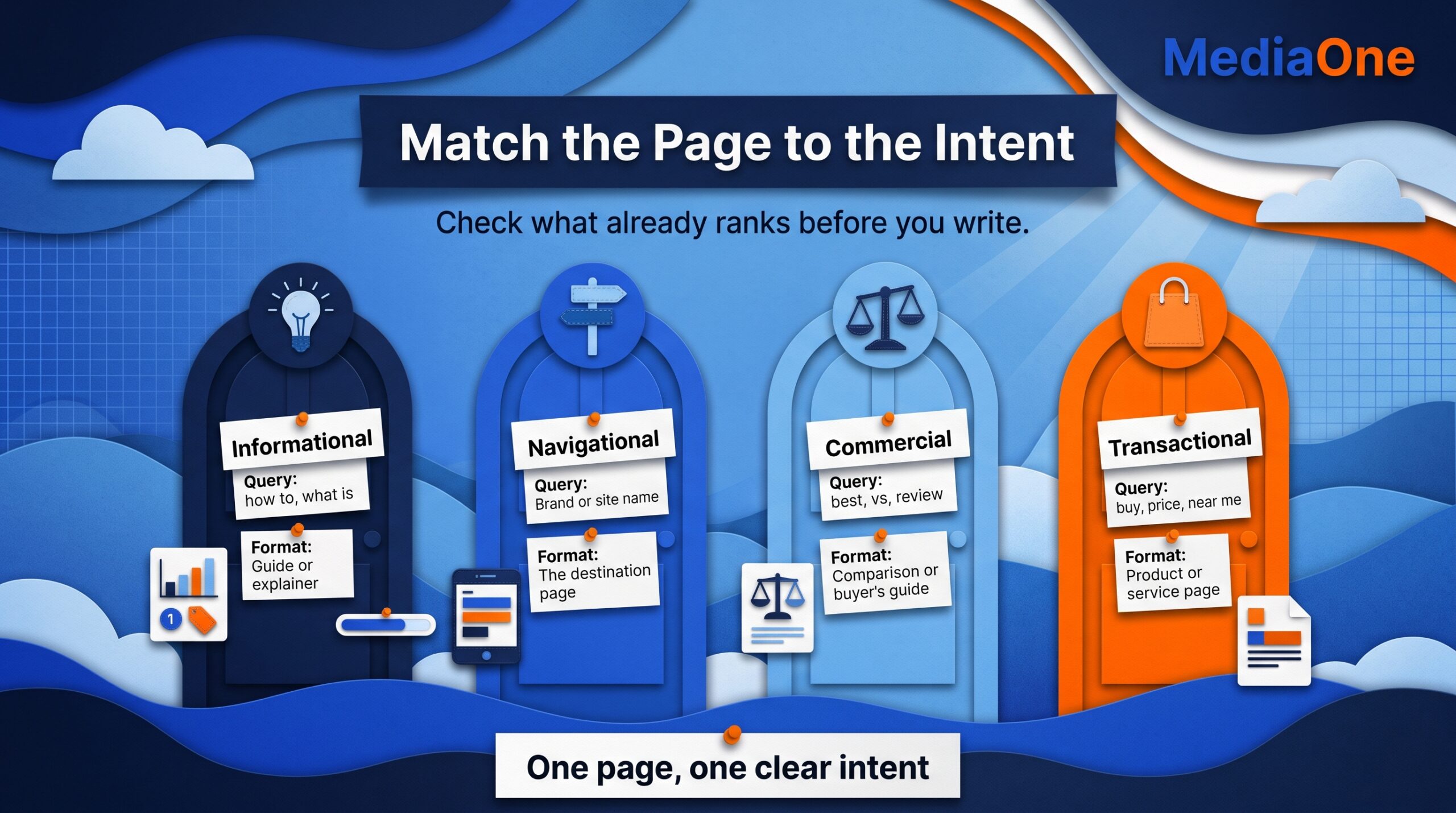
Search your target phrase and look at what already ranks. If the top results are all guides, a product page will struggle. Match the dominant format before you write.
Voice Search and Spoken Queries
Voice search changes the shape of queries. Spoken questions run longer and sound like full sentences. Lyfe Marketing, citing Google, reports that 41% of adults and 55% of teens use voice search daily. The same source cites a Gartner projection that 30% of searches in 2020 would be made without a screen. That projection is now dated, so treat it as historical context. Confirm current usage data from primary sources before relying on any voice search statistic.
For a page targeting a spoken query:
- Write H2 and FAQ headings as complete questions (“Can I do SEO myself?” not “DIY SEO”).
- Open each answer with a direct, one or two sentence reply, then expand.
- Use plain words a person would say aloud.
- Ask whether a social media search or a spoken question would be the first place your audience turns for help.
Keyword Use Without Stuffing
Place your primary and secondary keywords where readers and search engines will see them: the title tag, the H1, one or two H2s, the first paragraph, the URL and the image alt text. Repeat the primary keyword only where it reads naturally.
Stuffing happens when a phrase is repeated for the search engine rather than the person. If a sentence only makes sense because it contains a keyword, rewrite it. Related terms such as “search visibility” or “organic traffic” show topical depth without repetition. Teams that offer SEO services apply the same restraint when they write client pages.
Read the page aloud. If it sounds like a list of phrases, cut the phrases and keep the answers.
Worked Example: Auditing a Small Business Page
A local accounting firm targets “small business tax help Austin” with a page titled “Tax Services | Smith & Co,” an H1 of “Our Services,” and the URL /services-2. Audit it against the five links of the Visibility Chain:
- Crawlable: yes, the page is linked from the main navigation.
- Indexable: no, a leftover noindex tag blocks it.
- Relevant: no, the title and H1 omit the query and the city.
- Intent-matched: unclear, it lists services without answering a question.
- Trustworthy: no author name or credentials.
Fix indexability first by removing the noindex tag and confirming the page in the Page Indexing report in Google Search Console. Then rewrite the title, H1 and URL to match the query, following the same best practices that businesses apply across their digital marketing. Compare impressions and clicks over the following months to see whether the changes improve performance.
Decision rule: if a page has no impressions for several months, has no internal links and covers the same query as another page, merge it into the stronger page and redirect the old URL. Keep pages that have impressions, even when they earn few clicks, and improve their titles first.
Creating Content That Answers Real Questions
Search engines reward pages that help people, and content does most of that work. A page can be crawlable and well structured yet still lose to a competitor that says more of what matters. The goal is an answer a person would consider complete, not more words.
Google’s helpful content guidance asks whether a page was written to inform people or to attract search traffic. The strongest pages share three traits:
- Depth: the page covers the question and the obvious follow-ups.
- Accuracy: claims are specific, sourced and checkable.
- First-hand experience: the author has done the thing described and says what went wrong.
Thin, duplicated or AI-generated filler underperforms because it adds nothing the searcher lacks. Repeating target keywords does not earn trust. Write for the person first, then check that the page clearly names its topic and supports your website’s goals. Pages that explain how professional services are delivered, and what clients should expect, tend to answer the questions people actually ask.
Keeping Content Current
Content decays. Prices change, tools are retired and better information appears. Freshness matters most where answers change over time, so a regular review schedule keeps a website accurate and maintains trust with its visitors.
- List pages with dated facts. Export URLs from your content management system and flag any page that mentions years, prices, versions or statistics.
- Check each claim against a current source. Replace outdated figures and note the date of the new source beside it.
- Review pages that lost traffic. In Google Search Console, go to Performance, set the date range to the last 28 days, and compare clicks and impressions with the same period a year earlier. Flag any page whose clicks have fallen for six or more consecutive weeks.
- Prune low-value pages. Merge or redirect pages with no traffic, no links and overlapping topics.
- Record the update date. A visible “last updated” line shows readers and search engines that someone checked the content.
Pruning is the step teams most often skip. Consolidating several weak posts into one thorough guide often outperforms them all.
Measuring Results and Business Impact
Track SEO through traffic and customers. Use Google Search Console for impressions, clicks, average position and indexing status. Use Google Analytics to see whether visitors read, contact you or buy. Together, these two tools show whether your search engine optimization is bringing in the right audience for your services and website, which matters most to businesses that depend on qualified leads.
Open the Performance report in Google Search Console and filter by page to see which URLs gained or lost clicks. Then open Google Analytics and check the conversion or contact events on those same pages.
Each month, ask which pages gained impressions, clicks and conversions, and which lost ground. Flat clicks despite rising impressions often mean the search snippet does not match what searchers expected. Rewrite the title and meta description first, as part of your overall strategy. Judge progress across quarters, not weeks.
Conclusion and Summary
SEO is the ongoing work of making a website easy for search engines to crawl, understand and trust, and making its content match what people search for within digital marketing strategy. Google does not publish a complete ranking formula, but its ranking systems documentation describes the signals it uses.
The work rests on three pillars: technical SEO, helpful content and authority. Run each page through the Visibility Chain and fix the weakest link first. A good page with poor user experience can still underperform.
To act, start with a free audit in Google Search Console, then take one important page through the checklist in this guide.
Frequently Asked Questions
What is SEO in simple terms?
SEO makes your website easy for search engines to find, understand and trust. It also matches your pages to what people search for. Good SEO earns organic search results without paying for ads.
How long does SEO take to show results?
New pages can be indexed within days. Rankings build over weeks or months, so track progress in Google Search Console rather than expecting one breakthrough.
Is SEO free, and what does it cost?
Core tasks, such as fixing crawl errors and writing clear titles, cost only your time. Tools, freelancers and agency retainers add cost, and prices vary widely. Confirm rates with each provider before you commit.
What is the difference between SEO and SEM?
SEO earns unpaid organic search results through content and site quality. SEM buys visibility through paid ads. SEO takes longer, but it keeps delivering traffic without ongoing ad spend.
Do I need to know coding to do SEO?
No. Most beginner SEO work involves writing and editing titles, descriptions and headings in a content management system. A developer can handle technical fixes.
Does SEO still matter with AI search tools?
Yes. AI answer engines still draw on indexed, well-structured, credible pages, so the same fundamentals apply. Voice and conversational queries are a meaningful part of search behaviour, as Lyfe Marketing reports, citing Google.