If you run a small business in Singapore, Google Maps optimisation is no longer optional. When people search for a café, tuition centre, clinic, salon, contractor, or nearby service, Google Maps is often one of the first places they look.
If your business is missing, incomplete, or poorly optimised there, you are not just losing visibility; you are losing business. You are likely losing calls, visits, bookings, and enquiries to competitors that are easier to find.
Google says local results are mainly based on relevance, distance, and prominence. That matters because it means Google Maps optimisation is not just about adding a few keywords or claiming your listing once and leaving it alone.
It is about sending accurate, trustworthy local signals through your Google Business Profile, website, reviews, and wider online presence. Google also states there is no way to request or pay for a better local ranking, so sustainable improvement comes from better optimisation, not shortcuts.
In this guide, I will walk through what Google Maps optimisation actually means, what small businesses in Singapore can do now, the mistakes I see most often, and how to troubleshoot common problems before they cost you visibility.
Key Takeaways
- Google Maps optimisation helps small businesses improve visibility where local intent is strongest. If your customers are searching nearby and ready to call, visit, or book, showing up well on Google Maps can directly affect enquiries and conversions.
- Google says local rankings are mainly influenced by relevance, distance, and prominence. That means better visibility comes from strengthening the quality and credibility of your local signals, not from shortcuts or paid ranking tricks.
- Google Business Profile is one of the most important assets in Google Maps optimisation. Accurate business details, the right categories, strong reviews, and regular updates all help Google better understand and trust your business.
- A well-optimised profile works best when your website supports the same local signals. If your profile and website do not align on services, contact details, or location relevance, your overall local SEO will be weaker.
- Google Maps optimisation is not a one-time setup. Small businesses usually achieve better long-term results when they regularly review their profile, consistently manage reviews, and keep business information up to date.
What is Google Maps Optimisation?
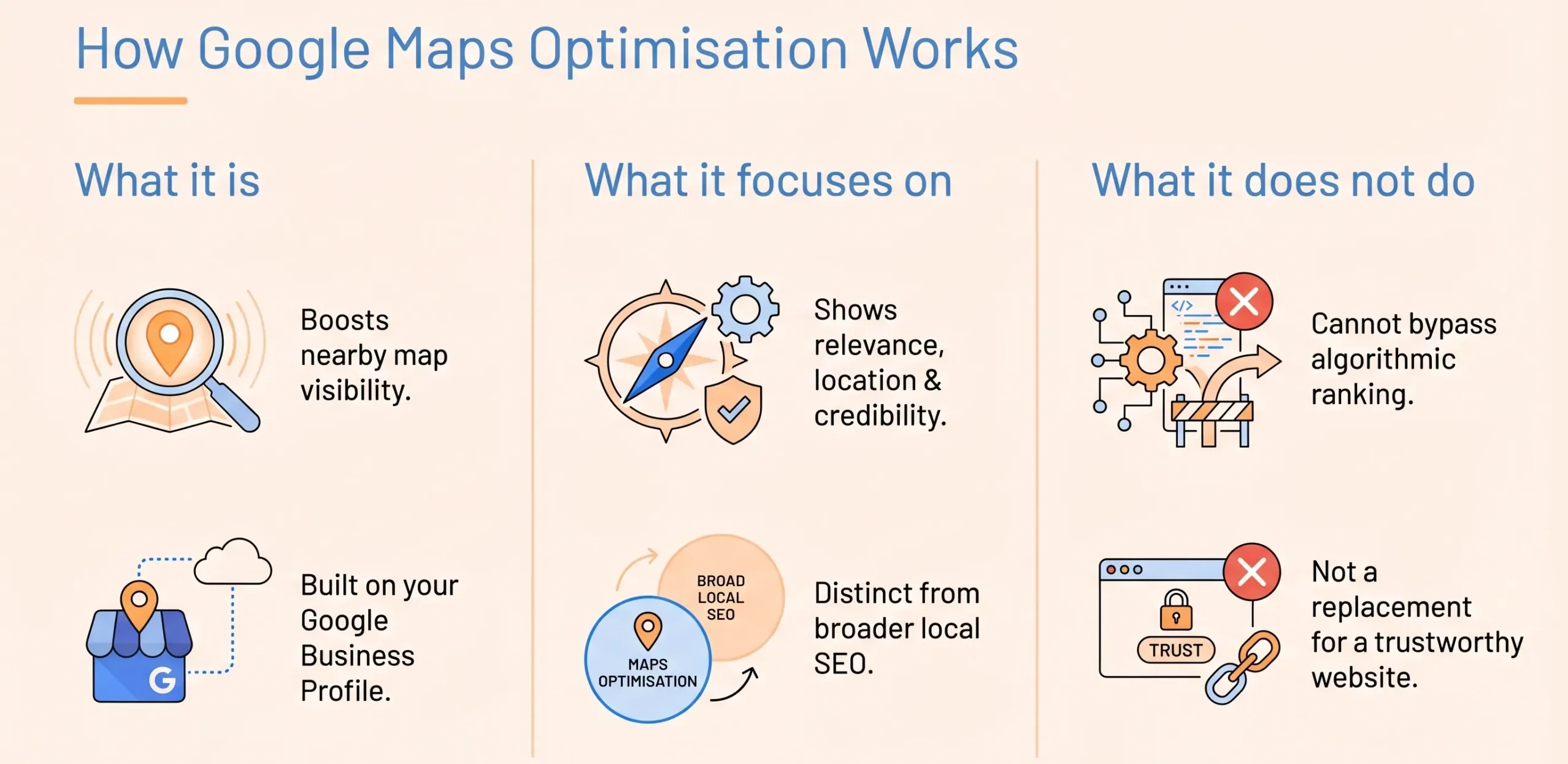
Google Maps optimisation is the process of improving your business’s visibility in Google Maps and in local search results that pull information from your Google Business Profile.
In practical terms, it means making it easier for Google to understand what your business does, where you are, who you serve, and why you are a credible option for nearby customers.
For most small businesses, Google Maps optimisation overlaps with local SEO, but it is not the same thing. Local SEO is broader. It includes your website, local landing pages, reviews, citations, and other search signals.
Google Maps optimisation is more focused on the map-facing side of local visibility, especially your Google Business Profile and the signals that influence whether you appear in local discovery results.
Just as important is what it does not cover. It does not guarantee rankings. It does not override proximity. It does not make ineligible businesses eligible for a profile. And it does not replace the need for a credible website if customers click through to learn more.
Google’s own help documentation is clear that local rankings are determined algorithmically and that profile eligibility must be met before a business can participate properly.
How Google Maps Rankings Work
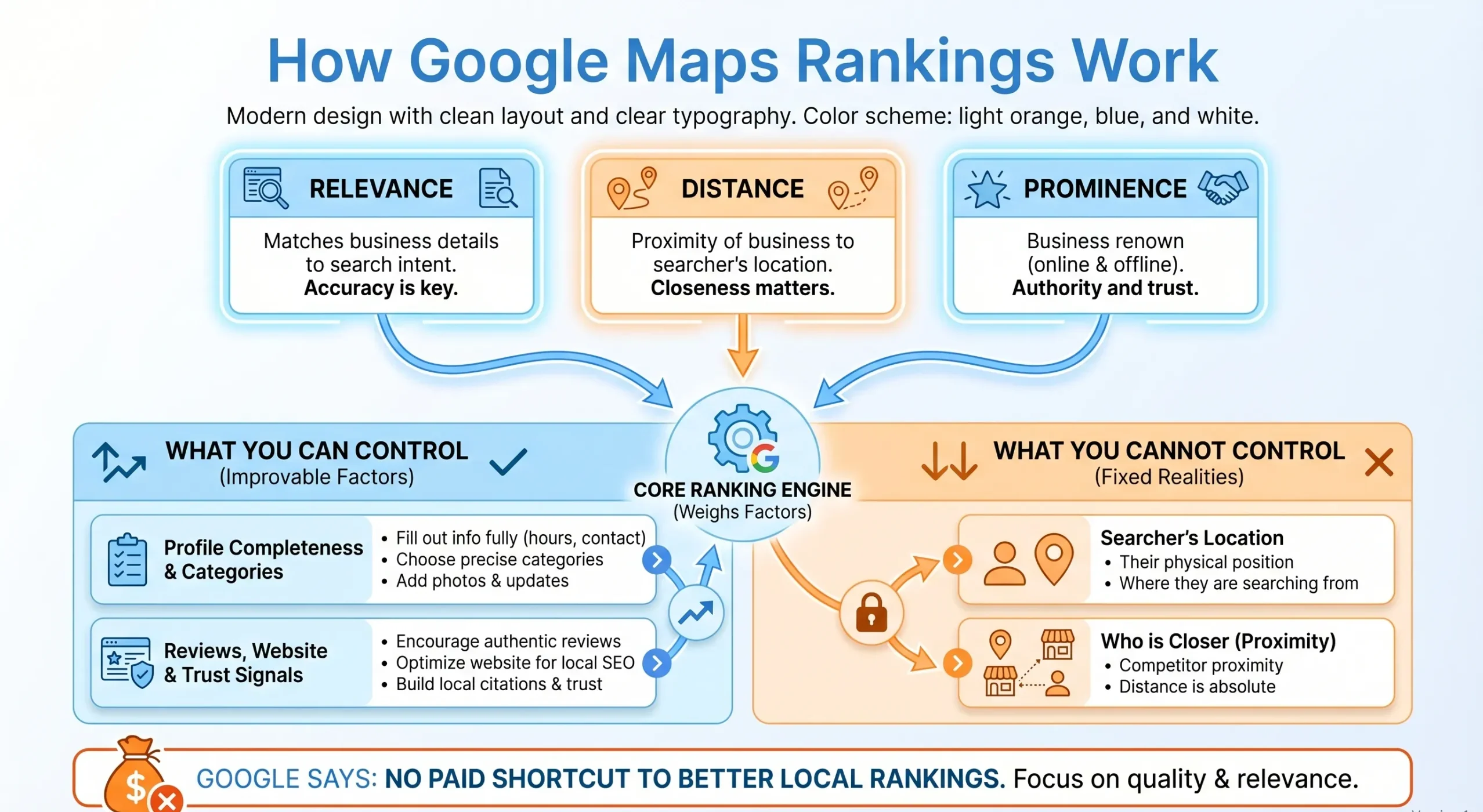
When business owners ask me why one company shows up in Maps, and another does not, I usually start with Google’s own framework. Google says local results are mainly influenced by:
- Relevance: How closely your business matches what someone is searching for.
- Distance: How near your business is to the searcher or to the location term used in the search?
- Prominence: How established, well-known, and trusted your business appears online.
That means some parts of Google Maps’ performance are within your control, and some are not.
What you can influence
We can improve factors such as:
- profile completeness
- business categories
- accuracy of contact details
- services and attributes
- review quality and response activity
- website support
- local trust signals and consistency across the web
What you cannot directly control
We cannot directly control:
- the searcher’s physical location
- whether Google considers another business closer
- a paid route to higher local rankings, because Google says there is no way to pay for a better local ranking
This is why Google Maps optimisation works best when we focus on the parts that are actually actionable, rather than trying to game what isn’t.
Who Should Focus on Google Maps Optimisation?
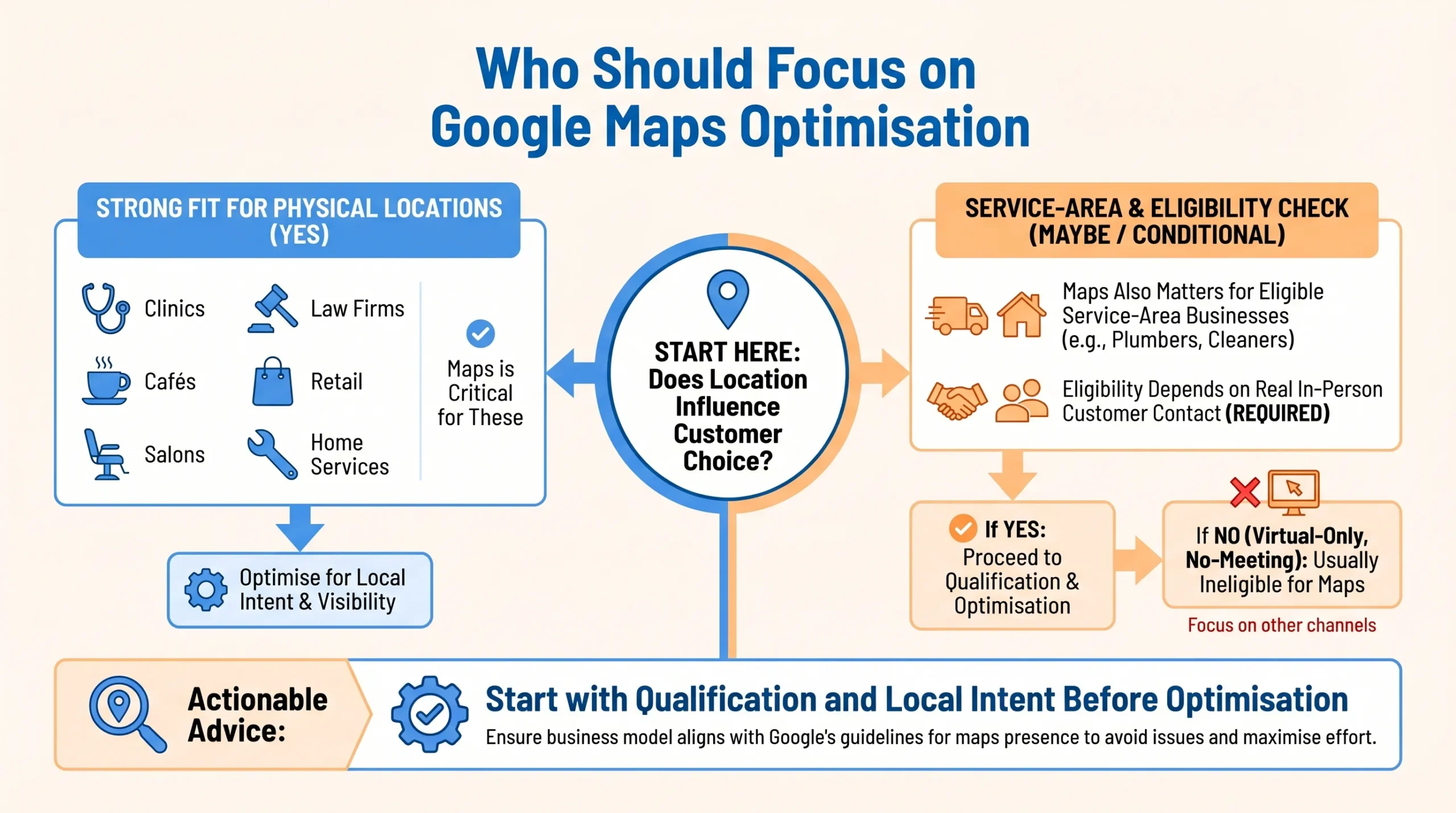

Google Maps optimisation matters most for businesses where location affects customer choice. If proximity influences whether someone contacts you, visits you, or books with you, then Maps visibility should usually be a real priority.
This often includes:
- clinics
- cafés and restaurants
- salons and beauty businesses
- tuition centres
- home service businesses
- law firms
- retail shops
- enrichment centres
- repair and maintenance businesses
It can also apply to service-area businesses, but eligibility matters. Google says a business must make in-person contact with customers during its stated hours to qualify for a Business Profile, with a few limited exceptions.
For example, an aircon repair company in Singapore that sends technicians to customer homes is eligible, while a local bakery operating as a pickup-only location (with no in-person visits) may also qualify if it serves walk-in customers.
However, an online tutoring business that conducts only virtual classes, or a Shopee reseller who never meets customers in person, would not be eligible.
Businesses operating from private residential addresses without signage and without face-to-face customer interaction are also typically ineligible. These distinctions help business owners quickly determine if they meet Google’s local requirements.
So before we talk about optimisation, the first question should be whether the business genuinely qualifies and whether local intent actually affects conversions.
Google Maps Optimisation Checklist for Small Businesses
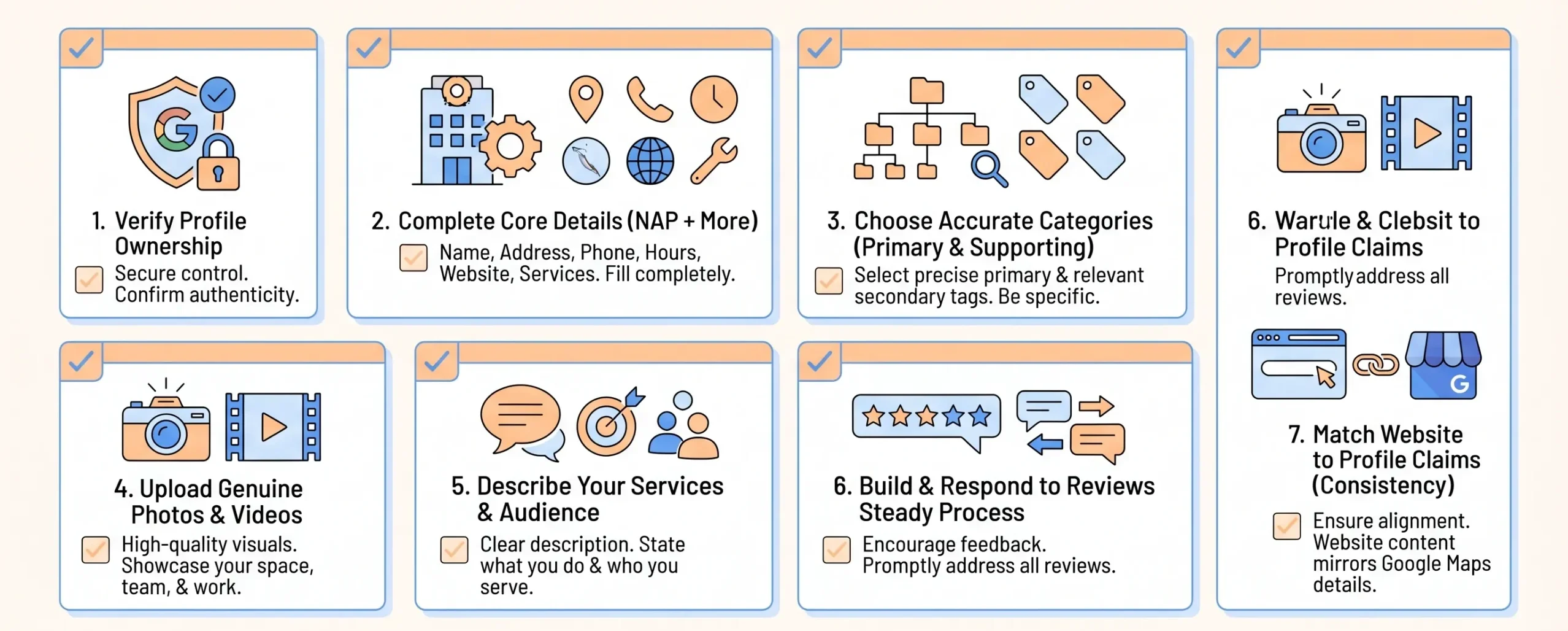
If I were advising a small business owner who wants to improve Google Maps visibility now, these are the areas I would prioritise first.
For a more general checklist on improving and maintaining your profile, you can also refer to our guide on Google My Business optimisation.
1. Claim and verify your Google Business Profile
If you do not control the profile, you are limiting what you can update and monitor. Verification is the starting point because it confirms your ownership and gives you access to properly manage the listing. Google provides several verification pathways depending on the business and situation.
2. Complete every core business field accurately
At a minimum, keep these details current and aligned:
- business name
- address
- phone number
- opening hours
- website URL
- services
- service areas where relevant
- business description
This sounds basic, but incomplete or inconsistent information is still one of the most common reasons local profiles underperform.
3. Choose the right business categories
This is more important than many businesses realise. Google explicitly says the categories you select affect your local ranking.
The goal is not to choose the widest possible set of categories. It is to choose the most accurate primary category, then use supporting categories only where they genuinely reflect the business.
4. Add real photos and videos
Photos help users judge whether your business looks credible, active, and worth visiting. They also make the profile more complete and more useful. For small businesses in Singapore, this can mean:
- storefront photos
- interior photos
- team photos
- product or service photos
- before-and-after visuals where relevant
I would avoid treating this as decoration. In local search, the visual impression often shapes whether someone clicks, calls, or compares you further.
5. Write a clear, useful business description
Your description should explain what you do, who you serve, and what makes your business relevant. It should not sound stuffed with keywords or written purely for Google. Clear, customer-facing language usually works better than trying to force every location term into a single paragraph.
6. Encourage and manage reviews
Reviews are not just reputation signals. They are comparison signals. BrightLocal’s 2026 Local Consumer Review Survey found that 97% of consumers read reviews online, and 41% always read reviews when browsing for businesses.
That is not Singapore-only data, so I would treat it as directional rather than absolute, but it is still a strong indication that reviews affect local decision-making.
In Singapore, consumer interviews and market reports consistently show that reviews are among the main digital touchpoints for choosing local businesses, especially in food, education, clinics, and service sectors.
Local surveys suggest that Singaporeans not only check overall star ratings but also pay close attention to detailed comments and the recency of reviews when deciding where to go.
In practice, people often compare:
- star rating
- review volume
- review recency
- response quality
- consistency of experience described in the reviews
We should treat review generation and response handling as an ongoing process, not a one-off push.
7. Keep your website and profile aligned
A well-optimised profile performs better when the website reinforces its claims. If your profile says you offer a service in a specific area, but your website barely mentions that service or location, the signal becomes weaker.
Your service pages, contact details, and location information should support the same local story.
8. Build useful location or service-area pages where needed
If your business has multiple branches or meaningful service-area differences, build pages that are genuinely useful for those users. I would include:
- location-specific service details
- branch contact information
- area-specific FAQs
- clear directions or transport notes where relevant
- local proof points and trust signals
What I would avoid is copying one page ten times and swapping the area name.
9. Use posts for updates, offers, and events where relevant
Google says businesses can use Business Profile posts to share announcements, offers, updates, and event details directly on Search and Maps.

Not every business needs to post constantly, but for promotions, seasonal activity, and timely updates, this can help make the profile look more active and useful.
10. Review performance regularly
Do not optimise once and forget it. The profile should be checked regularly for:
- accuracy
- missing fields
- new reviews
- customer questions
- outdated opening hours
- fresh photo opportunities
- performance trends
Google Business Profile performance data can help you understand how users are interacting with your listing over time.
Common Google Maps Optimisation Mistakes
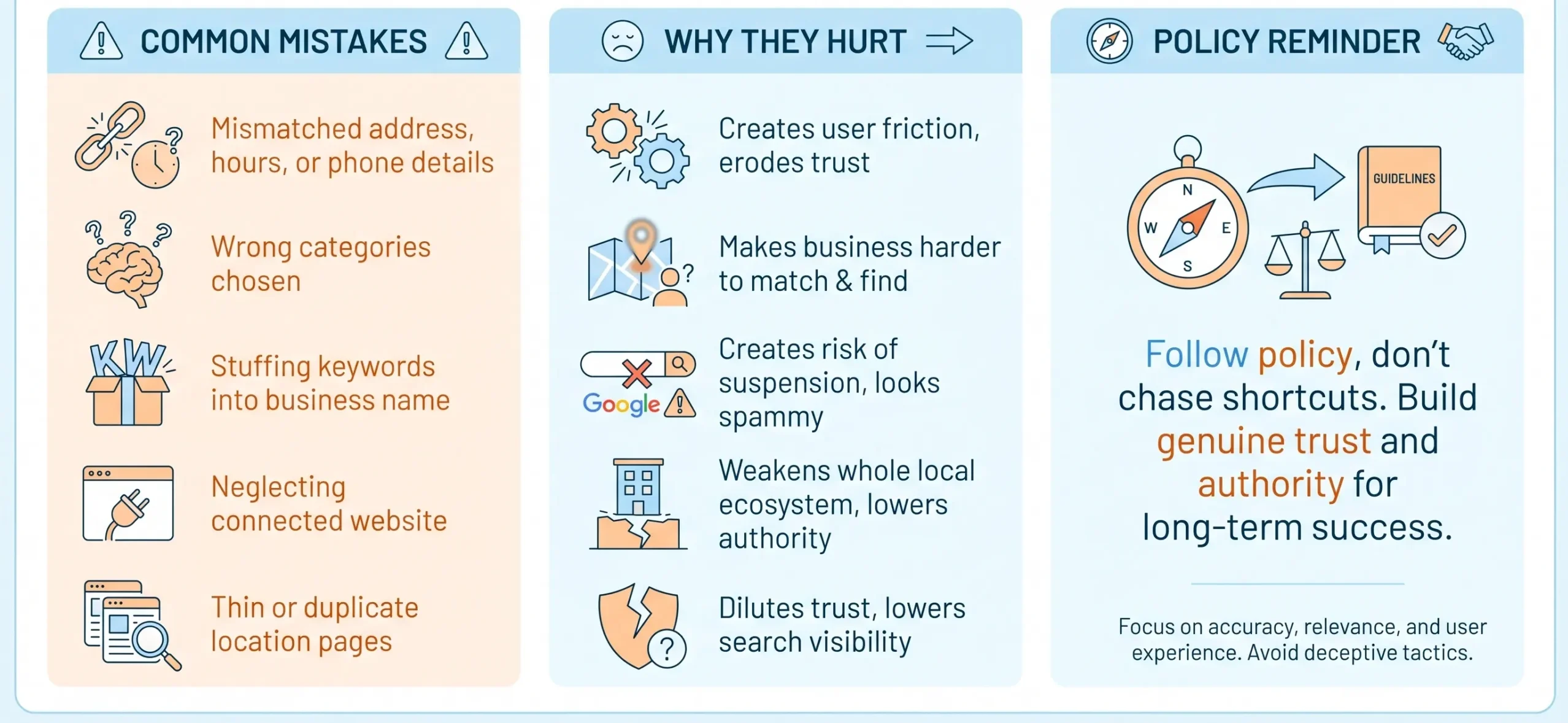
The mistakes I see most often are not always dramatic. More often, they are small but repeated issues that weaken local relevance and trust over time.
The most common ones are:
- Using outdated or inconsistent business details: Even small mismatches in address, hours, or phone number can reduce trust and create friction for customers.
- Choosing inaccurate categories: If your category setup is vague or misleading, Google has less clarity on what searches you should appear for.
- Keyword stuffing the business name: This is a common shortcut, but Google’s representation guidelines require your business name to reflect your real-world name s than building trust steadily.
- Relying on the profile alone while neglecting the website: A strong profile and a weak website still make for a weak local search system.
- Publishing weak or duplicate location pages: These often add little value and can dilute trust.
- Leaving the profile inactive for long periods: An outdated profile sends the wrong signals to both Google and users.
Compliance and policy note
This is one area where I would be careful. Google’s representation guidelines say businesses should follow its rules to avoid common problems, including changes to business information or, in some cases, removal from Google.
So optimisation should always stay within policy rather than pushing shortcuts that create long-term risk.

Troubleshooting Common Google Maps Visibility Issues
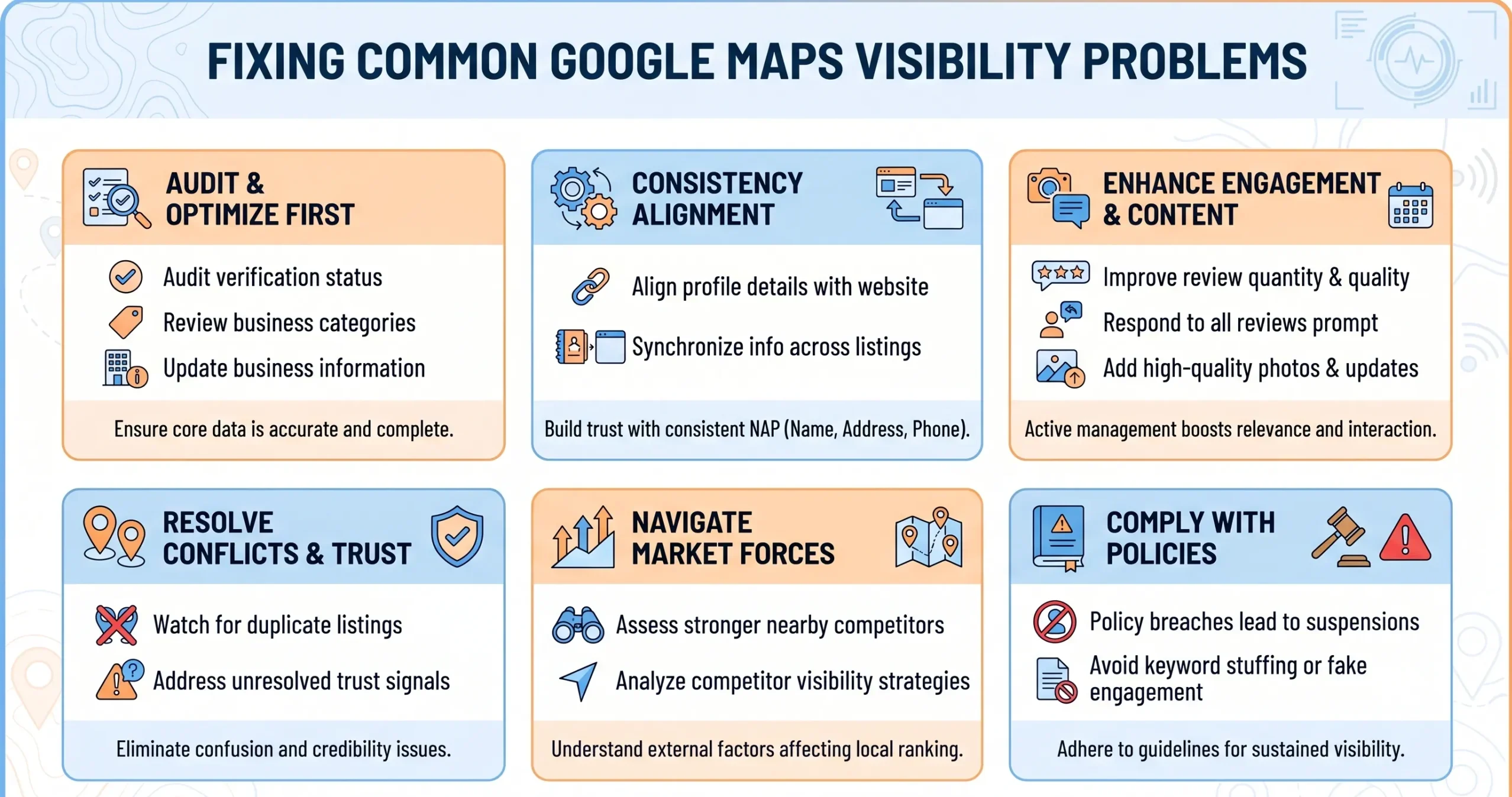
If your Google Maps visibility is lower than expected, start with these key troubleshooting steps:
- Double-check that your Google Business Profile is fully verified and that all essential business information is complete and accurate.
- Review your business categories and ensure they accurately describe your primary services.
- Look for any mismatches between your profile, website, and other online listings, especially for your name, address, phone number, hours, and services.
- Check that reviews are recent and have been responded to, and see if any negative reviews are unresolved.
- See whether your business location or service area is clearly specified.
- Make sure you have added quality photos and updated posts.
- Look at your competitors’ profiles to see what you might be missing.
After completing these steps, you can use the troubleshooting table below for more details if you are still experiencing visibility challenges.
| Common concern | Why it happens | What to do |
| Inaccurate business information | The profile was not maintained, or edits have become outdated | Audit the profile and the website regularly and correct inconsistencies |
| Low visibility in Maps | Weak relevance, low prominence, incomplete profile, or stronger competitors nearby | Improve categories, complete the profile, strengthen reviews, and align the website better |
| Duplicate listings | Multiple versions of the same business exist | Consolidate eligible listings and report duplicates where needed |
| Negative reviews affect trust | Poor review management or unresolved service issues | Respond professionally, fix operational issues, and improve follow-up |
| Business not appearing for key searches | Weak local relevance, eligibility issues, or limited prominence | Review categories, profile completeness, service alignment, and website support |
| Suspension or profile issues | Business representation rules may have been breached | Review Google’s policies, correct the issues, and follow the recovery process where applicable |
How Google Business Profile Supports Google Maps Optimisation
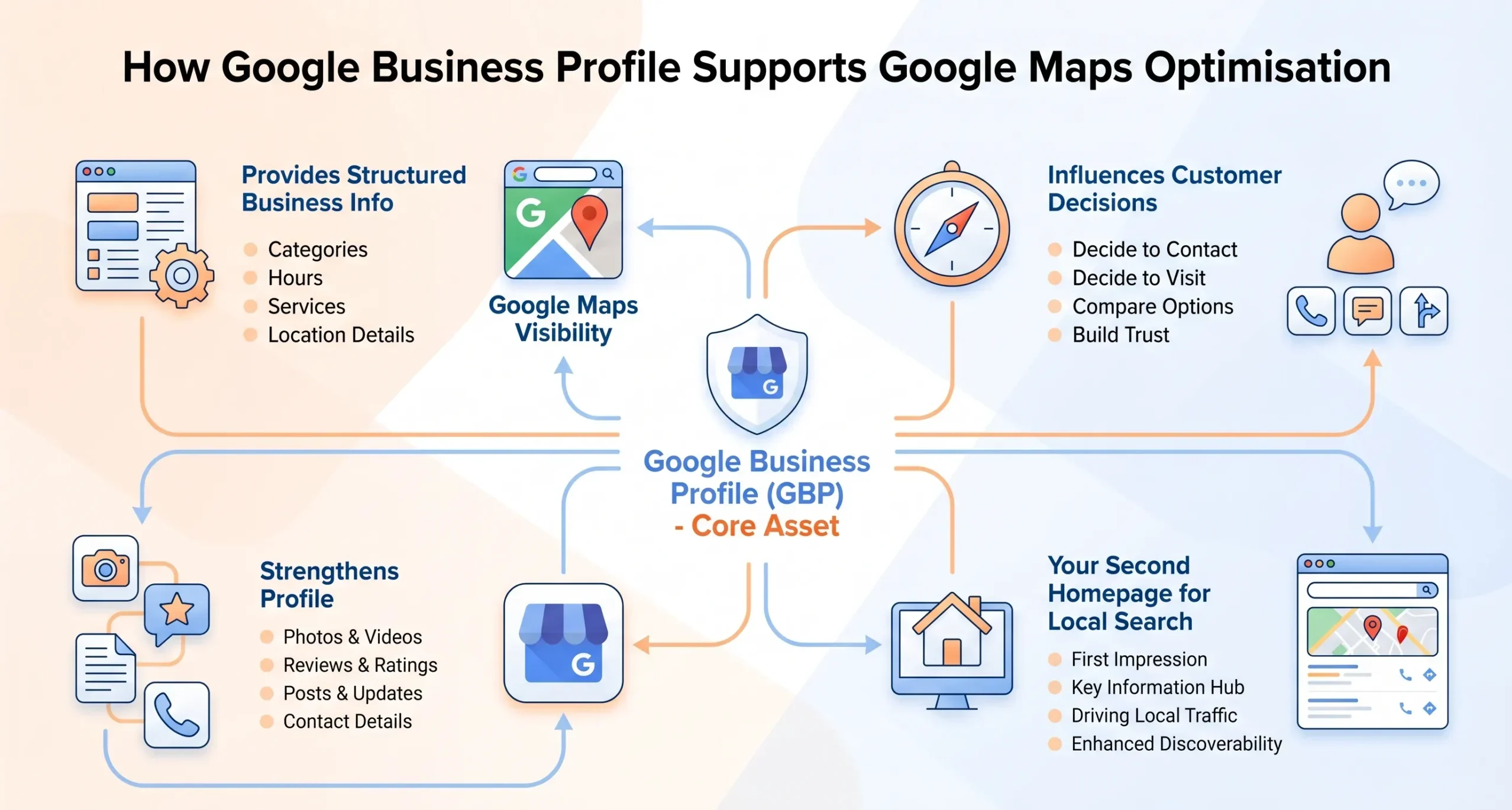
If you take one thing from this article, it should be this: for eligible local businesses, Google Maps optimisation is inseparable from Google Business Profile optimisation.
Google Business Profile is the core asset that powers much of your visibility in Maps and local results. It gives Google structured information about your business and gives customers the details they need to decide whether to contact or visit you.
The most important profile elements usually include:
- categories
- hours
- services
- address or service area
- photos
- reviews
- posts and updates
- contact details
Google’s documentation specifically confirms that categories affect local ranking and that posts can be used for updates, offers, and events on Search and Maps.
I would treat the profile as your second homepage. It may not replace the website, but for many local searches, it is the first thing a prospective customer sees.
Real Examples of Google Maps Optimisation
To make this more practical, it helps to look at how this plays out in real situations.
Public brand example: NTUC FairPrice
A recognisable Singapore example is NTUC FairPrice. In MediaOne’s local SEO case study roundup, FairPrice is highlighted as a brand that benefits from strong local relevance through its physical outlet network, campaign visibility, and store-driven search demand.
MediaOne also points to stronger Google Maps visibility, higher foot traffic and customer engagement during campaigns, and increased branded search interest supported by localised digital activity.
MediaOne example: English tuition centre
A more direct MediaOne performance example is its English tuition centre project. MediaOne says it improved the centre’s local performance through Google Business Profile optimisation, stronger local citations, NAP consistency, and location-specific landing pages.
The case study says noticeable ranking improvements began within the first three months, with stronger growth within six months, and by month nine, the centre had reached first-page rankings for multiple high-intent keywords.
MediaOne also reports a 45% increase in new student enrolments per term, a 150% increase in organic visitors, and an improvement in lead conversion rate from 2.5% to 6.8%.
This is a good example because parents searching for tuition often have strong local intent. They are not just comparing generic providers. They are comparing accessible, credible options in areas that fit their routine and travel needs.
What these examples show
These examples show that Google Maps visibility is not built solely on keywords. It becomes stronger when real physical presence, recognisable local relevance, accurate business information, and supporting search signals work together.
The only reason I removed the pet grooming example is that it reads like an illustrative scenario rather than a publicly verifiable case study.
Monthly Google Maps Optimisation Checklist
If you want a simple maintenance routine, this is the checklist I would use each month.
- check opening hours and contact details
- review categories and services
- add fresh photos where relevant
- respond to new reviews
- check for customer questions or edits
- monitor profile performance
- review location pages for consistency
- update offers, events, or announcements if relevant
- check whether competitors have improved their profile quality
- confirm the website still supports the same local service signals
This kind of regular maintenance is usually more effective than a single large setup followed by 6 months of ignoring the profile.
Google Maps Optimisation Matters for Small Businesses in Singapore
For many small businesses in Singapore, Google Maps optimisation is one of the clearest ways to improve local visibility without relying purely on paid media. It helps your business show up when nearby customers are actively searching, comparing, and deciding.
For a more complete guide to local SEO for small businesses, you can also refer to our guide on small business local SEO for SMEs.
But the businesses that perform well are usually not the ones chasing tricks. They are the ones maintaining accurate business details, choosing the right categories, collecting reviews, supporting the profile with a credible website, and treating local visibility as an ongoing discipline rather than a one-off task.
MediaOne can help you assess gaps and prioritise the improvements most likely to move the needle.
Explore our local SEO services or speak with MediaOne to find out how we can help you improve Google Maps visibility, attract more qualified local traffic, and turn local search demand into real enquiries.
Frequently asked questions
How do I improve my Google Maps ranking for a small business in Singapore?
Start with the fundamentals. Claim and verify your profile, complete all required fields accurately, select the appropriate categories, add photos, actively manage reviews, and ensure your website supports the same local signals. Google says local rankings are mainly based on relevance, distance, and prominence, so improvement comes from strengthening those factors rather than taking shortcuts.
Does Google Maps optimisation help businesses without a shopfront?
It can, but only if the business is eligible. Google says businesses generally need to make in-person contact with customers during their stated hours to qualify for a Business Profile. That means some service-area businesses may still qualify, but purely online businesses without in-person customer contact do not.
How important are reviews for Google Maps optimisation?
Very important. Reviews influence trust, click behaviour, and how users compare nearby businesses. They also contribute to the broader prominence signals that affect local visibility. BrightLocal’s 2026 data further suggests that review-reading is now a near-universal part of local business discovery.
Can I rank on Google Maps without a website?
You can still appear in local results with a Business Profile if the business is eligible, but I would not recommend relying solely on the profile. A website helps reinforce your services, credibility, and local relevance, especially when users click through to evaluate you more seriously.
How long does Google Maps optimisation take to show results?
It depends on the category, competition, starting point, and location. MediaOne’s recent guidance notes that for businesses with a verified and well-optimised Google Business Profile, early movement in the Maps pack can appear within one to four months. That said, sustainable improvement usually requires ongoing work rather than a single quick change.
What is the difference between Google Maps optimisation and local SEO?
Google Maps optimisation is a part of local SEO. It focuses more directly on your Google Business Profile, map visibility, and local discovery surfaces. Local SEO is broader and includes your website, location pages, citations, reviews, and other local search signals.
Do business categories affect Google Maps rankings?
Yes. Google explicitly says the categories you select affect your local ranking. That is why the category setup should be accurate and specific, rather than broad for the sake of appearing in more searches.
Why is my business not showing up on Google Maps?
There can be several reasons, including eligibility issues, incomplete verification, weak relevance, inaccurate categories, stronger competitors nearby, or issues with profile quality. Start by checking whether the profile is verified, policy-compliant, fully completed, and supported by a credible website.
Can I have more than one Google Business Profile?
Yes, but only when there are genuinely separate, eligible business locations or operations. Multiple listings should reflect real customer-facing business entities, not variations created to capture more map visibility.
What should I do if my Google Maps listing has incorrect information?
Correct it as soon as possible and ensure the same information is accurate on your website as well. Inconsistent details reduce trust and can weaken local performance. Ongoing profile maintenance is one of the simplest but most important parts of Maps optimisation.