Imagine waking up one morning to find your website’s organic traffic has plummeted by 40% overnight. No algorithm update was announced, and your content is as sharp as ever. The culprit? A hidden accumulation of toxic backlinks quietly eroding your site’s authority.

In the sophisticated SEO landscape of 2026, the quality of your link profile matters more than ever. While Google’s algorithms have evolved to be highly effective at ignoring spam, they are not infallible. Malicious negative SEO attacks and legacy bad practices can still trigger manual actions or algorithmic suppression.
According to Google’s official guidance, manual penalties are relatively rare; over the years, Google has issued millions of manual action notifications.
However, the vast majority of spam is handled algorithmically. Google’s sophisticated systems automatically detect and ignore most spam links without requiring manual intervention or the use of the disavow tool.
Understanding the nuance between a link that Google simply ignores and one that actively harms you is the key to maintaining robust rankings.
This comprehensive guide will walk you through identifying harmful links, managing your backlink profile, and using the Google Disavow Tool correctly without jeopardising your SEO strategy.
Key Takeaways
- In 2026, Google’s sophisticated algorithms automatically detect and ignore most spam links, so most websites don’t need to use the disavow tool.
- Only disavow links if you’ve received a manual penalty from Google or are experiencing severe negative SEO attacks, as over-disavowing can harm your rankings.
- Many backlink audit tools use automated “toxicity scores” that can be overly aggressive, so manual review and context are essential before taking action.
- Build high-quality backlinks from relevant, authoritative sources and monitor your backlink profile regularly rather than obsessing over occasional spam links.
- Always attempt manual removal first, document your efforts, create a properly formatted disavow file, and monitor results over 2-4 weeks after submission.
What Are Toxic Backlinks?
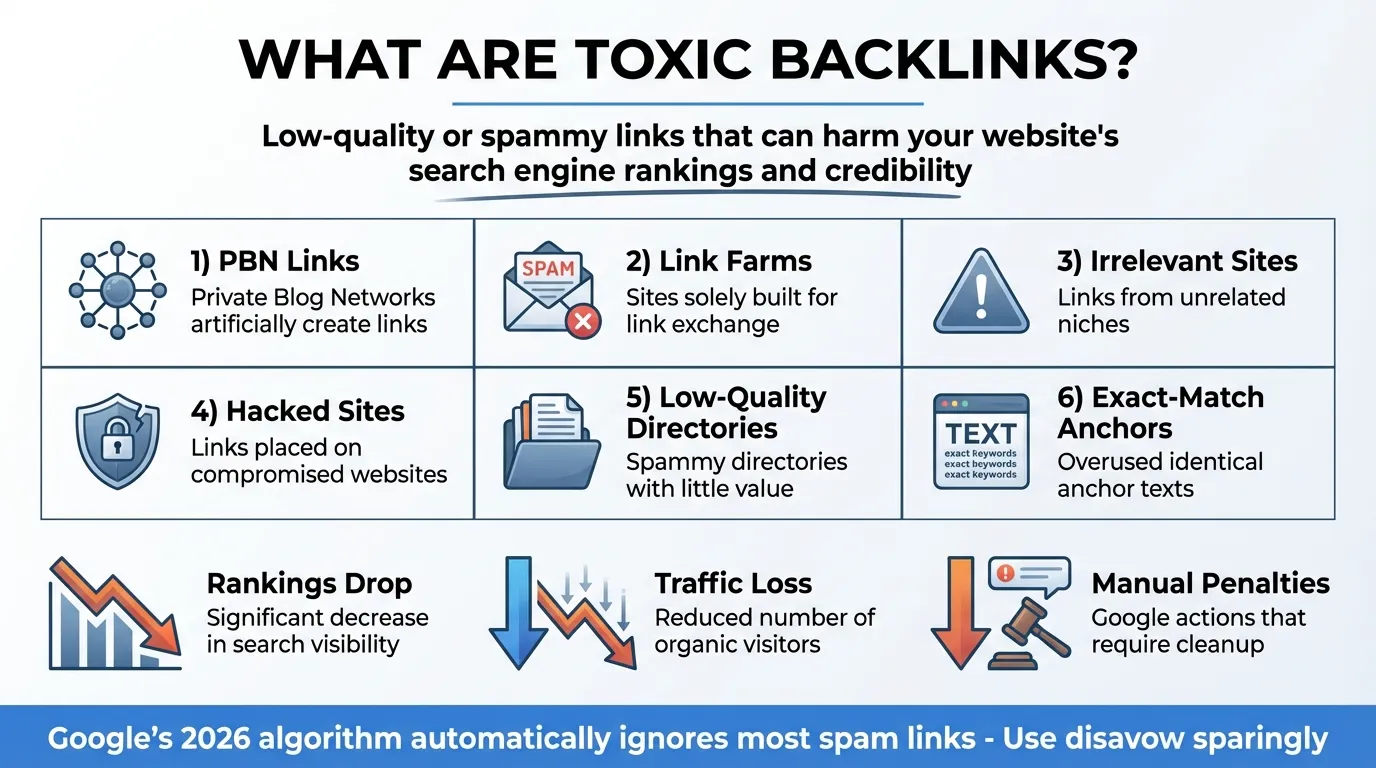
Before you clean up your profile and build backlinks, you need to clearly define what you are looking for.
Toxic backlinks are unnatural, low-quality, or spammy inbound links that violate Google’s Search Essentials (formerly known as the Webmaster Guidelines). These links are typically intended to manipulate search rankings artificially and can signal to search engines that a website is untrustworthy.
Unlike quality backlinks, which act as a “vote of confidence” from one reputable site to another, toxic backlinks act more like a “vote of suspicion.” In 2026, the definition has narrowed significantly. A link from a small, low-traffic blog isn’t necessarily toxic. It may be of low value.
A truly toxic link usually comes from a source that exists solely to sell links, distribute malware, or manipulate search algorithms.

Google’s Penguin algorithm (now part of the core algorithm) operates in real time to assess these. If the ratio of these manipulative links outweighs your natural, high-quality links, your site’s trust score drops.
It is crucial to differentiate between “useless” and “toxic.” A useless link provides no SEO benefit but does not harm. A toxic link actively harms your site’s performance.
How Toxic Backlinks Harm Your SEO

The damage caused by a toxic backlink profile can be subtle and gradual, or sudden and catastrophic. In 2026, the harm manifests in three primary ways.
- Algorithmic Devaluation: The most common issue. You won’t receive a notification in Google Search Console. Instead, your rankings will simply stagnate or slowly decline. You might find yourself stuck on page 2 for keywords you used to dominate. The algorithm detects the unnatural pattern and, rather than explicitly penalising you, simply discounts the value of your entire link profile, making your legitimate links less effective.
- Manual Actions: Although less common in 2026 due to improved AI detection, manual actions still occur. This occurs when a Google reviewer determines that your site is actively participating in link schemes. If your site is hit with a manual action for “Unnatural Links,” it may be removed entirely from the search index. Recovery from this requires a tedious process of link removal, documentation, and submitting a reconsideration request.
- Loss of Domain Trust: Your website builds “trust” over time. A sudden influx of spammy links, perhaps from a negative SEO attack in which a competitor purchases thousands of low-quality links pointing to your site, can undermine this trust. Once your domain’s trust is eroded, indexing new content becomes slower, and you will struggle to rank for competitive terms regardless of your on-page optimisation.
9 Types of Toxic Backlinks to Watch Out For
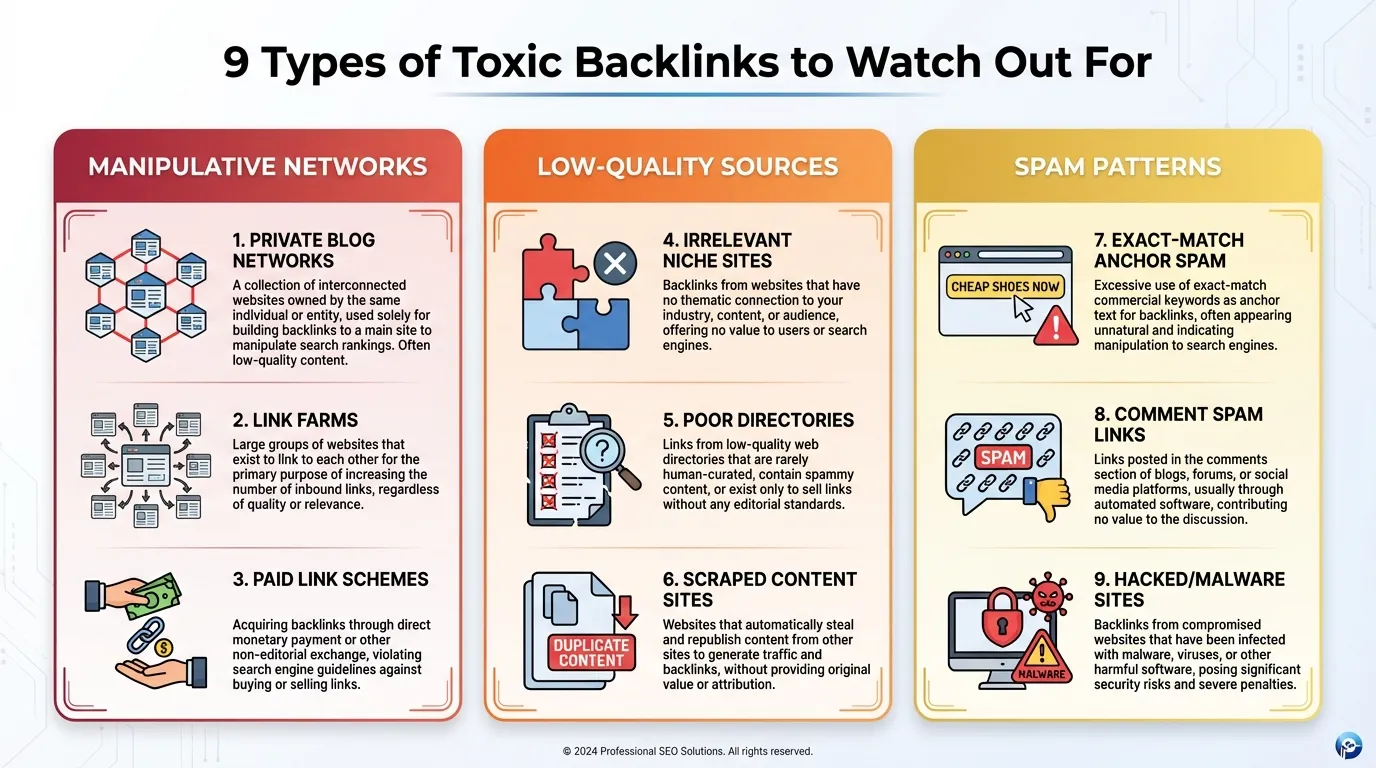
Not all bad links are equal. Some are minor nuisances; others can tank your rankings. In 2026, with AI-powered Google algorithms and rising negative SEO threats, monitoring and managing toxic backlinks has never been more critical.

| Toxic Backlink Type | Signal | Why It’s Dangerous | Mitigation / Monitoring Tools |
| Links from Spammy Sites |
|
|
|
| Paid Link Schemes |
|
|
|
| Private Blog Networks (PBNs) |
|
|
|
| Exact Match Anchor Text Overuse |
|
|
|
| Forum and Blog Comment Spam |
|
|
|
| Hacked Website Links |
|
|
|
| Links from Penalised Domains |
|
|
|
| Irrelevant Adult or Gambling Links |
|
|
|
| Link Farms and Low-Quality Directories |
|
|
|
How to Identify Toxic Backlinks
Identifying these harmful links requires a mix of automated tools and manual review. Do not rely 100% on any single tool’s “toxicity score,” as these are third-party metrics, not Google’s data.
Using Audit Tools (Semrush, Ahrefs, Moz)
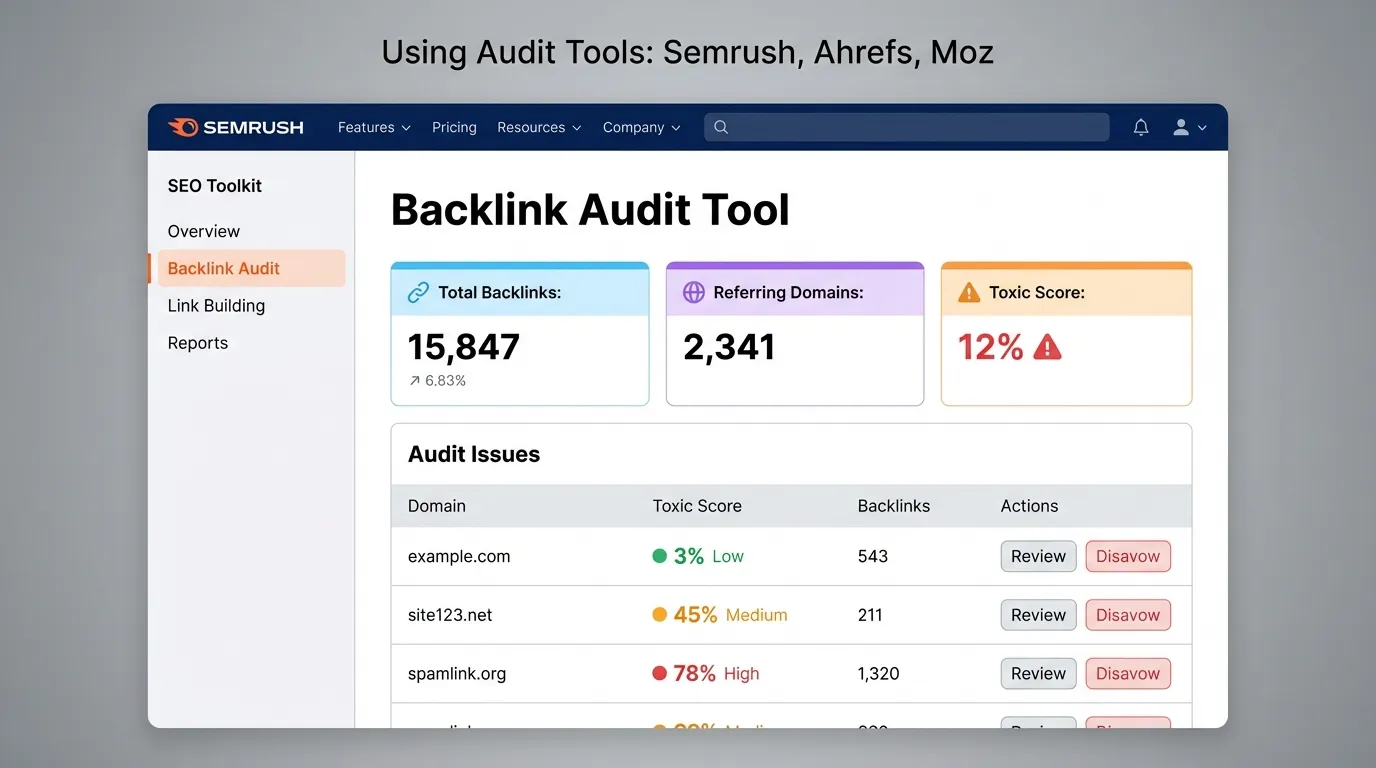
Tools like Semrush’s Backlink Audit are excellent starting points. They aggregate your links and assign a toxicity score based on known spam indicators (such as mirror pages or non-indexed domains).
Why this matters:
- Aggregates thousands of backlinks into a manageable dataset.
- Highlights suspicious clusters, such as multiple links from the same IP or spammy domains.
- Speeds up detection of patterns that AI algorithms might penalise.
Concrete Steps:
- Step 1: Connect your domain and Google Search Console to the tool.
- Step 2: Filter by “High Toxicity Score” (usually 60-100).
- Step 3: Identify clusters of links originating from the same IP address or subnet.
Manual Verification Checks:
- Confirm the flagged sites actually exist and are live.
- Check for meaningful, human-readable content.
- Evaluate domain authority and topical relevance.
Frequency:
- Run a full audit monthly for ongoing backlink hygiene. For high-risk sites, consider bi-weekly scans.
- Even minor unchecked toxic links can accumulate and erode SEO authority over time.
Next Steps:
- Disavow clearly toxic links.
- Reach out to webmasters for legitimate removal requests.
Google Search Console Analysis

GSC provides the most accurate raw backlink data, directly from Google. While tools provide convenience and scoring, nothing beats the source.
Concrete Steps:
- Navigate to the “Links” report in GSC.
- Click “Top Linking Sites.”
- Export the list and review the domains. If you see strange TLDs (like .xyz, .buzz, or .adult) that you don’t recognise, investigate them manually.
Manual Verification Checks:
- Check whether the site receives actual traffic or engagement.
- Evaluate relevance: Does the content relate to your niche or business?
- Assess trustworthiness: would a human visitor consider this a reputable site?
Frequency:
- Review GSC backlink exports quarterly or after major link-building campaigns.
- Faster review cycles are needed if you notice sudden spikes in low-quality links, which may indicate negative SEO attacks.
Next Steps:
- Disavow unsafe links using GSC’s disavow tool.
- Document suspicious domains for ongoing monitoring.
The Manual Eye Test
Automation catches patterns, but AI and tools cannot fully understand context. Manual review is essential to confirm toxicity.
Why this matters:
- Prevents accidental disavowal of valuable links.
- Helps detect nuanced negative SEO attempts that tools might miss.
- Ensures your link profile remains healthy and natural.
You must manually check a sample of the flagged links. Ask yourself:
- Does this website have real traffic?
- Is the content topically relevant to my site?
- Would I trust this site if I landed on it as a user?

If the answer is “No” to any of these, the backlink is likely toxic. Document findings and feed them into your audit tools to refine automated detection in future cycles.
Frequency:
- Perform a manual check on all flagged high-risk links at least monthly, ideally alongside your automated audits.
Next Steps:
- Disavow toxic links.
- Reach out to webmasters for removal.
- Track your link profile trends over time to catch emerging threats early.
When You Should (and Shouldn’t) Disavow Links
In 2026, the golden rule is: don’t disavow unless absolutely necessary. Google is adept at ignoring low-quality links, and panicked disavows can harm your SEO more than help.
Google’s Official Guidance
Google has repeatedly stated that its algorithms are proficient at ignoring spam. If they see a low-quality link, they typically just neutralise it, treating it as if it doesn’t exist. It neither helps nor hurts you.
Google’s guidance works like this:
- Google generally neutralises low-quality links automatically.
- These links usually don’t count against you.
- Removing them won’t improve your site unless they are part of a deliberate negative SEO attack, violate webmaster guidelines, or are tied to manual penalties.
This means that while monitoring and cleaning toxic backlinks is important, you can focus your efforts on high-risk or manipulative links, the ones that truly endanger rankings. Automated audits, manual reviews, and timely mitigation are about proactive protection, not panic.
When to Use the Disavow Tool
You should only use the disavow tool in two specific scenarios:
- You have a Manual Action: You received a message in Search Console indicating that your site has unnatural links. In this case, disavowing is mandatory for recovery.
- Clear Negative SEO Attack: You see a massive influx of thousands of spammy links from suspicious domains in a short period, and you are seeing a correlation with a drop in rankings.
As a reputable digital marketing firm, we often see clients panic over a few bad links. Panic-disavowing is dangerous. If you accidentally disavow links that Google actually liked (even if they looked low quality to you), you can inadvertently destroy your own rankings.
Many links that look “ugly” (old forums, directories) may still pass authority. Removing them unnecessarily can self-sabotage your rankings. Only disavow when there’s clear evidence of harm.
How to Use the Google Disavow Tool
If you have determined that disavowing is necessary, precision is key. Here is the step-by-step process for 2026.
Step 1: Create Your List
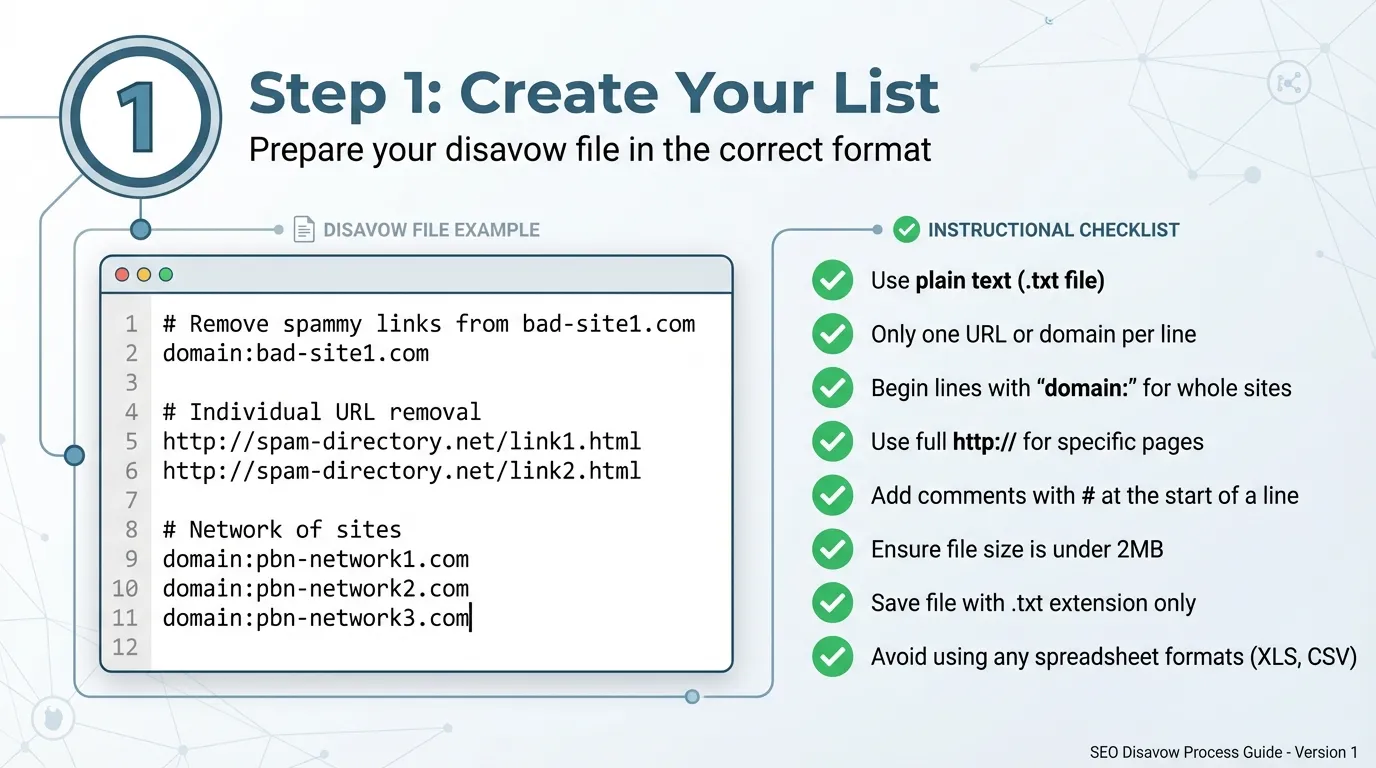
Do not simply export a list from an SEO tool and upload it. You must manually verify the domains. Once verified, create a list of the URLs or domains you want to block.
Step 2: Format the File

The file must be a simple .txt file encoded in UTF-8 or 7-bit ASCII.
- To disavow a specific URL: http://spam-site.com/bad-link-page
- To disavow an entire domain (recommended): domain:spam-site.com
Example File Content:
# Disavowing spam domains from negative SEO attack, Jan 2026
domain:spammy-directory.com
domain:buy-cheap-links.net
http://bad-site.co.uk/specific-page.html
Step 3: Upload to Google Search Console
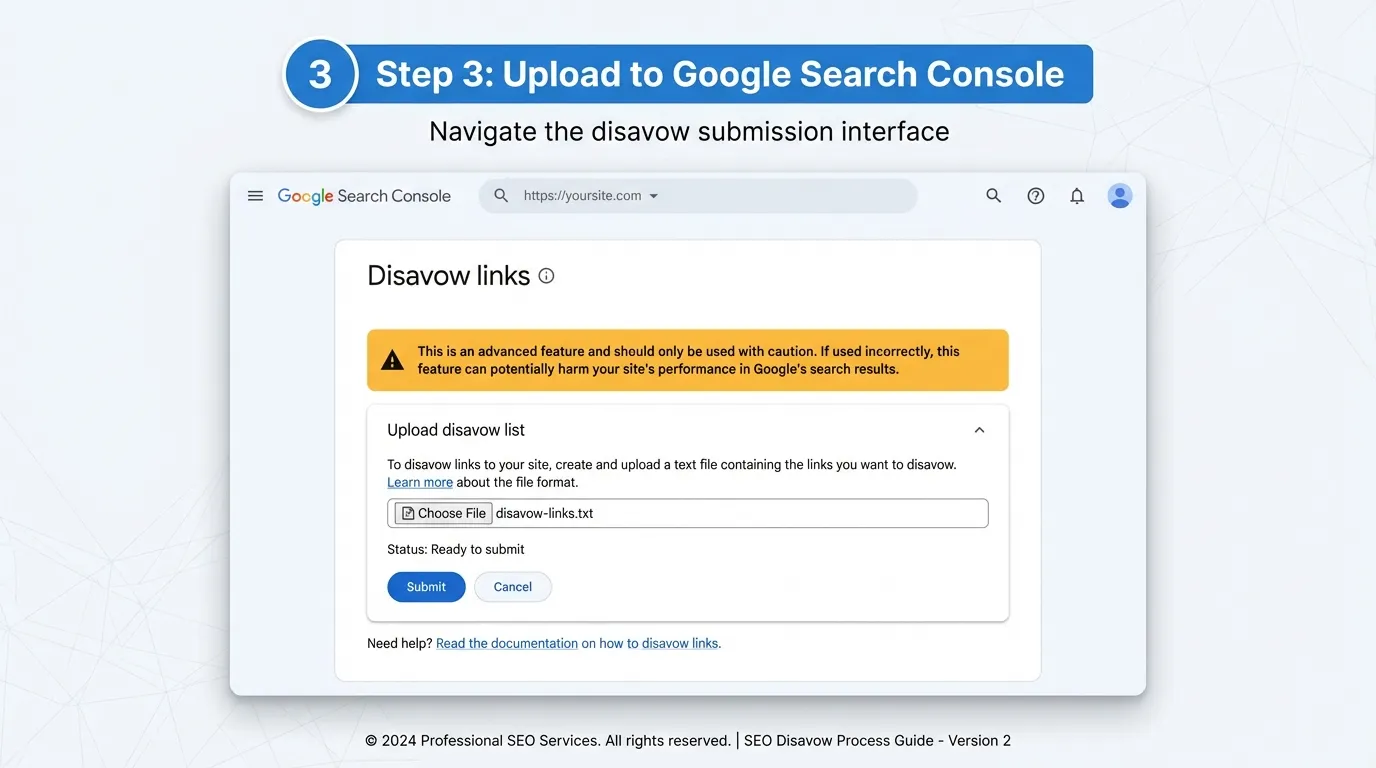
Navigate to the Google Disavow Links tool page (note: this is often separate from the main GSC dashboard). Select your property and upload your text file.
Warning: This is an advanced feature. If you upload a new file, it replaces the old one. Always download your current disavow file first, add the new domains to it, and re-upload the complete list.
Step 4: Wait
It can take Google several weeks to re-crawl the web and process your disavow file. Do not expect overnight results. The disavow command instructs Google to assign a “no-follow” attribute to these links.
Quick Tips for Monitoring:
- Keep an eye on your backlink profile using your audit tool (Ahrefs, SEMrush, Moz) 4–6 weeks after disavow to confirm the links no longer influence your SEO metrics.
- Track domain authority, referral traffic, and new toxic links to ensure no emerging threats appear.
- Set alerts for sudden spikes in new backlinks to catch potential negative SEO attacks early.
Alternative Methods to Handle Toxic Backlinks
The disavow tool is a nuclear option. There are softer, often more effective ways to manage your link profile.
Manual Removal Requests
The most effective approach is to contact the webmaster of the offending site and politely request that they remove the link.
Subject: Request to remove link to [Your Site]
“Hello, we are auditing our link profile and noticed a link on your page [URL] pointing to our site. Could you please remove this link? Thank you.”
While the success rate is often low for spam sites, it is a necessary step if you are seeking to have a manual action reversed.
Step-by-Step Checklist:
- Identify the toxic link and its source URL.
- Find the webmaster’s contact email (look for “Contact” or WHOIS information).
Draft a polite removal request:
- Send a request and log the outreach for follow-up.
- Wait 1–2 weeks for a response; follow up once if needed.
- If no response or link persists, consider disavow as the next step.
Improving Your Overall Link Profile
The best defence against toxic backlinks is dilution. If you have 10 toxic links but 1,000 high-quality, authoritative links, the toxic ones become statistical noise.
Focus your energy on earning fresh, high-authority links. Working with the best SEO agency can help you build a proactive strategy that secures placements on reputable industry sites. When your “Good Link” velocity outpaces your “Bad Link” velocity, your trust score remains high.
Step-by-Step Checklist:
- Audit your current backlinks to identify high-quality and authoritative sources.
- Develop a link-building plan targeting reputable industry sites, publications, and partners.
- Track your “Good Link Velocity” versus “Bad Link Velocity”, and ensure new authoritative links outnumber any toxic additions.
- Monitor your domain authority, organic traffic, and referring domains monthly.
- Maintain a rolling audit cycle to catch new toxic backlinks early.
- Consider working with an SEO agency to secure high-value placements safely.
Preventing Toxic Backlinks in 2026
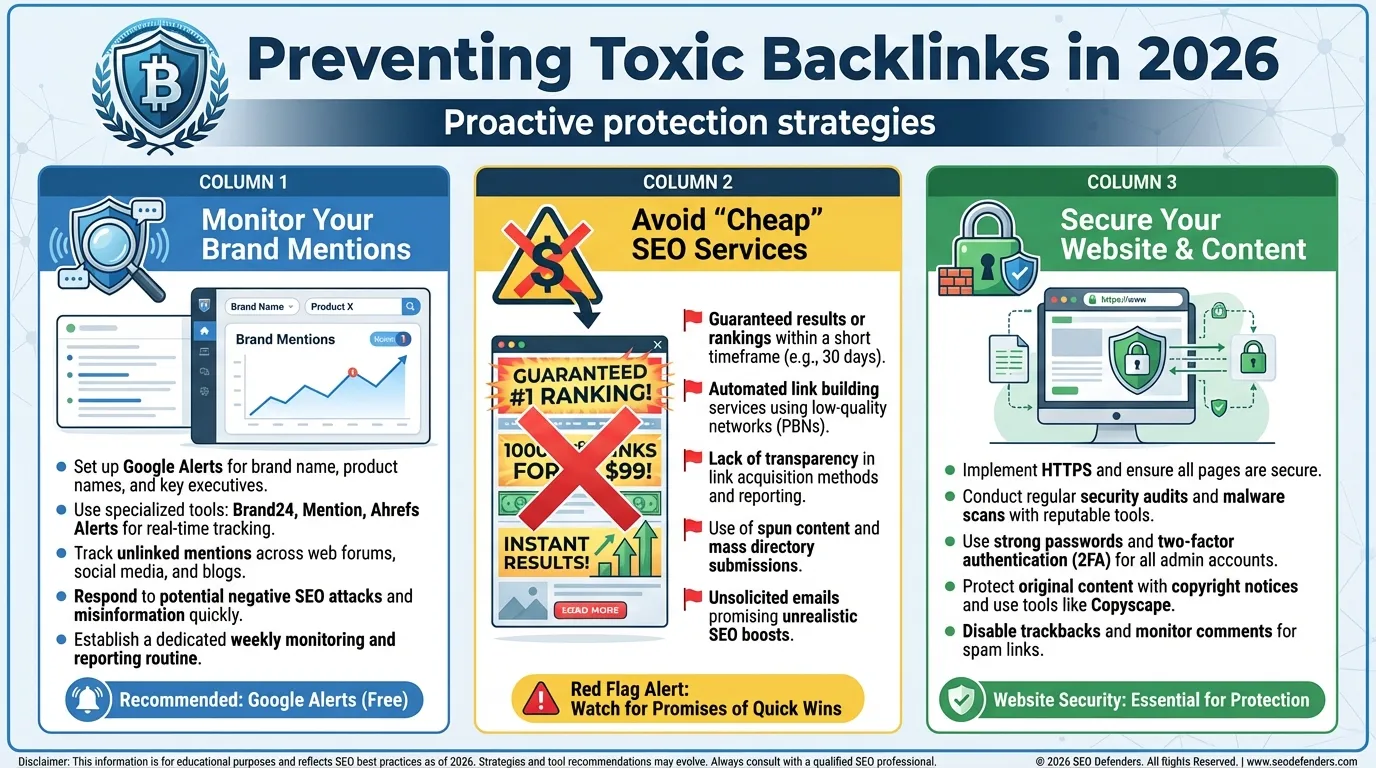
Prevention is far cheaper than the cure. While you cannot stop people from linking to you, you can minimise the risk.
- Monitor Your Brand Mentions: Use tools to alert you whenever your brand is mentioned online. This allows you to spot potential spam links as soon as they appear.
- Avoid “Cheap” SEO Services: If an agency promises “100 backlinks for $50,” run away. These are invariably automated spam links that will toxify your profile. Quality SEO takes time and resources.
- Regular Audits: Schedule a quarterly backlink audit. You don’t need to obsess over it weekly, but a check every three months ensures no negative SEO attacks go unnoticed.
Monitoring brand mentions, avoiding shortcut-driven SEO, and conducting regular audits help you maintain control over your link profile and protect your site’s long-term authority. Prevention keeps your SEO stable, resilient, and focused on growth rather than damage control.
Building a Resilient SEO Strategy Against Toxic Backlinks
Managing toxic backlinks in 2026 requires a balanced approach. The days of obsessively scrubbing every single low-quality directory link are over. Google’s algorithms are smarter, and your focus should primarily be on growth rather than defence.
However, vigilance is still necessary. Negative SEO is real, and algorithmic suppressions can be frustratingly silent. By conducting regular audits and using the disavow tool only when required, you can protect your site’s reputation and rankings.
Remember: The goal is not a “perfect” link profile; such a thing doesn’t exist on the messy internet. The goal is a natural link profile where high-quality signals vastly outweigh the noise.
If managing toxic backlinks feels overwhelming or time-consuming, MediaOne can help. Our SEO specialists conduct in-depth backlink audits and implement clean, Google-compliant strategies that protect your rankings. Contact us today!
Frequently Asked Questions
Do I need to disavow every low-quality backlink?
No. Google is very good at ignoring random spam. Only disavow if you see a systematic pattern of manipulative links or receive a manual penalty. Focus on the links that affect your rankings rather than trying to chase every minor spam signal.
How long does it take for a disavow file to work?
It typically takes 3 to 9 weeks. Google needs to recrawl the specific pages linking to you to register the disavow command. During this time, continue monitoring your rankings and traffic to spot any unexpected changes.
Can disavowing links hurt my rankings?
Yes. If you disavow links that Google considers “good” or even “neutral but passing value,” your rankings can drop. Be very conservative with what you remove. Always back up your decisions with data from backlink audits and avoid guessing.
What is a “Toxic Score”?
This is a metric used by third-party tools such as SEMrush and Moz. It is NOT a Google metric. Use it as a hint to investigate, not as absolute proof of toxicity. Check the context of each flagged link before taking action, considering relevance, traffic, and anchor text.
How often should I audit my backlinks?
For most small to medium businesses, once a quarter is sufficient. Large enterprise sites should be monitored monthly. Regular audits help you catch patterns early, keeping your link profile healthy and your SEO stable.