Most e-commerce brands treat Google Merchant Center as a plumbing job; something IT sets up once, hands to the PPC team, and nobody else thinks about. That’s a costly assumption.

E-commerce keywords now trigger free product listing carousels in Google search results, with most appearing above the first traditional blue link. And according to Brodie Clark’s organic product grid analysis, a product ranking in the top spot of one of those grids can achieve a click-through rate of 58%, a figure that makes even the best-performing blue-link result look modest.
Every single one of those placements is powered by a Google Merchant Center product feed. While SEO teams focus on title tags, Core Web Vitals, and backlinks, the feed ultimately decides whether your products appear, qualify, or remain invisible in prime ecommerce search positions.
A feed with missing GTINs, stale availability data, or misaligned schema doesn’t just underperform; it actively disqualifies your products from organic grids your competitors are already winning.
This guide covers everything: what Google Merchant Center actually does, how to set it up correctly, and how to optimise your product feed so it complements your on-site SEO to deliver visibility that neither channel could achieve on its own. Whether you’re building your first feed or auditing an existing one, working with a professional e-commerce SEO agency can ensure your setup maximises organic performance and drives real results.
Key Takeaways
- Google Merchant Center is an organic SEO channel, not just a paid ads tool. Your product feed directly powers free listings across Google Search, Shopping, Images, YouTube, Maps, and Gemini, at zero cost per click.
- Your feed is your Shopping keyword strategy. Unlike traditional SEO, where you optimise pages for keywords, in Google Shopping, your product titles, descriptions, taxonomy, and attributes determine when and where your products appear.
- Feed data and on-page schema must always agree. Google cross-references your Merchant Centre feed against your product page content and structured data.
- Products with correct GTINs unlock eligibility for the Popular Product grid, price comparison clusters, aggregate reviews, and seller ratings, and Google’s own data shows a 20% average increase in clicks once GTINs are added.
What is Google Merchant Center And Why it Matters for Organic SEO
At its core, Google Merchant Center (GMC) is a data warehouse. It serves as the central translator between your internal product catalogue (SKUs, inventory levels, and pricing) and Google’s ecosystem. While it was historically built to power Google Shopping Ads (PLAs), its role has expanded significantly.
Today, the data residing in GMC powers the “Shopping Graph,” Google’s AI-enhanced model that understands products, brands, reviews, and inventory data across the web. This feed data drives both paid placements and free organic listings.

With the rollout of Google Merchant Center Next, the platform has become simpler and more automated, but the underlying requirement remains: Google needs structured, high-quality data to understand what you sell. If you treat GMC solely as a PPC tool, you are voluntarily opting out of a massive slice of organic traffic.
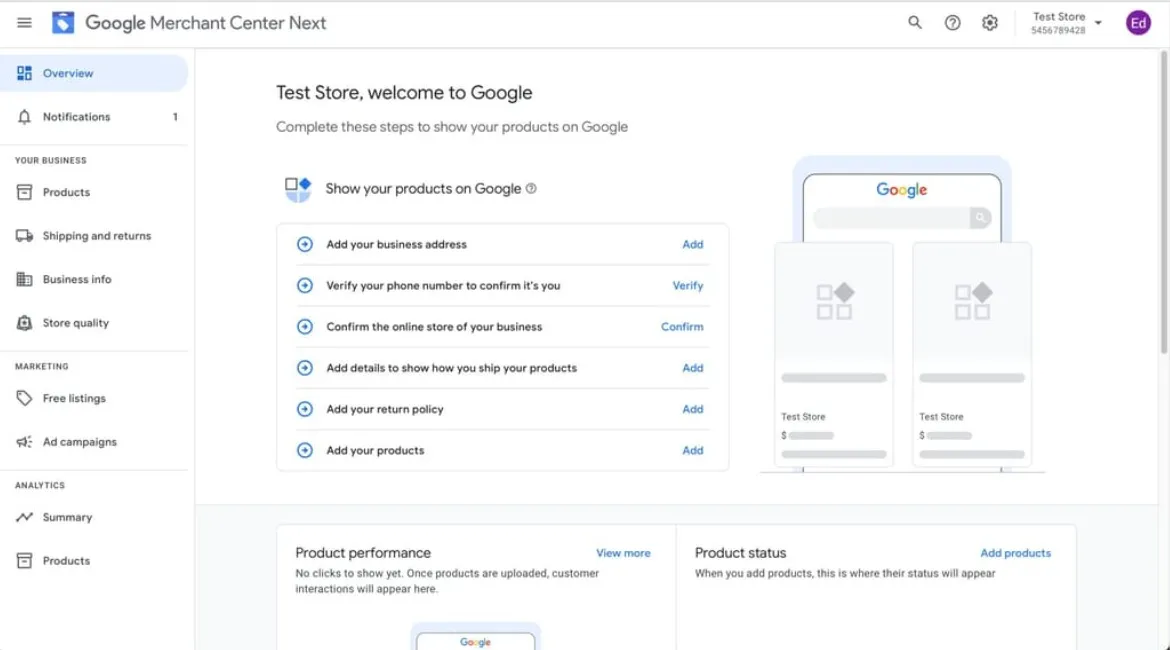
Note: The Google Merchant Center Next interface simplifies product management, but deep optimisation requires manual attention to attributes.
The Organic Shopping Surfaces You Could Be Missing
When you optimise your feed, you aren’t just targeting one placement. Free listings appear across a diverse range of surfaces:
- The Google Shopping Tab: Originally a paid-only zone, this tab now consists largely of free listings. Users browsing here have high purchase intent.
- Google Search (SERPs): This is the most critical surface. Google injects “Popular Products,” “More Products,” and “In Stores Nearby” grids directly into the main search results page.
- Google Images: Product tags on images allow users to shop directly from visual search results.
- Google Maps: If you utilise local inventory feeds, your products appear when users search for items “near me.”
- Google Gemini / AI Mode: As Google integrates conversational AI into search, Gemini relies on structured data in Merchant Centre to recommend products in natural-language responses.
Stat to Know: Industry data suggests that Google Shopping surfaces capture roughly a third of retail searches and generate 2–3x more revenue per session than traditional organic search results, as user intent is explicitly transactional.
Google Merchant Center Feed Hygiene: The Foundation of Everything
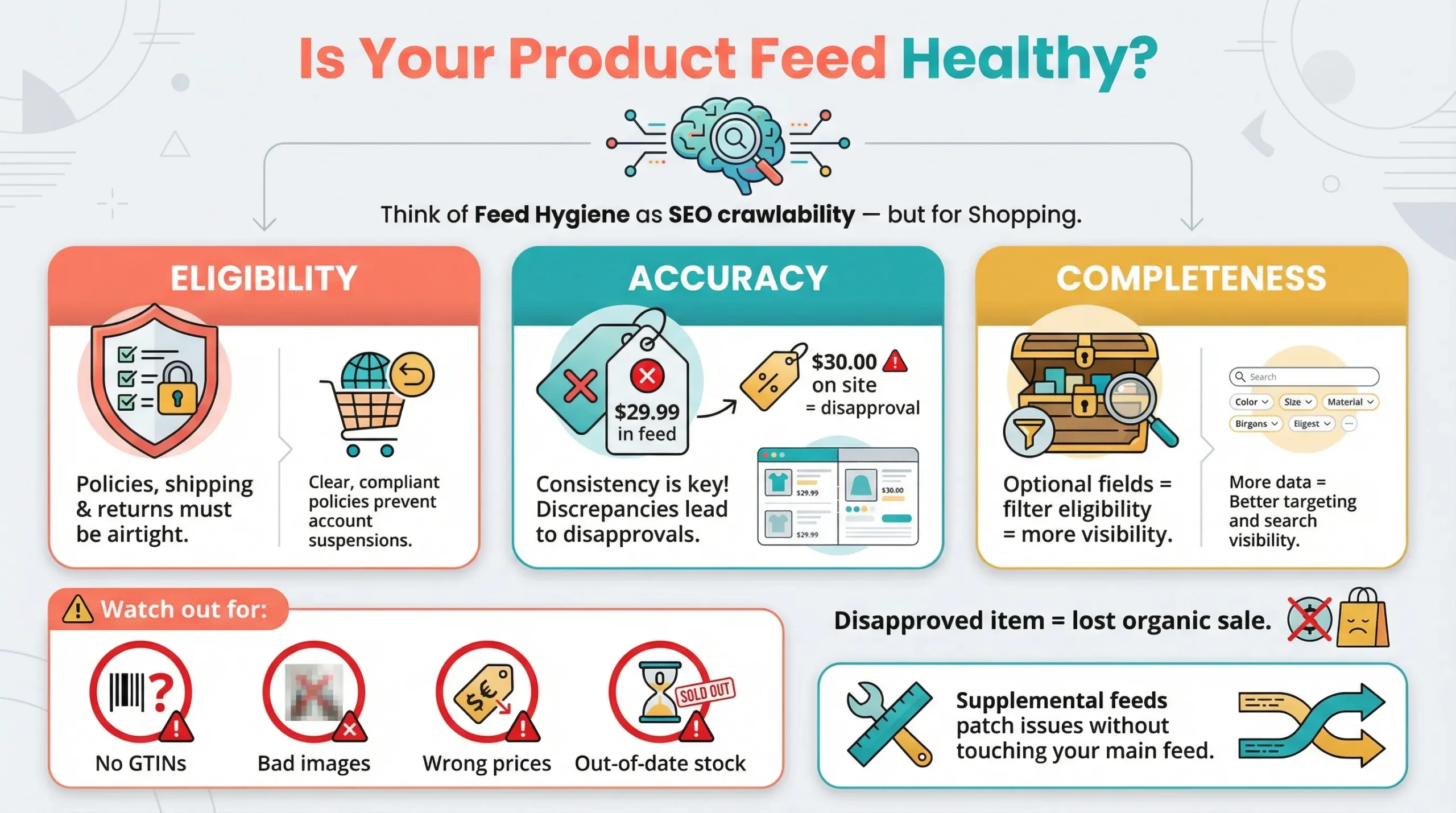
Feed hygiene refers to the health, accuracy, and completeness of your product data. It is the technical SEO equivalent of “crawlability.”
If your feed is unhygienic, Google cannot “index” your products for shopping surfaces. Common failures include missing Global Trade Item Numbers (GTINs), mismatching prices between the feed and the website, broken image URLs, and stale availability data.
The Three Lenses of a Healthy Feed
- Eligibility: Can your products even show up? This covers the baseline requirements. Are your shipping policies accurate? Is your return policy clearly stated on your landing page? Do you have any account suspensions or policy violations? If you fail here, no amount of keyword optimisation will help.
- Accuracy: Does your feed match your live site exactly? Google crawls your landing pages to verify the data in your feed. If your feed says a product costs $29.99, but your landing page shows $30.00, the product will be disapproved.
- Completeness: Have you filled every relevant attribute? Many merchants stop at the “Required” fields. To win in SEO, you must populate the “Optional” fields that allow users to filter products (e.g., material, pattern, sleeve length).
Using GMC Diagnostics to Spot & Fix Feed Issues
The Diagnostics (or “Needs Attention”) tab in Google Merchant Center is your primary audit tool. It categorises issues into Disapprovals (critical errors blocking visibility), Warnings (issues that limit performance), and Notifications.
If your primary feed is hard to edit (for example, if it is generated by a rigid plugin), you can use Supplemental Feeds. These allow you to upload a Google Sheet that overrides or enriches specific attributes in your primary feed without requiring developer intervention on your website.
Pro Tip: A feed error isn’t just a technical issue; it’s a lost sale. Every disapproved item is a product that cannot compete organically. Set up email alerts for critical feed drops to catch issues immediately.
Core Google Merchant Center Attributes: The Non-Negotiables
Google uses specific attributes to match your products to user search queries. Think of these attributes as your on-page SEO elements (Title Tags, H1s, Meta Descriptions) but for the Shopping ecosystem.
| Attribute | SEO Optimisation Tip |
| id | Keep this stable and unique. Never change IDs when updating product data, as this resets the product’s quality score and history. |
| title | Front-load the Brand + Product Type. Use natural search language. This is the single most important ranking factor in the feed. |
| description | You have 5,000 characters. Weave in long-tail keywords, synonyms, and use cases naturally. Do not keyword stuff. |
| link | Use the canonical URL. Ensure variant parameters (e.g., ?variant=123) are correct so the user lands on the specific colour/size displayed. |
| image_link | Use high-res images (800x800px min). White backgrounds perform best for main images. Absolutely no watermarks, text overlays, or logos. |
| availability | Must match the live site in real-time. Use: in_stock, out_of_stock, preorder, or backorder. |
| price | An exact match to the landing page is critical. Mismatches lead to immediate item disapproval. |
| brand | Use the exact manufacturer name. Do not use your store name unless you are the manufacturer (DTC). |
Optimising Product Titles for Shopping SEO
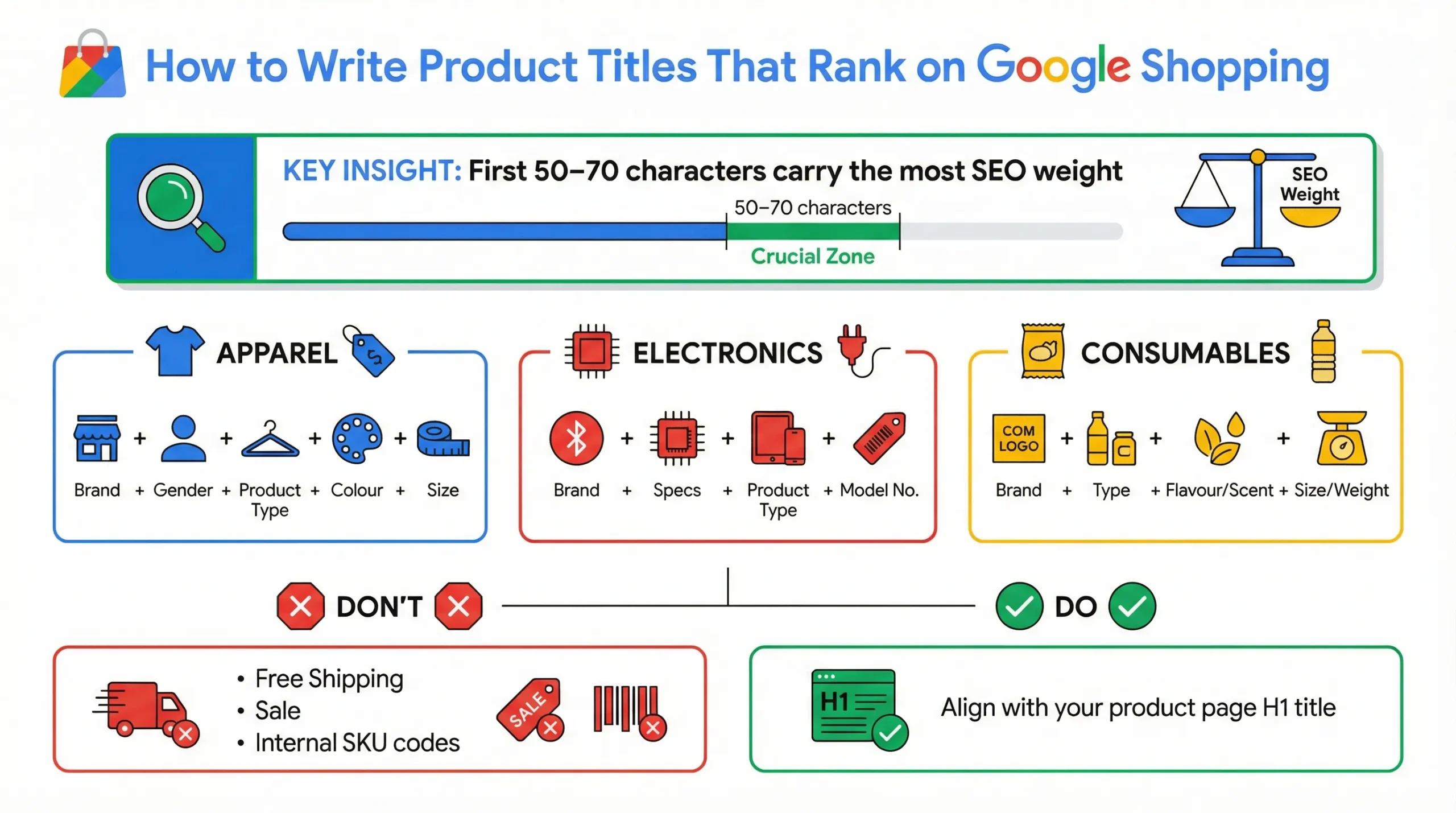
Your product title serves as your “ad headline” and your primary query-matching signal. Google places heavy weight on the words at the beginning of the title. Furthermore, on mobile devices, titles are often truncated after 50–70 characters.
Category-Specific Title Formulas:
- Apparel: Brand + Gender + Product Type + Attributes (Colour, Size, Material).
- Example: Nike Women’s Running Shoes – Air Zoom Pegasus 39, Black/White, Size 8
- Electronics: Brand + Attributes + Product Type + Model Number.
- Example: Sony 65-Inch 4K Ultra HD Smart LED TV – XR65A80K
- Consumables: Brand + Product Type + Flavour/Scent + Quantity/Weight.
- Example: Optimum Nutrition Gold Standard Whey Protein Powder – Double Rich Chocolate, 5lb Tub
Avoid: Promotional text like “Free Shipping,” “Best Seller,” or internal SKU codes that mean nothing to the user. Ensure the feed title generally aligns with the product page H1, though it can be more descriptive.
GTINs in Google Merchant Center: The Most Powerful Attribute You’re Underusing
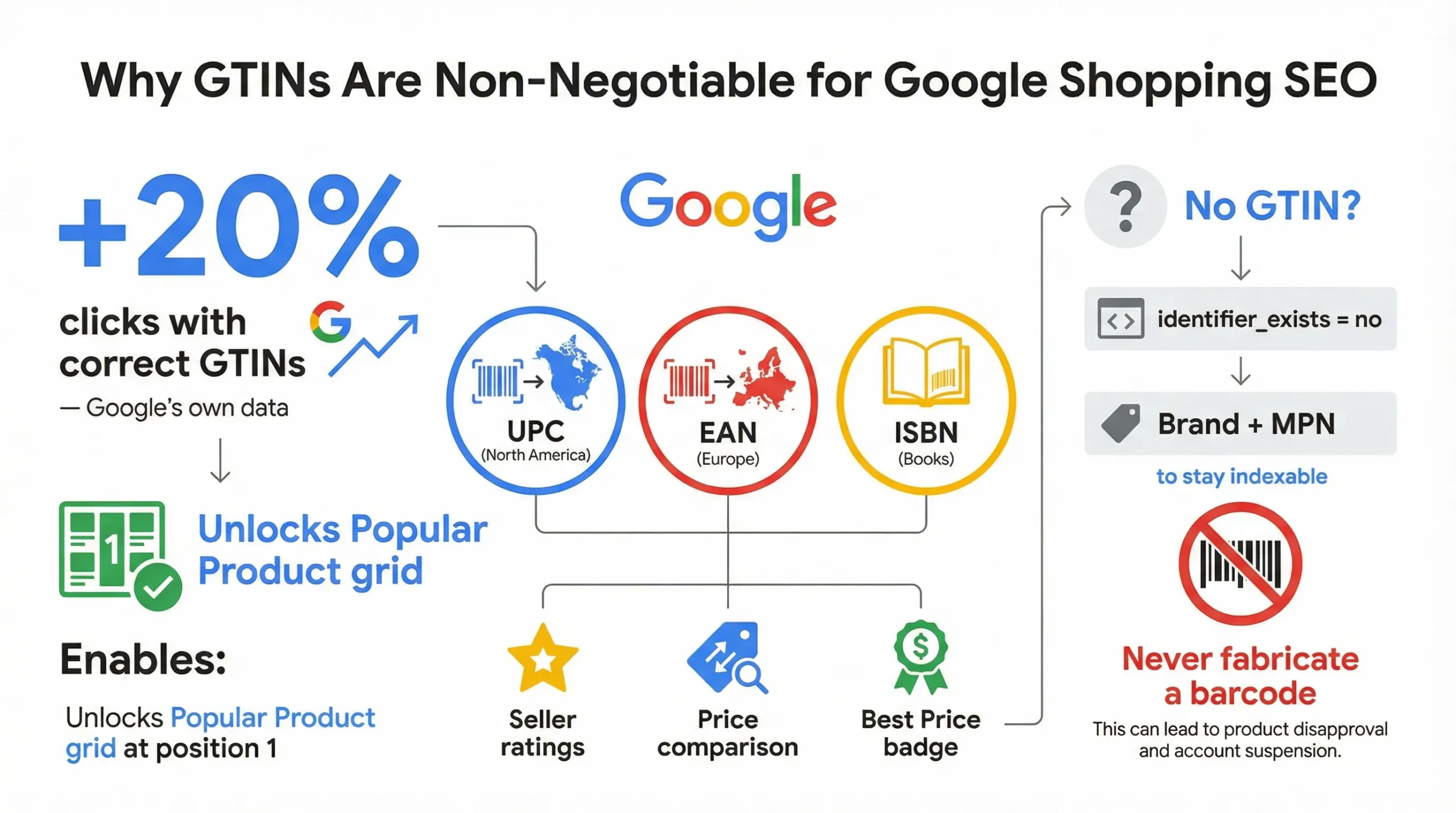
A GTIN (Global Trade Item Number) is the unique numerical fingerprint of a product. Common formats include UPC (North America), EAN (Europe), and ISBN (Books). Google uses GTINs to understand exactly what you are selling. It allows the algorithm to “cluster” identical products from different sellers into a single comparison view.
If you do not provide a GTIN, your product is data-isolated. Google cannot confidently match it to user queries or compare it against competitors, which often results in the product being excluded from premium placements.
The SEO Impact of GTINs
The impact of this attribute cannot be overstated. According to Google’s own data, products with correct GTINs see a 20% average increase in clicks. More importantly, GTINs are effectively a requirement for Popular Product grid eligibility, the specific visual grid that appears at the top of organic search results.
Correct GTINs also unlock rich features such as:
- Seller ratings and product reviews aggregation.
- Price comparison visibility.
- “Best Price” annotations.
What to Do When You Don’t Have a GTIN
If you sell custom goods, vintage items, or are a private label brand without official barcodes, do not invent a GTIN. Instead, set the attribute identifier_exists to no (or false). This tells Google not to look for a code. However, you must then provide the Brand and MPN (Manufacturer Part Number) to ensure the product is still indexable.
Google Merchant Center Product Taxonomy: Getting Category Mapping Right
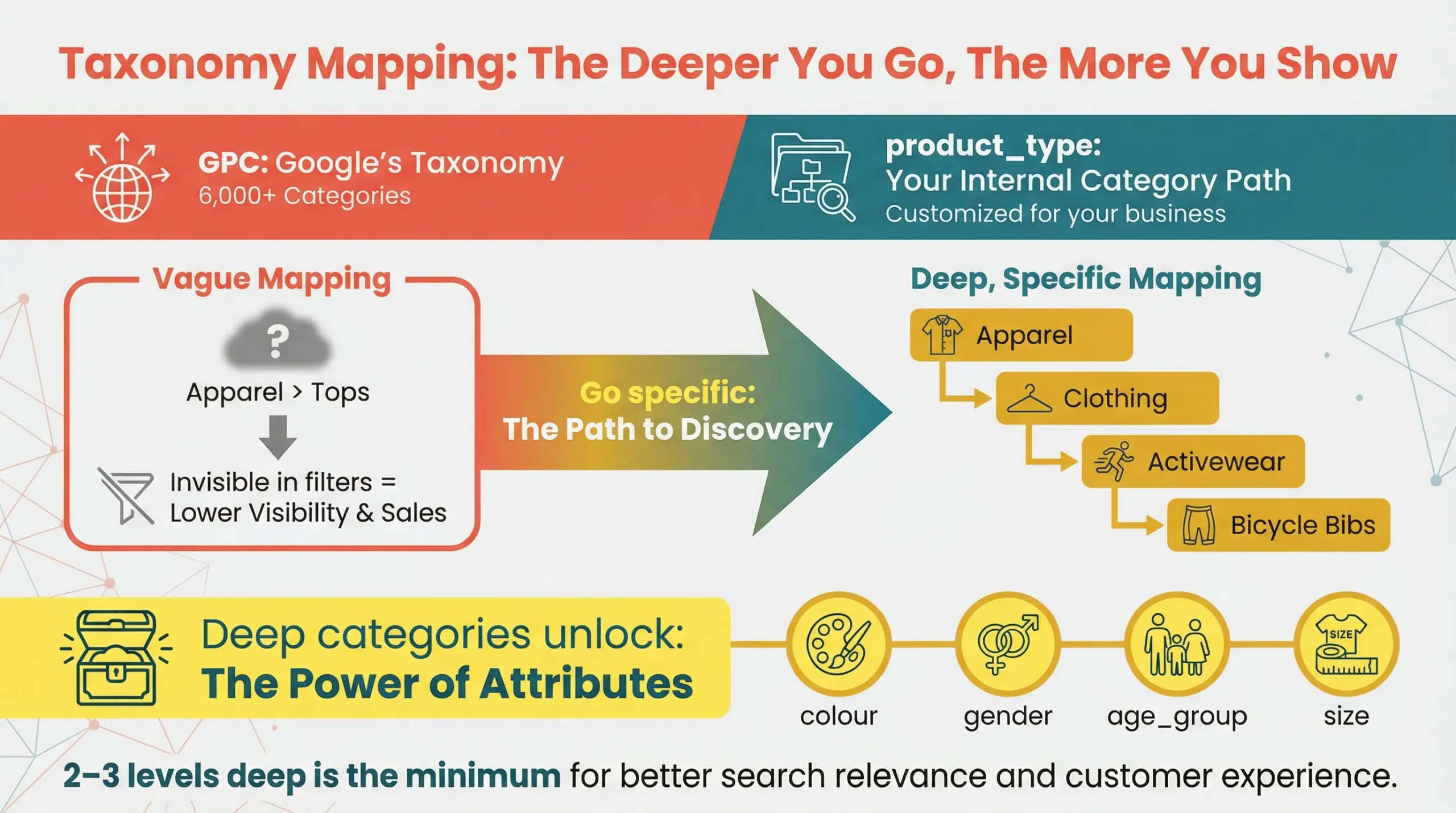
Many SEO managers confuse these two fields, google_product_category vs. product_type, but they serve distinct purposes in the ecosystem.
- google_product_category (GPC): This is Google’s standardised taxonomy containing over 6,000 categories. You must select the Google category that best matches your product. This determines ad serving eligibility, filter inclusion, and tax calculation.
- product_type: This is your own internal categorisation string (e.g., Home > Kitchen > Bakeware). While you control this, it is vital for campaign segmentation and helps Google understand your specific niche structure.
Why Specificity in Taxonomy Matters
Google recommends mapping your products at least 2–3 levels deep in the taxonomy. Using a vague top-level category is a missed SEO opportunity.

- Weak Mapping: Apparel & Accessories
- Strong Mapping: Apparel & Accessories > Clothing > Activewear > Bicycle Activewear > Bicycle Bibs
Specificity matters because certain categories trigger mandatory optional attributes. For example, if you categorise a product as “Apparel,” Google’s algorithm immediately requires colour, gender, age_group, and size.
If you categorise it vaguely, you might avoid the requirement, but you will be excluded from all the filters users use to find those products (e.g., filtering by “Men’s” or “Blue”).
Google Merchant Center Pricing and Availability Sync
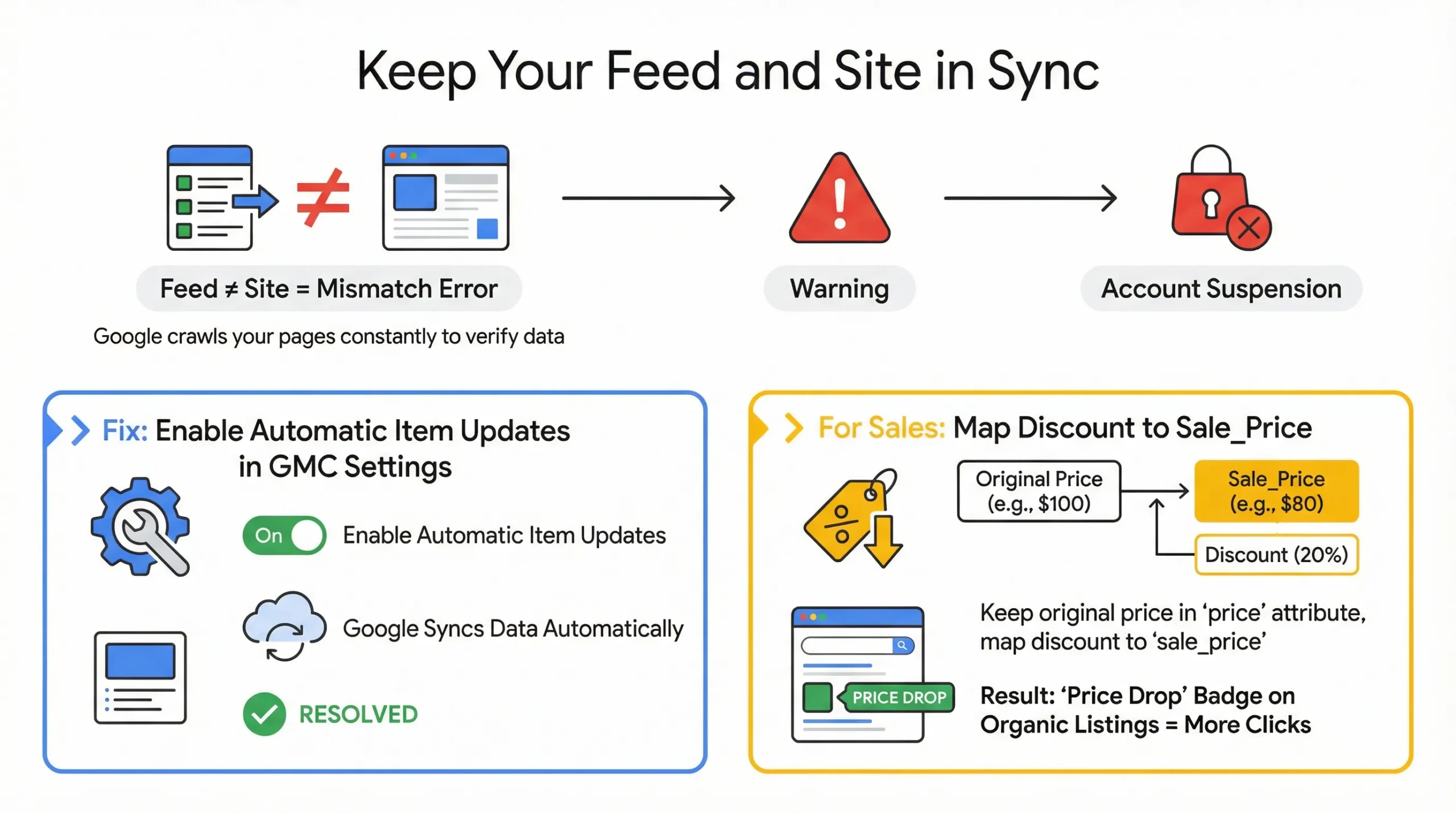
Google employs automated crawlers that constantly check your product landing pages against your feed data. If a discrepancy is found, it triggers a “mismatch” error. A price mismatch is considered a severe policy violation because it degrades user trust. If a user sees $29.99 in the SERP and $35.00 on your site, they bounce immediately.
Frequent mismatches will lead to account warnings and, eventually, the suspension of your Merchant Centre account, killing your organic visibility entirely.
Automating Price & Availability Updates
To ensure real-time accuracy, enable Automatic Item Updates in the Merchant Centre settings. This feature allows Google to update the price and availability in your ads/listings based on the structured data (Schema) found on your landing page, bridging the gap between feed uploads.
Additionally, utilise the sale_price attribute. When you run a promotion, do not just change the base price. By mapping your discounted price to sale_price and leaving the original in price, you unlock the “Price Drop” badge in organic listings, which significantly improves Click-Through Rate (CTR).
Optional Google Merchant Center Attributes That Are Basically Mandatory
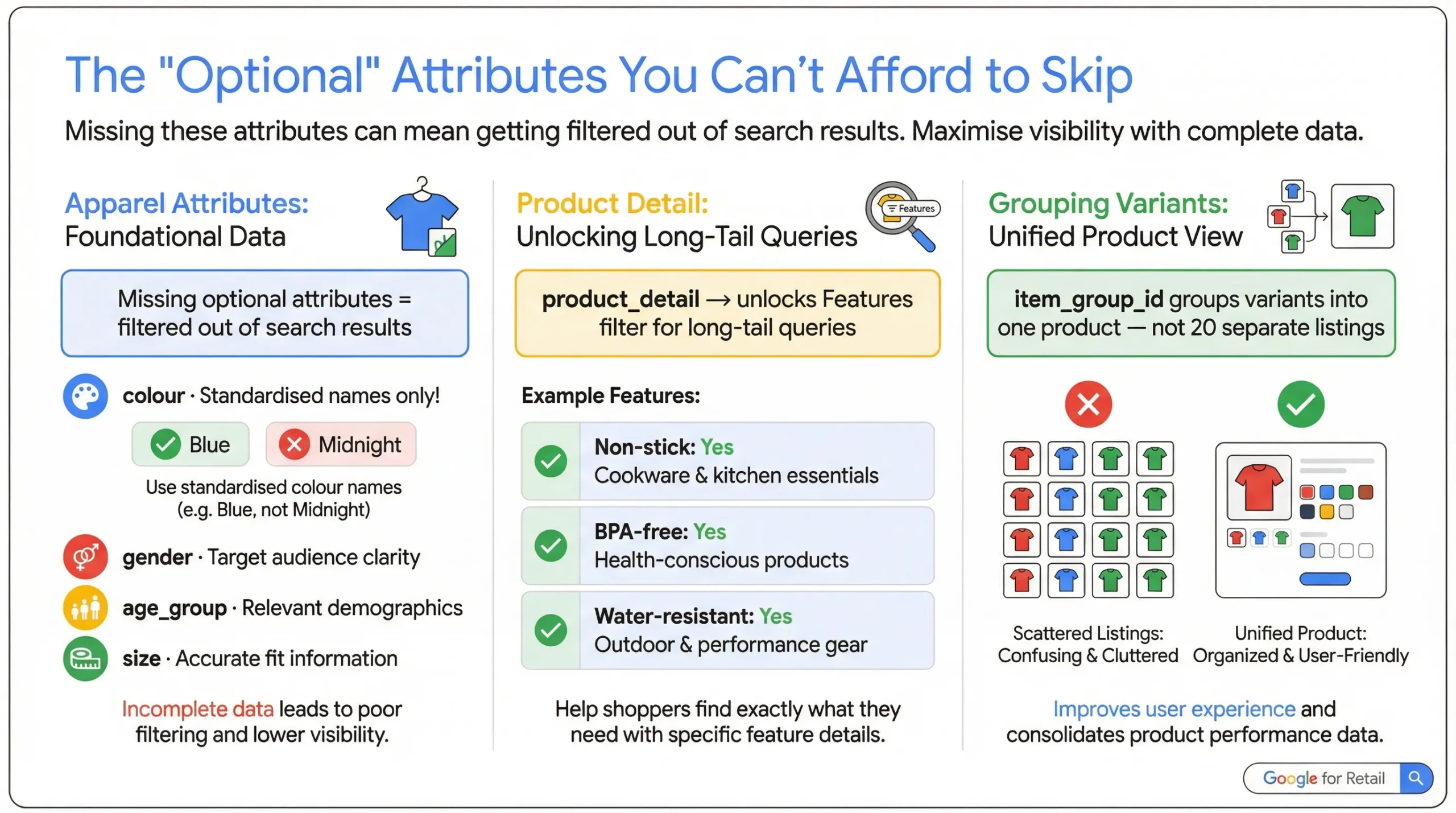
In the context of SEO, “Optional” is a misnomer. While your product won’t be disapproved for missing these attributes, it will be invisible in filtered search results. To rank #1, you must provide data that allows Google to filter your product effectively.
Category-Specific Attributes
For Apparel (Category ID 166), the following are effectively required:
- Colour: Standardise these (e.g., don’t just use “Midnight,” use “Blue”).
- Gender: Male, Female, Unisex.
- Age Group: Adult, Kids, Toddler, Infant.
- Size: Critical for filtering.
Without these, a user searching for “Women’s blue running shoes” will never see your product because the algorithm cannot verify if it fits the criteria.
product_detail: The Hidden SEO Lever
The product_detail attribute lets you provide structured technical specifications for your product. This powers the “Features” filter in Shopping search results (e.g., “Non-stick,” “BPA-free,” “Water-resistant”).
Example Implementation:
- Section Name: Features
- Attribute Name: Non-stick
- Attribute Value: Yes
Populating this data makes your products eligible for high-intent, long-tail filtered queries that competitors often ignore.
Variant Grouping (item_group_id)
If you sell a t-shirt in 5 colours and 4 sizes, you must group them using the item_group_id attribute. If you fail to do this, Google treats them as 20 disconnected products. This dilutes your ranking signals and results in a poor user experience, where users cannot toggle between colours on the Google interface.
How Google Merchant Center Feed Optimisation and On-Site SEO Compound
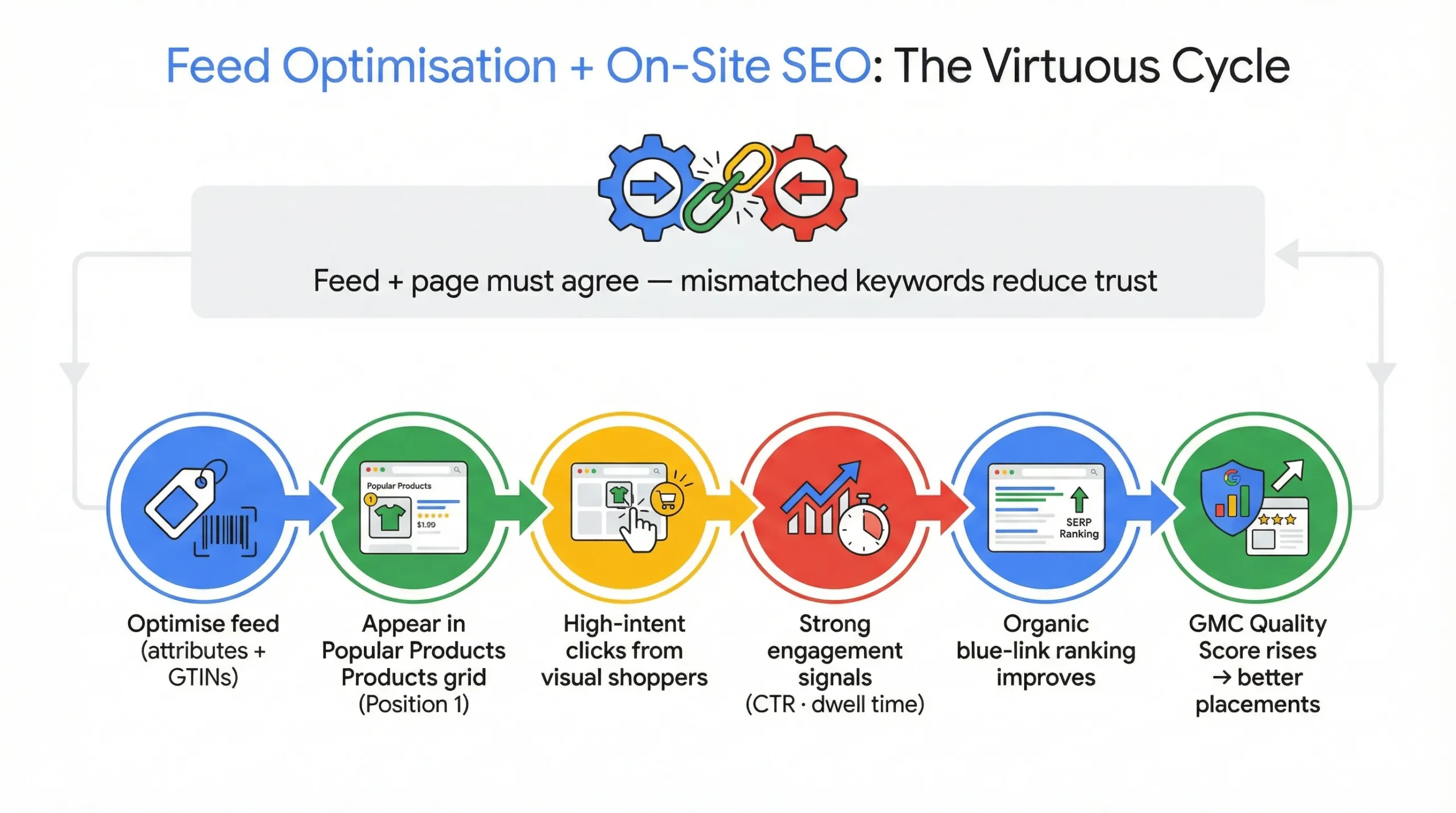
There is a bidirectional relationship between your feed and your on-page SEO. Google cross-references your feed attributes against the content on your page to verify accuracy.
If you optimise your feed title to include keywords like “Ergonomic Office Chair,” but your landing page only mentions “Desk Chair,” Google may mistrust the feed data. Keywords introduced in the feed should be visible on the landing page or in the structured data.
The Compounding Effect in Practice
This relationship creates a “virtuous cycle” of SEO:
- Clean Feed: You optimise your feed with rich attributes and GTINs.
- Grid Visibility: Your products appear in “Popular Products” grids (often Position 1).
- High-Intent Clicks: Users clicking these visual listings have higher intent than general searchers.
- Engagement Signals: Increased click-throughs and lower bounce rates signal to Google that your product page is authoritative.
- Ranking Boost: Google boosts your traditional organic ranking (blue link) for the product page.
- Trust Score: Your Merchant Centre “Quality Score” improves, granting you access to even more competitive grid placements.
Insight: Think of your Google Merchant Center feed as the live, machine-readable version of your product page SEO. They should always agree, and both should always be improving.
Product Schema Markup: How It Supports Google Merchant Center Eligibility
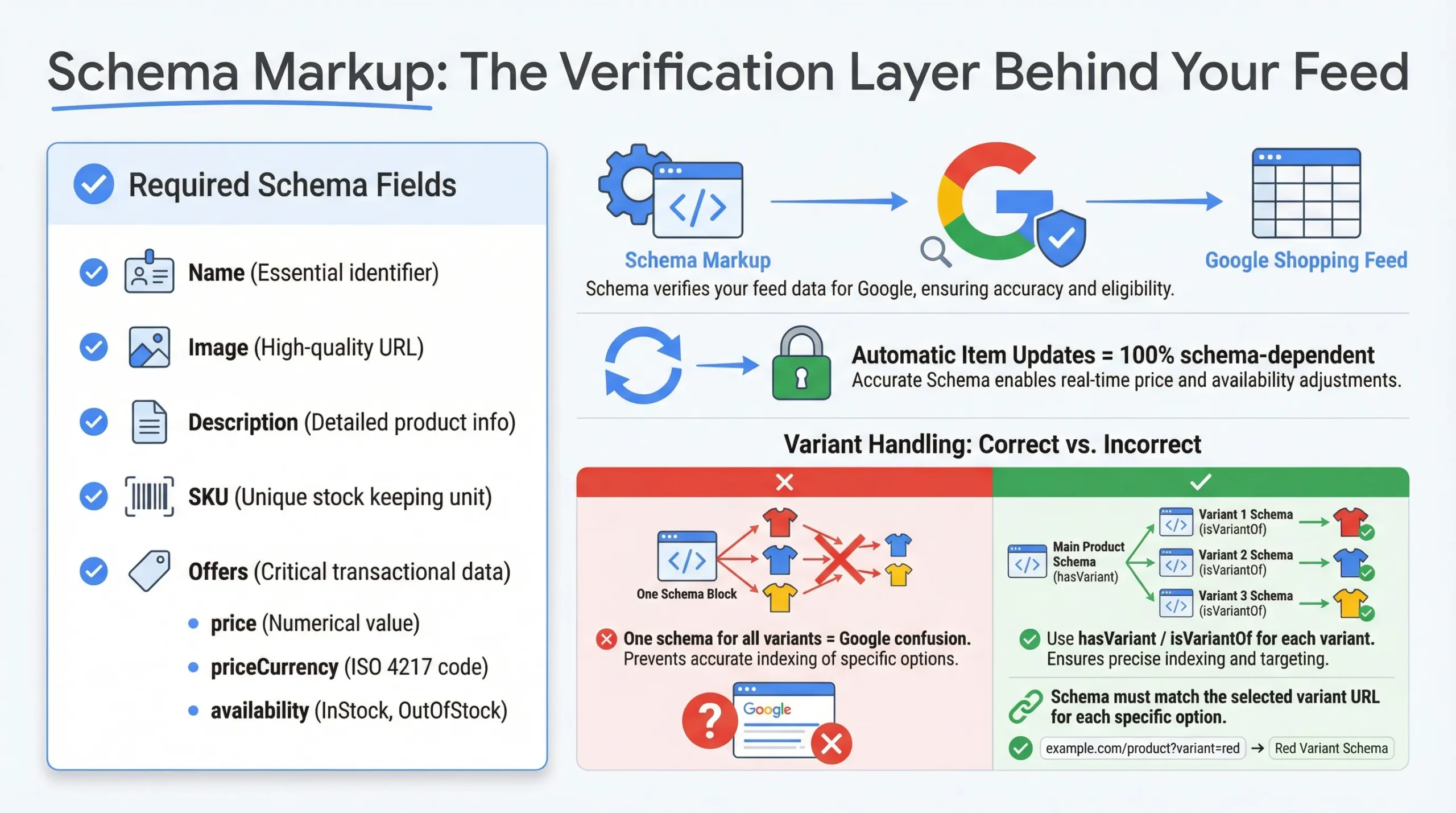
Schema markup (structured data) is the code that helps Google’s crawlers understand your page’s content. In e-commerce, the Product schema serves as the verification layer for your Merchant Centre feed.
When you enable Automatic Item Updates in GMC, Google relies solely on your schema to verify prices and availability. If your schema is broken or missing, Google cannot auto-correct your data, leading to disapprovals during price changes.
Minimum Schema Requirements for Shopping Eligibility
To support your feed, your on-page JSON-LD schema must include:
- Name: Matches product title.
- Image: URL of the main product image.
- Description: Brief product summary.
- SKU: Matches the ID in the feed.
- Offers: Nested property containing price, priceCurrency, and availability.
Variant Schema: The Most Overlooked Implementation
A common error on e-commerce sites (especially Shopify or WooCommerce) is failing to implement the hasVariant or isVariantOf schema. If your page displays a dropdown for sizes but your schema only declares a single product price, Google may get confused about which price applies to which variant.
You must ensure that when a user selects a variant (e.g., “Small”), the schema (or the URL change) reflects the specific data for that variant. This ensures that users searching for specific sizes land on the correct pre-selected option.
Google Merchant Center Feed Management Best Practices
Effective Google Merchant Center feed management is the operational backbone of sustainable shopping visibility. Clean data, structured rules, and disciplined auditing prevent performance leakage and eligibility issues. The goal is not just approval, but competitive optimisation.
Tools & Platforms
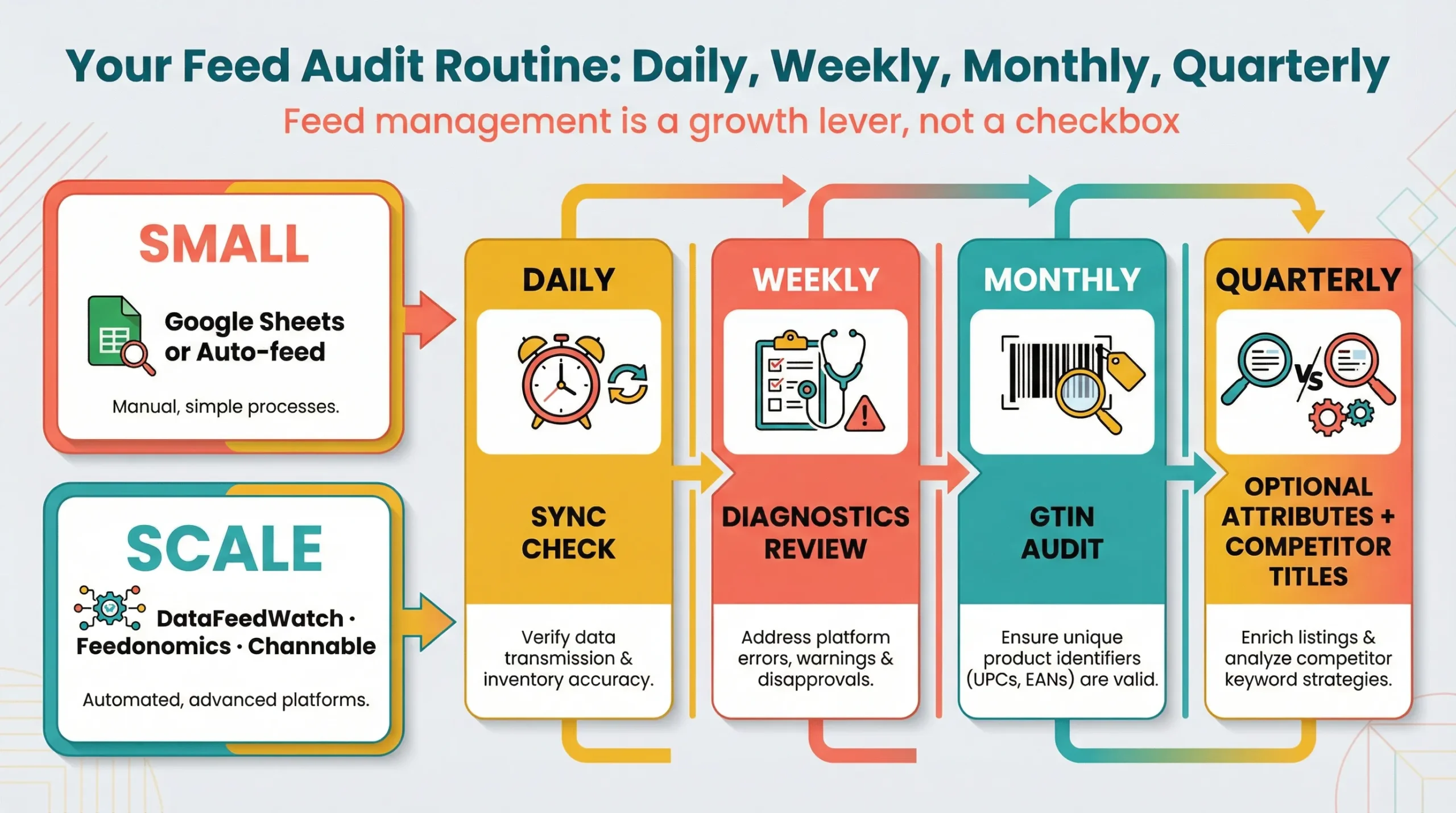
For small catalogues (under 50 SKUs), managing your feed manually via Google Sheets or the “Auto-feed” setting in GMC is acceptable. However, for scale, you need middleware.
Tools like DataFeedWatch, Feedonomics, or Channable allow you to create rules-based logic (e.g., “If Brand is Nike, add ‘Running Shoes’ to the end of Title”). For Shopify merchants, the native Google & YouTube app is a good start, but often requires a supplementary feed app to edit specific attributes, such as product_detail.
A Recurring Feed Audit Checklist
Feed optimisation is not a “set and forget” task. Establish the following routine:
- Weekly: Check GMC Diagnostics for new disapprovals or warnings.
- Daily: Ensure automated price/availability syncs are running without errors.
- Monthly: Audit GTIN coverage. Are new products missing codes?
- Quarterly: Review “Optional” attributes. Have you populated new fields like sustainability_incentives or product_highlight?
- Quarterly: Audit competitor titles in “Popular Products” grids. Are they using keywords you missed?
Consistent feed governance protects visibility, improves product clustering accuracy, and compounds long-term click performance. In competitive ecommerce environments, disciplined feed management is a growth lever, not just a compliance requirement.
Google Merchant Center in the Age of Agentic Commerce
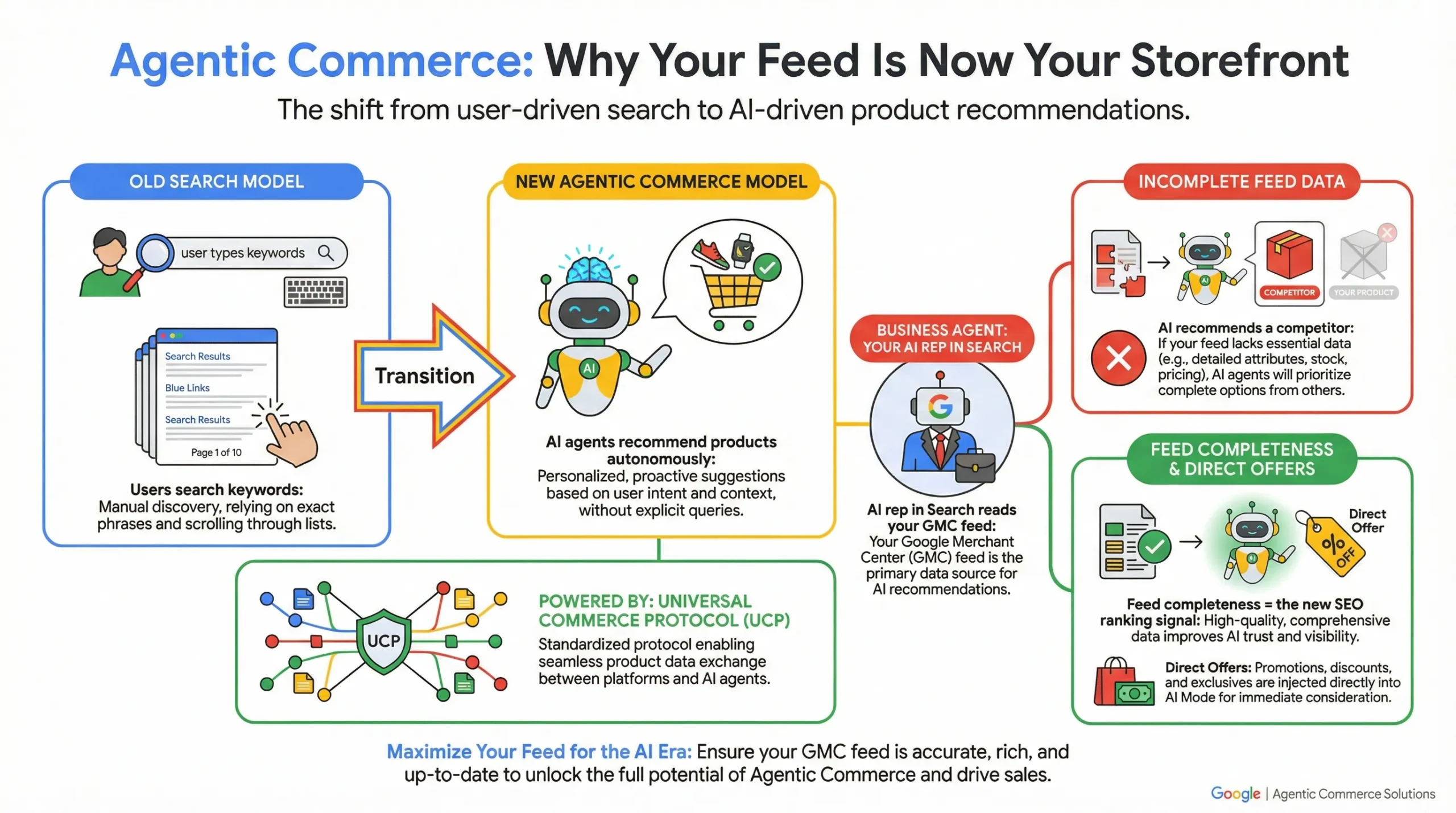
Google Merchant Center is evolving beyond a feed management tool into the infrastructure layer of AI-driven commerce.
As search shifts from keyword queries to autonomous recommendation systems, structured product data becomes the primary discovery surface. Merchants who optimise for machines, not just humans, will dominate the next phase of e-commerce visibility.
The Shift to Universal Commerce
We are entering the era of “Agentic Commerce,” driven by the Universal Commerce Protocol (UCP). This shift means that AI agents (like Google’s Gemini) will increasingly discover, evaluate, and recommend products on behalf of users, rather than users searching for keywords themselves.
In this future, your website’s visual design matters less to the initial discovery process than your structured data. AI agents read feeds, not pixels.
Business Agent & Direct Offers
Google is rolling out features like Business Agent, which allows brands to deploy an AI representative inside Search to answer product questions.
This agent relies entirely on the structured data in your Merchant Centre feed to function. If your feed lacks data on “materials” or “compatibility,” the AI cannot answer user questions and will likely recommend a competitor that does.
Similarly, Direct Offers let you inject promotions into AI Mode recommendations. To compete in this new landscape, feed completeness is no longer just a best practice; it is the prerequisite for being “chosen” by the AI.
Make Your Google Merchant Center Feed Work For Your E-commerce Store
Every ecommerce query that triggers a product grid is a moment of decision. Google considers every eligible merchant for that query and selects a winner based on feed completeness, pricing competitiveness, shipping speed, return policy, schema alignment, and product ratings.
If your feed has gaps, a missing GTIN here, a stale availability value there, an “optional” attribute left blank, Google has every reason to choose your competitor instead. And it will do so silently, without notification, while your organic visibility quietly erodes.
The good news is that Google Merchant Center is one of the most actionable channels in e-commerce SEO. Unlike domain authority or backlink profiles, feed quality is entirely within your control. Clean your data, fill your attributes, match your schema, earn your GTINs.

The compound effect is measurable: more organic grid impressions, better CTR, stronger engagement signals on your product pages, and a feed that makes your Performance Max campaigns significantly more precise.
The brands winning organic search are not necessarily the ones with the biggest budgets or the strongest traditional rankings. They are the ones who understood that their product feed is a living SEO asset and treated it accordingly.
If you have already read our comprehensive e-commerce SEO guide, consider this the structured data counterpart that powers product-level visibility.
If you’d like an expert eye on your Google Merchant Center setup, feed health, and the gaps costing you organic visibility, MediaOne‘s ecommerce SEO team is ready to help.
We audit feeds, fix disapprovals, align schema, and build the kind of compounding feed + on-site SEO strategy that turns organic Shopping from an afterthought into one of your highest-ROI channels. Contact us today!
Frequently Asked Questions
How long does it take for products to appear in Google Shopping after uploading a feed?
After uploading your feed to Google Merchant Center, products typically take 24–72 hours to be reviewed and approved. New accounts may take up to 3–5 business days due to a more thorough initial policy review. Feed quality and account history can also affect how quickly listings go live.
Can Google Merchant Center be used for digital products, services, or subscription boxes?
Google Merchant Center is designed for physical, tangible goods; digital products, services, and standalone subscriptions are not eligible for standard Shopping listings. Subscription boxes that include physical items may qualify, provided the listing describes those physical products. Always check Google’s Merchant Center eligibility policies before submitting non-standard product types.
What is a Multi-Client Account (MCA) in Google Merchant Center, and who needs one?
A Multi-Client Account (MCA) is a parent-level account that lets you manage multiple sub-accounts from a single dashboard. It is best suited for agencies handling feeds for multiple clients, large retailers running several regional stores, or marketplace operators with third-party sellers. Shared settings, such as shipping and tax rules, can be applied to all sub-accounts at once.
How do I set up Google Merchant Center for multiple countries and currencies?
In Google Merchant Center, add each target market under Business Information → Target Country, then submit either separate per-country feeds or a single multi-country feed with target_country and currency attributes set per item. Pricing, shipping, and tax settings must be configured individually for each market. Supplying native-currency feeds, rather than relying on automatic conversion, reduces disapprovals and improves listing accuracy.
What is the difference between a primary feed and a supplemental feed in Google Merchant Center?
A primary feed is your main product data source containing all required attributes; it is the authoritative record Google uses to list your products. A supplemental feed layers on top of the primary feed to override or enrich specific attributes without replacing the entire feed. Supplemental feeds are ideal for patching missing GTINs, adding product_detail fields, or testing title changes at scale.