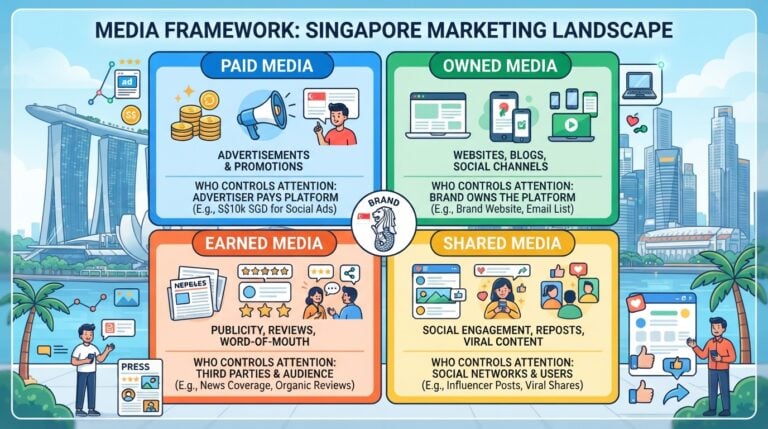
Digital marketing tools are software platforms that help businesses plan, publish, manage and measure their online marketing activities. They include social media schedulers, SEO platforms, email marketing software, website analytics tools and advertising dashboards.
However, choosing the right software involves more than comparing features. Subscription costs, learning requirements, integration capabilities and usage limits all affect whether a platform is worth keeping.
For small businesses, investing in more tools does not necessarily produce better marketing results. A smaller selection of well-integrated platforms may be easier to manage, more cost-effective and better aligned with business objectives. Businesses can also explore AI-powered digital marketing tools to streamline selected workflows, provided those tools address genuine business needs.
This guide explores the main types of digital marketing tools, explains what to consider when comparing platforms and highlights common mistakes that can lead to unnecessary spending. It also provides a practical framework for choosing software based on your marketing goals, team size and budget.
Key Takeaways
- Identify the task you need a tool to perform before comparing platforms
- Choose software based on your actual business requirements, not the length of its feature list
- Check subscription costs against your actual contact numbers, sending volumes and user requirements
- Use analytics to measure engagement, enquiries, purchases and other meaningful business outcomes
- Test free plans or trial periods before committing to paid subscriptions
Best Digital Marketing Tools by Function
The following table provides a starting point for comparing digital marketing tools according to their main functions.
| Marketing function | Example tool | What it helps you do |
|---|---|---|
| Social media management | Buffer | Plan and schedule social media content |
| Social media monitoring | Hootsuite | Manage social activities and monitor conversations |
| SEO and backlink analysis | Moz Link Explorer | Examine backlinks and third-party authority metrics |
| Email marketing | MailerLite | Manage subscribers, campaigns and automations |
| Website analytics | Google Analytics 4 | Understand website traffic and user engagement |
| Keyword research | Google Keyword Planner | Explore keyword ideas and advertising forecasts |
| Website performance | Google PageSpeed Insights | Assess performance and identify improvement opportunities |
| Dashboard reporting | Looker Studio | Combine information from different data sources |
These platforms serve different purposes, so the most suitable option depends on your business size, marketing activities and reporting requirements.
What Are Digital Marketing Tools and What Should They Do?
Digital marketing tools are software products that help businesses manage different aspects of their online marketing activities.
For example, a social media scheduler helps organise and publish posts across connected channels. An analytics platform tracks website activity and shows how visitors interact with content. An email marketing platform manages subscriber lists and distributes campaigns.
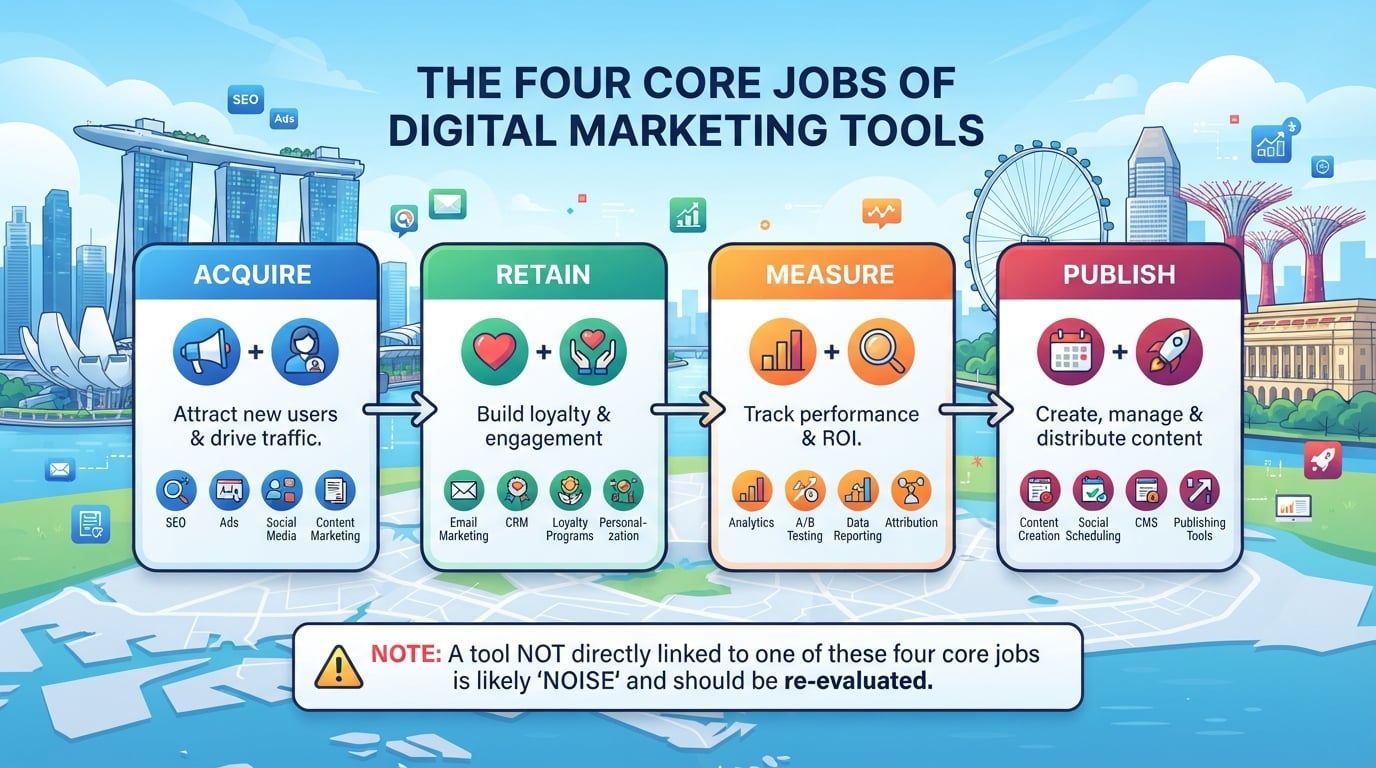
Most digital marketing tools support one or more of four core business activities:
- Acquire: Attract potential customers through search engines, advertising and other digital channels.
- Retain: Maintain relationships with existing customers through email campaigns, content and automated communication.
- Measure: Monitor marketing performance, user behaviour and business outcomes.
- Publish: Create, schedule and distribute content across digital platforms.
A tool that does not support a meaningful business activity may not justify its subscription cost.
The Features That Separate Useful Tools from Unnecessary Software
Useful software solves an identifiable problem and provides information or capabilities that businesses can act on.
Before subscribing, consider three questions.
1. Does it integrate with your existing systems?
A marketing platform should work with the other systems you use. For example, a landing page builder should be able to transfer new form submissions to your email marketing platform or customer management system.
2. Does it provide actionable information?
A tool that reports website visits or social media likes may be useful, but businesses also need to understand whether their marketing activities generate enquiries, purchases or other meaningful actions.
3. Can you test it before paying?
Free plans and trial periods allow businesses to evaluate a platform before committing to a subscription. However, check the restrictions, including contact allowances, connected accounts, user seats and available features.
Avoid selecting software solely because it has an impressive dashboard or a long feature list. A smaller platform that performs an essential task reliably may be more valuable than an expensive suite with features your team rarely uses.
Where Digital Marketing Tools Fit Within a Marketing Plan
Tools should support your marketing strategy rather than determine it.
Start by identifying your business objective. For example, a company may want to increase qualified enquiries, improve customer retention or generate more online sales.
Next, identify the channels that can help achieve that objective. A business seeking organic search visibility may need keyword research and SEO tools, while one focusing on customer retention may benefit more from email marketing software.
Google Keyword Planner is one option for exploring keyword ideas and advertising forecasts. However, its advertiser competition metric should not be confused with organic keyword difficulty.
You can also score each shortlisted platform from 1 to 5 based on:
- How well it performs the required task
- How many users it supports
- Its monthly cost at your actual usage level
- How easily it integrates with your existing systems
This is a practical decision-making framework, not an established industry standard. Its purpose is to help your team compare options consistently.
Social Media Management Tools
Social media management tools bring content planning, scheduling, publishing and engagement activities into a central dashboard. Two examples are Buffer and Hootsuite. Both help businesses manage social media activities, although their features and intended use cases differ. Businesses comparing social media management tools should consider scheduling, monitoring, analytics and team collaboration requirements before selecting a platform.
1. Scheduling, Publishing and Engagement in One Place
The practical test is whether a tool saves time on activities your team already performs regularly.
For example, a business publishing content across Facebook, Instagram and LinkedIn may benefit from a scheduler that allows its team to prepare posts in advance.
2. Buffer
Buffer focuses on social media publishing and content planning. Its Free plan currently supports up to three connected channels and allows up to 10 scheduled posts per channel in the queue at one time.
This is a queue limit, not a monthly posting allowance. Once a scheduled post is published, the available queue space can be used again. Paid plans offer additional capabilities, including more extensive scheduling and analytics features.
3. Hootsuite
Hootsuite offers a broader range of social media management capabilities, including publishing, scheduling, monitoring, analytics and social listening features. Its suitability depends on the channels, plan and features your team needs.
| Feature | Buffer | Hootsuite |
|---|---|---|
| Content scheduling | Yes | Yes |
| Social publishing | Yes | Yes |
| Analytics | Available; features vary by plan | Available; features vary by plan |
| Social listening | More limited capabilities | Broader monitoring capabilities |
| Team collaboration | Available on selected plans | Available on selected plans |
The right choice depends on the number of social channels you manage and the level of monitoring and collaboration your team requires.
A small business that mainly schedules content may not need an extensive social listening platform. Larger teams managing multiple brands or customer conversations may benefit from more advanced capabilities.
Check each provider’s current plan details before subscribing, as features and prices can change.
Measuring Social Media Performance and Return on Investment
Social media analytics can report impressions, reach, likes, comments, shares and other engagement indicators. However, these figures do not automatically demonstrate commercial success.
A business should connect social media activities to outcomes such as:
- Website visits from social channels
- Enquiries generated through social campaigns
- Leads that become paying customers
- Purchases attributed to social advertising
- Customer acquisition costs
Compare the cost of a social media management subscription with the time it saves and the reporting capabilities it provides.
A well-planned social media workflow should connect publishing activities with measurable marketing objectives. If a tool does not provide useful information or save meaningful time, reconsider whether the subscription is necessary.
Design and Landing Page Tools for Creating Campaign Assets
Every digital marketing campaign needs suitable creative assets and a destination where interested users can take action.
Design tools help businesses create graphics, videos, banners and other marketing materials. Landing page builders provide pages that visitors reach after clicking an advertisement, email link or social media post.
Although these tools are often purchased separately, they should work together to support a consistent customer experience.
The Main Categories of Creative Tools
| Tool category | Example platforms | Main purpose |
|---|---|---|
| Graphic design | Canva, Adobe Express | Create social graphics, banners and marketing materials |
| Image editing | Adobe Photoshop | Edit and refine images |
| Video editing | CapCut, Adobe Premiere Pro | Produce promotional videos and short-form content |
| Website publishing | WordPress | Create and manage website content |
| Landing page development | WordPress and dedicated landing page builders | Create pages for campaigns and lead generation |
The right choice depends on your team’s design requirements and technical capabilities.
A small business producing regular social media graphics may find a template-based design platform sufficient. Businesses requiring detailed image manipulation or advanced video production may need more specialised software.
What a Landing Page Builder Must Connect To
A landing page builder should do more than display information. It should also support the collection and measurement of customer actions. Check three important integrations before subscribing.
1. Email marketing platform
New form submissions should be transferred to the appropriate subscriber list or customer database. Where appropriate, the platform should also support automated follow-up messages.
2. Analytics platform
Page views, form submissions and important button clicks should be measurable. Campaign parameters should also be configured correctly so businesses can understand where visitors originated.
3. Advertising accounts
Where paid advertising is involved, relevant conversion events should be configured so advertising platforms can measure campaign outcomes.
If a landing page builder requires repeated manual exports or complicated workarounds, the maintenance effort may outweigh its subscription savings.
Checking Mobile Responsiveness and Page Speed
Businesses should test campaign landing pages on mobile devices as well as desktop screens.
Check that:
- Headlines and calls to action are easy to find
- Form fields are large enough to use comfortably
- Images are appropriately sized and compressed
- Buttons and navigation elements work correctly
- The page loads without unnecessary delays
- Visitors can complete the intended action without difficulty
Google PageSpeed Insights can help assess website performance and identify technical improvements. Its reports should be considered alongside real-user performance data and usability testing.
For businesses planning a new website or redesign, MediaOne’s website design and development services provide another resource to explore.
The Ease-of-Use Versus Control Trade-Off
Drag-and-drop builders allow marketers to create pages without extensive programming knowledge. However, they may offer less flexibility for highly customised layouts or technical integrations. Developer-led platforms provide greater control but require technical expertise and ongoing maintenance. For standard marketing campaigns, an easy-to-manage builder may be sufficient. For more complex requirements, choose a platform that your developers can maintain and extend.
SEO Tools and Search Visibility
SEO tools help businesses research search demand, analyse competitors, examine backlinks and monitor organic search performance.
One example is Digimetrics, an SEO and digital marketing workspace that brings several functions together, including keyword research, rank tracking, technical SEO audits, competitor analysis, backlink checking and on-page optimisation. Businesses can use these features to identify search opportunities, assess website performance and prioritise improvements.
Digimetrics also provides reporting and analysis features that help users interpret SEO findings and plan their next steps. However, like other third-party SEO platforms, its metrics and recommendations should be treated as guidance rather than official Google ranking scores or guarantees of improved rankings.
Businesses adopting a data-driven SEO approach should connect search performance with meaningful business outcomes rather than focusing exclusively on keyword positions, backlink counts or technical scores.
Checking Domain Authority and Backlink Profiles
Domain Authority estimates the ranking potential of an entire domain, while Page Authority estimates the ranking potential of an individual page. Both metrics are developed by Moz and are useful primarily for comparative analysis.
For example, a business may compare its backlink profile with those of competitors targeting similar search terms.
However, a higher DA score does not guarantee higher Google rankings. Google uses multiple ranking systems and signals, including link analysis and PageRank, rather than Moz’s proprietary authority scores.
When reviewing backlinks, businesses should consider:
- The relevance of referring websites
- The context in which links appear
- The quality of the linking pages
- Whether links are editorially earned or artificially created
- Whether the linked pages receive meaningful organic traffic
A smaller number of relevant, editorially earned links may be more valuable than a large collection of unrelated links.
Limits of Third-Party SEO Metrics and How to Interpret Them
Third-party SEO metrics are estimates based on each provider’s own data, coverage and methodology. Different SEO platforms may therefore report different backlink totals, keyword data and authority scores for the same website.
For example, Digimetrics provides tools for backlink checking, competitor analysis and SEO performance monitoring. These features can help businesses identify potential opportunities, but the results should be treated as estimates and research guidance—not as a complete record of the web or a direct measure of how Google evaluates a website.
For this reason, avoid making important SEO decisions based on one metric or platform. Instead, review several sources, including:
- Google Search Console for search impressions, clicks and indexing information
- Google Analytics 4 for website engagement and key events
- SEO platforms such as Digimetrics for competitor research, backlink analysis and identifying optimisation opportunities
- Actual enquiries and sales to understand commercial performance
Businesses can also refer to Google’s Search ranking systems documentation to understand how its ranking systems work.
Email Marketing Tools
Email marketing platforms help businesses manage subscriber lists, create campaigns, send newsletters and automate selected communications. Email is a useful channel for communicating directly with subscribers, nurturing leads and maintaining customer relationships. Unlike social media followers, an email subscriber list is a first-party audience asset. However, businesses must still comply with applicable consent, privacy and email marketing requirements. Companies looking for additional support with campaign planning and subscriber management can explore MediaOne’s email marketing services.
Why Email Still Earns Its Place in the Marketing Mix
Email provides a direct communication channel between businesses and people who have chosen to receive their messages.
Common uses include:
- Welcome emails for new subscribers
- Educational newsletters
- Product and service announcements
- Promotional campaigns
- Customer onboarding sequences
- Post-purchase communication
- Customer retention campaigns
A basic setup requires a subscriber list, an appropriate sign-up process, relevant email content and a regular sending schedule. Email marketing software can help automate these activities and provide reporting on campaign performance. Businesses should also pay attention to subscriber consent, list hygiene, unsubscribe requests and email deliverability.
Comparing Plan Limits, Contact Volumes and Pricing Tiers
Subscription limits can significantly affect the actual cost of an email marketing platform.
For example, MailerLite’s Free plan currently includes the following allowances:
| Feature | Free plan allowance |
|---|---|
| Active subscribers | Up to 250 |
| Monthly email sends | Up to 2,500 |
| User seats | 2 |
| Automations | Up to 3 |
| Active forms | Up to 3 |
| Landing pages | 1 |
| Websites | 1 (up to 5 pages) |
These limits are confirmed by MailerLite’s published pricing and help documentation. The limits apply to active or published items for features such as automations, forms, landing pages and websites; drafts do not count towards those limits.
Before choosing a subscription, compare:
- The number of active subscribers
- Your expected monthly email volume
- The number of people who need account access
- Available automation features
- Reporting and integration requirements
- Additional costs associated with larger subscriber tiers
Do not select a platform simply because it offers unlimited contacts or sends. Consider whether its features are appropriate for your business and whether you will actually use them.
MailerLite may change its pricing, features and allowances, so check its current pricing page before choosing a plan.
Keyword and Competitor Research Tools for Planning Content
Keyword research tools help businesses understand what people search for and identify topics that may be relevant to their products or services.
Common metrics include:
- Search volume: An estimate of how frequently a keyword is searched
- Keyword difficulty: A third-party estimate of how competitive it may be to rank for a keyword organically
- Search intent: The likely purpose behind a search, such as learning, comparing products or making a purchase
For most small businesses, search intent and commercial relevance are often more useful than search volume alone. A keyword with 300 monthly searches from people actively comparing service providers may be more valuable to a business than a keyword with 5,000 searches from people looking for a general definition.
Using Google Keyword Planner for Keyword Research
Google Keyword Planner is a tool within Google Ads that provides keyword ideas, historical search-volume estimates and advertising forecasts. It can help businesses identify relevant search terms and plan paid search campaigns.
However, there are some limitations to understand.
First, Google requires users to complete account setup and provide billing information to access basic features such as keyword suggestions.
Second, its advertiser competition metric measures competition among advertisers. It should not be interpreted as an organic SEO keyword difficulty score.
For SEO planning, businesses should also examine search intent, competing pages and the relevance of a keyword to their products or services.
Competitor Analysis for Content Gaps
Competitor analysis tools allow businesses to examine the keywords, pages and backlinks associated with competing websites. The objective is to identify opportunities where a business may be able to create more relevant or useful content.
For example, a competitor may rank for a group of service-related keywords that your website does not currently address.
This could reveal opportunities to:
- Publish new educational articles
- Expand existing service pages
- Answer frequently asked customer questions
- Improve outdated website content
- Develop resources that attract relevant backlinks
Moz Link Explorer can help examine backlink profiles, but it should not be treated as a complete competitor research platform on its own. Use its data alongside keyword research, search results and website performance information.
A Simple Process for Turning Keywords into a Content Plan
- Export keyword ideas from your research tool
- Remove keywords unrelated to your products or services
- Group closely related terms by topic
- Identify whether each group has informational, commercial or transactional intent
- Evaluate business relevance, search competition and content production requirements
- Prioritise topics that support your business objectives
- Publish relevant pages and review their performance over time
Treat keyword volume figures as estimates rather than guaranteed traffic forecasts.
Different tools use different data sources and methodologies, so their reported search volumes may not match. Use the figures to compare opportunities within the same platform rather than predict exact website visits.
Analytics, Tracking and Reporting Tools
Analytics tools help businesses understand what happens after visitors arrive at their websites.
Google Analytics 4 is a widely used platform for examining website and app activity, traffic acquisition, user engagement and important events.
It can help answer questions such as:
- Which channels bring visitors to the website?
- Which pages receive the most engagement?
- What actions do visitors take?
- Which marketing channels generate enquiries?
- How do users move through the website?
However, analytics tools are only useful when the information they provide leads to better decisions.
Measuring Engagement Rate, Bounce Rate and Key Events
Google Analytics 4 uses specific definitions for engagement. An engaged session is one that meets at least one of the following conditions:
- Lasts longer than 10 seconds
- Includes a key event
- Includes at least two page or screen views
Engagement rate measures the percentage of sessions that qualify as engaged sessions. Bounce rate measures the percentage of sessions that are not engaged. This means GA4 bounce rate is not simply the percentage of visitors who leave after viewing one page. Average engagement time per session can also help businesses understand how long their website remains in focus during a session. Businesses should interpret these metrics according to the purpose of each page.
For example, a contact page may have a relatively short engagement time because visitors quickly find the telephone number they need. This does not necessarily indicate poor performance. Key events are actions that matter to the success of a business, such as submitting an enquiry form or completing a purchase.
Google Analytics distinguishes key events from advertising conversions. A key event identifies an important action in Analytics. A conversion is used to measure important actions for advertising performance and campaign optimisation.
For accurate reporting, businesses should configure relevant events and check that their tracking works correctly.
Separate reports from individual platforms can make marketing performance difficult to understand. Looker Studio allows businesses to create dashboards that combine information from supported data sources.
For example, a marketing dashboard may include:
- Website traffic from Google Analytics 4
- Search impressions and clicks from Google Search Console
- Advertising results from Google Ads
- Lead information from connected business systems
Keep dashboards focused on the information that supports actual decisions.
For a small business, five or six meaningful indicators may be more useful than dozens of figures that nobody reviews.
Choose the metrics first, then build the dashboard around the questions your team needs to answer.
Testing and Improving Conversions with A/B Testing Tools
A/B testing tools help businesses compare two versions of a page, email or advertisement to determine which performs better against a defined objective.
In a basic A/B test:
- Version A is the control
- Version B is the alternative variation
- Visitors are assigned to the versions
- Both versions are measured against the same conversion objective
The purpose is to identify whether a change produces a measurable improvement rather than relying on personal preferences.
What to Test First
Start with elements that influence the visitor’s decision.
- Headlines: Test whether a clearer or more specific headline helps visitors understand the offer.
- Calls to action: Compare different button messages, placements or presentations.
- Form length: Test whether reducing the number of fields improves completion rates without compromising lead quality.
- Landing page content: Compare different layouts, content structures or value propositions. For example, visitors arriving from social media may respond differently to a landing page than visitors arriving through organic search. Where traffic volumes allow, evaluate these audiences separately.
Change one main variable at a time so that you can better understand what influenced the result.
Set Sample Size and Run Time Before Reviewing Results
One common A/B testing mistake is stopping an experiment as soon as one variation appears to perform better.
Early differences may result from random variation rather than a genuine improvement.
Before starting a test, establish:
- The baseline conversion rate
- The minimum improvement worth detecting
- The significance level
- The desired statistical power
- The expected traffic volume
- The planned test duration
For example, suppose a service page has a baseline conversion rate of 4%, and a business wants to detect an increase to 5%. Under a two-sided test with a 5% significance level and 80% statistical power, approximately 6,726 visitors per variation would be required under standard independent-sample assumptions.
This is an illustrative calculation, not a universal requirement. The actual sample size depends on the experiment design and the assumptions used. Do not declare a winner based on a small number of visitors or a few days of results.
Avoid Acting on Random Variation
Common A/B testing mistakes include:
- Stopping a test as soon as one version appears to perform better
- Running several overlapping tests without accounting for their effects
- Changing the page during an active experiment
- Testing small changes with insufficient traffic
- Ignoring lead quality and revenue
- Treating an inconclusive result as proof that both versions perform equally
For low-traffic websites, consider prioritising usability improvements and testing larger changes that have a clear rationale.
Paid Advertising and Marketing Automation Tools
Paid advertising tools help businesses manage advertising campaigns, budgets, audiences, bids and reporting. Examples include Google Ads and advertising management tools offered by major social media platforms. Marketing automation tools help manage repetitive tasks, such as sending follow-up emails, updating customer records and generating campaign reports. Both categories can improve operational efficiency, but they require clear objectives and appropriate monitoring.
What Paid Advertising Tools Cover and When They Pay Off
Paid advertising platforms help businesses reach audiences through sponsored placements. Google Ads, for example, supports search advertising and other campaign formats within Google’s advertising network.
These platforms provide tools for managing:
- Campaign budgets
- Audience and location targeting
- Bids and bidding strategies
- Advertising creative
- Conversion measurement
- Campaign reporting
Paid advertising is most useful when businesses have a clear offer, a suitable landing page and a defined conversion objective. Before committing a significant budget, test a campaign with a controlled spending limit. Set a target cost per enquiry or acquisition, monitor the quality of the resulting leads and review performance before increasing expenditure. Keyword Planner can help businesses explore advertising forecasts, but actual campaign performance will depend on bidding, budget, ad quality, targeting and customer behaviour.
Automating Campaigns Without Losing Control of the Message
Marketing automation can reduce the time spent on repetitive activities.
Examples include:
- Sending welcome emails to new subscribers
- Notifying sales teams when a lead submits a form
- Scheduling email sequences
- Organising subscribers into relevant groups
- Generating automated campaign reports
- Applying predefined rules to advertising activities
However, automation should not replace human oversight. Businesses should review the rules governing automated actions, check the accuracy of their data and monitor whether automated decisions support actual commercial objectives.
For example, an automated email sequence may send a discount offer to a subscriber who has already purchased the product. This can create unnecessary communication and affect the customer experience.
The goal is to automate appropriate tasks while retaining control over important customer interactions.
Choosing the Right Digital Marketing Tool
The best digital marketing tool is the one that supports your business objectives, fits your team’s requirements and provides sufficient value for its cost. Buying a comprehensive software suite before defining the required tasks can result in unnecessary spending. Start with your marketing plan, identify the activities that require dedicated software and compare platforms based on their ability to support those activities.
Best Tool by Job
| Job | Example tool | Decision rule |
|---|---|---|
| Social publishing | Buffer | Choose it if you mainly need content planning and scheduling |
| Social monitoring | Hootsuite | Consider it if you need broader social monitoring and reporting |
| Email marketing | MailerLite | Consider it if its contact limits and sending allowance fit your requirements |
| Website analytics | Google Analytics 4 | Use it to measure traffic, engagement and key events |
| SEO and backlink analysis | Moz Link Explorer | Use it to examine backlink profiles and comparative metrics |
| Keyword research | Google Keyword Planner | Use it for keyword ideas and advertising forecasts |
| Website performance | PageSpeed Insights | Use it to identify performance improvement opportunities |
| Dashboard reporting | Looker Studio | Use it to combine information from supported data sources |
A Step-by-Step Checklist for Selecting a Tool
1. Name the job
Determine whether the tool needs to acquire customers, retain existing ones, measure results or publish content. A tool that does not support a meaningful task may not justify its subscription.
2. Count the users
Consider how many employees need to access the platform. Account seats, permissions, training and collaboration features can affect the total cost.
3. Price it at your actual usage level
Compare subscriber numbers, email sending volumes, connected social accounts and storage requirements. Free plans may be sufficient for smaller operations, but businesses should check the limits before committing.
4. Check integrations
Confirm that the tool works with your existing website, analytics, customer management and advertising systems. Poor integration can create additional administrative work.
5. Test before committing
Use a free plan or trial period to run a real marketing task. Evaluate whether the platform saves time, provides useful information and helps achieve the intended result.
Scoring Options Against Your Goals, Team Size and Budget
A simple scoring framework can help businesses compare shortlisted tools.
Give each platform a score from 1 to 5 across four criteria:
| Evaluation criterion | What to assess |
|---|---|
| Job suitability | How well does it perform the task you need? |
| Team requirements | Does it support the number of users and workflows involved? |
| Cost | Is the subscription affordable at your actual usage level? |
| Integration effort | How easily does it connect with your existing systems? |
For example, a tool that scores 4 for job suitability, 3 for team requirements, 5 for cost and 2 for integration effort would receive a total score of 14 out of 20.
Another platform may score 15 despite costing more.
This framework is intended to support decision-making, not provide an objective industry ranking. Businesses should give greater importance to criteria that directly affect their operations. A platform with many unused features may appear attractive but create additional maintenance and training requirements.
Common Digital Marketing Tool Mistakes
Choosing software before identifying the problem it needs to solve is one of the most avoidable purchasing mistakes. Businesses may see an impressive demonstration, subscribe to a platform and later discover that it does not address their actual requirements.
The following mistakes can lead to unnecessary spending and inefficient workflows.
1. Stacking Overlapping Tools and Paying for Unused Features
Some businesses pay for multiple platforms that perform almost identical tasks.
For example, a company might subscribe to three different social media schedulers when one platform could handle its publishing requirements.
Each additional subscription creates more logins, training requirements and data management work. Before renewing a subscription, list every tool, identify its main user and record the business activity it supports. If a platform has no clear owner or purpose, consider whether it is still necessary.
2. Trusting a Single Metric Without Verifying It
Third-party SEO scores and platform-specific analytics can provide useful information, but they should not be treated as definitive evidence of business performance. Moz Domain Authority, for example, is a proprietary metric rather than a Google ranking factor. Similarly, social media impressions do not automatically translate into enquiries or purchases. Compare information from relevant sources and evaluate whether marketing activities contribute to measurable business outcomes.
3. Choosing Features You Do Not Actually Need
A platform may advertise extensive automation, reporting and collaboration capabilities. However, a small business with one marketer may not need advanced team permissions or enterprise-level reporting. Choose software based on current requirements and realistic future needs rather than paying for features that may never be used.
4. Ignoring Integration and Maintenance Costs
A low-cost tool may become expensive if it requires manual data transfers, additional subscriptions or frequent troubleshooting. Evaluate the total cost of ownership, including subscription fees, training, integration and ongoing maintenance.
5. Failing to Review Subscriptions Regularly
Business requirements change over time. A platform that was useful during a major campaign may no longer be necessary once the campaign ends. Review subscriptions periodically to identify unused accounts, duplicated features and opportunities to simplify your marketing technology setup.
Choose Digital Marketing Tools That Support Real Business Goals
The right digital marketing tools are not necessarily the most expensive or feature-rich platforms. They are the tools that help your business complete important marketing tasks, understand performance and achieve measurable objectives without creating unnecessary complexity. Start by identifying what your business needs to accomplish. Compare platforms based on functionality, pricing, integrations and ease of use, then test your shortlisted options before committing to a subscription. A smaller selection of well-integrated tools can be easier to manage than a large collection of overlapping platforms. Most importantly, review their performance regularly. Keep the tools that support meaningful business outcomes and reconsider those that no longer justify their cost.
Frequently Asked Questions
How many people will use a digital marketing tool, and how should you count them?
Count everyone who needs to log in, approve content, manage campaigns or review reports. A platform used daily by five employees has different access and collaboration requirements from one used occasionally by a single marketer. Consider user seats, permissions, training and administrative responsibilities when comparing subscriptions.
Are free digital marketing tools good enough to start with?
Free tools can be sufficient for businesses with relatively simple marketing requirements. For example, MailerLite’s Free plan supports up to 250 active subscribers and 2,500 monthly email sends. However, free plans often have limitations involving users, automation, reporting and usage volumes. Test whether the available features meet your needs before upgrading.
Do I need a separate tool for every marketing channel?
No. A separate platform is not necessary for every marketing activity. Some businesses can manage social publishing, email communication and basic analytics with a small number of platforms. Add dedicated tools only when they provide capabilities that your existing software cannot reasonably support.
How many digital marketing tools should a small business use?
There is no universal number. The appropriate selection depends on team size, marketing objectives, campaign complexity and available resources. Start with the minimum number of platforms required to manage essential activities. Add more only when there is a clear operational or commercial reason.
What should I consider before paying for a digital marketing tool?
Consider its main function, subscription cost, usage limits, integration capabilities, user requirements and reporting features. Check whether the platform supports your existing systems and whether its features are appropriate for your actual marketing activities. Whenever possible, test it with a real campaign before purchasing a paid plan.