Website maintenance in 2025 isn’t about ticking boxes or occasional fixes. It’s the backbone that keeps your digital presence sharp, secure, and efficient.

When your website slows, glitches, or fails to adapt, it costs more than just clicks, it costs trust and sales. In Singapore’s competitive digital landscape, many businesses rely on an experienced SEO agency to ensure their websites remain fast, secure, and optimised for search performance.
This article breaks down exactly what effective website maintenance looks like now, showing you how to keep your site reliable and competitive in Singapore’s fast-moving market.
Key Takeaways
- Regular website maintenance protects your site from security risks, improves performance, and boosts user experience.
- Keeping plugins, themes, and content up to date ensures your website remains relevant and search engine-friendly.
- Automated backups and disaster recovery plans minimise downtime and safeguard your business against data loss.
- Continuous performance monitoring and SEO tracking help maintain fast load times and strong search rankings.
What is Website Maintenance?
Website maintenance means more than just updating content or fixing broken links. It’s the ongoing process that ensures your website runs securely, loads quickly, and adapts to changes in technology and user behaviour.
Think of it as regular servicing for a car – without it, small issues can turn into costly breakdowns that halt your business.

Your website needs constant attention: security patches to block new threats, performance tweaks to meet user expectations, backups to avoid data loss, and updates that keep your site compatible with browsers and devices.
Neglecting these invites slower load times and vulnerabilities: issues your competitors will exploit.
Here’s a simple checklist to start today:
- Schedule monthly security scans and updates
- Monitor site speed and optimise images regularly
- Test forms and checkout processes to avoid lost leads
- Keep backups off-site and easy to restore
- Audit plugins and remove unused ones to reduce risks
Website maintenance is not optional. It is a fundamental business practice that protects your brand and converts visitors into customers.

Why is Website Maintenance Important?
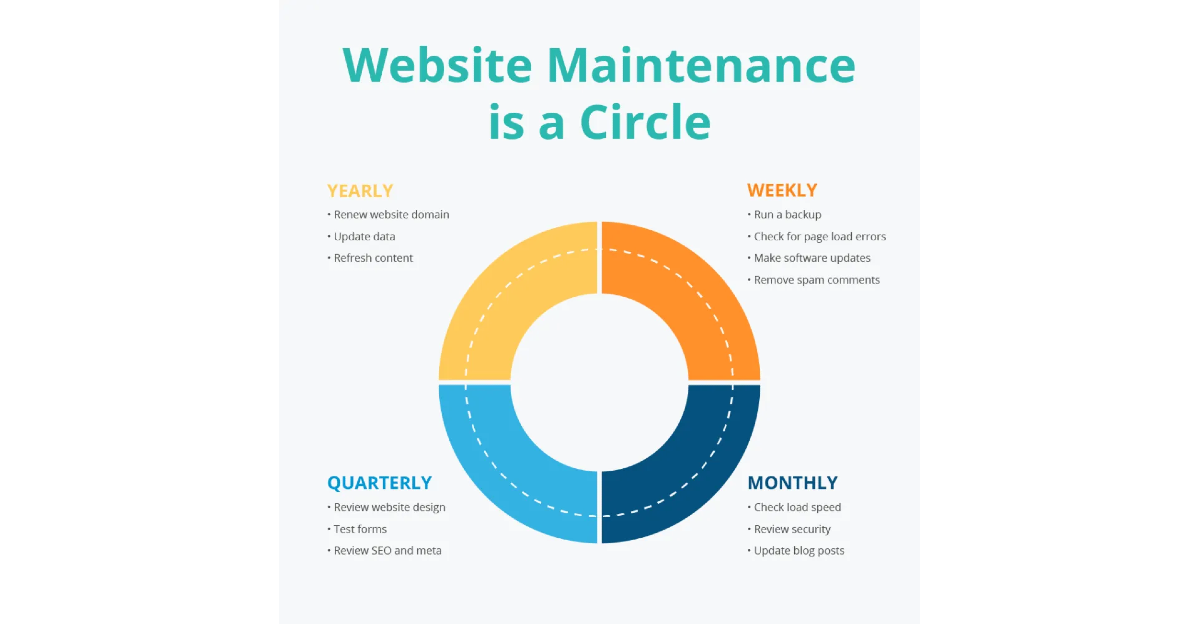
Image Credit: Alien Design
Website maintenance is the difference between a site that sells and one that stalls. When you skip upkeep, you’re inviting slow load times, broken links, security breaches, and a customer experience that drives prospects away faster than you can win them back.
Look at the data: Google reports that 53% of mobile users abandon sites that take longer than three seconds to load.
If your website drags, you lose half your potential customers before they even see your offer. Maintenance keeps your site lean and lightning-fast.
Beyond speed, security is non-negotiable. The 2019 Verizon Data Breach Investigations Report confirms that small businesses represented 43% of all data breaches.
Regular updates patch vulnerabilities and protect your site (and your customers) from costly hacks that can irreparably damage your reputation.
Here’s what website maintenance delivers in real terms:
- Consistent performance: Regular updates and optimisations keep load times below 3 seconds
- Stronger security: Timely patches close loopholes hackers exploit, as detailed in our comprehensive website security guide
- Improved SEO: Search engines favour sites that load quickly and are free of errors
- Better user experience: Functional navigation, working links, and fast checkout retain visitors
Comparison: Neglected Site vs Maintained Site
| Aspect | Neglected Site | Maintained Site |
| Load Speed |
|
|
| Security |
|
|
| SEO Ranking |
|
|
| User Experience |
|
|
| Recovery |
|
|
Your website’s health directly impacts your bottom line. Maintaining it is not a cost, it is an investment.
When you treat your website like a vital asset and commit to ongoing maintenance, you build trust with your audience and keep your digital engine running at full throttle.
7 Common Website Maintenance Tasks You Need
Here’s the reality: website maintenance isn’t a single job you tick off once a year. It’s a series of targeted tasks, done consistently, that keep your site secure, fast, and relevant.
1. Security Updates

Image Credit: EDUCBA
Security updates aren’t optional extras; they’re the frontline defence between your website and costly cyberattacks.
Every day, new vulnerabilities surface in software, plugins, and themes you rely on. Without prompt updates, you leave open doors for hackers to exploit.
For context, small businesses face significant risks, with data breaches affecting them disproportionately. Many breaches happen because of outdated software. Applying security patches regularly closes these gaps before attackers find them.
Here’s how to handle security updates like a pro:
- Monitor regularly: Set up alerts or dashboards to track new updates for your CMS and plugins
- Schedule prompt updates: Apply patches within days of release, not weeks or months
- Test updates in staging: Avoid surprises by testing changes on a staging environment before going live
2. Plugin and Theme Updates

Image Credit: WordPress
Plugin and theme updates are the backbone of your website’s health. They deliver essential improvements, fix bugs, and most importantly, patch security holes that hackers actively hunt.
Falling behind on these updates doesn’t just risk glitches, it invites vulnerabilities that can compromise your entire site.
Here’s your playbook to manage plugin and theme updates effectively:
- Audit before updating: Check plugin/theme compatibility with your CMS version to avoid conflicts
- Prioritise security patches: Apply critical updates immediately, especially those labelled as security fixes
- Test in a staging environment: Preview updates offsite to catch issues before they affect your live site
By managing plugin and theme updates proactively, you keep your site stable, secure, and running smoothly.
This directly supports your advanced SEO strategy by maintaining technical foundations.
3. Content Updates

Image Credit: ClearScope
Content updates aren’t just about swapping out old dates or tweaking typos. They’re strategic moves that keep your website relevant, trustworthy, and aligned with what your audience and search engines want now.
Google’s algorithm rewards freshness, which is why content updates are crucial for maintaining search visibility. Here’s how you treat content updates like an asset, not a chore:
- Schedule quarterly content audits to review accuracy, relevance, and performance metrics
- Refresh key pages with updated statistics, industry trends, and new customer insights
- Expand content where gaps exist, answering new questions your audience is asking
Keep your content alive and evolving. When done right, updates turn your website into a trusted resource that keeps both visitors and search engines coming back.
4. Backup and Disaster Recovery

Image Credit: Storix Software
Backup and disaster recovery are your website’s insurance policy – the safety net that saves you when everything else fails.
No matter how bulletproof your site seems, risks like server crashes, hacking, or human error can wipe out your digital presence in minutes.
Here’s how to implement backup and disaster recovery like a pro:
- Automate backups daily or at a minimum weekly to capture recent changes
- Store backups offsite on cloud platforms like AWS, Google Cloud, or specialised services
- Test backup restorations regularly to confirm data integrity and recovery speed
Backup isn’t a nice-to-have. It’s your last line of defence that keeps your business running when the unexpected hits.
5. Performance Monitoring and Optimisation

Image Credit: Mantra Labs
Performance monitoring and optimisation are your website’s engine tune-up. Without constant attention, even the best-built sites slow down, frustrate users, and lose rankings.
You want a website that runs smooth under pressure, delivering fast load times and seamless interactions every single visit.
Here’s your practical approach to performance monitoring and optimisation:

- Use tools like Google PageSpeed Insights, GTmetrix, or Pingdom to track load times
- Optimise images by compressing without losing quality using tools such as TinyPNG or ShortPixel
- Enable caching – both browser caching and server-side caching to reduce load times
Think of performance optimisation as an ongoing process, not a one-off fix. Our performance SEO guide shows how speed directly impacts your bottom line.
6. Security Scanning

Image Credit: VOCSO
Security scanning is your website’s early warning system. It spots weaknesses, malware, and suspicious activity before they turn into full-blown crises.
For businesses in Singapore, where digital trust is paramount, regular scanning isn’t a luxury; it’s a necessity.
Here’s how to integrate security scanning into your maintenance routine:
- Schedule automated scans weekly or biweekly using trusted tools like Sucuri, Wordfence, or SiteLock
- Scan for malware, vulnerabilities, and blacklisting status to ensure your site remains clean
- Review scan reports promptly and prioritise fixes based on risk severity
Think of security scanning as a health check for your site. Regular scans catch issues early, reduce downtime risk, and maintain the confidence your Singapore customers expect.
7. Accessibility Testing

Image Credit: Test With Nishi
Accessibility testing is about making your website usable for everyone, including people with disabilities. It’s not just ethical, it’s practical.
When your site works for a broader audience, you unlock new customers and comply with legal standards increasingly enforced worldwide.
Here’s how to approach accessibility testing with precision:
- Use automated tools like Axe, WAVE, or Lighthouse to catch common issues
- Conduct manual testing with screen readers and keyboard-only navigation
- Follow WCAG 2.1 guidelines, aiming for at least AA compliance
Accessibility testing isn’t just a box to tick – it’s a competitive edge. When your website welcomes all users, you enhance usability, improve SEO, and build trust with Singapore’s diverse customer base.
SEO Monitoring
SEO monitoring is your strategic radar for keeping your website visible and competitive in search results.
It’s not a one-time setup but a continuous process that tracks how your site performs against your target keywords, competitors, and evolving search algorithms.
Here’s how to run SEO monitoring like an expert:
- Track keyword rankings using tools like SEMrush, Ahrefs, or Google Search Console
- Monitor organic traffic trends to detect sudden drops or spikes
- Audit backlinks regularly to maintain a healthy link profile
By committing to continuous SEO monitoring, you stay ahead of shifts, protect your rankings, and ensure your website remains a powerful asset in Singapore’s crowded digital marketplace.
How Your Business Benefits With Regular Website Maintenance

Regular website maintenance transforms your site from a basic online presence into a powerful business asset.
It keeps your platform secure, fast, and aligned with the latest industry standards, giving your customers confidence and improving your search engine rankings.
When your website runs smoothly, you reduce downtime, prevent costly security breaches, and deliver a seamless experience that keeps visitors engaged and ready to convert.
Partnering with MediaOne means you get expert support that takes website maintenance off your plate whilst maximising your site’s potential.
Their professional SEO services ensure your site stays optimised, competitive, and ready to capture new opportunities in Singapore’s digital landscape.
Don’t leave your website’s performance to chance — invest in regular website maintenance with MediaOne and watch your business grow.
Frequently Asked Questions
How often should website maintenance be performed?
Website maintenance should be done regularly, ideally monthly for most tasks such as security updates and backups. Content reviews and SEO audits can be quarterly.
Consistent scheduling prevents small issues from escalating and keeps your site running smoothly.
What is the cost of website maintenance in Singapore?
The cost varies depending on the complexity of your site and the services required. Small to medium businesses in Singapore typically spend between SGD 100 to SGD 500 per month.
Investing in professional maintenance can save far more by avoiding downtime and security breaches.
Can website maintenance improve search engine rankings?
Yes, ongoing maintenance helps improve rankings by ensuring fast load times, fixing broken links, updating content, and maintaining technical SEO elements. Search engines favour websites that provide a reliable and updated user experience.
Is website maintenance different for e-commerce sites?
Yes, e-commerce websites require more frequent and specialised maintenance. This includes secure payment gateway updates, inventory management checks, and thorough testing of checkout processes to prevent lost sales.
What happens if website maintenance is neglected?
Neglecting website maintenance can lead to slower load speeds, security vulnerabilities, broken links, and poor user experience. Over time, it can result in costly repairs or even website downtime that damages your brand reputation.