Running a business with one shop is hard enough. But when you expand to two, five, or fifty outlets across Singapore, the complexity multiplies. Add to that the juggling involved with overseeing multiple digital profiles associated with each branch.

You might find that your Orchard branch is booming while your Jurong outlet is quiet. Perhaps your Tampines location shows up on Google, but your new spot in Katong is nowhere to be found.
Expansion and franchising have to be evident across both physical and digital channels. As such, you need a multi-location SEO strategy to ensure every branch gets the attention it deserves.
In this guide, we will break down how to manage SEO and digital visibility across multiple locations without losing your mind.
Key Takeaways
- Create Unique Local Landing Pages: Instead of a single “Locations” list, build dedicated pages for every branch to capture area-specific search intent.
- Claim Individual Google Business Profiles: Every physical outlet needs its own verified profile to appear in Google Maps and local search results.
- Focus on Hyper-Local Keyword Research: Use towns, districts, and even street names to optimise your content for “near me” searches. Targeting specific terms like “best pasta in Serangoon” signals to search engines that you are the most relevant result for that exact neighbourhood.
- Turn Reviews into a Business Routine: High-quality, recent reviews are the lifeblood of local rankings and directly influence customers’ decisions to visit.
- Centralise Management for Consistency: Use a single dashboard or partner with an SEO agency to oversee multiple digital profiles without losing track of updates.
What is Multi-Location Local SEO

Multi-location SEO is the process of optimising a brand with multiple locations so it appears in local search results for each area it serves.
For example, if you run a chain of law firms, you want people in different parts of the city to find the office closest to them. Essentially, each chain or branch is running its own local SEO campaign.
Local SEO focuses on ranking for “near me” or “in [Location]” queries. It optimises search for a high-intent audience that is within the service area of your business. As such, local SEO is used for brick-and-mortar businesses — those with physical addresses.
At its core, multi-location is essentially local SEO for multiple locations. It means adopting a unified, streamlined process for all local SEO campaigns across stores. It’s a systematised implementation that ensures online visibility for all branches within their respective locations.
The result is every branch — no matter where they are — getting ample visibility and foot traffic.
Implementing Multi-Location SEO Onsite
Your website is your digital storefront.
When you manage a multi-location business, however, it doesn’t necessarily mean that you need multiple domains. A single website would suffice, just with a few yet crucial changes:
Separate Landing Pages for Each Location Branch

Source: Pasta Fresca
Many multi-location businesses, particularly restaurants, have a single “Our Branches” or “Our Locations” page that simply lists all their locations.
While this can suffice and serve well for a lot of multi-location businesses, we can take it a step further. To succeed in multi-location SEO, you need individual location pages. That means each branch will have its own dedicated landing page.
Each of these location landing pages serves as the “home page” for that specific branch. This results in the following benefits:
- Creating landing pages for each location lets you create tailored content that can engage each of those locations, with each page unique and catered to that specific area.
- Having separate landing pages for each branch allows the brand to promote news and events specific to their branch, as opposed to publishing them on the homepage.
Think of it this way: A customer in Woodlands is not interested in your promotions in Sentosa. Yet when they visit your homepage, they’ll be greeted with news about amazing promos and events happening across branches except Woodlands.
As such, a dedicated landing page for the Woodlands branch — one where customers can make reservations, view photos, and see branch-specific promotions — will be highly beneficial for local SEO in Woodlands.
Optimising Each Landing Page for Local Keywords
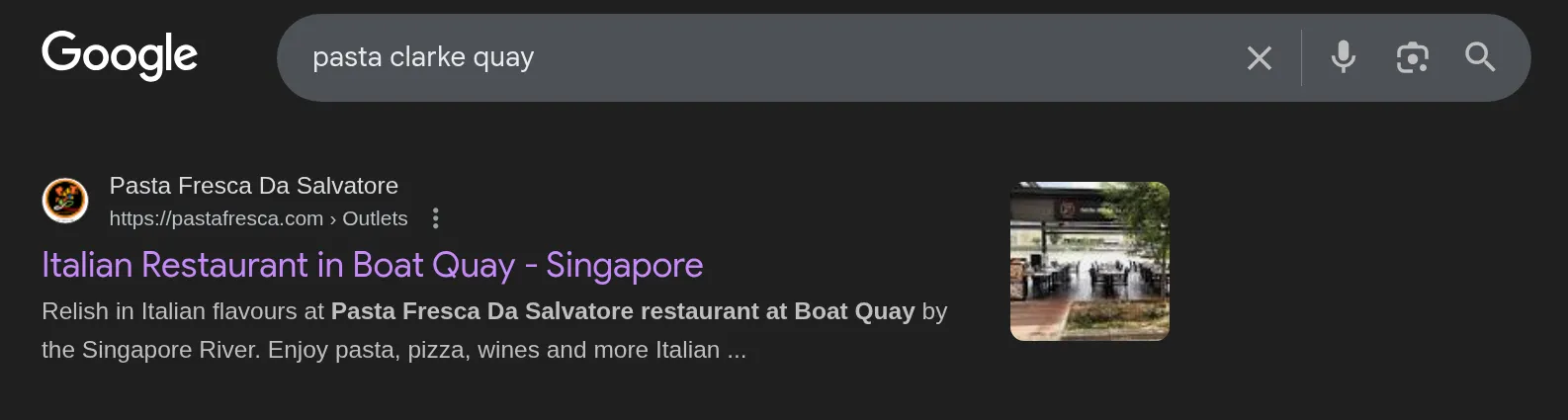
Keyword research helps find local keywords that people use in each area. Unfortunately, the most granular level SEO tools can reach is the city level. What if you have more than one branch in each city?
At this point, some guesswork would come into play. Even if you can’t set a filter for results in Clarke Quay, for example, you can use towns, streets, and districts to filter through your keywords.
- If you’re looking for keyword results in Singapore (city), filter for words such as “Tampines” and “Clarke Quay”
- Look through the filtered results and shortlist the ones relevant to you
For example, a restaurant might optimise for “best pasta in Bukit Timah” for one landing page and “best pasta in Serangoon” for another. Using these location-specific keywords signals to Google that your page is the best answer for those search queries.
Implementing Multi-Location SEO Offsite
Managing multi-location SEO requires a strong presence across the wider internet — even beyond your own website.
You’d want to leverage the following platforms for each of your locations:
Google Maps

Source: Google Maps, Mamma Mia

For high-intent local customers, the journey through your doors starts with a Google Maps search. Those looking through Google Maps are likely in their cars already, parked and ready to go. Or perhaps already have their shoes on, ready to head out.
Google Maps shows nearby potential patrons the following:
- The name of the business
- Driving directions
- Storefront photos
- Photos of the interior, food, services, etc.
- Reviews from customers
- The business’ contact information
- Link to the website (or location-specific landing page)
Essentially, all that is relevant to making a decision on whether to go there.
To appear on Google Maps and begin receiving reviews, you should have a Google Business Profile. You should have one profile for each location you want to appear on Google Maps.
Tip: Ensure the name, address, and phone number (NAP) are identical across your website and your Google Business Profile. If one says “St.” and the other says “Street,” it can cause consistency issues for crawlers.
Local Directories

Source: Michelin
Local directories like Yelp and Michelin give local patrons information about certain places—information that visitors should know. These are tremendously useful for the foodie and travel community, both of which are passionate, high-intent patrons.
Directories contain more detailed information about the business, such as menu items, “what the locals think”, a description of the business, and available facilities, among others.
- Listing your business in directories helps capture an adventurous audience who spend time there—people looking for their next adventure, cultural event, or experience.
- Listing the business on a local directory helps acquire more “real estate” on the SERP.
- AI tools (e.g., ChatGPT) and phone assistants (e.g., Siri, Alexa, Google Assistant) crawl through these directories to deliver tailored recommendations to their users, increasing your online presence even more.
Some directories to list on include Yelp, TripAdvisor, and Michelin.
Social Media
Social media is a great tool for building a local audience.

While social media presence is not a direct ranking factor for SEO, considering that social media marketing and SEO are two separate marketing mediums, a social media presence can still indirectly improve your search engine visibility.
Hence, some SEO agencies, such as MediaOne, offer social media management in addition to SEO services.
Furthermore, having a social media presence also places an additional snippet that can appear on the SERP, increasing your “real estate”.
Some quick social media tips to improve your multi-location SEO include:
- Creating a page (e.g., Facebook and Instagram) for each of your locations
- Indicating on each page the location and operating hours of their respective branch
- Running localised paid ads. The Meta Ads manager allows marketers to run ads within a specific region or mile-radius
Paid Feature Listings

Source: Sethlui
Sometimes, you need a boost from a trustworthy publication. In areas where you have many local competitors, you might consider paid feature listings.
By paying for a featured spot, such as a dedicated feature article or a place on a “Top 10” list, you complement your SERP visibility with credibility and authority.
Furthermore, AI and SEO crawlers go through these feature articles’ hyperlinks. If they link to you, it will be a solid boost — especially if the publication is well-established.
Integrating Multi-Location SEO Into Business Operations
SEO is not a “set it and forget it” task. It needs to be part of how you run your business every day. Managing seo should be as routine as checking your inventory.
Standardising Google Business Profile Creation for Every New Branch
When you open a new branch, the marketing work should start before the doors open.
Create a standard process for setting up a new Google Business Profile.
This includes:
- Uploading high-quality local photos of the interior and exterior.
- Including the name, address, and phone number on the Google profile.
- Verifying the physical location.
By standardising this, you ensure that every new branch starts with a strong, local SEO foundation.
Rewarding Reviews from Customers

Source: Google Maps, Keisuke Tokyo
Reviews are the lifeblood of local rankings. Google looks at the quantity, quality, and recency of your reviews. A branch with 500 five-star reviews will outrank one with only five.
Note, however, that happy and satisfied customers don’t tend to leave reviews 100% of the time. The tips below should help encourage that from patrons:
- Have your staff at each location request reviews.
- You can offer small incentives, such as complimentary ice cream for customers who leave reviews.
- Make the review process easy by providing a QR code that links directly to your Google Maps listing, where the patron can leave a review.
Also, do not just collect reviews; respond to them.
Replying to both positive and negative feedback shows that you care about your local customers. It also provides more content for search engines to index, informing them that you’re an active, responsive business.
Google Business Profile Updating and Management
Your Google Business Profile is a living document. You need to keep it updated with local news, holiday hours, and new photos — much like you would your website and social media pages.
If you change your business hours for a public holiday but do not update your profile, you will frustrate nearby customers who arrive to find the shop closed.
This leads to a disconnect between the “online” and the “offline.” As such, it should be standard for your marketing department to provide relevant updates to the Google Business Profile, especially if it concerns a change in operations.
You can also use the “Posts” feature on your profile to share updates about community events or special offers at that specific location. These will appear on the “Updates” portion of the Google Maps listing.
Updating and Managing Landing Page Information
Just as you update your Google Business Profile, you must keep your individual location pages up to date.
If a branch moves or changes its phone number, update all the pages on your site immediately.
Tip: You should also use these pages to link to local mentions, backlinks, and features you have earned. If a local newspaper writes about your new branch, link to that article. These local links are incredibly powerful for proving your authority in a specific location.
Multiple-Location Business Tips
Here are some tips to help you manage SEO more effectively as you scale.
Centralise Oversight
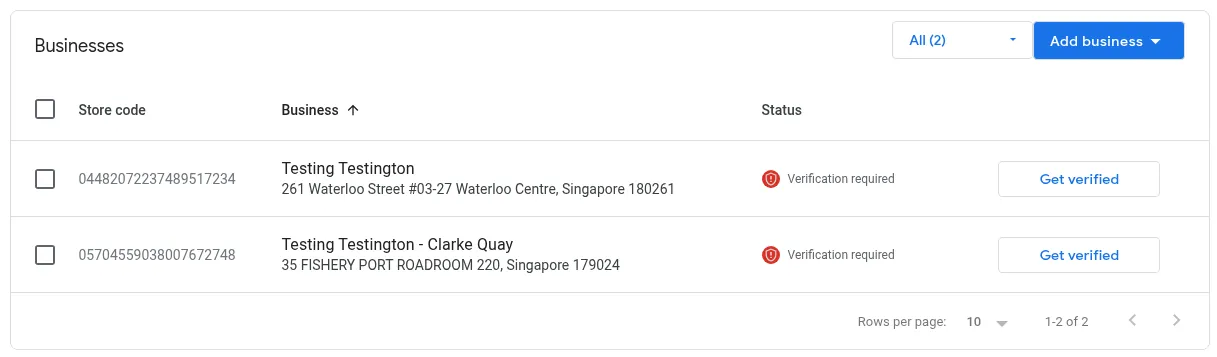
It is easy to lose track of things when you have more than one location. You should centralise oversight to ensure consistency.
The good news is that multiple Google Business Profiles (such as store branches or franchises) can be managed under a single Google Business Manager.
This allows you to see all your locations in one dashboard. You can update hours, respond to reviews, and track performance across the whole brand without logging in and out of different accounts.
Alternatively, you can have an SEO agency manage this centralised oversight for you.
Separate Emails for Each Location
An alternative to consolidating all Google Business Profiles under a single Google Business Manager account is to set up each location with its own account and email address.
That way, if one email is compromised—perhaps the manager of that branch engaged in shoddy link-building practices and, as a result, had the email suspended—only that branch’s local profile would be affected, not all 50 locations.
Having separate emails for each branch also gives marketers agency, as each would be the “super admin” of their assigned branch.
Partner with a Local SEO Agency
Multi-location SEO is a massive job. It requires technical expertise, constant monitoring, and a lot of focus.

Many multi-location businesses find that it is more cost-effective to partner with an agency.
A local SEO agency can handle the search engine optimisation for every branch. They can manage your Google Analytics, monitor Google Search Console, and ensure your multi-location SEO strategy is delivering more customers.
They have the tools to track local rankings in real time and adjust their SEO strategy as the market changes.
Partner with MediaOne Today!
Whether you are a chain of law firms or a growing group of restaurants, MediaOne can help you improve local rankings and reach most local customers in every neighbourhood you serve. Our local SEO expertise and management capabilities ensure you have an online presence across all areas your business serves.

Ready to see your branches at the top of the map? Partner with MediaOne today. Let’s work together to build a multi-location SEO strategy that gets people through your business’ many branches.
Contact us now for an initial consultation.
Frequently Asked Questions
How do I handle SEO for a “Service Area Business” that doesn’t have a physical storefront?
If you provide services at the customer’s location (like a plumber or locksmith), you can set a service area in your Google Business Profile instead of showing a physical address. You should still create separate landing pages for the major districts you serve to capture local search traffic in those specific areas.
Should I use a local phone number for each branch or a central 1800 hotline?
For local SEO, it is highly recommended to use a local area code (like a 6-series number in Singapore) for each specific branch landing page. This reinforces your local presence to search engines and gives customers the confidence that they are calling the outlet closest to them.
Can I use the same photos for all my Google Business Profiles?
While you can use brand-wide photos, it is much better to upload unique photos for each location. Google prioritises profiles with authentic, local images of the specific storefront and interior, as these help customers recognise the building when they arrive.
Does the “Post” feature on Google Business Profile actually help rankings?
While posts aren’t a direct ranking factor, they increase engagement and click-through rates, which signals to Google that your listing is helpful. Regularly posting branch-specific offers or events can keep your profile “fresh” and more attractive than a static competitor.
How do I handle a location that is temporarily closed for renovations?
Mark the location as “Temporarily Closed” on your Google Business Profile rather than deleting it or changing the hours to zero. This preserves your reviews and ranking history, and you can use the “Update” feature to tell customers when you expect to reopen.