You’re not imagining it—your competitors are watching your every move. They’re tracking your rankings, dissecting your content marketing strategy, and reverse-engineering your best campaigns. The question is: are you doing the same to them?

In Singapore’s hyper-competitive digital landscape, where brands like Shopee and Lazada fight for every percentage point of market share, competitive intelligence isn’t just smart—it’s essential for survival.
The good news? You don’t need a six-figure budget or a team of analysts. The right Chrome extensions let you extract their secrets in minutes, not months.
Whether you’re running campaigns in-house or partnering with an SEO agency, these browser tools transform you from a passive observer to a strategic predator, uncovering the exact tactics driving your competitors’ success before they even know you’re watching.
Key Takeaways
- Utilising Chrome extensions enables efficient competitor analysis, offering insights into traffic sources, SEO metrics, and backlink strategies.
- Tools like SimilarWeb and Ahrefs SEO Toolbar provide real-time data, aiding in informed decision-making.
- Regular competitive audits, conducted monthly with weekly check-ins, help in identifying strategic opportunities faster.
- Ethical intelligence gathering involves analysing publicly available data without breaching terms of service or privacy laws.
How to Use Chrome Extensions to Spy on Your Competitors: Why It’s Non-Negotiable
Every SGD you spend on digital marketing without competitive intelligence is a gamble, not a strategy. Your competitors have already done the expensive testing—they’ve identified which keywords convert, which content resonates, and which channels deliver ROI. Why reinvent the wheel when you can simply observe, adapt, and outperform?
Understanding your competitors’ business categories and Google Business Profile can directly influence your own local search engine optimisation strategy, helping your business appear more prominently in local search results.
According to research, 90% of Fortune 500 companies use competitive intelligence to gain a competitive edge over their industry rivals. The cost of ignorance is staggering. Without competitor insights, you might be targeting keywords that are impossibly competitive or too expensive, while easier opportunities remain untapped.
Selecting the correct business categories for your company is crucial to improving visibility in local search and ensure your business is found by the right customers. You could be investing in content formats that have already failed for others in your niche.
Research shows that 84% of businesses claim their market has gotten more competitive in recent years, making intelligence gathering more critical than ever.
Think of competitive intelligence as your unfair advantage. While your rivals are guessing their next move, you’ll know exactly where they’re vulnerable, which strategies are working, and how to position yourself for maximum impact. Optimising your business’s Google Business Profile categories can help your company rank higher in local search results and stand out in Google Maps and the local pack.
At the end of the day, the brands that win aren’t necessarily those with the biggest budgets—they’re the ones with the best intelligence.
What Makes a Chrome Extension Worth Installing
The wrong tools clutter your browser and waste your time; the right ones become indispensable intelligence assets. When evaluating Chrome extensions for digital marketing, prioritise those that deliver instant insights without disrupting your workflow. Users can download recommended extensions directly from the Chrome Store and pin them to the Chrome toolbar for easy access.
You shouldn’t need to navigate complex dashboards or wait for reports—the best extensions surface critical data the moment you land on a competitor’s page, with a single click or even automatically. Data accuracy trumps volume every time. An extension that provides 80% accurate insights on five critical metrics beats one that’s drowning you in questionable numbers across twenty parameters.
Look for extensions that tap into established data sources—tools backed by companies with their own web crawlers and databases rather than those aggregating third-party estimates.
With one simple click, users can access critical data directly in their Chrome browser. Here’s what separates essential extensions from time-wasters:
- Real-time insights: Shows current data, not snapshots from three months ago
- Multi-metric visibility: Reveals SEO, traffic, and technical factors simultaneously
- Export capabilities: Let you pull data into spreadsheets for deeper analysis
- Lightweight performance: Doesn’t slow down your browser or crash on complex sites
- Regular updates: Maintained actively by developers who keep pace with platform changes
- Reputable developers: Extensions are developed and maintained by reputable developers, ensuring reliability and accountability
The most powerful extensions integrate seamlessly with your existing tools. Users benefit from seamless workflows when extensions are easily accessible from the Chrome toolbar. Those that export to Google Sheets, sync with analytics platforms, or feed into reporting dashboards amplify their value exponentially.
Remember, you’re not collecting data for its own sake—you’re gathering actionable intelligence that directly informs strategic decisions worth thousands of SGD in marketing spend.
The Spy Toolkit: Essential Chrome Extensions for Competitive Intelligence
SimilarWeb – Uncovering Traffic Sources and Audience Behaviour

SimilarWeb is your window into competitors’ complete traffic ecosystem. This extension instantly reveals where their visitors come from, how engaged they are, and which pages drive the most value.
When you’re analysing a rival’s site, SimilarWeb displays traffic estimates, bounce rates, pages per visit, and even geographical breakdowns showing whether they’re winning in Singapore, Malaysia, or beyond. The extension also helps you analyse competitor websites by uncovering their ad campaigns, including Google Ads, so you can see how they drive traffic and optimise their advertising strategies.
The real power lies in channel analysis. You’ll see exactly what percentage of traffic comes from organic search, paid advertising, social media, referrals, or direct visits.
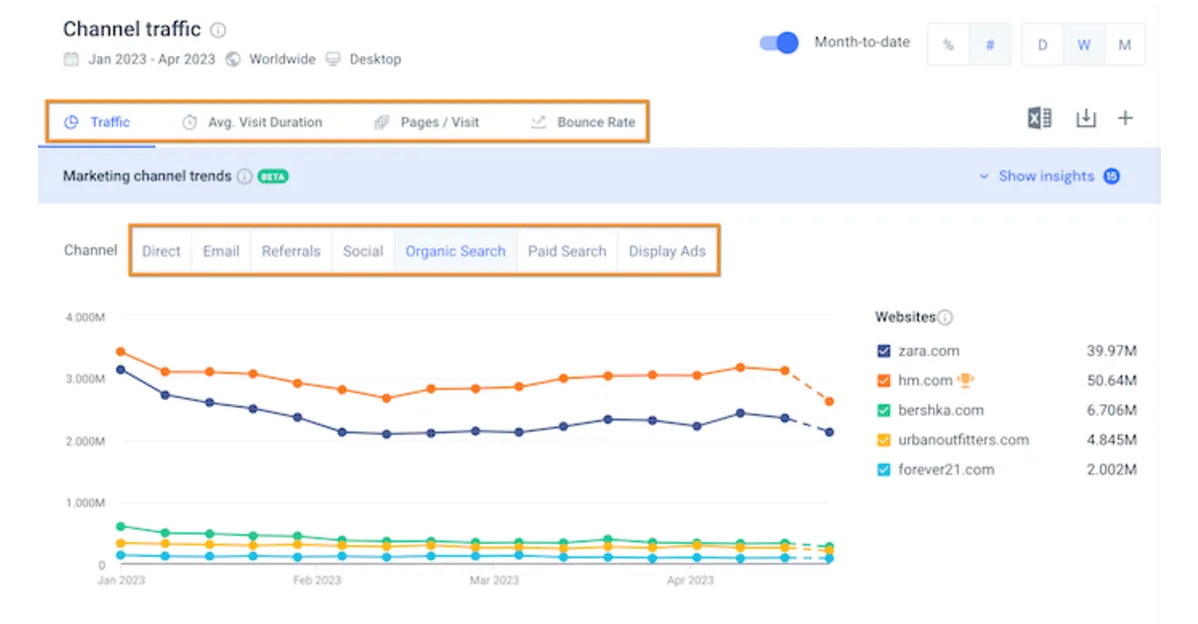
For Singaporean brands competing against giants like Grab or Gojek, this reveals their investment priorities.
Competitor suddenly shifts from 40% organic to 60% paid traffic, they’re either struggling with SEO or aggressively scaling through advertising—intelligence that shapes your own budget allocation. By understanding competitors’ ads and campaign strategies, you can optimise your own campaigns to boost sales and improve your results.
SimilarWeb’s accuracy exceeds 90% for high-traffic sites, making it reliable for strategic decisions worth thousands in marketing spend.
MozBar – Exposing Domain Authority and Link Vulnerabilities

MozBar transforms search results into competitive intelligence goldmines. This extension displays Domain Authority (DA), Page Authority (PA), and spam scores for every site you visit, helping you instantly assess whether a competitor’s rankings stem from genuine authority or questionable tactics.
You’ll see their total backlinks, linking domains, and on-page optimisation factors without leaving the page. The strategic advantage emerges during SERP analysis.
When searching for valuable keywords, MozBar overlays DA/PA metrics on every result in the top search results, revealing exactly how authoritative competitors are and whether you can realistically outrank them.

For instance, performing an example search like “coffee near me” allows you to see MozBar’s metrics directly on the top search results, making it easy to compare local competitors.
Moz’s research shows that domain authority correlates strongly with ranking positions—making this metric critical for understanding competitive landscapes. If Singaporean beauty brand Sephora ranks with DA 75 while your site sits at DA 35, you’ll know that outranking them requires significant link-building investment, not just better content.
Ahrefs SEO Toolbar – Reverse-Engineering Backlink Strategies

Ahrefs SEO Toolbar delivers enterprise-level link intelligence through a simple browser extension. This tool provides instant access to Domain Rating, URL Rating, backlink counts, and referring domains for any page you visit.
More importantly, it shows you which sites link to competitors and which anchor text they’re using—the exact blueprint for replicating their link-building success. What makes Ahrefs indispensable is database depth. According to Ahrefs’ research, they crawl over 8 billion pages daily, maintaining the web’s largest link index.
When DBS Bank or OCBC publishes content that attracts 50 new backlinks, Ahrefs shows you precisely which financial blogs, news sites, or industry publications are linking and why.
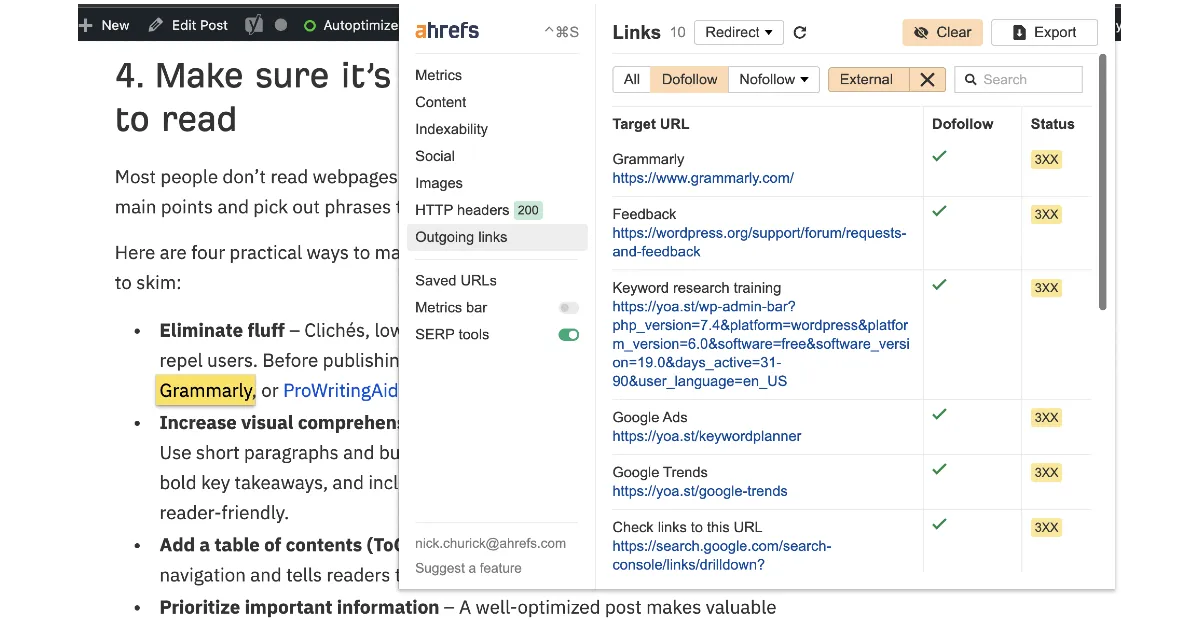
You can then approach those same sites with equally valuable content, systematically building authority that matches or exceeds your competitors.
The broken link checker feature also reveals technical issues on competitor sites—opportunities to steal their traffic when links fail. Additionally, you can download backlink data as a CSV file for deeper analysis outside the extension.
Backlinko’s SEO Checker – Comprehensive On-Page Analysis at a Glance
Backlinko’s SEO Checker is competitive espionage disguised as an SEO audit tool. This extension provides over 30 SEO parameters instantly, including Google Index status, keyword density, internal linking structure, and social signals.
The diagnosis tab delivers a comprehensive on-page audit showing everything from meta descriptions to heading hierarchy—revealing exactly how competitors optimise their highest-performing pages.
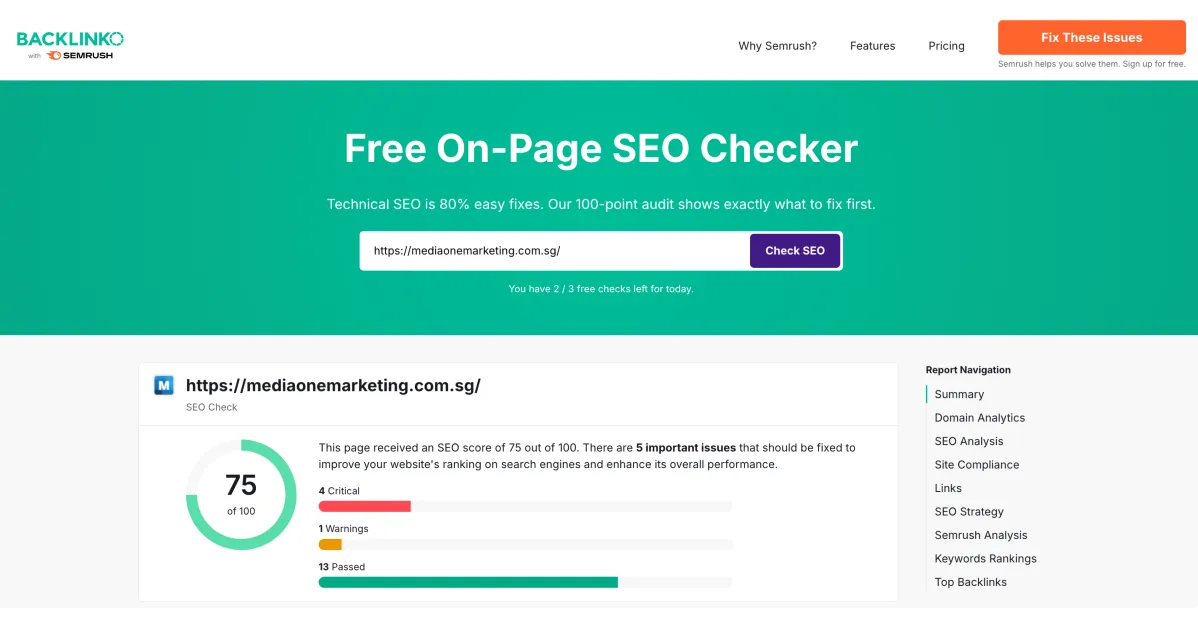
Additionally, SEO Checker can help identify the current categories used on competitor pages, allowing you to align your on-page optimisation with what is currently ranking in your niche.
The comparison feature transforms competitive analysis from guesswork to science. You can simultaneously compare up to five URLs across multiple metrics, perfect for understanding why certain content ranks. Research indicates that 68% of online experiences begin with search engines, making SERP dominance crucial.
When PropertyGuru consistently outranks 99.co for “Singapore condos for rent,” SEO Checker reveals whether they’re winning through keyword optimisation, better internal linking, or superior content structure—insights you can immediately implement.
Hunter – Identifying Key Players and Outreach Opportunities

Hunter turns competitor research into relationship-building intelligence. This extension finds verified email addresses associated with any domain, revealing key decision-makers, content creators, journalists, and potential collaboration partners at competitor organisations.
You’ll see email formats, confidence scores, and LinkedIn profiles for strategic outreach. For Singaporean marketers, Hunter unlocks partnership opportunities that competitors have already validated. Backlinko’s email outreach study found that personalised emails with well-structured copy achieve 32.7% better response rates than generic outreach.
Beyond media relations, Hunter reveals competitor hiring patterns—if they’re recruiting five content marketers, they’re clearly scaling content production, signalling where they see opportunity worth substantial investment.
FYI: Hunter does not collect personal data beyond what is publicly available for outreach purposes.
Your Competitive Intelligence Workflow: From Data to Dominance
Random spying wastes time; systematic intelligence gathering builds competitive advantages. Start by identifying your five most dangerous competitors—those directly competing for your keywords, audience, and market share. For each competitor, bookmark their homepage, top blog posts, product pages, and resource centres.
Install our five recommended Chrome extensions and create a standardised tracking template in Google Sheets with columns for traffic estimates, domain authority, top keywords, backlink counts, and key observations.
When tracking competitors, make sure to monitor GBP categories for each selected GBP and specific business name. This helps you understand why certain GBP listings rank high in the local pack tab and Google Local Finder.
Follow this proven reconnaissance sequence for maximum efficiency:
- Begin with SimilarWeb to establish baseline traffic patterns and identify which competitors are growing or declining. A competitor whose traffic jumped 40% in three months is doing something right—worth deeper investigation.

Image Credit: SimilarWeb
- Next, deploy MozBar to assess domain authority and determine competitive feasibility. If their DA is 65 and yours is 25, you’ll need a different strategy than direct competition for their top keywords.

Image Credit: MozBar
- Then, unleash Ahrefs SEO Toolbar to examine backlink profiles systematically:
- Identify their strongest links: Which high-authority domains link to them repeatedly?
- Analyse anchor text patterns: Are they building exact-match or branded anchors?
- Spot link-building tactics: Do they earn links through resources, tools, or research?
- Find broken opportunities: Which of their links are dead or broken?

Image Credit: Ahrefs
Use Google Maps to analyse secondary categories for each specific business and compare how each GBP listing is categorised. This will help you identify opportunities to optimise your own GBP categories and rank high in local search.
- Follow up with SEO Checker to compare on-page optimisation factors. Open their top-ranking pages alongside your own content targeting the same keywords. Compare title tags, meta descriptions, heading structure, keyword density, and content length. The patterns reveal their optimisation playbook.
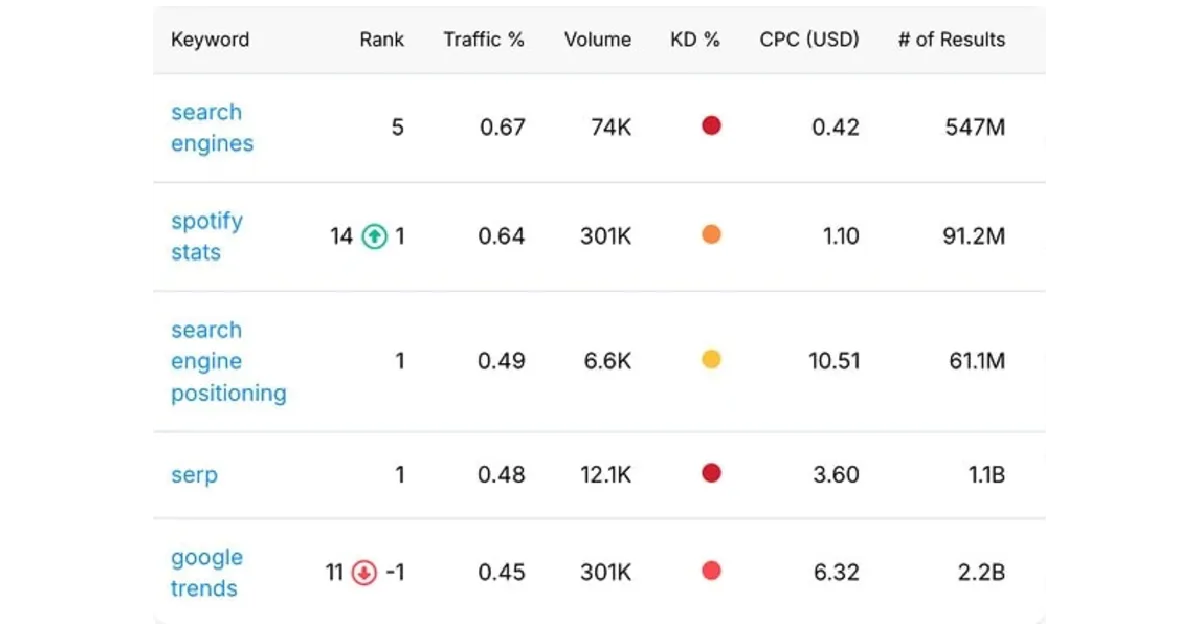
Image Credit: Backlinko
Here’s what you need to do next:
- Schedule recurring intelligence sessions for sustained advantage.
- Conduct comprehensive competitive audits monthly, with quick 15-minute check-ins weekly on your top three competitors.
- Set up alerts within extensions that support them, and track changes in a timeline format.
- When a competitor’s DA increases by 5 points, investigate immediately—they’ve likely earned significant new backlinks worth analysing.
- When their traffic drops 20%, understand why before making the same mistakes.
Checking GBP categories all the time is essential to maintain your visibility and rank high in both Google Maps and local search results.
Intelligence-Gathering Best Practices That Keep You Ahead
Effective competitive spying requires discipline, focus, and ethical boundaries. Before diving into competitor analysis, define crystal-clear objectives:
Are you trying to identify keyword opportunities, reduce PPC costs, or find content gaps? Vague objectives like “see what competitors are doing” waste hours; specific goals like “identify 10 keywords where competitors rank but we don’t” drive action.
Stay firmly within ethical and legal boundaries while gathering intelligence. Everything discussed involves publicly available data—you’re analysing what competitors voluntarily publish, not accessing proprietary systems or confidential information. Never use scraping tools that violate terms of service, attempt to access competitor analytics accounts, or misrepresent yourself to gather information.
The Interactive Advertising Bureau‘s guidelines emphasise transparency and ethical data collection, principles that protect both your reputation and legal standing. Singapore’s Personal Data Protection Act (PDPA) also governs data collection practices, making ethical intelligence gathering both a moral and legal imperative.
Avoid analysis paralysis by prioritising action over perfection. Limit each research session to identifying three to five actionable insights, then implement them immediately. It’s tempting to chase every data point and build elaborate competitor matrices, but speed of implementation often trumps depth of analysis.
The marketers winning in Singapore’s fast-moving digital landscape aren’t those who analyse longest—they’re those who implement fastest:
- Found competitors’ ranking for valuable keywords you’ve missed? Create content targeting those terms this week, not next month.
- Discovered backlink opportunities through Ahrefs? Launch outreach campaigns within 48 hours while the intelligence is fresh.
- Identified content formats driving competitor traffic? Test those formats immediately with your own spin rather than planning indefinitely.
If you encounter troubleshooting fails—such as errors or the extension not working as expected—try to reinstall the extension from the Chrome Store. This simple step often resolves common issues and ensures your competitive analysis tools function properly.
Track implementation rates alongside research time. If you’re spending 10 hours monthly on competitive analysis but only implementing two insights, you’re building a research hobby, not a competitive advantage. The goal isn’t knowing more about competitors—it’s using that knowledge to capture market share, rankings, and revenue they currently own.
How Chrome Extensions Help Turn Intelligence Into Action
You’ve now got a professional spy network that costs nothing but delivers insights worth thousands in strategic advantage. These Chrome extensions compress hours of manual research into minutes of actionable intelligence, giving you the information needed to outmanoeuvre competitors across Singapore’s digital battlefield.
The brands dominating eCommerce, financial services, and professional services aren’t guessing their next move—they’re using these exact tools to make data-driven decisions that systematically capture market share from slower, less informed competitors. The question isn’t whether competitive intelligence matters; it’s whether you’ll weaponise it faster than your rivals.
Start by installing these five extensions today, then commit to a weekly 30-minute competitive reconnaissance session. You’ll be shocked how quickly you spot the opportunities others miss—the undervalued keywords, the content gaps, the link-building tactics actually working, the partnership opportunities sitting in plain sight.
For those looking to rank high in local search results, consider watching a video tutorial on local SEO strategies to learn how to optimise your Google Business Profile and outperform competitors in Google Maps and local finder. Don’t let competitors monopolise the intelligence that should be fuelling your growth. Every day you delay is another day competitors operate with advantages you could eliminate.
The traffic they’re capturing, the rankings they’re holding, the customers they’re converting—much of it could be yours with the right intelligence and swift execution. Your competitors won’t slow down to let you catch up, so you need every advantage these tools provide.
Ready to transform competitive intelligence into revenue growth and market dominance? Contact MediaOne for a professional competitor analysis that goes beyond surface-level metrics. Our team uses these tools daily, combined with proprietary research methods, to deliver strategies that position Singapore’s most ambitious businesses ahead of their competition.
Let’s uncover exactly what your competitors are doing—and build the plan to beat them.
Frequently Asked Questions
What are the best free Chrome extensions for spying on competitors?
SEO Checker, MozBar (limited free version), and Hunter (free tier) offer robust competitive intelligence without paid subscriptions. These extensions provide essential metrics like domain authority, backlink counts, traffic estimates, and contact information covering most reconnaissance needs for small to medium businesses looking to understand competitor strategies.
How often should I analyse competitors using these Chrome extensions?
Conduct comprehensive competitive audits monthly, with weekly 15-minute check-ins on your top three competitors.
Research shows that the percentage of organisations monitoring competitors at least once per month increased from 64% to 70% from 2020 to 2021, indicating regular monitoring is becoming standard practice amongst successful businesses.
Chrome extensions complement but don’t fully replace professional SEO platforms. Extensions provide quick insights and surface-level analysis perfect for ongoing monitoring and opportunistic intelligence gathering, while full platforms offer deeper historical data, advanced features like rank tracking, and comprehensive site audits essential for strategic planning and execution.
Is it legal to use Chrome extensions to analyse competitor websites?
Yes, using Chrome extensions to analyse publicly available competitor data is completely legal. You’re accessing information competitors voluntarily publish online, similar to how market research has always worked. However, avoid tools that breach terms of service, access password-protected areas, or scrape content excessively, as these activities may violate Singapore’s Computer Misuse Act.
Which Chrome extension provides the best insights into competitor paid advertising?
SimilarWeb offers the most comprehensive paid advertising intelligence amongst Chrome extensions, revealing traffic percentages from paid search and display advertising, plus top advertising networks competitors use. For deeper PPC competitive analysis, combine it with manual inspection of competitor landing pages and systematic monitoring of their ad copy through targeted Google searches.