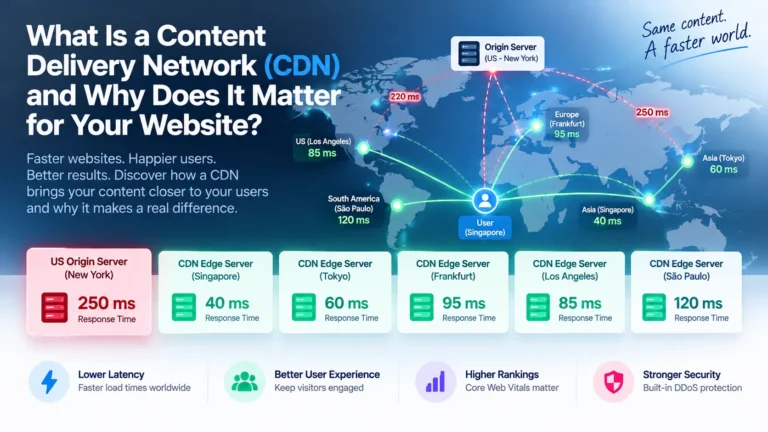
A content delivery network (CDN) is a distributed system of servers across geographic regions that work together to deliver web content to users from the closest location. Instead of every request travelling back to your origin server (the server where your website actually lives), a CDN caches copies of your images, videos, stylesheets, and other assets at multiple edge locations worldwide. When someone visits your site, the CDN routes their request to the nearest available server, dramatically reducing latency and load times.

The core value is straightforward: distance matters. A user in Singapore waiting for content served from a server in London experiences a network delay measured in hundreds of milliseconds. The same user accessing that content from a CDN server in Singapore experiences delays measured in tens of milliseconds. This difference translates into measurable improvements in perceived responsiveness and directly impacts lower bounce rates, higher engagement, and better search rankings.
A CDN isn’t a luxury reserved for tech giants. Even small businesses and content publishers benefit measurably: faster pages mean fewer visitors leave before the page loads, lower bandwidth bills reduce hosting costs, and most CDNs’ built-in security features add DDoS protection without extra infrastructure spend.
Quick Summary
- A CDN typically reduces latency by serving content from servers geographically close to users, with reductions typically ranging from 10 to 50 milliseconds for nearby regions compared to 250+ milliseconds from distant origins.
- Cache hit ratios of 80% or higher indicate a healthy CDN configuration for static-content-heavy websites; dynamic or personalised sites typically target 50-70%.
- Page load speed impacts conversion rates and search rankings via Core Web Vitals.
- Asia-Pacific users should evaluate regional coverage explicitly, as global CDN presence does not always mean low latency to Japan, Singapore, or India.
- Implementation requires three decisions: choose a provider, configure DNS and cache headers, and monitor the metrics that matter (TTFB, cache hit ratio, bandwidth savings).
How a CDN Works: The Technical Mechanics Behind Faster Content
A CDN doesn’t make your origin server faster. Instead, it stores copies of your content on servers around the globe, then routes visitor requests to the closest server. Understanding how routing, caching, and protocol selection work reveals why a CDN actually delivers the speed gains you’re paying for.
Request Routing and Edge Server Selection
When a user’s browser requests a file from your CDN, a request-routing system (often called a traffic director or load balancer) intercepts the query and decides which edge server should handle it. This decision happens in milliseconds using real-time data: the CDN measures latency from the user’s IP address to each edge location, checks server load and health, and applies business rules you set (for example, prefer this region, avoid that location).
The result is that a visitor in Tokyo gets content from a Tokyo edge server, not from a US origin. That single routing decision cuts latency from 250+ milliseconds to 10-50 milliseconds.
Most modern CDNs use a trick called Anycast routing. Multiple servers share one IP address. Your request automatically flows to the geographically nearest one. Cloudflare, AWS CloudFront, and Akamai all deploy Anycast networks. The alternative, geographic DNS (GeoDNS), is simpler but less responsive to real-time conditions. GeoDNS directs requests based on the user’s location detected from their IP address, then routes them to a specific server.
Caching Strategy and Cache Invalidation
Caching is where a CDN proves its value. Your origin stores the authoritative copy. An edge server holds a temporary replica, stamped with an expiration time called the Time-To-Live, or TTL. As long as the TTL hasn’t elapsed, the edge server serves the copy without contacting your origin.
[INFOGRAPHIC: A timeline or flowchart showing the lifecycle of cached content: origin server storing authoritative copy, edge server holding replica with TTL expiration, cache hit when TTL valid, and cache invalidation when new version deploys]
TTL is the lever you control. Set a short TTL (60 seconds), and you get freshness at the cost of more origin requests. Set a long TTL (30 days) and you get cache hits and low origin load, but risk stale content longer. For images, CSS, and JavaScript that rarely change, 30 days is standard. For HTML that you update hourly, 5 minutes is more appropriate.
Cache invalidation happens when you deploy a new version of your site. Most CDNs let you purge (instantly delete) cached files, so the next request fetches the fresh version from origin. Cloudflare, Fastly, and AWS CloudFront all offer instant purge APIs. However, purging a million cached objects takes time and API bandwidth. Many teams instead use version-numbering: change the filename from style.css to style-v2.css, and the old version stays cached while browsers request the new one.
Cache hit ratio (the percentage of requests served from cache, not origin) is your north star metric. For static-content-heavy sites, a ratio above 80% is healthy. Dynamic or personalised applications typically achieve 50-70% cache hit ratios. Below 50% on static sites suggests misconfigured TTLs or too much dynamic content.
Protocol Optimisation: HTTP/2, HTTP/3, and QUIC
The route from edge to user matters as much as the route from origin to edge. Modern CDNs optimise this using newer HTTP protocols.
HTTP/2 (standardised in 2015) multiplexes multiple requests over a single TCP connection. Instead of opening six separate connections to fetch six images, a browser opens one connection and sends all requests in parallel. This cuts round-trip overhead and improves download speed, especially on high-latency networks such as mobile or satellite connections.

HTTP/3 and QUIC (standardised in 2021) go further. QUIC replaces TCP with a faster, more resilient transport layer. Connection setup is faster: one round-trip instead of three for TCP. Packet loss is handled more intelligently, so a single dropped packet doesn’t block other streams. For users on unstable networks (train commuters, rural mobile), QUIC typically improves packet-loss resilience.
By 2024, most major CDNs support HTTP/3. Adoption varies by region and browser support. Your edge server negotiates the best protocol the user’s browser can handle and falls back to HTTP/2 or HTTP/1.1 if needed.
Geographic Distribution and Latency Reduction
Geographic distribution determines latency reduction outcomes. The farther a user is from your origin, the more packets must travel, and the longer each round trip takes. Light travels at 200,000 kilometres per second through fibre, so a request crossing a continent takes at least 40 to 100 milliseconds one way.
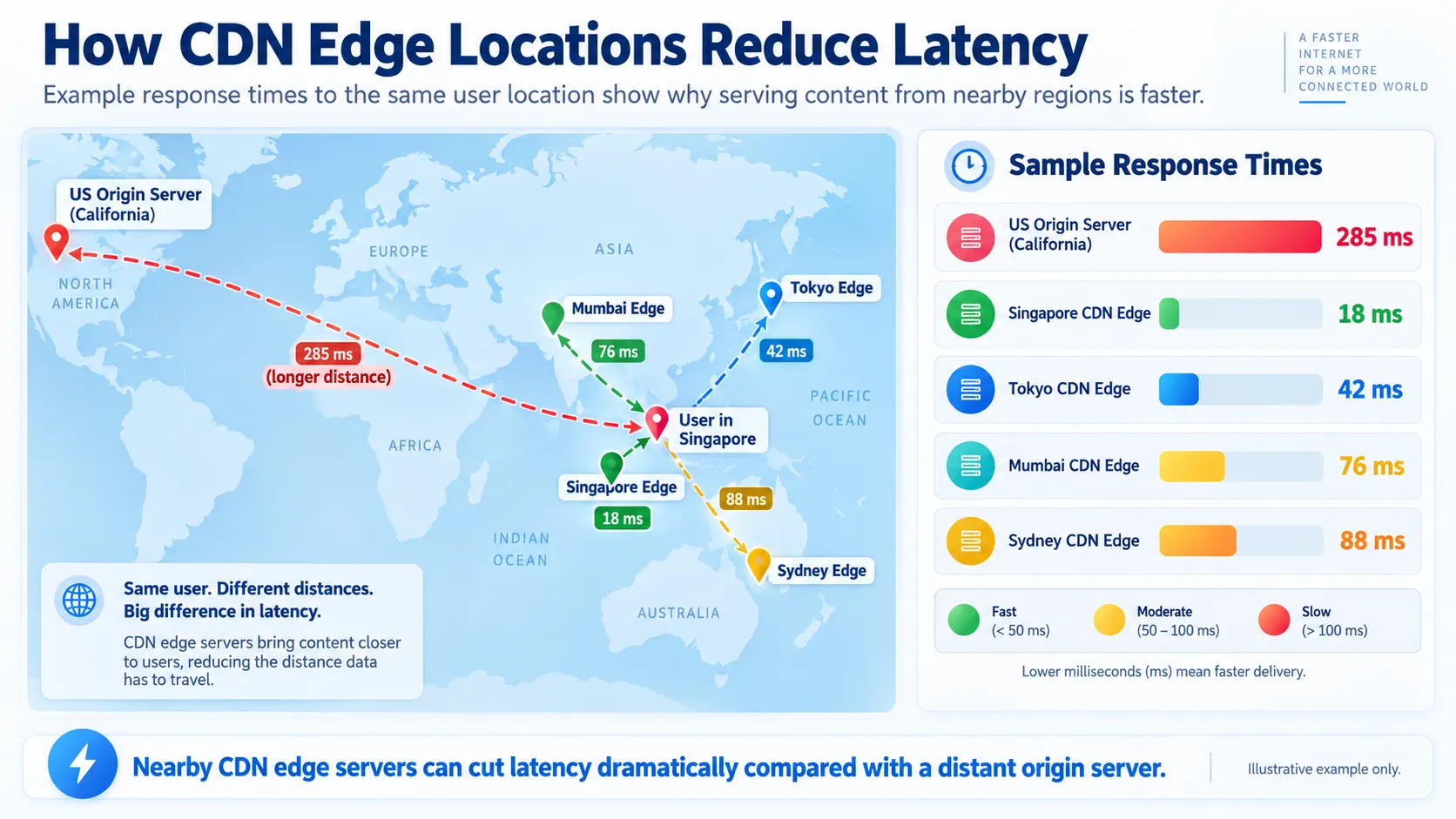
Serving from nearby is faster. Very nearby (within one region) means 10-50 milliseconds. Very far (intercontinental) means 300+ milliseconds or more. Users feel this difference.
Edge servers in regional hubs significantly reduce latency. Cloudflare operates more than 300 data centres worldwide (as of 2024). Akamai has over 360,000 edge servers. AWS CloudFront uses 500+ edge locations, including regional caches.
In Asia-Pacific, CDN coverage is critical because users span vast distances; for example, India to Japan is over 6,000 kilometres. Regional CDN operators often outperform global giants in latency because they operate deeper local infrastructure. A global provider might place a single edge server in Singapore to serve all of Southeast Asia. A regional operator might have separate nodes in Singapore, Bangkok, and Ho Chi Minh City.
This choice has real effects. A user in rural Malaysia connecting to an edge server 800 kilometres away in Singapore experiences 30-40 milliseconds of latency. Served from a US origin, the same user experiences 300+ milliseconds. Over a slow mobile link, that difference determines whether a page loads in 3 seconds or 8 seconds.
When you select a CDN, review its PoP (point-of-presence) map, not just headline numbers. A provider claiming 300 locations is only useful if at least one is near your users. Many CDNs publish latency heat maps showing average response times from each PoP to major cities, so you can validate coverage before committing.
Key Benefits of Using a CDN for Businesses
Reducing Page Load Times and Improving User Experience
Page load speed directly affects user behaviour. Faster pages reduce bounce rates and improve time on site. Users expect pages to load within 2-3 seconds; delays beyond this threshold trigger abandonment. A CDN cuts load times by serving content from nearby, so users get faster responses and stay longer.
Decreasing Server Load and Bandwidth Costs
Your origin server handles every uncached request. A CDN absorbs most traffic through caching, reducing the origin load by 50-90%. Lower origin load means lower bandwidth costs. A CDN may pay for itself within 3-6 months depending on your current bandwidth costs and traffic patterns.
Improving Search Engine Rankings Through Core Web Vitals
Google’s Core Web Vitals measure page speed, visual stability, and interactivity. Largest Contentful Paint (LCP), Cumulative Layout Shift (CLS), and Interaction to Next Paint (INP) all improve when content arrives faster. A CDN that reduces TTFB (Time to First Byte) and ensures cached content loads quickly directly improves these metrics, which Google uses in ranking decisions.
Protecting Against DDoS Attacks and Improving Security
Most CDNs include built-in DDoS protection. Because traffic flows through the CDN’s infrastructure first, attacks hitting your edge servers don’t reach your origin. CDNs filter malicious requests, rate-limit suspicious IPs, and absorb volumetric attacks across their distributed network. This protection doesn’t eliminate the need for a Web Application Firewall (WAF), but it does provide essential first-line defence at no extra cost.
Key Benefits of Using a CDN for Businesses
Once a CDN distributes your content across edge servers worldwide, the practical returns become immediate and measurable.
Reducing Page Load Times and Improving User Experience
Page load speed directly affects user behaviour. Research shows that page load speed impacts conversion rates on e-commerce sites. A CDN reduces load time by serving content from servers that are geographically close to each visitor, rather than from your origin server thousands of kilometres away.
When a user in Singapore requests an image from your origin server in California, data travels across submarine cables through multiple network hops and incurs network latency measured in hundreds of milliseconds. A CDN edge server in Singapore serves the same image in 10-50 milliseconds. This translates to a measurable improvement in perceived responsiveness.
The improvement compounds across all content types. Static assets (images, CSS, JavaScript, and video files) transfer faster. Dynamic API responses benefit from reduced latency to your origin. Time to First Byte (TTFB), a metric Google Search weighs heavily, improves because the geographically close edge server responds before your origin would.
In documented cases, organisations have significantly reduced average page load times by enabling CDN acceleration on static assets and HTML. When combined with high cache hit ratios, these implementations typically improve user engagement metrics, including pages per session and average session duration.
Decreasing Server Load and Bandwidth Costs
Every time an edge server delivers cached content, your origin server handles one fewer request. Your origin only processes requests that the edge cannot serve (cache misses), plus all dynamic and personalised content.
This creates two cost savings:
Bandwidth cost reduction: Outbound bandwidth from your origin to end users represents a major line item in hosting bills, especially for companies distributing large files or streaming video. CDN bandwidth typically costs less than origin bandwidth. For a media company delivering 500 terabytes of content monthly, this difference compounds into significant annual savings.
Server resource relief: By offloading content delivery, your origin server spends less CPU, memory and network I/O on static asset delivery. This headroom lets you handle application logic and database queries more efficiently. Under traffic spikes, your servers remain responsive instead of becoming bottlenecks.
A CDN may pay for itself within 3-6 months depending on your current bandwidth costs and traffic patterns. If your origin servers regularly run above 70% CPU during peak traffic, a CDN becomes financially justified.
Improving Search Engine Rankings Through Core Web Vitals
Google’s Core Web Vitals (Largest Contentful Paint, First Input Delay, and Cumulative Layout Shift) factor directly into search rankings. Page speed, which depends heavily on Time to First Byte and asset delivery latency, influences both Core Web Vitals and overall ranking position.
A CDN improves these metrics because:
- Largest Contentful Paint (LCP) improves when images and large text blocks load faster from nearby edge servers. LCP should be under 2.5 seconds.
- First Input Delay (FID) and Interaction to Next Paint (INP) depend partly on unblocked JavaScript execution, which a CDN aids by serving JS files from low-latency locations.
- Cumulative Layout Shift (CLS) remains independent of CDN delivery but benefits from faster overall page rendering.
Search engines reward sites with faster TTFB values. A CDN can reduce TTFB compared to serving globally from a single origin, which Google interprets as a signal of site quality.
After CDN implementation, monitor your Core Web Vitals via Google Search Console or PageSpeed Insights. Track LCP improvements within the first two weeks if your cache hit ratio exceeds 80%.
Protecting Against DDoS Attacks and Improving Security
DDoS (Distributed Denial of Service) attacks flood your origin with traffic, making it unavailable. Most CDN providers operate scrubbing centres that absorb and filter out malicious traffic before it reaches your servers.
A CDN’s security benefits include:
- Attack absorption at scale: CDN providers maintain networks with massive combined capacity. A significant volumetric attack that would cripple a typical business server is absorbed across thousands of edge nodes.
- Invisible origin IP: If you route all traffic through a CDN, attackers never learn your origin server’s real IP address. They cannot bypass the CDN to hit you directly.
- Request filtering and rate limiting: CDN providers apply Web Application Firewall (WAF) rules that block known attack patterns and limit requests from single IPs. This process happens at the edge before traffic reaches your origin.
- SSL/TLS termination: The CDN encrypts all traffic between users and the edge node. Your origin can handle either unencrypted traffic or encrypted traffic only to the CDN, reducing CPU load from cryptographic operations.
A single successful DDoS attack can result in substantial downtime and remediation costs. Many CDN providers include basic DDoS protection at no extra cost. Enterprise-grade DDoS mitigation typically costs $200-1,000 monthly and protects against costly outages.

Types of CDNs: Choosing the Right Architecture for Your Needs
Not all CDNs work the same way. The architecture you choose shapes how content flows from your origin servers to end users and directly affects cost, control, and performance.
Push CDNs: Full Control, Manual Uploads
Push CDNs require you to actively upload content to edge servers. You decide what gets cached, where it goes, and when it expires. Think of it as managing a distributed storage facility where you control every copy.
Push CDNs work best for static, predictable content with a long shelf life: product images, downloadable files, video libraries, or company logos. You upload once, and the content sits on edge servers until you manually remove or refresh it. You don’t have to guess what will be cached or what will cause cache misses for popular files.
This model suits businesses with well-defined content catalogues and stable traffic patterns. Media companies serving the same video across millions of users, or e-commerce platforms with fixed product images, see immediate ROI. You avoid wasting cache space on rarely accessed content, and bandwidth costs become highly predictable.
The trade-off is the operational burden. Your team must manage uploads, version tracking, and cache invalidation manually. For dynamic or frequently changing content—such as news feeds, personalised recommendations, and stock prices—push CDNs can quickly become unwieldy. Every origin update requires a fresh push to all edge servers, creating deployment delays.
Some providers offer hybrid approaches that let you selectively push high-impact assets while keeping pull-based delivery for other content.
Pull CDNs: Automatic, Hands-Off Content Distribution
Pull CDNs flip the model. You configure your origin server once, and the CDN fetches and caches content on demand. The first user in Singapore requesting a file triggers an automatic pull from your origin. After the first request, any subsequent requests within the cache window are served directly from the Singapore edge server.
This is the dominant architecture today, used by Cloudflare, AWS CloudFront, and Fastly. You point your DNS at the CDN, and content distribution happens invisibly. No uploads, no manual cache management, no deployment complexity.

Pull CDNs excel at serving dynamic, frequently updated content. Blog posts, API responses, user-generated content, and e-commerce product pages benefit immediately. You push changes to your origin once, and the CDN’s cache gradually updates as users request the new version. Personalised content, authenticated resources, and real-time data all work cleanly.
The cost structure differs. Every cache miss incurs an origin fetch, consuming your bandwidth and origin CPU. If your cache hit ratio is poor (below 60%), you are paying for the CDN without the performance gain. Additionally, the first user in each region experiences slower service while the edge server warms up.
Pull CDNs suit businesses with unpredictable content, global audiences, and limited DevOps capacity. You get scale without managing infrastructure, at the cost of less fine-grained control.
Hybrid CDNs: Combining Push and Pull Advantages
Hybrid models let you push some content and pull the rest. You push large, stable video files or downloadable assets while the CDN’s pull mechanism handles blog posts, API calls, and dynamic pages.
In practice, this means uploading a library of promotional images and product videos once, while letting the CDN’s pull mechanism handle blog posts, API calls, and dynamic pages. Some providers (like Cloudflare, via its API) let you selectively invalidate the cache without full re-uploads, creating a middle ground.
Hybrid approaches work for mature businesses with mixed traffic patterns. An online news platform might push high-traffic video to edge servers during the day, then rely on pull caching for article text and ad-serving APIs. A SaaS company might pre-push client logos and documentation while pulling API responses in real time.
The operational cost sits between push and pull. You gain control over high-impact assets without managing every byte.
Choosing Your CDN Architecture
| Content Type | Best Model | Why |
|---|---|---|
| Static images, videos, downloads | Push or hybrid | Stable, high volume; pre-push avoids cache misses |
| Blog posts, news articles | Pull | Frequent updates; cache auto-refreshes |
| API responses, personalised data | Pull | High variance; pull avoids stale cache problems |
| Product catalogues (e-commerce) | Hybrid | Core images pushed; category pages pulled |
| Livestream video | Pull + edge compute | Dynamic bitrate; edge servers handle adaptive bitrate logic |
Choose pull as your default unless you have a specific reason to push. Modern pull CDNs with high cache hit ratios outperform poorly managed push systems. If you are uncertain, start with pull, measure your cache hit ratio, and add push only for bottleneck assets.
CDN Performance Metrics: What to Measure and Why
Before choosing a CDN or claiming it is delivering value, you need concrete numbers. Too many teams deploy a CDN, assume it is working, and never verify. The result: paying for infrastructure that is not performing as expected, or worse, missing the real bottlenecks while obsessing over vanity metrics.
Time to First Byte (TTFB) and Origin Response Times
Time to First Byte is the elapsed time between a client’s request and the arrival of the first byte of response from the server. It reflects two distinct phases: network latency plus server processing time.
When a CDN sits in front of your origin, you are measuring TTFB from the edge server, not from your origin. A proper CDN should reduce TTFB significantly by serving cached content from a server geographically closer to the user. For cached responses, TTFB should fall within the 50-200 millisecond range, often lower. For uncached or origin-dependent requests, TTFB depends on origin response time plus the latency between edge and origin.
Origin response time is the processing delay at your actual server: database queries, rendering, and API calls. A CDN cannot improve this delay directly. If your origin takes 800 milliseconds to generate a page, every cache miss will incur that overhead. Track origin response time in your monitoring dashboard. If it is slow, the CDN is not the problem.
Blaming the CDN for slow TTFB when the origin itself is slow is a common mistake. Measure both separately. A healthy configuration shows cached TTFB under 200ms and origin response time under 500 ms for dynamic content.
Cache Hit Ratio and Its Impact on Performance
Cache hit ratio is the percentage of requests served directly from the edge without touching the origin. It is the single best indicator of whether your CDN is actually working.
Example: If your CDN logs 10,000 requests and 8,500 are served from cache, your hit ratio is 85%. The remaining 1,500 requests went back to the origin (cache misses). A healthy ratio for static assets (images, CSS, JavaScript) is 90-99%. For HTML and dynamic content, a 50-80% cache hit ratio is more realistic, depending on how aggressively you cache and how often the content changes.
Cache hit ratio drives both performance and cost. Each cache miss forces a round trip to your origin, consuming bandwidth and adding latency. It also costs more: you pay for origin bandwidth egress, not just CDN edge delivery. If your ratio drops below 70% unexpectedly, investigate immediately. Causes include misconfigured cache headers, overly short TTLs, or a surge in unique URLs.
Pull CDNs automatically calculate the hit ratio. Push CDNs require you to upload content, so the ratio reflects your upload discipline, not cache logic. Check your CDN’s analytics dashboard weekly. Most provide a per-URL view, so you can spot which assets are and are not caching effectively.
Example: a media company serving image-heavy articles saw their cache ratio drop from 92% to 64% after changing image URLs to include timestamp parameters for cache-busting. The solution was to cache-bust only on actual updates, not on every deployment, restoring the ratio to 88%.
Real User Monitoring (RUM) vs Synthetic Monitoring
Real User Monitoring (RUM) collects performance data from actual users’ browsers as they interact with your site. It captures TTFB, page load time, layout shifts, and interaction latency in the real world: real networks, real devices, and real geographic locations.
Synthetic monitoring runs scripted tests from fixed locations at scheduled intervals, simulating a user visit. It is repeatable and controlled, but artificial: it does not reflect your actual user base and can miss intermittent or geographic performance variations.
You need both. RUM tells you what users are experiencing. Synthetic tells you whether your infrastructure is functioning as expected. If synthetic tests show fast load times but RUM shows users in Singapore waiting 2 seconds, you have a network or CDN coverage gap in that region.
Set up RUM via a free tool like Google Analytics 4 (Core Web Vitals), or invest in a paid service like Datadog or New Relic that offers deeper insights. Aim for at least 500 real user sessions per day before the data is statistically meaningful. Compare performance by geographic region, device type, and connection speed.
Optimising for synthetic monitoring while users suffer slow load times is a common mistake. This happens when tests run from a single location or omit mobile devices. Always weight RUM more heavily in your decision-making.
Bandwidth Savings and Cost Per Gigabyte
CDNs charge per gigabyte (GB) of data delivered from the edge, or per request, or both. Your origin is also charged by your hosting provider for bandwidth egress (data leaving your server). The goal is to maximise the data served from the CDN edge and reduce the origin bandwidth.
If your origin normally serves 100 GB per month at a cost of $0.10 per GB (typical for cloud providers), that is $10. By adding a CDN, you split costs between the origin and the edge. But if the CDN cache hit ratio is 85%, your origin only serves 15 GB (cache misses), while the CDN serves 85 GB. Total cost depends on the CDN pricing in your region. Net savings depend on your cache hit ratio and how much you reduce origin traffic.
Calculate your bandwidth savings like this:
- Measure current monthly origin bandwidth (GB).
- Estimate your expected cache hit ratio (70-85% for typical sites).
- Multiply the origin bandwidth by (1 – hit ratio) to find the post-CDN origin traffic.
- Calculate savings: current origin cost minus (post-CDN origin traffic cost + CDN cost).
CDN pricing varies widely by region. Cloudflare’s standard plan is available at competitive rates for most regions, with discounts for high volume. AWS CloudFront pricing varies by region and volume. Asia-Pacific regional operators like BunnyCDN or local providers may offer lower rates if their coverage aligns with your user base.
Bandwidth savings alone rarely justify a CDN for small sites. A 5 GB/month blog might save $0.30 in origin bandwidth but spend more on the CDN, creating a net loss. However, when combined with performance gains (see Key Benefits earlier), even small savings become meaningful.
Track cost per GB monthly in your CDN’s billing dashboard. If it trends upward while the hit ratio falls, it signals misconfigured caching or unintended traffic spikes.
Comparing Major CDN Providers
The CDN market offers dozens of options, each with different strengths, coverage, and pricing. The right choice depends on your traffic patterns, geographic audience, budget, and feature requirements. The table below compares five widely used providers, each serving different market segments. All figures are indicative and subject to change; verify current details directly with each provider.
| Provider | Global Coverage | Entry Price | Best For | Standout Feature | Asia-Pacific Latency |
|---|---|---|---|---|---|
| Cloudflare | 300+ data centres | Free tier available | Small to mid-market sites, developers | Integrated DNS, WAF, and DDoS protection; Workers for edge compute | Good coverage in region |
| AWS CloudFront | 500+ locations | Pay-as-you-go; varies by region | AWS ecosystem users, high-volume video | Deep AWS integration; Lambda@Edge for serverless compute | Available; regional pricing |
| Fastly | 65+ PoPs | ~$0.12/GB plus base fee | Media, SaaS, APIs; real-time control needs | Instant cache invalidation; Varnish-based control | Limited but strategic locations |
| Akamai | 360,000+ edge servers | Enterprise; typically $5,000+/month | Enterprise, media companies, high-security requirements | Unmatched global scale; advanced bot protection; NetSession interface | Comprehensive coverage |
| BunnyCDN | 100+ PoPs | $0.01–$0.03/GB | Cost-conscious operators, video streaming | Competitive bandwidth pricing; video optimisation tools | Growing Asia-Pacific presence |
Singapore-Specific Considerations
Singapore-based businesses should evaluate CDN options with data residency and compliance in mind. The Personal Data Protection Act (PDPC) requires organisations to manage personal data responsibly, and some may need to retain data within Singapore or specified regions.
Cloudflare, AWS CloudFront, and Akamai all maintain data centres or PoPs in Singapore, enabling local caching with minimal latency to users across Southeast Asia. When evaluating providers, confirm that cached content can be served from Singapore or nearby regions and that your service agreement addresses data residency requirements. Local CDN operators serving the Asia-Pacific region may also offer competitive rates and simplified compliance workflows if your user base is concentrated in the region.
How to Choose a CDN: A Decision Framework
Selecting a CDN is not a one-size-fits-all decision. Use the following steps to evaluate which provider and architecture aligns with your specific situation.
1. Assess Your Geographic Audience
Where do your users live? Use Google Analytics or your server logs to identify the geographic distribution of traffic. If 80% of your users are in North America, a provider with strong US coverage (AWS CloudFront, Cloudflare) is sufficient. If users span Asia-Pacific, India, and Europe equally, verify that your candidate CDN has local points of presence in each region.
Request latency heat maps from your shortlisted providers. These show average response times from each point of presence to major cities worldwide. A provider claiming global coverage but showing 200+ millisecond latency to Singapore is not suitable for an Asia-focused business.
For Singapore-based businesses, consider local CDN options and data residency requirements. Singapore’s Personal Data Protection Act (PDPA) imposes strict controls over where personal data can be stored and processed. Verify that your chosen CDN either maintains servers within Singapore or has contractual guarantees of data handling compliance. Providers like Cloudflare, AWS CloudFront, and BunnyCDN all maintain points of presence in Singapore and offer documentation on data residency. Local alternatives include regional providers that prioritise Southeast Asian coverage.
2. Calculate Your Current Bandwidth and Traffic Volume
Extract monthly bandwidth from your hosting bill. Estimate monthly pageviews and average visitor count. A site with 100,000 visitors per month and a 50 MB average page size consumes roughly 5 TB of bandwidth per month.
Use this to calculate your expected CDN cost under each provider’s pricing model:
- Cloudflare: Free tier up to monthly limits; $20+ per month for business tiers with full features.
- AWS CloudFront: 5 TB would cost roughly $425 per month at standard rates ($0.085 per GB).
- Fastly: 5 TB plus base fee would cost $600–800 per month.
- BunnyCDN: 5 TB would cost $50–150 per month depending on region.
CDN pricing varies significantly by provider, region, and contract volume. These figures are indicative and subject to change; consult current pricing pages for exact rates.
If the CDN cost exceeds 30% of your current hosting bill without clear return on investment (for example, your origin is not overloaded or your pages already load quickly), a basic free or low-cost CDN may be more prudent than an expensive enterprise provider.
3. Identify Your Content Mix
What are you serving? Break your traffic into categories:
- Static assets (images, CSS, JavaScript, fonts): Highly cacheable; any CDN handles this well.
- Dynamic HTML (blog posts, product pages): Moderately cacheable if content updates are infrequent (hours or days between edits).
- Personalised or authenticated content (user dashboards, account pages): Not cacheable in traditional CDNs without custom logic.
- APIs and real-time data (stock prices, live feeds): Low cache hit ratios; benefits mainly from reduced latency to origin rather than cache.
- Video (streaming or downloads): Highly bandwidth-intensive; specialised providers (BunnyCDN, Akamai, AWS CloudFront with streaming protocols) are essential.
If 90% of your traffic is static assets, a basic pull CDN generates immediate savings. If 70% is personalised or real-time, a CDN helps less with bandwidth but still improves latency via HTTP/2 and proximity.
4. Evaluate Required Features and Integrations
Does your workflow depend on specific capabilities?
- Edge compute / serverless functions: Cloudflare Workers, AWS Lambda@Edge, or Fastly Compute@Edge let you run code at the edge. Essential if you need to modify requests or responses without touching your origin.
- DNS hosting: Cloudflare includes DNS. AWS Route 53 integrates tightly with CloudFront. If you want a unified control plane, consider this.
- Web Application Firewall (WAF) and DDoS protection: Cloudflare and AWS offer integrated WAF. Fastly requires a separate third-party WAF solution. If you need built-in security, rule this out for providers lacking it.
- Instant cache invalidation: Fastly excels here. AWS CloudFront and Cloudflare offer invalidation but with slight delays. If you deploy code constantly and need immediate cache refresh, Fastly is preferable.
- Analytics and real-time metrics: Fastly provides granular real-time analytics. Cloudflare and AWS offer analytics but with slight delays. Assess how important immediate visibility is to your team.
5. Test with a Pilot or Trial
Do not commit to a multi-year contract without testing. Most providers offer free trials or risk-free periods. Set up a CDN for a subset of your traffic (for example, static assets only) for two weeks.
Measure:
- Actual cache hit ratio (compare to your projection).
- Real user latency from your key geographic markets (use Real User Monitoring data).
- Cost per gigabyte served.
- Ease of configuration and support responsiveness.
If results meet your expectations and cost is acceptable, expand to full traffic. If not, switch before committing further resources.
Setting Up and Configuring Your CDN
Once you choose a provider, implementation involves four core steps: DNS configuration, cache headers, a purge workflow, and monitoring.
Step 1: Configure DNS and Point Traffic to the CDN
Your CDN provider gives you a CNAME target (for example, yoursite.cdn.provider.net) or a nameserver list for your domain.
For pull CDNs, you create a CNAME record pointing your subdomain or domain to the CDN. Example:
- Current DNS: yoursite.com A 203.0.113.5 (your origin IP).
- With CDN: yoursite.com CNAME cdn.provider.net.
The CDN now intercepts all requests. You configure the CDN to fetch uncached content from your origin (via the origin IP you specify in the CDN dashboard).
For Cloudflare or providers offering nameserver-based setups, change your domain’s nameservers at your registrar to point to the CDN’s nameservers. The CDN then manages all DNS resolution.
After DNS changes propagate (5 minutes to 48 hours depending on TTL), verify using nslookup yoursite.com or dig yoursite.com. The response should show the CDN’s IP address, not your origin.
Step 2: Configure Cache Headers (TTL, Cache-Control, ETag)
Your origin server must send cache headers telling the CDN how long to cache each response. The primary headers are:
- Cache-Control: Directs both CDN and browser cache. Example: Cache-Control: public, max-age=86400 means cache for 86,400 seconds (1 day).
- Expires: Older standard; specifies an absolute expiration time. Most CDNs prefer Cache-Control.
- ETag / Last-Modified: Allows the CDN to revalidate with the origin without re-downloading. If content hasn’t changed, the origin responds with HTTP 304, saving bandwidth.
- Set-Cookie / Vary: If your response includes Set-Cookie or Vary: Accept-Encoding, the CDN may bypass cache, serving fresh responses every time. Configure carefully.
Example configuration for a static site:
- Images, CSS, JavaScript: Cache-Control: public, max-age=31536000, immutable (1 year; use only for versioned files like style-v2.css).
- HTML: Cache-Control: public, max-age=3600 (1 hour; allows updates within a reasonable window).
- API endpoints: Cache-Control: public, max-age=60 (60 seconds; balance freshness and cache hits).
- User-specific data: Cache-Control: private, no-cache (bypass CDN cache; browsers may cache).
Most web servers and frameworks allow you to set these headers in config files or code. In Apache, use mod_expires. In Nginx, use the expires and add_header directives. In PHP, use the header() function.
Step 3: Plan Your Cache Invalidation Workflow
When you deploy new code or update content, cached copies at edge servers become stale. Plan how you will refresh them:
- Wait for TTL expiration: Simplest but slowest. If TTL is 1 day, users see old content for up to 24 hours after deployment.
- Use version numbering: Change filenames (for example, style-v2.css instead of style.css). The old version stays cached forever; new requests fetch the new filename. Works for immutable assets but not dynamic content like HTML.
- Purge via API: Call your CDN’s purge API immediately after deployment. Cloudflare, AWS CloudFront, and Fastly all offer instant purge. Downside: purging millions of files takes API bandwidth and time.
- Selective purge by path or tag: Cloudflare supports purging by URL, hostname, or cache tag. Instead of purging everything, you purge only affected assets. More efficient.
- Soft purge / surrogate keys: Fastly supports surrogate keys, letting you tag related objects (for example, all product images for a category) and purge them as a group.
For most sites, a hybrid approach works: use long TTLs (30 days) for immutable assets (images, compiled CSS or JavaScript), version-numbering for dynamic assets, and selective API purge for HTML pages when they change.
Step 4: Set Up Monitoring and Alerts
Enable monitoring from day one. You want to catch configuration errors or performance degradation immediately.
Key metrics to track:
- Cache hit ratio (target: 80% or higher for static sites, 60% or higher for mixed content). Healthy ratios vary by content type; static-heavy sites typically target 80% or higher, while dynamic applications with personalisation may see 50–70%.
- Origin bandwidth (should drop by 70% or higher if cache is working).
- Time to First Byte from the CDN (target: under 200 milliseconds).
- Error rates (5xx errors indicate origin problems).
- Cost per gigabyte (track for trends).
Set up alerts for anomalies:
- Cache hit ratio drops below 70%.
- Origin error rate exceeds 1%.
- Cost per gigabyte trends up 20% or more.
- Time to First Byte from a region exceeds 500 milliseconds.
Use your CDN’s built-in dashboard (Cloudflare, AWS, and Fastly all provide analytics), or integrate with a third-party monitoring tool (Datadog, New Relic, Grafana) for custom dashboards.
Troubleshooting Common CDN Issues
Even after correct setup, CDNs can behave unexpectedly. This table covers the most common problems and solutions.
| Symptom or Issue | Probable Cause | Troubleshooting Steps |
|---|---|---|
| Cache hit ratio below 50% despite high traffic | Cache headers missing or too aggressive. TTL too short. URL variance (e.g., tracking parameters, session IDs) creating unique cache keys. | 1. Check origin response headers via curl or browser DevTools. Verify Cache-Control is set. 2. Increase TTL for static assets to at least 1 hour. 3. Use cache key normalization to remove query parameters that don’t affect content. 4. Review CDN logs for repeated requests to the same URL with different query strings. |
| After deployment, users see old content | Cache not invalidated. TTL still active. Browser cache or DNS cache holding old IP. | 1. Manually purge affected URLs via CDN dashboard. 2. Verify purge completed in CDN logs. 3. Use versioning for static assets (style-v2.css) to avoid cache issues in the future. 4. Clear your own browser cache and hard-refresh (Ctrl+Shift+R or Cmd+Shift+R). 5. Query DNS from multiple locations to confirm DNS propagated. |
| Slow Time to First Byte (TTFB) from users in a specific region | No CDN point of presence (PoP) in that region, or the PoP connection to the origin is slow. The origin itself is slow. Network routing issue between user and PoP. | 1. Check CDN heat map showing latency from PoPs to your user’s city. If there is no local PoP, consider a regional CDN or multi-CDN failover. 2. Measure origin response time independently by running curl commands directly from the origin IP. If slow, optimise the origin first, not the CDN. 3. Use traceroute or MTR to diagnose routing delays between user location and CDN PoP. 4. Contact CDN support if routing appears broken. |
| Personalised or authenticated content not caching | The Cache-Control header is set to ‘private’ or ‘no-cache’. Set-Cookie or user-specific headers are present, causing CDN to bypass the cache. Content differs per user by design. | 1. Verify that only truly user-specific responses include Cache-Control: private. Public content should have public max-age. 2. If user-specific data is in query parameters (e.g., ?user=123), exclude those from the cache key. 3. Use edge compute (Cloudflare Workers, Lambda@Edge) to inject user data after cache hit, not in the cached response. 4. Separate cached content (HTML template) from personalisation (via API call). |
| Stale content served despite expired TTL | Origin unreachable or returning errors. CDN serving stale cache as fallback. Revalidation (ETag, Last-Modified) failing. | 1. Check origin health in CDN dashboard. Verify origin server is responding. 2. Monitor origin error logs. If the origin is returning 5xx errors, the CDN will serve stale cache to avoid errors. Fix origin first. 3. Ensure ETag headers are consistent (some servers regenerate ETags on each request, defeating revalidation). 4. Temporarily reduce TTL and disable serve-stale logic during troubleshooting. |
| Bandwidth costs unexpectedly high or increasing | Cache hit ratio dropped. Bot traffic or DDoS attack consuming bandwidth. Unintended file uploads or downloads. Misconfigured TTL allowing stale content to be served repeatedly. | 1. Review the cache hit ratio trend. If falling, troubleshoot cache configuration. 2. Check CDN logs for unusual traffic patterns (many requests from single IPs, non-browser user agents). Enable DDoS protection if available. 3. Review bandwidth by URL and user agent. Identify the top bandwidth consumers. 4. Check for bandwidth-heavy content that should not be cached (logs, backups, API responses). Set a short TTL or exclude from CDN. 5. Validate that your pricing tier reflects actual usage. |
Frequently Asked Questions
What is the difference between a CDN and a web hosting provider?
A web hosting provider, such as GoDaddy, Bluehost, or AWS, stores your website files and serves them to users. A CDN distributes cached copies of those files globally, reducing latency for distant users. You can use both: your site lives on a hosting provider, and a CDN sits in front of it to accelerate delivery. Many modern hosting providers, including AWS, Google Cloud, and Linode, now bundle CDN services as part of their platform.
Will a CDN improve my site’s search engine rankings?
Indirectly, yes. Google has confirmed page speed as a ranking factor, measured via Core Web Vitals and Time to First Byte. A CDN improves these metrics, which can result in higher rankings, especially for competitive keywords. However, a CDN alone is not enough. You still need quality content, effective UX design, and solid SEO fundamentals. A CDN is one tool in a larger strategy.
Can I use multiple CDNs at the same time?
Yes. Some teams use a multi-CDN strategy for redundancy or to optimise cost and coverage. For example, you might route static assets through one CDN and API calls through another, or use geographic failover if one provider has outages in a key region. The trade-off is complexity in configuration and monitoring.
How much will a CDN cost for my business?
CDN pricing varies widely by provider and volume. Most charge per gigabyte of bandwidth transferred, typically lower than origin bandwidth costs. Small sites with modest traffic may pay $20–50 per month. High-traffic sites or those with peak usage spikes may spend hundreds monthly. Request pricing quotes from multiple providers based on your current bandwidth usage to estimate payback period.
How long does it take to set up a CDN?
Basic setup typically takes 1–2 hours: update DNS records, configure cache headers, and test. Full integration, including cache invalidation workflows and monitoring, may take a few days. Most CDN providers offer setup guides and support teams to accelerate deployment.
What is a good cache hit ratio to aim for?
For static-content-heavy sites, target 80% or higher. Dynamic or personalised content sites may see healthy ratios of 50–70%. A low ratio indicates missing cache headers, short TTLs, or high URL variance. Monitor this metric closely and investigate downward trends.
What does TTFB mean, and why does it matter?
Time to First Byte (TTFB) is the time from when a user requests content until the first byte arrives. It reflects origin response time plus network latency. Faster TTFB improves perceived page speed. A CDN reduces TTFB by serving from locations closer to users.
Is a CDN necessary for small websites?
Not always. Small sites with local audiences or low traffic may not see meaningful benefits. A CDN adds complexity and cost. Evaluate based on your audience geography and current page load times. If most users are near your server, a CDN may not be worth the effort.
What happens if my CDN goes down?
Failover depends on your configuration. If the CDN is your only point of entry, users cannot reach your site. Some teams configure automatic failover to origin or a secondary CDN to maintain availability. Others accept brief downtime. Discuss failover options with your CDN provider during setup.
Does a CDN help with DDoS protection?
Yes. CDNs absorb traffic spikes and distribute them across global servers, making DDoS attacks less effective. Most major providers offer built-in DDoS mitigation. However, a CDN is not a complete DDoS solution. Layer additional protections (rate limiting, WAF rules) for robust defence.
What is Singapore-specific when choosing a CDN?
Singapore-based businesses should verify that their CDN provider has data centres in Singapore or nearby Southeast Asia to meet data residency expectations. The Personal Data Protection Act (PDPA) does not mandate data residency, but many organisations prefer serving content locally to reduce latency for users in Singapore and simplify compliance. Providers like Cloudflare, AWS, and Akamai maintain PoPs in Singapore or Malaysia. Confirm Asia-Pacific coverage during the selection process.