WooCommerce is widely used across eCommerce platforms globally, yet most store owners treat it like Shopify with a plugin stack. This approach requires different strategies than those offered by closed platforms.

Running a profitable WooCommerce store requires a fundamentally different marketing approach. You’re not working with a closed ecosystem of built-in tools. Instead, you connect separate integrations, each with its own setup requirements and potential failure points. Your conversion tracking can break without visible warning. Your product feed can cause issues with your Google Shopping ads. Your automation workflows live in third-party plugins that may or may not survive the next WordPress update.
This guide is built on documented experience marketing WooCommerce stores across Southeast Asia: Singapore, Malaysia, Indonesia, and Thailand. This guide goes beyond generic eCommerce advice and shows you which channels work for WooCommerce, how to set them up correctly, and where most store owners lose revenue. You’ll learn which metrics actually matter, which plugins deliver genuine value, and which mistakes are fixable right now.
Key Takeaways
- WooCommerce stores face distinct marketing challenges: no native social integrations, manual feed management, and higher technical complexity than Shopify. Success requires systems, not shortcuts.
- The fastest revenue gains come from three channels in sequence: on-page SEO (weeks 1-4), Google Shopping (weeks 4-8), and email to existing customers (weeks 8+). Paid social and brand-building follow.
- Many WooCommerce store owners report unrecovered revenue through abandoned carts, missing cart-recovery sequences, or unmapped checkout steps. A single audit often reveals SGD 500-2,000 in recoverable revenue each month.
- Regional payment methods (GCash, Shopee Pay, Grab Pay), local currency handling, and shipping confidence are invisible to Western eCommerce guides but critical to Asia-Pacific conversion rates.
- Your first 90 days should focus on measurement and product-page fundamentals, not paid advertising. A store that cannot track conversions accurately will spend inefficiently on channels that don’t work for its audience.
Who This Guide Is For
This guide is built for three audiences.
eCommerce founders and store owners in Singapore, Malaysia, Indonesia, Thailand, and the Philippines who run WooCommerce stores on self-hosted WordPress or managed platforms like Kinsta. If you own the product pages, manage inventory, and set the marketing budget, this is written for you.
Digital marketing teams tasked with growing a WooCommerce store but without access to Shopify’s native tools or the luxury of a dedicated developer. You’ll find actionable channel strategies, plugin recommendations, and automation workflows you can implement this week.
Agencies and freelancers supporting multiple WooCommerce clients simultaneously. The frameworks here scale: a checklist for one store becomes a repeatable audit for twenty.
This guide assumes you have basic WordPress knowledge (you know where the plugins menu is) but not necessarily technical depth. Technical sections include plugin links and step-by-step instructions.
This guide does not cover WordPress development, server optimisation, or hosting options. For those topics, consult a WordPress developer or your hosting provider.
What You’ll Learn
By the end of this guide, you will have:
- A system to measure every marketing dollar you spend. Most WooCommerce owners are blind to why they do or don’t convert. You will not be.
- A 12-week launch roadmap that prioritises channels by speed and payback, not by trends or vendor noise.
- Specific tactics for Southeast Asian buyers: local payment integrations, currency handling, shipping confidence-building, and influencer strategies that work in the region.
- Three proven channels to scale revenue without touching paid social (which takes months to optimise) or hiring developers.
- A diagnostic framework to spot the difference between a marketing problem and a product/checkout problem. Spending SGD 500 on ads for a broken checkout is a waste. You’ll know the difference.
- Plugin recommendations, feed templates, and email sequences you can adapt right away.
Why WooCommerce Marketing Differs from Generic eCommerce Tactics
WooCommerce is not a closed platform like Shopify. This fundamental difference shapes every marketing decision you make.
When you run a Shopify store, Shopify owns the infrastructure, enforces standardised checkout flows, and manages hosting performance. Your marketing job is narrower: drive traffic, optimise conversion rate, and build email lists. When you run WooCommerce, you own the entire stack. However, that freedom also comes with hidden marketing costs that many sellers overlook.
The Unique Constraints and Opportunities of the WooCommerce Platform
WooCommerce runs on WordPress. Your marketing success depends on server speed, plugin bloat, and your own technical capability. A slow WordPress installation does not just annoy customers. Google’s algorithm directly penalises slow pages in search rankings. Shopify handles this issue automatically; WooCommerce does not.
This constraint is also an opportunity. Because WooCommerce is open-source, you can:
- Install lightweight, high-performance payment gateways without Shopify’s transaction fees (Stripe, PayPal, and local payment processors across Southeast Asia).
- Build custom product feeds for Google Shopping, Facebook, and TikTok without relying on Shopify’s third-party integrations.
- Own your customer data completely. No platform lock-in when you decide to migrate or expand to multiple sales channels.
The trade-off is real. You are responsible for plugin security updates, database backups, and server uptime. Poor hosting directly damages your marketing ROI because checkout failures and slow pages kill conversions.
WooCommerce stores also face greater complexity in their analytics setup. Shopify ships with built-in conversion tracking for Facebook and Google. WooCommerce requires manual Google Analytics 4 configuration, often using a custom plugin like Google for WooCommerce or MonsterInsights, to track purchase events correctly. Many WooCommerce sellers run ads blind for months without knowing their true return on ad spend (ROAS).
How WooCommerce Store Owners Compete Against Shopify and Native Marketplaces
In Southeast Asia, eCommerce competition includes Shopee, Lazada, Tokopedia, and regional marketplaces that dominate search intent for product discovery.

A customer searching “buy phone charger Singapore” is more likely to land on Lazada than on a branded WooCommerce store. Shopee and Lazada have network effects: millions of buyers, seller protection, and integrated logistics. A standalone WooCommerce store cannot match that distribution alone.
What WooCommerce sellers can do instead:
Build direct customer relationships. Shopee and Lazada own the customer relationship. You become one vendor among thousands. A WooCommerce store with email capture and customer retention marketing can profitably serve a smaller, loyal audience. A customer who buys twice from you is worth 5 to 10 times more than a marketplace customer who compares shops every time they buy.
Compete on specialisation. Lazada and Shopee are horizontal marketplaces. A WooCommerce store for niche products (premium pet supplements, mechanical keyboards, sustainable fashion) can rank in Google Search and build a reputation that a generic marketplace vendor struggles to achieve.
Avoid marketplace commissions and fees. Lazada takes 10-15% commission as of 2024. Shopee takes 5-15% as of 2024. Stripe charges 2.9% plus SGD 0.30 per transaction on WooCommerce. With over 100 sales a month, WooCommerce is cheaper. At scale, that margin difference funds better product photography, customer service, and paid advertising.
Shopify stores face different competitive pressures. In Southeast Asia, Shopify is perceived as a premium platform. Shopify takes 2% of gross merchandise value (GMV) plus payment processing fees, totalling 4-5% on every sale. A lean WooCommerce store can undercut Shopify-powered competitors on price and reinvest margin in marketing.
Why Generic Digital Marketing Advice Fails for WooCommerce Stores
Most eCommerce marketing blogs and courses come from Shopify affiliates or agencies that work with Shopify brands. The advice assumes a certain baseline: stable hosting, built-in analytics, a standardised checkout, and Shopify App Store integrations.
Generic advice that breaks on WooCommerce:
“Increase traffic and conversion will follow.” On Shopify, if you drive traffic, conversions usually scale because checkout is fast and familiar. On WooCommerce, a slow plugin or poorly configured SSL certificate can spike checkout abandonment to 80% even if traffic doubles. Increasing traffic amplifies the damage.
“Install a pixel and retarget all visitors.” On Shopify, Facebook and Google pixels work out of the box. On WooCommerce, if you don’t properly configure Google Analytics 4, your pixel may fire, but it won’t sync conversion-value data back to Google or Facebook. You will overpay for retargeting ads because the platform cannot learn which visitors are actually buying.
“Run Google Shopping campaigns; ROI will improve over time.” This recommendation assumes a product feed. WooCommerce product feeds are error-prone if you don’t maintain them actively. Duplicate products, missing category data, low-quality images, and price mismatches cause Google to disapprove listings or flag your merchant account. Shopify enforces data standards; WooCommerce does not.
“Email marketing is your best channel.” Email marketing is your best channel, but only if you can segment and automate. Most WooCommerce sellers use Mailchimp or Klaviyo, which charge per subscriber. On Shopify, some email features sync contacts for free. Typically, on WooCommerce, you pay for contact storage. For a store with 5,000 subscribers, email platforms cost SGD 300+ a month.
The more profound issue: WooCommerce marketing requires hands-on technical management. You cannot delegate it to a generalist marketer who has only used Shopify. You need someone who understands WordPress, can diagnose plugin conflicts, and knows when to hire a developer.
For Asian sellers specifically, this gap widens. Most WooCommerce documentation and support is in English and assumes North American tax, shipping, and payment norms. A seller in Malaysia or the Philippines often discovers critical gaps when they try to integrate GCash, Shopee Pay, or Grab for payment, or when they set up regional shipping and tax rules.
The competitive advantage is real, but it belongs to sellers who account for these differences upfront.
Core WooCommerce Marketing Channels That Drive Measurable Sales
WooCommerce stores compete on two fronts: they must rank in search results and convert visitors at higher rates than marketplace alternatives. Most owners try generic eCommerce tactics and wonder why they underperform. The five channels below work because they match how WooCommerce stores function and how customers search, discover, and buy.
[IMAGE: 12-week WooCommerce marketing channel prioritisation timeline with sequential phases showing weeks 1-4 (on-page SEO), weeks 4-8 (Google Shopping), weeks 8+ (email retention), with secondary channels marked below]

Pick two channels to master before adding a third. Splitting effort across all five weakens your position in each.
Search Engine Optimisation for WooCommerce Product Pages
Organic search converts visitors at 2 to 3 times the rate of paid traffic for eCommerce stores, yet most WooCommerce product pages rank nowhere. The difference lies in technical setup and content strategy, not SEO philosophy.
WooCommerce product pages fail to rank because they lack:
- Unique, searchable titles. Default WooCommerce titles are [Product Name | Site Name], which gives search engines no keyword signal. Rewrite them to answer what someone searches for: “Cotton Crew Neck T-Shirt (Pack of 5) in Malaysia” instead of “T-Shirt / Store Name”.
- Category and tag architecture that helps Google understand product relationships. Create parent categories for search intent (for example, “Men’s Shirts”) and subcategories for product types (for example, “Crew Neck”, “V-Neck”). Link related products with internal links that use descriptive anchor text.
- Schema markup (structured data) that tells Google product attributes: price, availability, rating, and inventory status. Without schema, Google cannot populate rich snippets or feed performance data back into your analytics.
If your WooCommerce store uses Yoast SEO for WooCommerce, it handles basic schema automatically. However, you still need to verify that product variants, bundle pricing, and special offers are marked correctly. Check your structured data in Google’s Rich Results Test.
Organic search requires patience (8 to 16 weeks for new pages to rank). Build it alongside paid channels, not instead of them.
Google Shopping and Performance Max Integration with WooCommerce
Google Shopping is where buyers land first when they search for a product with purchase intent. A misaligned shopping feed can cause you to miss out on 40-60% of the traffic you should be getting.
WooCommerce does not automatically feed products to Google Shopping. You must either:
- Use the official Google for WooCommerce plugin (free, directly managed by Google) to push your product catalogue to the Google Merchant Centre. This is the fastest path if you have fewer than 5,000 products.
- Use a third-party feed management tool like Datafeedwatch or Simprosys if you need to customise attributes across multiple sales channels (Lazada, Shopee, TikTok Shop) in one place.
The feed quality determines whether your products appear at all. Google rejects products with:
- Missing required attributes: title, description, image URL, price, availability, and GTIN (barcode or SKU).
- Inaccurate inventory data. If Google thinks a product is out of stock but your site shows it as available, buyers abandon their carts and report the store as unreliable.
- Broken image links. WooCommerce’s lazy-loading can delay image indexing. Test all product images in Google’s Rich Results Test before you submit the feed.
Performance Max campaigns (Google’s AI-driven ad format) work best when fed a clean, complete product catalogue. Performance Max automatically tests your products across Google Search, Shopping, YouTube, Gmail, and the Display Network. Set a daily budget of at least SGD 15-20 to give the algorithm enough data to learn which products convert best.
Track Performance Max results in the Google Ads conversion column, not in your WooCommerce analytics. The two platforms report conversions differently.
Email Marketing to Existing WooCommerce Customers
WooCommerce stores have a hidden advantage: ownership of customer data. You control the email list. Google, Facebook, and TikTok control the audience; if their algorithm changes, your reach vanishes. Email does not.
Email marketing to WooCommerce customers returns 40-50 SGD for every 1 SGD spent, making it the highest ROI of any channel. Yet most WooCommerce stores send zero automated emails.
Build three email sequences:
- Post-purchase flow (3 to 5 emails over 30 days): Order confirmation, tracking reminder, thank-you with discount for next purchase, and re-engagement if the customer hasn’t returned.
- Cart abandonment (2 emails over 24 hours): First email at 4 hours, second at 24 hours with a small discount (5-10%) or urgency message (“2 items left in stock”).
- Win-back campaign (monthly): Target customers who have not bought in 90 days. Offer a percentage discount or free shipping to rebuild purchase frequency.
WooCommerce integrates natively with Mailchimp (free for lists under 500 contacts) and Klaviyo (starts at USD 20 per month). Plugins like FluentCRM let you automate marketing without leaving the WooCommerce admin area.
Do not send more than two marketing emails per week. Email fatigue causes unsubscribes faster than it drives sales. Segment by purchase history (new customers vs. repeat buyers) and test subject lines: personal names and benefit-driven language outperform generic messaging.
Social Commerce on Facebook and Instagram Linked to WooCommerce Inventory
Facebook and Instagram shops create a second shopfront without requiring customers to leave the social platform. For Southeast Asian eCommerce, this is essential: 89% of Malaysians and 88% of Singaporeans use Facebook or Instagram daily, according to DataReportal’s 2024 Digital report.
However, WooCommerce shops linked to Facebook and Instagram rarely convert because they skip inventory sync. A customer buys on Instagram, but your WooCommerce inventory does not update. You oversell, ship late, and damage trust.
Solutions:
- Use the official Meta for WooCommerce plugin (free) to sync product catalogue and inventory in real time. Choose which product categories to display on your shop.
- Enable checkout directly on Instagram and Facebook (not a link-out). In-app checkout improves conversion by 20-30% by removing friction. You lose the customer data in your WooCommerce email list, but the sale closes faster.
- Use product tags to highlight bestsellers and seasonal items on social. Instagram’s “Shop” tab currently shows only 30-60 products; prioritise your highest-margin or fastest-turning SKUs.
Test with 15 to 20 products first. Once you confirm inventory sync works and the product feed displays correctly, expand your catalogue. Most WooCommerce store owners lose money on social shops because they try to sync 2,000 products at once, then turn it off after one disastrous inventory clash.
Social commerce works best for repeat purchases (cosmetics, snacks, supplements) and gift items. For high-ticket products (electronics, furniture), drive traffic to Google Shopping or your WooCommerce site instead.
Paid Search (Google Ads) Tuned to WooCommerce Conversion Rates
Google Ads delivers immediate traffic. Unlike organic search, which takes 16 weeks, a shopping campaign can generate sales in 48 hours. The cost per click is higher, but the intent is clearer.
WooCommerce stores underperform in paid search because they optimise for clicks, not conversions. A 2% click-through rate means nothing if your conversion rate is 0.5%. You are paying for traffic you cannot close.
Before you launch Google Ads, ensure:
- Checkout is under three steps. WooCommerce’s default checkout is five steps (shipping, payment, billing address, order review, and confirmation). Use a plugin like Checkout for WooCommerce to collapse this to one or two pages. A one-page checkout lifts conversion rate by 10-15%.
- Mobile checkout works. Test placing a real order on your phone. If buttons are misaligned or fields require horizontal scrolling, your mobile conversion rate is zero. 65-70% of WooCommerce traffic is mobile in Southeast Asia.
- Cart abandonment is tracked in Google Analytics 4. Set up Enhanced eCommerce tracking so you know your baseline conversion rate before you spend on ads.
Launch with a budget of SGD 300-500 over 30 days. Track conversions, not just clicks. Google Ads’ Smart Bidding algorithm needs at least 30 conversions per month to optimise properly. If you spend SGD 300 and get only 5 conversions, you are below the data threshold.
Target high-intent keywords: brand searches (your brand name), category searches (“organic coffee Malaysia”), and competitor brand searches. Avoid broad keywords like “coffee” unless you have a large budget (above SGD 2,000 per month) and can afford the low-conversion-rate traffic.
Set your maximum cost-per-click (CPC) bid at one-third of your average order value. If your average order is SGD 90, bid no higher than SGD 30 per click. This forces you to target only high-intent searches.
Key Metrics to Compare Across Channels
| Channel | Conversion Rate | Cost Per Sale (typical) | Time to First Sale | Best For |
|---|---|---|---|---|
| Organic Search | 2-3% | SGD 50-150 | 8-16 weeks | Sustainable, repeatable traffic |
| Google Shopping | 1-2% | SGD 30-100 | 1-3 days | High-intent purchase decisions |
| 1-2% | SGD 5-20 | Immediate (existing customers) | Retention and repeat purchase | |
| Social Commerce | 0.5-1% | SGD 20-60 | 2-5 days | Impulse and discovery buys |
| Paid Search (Google Ads) | 0.8-1.5% | SGD 40-120 | 1-3 days | Fast scaling with intent match |
Choose the two channels where your product and customer behaviour align. A food brand reaches repeat buyers fast via email and social. A B2B service provider needs organic search and paid search. Splitting effort across all five weakens execution in each.
Setting Up WooCommerce Analytics and Conversion Tracking
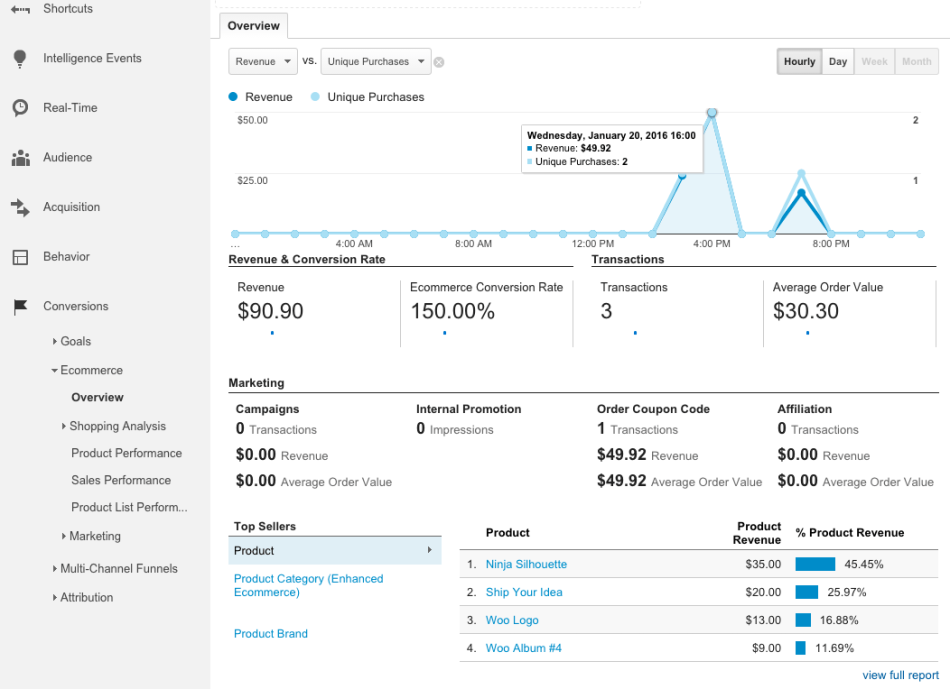
You can’t improve what you don’t measure. Most WooCommerce store owners miss this truth entirely: they run promotions, change product pages, and adjust prices without actually knowing what’s working. The difference between guessing and winning comes down to one thing: proper analytics setup.
(Credit: Woocommerce)
Without tracking, you’re flying blind. You won’t know your real conversion rate, which products actually make money, or where customers drop off. You’ll spend marketing budget on channels that don’t work and ignore the ones that do.
Installing and Configuring Google Analytics 4 with WooCommerce
Google Analytics 4 (GA4) is the current standard. Unlike Universal Analytics (which Google shut down in July 2023), GA4 is built for modern eCommerce tracking and gives you the data you need to run a profitable store.
Step 1: Install Google Analytics 4
You need two things: a Google Analytics account and a plugin to connect it to WooCommerce.
- Go to <a href=”https://analytics.google.com/”>Google Analytics</a> and sign in with your Google account.
- Click “Create” to set up a new property for your store.
- Choose “Web” as your platform.
- Enter your store’s URL and timezone (use your local timezone, not UTC).
- Accept Google’s terms and complete the setup.
Google will give you a Measurement ID (it looks like G-XXXXXXXXXX). Keep this safe: you’ll need it next.
Step 2: Install a WooCommerce plugin
The official <a href=”https://woocommerce.com/products/google-for-woocommerce/”>Google for WooCommerce plugin</a> (built by WooCommerce) is the simplest approach. It handles both GA4 and Google Shopping in one place.
Alternatively, <a href=”https://www.monsterinsights.com/”>MonsterInsights</a> is a popular third-party option that makes GA4 setup simpler for non-technical users.
To install via plugin:
- Go to WordPress Admin > Plugins > Add New.
- Search for “Google for WooCommerce” (or your chosen plugin).
- Click “Install Now” then “Activate”.
- Paste your Measurement ID into the plugin settings.
- Check the box to enable eCommerce tracking.
Step 3: Enable enhanced eCommerce measurement
This is critical. It tells GA4 to track product views, add-to-cart actions, checkouts, and completed purchases.
- In your GA4 property, go to Admin (bottom left).
- Under “Data Collection and Modification”, select “Data Streams”.
- Click on your website stream.
- Under “Enhanced Measurement”, toggle on “Purchase” and “View item list”.
- Save.
Once you’ve done this, GA4 will automatically collect data from your WooCommerce store. Wait 24 hours for data to populate.
Understanding WooCommerce-Specific Metrics: AOV, Repeat Customer Rate, Cart Abandonment
Not all metrics are created equal. Generic metrics (page views, sessions) tell you nothing about profit. WooCommerce-specific metrics show you where you’re making and losing money.
Average Order Value (AOV)
AOV is the average dollar amount customers spend per order. It’s one of the most important numbers in your store.
Formula: Total Revenue / Number of Orders
If you made SGD 10,000 from 50 orders, your AOV is SGD 200.
Why it matters: A 10% increase in AOV is often easier than a 10% increase in traffic. If you raise AOV from SGD 200 to SGD 220, your profit climbs immediately on existing traffic.
Track this weekly. Seasonal dips (like July in many parts of Asia) are normal, but a sustained drop signals a problem: either your products are less appealing, or customers are buying smaller quantities.
In GA4, find AOV under Reports > Monetisation> Ecommerce Purchases. Look at “Average purchase value”.
Repeat Customer Rate
This is the percentage of customers who buy twice or more.
Formula: (Repeat Customers / Total Customers) x 100
A repeat customer rate of 25% is strong for most eCommerce stores. Below 15%, you’re losing money on customer acquisition because you’re not getting enough future revenue from each buyer.
This metric reflects your product quality, customer service, and email marketing health. A sudden drop often means a bad product shipped recently or checkout emails landed in spam.
Track this monthly in GA4 under Monetisation> Ecommerce Customers, filtered by “Repeat Customers”.
Cart Abandonment Rate
This is the percentage of customers who add items to their cart but never complete the purchase.
Formula: ((Sessions with Add-to-Cart / Total Sessions) – (Completed Orders / Total Sessions)) x 100
Industry benchmarks sit around 70% (yes, seven out of ten carts are abandoned). If you’re seeing 80%+, you have a friction problem: either checkout takes too long, payment options are limited, or shipping costs surprise customers at the last step.
Cart abandonment is your fastest profit lever. Recovering just 5% of abandoned carts can increase revenue 10-20% without spending on ads.
In GA4, go to Monetisation > Ecommerce Purchases and compare “Add to cart” events with “Purchase” events. The gap is your abandoned carts.
Other WooCommerce Metrics Worth Tracking
- Conversion rate: Orders / Sessions. Benchmark: 1-3% for most retail eCommerce.
- Customer Acquisition Cost (CAC): Total marketing spend / New customers. If your CAC is SGD 50 and AOV is SGD 60, you’re losing money on first-time buyers.
- Customer Lifetime Value (CLV): AOV x Average repeat purchases per customer. This tells you the real value of acquiring a customer.
- Return customer percentage: High-value metric. Tells you whether your retention efforts work.
Building a Decision Dashboard: Weekly and Monthly Metrics
Tracking everything drowns you in data. You need a dashboard that answers one question: “Is my store healthy?”
A dashboard should have two layers: a weekly snapshot and a monthly deep-dive.
Weekly Dashboard (check every Monday)
These five metrics flag problems fast:
- Last 7-day revenue: Total sales. Catches unexpected dips.
- Last 7-day conversion rate: Orders / Sessions. Baseline health check.
- Last 7-day AOV: Trending up or down? If down, something’s breaking.
- Add-to-cart abandonment rate (7-day): Cart adds vs. purchases. Did checkout break?
- Traffic source breakdown: Which channel (organic, paid, email, direct) drove most revenue? Fund winners.
This takes 5 minutes to read. It tells you whether to keep operating as normal or investigate.
Monthly Dashboard (check on the 1st)
These metrics explain the story behind the numbers:
- Month-over-month revenue growth: Compares this month to last month. Removes seasonal noise.
- Repeat customer rate: New vs. returning. Improving retention?
- AOV by traffic source: Does paid traffic convert at a lower AOV? Does email? This tells you which channels bring quality customers.
- Cart abandonment by device: Is mobile checkout broken?
- Customer Acquisition Cost (CAC) by channel: What does each channel cost? Is it sustainable?
- Top 10 products by revenue: What’s actually selling? Reallocate marketing budget here.
- Geographic performance: If you sell across regions, which one is strongest?
How to Build This in GA4
- Go to Reports > Monetisation> Ecommerce Purchases.
- Click the pencil icon to customise the report.
- Add rows (dimensions) for “Date”, “Source / Medium”, and “Device Category”.
- Add columns (metrics) for “Revenue”, “Conversions”, and “Users”.
- Save this as a custom report.
- Duplicate it and modify it for monthly comparisons.
Alternatively, export this data to a Google Sheet and build a simple dashboard with formulas. This gives you more control and lets you add calculated metrics like CAC and CLV.
Decision Framework: When to Act
Use this framework to move from data to action.
| Metric | Normal Range | Yellow Flag | Red Flag | Action |
|---|---|---|---|---|
| Weekly Conversion Rate | 1-3% | Down 10% | Down 25% | Check product pages and checkout for errors |
| AOV (weekly) | Stable | Down 5% | Down 15% | Review top products; test higher-priced bundles |
| Cart Abandonment | 70-75% | 76-80% | 81%+ | Add one payment method; test “Continue Shopping” CTA |
| Repeat Customer % | 20%+ | 15-20% | Below 15% | Review post-purchase email; check product reviews |
| CAC vs. AOV | CAC less than 30% of AOV | CAC 30-40% of AOV | CAC over 50% of AOV | Pause paid ads; focus on organic and email |
These thresholds aren’t law. They’re starting points. Regional differences matter: a WooCommerce store selling to Malaysia may have a different AOV than one selling to Singapore, due to purchasing power and average basket size.
The goal isn’t perfection. It’s clarity. Once you know which metrics drive profit and which ones are noise, you can stop reacting to vanity numbers and start optimising for real business outcomes.
Product Page Optimisation for WooCommerce Conversion
Your product pages are where intent becomes action. A visitor arriving at your WooCommerce store with buying intent will make a conversion decision within seconds, often before scrolling past the product title and first image. Optimising these pages directly impacts your profit margin, because every improvement compounds across your entire catalogue.
Unlike SaaS or service landing pages, eCommerce product pages carry a dual burden: they must rank in organic search (SEO) while simultaneously persuading a ready buyer to complete checkout. This creates tension. The sections below show how to resolve it without sacrificing either goal.
Writing Product Titles and Descriptions for Search Intent and Conversions
Your product title serves two masters: Google’s ranking algorithm and the customer’s decision-making process. A title optimised for only one will fail at the other.
Structure your title for clarity first, keywords second. A title like “Blue Wireless Headphones Bluetooth 5.0 Noise Cancelling Over-Ear for iPhone Samsung” ranks better than “Best Bluetooth Headphones”, but only if the specificity also matches what buyers are actually searching for. Research your category’s search volume using tools like Ahrefs or SE Ranking. If “blue noise-cancelling headphones” drives meaningful traffic in your region, include it. If no one searches that exact phrase, prioritise clarity instead.
Keep titles under 60 characters where possible. WooCommerce displays the full title in search results, but mobile SERPs truncate at around 55-60 characters. A truncated title loses persuasive power.
Product descriptions must answer the buyer’s unstated question: “Why should I buy this instead of the alternative I already know about?”
Place your strongest differentiator in the first 150 words. Not features. Not what the product is. What makes it different? If your headphones have a 40-hour battery, that’s interesting. If competitors claim 30 hours and yours genuinely delivers 40, that’s a differentiator: lead with it.
Use a three-part structure:
- Problem and solution (one paragraph): “Wireless headphones either sound great or last all week. These do both.”
- Proof (specifications, certifications, materials): List only specs that defend your differentiator. If you claim premium sound, name the driver size and frequency response. If weight matters, state it.
- Application (when and how the buyer uses it): “Ideal for commuters, office workers, or anyone flying weekly.”
This structure works because it mirrors how customers evaluate a product. They check: Does this solve my problem? Is it genuinely better? Will it work for me?
Avoid marketing clichés. Replace them with specific claims backed by data. “Built from aerospace-grade aluminium” beats “premium construction”. “Tested to IP67 standards” beats “water-resistant”.
Product Images, Videos, and Visual Hierarchy in WooCommerce
On mobile, your product images occupy 80% of the visible space. On desktop, they are still the first thing a visitor evaluates. Poor images cost sales.
Image Sequence and Composition
Your first image should communicate the product immediately. Use a clean background, show the entire product, and avoid promotional badges covering important details. The customer should understand what is being sold before reading a single line of copy.
A strong image sequence usually follows this order:
- Hero product image: Clean, high-resolution image showing the product clearly.
- Alternative angles: Side, rear, open, closed, folded or assembled views depending on the product.
- Scale image: Show the product beside a familiar object or being used by a person so customers understand its size.
- Feature close-ups: Highlight details that support your key selling points.
- Lifestyle image: Show the product in the situation where the buyer is likely to use it.
- Specification graphic: Dimensions, materials, compatibility or other decision-making information.
- Packaging image: Particularly useful for gifts, premium products or products where customers care about what arrives.
For fashion, beauty, food and home products, lifestyle photography is especially important. A technical specification alone does not answer the buyer’s emotional question: “What will this look or feel like when I own it?”
For electronics and technical products, diagrams and close-ups matter more. Buyers want ports, connectors, dimensions, controls and compatibility.
Do not upload unnecessarily large image files. WooCommerce lets you control your own hosting environment, so oversized images directly affect page speed. Compress images before uploading and use modern formats such as WebP where your setup supports them.
Product Video
Video is particularly effective for products that require demonstration.
Use a short video when:
- The product moves or transforms.
- Assembly requires explanation.
- Size is difficult to understand from photographs.
- The product’s primary advantage is easier to demonstrate than describe.
- Buyers frequently ask the same question before purchasing.
A 20- to 60-second demonstration is usually more useful than a polished two-minute brand film.
Show the product solving the problem.
If you sell a waterproof backpack, show water hitting it. If you sell a compact travel charger, show how small it is beside a phone. If you sell kitchen equipment, show it operating.
Do not make customers imagine your differentiator when you can demonstrate it.
Designing the Above-the-Fold Product Area
The area visible before the customer scrolls should answer five questions immediately:
What is this?
The product title and primary image should make this obvious.
Why should I care?
Put the strongest differentiator close to the title.
How much does it cost?
Display the price clearly. Do not make customers search for it.
Can I trust buying it here?
Show reviews, payment methods, delivery expectations and relevant guarantees.
What do I do next?
The Add to Cart or Buy Now button must be visually obvious.
Do not crowd this area with ten promotional messages.
A cleaner hierarchy usually converts better:
Product image → Product name → Rating → Key benefit → Price → Variant selection → Add to Cart → Delivery/trust information.
On mobile, test this hierarchy yourself. If a customer must scroll past promotional banners to reach the product information, simplify the page.
Reviews, Trust Signals and Purchase Anxiety
A buyer arriving from Google trusts your WooCommerce store less than a familiar marketplace.
Your product page must compensate.
Useful trust signals include:
- Verified customer reviews
- Clear returns policy
- Delivery timeframe
- Accepted payment methods
- Secure checkout messaging
- Local contact details
- Warranty information
- Real product photography
- Stock availability
- Customer service options
Reviews are especially powerful when they answer objections.
“Great product” is weak.
“Arrived in Singapore in two days, fits my 14-inch laptop and survived heavy rain” helps another customer make a decision.
Encourage customers to mention how they use the product rather than simply asking for a star rating.
Cross-Sells, Bundles and Average Order Value
Once your core product page converts reliably, use WooCommerce’s flexibility to increase average order value.
Start with complementary products.
Someone buying a camera may need a memory card. Someone buying coffee may need filters. Someone buying skincare may need a complementary cleanser.
Avoid showing unrelated “recommended products” simply because a plugin generated them automatically.
A useful cross-sell answer:
What else does this buyer logically need to complete the purchase?
Bundles can work even better.
For example:
Individual price:
- Product A: SGD 39
- Product B: SGD 20
- Product C: SGD 15
Bundle:
Complete Starter Kit: SGD 65
The customer saves SGD 9 while your average order value increases substantially.
Measure bundle performance instead of assuming discounts automatically increase profit.
Paid Advertising Strategies for WooCommerce
Paid advertising can accelerate a working WooCommerce store. It cannot repair a broken one.
Before spending meaningfully on advertising, confirm:
- Purchase tracking works correctly.
- Product feeds contain accurate data.
- Mobile checkout works.
- Shipping costs are visible early.
- Payment options suit your target market.
- Product pages convert existing traffic.
- Gross margins can support customer acquisition costs.
If any of these fail, fix them before scaling.
Google Shopping and Performance Max
For product-led WooCommerce stores, shopping is usually more useful than generic search advertising because customers see the product, price, and seller before clicking.
The feed therefore becomes part of your advertising creative.
Optimise:
Product titles
Include the attributes customers actually search for:
Brand + product type + major attribute + size/model/colour where relevant.
Descriptions
Use natural language containing meaningful product information. Do not stuff keywords.
Images
Use clear primary images without distracting overlays.
Categories
Map products accurately to Google’s taxonomy.
Availability
Keep stock status synchronised.
Price
The feed price and landing-page price must match.
Identifiers
Use valid GTINs, SKUs or other available product identifiers.
A beautifully structured advertising campaign cannot compensate for poor feed data.
Search Campaigns
Traditional search campaigns are useful when customers search for a category or problem rather than a specific visual product.
Separate your campaigns into intent groups.
Brand searches
People searching specifically for your brand.
Product/category searches
Examples:
“organic coffee beans Singapore”
“mechanical keyboard Malaysia”
“running hydration vest”
Problem or need searches
Examples:
“gift for new parents Singapore”
“office chair for back support”
Competitor searches
Potentially useful, but often expensive and lower converting. Test separately so competitor traffic does not distort your main campaigns.
Avoid mixing all keyword types into one campaign.
They represent different levels of purchase intent and should have different budgets, messages and landing pages.
Calculate Your Break-Even Customer Acquisition Cost
Do not choose advertising budgets based on what competitors appear to spend.
Start with your economics.
Suppose:
Average order value = SGD 100
Gross margin = 45%
Gross profit before marketing = SGD 45
If you spend SGD 40 acquiring the customer, only SGD 5 remains before overhead.
That may still work if customers purchase repeatedly.
If most customers buy once, it probably does not.
Your acceptable acquisition cost therefore depends on:
- Gross margin
- Repeat purchase rate
- Refund rate
- Payment fees
- Shipping subsidies
- Customer lifetime value
A WooCommerce dashboard should connect advertising spend to contribution margin, not merely revenue.
ROAS can look impressive while the business still loses money.
Meta Advertising for WooCommerce
Facebook and Instagram advertising works differently from Google.
Google captures existing intent.
Meta creates or interrupts attention.
That makes creative quality much more important.
A useful Meta creative structure is:
Problem → Product → Proof → Offer → CTA
For example:
“Tired of cables taking over your travel bag?”
Show the compact charger.
“Charges laptop, phone and watch from one adapter.”
Show product being used.
“4.8/5 from 600+ customers.”
Show review.
“Free Singapore delivery this week.”
CTA.
Test several angles rather than changing tiny design elements.
Useful creative angles include:
- Problem/solution
- Before/after
- Demonstration
- Customer testimonial
- Founder story
- Comparison
- Unboxing
- User-generated content
- Limited offer
Retargeting Without Wasting Budget
Do not treat every website visitor equally.
Someone who read a blog article is less valuable than someone who added a SGD 200 product to their cart.
Build separate audiences for:
- Product viewers
- Multiple product viewers
- Add-to-cart users
- Checkout starters
- Past purchasers
- High-value customers
Exclude completed purchasers from basic cart-recovery advertising unless the product is naturally repurchased.
Your highest-priority retargeting group should normally be customers who showed strong buying intent but failed to complete checkout.
Do Not Scale Until the Numbers Work
If a campaign spends SGD 500 and loses money, increasing the budget to SGD 5,000 usually creates a larger loss.
Scale when:
- Conversion tracking is trusted.
- Conversion rate is stable.
- Customer acquisition cost is economically viable.
- Feed errors are minimal.
- Enough conversions exist for platform algorithms to learn.
- The store can fulfil additional orders reliably.
Increase budgets progressively rather than multiplying them suddenly.
Customer Retention and Repeat Purchase Marketing
Acquiring a customer is expensive.
Getting an existing customer to buy again is usually easier because the hardest problem has already been solved: trust.
WooCommerce gives you direct ownership of customer data, making retention one of the platform’s most important strategic advantages.
Build a Post-Purchase Journey
Do not stop communicating when the order confirmation is sent.
A basic post-purchase sequence can include:
Immediately: Order confirmation
Confirm the purchase, shipping address and expected next step.
After dispatch: Shipping notification
Give customers tracking information and realistic arrival expectations.
After delivery: Product usage guidance
Help customers get maximum value from the product.
7–14 days later: Review request
Ask for feedback after customers have had enough time to use the product.
14–30 days later: Complementary product recommendation
Recommend a genuinely related next purchase.
Later: Replenishment or win-back message
Timing depends on the product’s normal purchase cycle.
This is more effective than repeatedly sending discounts.
Cart Abandonment Recovery
Not every abandoned cart should get a coupon immediately.
Start with a reminder.
Email 1:
You left something behind
Show the product, price and direct link back to checkout.
Email 2:
Address a likely objection.
“Questions about delivery?”
“Need help choosing the right size?”
“Want to know whether this fits your device?”
Only test a discount if reminders alone fail.
Automatically teaching customers that abandoning checkout generates a coupon can train unwanted behaviour.
Segment Customers by Behaviour
A customer who bought five times should not receive the same marketing as someone who bought once 18 months ago.
Useful segments include:
- First-time customers
- Repeat customers
- High-value customers
- Recent customers
- Lapsed customers
- Category-specific buyers
- Discount-driven customers
- Customers with high average order value
Then adjust offers accordingly.
A customer who repeatedly buys premium products probably does not need a 15% discount.
They may respond better to early access, priority delivery or exclusive products.
Loyalty Programmes
A loyalty programme works when there is a natural reason to purchase repeatedly.
It is useful for:
- Cosmetics
- Food
- Supplements
- Pet supplies
- Fashion
- Hobby products
- Consumables
It is less useful for products customers purchase once every five years.
Do not launch points simply because a plugin makes it easy.
Ask:
Will this programme meaningfully change purchasing behaviour?
If not, focus on excellent service, email retention and product quality instead.
Measure Customer Lifetime Value
A paid campaign can look unprofitable on the first sale but highly profitable over 12 months.
Suppose:
Initial order: SGD 80
Advertising cost: SGD 35
Initial gross profit after product cost: SGD 32
The acquisition appears unprofitable.
But if the average customer makes another three purchases over the next year, their lifetime revenue may exceed SGD 300.
This changes how aggressively you can acquire customers.
Track cohorts wherever possible:
Customers acquired in January.
How much did they spend after 30, 60, 90 and 180 days?
Repeat this for each acquisition channel.
You may discover that Google Shopping customers buy once while email-referred customers become loyal repeat purchasers.
That distinction matters more than first-order ROAS.
Local and Regional Marketing for WooCommerce Sellers
Selling across Southeast Asia is not simply a matter of translating your homepage.
Different markets have different payment expectations, currencies, delivery concerns, marketplaces and purchasing behaviour.
Local Payment Methods Matter
Customers abandon stores when their preferred payment method is missing.
Your exact payment mix depends on the countries you target, but common expectations across Asia may include:
- Credit and debit cards
- Bank transfers
- Mobile wallets
- Buy-now-pay-later services
- Country-specific payment services
Do not install every payment plugin available.
Prioritise methods based on your actual customer geography.
Review checkout abandonment by country. If Malaysian traffic reaches checkout but converts significantly worse than Singapore traffic, payment availability may be one cause worth investigating.
Local Currency and Pricing
Displaying SGD to a Malaysian shopper and expecting them to calculate the exchange rate adds friction.
If cross-border sales justify it, show prices in the customer’s local currency.
Make clear whether:
- Currency conversion is estimated or fixed.
- Taxes are included.
- Import duties may apply.
- Payment providers may charge conversion fees.
Unexpected costs at checkout destroy trust.
Shipping Confidence Is a Marketing Issue
Sellers often treat logistics as an operations problem.
Customers treat it as part of the buying decision.
Before checkout, answer:
- How much does delivery cost?
- How long will it take?
- Where do you ship?
- Is tracking included?
- What happens if the parcel is lost?
- Who pays for returns?
- Are duties included?
Do not hide shipping information in your footer.
Put important delivery information close to the Add to Cart button.
For cross-border sales, delivery uncertainty can matter more than a small difference in product price.
Localise SEO by Market
Do not create identical pages for five countries and replace the country name.
Useful local landing pages should contain genuinely local information.
For example:
Mechanical Keyboards Singapore
Could include:
- Prices in SGD
- Singapore delivery times
- Local warranty information
- Payment methods available in Singapore
- Relevant customer reviews
- Products available locally
A Malaysian equivalent should contain Malaysian information rather than copied Singapore content.
Localisation is useful when it improves the customer experience, not merely when it creates another indexable URL.
Marketplaces Can Support Your WooCommerce Store
Shopee, Lazada, and other regional marketplaces don’t have to be treated purely as competitors.
They can become acquisition channels.
A buyer may first discover your brand on a marketplace because they trust its checkout and delivery ecosystem.
Your WooCommerce site can then provide:
- Wider product selection
- Bundles
- Educational content
- Loyalty programme
- Exclusive products
- Better repeat-purchase experience
Do not violate marketplace rules by attempting to divert customers improperly. Instead, build a memorable brand so customers naturally search for you directly later.
Influencers and Creators
Influencer marketing performs best when the audience and product genuinely match.
Do not evaluate creators only by follower count.
Track:
- Average views
- Engagement quality
- Audience geography
- Audience demographics
- Previous sponsored content performance
- Clicks
- Coupon use
- Revenue
- New customers generated
Give each creator a unique URL, UTM parameters or promotional code.
Without attribution, influencer marketing becomes guesswork.
Micro-creators can outperform large creators because their audience is often more specialised and trusted.
Test several smaller creators before committing a large budget to one major campaign.
Common WooCommerce Marketing Mistakes and How to Avoid Them
WooCommerce’s flexibility creates opportunity, but it also creates failure points.
Most underperforming stores do not have one giant problem. They have five or six smaller ones compounding together.
Mistake 1: Buying Traffic Before Fixing Conversion
Traffic does not solve:
- Broken checkout
- Slow pages
- Poor product photography
- Missing payment options
- Unexpected shipping fees
- Weak product descriptions
More traffic simply exposes more people to the problem.
Fix: Establish a conversion-rate baseline before increasing advertising.
Mistake 2: Installing Too Many Plugins
Every new marketing idea appears to have a WordPress plugin.
Pop-ups.
Reviews.
Points.
Upsells.
Analytics.
Chat.
Heatmaps.
Social feeds.
Countdown timers.
Install enough of them and your store becomes slower, harder to maintain and more likely to break.
Fix: Audit plugins quarterly.
Ask of every plugin:
- Does it materially support revenue or operations?
- Is another plugin already doing the same thing?
- Does removing it improve site speed?
- Is it still actively maintained?
Remove unnecessary plugins.
Mistake 3: Trusting Platform Reports Without Verification
Google Ads may claim one revenue number.
Meta may claim another.
GA4 may show something else.
WooCommerce may report total sales that do not match any of them.
This does not necessarily mean one platform is broken. Each attribution system uses different rules.
Fix: Use WooCommerce actual completed orders as the commercial source of truth, then compare channel attribution using GA4 and advertising platforms.
Do not add Google, Meta and email-attributed revenue together. You may count the same purchase multiple times.
Mistake 4: Ignoring Product Feed Health
A product feed is not something you configure once.
Prices change.
Stock changes.
Products are discontinued.
Images break.
Variants get added.
Google requirements change.
Fix: Review Merchant Center diagnostics routinely and resolve disapprovals quickly.
Mistake 5: Optimising for Revenue Instead of Profit
SGD 100,000 revenue sounds impressive.
If advertising costs SGD 40,000 and fulfilment, product cost and discounts consume another SGD 55,000, the campaign generated only SGD 5,000 before overhead.
Fix: Build dashboards around:
- Gross margin
- Contribution margin
- CAC
- AOV
- Repeat purchase rate
- CLV
- Refund rate
Revenue is an output. Profitability is the objective.
Mistake 6: Copying Western eCommerce Tactics Without Localising Them
Advice created for US buyers may assume:
- Credit cards dominate payment.
- Domestic shipping is simple.
- USD is understood.
- Amazon controls product discovery.
- Delivery expectations are uniform.
These assumptions do not automatically transfer to Southeast Asia.
Fix: Analyse your own checkout, payment and traffic data by country.
Local behaviour beats imported best practice.
Mistake 7: Spreading Budget Across Too Many Channels
SEO.
Meta.
TikTok.
Google Ads.
Influencers.
Email.
Affiliates.
Marketplaces.
Trying everything with a limited budget usually means learning nothing.
Fix: Master two channels before scaling into a third.
Your 12-Week WooCommerce Marketing Roadmap
The order matters.
Do not start by buying traffic.
Build the measurement and conversion foundation first.
Weeks 1–2: Measurement
Set up and verify:
- GA4
- WooCommerce purchase tracking
- Google Search Console
- Merchant Center
- Google Ads conversion tracking
- Meta tracking if relevant
- UTM conventions
Place test orders.
Confirm revenue values are recorded correctly.
Document your baseline:
- Traffic
- Conversion rate
- AOV
- Cart abandonment
- Repeat customer rate
- Revenue by channel
Weeks 3–4: Product Pages and SEO
Optimise your highest-revenue products first.
Improve:
- Titles
- Descriptions
- Images
- Schema
- Internal links
- Categories
- Mobile layout
- Page speed
- Calls to action
Don’t try to optimise 5,000 products at once.
Start with the 20 products that matter most.
Weeks 5–6: Product Feed and Google Shopping
Clean:
- Product titles
- Images
- GTIN/SKU data
- Categories
- Pricing
- Availability
- Landing pages
Launch a controlled Shopping or Performance Max test.
Measure actual completed sales rather than clicks.
Weeks 7–8: Conversion Optimisation
Study where customers abandon.
Test:
- Checkout length
- Payment options
- Delivery messaging
- Product bundles
- Trust signals
- Mobile usability
- Cart recovery
Fix major friction before increasing advertising.
Weeks 9–10: Email and Retention
Launch the essential automated flows:
- Cart abandonment
- Post-purchase
- Review request
- Win-back
Segment new and repeat customers.
Measure revenue per recipient, not just open rates.
Weeks 11–12: Scale What Works
Compare your channels.
Ask:
- Which generated the most profitable customers?
- Which delivered repeat purchasers?
- Which required the most operational effort?
- Which has the greatest room to scale?
- Where are customers abandoning?
Increase investment in the strongest one or two channels.
Reduce or pause channels that generate activity without profitable outcomes.
At week 12, you should have something more valuable than a collection of marketing campaigns.
You should have a working WooCommerce growth system.
Final Takeaway
WooCommerce marketing rewards operators who understand systems.
The platform gives you extraordinary flexibility. You own your website, customer data, product catalogue, tracking setup, payment integrations and marketing infrastructure.
That freedom is also the challenge.
With Shopify or a marketplace, many technical decisions are made for you. With WooCommerce, every integration can become either a competitive advantage or another point of failure.
The most successful approach, then, is not to chase every new marketing channel.
Get the fundamentals right first:
Measure accurately.
Know where customers come from and what they are worth.
Fix the store before buying traffic.
A conversion problem multiplied by advertising becomes a larger conversion problem.
Build organic visibility.
Optimise products and categories around how real customers search.
Use paid media selectively.
Scale channels only after the unit economics work.
Own the customer relationship.
Use email, retention and direct customer data to reduce dependence on Google, Meta and marketplaces.
Localise for the markets you actually serve.
Payments, currencies, shipping expectations and buying behaviour vary substantially across Asia.
Finally, measure success in profit and repeat customers, not traffic, followers, or advertising impressions.
WooCommerce gives sellers something increasingly rare in eCommerce: control.
Use that control well, and your store becomes more than another place to buy a product. It becomes an owned marketing asset that becomes more valuable as your customer data, search authority, and repeat-purchase base grow.
Frequently Asked Questions About WooCommerce Marketing
What is WooCommerce marketing?
WooCommerce marketing is the process of attracting, converting and retaining customers for a WooCommerce-powered online store using channels such as SEO, Google Shopping, paid advertising, email, social commerce and customer retention.
Unlike marketing on closed platforms, WooCommerce marketing also requires attention to hosting, plugins, analytics, feeds, checkout configuration and third-party integrations.
What is the best marketing strategy for WooCommerce?
No single channel works best for every store. A strong starting sequence is to establish analytics, optimise product pages and SEO, test Google Shopping, then build email and retention programmes.
You can add paid social and other channels after you’ve proven conversion tracking and unit economics.
Is WooCommerce good for SEO?
Yes. WooCommerce runs on WordPress and provides significant control over URLs, product content, categories, internal linking, structured data and technical optimisation.
That flexibility is an advantage, but only when the store is configured properly. Poor hosting, too many plugins, and weak category architecture can undermine SEO performance.
How do I increase WooCommerce sales?
Start by identifying whether your problem is traffic or conversion.
If traffic is low, focus on SEO, shopping, paid search and audience acquisition.
If traffic is healthy but sales are weak, investigate product pages, checkout friction, payment methods, delivery messaging, mobile usability and cart abandonment.
Increasing traffic before solving conversion problems usually wastes budget.
What should I track in WooCommerce marketing?
At minimum, track:
- Revenue
- Conversion rate
- Average order value
- Customer acquisition cost
- Cart abandonment
- Repeat customer rate
- Customer lifetime value
- Revenue by traffic source
- Gross or contribution margin
Traffic and clicks are useful diagnostic metrics, but they should not be your primary measure of marketing success.
Should I use Google Shopping for WooCommerce?
Google Shopping can be highly effective for products with clear purchase intent, provided your Merchant Center feed is accurate.
Check product titles, images, prices, inventory, identifiers, and landing pages before scaling campaigns.
How can I reduce WooCommerce cart abandonment?
Start by testing the checkout yourself on desktop and mobile.
Common causes include unexpected shipping charges, lengthy forms, missing payment methods, slow pages, unclear delivery dates and technical errors.
Cart-recovery emails can recover some lost sales, but they shouldn’t replace fixing checkout friction.
Is email marketing important for WooCommerce?
Yes. One of WooCommerce’s biggest advantages is direct ownership of customer data.
Automated cart-recovery, post-purchase and win-back campaigns can generate additional revenue from customers you have already paid to acquire.
How should Asian WooCommerce stores approach marketing differently?
Stores selling in Asia should account for local currencies, preferred payment methods, delivery expectations, country-specific search behaviour and competition from marketplaces such as Shopee and Lazada.
The fundamentals of eCommerce marketing remain the same, but the execution should reflect the market where customers actually live and buy.
How long does WooCommerce SEO take to work?
SEO typically takes longer than paid advertising because pages need to be crawled, indexed and earn authority.
Product and category improvements may begin producing measurable movement within several weeks, while more competitive search terms can require months of consistent optimisation.
This is why SEO should be built alongside faster channels rather than judged after a few days.
Should WooCommerce sellers use Shopify-style marketing strategies?
Some principles transfer, but not all tactics do.
WooCommerce sellers have greater control over their technology stack, but they also carry more responsibility for site performance, tracking, feeds, plugins and checkout reliability.
A successful WooCommerce strategy should therefore combine marketing with ongoing technical management.