AI Summary
TikTok LIVE works best as a repeating loop rather than a one-time presentation, since new viewers can join at any point and need context to catch up. This article introduces the “MediaOne LIVE Loop” (Hook → Orient → Demonstrate → Interact → Convert → Reset) for structuring sessions, along with guidance on planning, timing, and moderation. It also covers TikTok Shop-specific rules for Singapore sellers, including interactivity requirements and the ban on simulcasting LIVEs.
A TikTok LIVE can look deceptively simple. Open the app, start broadcasting and talk to whoever appears.
For a business, that usually is not enough.
A normal presentation assumes most people experience the beginning before they experience the middle. TikTok LIVE does not give you that luxury. Someone can discover the stream while you are halfway through a demonstration, answering another viewer’s question or explaining an offer you introduced ten minutes earlier.
That changes how we think a LIVE should be structured.
Don’t design your TikTok LIVE only for the viewer who was there at the beginning. Design it so the viewer who arrives right now has a reason to stay.
The strongest TikTok LIVE sessions therefore need more than one hook. They repeatedly help new viewers understand what is happening, show something worth watching, involve the audience and give people an appropriate next step.
That is the idea behind what we call the MediaOne LIVE Loop.
Key Takeaways
- TikTok LIVE should be designed for continuous audience entry rather than treated like a presentation with one opening and one conclusion. Reorient new viewers throughout the session so someone joining halfway through can understand the value quickly.
- Plan the objective, format, viewer promise, moderation and measurement before going LIVE. TikTok itself recommends planning content, testing the technical setup, promoting the stream beforehand and going LIVE when your audience is active.
- During the LIVE, alternate between explanation and action. Demonstrations, specific questions and clear transitions generally give viewers more to respond to than an uninterrupted talking-head monologue.
- For TikTok Shop sellers in Singapore, LIVE also comes with platform-specific content and selling rules. These include requirements around interactive content, accurate product promotion and restrictions on simultaneous streaming across platforms.
What Is TikTok LIVE?
TikTok LIVE is TikTok’s real-time broadcasting format. It supports live viewer comments and features including multi-guest hosting, co-hosting, moderation, LIVE Events and replays, although the exact features available can depend on account eligibility and location.
For a business, LIVE can support several different jobs. A company might use it for a product demonstration, Q&A, launch, interview, behind-the-scenes session, educational programme or e-commerce selling session.
The format should follow the job.
A LIVE designed to answer customer questions should not necessarily look like a TikTok Shop selling session, while a shopping LIVE needs much more attention to product sequencing, offers, demonstrations and buying friction.
TikTok Shop’s own Singapore data shows how quickly LIVE commerce is growing locally. During its June 2026 6.6 Birthday Mega Sale, TikTok reported that platform livestream GMV doubled year on year, the number of livestreams per day doubled, and livestream views increased by 167% compared with the 2025 sale. Overall platform GMV during the campaign increased 80% year on year. These figures refer specifically to TikTok Shop’s 6.6 campaign, not to every LIVE session, but they show the scale of activity taking place around livestream commerce in Singapore.
The Biggest TikTok LIVE Mistake: Designing Only for the Opening
Imagine you are running a 45-minute LIVE.
The opening is excellent. You explain the topic, introduce the presenter and tell viewers exactly what they will learn.
Then minute 16 arrives.
A new viewer enters.
They did not see any of that.
If the screen currently shows someone saying, “Yeah, that one is actually much better,” the viewer has no idea what “that one” refers to, what is being compared or why they should keep watching.
This is why LIVE needs periodic orientation.
A host can naturally say:
“If you’ve just joined us, we’re comparing the three models today. I’m testing the second one now, and next I’ll show you where the cheaper version actually makes more sense.”
That sentence performs several jobs at once. It explains the context, tells viewers what is happening now and gives them a reason to stay for what comes next.
The stream does not need to restart every five minutes. It simply needs enough contextual resets that a viewer can enter almost anywhere without feeling lost.
The MediaOne LIVE Loop
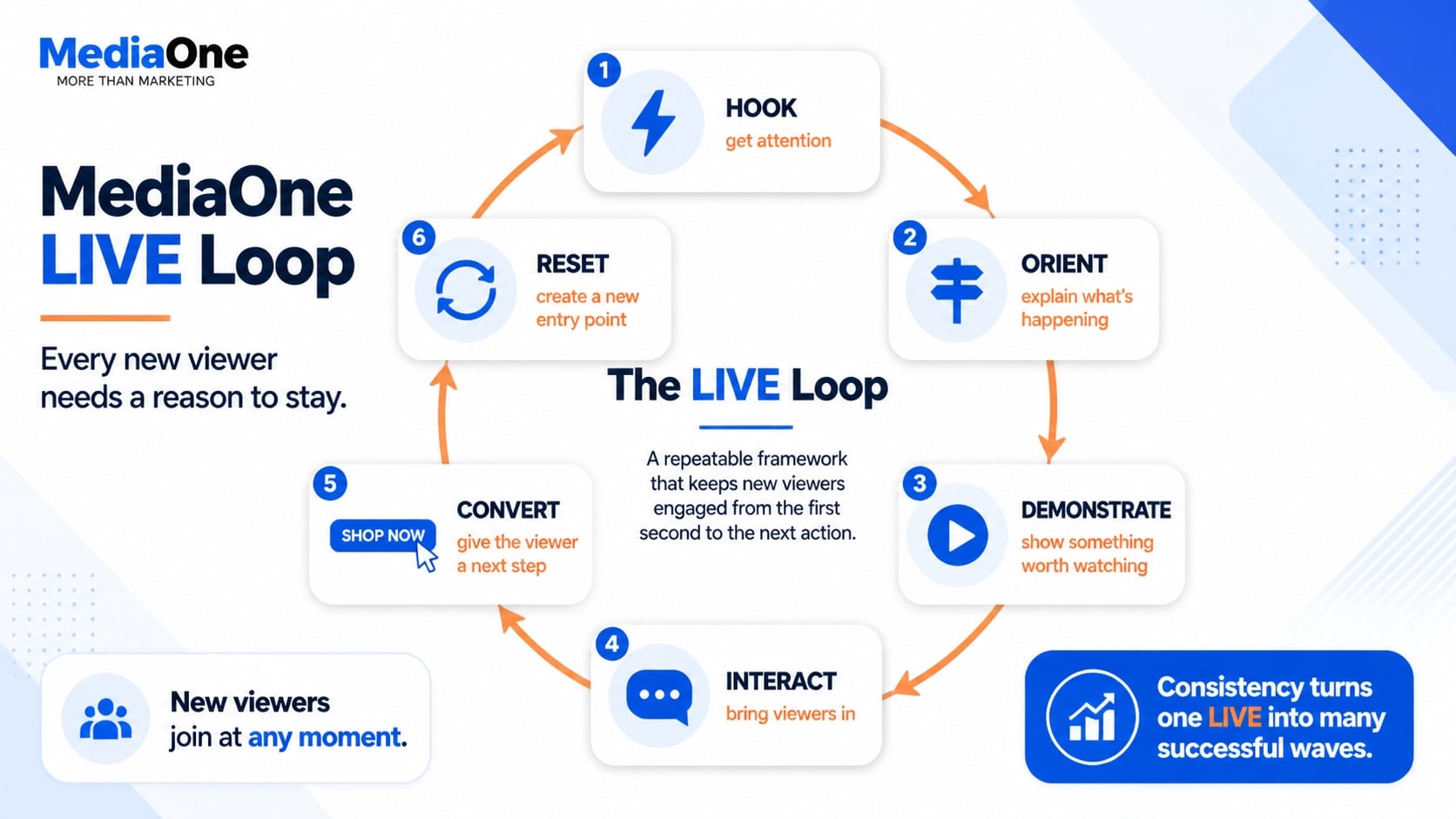
We recommend thinking about a TikTok LIVE as a repeating six-stage loop:
Hook → Orient → Demonstrate → Interact → Convert → Reset
The duration of each loop does not have to be fixed. The purpose is to prevent the LIVE from becoming a long uninterrupted block of talking.
1. Hook
A hook gives the viewer an immediate reason to pay attention.
That does not mean shouting, exaggerating or promising something unbelievable. It means beginning with something specific enough that a viewer understands why the next few moments may be useful.
Instead of:
“Hi guys, we’ll wait for more people to come in.”
a product host might already be doing something:
“I’m testing whether the cheaper model can actually do the same job as the premium one.”
An educational LIVE might start with:
“If your TikTok ads are getting clicks but no purchases, I’m going to show you the first three things I would check.”
The LIVE has begun before the audience reaches some imaginary attendance threshold.
2. Orient
Tell viewers what they have entered.
Orientation can be as short as one sentence. The host might explain what is being tested, which stage of the discussion they are in or what is happening next.
Do this naturally throughout the LIVE rather than delivering the exact same introduction repeatedly.
3. Demonstrate
Whenever the topic allows it, show rather than merely describe.
TikTok’s own LIVE guidance encourages brands and creators to build streams around formats such as demonstrations, tutorials and Q&As, while TikTok Shop Singapore’s guidance emphasises visible product introduction, hands-on demonstrations and showing products from different angles during shopping LIVEs.
A beauty seller can apply the product. A kitchen brand can cook with it. A software business can share the workflow. A service company can review an example or diagnose a common problem.
The principle is broader than ecommerce: give viewers something that changes on screen.
4. Interact
Interaction becomes stronger when the question is easy to answer.
“Any questions?” puts all the work on the audience.
Compare that with:
“Which one should I test next: A or B?”
or:
“What’s the bigger problem for you right now, getting viewers into your LIVE or keeping them there?”
The viewer already knows how to participate.
Interaction can then change the direction of the session. If several viewers ask the same question, address it. If everyone wants to see one product demonstrated again, that may be more valuable than rigidly following the original script.
5. Convert
Conversion does not always mean a purchase.
Depending on the objective, the next action might be following the account, viewing a product, registering for another LIVE, submitting a question or moving to another stage of the customer journey.
Make the CTA fit what is happening rather than inserting the exact same sales line every few minutes.
For example:
“If you’ve just joined because you’re comparing the two versions, the model I’m demonstrating now is the first product in the list.”
That is more contextual than interrupting the demonstration with a generic “Buy now”.
6. Reset
Once one segment has delivered its value, create another entry point.
Recap what just happened, tell viewers what is coming next and move into the next demonstration or topic.
The strongest LIVE therefore does not depend on one great opening.
It continuously creates new reasons to stay.
Engagement and Retention Are Not the Same Thing
Engagement describes what viewers do while they are in your LIVE: commenting, asking questions, reacting, sharing or taking another action. Retention describes whether they continue watching.
The distinction matters because they point to different problems. If people enter but leave quickly, we would investigate orientation, pacing and the viewer promise. If people stay but barely participate, the host may need stronger questions, demonstrations or opportunities for involvement.
Decide What Your TikTok LIVE Is Supposed to Achieve
Before planning segments, decide what outcome matters.
| LIVE Objective | What the Session Should Emphasise | Useful Signals |
| Product education | Demonstrations, comparisons, FAQs | Questions, viewing behaviour, product interest |
| Community building | Conversation, Q&A, recurring formats | Comments, participation, returning viewers |
| Product launch | Reveal, explanation, demonstrations | Product interactions, questions, actions |
| Lead generation | Expertise, problem solving, CTA | Qualified enquiries or tracked actions |
| TikTok Shop sales | Product demos, offer clarity, shopping flow | Product clicks, orders and LIVE commerce data |
| Content development | Questions and audience reactions | Recurring questions and reusable segments |
Do not force every LIVE to sell immediately.
If the primary job is education, a useful discussion that answers objections may be doing exactly what the business needs even if the session is not structured like a shopping channel.
TikTok LIVE vs TikTok Shop LIVE
TikTok LIVE and TikTok Shop LIVE overlap, but businesses should not treat them as identical.
A normal brand LIVE might focus on education, conversation, an interview or community interaction. TikTok Shop LIVE adds a commerce layer in which products are promoted directly within the shopping environment.
That introduces additional operational and policy considerations.
TikTok Shop Singapore’s current Content Policy requires promotional content to accurately and clearly represent the product being promoted. It also treats non-interactive content, irrelevant product promotion and certain forms of unoriginal content as policy issues.
So if you are reading this article primarily as a TikTok Shop seller, the basic hosting principles still apply, but you should also follow the latest Singapore-specific TikTok Shop Academy policies.
Before You Go LIVE: Prepare the Session, Not Just the Camera
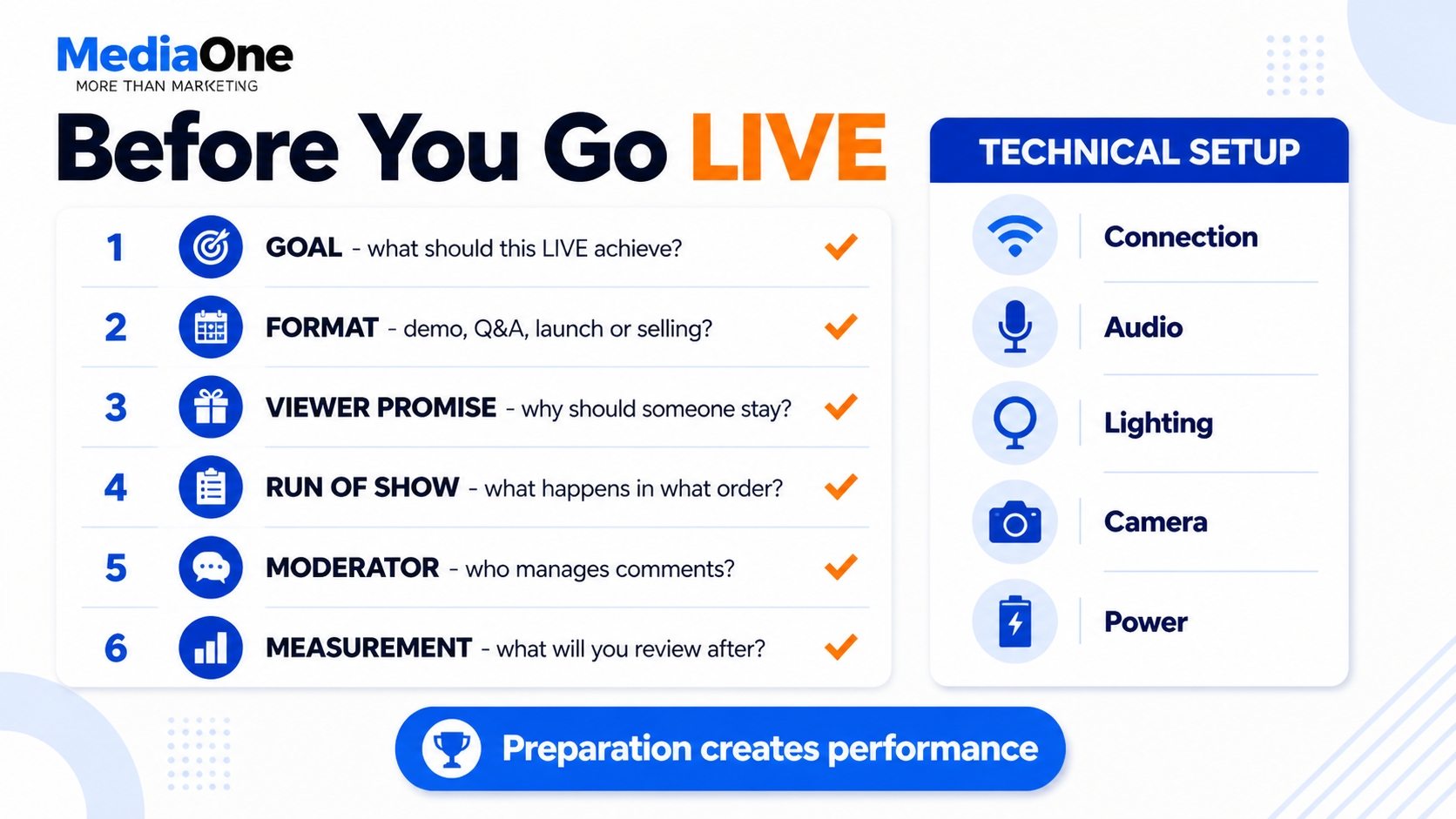
A good technical setup helps, but preparation should go further than checking the ring light.
TikTok’s official business guidance recommends testing the setup, confirming a stable connection, creating an outline or script, using a quiet and well-lit environment, selecting a time when the audience is active and promoting the LIVE beforehand.
We would add several strategic questions before starting.
First, define the viewer promise. What will someone gain by staying? “Join our LIVE at 8 pm” is an announcement, not a promise. “We’ll compare all three models live and show which one suits each use case” gives the viewer a reason to attend.
Next, prepare the run of show. You do not need to script every sentence, but the host should know the major demonstrations, transitions, questions and CTAs.
Finally, decide who is managing the stream. If the session expects a meaningful volume of comments, having someone assist with moderation and recurring questions can allow the presenter to focus on hosting.
There Is No Universal Best Time to Go LIVE
The existing article used general TikTok posting-time data as a basis for LIVE scheduling. I would not carry that into the rewrite.
A universal posting chart cannot know when your particular customers are available. A Singapore tuition business, fashion retailer and B2B consultancy may have completely different audience behaviour.
TikTok’s own guidance recommends scheduling LIVE sessions around periods of high engagement or when your audience is most active.
Treat timing as something to test.
If you run recurring sessions, compare similar formats across several time slots. Once you find a window that consistently works for your own audience, consistency may also make it easier for regular viewers to know when to return.
Singapore Example: Kim’s Duet Tested Its LIVE Timing Instead of Following a Generic Schedule
Singapore heritage coffee brand Kim’s Duet provides a useful example of why LIVE timing should be treated as something to test rather than something copied from a global posting-time chart.
According to TikTok Shop Singapore, the second-generation business worked through TikTok Shop’s Growth Accelerator Programme to refine its LIVE strategy, including experimenting with different streaming time slots and developing its online community. The brand reported 42% month-on-month GMV growth in June 2026.
The important lesson is not that another business should copy Kim’s Duet’s eventual schedule; TikTok does not publish one universal winning time in the case. The useful takeaway is the process: test different time slots against your own viewers and commercial results, then build a schedule around what your audience actually does.
Use TikTok LIVE Events Before Important Sessions
For a planned LIVE, TikTok provides a more useful tool than simply publishing a reminder and hoping people remember.
TikTok LIVE Events allow creators to announce an upcoming LIVE in advance. Viewers can register for the event and receive notifications, while registered viewers can also add the event to their device calendar.
For an important session, the promotion flow might therefore be:
Teaser content → LIVE Event → reminder content → LIVE
A retailer launching a new range could publish a short preview explaining what will be demonstrated and direct interested viewers towards the scheduled event.
Cross-promotion through email or other social channels can still make sense if the business already has an audience there, but use TikTok’s native event tools where available.
Singapore Case: The Beauty Story
A Singapore example also shows how organic LIVE and paid distribution can work together. The Beauty Story, a Singapore-based Korean skincare reseller, used LIVE Shopping Ads to bring more users from TikTok’s For You feed into its livestreams. The brand also incorporated interactive elements such as a “Spin the Wheel” mechanic for customers purchasing through TikTok Shop.
TikTok’s case study reports that the LIVE Shopping Ads component generated a 6.6x ROAS during the campaign. Across the wider Video Shopping Ads and LIVE Shopping Ads activity, the brand reached more than 66,000 users on average and recorded more than 12,800 engagements and 3,400 profile visits.
Structure the LIVE Without Making It Feel Scripted
Planning and spontaneity are not opposites.
The host should know what the session is supposed to accomplish and which segments need to happen, but still have enough room to follow useful viewer questions.
For example, a product LIVE could move between demonstrations, comparisons, Q&A and offer reminders. An educational LIVE could alternate between teaching, answering a question and applying the idea to a real example.
The mistake is either extreme.
No structure creates dead time and rambling. Too much structure makes the presenter ignore the audience while reading a script.
The MediaOne LIVE Loop gives the host a structure without requiring every sentence to be predetermined.
Repeat Context Without Sounding Repetitive
Repetition is unavoidable in LIVE because the audience changes throughout the session.
The skill is repeating information for a new reason.
Suppose you are showing a product. You might first say:
“This is the version we’re testing right now.”
Later:
“For anyone who just joined, we’re comparing this with the premium version next.”
Then:
“A few people have asked which model this is; it’s the first item we’re showing in this segment.”
The core information is repeated without sounding like an automated announcement.
This applies to the session topic, products, upcoming segments and CTAs.
Use Open Loops, But Deliver the Payoff
Giving viewers a reason to stay can work well when the promised value is genuine.
For example:
“We’ve tested the two expensive options. After this, I’ll show you the situation where the cheapest one actually makes more sense.”
That creates an open loop because there is a specific unanswered question.
The important part is delivering the answer.
Constantly promising a huge reveal “at the end” without providing meaningful value along the way makes the session weaker, not stronger.
A viewer should benefit even if they do not watch the entire LIVE.
Moderate the LIVE Before Comments Become a Problem
Moderation should be planned, especially for larger sessions.
TikTok allows creators to add moderators and gives creators or moderators tools to filter comments, block keywords, mute viewers and block accounts.
A moderator can do more than remove spam. They can surface repeated questions, flag useful comments for the host and identify confusion that deserves an explanation.
That creates a useful division of labour.
The presenter focuses on the audience and content. The moderator helps keep the conversation usable.
TikTok Shop LIVE Best Practices for Singapore Sellers
TikTok Shop sellers need to treat interactivity as more than an engagement tactic.
TikTok Shop Singapore’s August 2026 guidance defines non-interactive content as content with little meaningful on-screen activity or insufficient sustained real-time interaction. It specifically warns against static scenes, looping content and LIVEs that lack real-time verbal engagement, while recommending visible demonstrations and active interaction.
For a shopping LIVE, that means the host should actively present the product rather than treating the session as a moving catalogue. Show how it works, answer relevant questions, display the correct item clearly and keep what is happening on screen connected to the product being promoted.
TikTok Shop’s Singapore policy also prohibits misleading content, including exaggerated or unsupported product claims.
A LIVE host should therefore know the approved product information before streaming. Enthusiasm is not a substitute for accuracy.
Do Not Simulcast a TikTok Shop LIVE
This is an important distinction for Singapore sellers.
TikTok Shop’s current Singapore guidance prohibits simulcasting the same shopping LIVE on TikTok Shop and another platform at the same time. It also prohibits multicasting the same session across several TikTok Shop accounts simultaneously.
You can still livestream on other platforms at different times. The restriction applies to simultaneous TikTok Shop LIVE streaming.
For current policy details, always check TikTok Shop Singapore’s guidance before a campaign because platform rules can change.
Plan the Shopping Bag Before Going LIVE
Product selection itself is part of the LIVE strategy.
TikTok Shop Singapore introduced LIVE Guide functionality in 2026 for selected sellers and affiliate creators. The tool can recommend products based on shop or showcase performance, diagnose the current LIVE Shopping Bag and suggest a product order. TikTok explicitly notes that the feature is currently available only to selected sellers and creators, and that AI-generated recommendations still need human review.
That does not mean you should hand the entire show over to an algorithm.
Think about the sequence from the viewer’s perspective. Which product gives you an immediate demonstration? Which needs more explanation? Which products naturally compare with each other? Which offer needs to be revisited after a Q&A?
The Shopping Bag is part of the run of show, not an inventory dump.
Example: A 30-Minute TikTok LIVE Run of Show
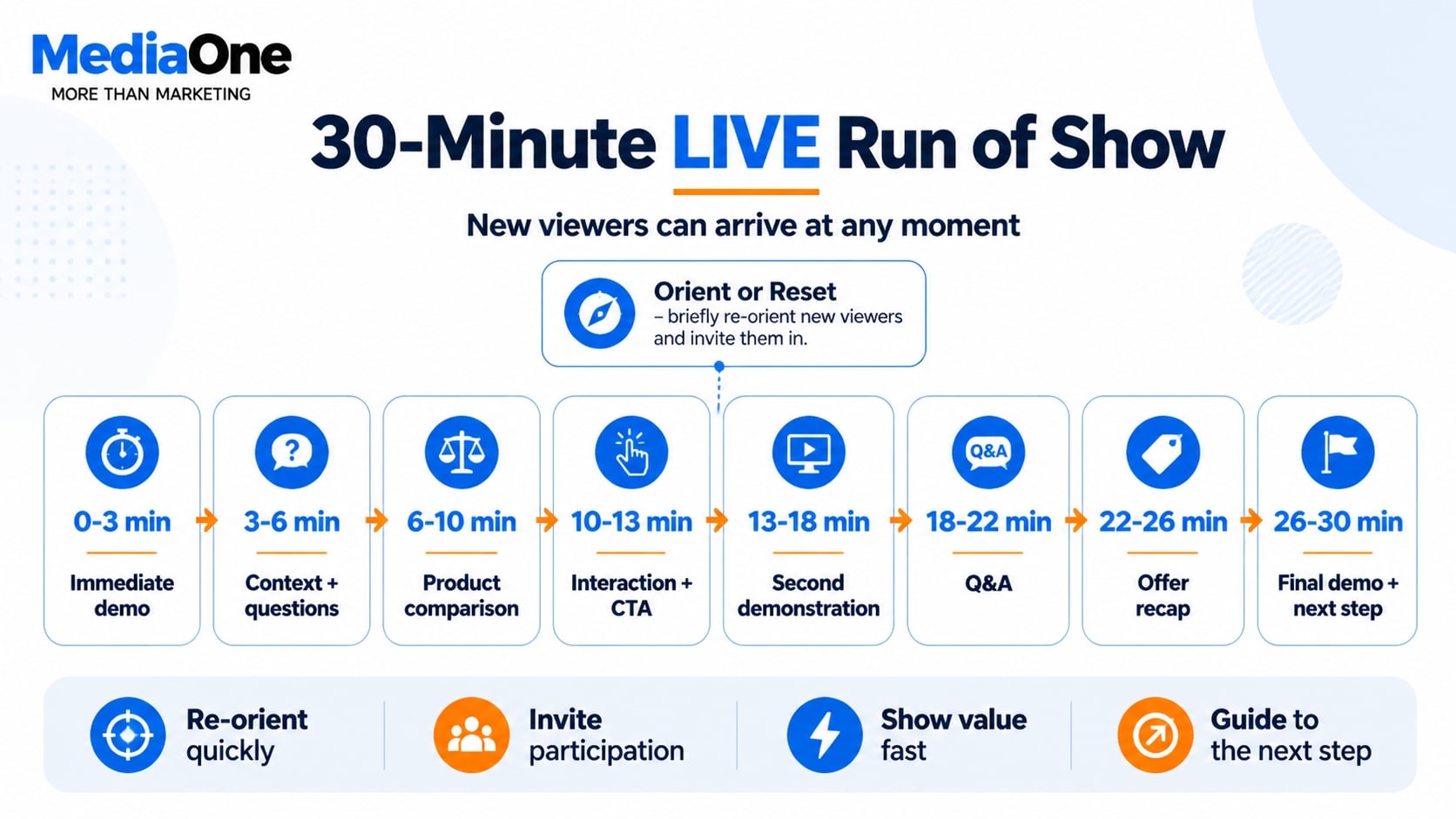
Consider a hypothetical Singapore beauty brand running a 30-minute product LIVE. This is an illustrative structure, not a TikTok benchmark or a MediaOne case study.
| Time | Segment | Host’s Job |
| 0–3 min | Immediate demo | Start showing value instead of waiting |
| 3–6 min | Context + questions | Reorient newcomers and answer comments |
| 6–10 min | Product comparison | Give viewers something concrete to evaluate |
| 10–13 min | Interaction + CTA | Ask a specific question and explain the next action |
| 13–18 min | Second demonstration | Begin a fresh LIVE Loop |
| 18–22 min | Q&A | Address recurring questions |
| 22–26 min | Product/offer recap | Reorient new arrivals |
| 26–30 min | Final demo + next step | Recap and promote the next relevant action |
This is not meant to become a rigid script.
If viewers become highly engaged with the comparison at minute eight, the host can spend longer there. If a recurring question exposes an objection that was not in the plan, answer it.
The purpose of the run of show is to prevent dead space while still allowing the audience to influence the session.
What Should You Measure After a TikTok LIVE?
The LIVE should not disappear from the marketing process when the host presses End.
For TikTok Shop sellers in Singapore, TikTok’s 2026 LIVE Selling hub in Seller Center includes performance data alongside planning and educational resources.
Regardless of the type of LIVE, review the session according to the objective you defined beforehand.
If entry was weak, examine whether the topic, timing and promotion gave people enough reason to attend. If people entered but the session struggled to hold attention, review the opening moments, orientation and pacing.
If viewers watched and asked questions but rarely took the intended action, investigate the offer and CTA rather than assuming engagement itself was the problem. For ecommerce, product page, pricing and buying friction may also need investigation.
These are diagnostic questions rather than universal causal rules.
The aim is to make the next LIVE better than the previous one.
Turn Strong LIVE Moments Into Future Content
A good LIVE can generate more than one piece of content.
Repeated questions can become future short videos. A particularly useful demonstration can inspire a dedicated tutorial. A common objection can become the subject of the next LIVE.
TikTok Shop Singapore also offers LIVE Highlights, a feature that can surface strong livestream segments as short videos that sellers or affiliate creators can choose to publish. TikTok says these clips can be used as shoppable or non-shoppable videos and can also help drive viewers towards a future LIVE.
That creates a useful content cycle:
Short video promotes LIVE → LIVE creates insight and content → LIVE moments become short videos → short videos promote the next LIVE
The stream becomes part of an ongoing content system rather than a standalone event.
Common TikTok LIVE Mistakes
The most common problems are usually structural rather than technical.
Waiting for more viewers before providing value wastes the attention of the people who already arrived. Talking for long periods without demonstrating or involving the audience makes the format behave like a recorded webinar. Repeating the same introduction word-for-word makes regular viewers tune it out, while never resetting the context makes new viewers feel lost.
Businesses also create unnecessary risk when the host does not know the approved product facts, when TikTok Shop items are shown passively rather than actively demonstrated, or when nobody is assigned to manage comments during a busy stream.
Finally, do not judge every LIVE purely by peak viewer count. A smaller session that answers high-intent customer questions or drives the desired business action can be more useful than a larger stream that attracts viewers with little relevance to the objective.
Treat Every TikTok LIVE as a Loop, Not a Speech
TikTok LIVE becomes easier to plan when you stop thinking of it as one long presentation.
A viewer can arrive at almost any point. Your job is to give that person enough context to understand what they are watching, enough value to keep watching and enough opportunity to participate.
That is why we come back to the same six-stage loop:
Hook → Orient → Demonstrate → Interact → Convert → Reset
Start with value. Explain what is happening. Show rather than only tell. Involve the audience. Give people an appropriate next step. Then create another entry point for whoever has just arrived.
For a broader TikTok strategy beyond LIVE, see MediaOne’s TikTok marketing guide.
Businesses that want TikTok LIVE integrated with content planning, paid social and wider social-media campaigns can also explore MediaOne’s social media marketing services.
Frequently Asked Questions
How do I keep viewers on TikTok LIVE?
Give viewers something to understand or watch immediately, periodically explain what is happening for new arrivals and keep moving between demonstration, interaction and the next piece of value. Avoid long stretches in which nothing changes visually or conversationally.
How should I start a TikTok LIVE?
Start doing the thing viewers came to see rather than spending several minutes waiting for attendance to build. Introduce the topic quickly, explain the value and begin the first demonstration, answer or discussion.
What is the best time to go LIVE on TikTok in Singapore?
There is no universal time that works for every Singapore audience. TikTok recommends going LIVE when your own audience is active, so use account behaviour and previous LIVE performance as the starting point and test consistent time slots.
Can I schedule a TikTok LIVE in advance?
TikTok provides LIVE Events, which allow eligible creators to announce an upcoming LIVE. Viewers can register and receive notifications before the event.
Should I use a moderator on TikTok LIVE?
It can be particularly helpful when the host expects a busy comment section. TikTok allows creators to assign moderators, and moderation tools include filtering comments, blocking keywords and muting or blocking viewers.
Can I stream a TikTok Shop LIVE on Facebook or another platform at the same time?
TikTok Shop Singapore currently prohibits simulcasting a TikTok Shop LIVE on another platform at the same time, as well as multicasting one LIVE across multiple TikTok Shop accounts.
Are static TikTok Shop LIVEs allowed?
TikTok Shop Singapore’s current guidance prohibits still-frame and non-interactive LIVE content. It recommends ongoing on-screen activity, real-time interaction and clear product demonstration.