If you have ever sat in a meeting trying to explain SEO performance to a business owner, finance lead, or C-suite executive, you already know the problem.

Most SEO reports are too technical, too bloated, or too vague.
They dump rankings, traffic charts, impressions, bounce rate, and a pile of disconnected screenshots into one document, then expect the reader to work out what matters. That is not reporting. That is data dumping.
At our SEO agency in Singapore, I have spent years presenting SEO reports to founders, CMOs, finance teams, sales leaders, and regional stakeholders. And over time, I have learnt something simple:
A good SEO report does not just show performance. It helps people make decisions.
That means the report must do more than list metrics. It must explain what changed, why it changed, what it means commercially, and what should happen next.
That is how I build SEO reports.
In this guide, I will walk you through the framework I use to turn SEO data into a decision-ready report, how I connect SEO to ROI, how I tailor reporting by stakeholder type, which metrics matter most, how I handle bad news, and how I make reporting useful rather than decorative.
Key Takeaways
- SEO reporting should translate performance data into a clear business story that explains what changed, why it changed, and what actions to take next
- Effective reports focus on meaningful metrics such as traffic, keyword visibility, conversions, and landing page performance rather than vanity data
- Strong SEO reporting connects search performance directly to business outcomes like leads, revenue, and growth opportunities
- Reports must be tailored to different stakeholders, with simplified insights for executives and deeper analysis for marketing or SEO teams
- Clear recommendations and next steps are essential, as reporting should guide decisions rather than simply present data
TL;DR: What Good SEO Reporting Should Do
A strong SEO report should:
- Show what changed
- Explain why it changed
- Connect SEO work to business goals
- Highlight what to do next
- Make sense to the person reading it
If your report does not do those five things, it needs work.
What Bad SEO Reporting Gets Wrong
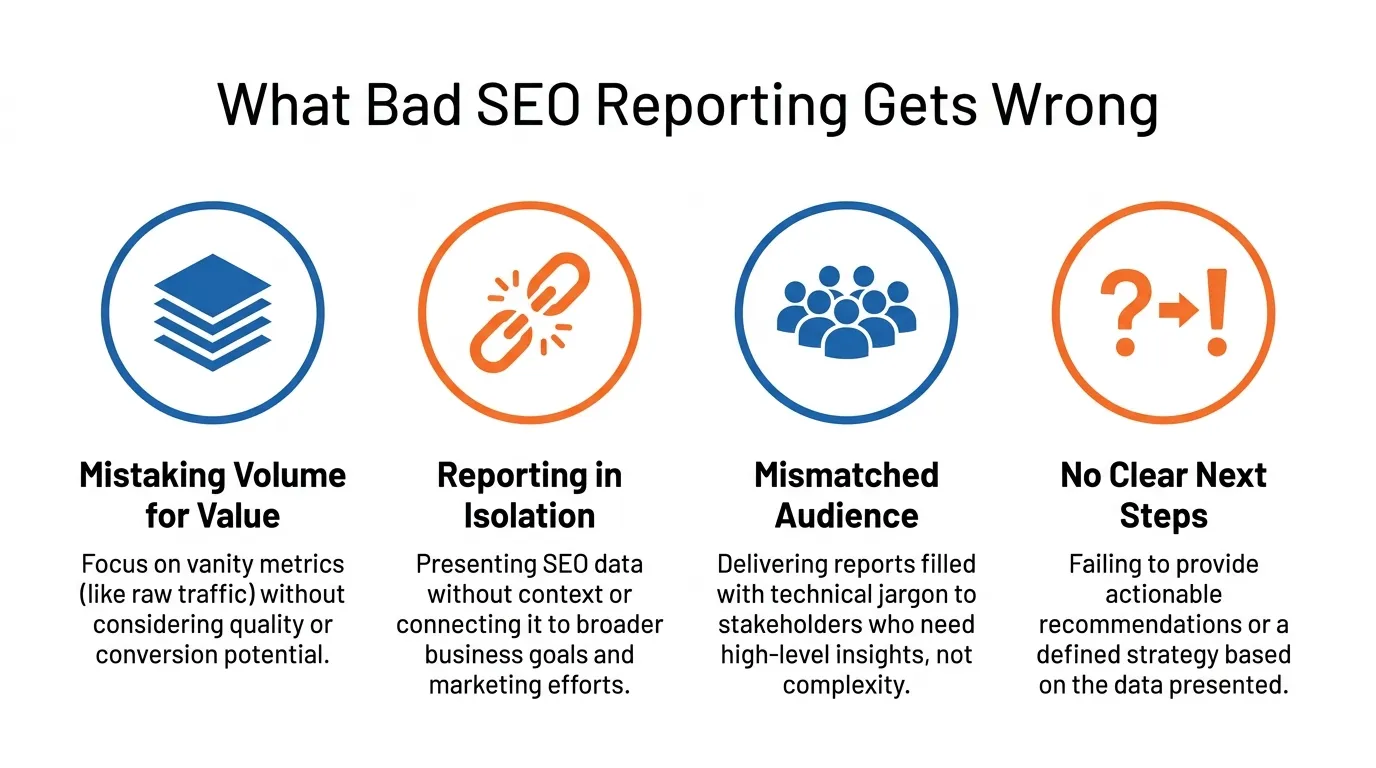
Before I explain how I build reports, it helps to be clear about what weak reporting usually gets wrong.
The most common mistake is mistaking volume for value. Many reports include too much data and too little interpretation. Everything is shown, but nothing is prioritised.
The second mistake is reporting on SEO in isolation. Rankings and clicks matter, but business leaders want to know whether SEO is contributing to leads, pipeline, revenue, or strategic growth.
The third mistake is failing to match the audience. A founder does not need the same report as an SEO lead. A sales director does not care about the same details as a technical SEO specialist.
The fourth mistake is ending with no decision. If the report tells me what happened but not what to do next, it is incomplete.
That is why I do not treat SEO reporting as an admin task. I treat it as part of the strategy.
What Decision-Ready SEO Reporting Looks Like

When I build an SEO report properly, I want the reader to understand three things by the end:
- What is happening
- What it means
- What we should do next
That sounds obvious, but it changes how I structure the report.
Instead of starting with every metric available, I start with the business question. Usually, that question sounds like one of these:
- Is SEO contributing to growth?
- Are we attracting the right kind of traffic?
- Which pages or topics are driving results?
- What is underperforming?
- Where should we invest next?
Once the report answers those questions clearly, it becomes useful.
The SEO Reporting Framework I Use
This is the framework I use when I build monthly SEO reports.
1. Start with the audience, not the dashboard
Before I pull a single number, I ask who the report is for.
That changes what matters.
A founder wants clarity on growth, leads, revenue contribution, and strategic priorities. A CMO usually wants channel contribution, content performance, pipeline quality, and scaling opportunities. An SEO team needs page-level performance, technical blockers, content gaps, and tactical next steps.
The same data can be interpreted differently depending on who needs to act on it.
2. Build the report around decisions, not metrics
I do not ask, “What can I include?”
I ask, “What decision does this report need to support?”
For example:
- Should we invest in new content or improve existing pages?
- Should we prioritise technical fixes or CTR improvements?
- Should we scale a topic cluster that is already converting?
- Is traffic growth actually producing better leads?
- Has a competitor created a gap we need to respond to?
That mindset keeps reporting commercially relevant.
3. Use a KPI stack, not a random metric list
I usually connect performance in this order:
Visibility → Traffic → Engagement → Conversions → Revenue / Pipeline Contribution
That sequence matters because it shows cause and effect.
If rankings improve but traffic does not, I look at CTR and intent match.
If traffic rises but leads stay flat, I look at landing page quality, conversion paths, and traffic relevance.
If conversions improve but revenue stays weak, I look at lead quality, sales close rate, and attribution limits.
This is how SEO reporting becomes diagnostic rather than descriptive.
4. Prioritise insights by commercial impact and urgency
Not every observation deserves equal attention.
When I review performance, I rank insights using two filters:
Commercial impact
How much could this affect leads, revenue, or pipeline quality?
Urgency
Does this need action now, soon, or later?
That helps me avoid clutter. A small ranking drop on a low-value blog post should not compete for space with a conversion drop on a high-intent service page.
5. End with actions, owners, and expected impact
Recommendations should not be vague.
Instead of saying:
- Improve CTR
- Refresh content
- Fix technical issues
I prefer to say:
- Rewrite title tags for three high-impression service pages with below-benchmark CTR
- Expand the probate cluster because two related pages are now ranking on page 1, but lack internal support
- Fix indexation on the new practice-area hub because it is blocking the discovery of supporting pages
The more specific the action, the easier it is to execute.
How I Connect SEO Reporting to ROI
This is the part many SEO reports still handle badly.
Many reports focus on value. Far fewer show a clear method for defending that value.
If I want SEO reporting to prove ROI, I need to go beyond traffic charts.
The simple SEO ROI formula I use
At a basic level, I look at SEO ROI like this:
SEO ROI = (Revenue influenced by organic search – SEO investment) / SEO investment
That is the simple version.
But in practice, the challenge is not the formula. The challenge is deciding what counts as revenue influenced by SEO.
What I count when reporting ROI
Depending on the business model, I usually work with one of these:
- Direct revenue from organic search for eCommerce
- Lead value from organic conversions for lead generation businesses
- Pipeline contribution for higher-ticket B2B services
- Revenue influence where SEO supports earlier-stage discovery but is not always the final click
That distinction matters because not every business can measure SEO the same way.
A simple lead-generation example
Let’s say a business spends:
- SGD 4,000 per month on SEO
- Organic search generates 25 qualified leads
- The average close rate is 20%
- Average customer value is SGD 3,000
Estimated revenue contribution:
25 leads × 20% close rate × SGD 3,000 = SGD 15,000
Estimated ROI:
(SGD 15,000 – SGD 4,000) / SGD 4,000 = 275% ROI
That does not mean SEO gets credit for everything in a simplistic way. It means the report gives the business a commercially understandable way to evaluate contribution.
Why last-click attribution is not enough
This is important.
If I only report on last-click conversions, SEO often gets undervalued.
A user may discover the brand through organic search, return later via direct traffic, and convert after a branded paid search click. If I only look at the final touchpoint, SEO can appear weaker than it really is.
That is why I usually explain ROI in two layers:
- Measured conversions: what analytics clearly attributes to organic search
- Assisted influence: where SEO clearly contributed to discovery, education, or consideration before conversion
That helps stakeholders understand the difference between hard attribution and commercial influence.
The CFO-friendly way I frame SEO
Finance stakeholders rarely care whether the average position improved from 8.3 to 6.1 unless it affects outcomes.
So when I report to financially minded stakeholders, I frame SEO around:
- Cost of investment
- Qualified lead contribution
- Pipeline support
- Revenue influence
- Efficiency versus other channels
- Compounding value over time
That is often the moment when SEO stops looking like a vague marketing cost and becomes a growth asset.
The Executive Reporting Rules I Follow
When I build reports for leadership teams, I keep four rules in mind:
- Simplicity: Executives do not need every detail. They need the clearest version of the truth.
- Consistency: Reports should look and behave the same way each month, so changes are easier to interpret.
- Correlation: Metrics should connect logically. Rankings should tie to traffic. Traffic should tie to conversions. Conversions should tie to revenue or pipeline.
- Comparability: The reader should be able to compare performance across time periods, campaigns, pages, or business units without confusion.
These four rules make reporting easier to trust.
What always goes in my executive SEO report
My executive version usually includes:
- Executive summary
- Organic traffic trend
- Conversion or lead trend from organic
- Performance of high-intent landing pages
- Key drivers of growth or decline
- Risks or blockers
- Top 3 to 5 next actions
What I usually leave out
I usually keep these out of the main executive view unless they directly affect outcomes:
- Large keyword dumps
- Full crawl exports
- Overly technical issue lists
- Low-impact fluctuations
- Vanity metrics without context
If it does not help a leader make a better decision, it probably does not belong in the top layer of the report.
The KPI Stack I Use for Different Audiences
The same SEO report should not be presented the same way to every stakeholder.
Here is how I usually tailor it.
| Audience | What I Focus On | What I Show |
| Founders / CEOs | Commercial clarity | Leads, pipeline contribution, revenue influence, high-level traffic trend, strategic wins/losses, next actions |
| CMOs / Marketing Managers | Channel performance and growth levers | Content performance, non-branded growth, conversion trends, landing page performance, keyword movement, scaling opportunities |
| Sales Teams | Lead quality and intent | High-intent pages, commercial keywords, lead flow patterns, and content that supports sales conversations |
| SEO / Content Teams | Execution and optimisation | Page-level performance, query shifts, CTR gaps, content refresh opportunities, technical blockers, internal links |
| Finance Stakeholders | Efficiency and contribution | SEO investment, lead value, conversion efficiency, measured vs assisted impact, trend reliability |
This is one reason generic dashboards often fail. They are not built for the person reading them.
What I Include in an SEO Report
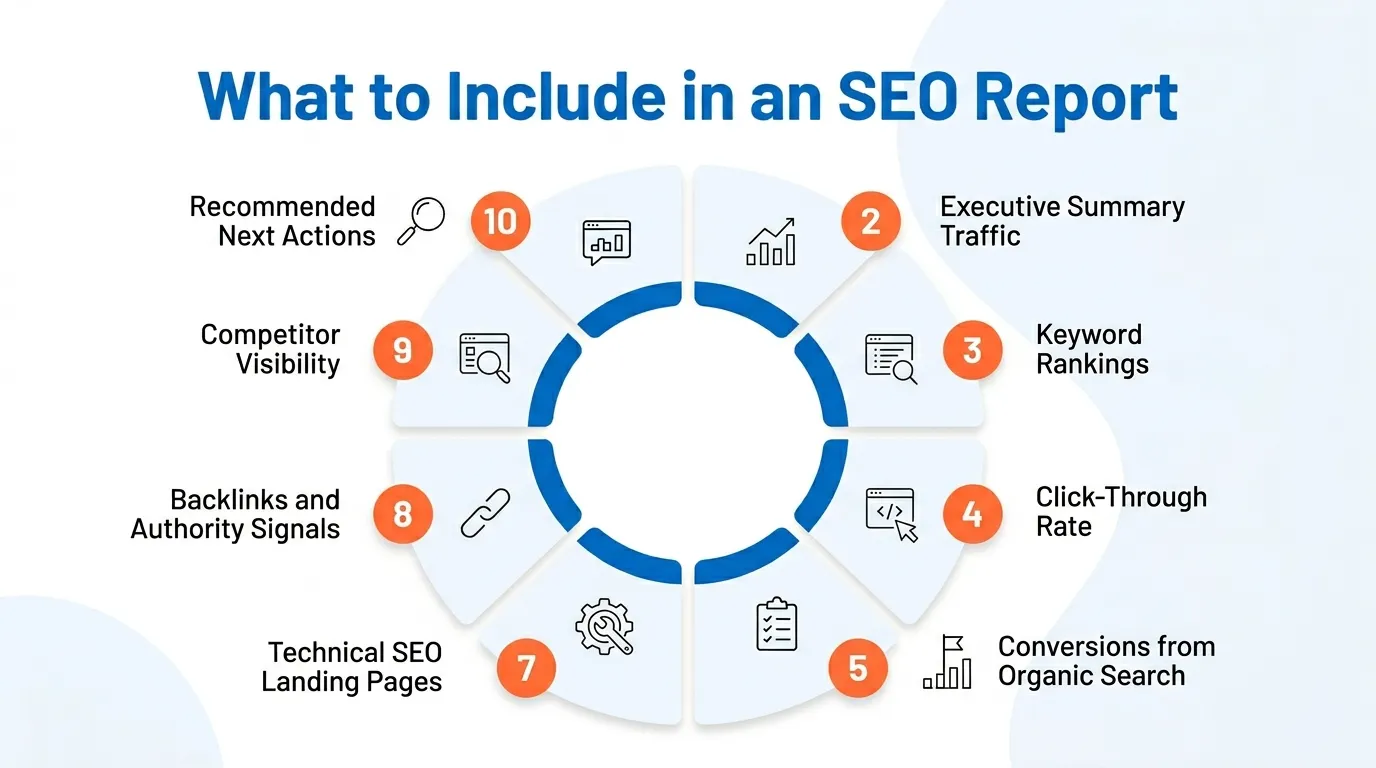
I keep the structure focused. I would rather explain fewer important things properly than bury the reader under dozens of shallow metrics.
1. Executive Summary
This comes first because busy stakeholders may only read this section.
My summary usually answers five questions:
- What improved?
- What declined?
- Why did it happen?
- What does it mean commercially?
- What should we do next?
I write this first, not last. If I cannot explain the month clearly in plain English, the rest of the report is not ready.
2. Organic Traffic Quality, Not Just Volume
Traffic matters, but not all traffic matters equally.
I look at:
- Month-on-month and year-on-year movement
- Non-branded versus branded growth
- Landing pages driving the change
- Traffic relevance
- Engagement quality was useful
More traffic is only good if it is the right traffic.
3. Keyword Visibility by Business Value
I do not dump a spreadsheet of 200 keywords into the report.
I focus on:
- Priority commercial terms
- Important informational clusters
- Keywords entering the top 10 or top 3
- Significant losses with business relevance
- Competitor movement, which changes the picture
4. CTR and SERP Efficiency
CTR tells me whether users are choosing our result when they see it.
If rankings improve but CTR stays poor, that can point to:
- Weak title tags
- Weak meta descriptions
- Mismatched intent
- SERP feature crowding
- AI answers are reducing click demand
CTR is one of the fastest ways to spot practical gains.
5. Conversions and Lead Quality from Organic
This is where SEO reporting becomes commercially meaningful.
Depending on the business, I track:
- Form submissions
- Calls
- Demo requests
- Quote requests
- Purchases
- WhatsApp clicks
- Newsletter sign-ups
- Qualified lead signals are available
If a report focuses heavily on impressions and barely touches conversions, it is probably missing the point.
6. Landing Page Performance
This section often gives me the clearest path to optimisation.
I look at:
- Pages attracting the most organic traffic
- Pages generating the most conversions
- Pages with strong traffic but weak conversion
- Pages ranking well but underperforming commercially
- Pages that deserve expansion, refresh, consolidation, or stronger internal support
7. Technical Issues That Affect Performance
I do not include every crawl error under the sun.
I focus on the technical issues that are actually affecting discoverability, indexation, user experience, or conversion potential:
- Indexing problems
- Internal linking breakdowns
- Core Web Vitals and speed issues
- Mobile usability problems
- Duplicate or cannibalising pages
- Crawl waste on low-value URLs
8. Authority and Link Signals
Links still matter, but I report on them in context.
I usually include:
- New referring domains
- Lost referring domains
- Link quality
- Pages attracting links
- Gaps versus competitors where relevant
I care less about inflated vanity authority scores and more about whether the site is earning trust and relevance.
9. Competitor Context
SEO does not happen in isolation.
Sometimes a drop is caused by internal issues. Sometimes competitors simply moved faster.
That is why I review:
- Competitor ranking movement
- New competing pages
- Content gaps
- SERP feature ownership
- Topic areas where competitors are consolidating visibility
10. Recommended Next Actions
This section matters more than most people realise.
A report should not leave the reader asking, “So what now?”
I end with:
- Top actions
- Priority level
- Owner or team
- Expected impact
- Time horizon
That turns reporting into operational guidance.
How I Decide What Makes the Executive Summary
This is one of the most important parts of my workflow.
I do not summarise everything. I summarise what matters most.
To decide what goes into the summary, I usually ask:
- Did this affect leads, revenue, or strategic growth?
- Does this explain a major change?
- Does this create a risk that leadership needs to know now?
- Does this change what we should prioritise next?
If the answer is no, it probably belongs lower in the report or not at all.
A strong executive summary is selective. It is not a compressed version of the whole report. It is the signal, not the noise.
How I Handle Conflicting Signals
SEO reporting gets more useful when you stop pretending every month tells a clean story.
Some months are messy.
Traffic is up, but leads are flat
That usually pushes me to check:
- Whether growth came from informational pages with weak commercial intent
- Whether conversion paths are too weak
- Whether the wrong audience is arriving
- Whether lead quality is down, even if volume is up
In that case, I do not blindly celebrate traffic. I explain the gap.
Rankings improved, but clicks did not
Then I look at:
- CTR performance
- SERP layout changes
- AI answer compression
- Search intent mismatch
- Whether rankings improved on low-click queries
Technical fixes were completed, but growth has not appeared yet
This often happens with indexation or architecture work.
In those cases, I explain that some fixes remove friction before they create visible gains. The report needs to show why the work still matters, even if the payoff is delayed.
This kind of interpretation is what builds trust.
How I Report Bad News Without Losing Trust
Weak reporting tries to hide bad news.
Strong reporting explains it honestly.
When performance slips, I structure it like this:
- What declined
- Why it likely declined
- Whether the issue is temporary or structural
- What we are doing about it
- What signal will we watch next
For example, instead of saying, “Organic leads fell this month,” I would say:
“Organic leads fell 14% month on month, mainly because two high-intent service pages lost visibility after competitor content improvements, and one enquiry form experienced tracking inconsistency.
We have already identified the content gap, corrected the tracking issue, and prioritised page refreshes. The next report should confirm whether visibility and conversion volume stabilise.”
That tone matters. It shows honesty without panic.
How I Turn Observations Into Recommendations
This is where many SEO reports lose force.
An observation is not the same thing as a recommendation.
For example:
- Observation: The page ranks in positions 4-6 for several high-intent queries but has a below-average CTR.
- Weak recommendation: Improve CTR.
- Better recommendation: Rewrite title tags and meta descriptions for the probate and divorce service pages, test stronger commercial messaging, and review competitors’ SERP headlines. Expected impact: higher click yield from existing impressions without waiting for ranking gains.
The second version is clearer because it includes action, scope, and expected value.
Whenever possible, I connect recommendations to:
- Owner
- Priority
- Expected impact
- Time horizon
- Dependency if relevant
That makes follow-through easier.
The Tool-to-Question Mapping I Use
I use several tools for SEO reporting, but I try to be clear about which tool answers which question.
| Tool | What I Use It For | The Reporting Question It Helps Answer |
| Google Search Console | Search performance in Google | Are we gaining visibility, clicks, CTR, and query coverage? |
| Google Analytics 4 | Behaviour and conversions | What do organic visitors do after landing, and do they convert? |
| Ahrefs or Semrush | Competitive visibility and link analysis | Are competitors overtaking us, and where are the gaps? |
| Screaming Frog | Technical diagnostics | Is site structure, indexation, or crawlability holding performance back? |
| Looker Studio | Live dashboards | How do we make performance visible to stakeholders on an ongoing basis? |
| Google Sheets | Flexible monthly analysis | How do I build a clear, presentation-friendly report with custom logic? |
This mapping matters because it makes reporting more practical. It helps teams know where to look when a number changes.
Looker Studio vs Google Sheets for SEO Reporting
I get asked this often.
The answer is simple: it depends on the job.
Use Looker Studio if:
- You want live dashboards
- You need automated data refreshes
- Multiple stakeholders need ongoing access
- You are combining several sources into one dashboard
Use Google Sheets if:
- You want more control over layout
- You want a simple monthly reporting workflow
- You need a quick manual analysis
- You want a presentation-friendly format with commentary
At MediaOne, we use both. The right tool depends on the reporting purpose, not what is fashionable.
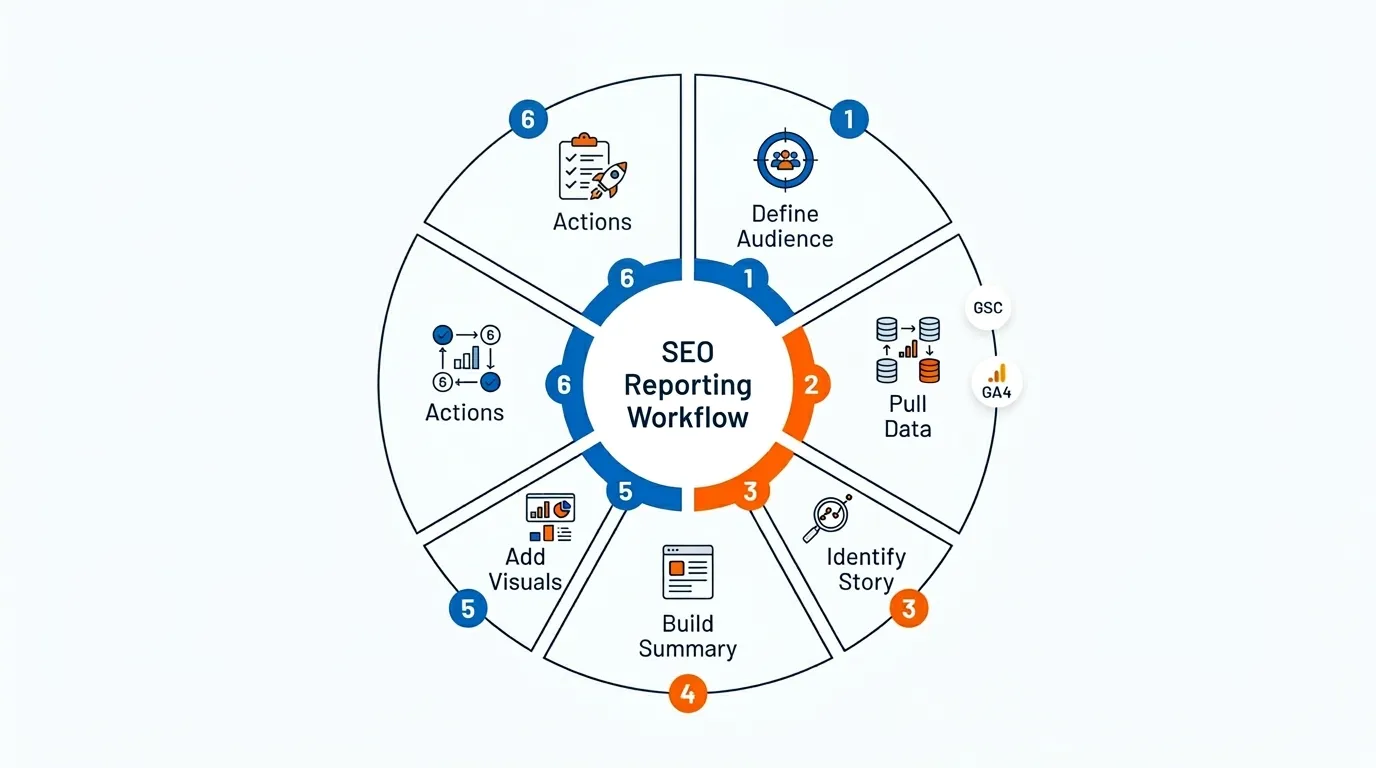
My Monthly SEO Reporting Workflow
If I am building a monthly report, this is the process I follow.
Step 1: Define the audience
I decide who the report is for and what decisions they need to make.
Step 2: Pull the core data
I gather data from:
- Google Search Console
- GA4
- Ahrefs or Semrush
- Technical crawls where relevant
Step 3: Look for the story
I review:
- Wins
- Losses
- Unusual changes
- Causes
- Patterns
- Risks
- Opportunities
This is the most important step. The story matters more than the spreadsheet.
Step 4: Rank findings by impact
I sort insights by:
- Commercial value
- Urgency
- Confidence level
This stops the report from becoming noisy.
Step 5: Write the executive summary first
This forces clarity. If I cannot explain the month simply, I am not done analysing it.
Step 6: Add visuals with a purpose
I use charts, tables, and screenshots only when they improve understanding.
Step 7: Finish with actions
I end with recommendations, owners, priority level, and expected impact.
That is the point where a report becomes useful to the business.
Mini-Examples of How I Interpret SEO Performance
A few short examples make this easier to see in practice.
Example 1: Traffic up, but lead quality down
An SME service business saw organic traffic rise after several informational articles started ranking. On paper, that looked positive.
But lead quality dropped because the growth came from top-of-funnel topics that were less commercially relevant. The reporting recommendation was not to celebrate traffic volume alone.
It was to strengthen internal links toward service pages, improve conversion pathways, and expand content closer to buying intent.
Example 2: Rankings up, but eCommerce revenue flat
An eCommerce account improved rankings across several category terms, but revenue stayed flat.
The issue was not visibility alone. Product page CTR lagged behind competitors, and some high-ranking pages had poor mobile conversion flow.
The report led to a decision to prioritise snippet improvements and conversion optimisation instead of assuming more ranking work was the immediate answer.
Example 3: Branded search growth as a market signal
A local business saw branded search demand rise steadily, even though non-branded growth was moderate.
That mattered because branded growth often signals stronger awareness, repeat demand, and market traction. In that case, SEO reporting supported a broader commercial discussion about brand momentum and channel support.
Example 4: Technical improvements need patience
A larger site resolved major indexation issues, but visible growth was slower than expected.
In that report, the right message was that technical SEO had removed a major constraint, but content reprocessing and ranking gains would take time. Reporting had to manage expectations while showing why the fixes still mattered.
These are the kinds of situations where reporting helps teams make better decisions, not just describe performance.
SEO Reporting in the AI Era
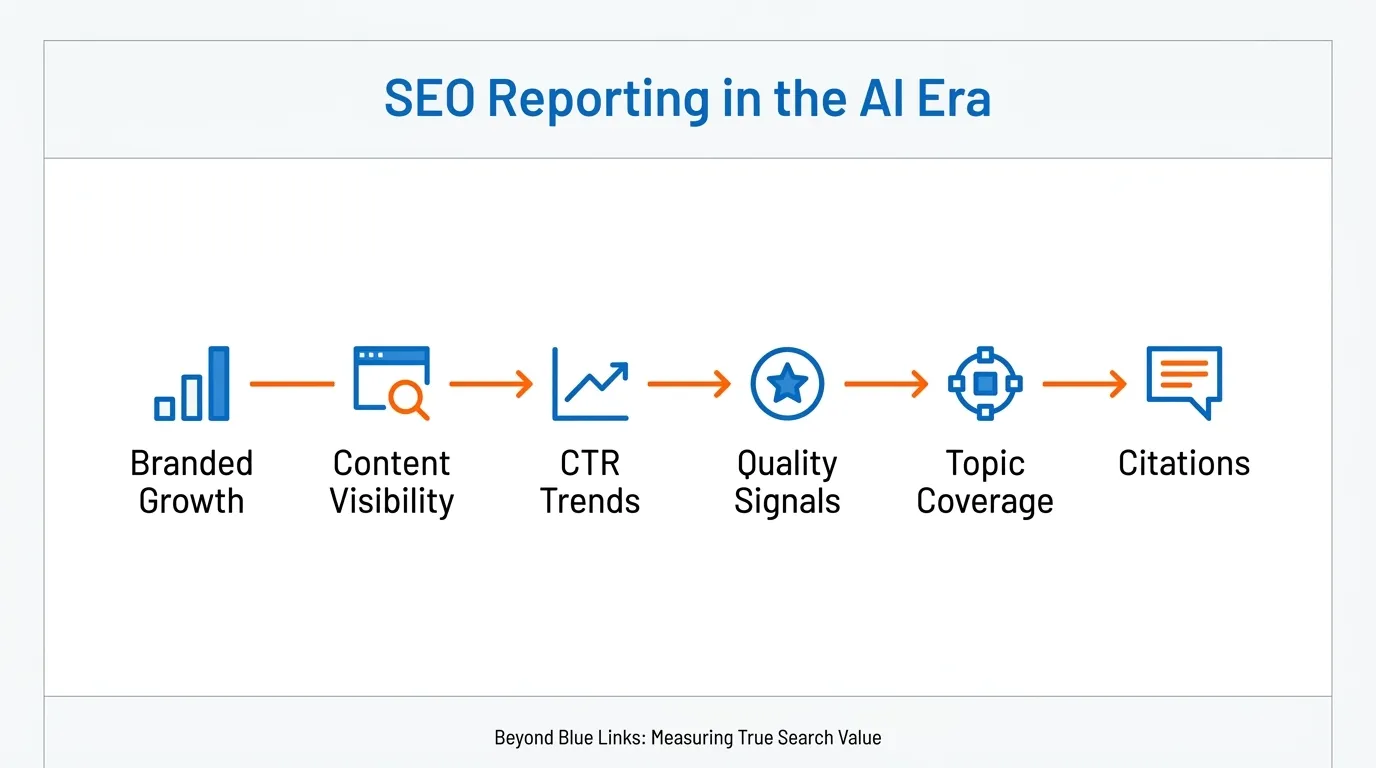
SEO reporting has changed.
Traditional metrics still matter, but search visibility now extends beyond blue links alone. AI summaries, richer SERP features, and answer-driven search behaviour are changing what visibility looks like and how clicks behave.
So I have adjusted reporting in a few practical ways.
I watch CTR more carefully
If rankings stay stable but CTR drops, I want to know whether:
- AI answers are reducing click demand
- SERP features are crowding organic listings
- Our snippet is weaker than competitor alternatives
I separate branded and non-branded resilience
Branded search can behave differently from non-branded discovery. Reporting that lumps them together can hide meaningful trends.
I give informational content a fuller commercial context
Some informational pages may attract fewer clicks than before, but they can still matter if they:
- Build topical authority
- Support internal links to money pages
- Improve branded recall
- Assist conversion journeys
I look at visibility mix, not rankings alone
I now pay more attention to:
- SERP feature presence
- Featured snippets
- Video or image inclusion
- Topic-level visibility
- Whether content is being surfaced more often across search experiences
I treat citation or surface visibility carefully
If content appears to be cited, referenced, or surfaced more often in new search experiences, I treat that as a directional signal, not a perfect KPI.
That distinction matters. Not everything important in modern search is easy to measure cleanly.
A Simple SEO Reporting Template I Recommend
If I were keeping the report structure lean, this is the version I would use.
| Section | What It Covers | What to Include |
| Executive Summary | The business version of the month | Key wins, losses, causes, commercial meaning, next actions |
| Traffic & Visibility | Whether SEO is expanding its reach | Organic sessions, branded vs non-branded trend, landing pages, priority keyword visibility |
| Conversion Impact | Whether SEO is producing outcomes | Leads or revenue from organic, conversion rate, top converting pages, and assisted influence where relevant |
| Page & Topic Performance | Where growth is really coming from | Best pages, underperforming pages, cluster opportunities, and content gaps |
| Technical & Competitive Context | What may be helping or blocking performance | Critical issues, indexation notes, competitor movement, SERP gaps |
| Recommended Actions | What should happen next | Top priorities, owners, urgency, expected impact |
That is enough for most businesses.
You do not need a bloated 40-page report to show competence.
Common SEO Reporting Mistakes I Still See
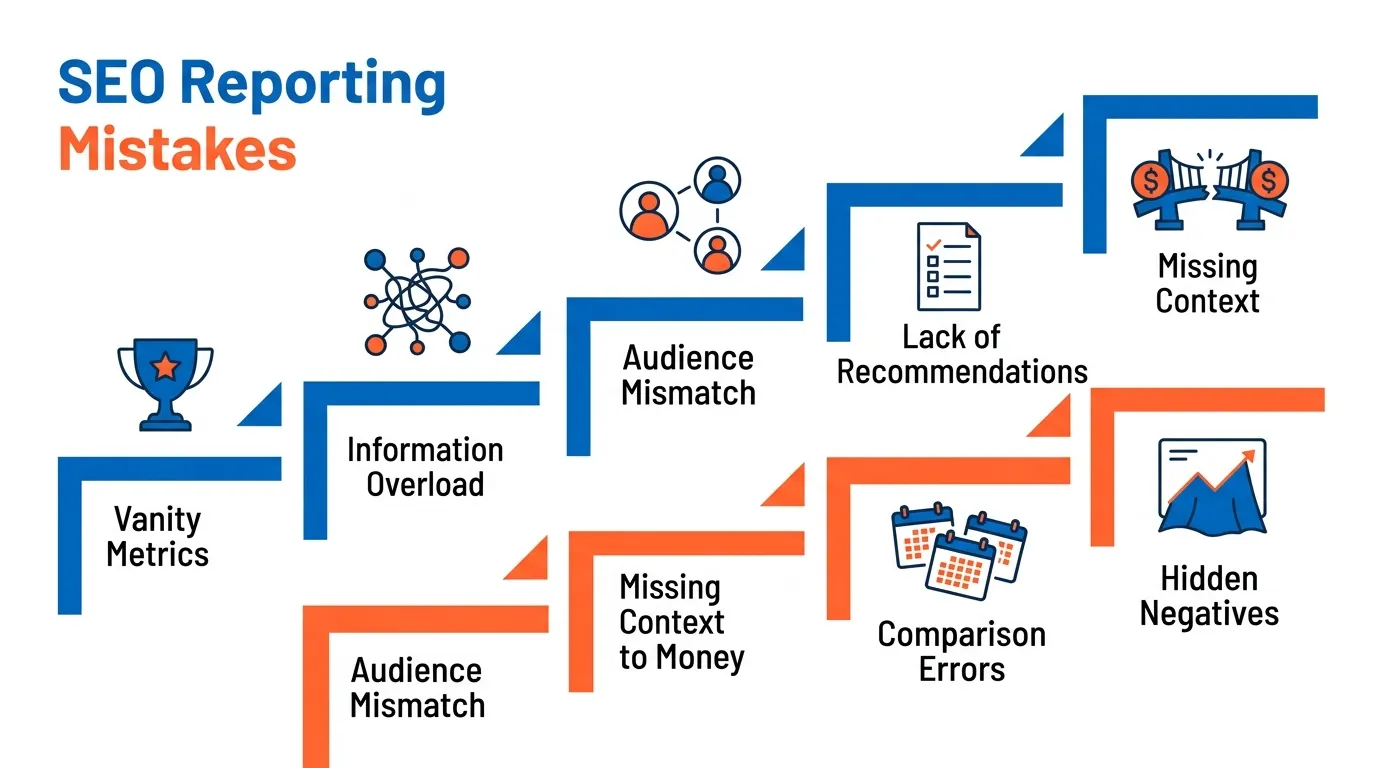
Some mistakes keep showing up.
- Reporting on vanity metrics: Impressions and visibility are useful, but if the report barely touches on leads, revenue, or pipeline contribution, it lacks commercial context.
- Including too much data: If everything looks important, nothing feels important.
- Not matching the audience: A CEO should not have to work through crawl diagnostics to understand the month.
- No attribution caveats: Good reporting should distinguish between measured revenue, estimated value, and assisted influence. Blurring them weakens trust.
- Comparing the wrong time periods: SEO is affected by seasonality, promotions, site changes, algorithm shifts, and market demand. Bad comparisons create bad conclusions.
- Hiding the bad news: Trust grows when the report explains what slipped, why it slipped, and what happens next.
- No clear recommendation layer: If a report ends with charts and no direction, it stays passive.
How I Make SEO Reports Easier to Read
Readability matters more than many people think.
Even a smart report fails if nobody wants to read it.
So I do a few simple things consistently:
- Keep paragraphs short
- Use plain English
- Avoid jargon unless necessary
- Break sections up clearly
- Use tables and bullets where they improve scanning
- Keep charts simple
- Highlight takeaways, not just numbers
- Put decisions and actions where they are easy to find
A report should feel easy to scan, but still strong enough to guide action.
That is the balance.
The Methodology Caveat I Always Keep in Mind
This matters for trust.
When I report SEO impact, I try to be honest about what is directly measured and what is inferred.
For example:
- Revenue from eCommerce purchases may be directly measurable
- Lead-generation revenue may be estimated using close rates and lead values
- Assisted SEO influence may be directional rather than exact
- Some technical improvements remove blockers before they produce visible gains
That does not make SEO reporting weaker. It makes it more credible.
A report earns trust when it is clear about certainty, assumptions, and limitations.
What Good SEO Reporting Really Does
At its best, SEO reporting is not about spreadsheets.
It is about trust, clarity, and better decisions.
When I present an SEO report, I want the stakeholder to feel three things:
- They understand what is happening
- They trust the direction
- They know what comes next
That is the standard I hold myself to at MediaOne.
If your current reporting is cluttered, too technical, or too vague, simplify it. Focus on it. Tie it to business outcomes. Separate measured results from inferred influence. And most of all, make it useful to the person reading it.
Because that is what good reporting should do.
Frequently Asked Questions
What makes a good SEO reporting dashboard?
A good SEO reporting dashboard focuses on clarity and relevance rather than volume of data. It highlights key metrics such as traffic, conversions, and keyword visibility in a simple format. The goal is to help stakeholders quickly understand performance. Visuals should support decision-making, not overwhelm the reader.
Should SEO reporting include competitor data?
Including competitor data in SEO reporting provides useful context for performance changes. It helps explain whether ranking shifts are due to internal factors or external competition. This makes it easier to identify gaps and opportunities. Without competitor insights, performance can be misinterpreted.
How do you measure SEO success in reports?
SEO success is measured by linking search performance to business outcomes. This includes tracking organic traffic, conversions, and the performance of key landing pages. Improvements in keyword visibility also indicate progress. The most important factor is whether SEO contributes to leads or revenue.
Is automated SEO reporting reliable?
Automated SEO reporting can be useful for efficiency, but it often lacks context and interpretation. Tools can accurately pull data, but they do not explain why changes occur. Human analysis is still needed to turn data into insights. A balanced approach combines automation with expert review.
How detailed should SEO reporting be?
The level of detail in SEO reporting should match the audience. Executives usually need high-level summaries focused on outcomes, while marketing teams may require deeper insights. Including too much detail can reduce clarity. The best reports prioritise what is actionable and relevant.