A centralised dashboard gives you real‑time visibility into key metrics, lets you monitor performance by location (especially if you serve multiple Singapore districts) and empowers you to act on the data rather than chase it.

According to recent best‑practice frameworks, dashboards should tie together sources like Google Analytics 4, call‑tracking, review sentiment and local ranking data to shift from vanity reporting to outcomes you can optimise.
In this step‑by‑step guide you’ll learn how to build a local SEO analytics dashboard in 2026. From defining objectives, selecting the right KPIs, integrating multi‑location data, to enabling actionable insights that drive foot‑traffic, calls and conversions.
Key Takeaways
- A local SEO dashboard centralises all performance data, making it easier to track visibility, engagement, reputation and website metrics.
- Monitoring location-specific performance is critical, especially for businesses serving multiple districts in Singapore.
- Structuring your dashboard with clarity and purpose turns raw data into actionable insights for decision-making.
What is A Local SEO Analytics Dashboard?
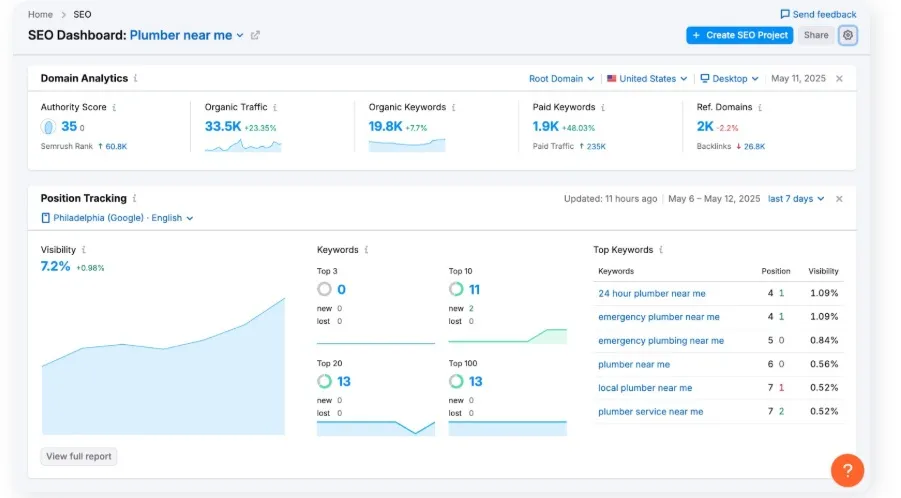
Image Credit: Semrush
A Local SEO Analytics Dashboard is a centralised reporting hub that compiles all your local search performance data into one easy-to-read interface.
It tracks the key metrics that determine how well your business appears in local search results, from Google Business Profile insights and keyword rankings to website traffic, calls and customer reviews.
Unlike a standard SEO dashboard that looks at overall site performance, a local SEO dashboard focuses on location-specific visibility and engagement. This is especially valuable for multi-location businesses where performance can vary across districts or neighbourhoods.
Steps to Build Your 2026 Local SEO Dashboard
Here’s a step-by-step guide to building a 2026 local SEO dashboard that helps you track rankings, monitor performance by district and make smarter marketing decisions:
Step 1: Define Your Local SEO Goals

Image Credit: Ahrefs
What is my local SEO goal? Begin by clarifying what you want to achieve. Without this, your dashboard becomes a jumble of numbers rather than a decision‑making tool.
Questions to ask:
- What local result do you aim for? For example: increase “call now” clicks from your Google Analytics 4 reports by 30 % over six months; attain top‑3 in the Local Pack for “[service] in [Singapore district]”.
- Who is your audience? Are you targeting Singapore wide, or specific areas such as Orchard, Jurong, Tampines, or West Singapore?
- What action do you want people to take? Website visits, calls, direction requests, bookings?
From this, pick KPI(s) that match your goals. For example:
- Number of directions‑requests via your Google Business Profile listing.
- Local ranking position for target keywords (e.g., “plumber in Ang Mo Kio”).
- Website sessions from local search queries (Singapore‑based traffic).
- Number of new reviews and average review rating (critical in local search trust).
Having your goals defined ensures you measure what matters, not everything.
Step 2: Identify the Key Metrics to Track

Image Credit: Semrush Blog
With goals in hand, determine which metrics will feed into your dashboard which is the data that drives insights and action.
Visibility / Reach Metrics
- Ranking positions in the Local Pack for target keywords (e.g., “dentist Bukit Timah”).
- Number of impressions and clicks via your GBP listing (map + local search).
- Map or ‘near me’ view‑counts.
With more than 95% of Singapore’s population online, securing a prominent spot in local search results has become essential for any business looking to attract nearby customers.
Engagement & Conversion Metrics
- Call‑clicks from your Google Business Profile (mobile users tapping “Call”).
- Direction‑clicks (users tapping “Directions” to your business location).
- Website visits from local‑intent queries (mobile, tablet, desktop) filtered for Singapore geography.
- Conversion actions on your site or landing page (booking form submissions, quote requests).
Reputation & Listing Accuracy Metrics
- Review count (new reviews) and average rating (for example 4.8 stars).
- Sentiment of reviews: positive vs negative trends.
- NAP (Name, Address, Phone) consistency across directories and websites, especially important in local SEO. One Singapore‑based site lists NAP consistency as a key local SEO factor.
Website Performance Metrics
- Organic traffic from Singapore “near me” or district‑based keywords.
- Device breakdown (mobile vs desktop). In Singapore, mobile usage is high.
- Page load time / mobile‑friendliness. Mobile local searches often convert quickly.
Trend & Alert Metric
- Month‑on‑month changes: ranking drops, review count changes, call‑click variation.
- Alerts: e.g., if average rating falls below target, or if calls drop by > 20 % week‑on‑week.
Group your metrics into ‘visibility,’ ‘engagement,’ ‘reputation/listing,’ and ‘website performance’ to create a complete picture of your local SEO performance.
Step 3: Choose Your Analytics Tools
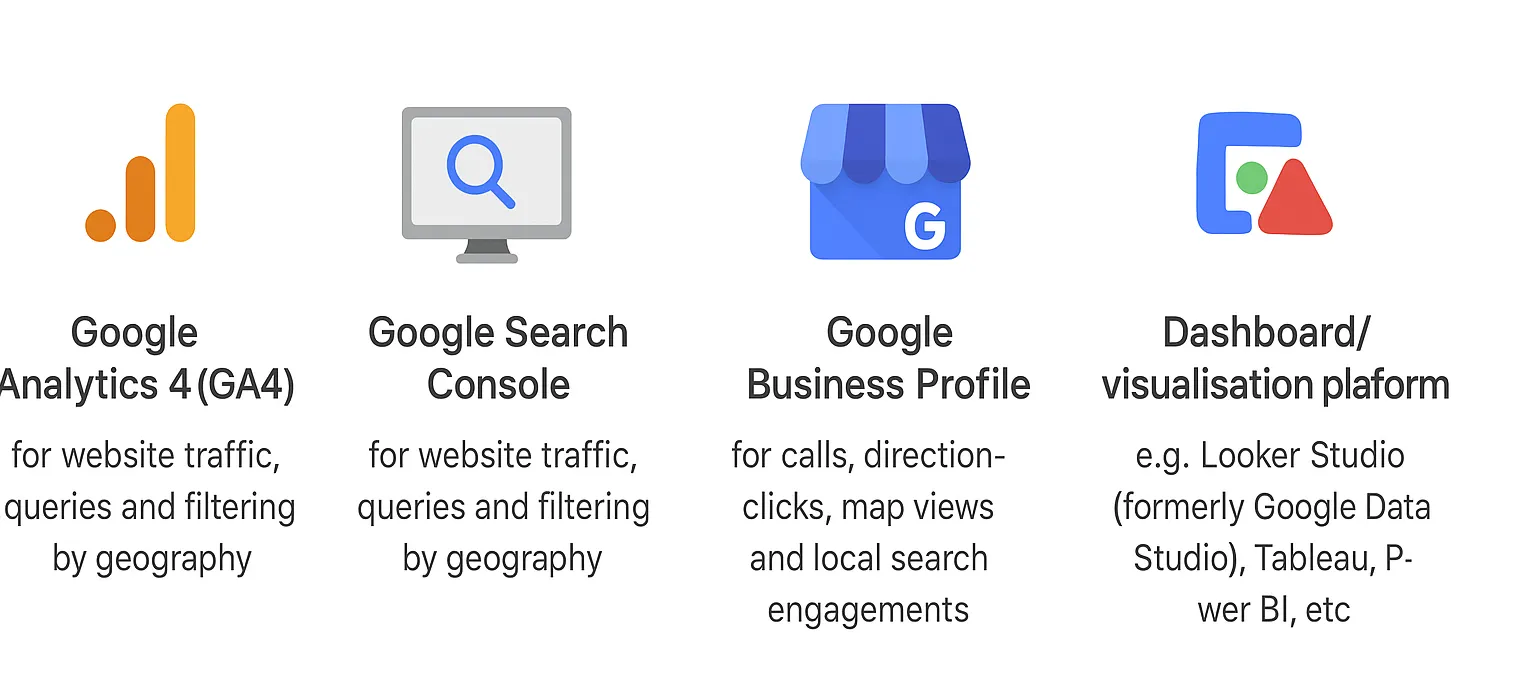
Image Credit: ChatGPT Generated
You’ll need a suite of tools to gather the data and feed it into a dashboard. Here’s a breakdown of what you’ll require.
Essential tools
- Google Analytics 4 (GA4) and Google Search Console: for website traffic, queries and filtering by geography.
- Google Business Profile: for calls, direction‑clicks, map views and local search engagements.
- Local SEO platforms (especially useful for Singapore): tools like citation checkers, local ranking trackers, review monitoring services.
- Dashboard/visualisation platform: e.g., Looker Studio (formerly Google Data Studio), Tableau, Power BI, etc.
Key considerations
- Ensure the tool supports Singapore geographic filters (e.g., traffic from Singapore, sessions from Singapore zip codes/areas).
- Make sure your local SEO tool supports “near me” or district‑based keyword tracking.
- Automate data imports where possible. You don’t want manual CSV uploads each week.
- Decide your data‑refresh cadence: daily, weekly, monthly. In local SEO, weekly is often sufficient unless you have many locations.
For agencies managing multiple locations (e.g., across Singapore districts or even across Malaysia/Singapore), the ability to segment data by location is key.
Step 4: Integrate Your Data Sources


Image Credit: Service Provider Pro
Now it’s time to bring together the data flows into one unified dashboard.
Setup checklist
- Connect GA4 and Search Console to Looker Studio using native connectors.
- Connect Google Business Profile (GBP) data to your dashboard (via built‑in connector or API).
- Import ranking data from your local SEO tool: keywords (district + service), positions, change.
- Import citation / listing data (NAP consistency, number of directories, errors flagged).
- Map each metric to your KPI definitions (so you know what you’re tracking).
- Automate refresh: e.g., set data to refresh daily or at worst weekly.
Pitfalls to avoid
- Duplicate counting: e.g., GA4 site sessions counting the same user via different channels.
- Missing geographic filters: ensure traffic is indeed from Singapore (not global).
- Time‑zone mismatches: Singapore is UTC+8; ensure your dashboard aligns.
- Data‑lag: some GBP data updates slower; plan accordingly.
Integrate your data properly to create a ‘single source of truth’ for your local SEO performance which is far more useful than juggling disparate spreadsheets.

Step 5: Design Your Dashboard

Image Credit: ChatGPT Generated
Design matters. Your dashboard must be clear, visually engaging and actionable for your team or client.
Layout suggestions
- Top row: Executive snapshot, e.g., ranking status (top‑3 keywords), total call‑clicks, total direction‑clicks, average review rating.
- Middle section: Engagement + listing‐health metrics, e.g., calls by location, direction‑clicks by location, NAP error count, new reviews count.
- Bottom section: Deep‑dive and trend analysis, e.g., ranking trend over last 3–6 months, call‑click trend by device type, traffic from local keywords, review sentiment breakdown.
- Filters: By location (district), by service (if you offer multiple), by time period (week, month, quarter).
- Colour‑coding: Green for on‑target, amber for caution, red for metrics below threshold.
- Include “action‑items” panel: e.g., “Review rating below 4.5 in Jurong → respond to reviews + improve service page”.
Visualisations to use
- Line chart: ranking position trend over time.
- Bar chart: call‑clicks by location or device.
- Pie chart: distribution of new reviews by 5‑star vs 4‑star vs 3‑star.
- Table: listing directories with NAP errors flagged (conditionally coloured).
- KPI tiles: high‑level metrics with trend arrows.
User focus
- If your agency dashboard is for clients: include brief interpretive commentary (“Calls up 12 % vs last month; direction‑clicks down 18 % – investigate map listing visibility in [District]”).
- If internal: include quick links to data export and detailed analysis tabs.
- Mobile friendly: local‑search dashboards are often checked on mobile by clients or managers.
Design your dashboard with clarity and purpose and it transforms from a set of numbers into a powerful decision-making tool.
Step 6: Set Up Reporting & Alerts
A dashboard is powerful, but only when someone uses it. Alerts + reports help ensure it gets used.
Reporting cadence
- Weekly email summary: Top KPI snapshot + commentary (e.g., “Calls up 10 % week‑on‑week”).
- Monthly deep‑dive report: Trend overview vs previous month, vs same month last year, location‑heatmap, highlighted issues.
- Quarterly review: Align dashboard results with business goals (e.g., “We aimed for +25 % calls this quarter, achieved +22 %. Next quarter target +30 %”).
Alerts to set
- If average review rating drops below target threshold (e.g., 4.5 stars).
- If call‑clicks or direction‑clicks drop > 20 % week‑on‑week.
- If ranking for top keywords falls out of local 3‑pack.
- If NAP error count in directories increases.
Local mobile searches lead to in‑store purchases at very high rates. If you miss a drop in direction‑clicks, you might lose real offline visits. Rather than checking the dashboard once a month and discovering issues too late, alerts and reports help you act quickly. The faster you respond, the better chance you have of preventing loss of visibility or transactions.
Step 7: Review and Optimise Regularly
Your dashboard should evolve. Local SEO is not static. Algorithms change, consumer behaviour shifts, competition adapts.
Routine reviews
- Monthly: Evaluate if the major KPIs are being met. Are we moving toward our goal?
- Quarterly: Review whether the metrics you track are still relevant. Are you capturing the right things (for example, voice search, maps referrals, ultra‑local keywords)?
- Annual: Re‑baseline our goals for 2026/27. For example, new locations in Singapore, new services offered.
Stay updated with local‑SEO trends in Singapore
- Local‑intent queries: choose keywords with district or “near me” qualifiers. One Singapore source states that 46% of all Google searches have local intent.
- Mobile usage: Singapore has high mobile internet penetration; local search often starts on the phone.
- Map/Zero‑click results: Search engines increasingly show information directly on the results page without clicking through, meaning your dashboard should monitor visibility even if clicks drop.
Refine as you learn
- If you see that “service in Location X” keywords convert much better than generic keywords, shift more tracking and optimisation efforts there.
- If one district has many NAP inconsistencies, consider remediating directories or map listings.
- If reviews are weak, run a review‑generation campaign and measure lift in review volume and rating trend.
When you stay flexible, your dashboard will remain a living asset, not a “set and forget” item.
Step 8: Use Your Insights to Take Action
Tracking is only useful if you act. The metrics you’re collecting should drive decisions that improve your local visibility and conversions.

Translate insights into tasks
- Fix listing errors: If NAP inconsistencies or missing information are flagged, resolve them to improve trust and ranking in local search.
- Improve reviews: Use your dashboard to identify drops in review volume or rating. Launch campaigns (ask happy customers, follow‑up emails) and monitor the effect.
- Optimise service/location pages: If traffic from a specific Singapore district is low, create or improve a dedicated page for that area (“[Service] in [District]”) with localised content, schema markup and CTA.
- Mobile and device optimisation: If mobile conversions are lower than desktop, audit the site’s mobile performance (load‑time, ease of tap/call, user flow).
- Keyword strategy refinement: Use your dashboard to identify high‑performing local keywords (including long‑tail and “near me” variants) and adjust your content strategy accordingly.
The aim is simple. Your dashboard should provide insight and lead to action. Without the latter, the former is wasted.
Next Steps: Putting Your Local SEO Dashboard to Work
Once your dashboard is live, start using it to drive action. Monitor key metrics regularly to spot trends and issues early, set benchmarks and goals based on historical data and optimise your content, business listings and local SEO campaigns according to what the insights reveal.
Automate reports to stay informed without manual effort and review and refine your dashboard periodically to keep it aligned with evolving search trends, consumer behaviour and business priorities.
Using Local SEO for Growth
A well-structured local SEO dashboard is more than a reporting tool. It’s a strategic asset that helps you track performance and make decisions that boost local visibility. When you centralise your metrics and monitor the performance by location, your business can stay ahead in Singapore’s competitive local search landscape.
Want to take your local SEO to the next level? Partner with MediaOne to optimise your dashboard, improve rankings and attract more customers to your business. Contact us today!
Frequently Asked Questions
How often should I update my local SEO dashboard?

Ideally, dashboards should update in real time or at least daily for critical metrics like Google Business Profile insights and local rankings. Weekly reviews work for broader trends, while monthly reports can help assess progress toward KPIs.
Can small businesses benefit from a local SEO dashboard?
Absolutely. Even a single-location business can use a dashboard to track online visibility, monitor reviews and understand which local search terms drive traffic.
Do I need technical expertise to set up a local SEO dashboard?
Not necessarily. Many tools offer drag-and-drop dashboards and prebuilt integrations. However, understanding key SEO metrics and data sources will help you design a dashboard that delivers actionable insights.
Which metrics should I prioritise if I have multiple locations?
Focus on location-specific KPIs such as local search rankings, calls or enquiries per location, review sentiment, website traffic by area and local engagement. Comparing these across districts helps identify opportunities and underperforming areas.
How can I measure the ROI of local SEO efforts using the dashboard?
Track conversions such as calls, bookings, website form submissions and foot traffic against your local SEO activities. A dashboard lets you correlate changes in rankings and visibility with tangible business outcomes.