You run a shop, not a guessing game. If your dashboards show clicks and pageviews but not profit, you pick tactics by gut. That stops here.

eCommerce analytics tools map the path customers take — from the first ad to the moment they hit buy. They show which channels add real margin, which SKUs bleed cash, and which campaigns deserve more budget.
You want tools that reveal why your 3% cart abandonment spike last Tuesday cost you S$847 in revenue. Not dashboards showing “engagement increased 12%.”
This article delivers clear criteria to choose the right stack. You’ll get practical tool comparisons for Singapore, step-by-step checks to prove ROI, plus implementation timelines and budget frameworks.
Specific feature requirements, integration checklists, and ROI calculation methods work for Singapore’s regulatory environment.
Read on only if you want a measurement that ties to profit, not just prettier charts.
Key Takeaways
- eCommerce analytics tools provide insights into customer behaviour, sales performance, and marketing effectiveness, enabling data-driven decision-making.
- Tools like Google Analytics 4 and Shopify Analytics offer comprehensive tracking of customer journeys, from ad click to purchase.
- Advanced platforms such as Kissmetrics and Conjura offer deeper insights into customer lifetime value and SKU profitability.
- Integrating analytics tools with your ecommerce platform ensures accurate data collection and reporting.
Importance of eCommerce Analytics Tools
You cannot manage what you do not measure. Good analytics tools show whether your Black Friday campaign generated S$23,000 profit or S$8,000 loss after factoring in fulfilment costs.
They reveal which specific product variants drive repeat purchases within 90 days. This granular insight changes how you allocate budget between Meta ads and Google Shopping.
You can adjust product pricing based on true margin data and optimise warehouse operations for peak seasons. The tools also show which customer acquisition channels deliver buyers who actually return.
Southeast Asia’s digital economy is expanding fast. The region’s GMV reached US$263 billion in 2024, up 15 per cent year on year, according to the e-Conomy SEA 2024 report by Google, Temasek, and Bain & Company.
That growth means more channels, more data, and more noise. Your analytics must cut through that noise and point to profit.
For Singapore specifically, the market is growing and becoming increasingly competitive. Singapore’s digital economy’s GMV grew 13% to US$29 billion in 2024, with ecommerce contributing significantly to this growth.
Independent market research projects strong growth over the next five years, driven by cross-border commerce and B2B digitalisation. That makes accurate attribution and unit economics non-negotiable if you want predictable margins.
Here’s concrete proof that this work exists: A direct-to-consumer brand using an AI-first attribution stack reported US$420,000 in incremental revenue within a year after setting up Sonar Send, according to Triple Whale.
The lift came from reallocating ad spend to profitable channels and cutting waste. That is not theory — it is a measured outcome.
Here is what analytics should deliver for you, now:
- True attribution. Connect ads to purchases across devices and platforms so you stop guessing which channel grows profit. Track customer journeys that span Instagram discovery, Google search, email click, and in-store pickup.
- SKU-level profitability. Know which products lose money once returns, shipping, payment processing fees, and allocated ad spend are counted. Include reverse logistics costs and warehouse handling fees.
- Cohort LTV. Track customer value over 30, 60, 90, and 365-day windows so you can bid and acquire at sustainable costs. Segment by acquisition channel, product category, and geographic region.
- Actionable alerts. Get real-time signals when CPA drifts beyond target thresholds. Receive alerts when inventory levels trigger demand forecasting updates, or when campaign performance drops below profitability benchmarks.
Quick checklist to judge a tool this afternoon:
- Can it tie ad spend to revenue by channel and campaign in a single view?
- Does it report profit per SKU after fees, returns, and shipping?
- Can you slice LTV by acquisition source and cohort period?
- Are the dashboards exportable and auditable for your finance team?
If the answer to any of those is no, you are operating with blind spots. Fix those first. Analytics is not an add-on. It is the foundation of repeatable growth in a market that will be more crowded next quarter.
Top eCommerce Analytics Tools for Singaporean Online Stores
If you’re running an online store in Singapore, data is your competitive edge. You can’t rely on basic traffic metrics when competitors are using predictive analytics for inventory management and dynamic pricing algorithms for real-time optimisation.
You need ecommerce analytics tools that reveal which specific customer segments generate the highest lifetime value.
The tools should show how seasonal trends affect your profit margins by product category, and where you’re losing potential revenue in the conversion funnel.
Here’s a curated list of top analytics tools for online stores that are already helping Singaporean brands make sharper, faster business decisions.
1. Google Analytics 4 (GA4)

Why it matters: GA4 is the global standard for web analytics, and with enhanced ecommerce tracking, you can see the complete customer journey.
It handles cross-domain tracking for businesses with separate checkout systems and provides machine learning insights for audience segmentation.
Best for: Businesses of all sizes.
Key features:
- Cross-device tracking with Google Signals integration
- Funnel visualisation for ecommerce with drop-off analysis
- Custom event tracking for micro-conversions
- Predictive metrics for churn probability and revenue forecasting
- Attribution reporting across paid and organic channels
Pricing: Free.
Singapore example: Love, Bonito leverages extensive data analytics to track over 100 product attributes per SKU and refine their product strategy based on comprehensive visitor engagement metrics.
2. Shopify Analytics
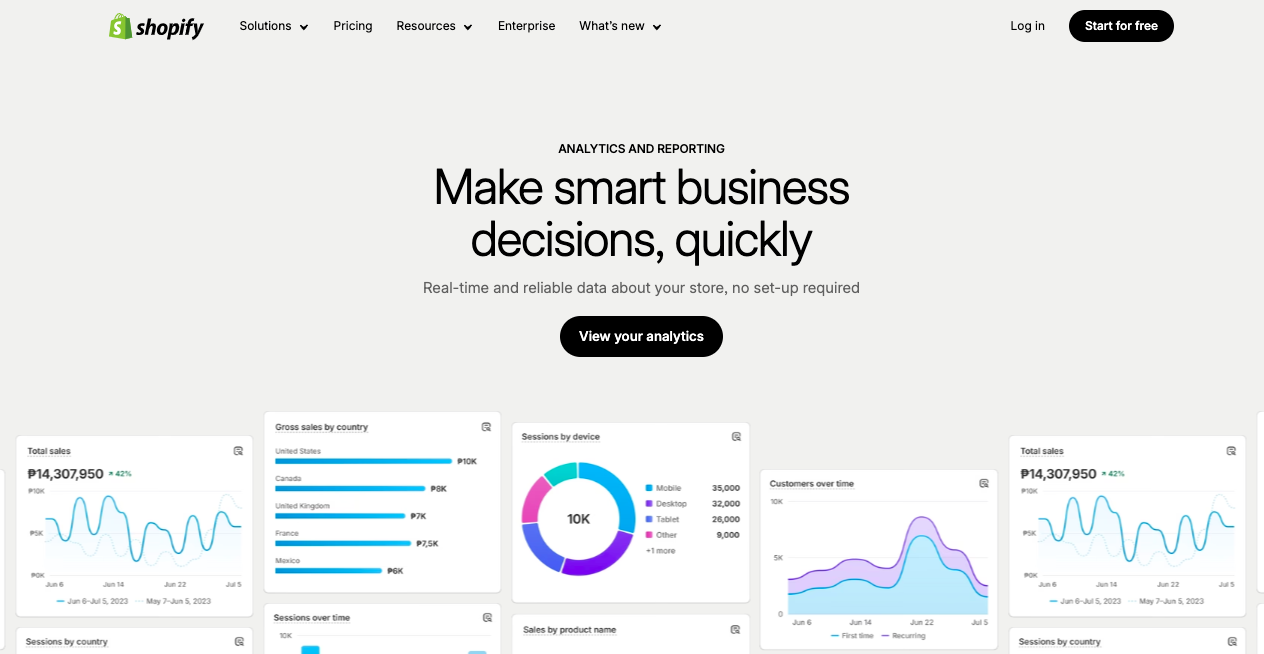
Why it matters: If your store runs on Shopify, its built-in analytics provides ready-to-use sales, customer, and marketing data without complex setup.
The platform automatically calculates important metrics like customer acquisition cost, average order value trends, and profit margins after Shopify’s transaction fees.
It integrates seamlessly with Shopify Payments for complete transaction visibility.
Best for: Small to medium-sized Shopify stores.
Key features:
- Sales performance reports with profit margin calculations
- Conversion rate tracking by traffic source and device type
- Customer lifetime value insights with segmentation capabilities
- Inventory performance analytics with sell-through rates
- Marketing attribution for Shopify’s advertising channels
Pricing: Included in all Shopify plans (Basic from SGD 51/month).
Singapore example: The Paper Bunny leverages Shopify’s analytics to track best-selling SKUs and optimise inventory.
3. Kissmetrics

Why it matters: Designed for ecommerce, Kissmetrics focuses on customer behaviour and revenue attribution — crucial if you’re scaling up.
Best for: Medium to large ecommerce stores.
Key features:
- Cohort analysis with retention rate calculations and churn prediction
- Customer journey mapping across multiple touchpoints and sessions
- Subscription analytics with MRR tracking and upgrade/downgrade patterns
- Revenue attribution with configurable models (first-touch, last-touch, multi-touch)
- Funnel analysis with conversion bottleneck identification
Pricing: From USD 299/month (~SGD 405).
Fact-check: Brands like Unbounce use Kissmetrics to cut customer acquisition costs by identifying underperforming campaigns.
4. Hotjar

Why it matters: Sometimes it’s not about what customers do, but why they do it. Hotjar’s heatmaps and session recordings reveal friction points in your store.
Best for: UX-focused store optimisation.
Key features:
- Heatmaps showing click patterns, scroll depth, and attention mapping
- Visitor recordings with rage click and error detection
- On-site surveys with NPS scoring and exit intent targeting
- Conversion funnel analysis with form field optimisation insights
- Mobile experience tracking with touch gesture analysis
Pricing: Free basic plan; paid from USD 39/month (~SGD 53).
Singapore example: Zalora tests checkout designs with Hotjar to reduce cart abandonment.
5. Omnisend Analytics

Why it matters: Email and SMS campaigns need precise tracking to justify spend. Omnisend’s analytics tells you exactly which campaigns bring sales.
Best for: Stores running frequent email/SMS promotions.
Key features:
- Campaign ROI tracking with revenue attribution down to individual emails
- Segmentation performance with open rates, click rates, and conversion tracking
- Automation workflow analytics with A/B testing for subject lines and send times
- Cross-channel performance comparison (email vs SMS vs push notifications)
- Customer lifecycle stage tracking with predictive engagement scoring
Pricing: Free basic plan; paid from USD 16/month (~SGD 22).
Fact-check: Over 125,000 ecommerce brands globally use Omnisend to optimise marketing ROI.
eCommerce Analytics Software
| Tool | Best For | Pricing (SGD) | Unique Advantage |
| Google Analytics 4 |
|
|
|
| Shopify Analytics |
|
|
|
| Kissmetrics |
|
|
|
| Hotjar |
|
|
|
| Omnisend Analytics |
|
|
|
Bottom line: Your choice of ecommerce analytics tools should match your current growth stage and data maturity.
If you’re starting out, GA4 or Shopify Analytics gives you the essentials. If you’re scaling, Kissmetrics or Hotjar will help you pinpoint high-value opportunities. And if marketing ROI is your priority, Omnisend brings the clarity you need.
How to Choose the Right eCommerce Analytics Tool for Your Business
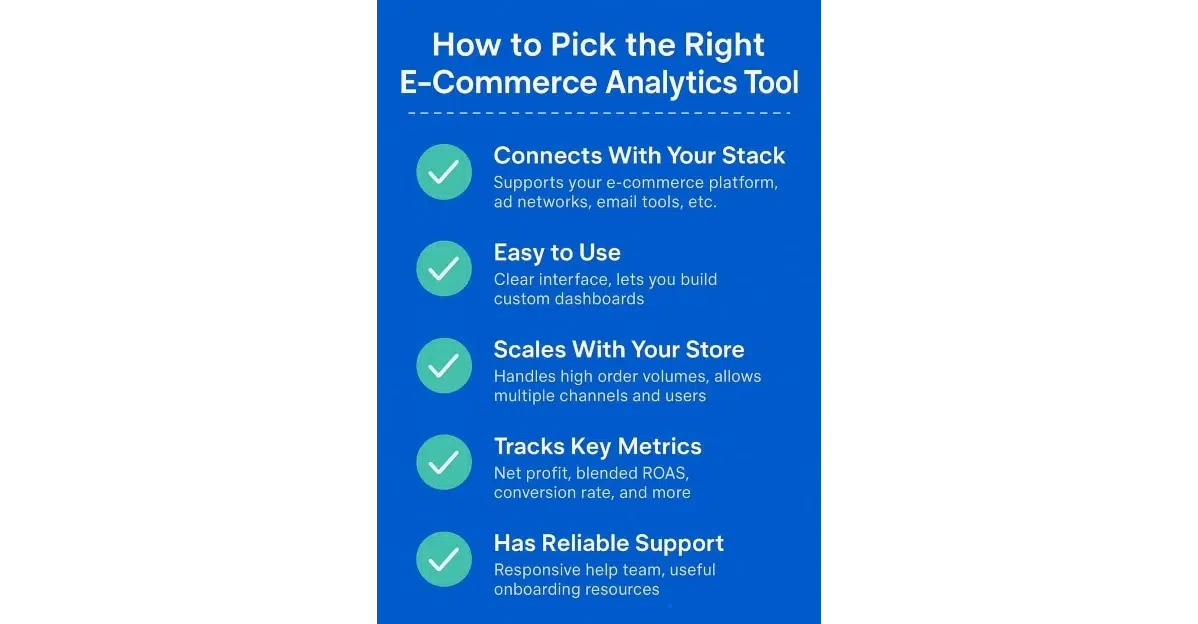
Image Credit: Doola
Choose the tool that answers the single question your finance director will ask: did this activity increase profit? If it cannot answer that in a meeting with your CFO and marketing lead, it is the wrong tool.
Below is a clear, practical process you can run through in a single afternoon, followed by a decision matrix that maps business size, budget, and priority to recommended tool types.
Each recommendation is evidence-backed and localised for Singapore where possible.
Quick, practical selection process (do this now)
1. Start with the KPI that pays the bills.
Define 2 primary KPIs: e.g., contribution margin per SKU after all costs and 90-day cohort LTV segmented by acquisition channel.
Everything else is secondary until these two metrics are reliably tracked and actionable.
2. Audit data completeness.
Ask your web/dev team to prove one complete order end-to-end: from initial ad click through website session to transaction ID in your backend payment system. Document the data flow including UTM parameters, session cookies, and conversion pixels.
If you cannot reconcile a single order’s complete journey with timestamp accuracy, fix tracking infrastructure before buying analytics tools.
3. Match features to decisions.
Use this rule: if a tool does not answer a specific business decision you make weekly, do not buy it.
Example decisions: reallocate S$2,000 monthly ad budget between Facebook and Google based on ROAS data, pause a SKU with a negative contribution margin after fulfilment costs.
You might also need to adjust free-shipping thresholds based on AOV impact analysis.
4. Check attribution and profit capabilities.
Ensure the tool supports configurable attribution models and shows profit after ad cost, fees and returns. Tools like Triple Whale and Conjura are built to surface those insights to marketers and finance teams.
5. Validate integrations for your stack.
Confirm native integrations with your store platform (Shopify, WooCommerce), payment provider, ad platforms and warehouse/fulfilment systems. If ETL or reverse ETL is required, budget for it.
6. Run a 30-day pilot with clear success metrics.
Define success before you start: e.g., “identify two ad audiences to scale that lift ROAS by 20 per cent” or “reallocate spend to increase contribution profit by X SGD.” Use the pilot to test data accuracy and signal quality.
7. Governance and handoff.
Confirm reports are exportable and auditable by finance. If dashboards are black boxes, you will hit reconciliation issues during audits.
Feature Checklist You Must Insist On
- Order-level reconciliation: Every transaction must map to a unique transaction ID with corresponding ad spend allocation. This includes view-through conversions and assisted conversions.
- Profit after costs: Revenue minus product cost, shipping, payment processing fees, returns handling, and allocated marketing spend. The tool must accept variable cost inputs by product category.
- Cohort LTV windows: 30, 60, 90 and 365-day tracking with the ability to segment by acquisition source. Include product category and customer demographic data.
- Attribution model flexibility: Support for last click, first click, linear, time-decay, and position-based models. Custom attribution windows should be configurable.
- Export & audit: One-click CSV/SQL exports with complete data lineage documentation. Audit trails for compliance reporting must be included.
- Local compliance: PDPA-aware data processing with Singapore hosting options. Data residency controls for sensitive customer information are essential.
- Actionability: Built-in alerts with customisable thresholds and automated recommendations. You should be able to execute these within 24 hours without manual analysis.
Real-world proof you can point to in procurement
Triple Whale’s case studies show DTC brands discovering incremental revenue and reclaiming previously missed conversions after unifying ad and store data.
One brand reported US$420,000 in incremental revenue within a year after fixing attribution and acting on recommendations. Use that as a benchmark for pilot outcomes.
Conjura customers have documented double-digit increases in contribution profit by switching ad spend away from unprofitable SKUs and focusing on margin-positive products.
That is precisely the outcome you want if your product catalogue has mixed margins.
Regional players such as Zalora show how joined-up personalisation and analytics lift average basket size substantially. That highlights the scale of impact when data feeds experience tools correctly.
Final Quick Play (30 minutes)
- Pull the last 7 days of orders. Export transaction IDs, SKUs, gross revenue and refund amounts.
- Pull the corresponding ad spend by campaign for the same period.
- Try to match 10 orders to ad campaigns. If you cannot, your tracking is broken. Stop here.
- If you can match, calculate the contribution profit for these 10 orders by subtracting ad spend allocated by campaign, plus estimated fulfilment and fees. If the contribution profit is negative on your “top campaign”, that campaign is a suspect.
Integrating eCommerce Analytics Tools with Your Online Store
If you want your data to drive profits instead of gathering dust in spreadsheets, integrating ecommerce analytics tools directly into your online store is non-negotiable.
The integration process determines how quickly you can turn raw numbers into revenue-generating insights. It also affects how little friction your team faces along the way.

Here’s how you can make integration seamless, whether you’re on Shopify, WooCommerce, Magento, or a custom-built platform:
1. Match the Tool to Your Platform’s Capabilities
Not all analytics tools play nicely with all platforms. Before you commit, check whether your preferred ecommerce analytics software offers:
- Native integrations (e.g., Google Analytics 4 has plug-and-play compatibility with Shopify and WooCommerce)
- API access for deeper customisation
- Real-time syncing to avoid reporting delays
Example: According to Shopify’s developer documentation, stores using Google Analytics 4 with Enhanced eCommerce enabled can track:
- Product impressions
- Add-to-cart events
- Checkout behaviour without custom code
2. Keep the Setup Simple (But Scalable)
You don’t need a full IT department to get started — but you do need to ensure the tool grows with your business.
Key steps to follow when integrating analytics tools:
- Install tracking scripts: Most platforms let you paste your analytics tag into a designated “header” or “analytics” field.
- Configure conversion tracking: Ensure the tool can differentiate between a sale, an upsell, and a refund.
- Set up custom events: If you run flash sales or bundle offers, track these separately to measure ROI.
3. Focus on Data Accuracy from Day One
Your marketing decisions are only as good as the data feeding them.
Before you start optimising campaigns or inventory, make sure all product IDs match across your ecommerce platform and analytics tool.
Currency should be set to SGD so your metrics reflect real Singapore market performance. Test transactions must be run to verify tracking works end-to-end.
4. Use Pre-Built Connectors Where Possible
If your store runs on Shopify Plus, Magento Commerce, or WooCommerce Pro, you can often use pre-built connectors to integrate tools like Klaviyo, Hotjar, or Mixpanel without coding.
This reduces setup time and minimises errors.
Bottom Line: When integrating ecommerce analytics tools, speed and accuracy should be your top priorities. The smoother the integration, the faster you can make data-backed decisions that grow revenue.
If you’re unsure which tools fit your platform and goals, a Singapore-based digital marketing agency can help you bridge the gap between tech setup and business results. This avoids wasting months on trial and error.
You’re Missing Out Without the Right eCommerce Analytics Tools
If your measurement setup still leaves more questions than answers, you are operating with a handicap. The right ecommerce analytics tools turn guesswork into repeatable decisions.
They let you spot a slipping campaign before it burns your margins, stop subsidising loss-making SKUs, and find the customer segments that actually return. That is how you turn marketing from expense into investment.

This is not about dashboards that look nice in a deck. It is about tools that reconcile orders to ad spend, report profit per SKU, and produce cohort LTV that your finance team can sign off on.
Get that right and you stop debating which metric looks best and start executing clear, measurable moves that grow margin.
If you want that level of clarity faster, you do not have to build it alone. Work with MediaOne for professional digital marketing services tailored to Singapore retailers.
We design analytics stacks that fit your platform, run pilot tests that prove lift, and hand over auditable reports your CFO will accept. We focus on outcomes that matter: sustainable CAC, predictable contribution profit, and repeatable growth.
Make the choice today. Fix tracking, pick a stack that answers profit questions, and partner with experts who will deliver results. Your store will thank you when the numbers finally make sense.
Frequently Asked Questions
What are the best ecommerce analytics tools for small businesses in Singapore?
For small businesses in Singapore, tools like Google Analytics 4 and Shopify Analytics are recommended due to their user-friendly interfaces and cost-effectiveness.
How can ecommerce analytics tools improve customer retention?
eCommerce analytics tools help identify customer behaviour patterns, enabling businesses to personalise marketing efforts and improve customer retention strategies.
What is the role of AI in ecommerce analytics?
AI enhances ecommerce analytics by providing predictive insights, automating data analysis, and offering personalised recommendations to optimise business strategies.
How do ecommerce analytics tools integrate with existing platforms?
Many ecommerce analytics tools offer native integrations or APIs that allow seamless connection with platforms like Shopify, WooCommerce, and Magento.

What metrics should I track with ecommerce analytics tools?
Key metrics to track include customer lifetime value, conversion rates, average order value, and return on ad spend to assess business performance.