Many retail businesses, especially fashion and lifestyle brands, believe that a beautiful design is the primary driver of sales. They invest in a Shopline website that features captivating images and on-brand layouts.

While aesthetics are important, they are only the beginning of the journey.
You might attract visitors through social media ads, but without proper conversion tracking, those visitors may leave without making a purchase. They land on your Shopline website, but they don’t do anything meaningful to drive meaningful results.
This gap between traffic and sales is a conversion problem. To build a successful e-commerce website, you must understand the factors that compel buyers to act. Earn their trust to gain their loyalty and patronage.
This guide explores how to set up an e-commerce website that converts.
Key Takeaways
- Visual design creates the first impression, but functional trust and ease of use drive the final sale.
- Reducing friction by offering guest checkout and diverse payment methods significantly lowers cart abandonment rates.
- Building brand credibility through “About Us” and CSR pages converts sceptical visitors into confident buyers.
- Optimised product pages must bridge the sensory gap with high-quality images, videos, and authentic customer reviews.
- Combining a feature-rich platform like Shopline with a professional SEO strategy ensures a steady flow of high-intent traffic.
What Makes a Converting Shopline Website Different from Just a Pretty Store
A Shopline website that converts is also a pretty website. But not every pretty website is a converting Shopline website.
A converting Shopline website is a reliable machine that generates returns. One where you can expect to invest, for example, S$100 in marketing and generate S$200 in sales in return. Whereas a pretty store isn’t necessarily optimised for conversions.
What separates a Shopline website that’s integral to the business, compared to one that’s just there for looks are the following:
- A converting Shopline website tells a story. Site visitors should be able to go through your website and understand the driving values behind the business’ operation.
- It cultivates a brand experience. Going into a digital storefront is the online equivalent of walking into a store. It should curate an experience for site visitors, not just display wares.
- It should serve as a reliable storefront. Shoppers should have a seamless, uninterrupted shopping experience to drive more conversions and sales. A clunky site or one that’s always down does not provide this level of reliability.
- It should engage visitors enough to encourage more browsing. Part of driving conversions is increasing the average order value (AOV) per customer. Optimising your site for browsing enables visitors to explore your full range of stock.
Why Aesthetics Alone Won’t Convert Traffic on Your Shopline Website
A website’s look and brand feel only comprise one element of the trust-building process. After all, there will be hundreds of thousands of other websites in your industry that will also “look good.” However, beauty alone will not resonate with clients. Visuals cannot answer a customer’s questions.
In order for them to make a purchase, a site visitor needs to:
- Feel that your online store is a legitimate business.
- Resonate with your brand’s values.
- Be confident enough in your product to buy it.
Core Conversion Principles for Your Shopline Website
Shopline Website Setup Process: Launching a Store That Converts
If you haven’t yet launched your store on Shopline, here’s how you can get started building your store:
Step 1: Add Products
First, add your products to Shopline.
When you add your products to Shopline, the platform automatically creates templated product pages for every product you include.
It also tracks each SKU, allowing you to monitor each product’s stock level.
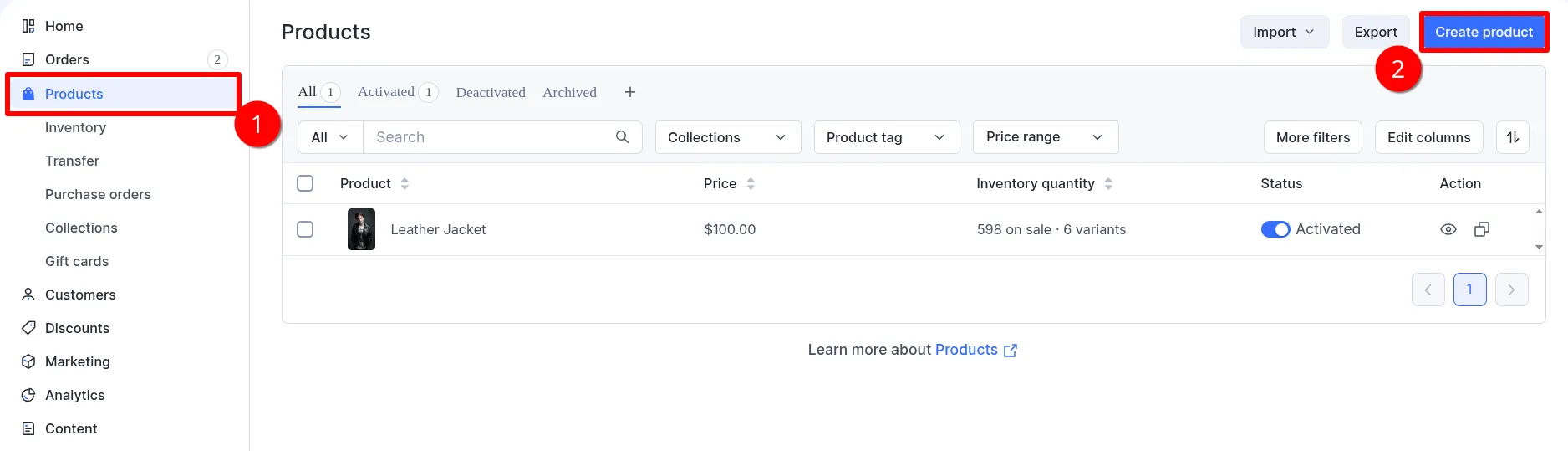
To add your products,
- Click on ‘Products’ from the admin panel.
- Click on ‘Create Product’
- Fill in the necessary product details. Here, you may also assign an SKU and input the inventory level of the product
- Save your changes.
If you’re migrating from another e-commerce platform, such as Shopify or WooCommerce, you can upload a CSV file. Simply click on ‘Import’ then select the options that apply to you.
Step 2: Add Shipping
Once you have your products, determine which areas you want to ship to.
You can start shipping within your immediate area. That way, you minimise your shipping fees, making customer transactions more likely to proceed.
Before setting up your shipping area, you’ll first need to input your location.

To do that,
- Click on Settings from the Admin Panel
- Select Locations
- Click Add
- Input your store’s address details
- Save changes
- Repeat this process for every store you have.
Once that’s done, you can set your store’s shipping area.

To set your shipping area,
- Click on Settings from the Admin Panel.
- Select Shipping and delivery.
- Click Create underneath ‘Custom shipping profile.’
- Set your Shipping Zone, then Shipping Rates underneath each Shipping Zone
- Save your changes.
Here’s how the data hierarchy works: Shipping Profile > Shipping Zone > Shipping Rates.
You can have multiple shipping profiles, each with multiple shipping zones and multiple shipping rates. So, I can have two shipping rates (e.g., Priority, Standard) underneath the ‘Southeast Asia’ Shipping Zone. This will allow customers to choose their preferred shipping priority.
Then, perhaps for the ‘United States’ Shipping Zone, I can have three shipping rates: Priority, Standard, and Express. The customisation is up to you.

Pro tip: You can opt for local delivery for your immediate neighbourhood. Simply navigate to Local Delivery under the ‘Shipping and delivery’ settings.
- Select your location where you want to offer local delivery from
- Then, check “Local delivery is available at this location.”
- Fill out the details
- Click Update.
Local delivery is ideal for areas where a Grab courier or in-house delivery staff can deliver orders to the customer.
Step 3: Add Payment Method
Once you’ve established your shipping areas, add a payment method for customers to pay you.
If you’re a merchant based in Singapore, you have the option to use Shopline Payments. Transaction fees through Shopline Payments can be as low as 2.4% + 0.25 USD.

To set that up:
- Click on Settings from the admin panel.
- Select Payments
- Click on Activate SHOPLINE Payments.
- Scroll down to Singapore, then click Activate.
- Complete the steps that follow. It will ask for the following:
- ACRA Document
- ID Copies
- Bank Statement
- Applying certain store settings
Activating SHOPLINE Payments allows you to accept payments through the major debit and credit cards, Apple Pay, Google Pay, Grab Pay, PayNow, Atome, and BLK

You can also add offline payment methods to accommodate customers without credit cards. Perhaps they’d like a cash-on-delivery payment method.
To do that,
- Scroll down to ‘Custom payment methods’, then click ‘Add.’
- Input the details and instructions for the payment method you’re adding. Ensure the customer can follow your instructions to avoid payment issues.
Step 4: Build the Website
Now that you have your products, your shipping areas, and your payment methods, you can begin building your website.
To build your website,

- Go to Online Store > Design from the Shopline admin panel
- Select ‘Design’
- Shopline’s default theme is Fashion. You can begin designing from this template.
- You may also explore more themes. To do that, click on Add Theme. This will take you to the theme store.
- Upon clicking ‘Design,’ you’ll be taken to Shopline’s website builder.
- Drag-and-drop sections, add sections, and edit sections until you achieve the site that you want.
Designing your site will take a while.
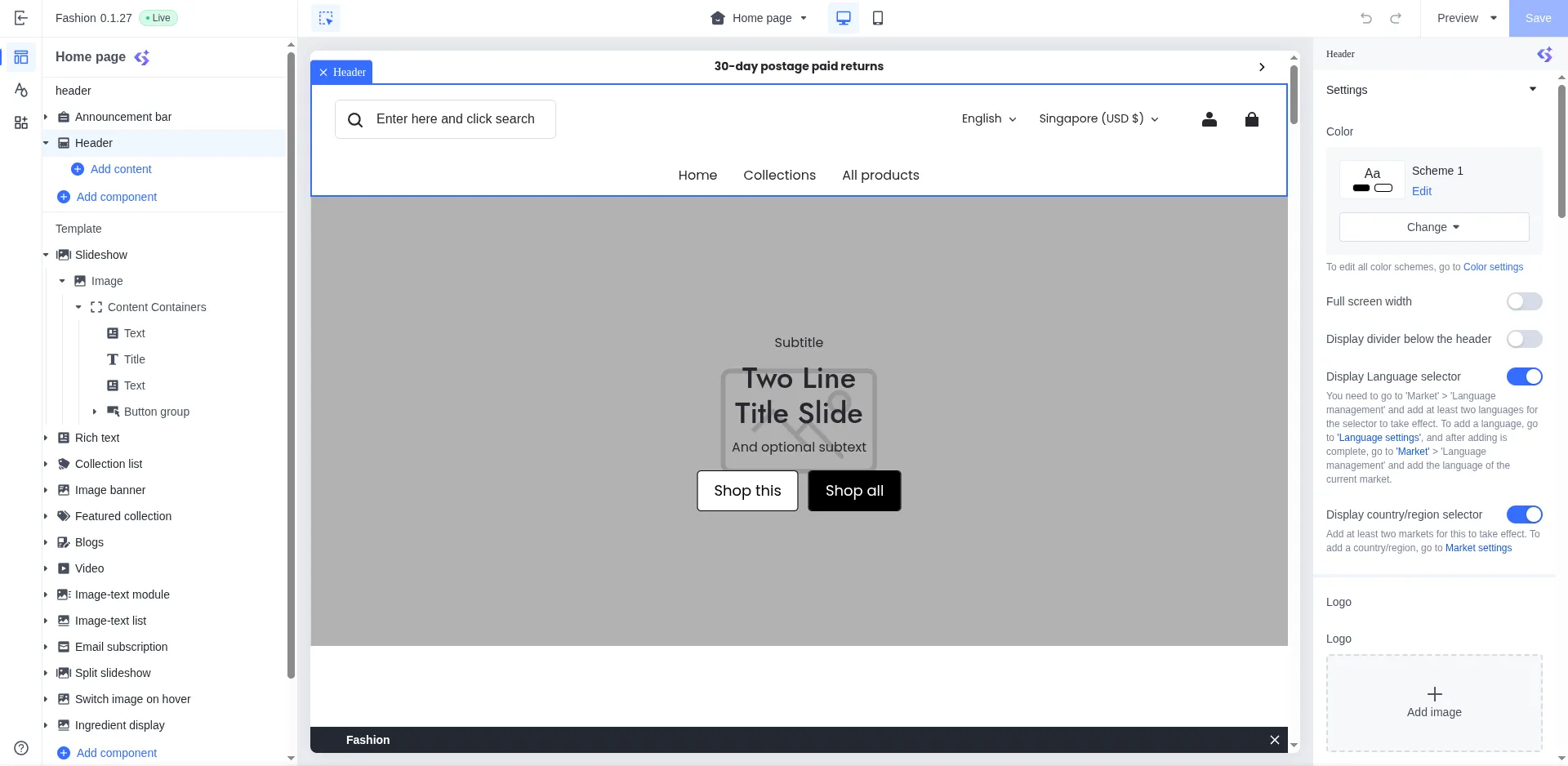
We strongly recommend that you delegate this task to a graphic designer or web developer. This process will determine how your storefront will appear to clients. As such, this part shouldn’t be an afterthought. It must be intentional and carefully crafted.
Understand Why Visitors Don’t Convert on Your Shopline Website
Before diving into tactics for building a high-converting Shopline store, it is essential to understand why visitors abandon their carts.

Understanding why customers leave is just as important as knowing why they stay. When you identify the friction points in your buyer journey, you can make targeted improvements that directly reduce drop-offs and lost revenue. In Singapore’s highly competitive e-commerce landscape, several common factors consistently drive cart abandonment.
Reservations About the Product
Online shoppers cannot touch, try on, or physically inspect products. This uncertainty often becomes a major barrier to conversion. If customers feel unsure about what they are buying, they hesitate. Most people will not spend money on something they are not confident about, especially for higher-value purchases.
This concern is particularly strong for categories such as jewellery, apparel, skincare, and premium products, where texture, fit, and quality matter.
To reduce this hesitation, product listings must provide reassurance through:
- Detailed and accurate product descriptions
- Multiple high-quality images showing different angles
- Close-up shots that highlight materials and craftsmanship
- Clear sizing, measurements, and usage information
The more complete the product information, the lower the perceived risk.
Scepticism About Website Security
Security remains one of the biggest trust factors in e-commerce.
Customers will not enter credit card details or other personal information on a website they perceive as unsafe. If your Shopline store does not have a visible SSL certificate, browsers may label it as “Not Secure,” which immediately raises an alarm.
Common security-related concerns include:
- Missing SSL certification
- Lack of trusted payment gateways
- No visible security or checkout badges
Even if your store is legitimate, the absence of visible security signals can deter customers from completing their purchases.
Distrust of the Brand
New or lesser-known online businesses often struggle with credibility. If customers are unfamiliar with your brand, they look for proof that you are legitimate and reliable. A weak or vague brand presence can create doubt, even if your products are strong.
Shoppers often check for:
- Customer reviews and testimonials
- Social proof, such as real user photos or mentions
- Clear business information and contact details
- Transparent policies for shipping, returns, and refunds
If your digital storefront lacks these trust-building elements, customers may fear scams or poor service. They want reassurance that there are real people behind the brand and that support exists if something goes wrong. By addressing these common concerns, you remove key barriers to conversion. Fixing these issues sets a strong foundation for improving sales performance on your Shopline website.
Building a Shopline Website that Converts Site Visitors
By now, you should already have your store. But there are features and policies you can implement to drive conversions. These additions will help scale your store’s conversions.
Note: these aren’t frontend implementations yet. These are offline decisions you can make for your business, which will be reflected on the e-commerce site.
Additional Conversion Streams
A purchase is not the only way customers can “convert.”
Customers also convert by:
- Claiming a voucher for free shipping. Create discount and free shipping vouchers for first-time visitors. This little “welcome gift” will make them more eager to purchase from you.
- Signing up for an email newsletter. First-time visitors can be prompted to sign up for your email newsletter in exchange for a discount or free item. This provides
- Adding an item to their cart. The Meta Pixel tracks website activity, such as browsing and add-to-cart behaviour, enabling marketers to retarget users on social media.
Notice how PunkYouth, a Shopline website, captures email addresses and drives conversions with a spin-the-wheel pop-up. Through this pop-up, customers have a chance of getting a discount voucher.

Source: https://www.punkyouth.com/
A website must also facilitate these other conversion activities. Even if a customer does not make a purchase, the business moves them to a deeper phase of the sales funnel. They can be retargeted later. This provides an opportunity to nurture them into a purchase in the near future.
Factor Shipping Into Product Cost
High shipping rates are a leading cause of abandoned carts. Many customers are frustrated when they encounter an additional fee at checkout. To improve conversion, consider factoring shipping into the product cost.
Offering “Free Shipping” is a powerful psychological trigger. It simplifies customers’ mental math, making them more likely to complete a purchase.
Even if the total price is the same, the word “Free” reduces the sense of obligation to pay.
Implement Additional Payment Methods

Source: PunkYouth Checkout
Singaporean shoppers expect multiple payment options. This provides shoppers with more ways to transact if one option is unavailable. Configure payment methods so that your e-commerce store supports:
- Credit cards
- Digital wallets
- PayNow
- Cash on delivery
- Manual payment methods, such as Bank Transfer
Providing a variety of payment methods ensures that every customer can use their preferred method. It reduces cart abandonment and improves your conversion rates.
Implement Better Site Security
Security is non-negotiable for online businesses. This signals to customers that you’re a legitimate business that takes itself seriously. You must ensure your e-commerce website uses a secure HTTPS connection. This encrypts the data sent between the user and the server. This is crucial for e-commerce businesses because it protects customer data from hackers and keeps their payment information secure.
Displaying security badges near the checkout can further reassure the customer. A secure site is a requirement for ranking well on search engines through search engine optimisation.
Launch Retargeting Campaigns
Not everyone will buy on their first visit.
Retargeting campaigns help you stay top of mind with consumers. Common retargeting methods include:
- Paid Social Media Ads. You can use social media ads to show customers content centred on the exact products they viewed.
- Email marketing. A cart abandonment campaign can remind users of the items left in their cart. Note that email marketing campaigns can only be sent to users who have provided their email addresses (i.e., warm/hot leads).
These reminders nudge the customer to complete the transaction. A robust marketing strategy always includes a plan for reaching out to interested but hesitant visitors.
Shopline Website Features that can Convert Visitors
Now, for the front-end implementations. Adding certain pages, sections, and features to your site can bridge the trust gap. These elements turn a generic digital storefront into a reliable brand. Keep these in mind when building websites: customers must trust both the brand and the product to make a zero-hesitation purchase.

Here are implementations that can foster brand trust within the website:
About Us Section

Source: https://www.chichiclothing.com/pages/about-us
The “About Us” page allows you to share your brand story. It conveys who the brand is and what its mission is—why it was founded.
This humanises the brand rather than making it appear like an untouchable, corporate, lifeless giant.
It also highlights the remarkable people behind the brand (i.e., the founders and employees). This lets customers know they’re transacting with real people, creating a genuine connection.
Things to include in the “About Us” section include:
- Origin Story
- Mission & Vision Statement
- Meet The Team
- Core Values
Having these elements makes the brand more relatable to your target audience.
Corporate Social Responsibility

Source: https://www.chichiclothing.com/pages/our-responsibility
Though the Corporate Social Responsibility (CSR) can be part of the About Us section, we recommend it be its own dedicated page.
So much content can be placed in the CSR.
- It involves elaborating on the problem your company aims to address (e.g., pollution from single-use plastics).
- It involves showcasing what your company has done to combat this problem. (e.g., green operations, such as using paper bags and sourcing from waste-free suppliers)
Think of it as your About Us section, but focused on the things you do for the environment and the general public, instead of from an industry standpoint.
Modern consumers care about ethics. In a world where giants face controversies over worker rights and environmentally unsustainable practices, you have to show you’re one of the “good guys.”
This gives consumers the impression that by patronising your brand, they’re helping to fund a good cause. The CSR shows that you care about more than just profit. It can be the deciding factor in a customer’s choice between you and a competitor. As such, the CSR is a crucial, humanising page that more e-commerce websites should have.
Live Chat Functionality

Source: https://www.punkyouth.com/
A live chat function allows you to answer questions in real time. If a customer is unsure about a product, they can ask immediately and get instantaneous feedback. Live chat is more commonly used in SaaS industries. However, e-commerce businesses can also adopt it, as it provides an immediate human touchpoint for customers with questions about specific products.
Image-Optimised Product Pages
The product page is one of the most important pages of an e-commerce website.
Unlike brick-and-mortar stores, where customers can hold the product in their hands, the product page bridges that sensory gap.

Source: https://my.salomon.com/products/salomon-reelax-slide-6.0-w-black-black-all-unisex-shoes
Since customers won’t be able to hold the product, the images should provide a comprehensive view.

It’s recommended that e-commerce websites have the following product images:
- Image of the product itself, taken from different angles
- Image of the product being used or worn
- A lifestyle image of the product. This type of image shows the item being used in a scenario that the brand imagines its target audience in (e.g., a laptop in a school environment)
Having these image categories enhances the product’s perception and gives site visitors a clear sense of what it’s like in person before it arrives.
Note, however, that more images don’t necessarily mean more conversions. Site speed is important, and having redundant images can increase the site’s weight, making it load more slowly.
Product Videos
Videos provide a better sense of scale and movement than photos. A short video of a model wearing apparel jewellery can show how the piece catches the light. This eliminates uncertainty and builds confidence in the piece’s authenticity and lustre. For more complex products, videos can also show the item in action, giving site visitors a clearer idea of what they’re looking at.
Product Page Reviews

Source: https://www.punkyouth.com/products/chic-guillotine-earrings
Reviews are the ultimate form of social proof. Shoppers read reviews before buying to verify the product’s usefulness.
To enable the reviews feature in your Shopline website, install the Product Review app from the Shopline App Store.
It’s a complete product reviews app that enables merchants to collect customer reviews. In addition, it lets merchants configure the review layout, limit reviews to customers who have purchased the product, and display the reviewer’s full name, among other features.
Encourage your customers to leave feedback. A few honest reviews can attract customers who are on the fence. It demonstrates that your products are genuine and have been purchased, used, and tested by others.
Testimonials
Testimonials focus on the overall experience of buying from you. Unlike product reviews, testimonials often address after-sales issues, shipping concerns, and other customer experiences with your brand. They might also include a piece of the customer’s story (e.g., what led them to look for a blender, a juicer, or a slow dog feeder). These aren’t typically placed on the product page. Rather, they are on the homepage.
FAQ Section
An FAQ section addresses common customer concerns about your product. These can include questions about shipping options, returns, and warranties; the material used in the clothing item; compatibility with Windows or Mac; and anything else you’d expect a customer to ask brick-and-mortar retail staff.
FAQs are usually drop-down sections that visitors can click to reveal brief answers to a wide range of questions.
Source: https://mediaonemarketing.com.sg/wp-content/uploads/2026/02/46665827941785.png
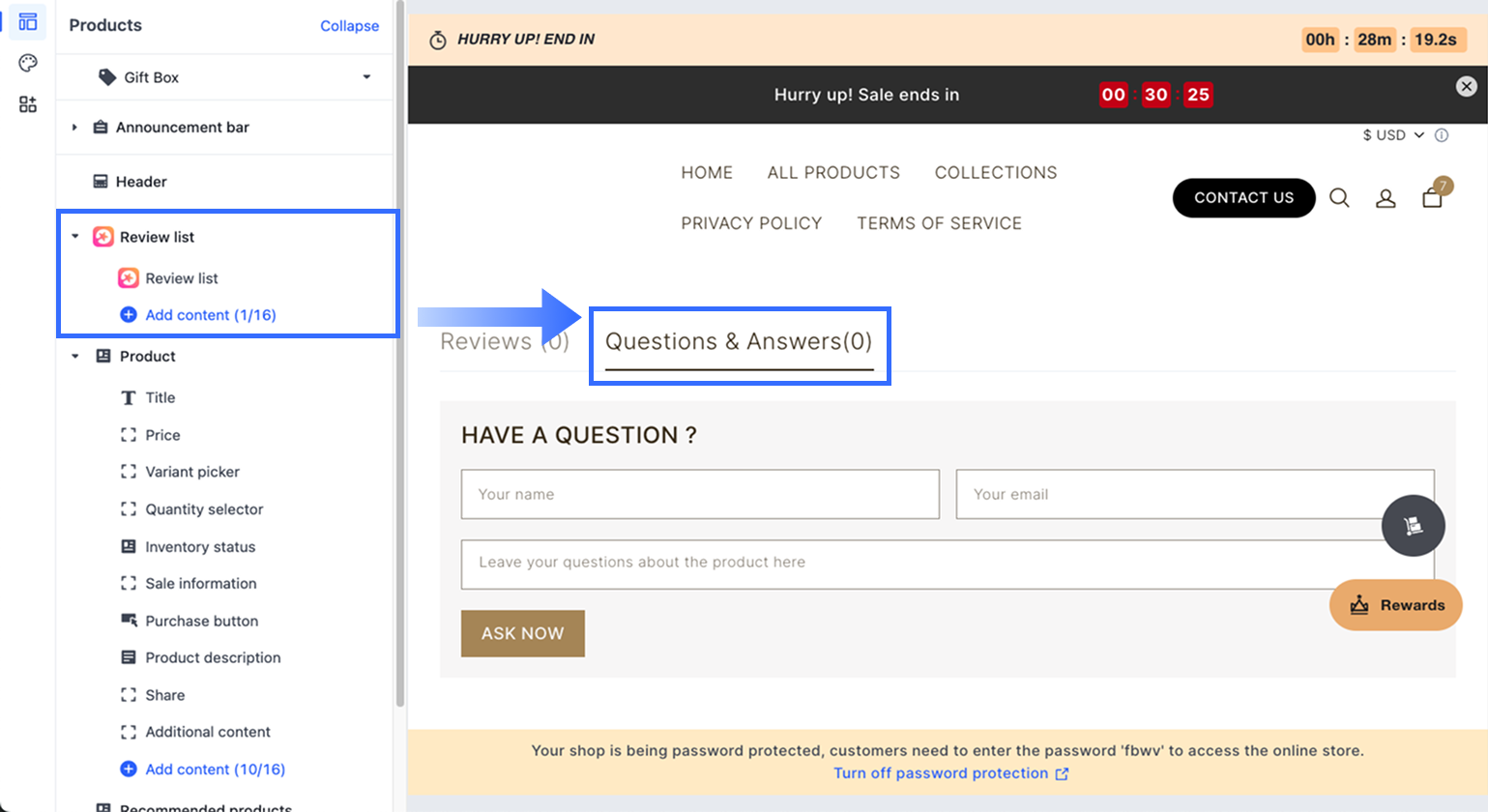
If you’re using a Shopline store, the Product Review app lets potential customers submit questions on a product page, which you can then address. That way, the FAQ isn’t a static list of questions. They’re a conversation board under your product page.
To enable it,
- Go to Settings > Enable Function > Enable Message Board.
- In the Shopline Theme Editor, add the Review List component to the Product Detail Section. This will display the Question & Answer section on your store.
- This will enable customers to post questions and get answers from any of your store managers.
Once a brand has built trust among its product, business, and customers, it strengthens customers’ tendency to make a purchase.
Upsell Features on Your Website

Source: PunkYouth
Upselling and cross-selling can increase your average order value.
Use sections like “You Might Also Like” or “Frequently Bought Together.” These features introduce customers to more products that can complement the item they’re browsing.
Though these features don’t directly increase your conversion rate, they can prompt a bigger (and hence, more committed) purchase from a customer. Which, in turn, moves them down the funnel more quickly toward becoming a loyal customer.
Integrating a Streamlined Checkout
Keep custom checkout flows as short as possible. Customers are already intent on finalising that transaction with you. As such, don’t make it difficult for them to make a purchase and finalise the sale.
Some tips for a streamlined checkout include:
- Allow for guest checkout so users do not have to create an account. Account creation shouldn’t be mandatory for a transaction. First-time visitors who have just gotten to know you wouldn’t want to have an account for every store they visit.
- Keep fields to a minimum. Every extra field adds work for the customer. You’d want to request the information needed for shipping.
- Adopt a one-page checkout. Having more pages might make your visitors groan. To keep things prompt and simple, keep the checkout process on a single page.
Conversion‑Boosting Tools & Add‑Ons for Your Shopline Website
Shopline has a robust app ecosystem that offers users a wide range of tools to support their conversion efforts. Some of these include:
Countdown Timer

Source: https://apps.shopline.com/detail?appHandle=countdown_timer
The countdown timer app creates urgency and pushes customers to make a purchase. A countdown timer signals to customers that a product’s price or availability is limited. The countdown timer’s moving element also gives a “clock is ticking” impression, prompting the customer to make a swift purchase.
This can be placed either on the product or checkout page.
Conversion Booster App

Source: https://apps.shopline.com/detail/conversion_booster
Merchants can use the Conversion Booster app to access a wide range of conversion features for their websites. These include:
- Countdown timers for flash sales
- “Real-time” sales alerts on the product page
- Dynamic inventory that shows “fluctuating” product stock on the product page
- Free shipping progress bars
- Discount popups
These small additions encourage shoppers to either add more items to their carts or complete their transactions sooner. The Conversion Booster App is already quite complete with conversion features. If you can choose only one app from this list, choose this one.
Popup

Source: https://apps.shopline.com/detail/popup
Popup allow merchants to display them on their site, prompting site visitors to claim a discount voucher, a free shipping voucher, or to sign up for the email newsletter. They can also be used to showcase sales and promotions that encourage users to purchase. Popups aren’t only used to nudge purchases. They also drive users to other conversion actions, such as signing up for newsletters or downloading lead magnets.
Product Upsells & Bundles

Source: https://apps.shopline.com/detail/product_bundles
The Product Upsells & Bundles app allows users to apply discounts when specific items are bundled (e.g., socks and shoes). This cross-selling method maximises value for each shopper.
From Launch to Growth: How MediaOne Enhances Your Shopline Website!
Building a store that looks nice is the first step. Ensuring it converts is the second.

However, conversion is not a one-off project that you can forget about. It’s a continuous process that involves feature iteration, customer journey optimisation, and marketing data analysis to ensure the store achieves the best possible conversion rate.
As such, both marketing and e-commerce expertise are needed. By using a website builder like Shopline and partnering with a trustworthy e-commerce solution, such as MediaOne, you set yourself up for e-commerce success.
Do not let your online store be just another pretty face on the internet. Make it a powerful sales engine that grows your business.
Partner with MediaOne today! Build a converting online store and surpass your business goals.
Frequently Asked Questions
What is the ideal loading time for an e-commerce website?
Your store should load in half a second to prevent visitors from bouncing. In the fast-paced online world, every second can mean lost sales. Search engines also use page speed as a ranking factor, so a fast site improves both your visibility and your conversion rate.
How does a clear return policy influence conversion rates?
A transparent return policy reduces the shopper’s perceived risk. When customers know they can easily return a product that does not meet their expectations, they are more likely to complete the initial purchase. However, by the time they receive the product, they will already be attached to it and not want to return it.
Is it necessary to have a custom domain name for my online store?
Yes, using a custom domain rather than a generic platform URL helps establish your store as a professional, legitimate business. A short, memorable domain name also makes it easier for customers to return to your site directly. It also helps reinforce your brand name.
Should I hide the coupon code field at checkout if I am not running a sale?
It is often wise to hide or de-emphasise the coupon box when there is no active promotion. An empty discount field can prompt customers to leave your site to search for a code, leading to abandoned carts.