When we audit websites, schema markup is frequently missing, outdated, duplicated, or overly broad. Pages either lack structured data entirely or they use schema types that do not match the visible content.

Both issues hinder search engines’ ability to understand your content. Schema markup will not boost a weak page to the top, but it helps engines interpret your pages and can make them eligible for select rich results.
Schema markup acts as a clarity layer by signalling to search engines whether your content is an article, product, service, organisation, event, FAQ section, local business, video, or review.
Google supports JSON-LD, Microdata, and RDFa, but recommends JSON-LD because it is easier to implement and maintain. Valid structured data does not guarantee rich search results.
If your website offers useful content but lacks search visibility, working with an experienced SEO agency in Singapore can help you review schema markup, resolve structured data issues, and enhance your broader SEO strategy.
Key Takeaways
- Schema markup helps search engines better understand your content. It adds context to key page elements so Google can interpret what the page is about, not just what words appear on it.
- Structured data can improve how your pages appear in search results. While it does not guarantee higher rankings, it can support rich results, such as FAQs, reviews, products, and other enhanced search features, which may improve visibility and click-through rates.
- Schema markup supports stronger content classification across different page types. It helps search engines distinguish whether a page is an article, product, service, FAQ page, organisation page, or another content type, thereby strengthening relevance and clarity.
What Is a Schema Markup?
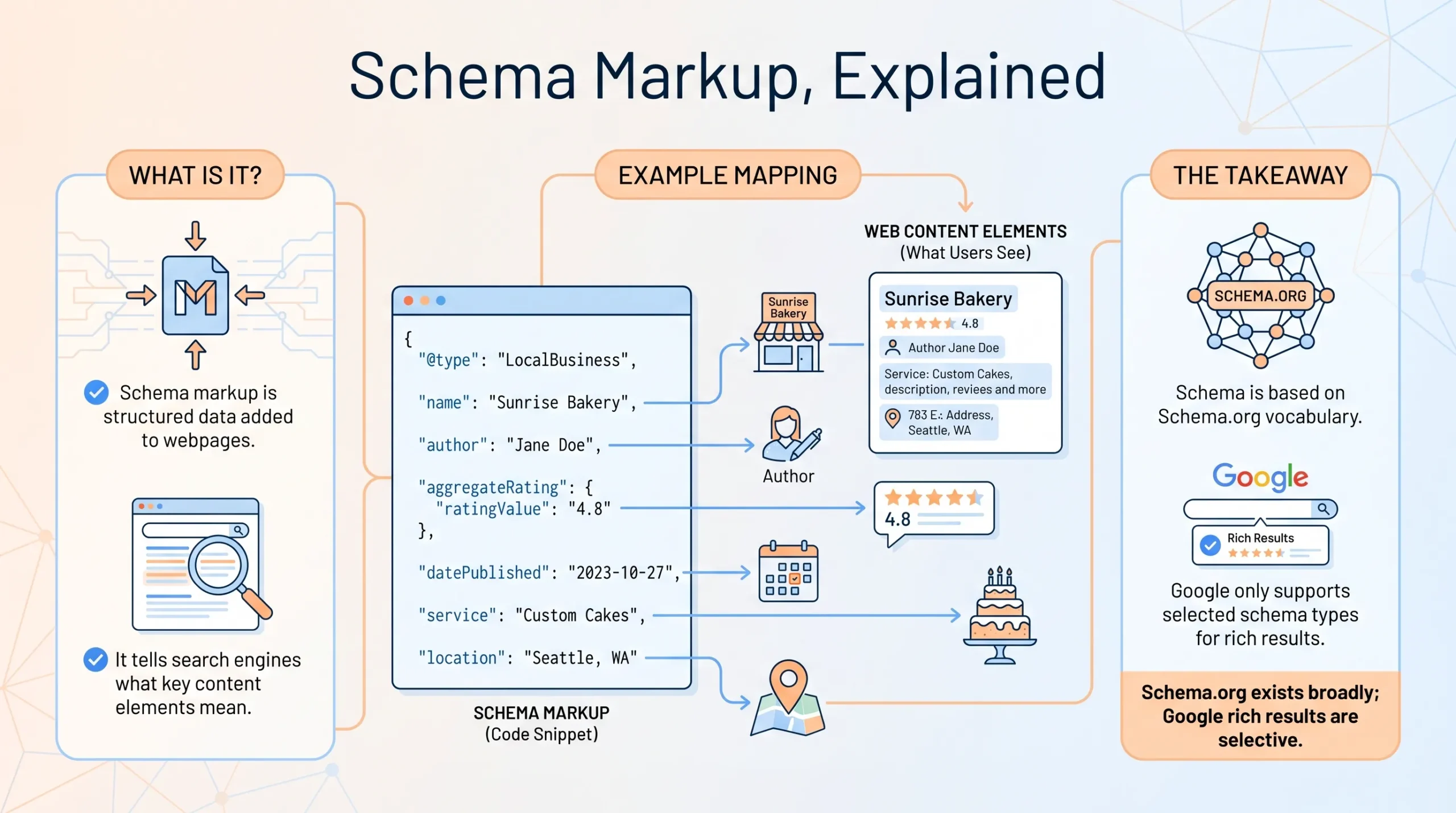
Schema markup is structured data added to a webpage to help search engines understand the meaning of your content. Instead of asking Google to infer whether a number is a rating, a date is an event date, a name is an author, or a page is a product page, schema markup labels those elements in a structured format.
For example, a normal webpage may show:
| Visible Content | What Schema Markup Clarifies |
| MediaOne | This is the organisation name |
| Tom Koh | This is the author or consultant |
| 4.8 out of 5 | This is a rating, if visible and compliant |
| 25 June 2026 | This is an event date or article date |
| SEO services | This is a service offered by the business |
| Singapore | This is the relevant business location |
Schema markup is based on the vocabulary from Schema.org. Search engines use this vocabulary to better classify page content, though Google supports only certain structured data types for rich results.
That distinction is important. Just because a schema type exists on Schema.org does not mean it will trigger a Google rich result.
Schema Markup, Structured Data and Rich Results: What Is the Difference?
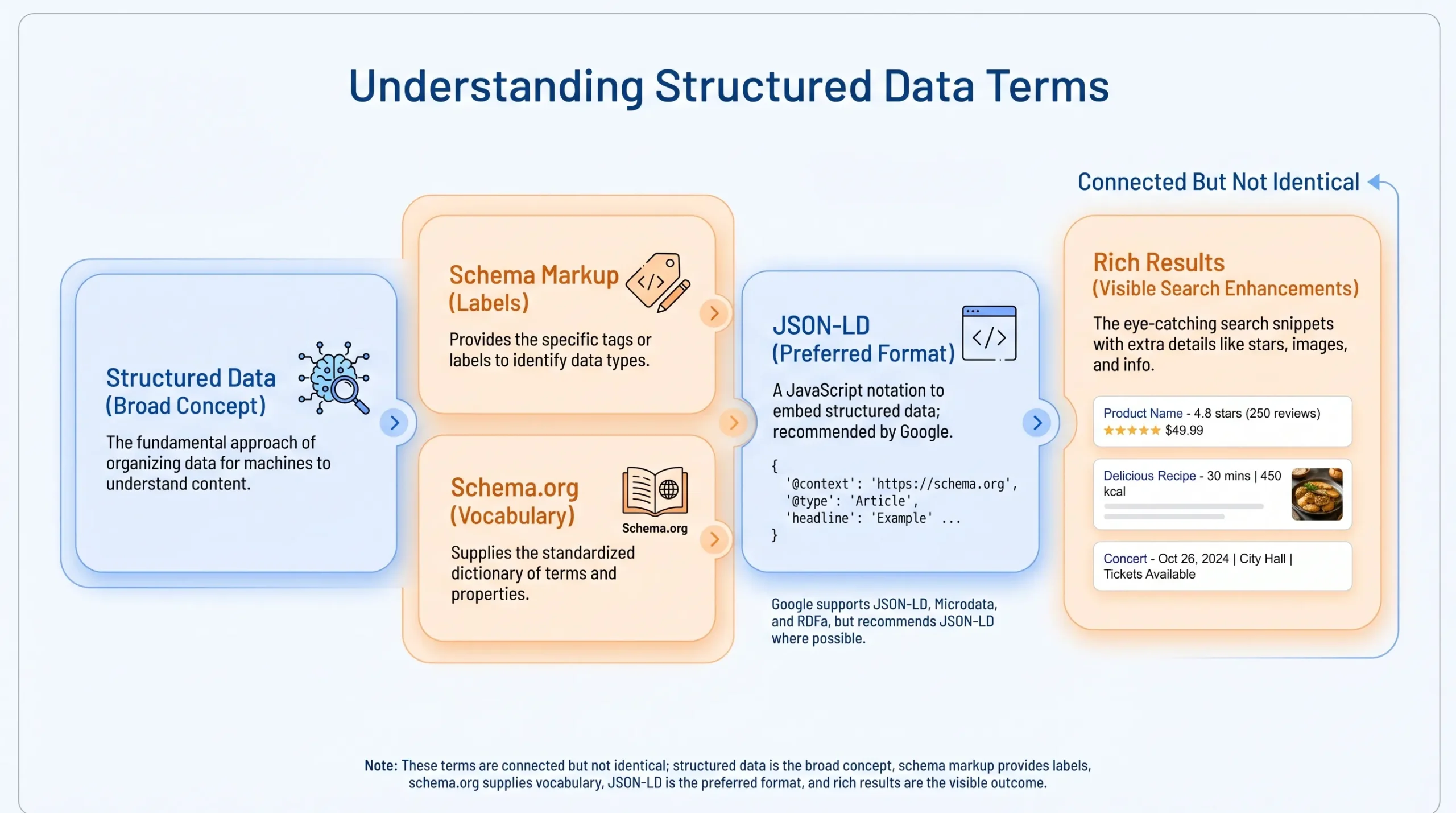
These terms are often used together, but they do not mean the same thing.
| Term | What It Means | Simple Explanation |
| Structured data | Organised data added to a webpage | The broad concept |
| Schema markup | A shared vocabulary for structured data | The labels used to describe content |
| Schema.org | The vocabulary library | The reference source for schema types |
| JSON-LD | A format for adding structured data | Google’s recommended format |
| Rich results | Enhanced Google search results | Search features your page may become eligible for |
We recommend JSON-LD because you can add it separately from HTML. This simplifies management, especially on WordPress, Shopify, Webflow, or custom websites.
Google’s structured data guidelines confirm that JSON-LD, Microdata, and RDFa are supported formats, but JSON-LD is recommended where possible.
Why Schema Markup Matters for SEO
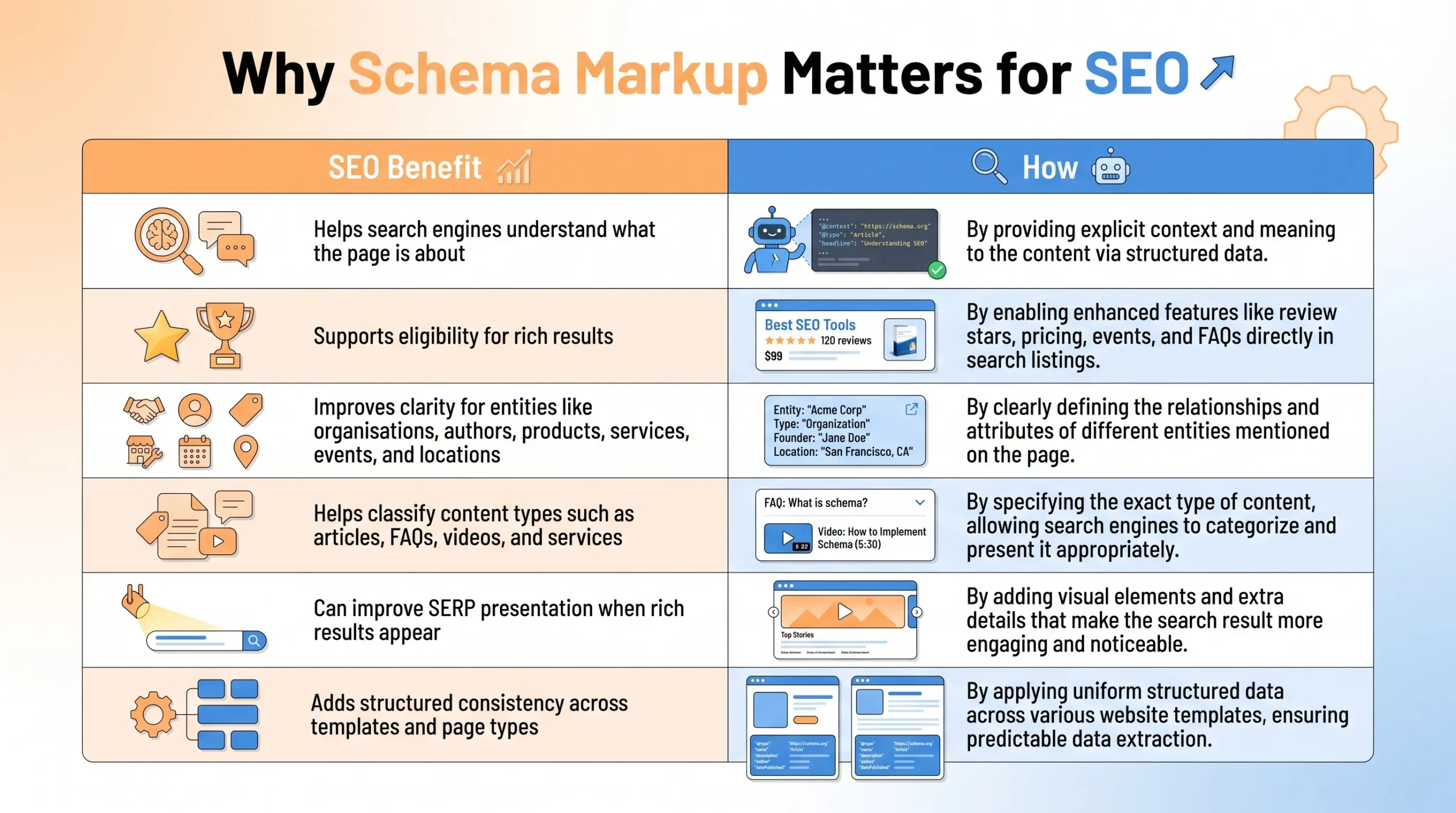
Schema markup matters because it helps search engines better understand your content.
It can support SEO by:
| SEO Benefit | How Schema Markup Helps |
| Better content understanding | Clarifies what the page is about |
| Rich result eligibility | Makes the page eligible for supported search features |
| Entity clarity | Helps define organisations, authors, products, services, events, and locations |
| Content classification | Helps search engines distinguish between articles, products, FAQs, services, videos, and events |
| SERP visibility | May improve how a result appears when rich results are shown |
| Technical consistency | Creates structured signals across templates and page types |
Schema markup is not a shortcut to rankings. It does not replace quality content, backlinks, technical SEO, topical authority, or search intent.
Google’s own guidance also states that structured data can make pages eligible for rich results, but Google does not guarantee that those features will appear in search results.
A safer way to think about schema markup is this:
Schema does not make weak content strong. It helps search engines better understand high-quality content.
Which Schema Markup Should You Use by Page Type?
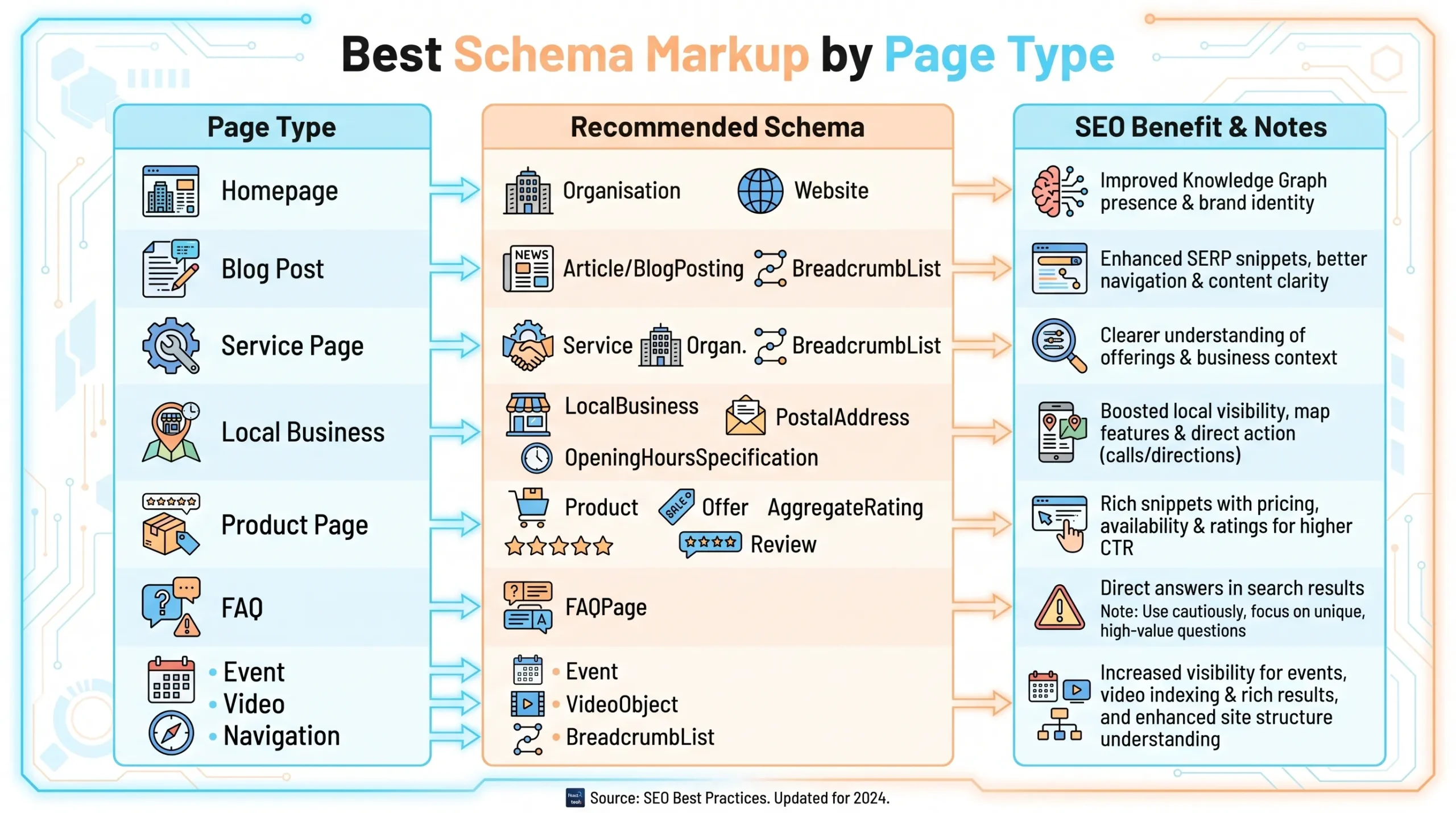
The correct schema type depends on the page. Only add a schema that aligns with the main content and purpose.
| Page Type | Schema to Consider | Why It Helps |
| Homepage | Organisation, Website | Helps clarify brand identity, logo, website name, and official profiles |
| Blog post | Article or BlogPosting, BreadcrumbList | Helps clarify headline, author, publisher, date, image, and page hierarchy |
| Service page | Service, Organisation, BreadcrumbList | Helps describe the service and the business providing it |
| Local business page | LocalBusiness, PostalAddress, OpeningHoursSpecification | Helps clarify business location, contact details, and opening hours |
| Product page | Product, Offer, AggregateRating, Review | Supports product information such as price, availability, and ratings when visible and compliant |
| FAQ section | FAQPage | Structures visible FAQs, but FAQ rich result visibility is now limited for most general websites |
| Event page | Event | Helps clarify event date, time, location, organiser, and availability |
| Video page | VideoObject | Helps search engines understand video title, description, thumbnail, duration, and upload date |
| Breadcrumb navigation | BreadcrumbList | Helps clarify page hierarchy and navigation path |
For product pages, Google explains that structured data can make product information eligible to appear in richer ways across Google Search, including price, availability, review ratings, and shipping-related information where relevant.
Exercise caution with the FAQ schema. Google reduced the visibility of FAQ rich results in 2023. FAQPage markup is no longer a reliable way to expand SERP space.
How We Implement Schema Markup
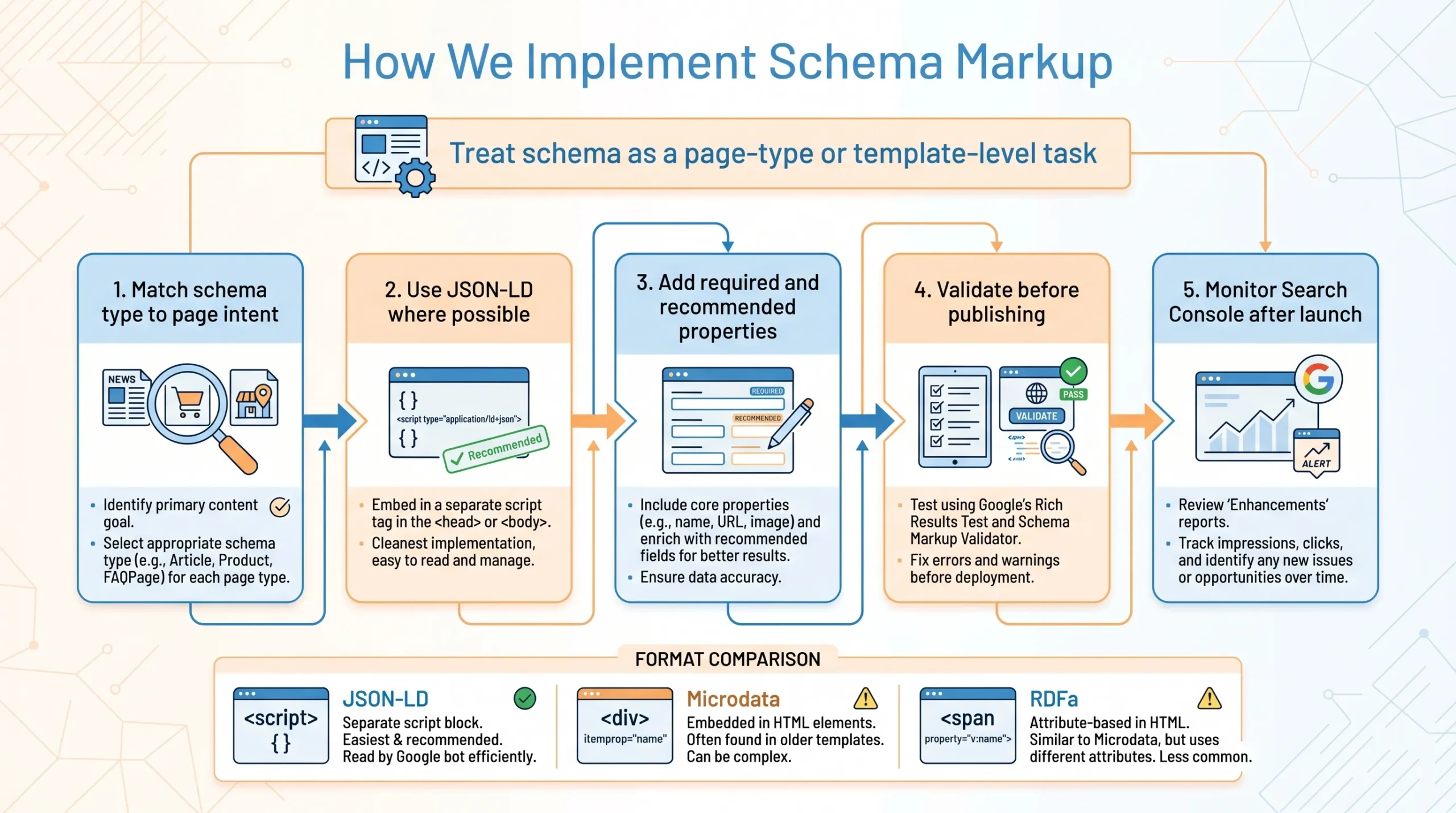
We treat schema markup as a page-type or template-level task. The goal is to apply the correct schema with accurate properties to relevant pages.
Step 1: Match the Schema Type to the Page Intent
Start by asking what the page is mainly about.
A blog post should usually use the Article or BlogPosting schema. A product page should use Product schema. A service page may use the Service schema. A local business page may use the LocalBusiness schema.
Do not mark up a page as a product unless it actually is one. Avoid the FAQ schema if there are no visible FAQs. Never add review markup for content that is not visible or does not meet Google’s review guidelines.
Step 2: Use JSON-LD Where Possible

JSON-LD is usually the most practical format because it sits separately from the main HTML. This makes it easier to edit, audit, and maintain.
| Format | How It Works | When It Is Used |
| JSON-LD | Added as a script block separate from visible HTML | Usually, the easiest and most recommended option |
| Microdata | Added directly into HTML elements | Sometimes used in older templates |
| RDFa | Added through HTML attributes | Less common for most standard SEO implementations |
Google supports all three formats, but JSON-LD is generally recommended because it is easier for site owners to implement and maintain.
Step 3: Add Required and Recommended Properties
Different schema types require different properties.
For example, an Article schema may include a headline, an image, an author, a publisher, a datePublished, and a dateModified. The product schema may include name, image, description, brand, offer, price, availability, and, where applicable, review details.
Aim for completeness, not exaggeration. Mark up only information that is true, visible, and relevant.
Step 4: Validate Before Publishing
After adding schema markup, validate it before publishing.
Google’s Rich Results Test checks which Google rich results can be generated from the structured data on your page. You can also use Schema.org Validator to check broader structured data syntax.
Validation is important. Critical errors block rich results. Non-critical warnings may not, but reviewing them can improve the quality of structured data. Google distinguishes between critical errors and non-critical issues for quality improvement.
Step 5: Monitor Search Console
Once the page is live, monitor Google Search Console, where enhancement reports are available.
Search Console can help you review valid, invalid, and potentially ineligible items and issues that may affect structured data eligibility. For some structured data types, Google provides reports that help debug and validate fixes after deployment.
Schema Markup Examples You Can Adapt
Adapt these examples to match the visible content on your page.
Do not mark up content that users cannot see. Do not add schema types that do not match the page’s primary purpose.
Organisation Schema Example
<script type=”application/ld+json”>
{
“@context”: “https://schema.org”,
“@type”: “Organisation”,
“name”: “Your Business Name”,
“url”: “https://www.example.com/”,
“logo”: “https://www.example.com/logo.png”,
“sameAs”: [
“https://www.facebook.com/yourbusiness”,
“https://www.linkedin.com/company/yourbusiness”
]
}
</script>
Article Schema Example
<script type=”application/ld+json”>
{
“@context”: “https://schema.org”,
“@type”: “Article”,
“headline”: “Schema Markup Guide: How Structured Data Supports SEO”,
“description”: “A practical guide to schema markup, structured data, rich results, and SEO implementation.”,
“image”: “https://www.example.com/schema-markup-guide.jpg”,
“author”: {
“@type”: “Person”,
“name”: “Author Name”
},
“publisher”: {
“@type”: “Organisation”,
“name”: “Your Business Name”,
“logo”: {
“@type”: “ImageObject”,
“url”: “https://www.example.com/logo.png”
}
},
“datePublished”: “2026-04-24”,
“dateModified”: “2026-04-24”
}
</script>
Service Schema Example
<script type=”application/ld+json”>
{
“@context”: “https://schema.org”,
“@type”: “Service”,
“name”: “SEO Services”,
“description”: “SEO services for businesses that want to improve organic visibility and search performance.”,
“provider”: {
“@type”: “Organisation”,

“name”: “Your Business Name”,
“url”: “https://www.example.com/”
},
“areaServed”: {
“@type”: “Country”,
“name”: “Singapore”
}
}
</script>
BreadcrumbList Schema Example
<script type=”application/ld+json”>
{
“@context”: “https://schema.org”,
“@type”: “BreadcrumbList”,
“itemListElement”: [
{
“@type”: “ListItem”,
“position”: 1,
“name”: “Home”,
“item”: “https://www.example.com/”
},
{
“@type”: “ListItem”,
“position”: 2,
“name”: “SEO”,
“item”: “https://www.example.com/seo/”
},
{
“@type”: “ListItem”,
“position”: 3,
“name”: “Schema Markup Guide”,
“item”: “https://www.example.com/schema-markup-guide/”
}
]
}
</script>
FAQPage Schema Example
Use the FAQPage schema only when the questions and answers are visible on the page.
<script type=”application/ld+json”>
{
“@context”: “https://schema.org”,
“@type”: “FAQPage”,
“mainEntity”: [
{
“@type”: “Question”,
“name”: “What is schema markup?”,
“acceptedAnswer”: {
“@type”: “Answer”,
“text”: “Schema markup is structured data added to a webpage to help search engines understand the meaning of the content.”
}
},
{
“@type”: “Question”,
“name”: “Does schema markup guarantee rich results?”,
“acceptedAnswer”: {
“@type”: “Answer”,
“text”: “No. Schema markup can make a page eligible for rich results, but Google does not guarantee that rich results will appear.”
}

}
]
}
</script>
How We Audit Schema Markup on a Website
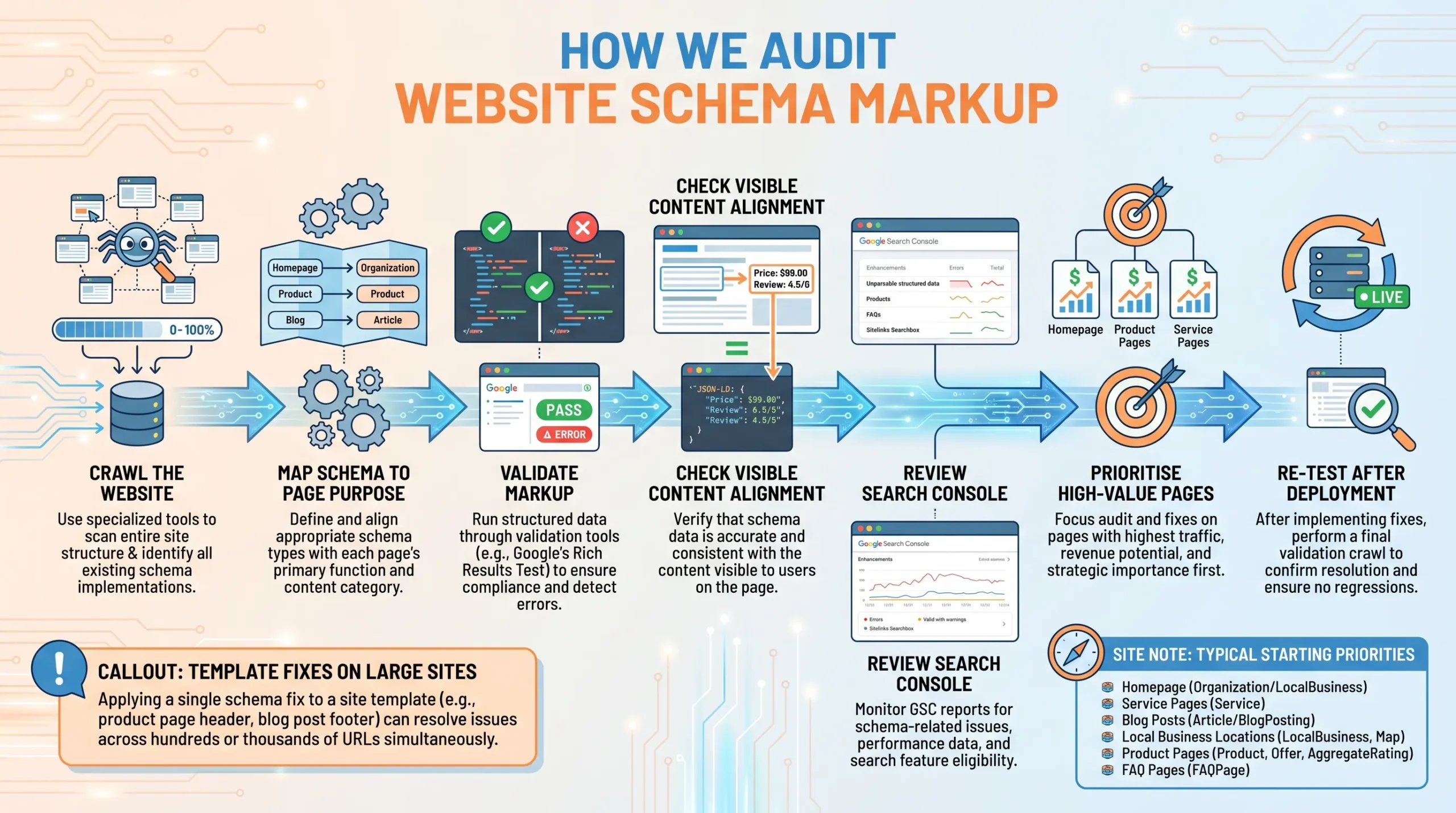
Before implementing any new schema, we audit existing markup to prevent duplication, mismatches, or unnecessary additions. This step ensures the schema is consistently aligned with the page’s purpose and content.
| Step | What We Check | Why It Matters |
| Crawl the website | Identify existing structured data across templates and pages | Shows what schema is already implemented |
| Map schema to page type | Check whether each page uses the right schema type | Prevents mismatch between content and markup |
| Validate markup | Use Rich Results Test and Schema.org Validator | Identifies errors and warnings |
| Check visible content alignment | Make sure markup matches what users can see | Reduces the risk of misleading structured data |
| Review Search Console reports | Check enhancement reports, errors, and valid items | Helps monitor Google’s interpretation |
| Prioritise high-value pages | Focus on templates and pages with SEO or commercial value | Avoids wasting time on low-impact pages |
| Re-test after deployment | Validate the final live page | Confirms fixes are working |
For large sites, we would prioritise schema fixes by template. For example, if every product page uses the same Product schema template, fixing that template may improve hundreds or thousands of URLs at once.
For smaller sites, we would usually start with the homepage, key service pages, important blog posts, local pages, product pages, and high-performing landing pages.
Common Schema Markup Mistakes to Avoid
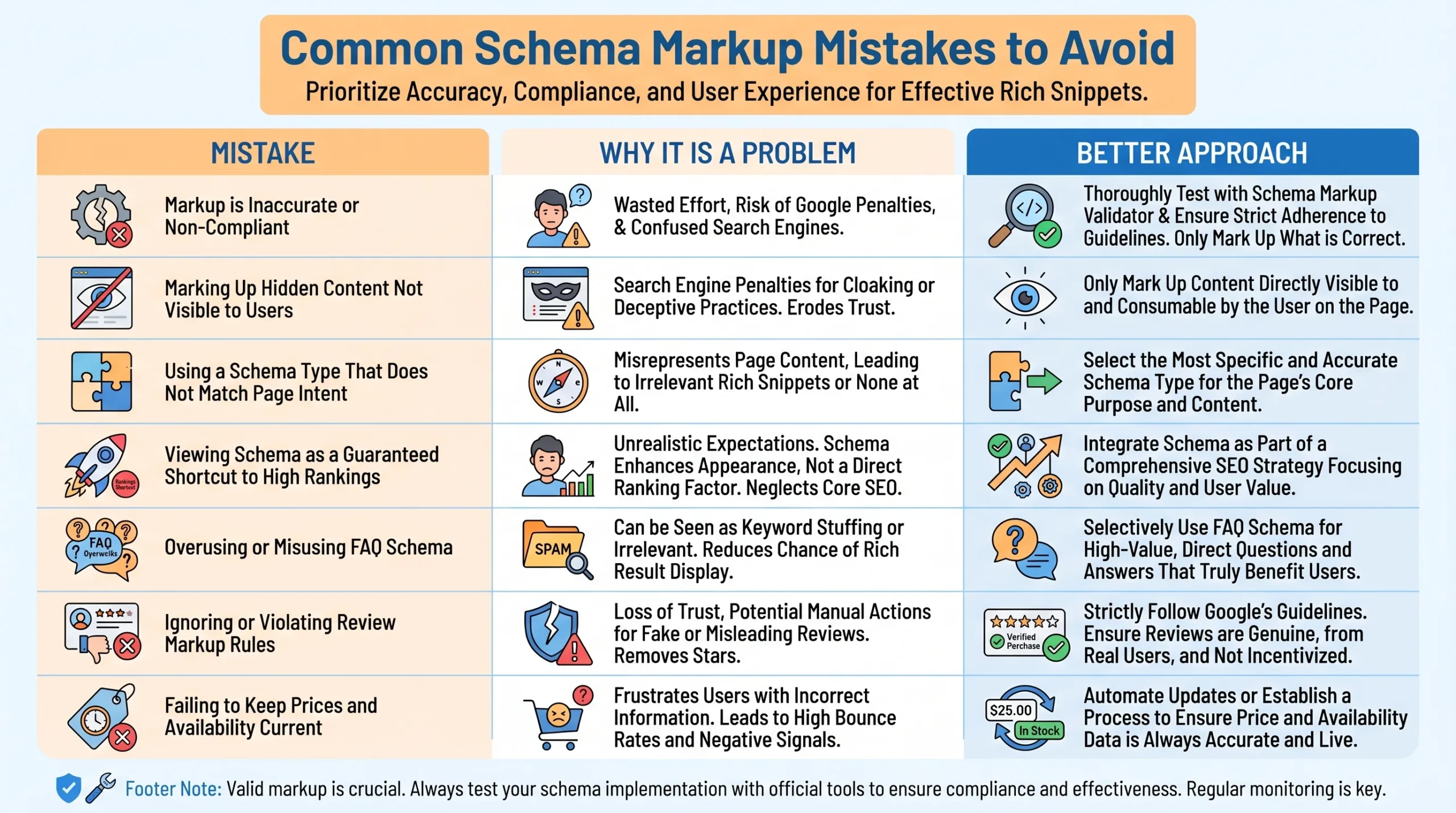
Schema markup can help, but only when it is accurate and compliant. Poor implementation can create confusion or make a page ineligible for rich result features.
| Mistake | Why It Is a Problem | Better Approach |
| Marking up hidden content | Structured data should represent visible page content | Only mark up content that users can see |
| Using the wrong schema type | Misleading markup can cause eligibility issues | Match schema to the main page intent |
| Expecting the schema to improve rankings directly | Schema is not a shortcut to higher rankings | Treat it as a clarity and eligibility layer |
| Using the FAQ schema on every page | FAQ: Rich result visibility is limited for many sites | Use FAQs only when they genuinely help users |
| Marking up reviews incorrectly | Review markup has strict rules | Follow Google’s review snippet guidelines |
| Leaving outdated prices or availability | Mismatched data can mislead users | Keep schema aligned with visible page content |
| Not validating after publishing | Errors can affect rich result eligibility | Test before and after deployment |
| Duplicating schema from multiple plugins | Conflicting markup can confuse implementation | Audit all plugins and templates before adding more |
Google’s structured data guidelines state that structured data must comply with technical and quality guidelines, and Google may not show content as a rich result for several reasons, even if markup is valid.
How Schema Markup Supports AI Search and GEO
Schema markup can support AI search readiness by making your content more machine-readable. It can help clarify entities, relationships, authors, organisations, products, services, locations, events, FAQs, and page purpose.
For GEO, we see schema markup as one part of the entity clarity layer. It helps search systems understand what your content represents and how its elements relate to one another.
For example:
| Entity or Content Type | Schema Can Clarify |
| Organisation | Business name, logo, website, official profiles |
| Author | Name, role, profile, credentials where applicable |
| Service | Service name, provider, service area |
| Product | Name, image, offer, price, availability |
| Local business | Address, opening hours, phone number, location |
| Article | Headline, author, publisher, date, image |
| FAQ | Visible questions and answers |
| Event | Date, time, venue, organiser, availability |
However, I would not claim that schema markup guarantees AI citations, AI Overview visibility, or voice search visibility. AI visibility depends on many factors, including brand authority, content quality, citations, mentions, topical coverage, retrieval systems, and how each AI platform summarises information.
Schema markup supports understanding. It does not replace a strong content strategy.
Schema Markup and SEO: Building Clearer Signals for Search Engines
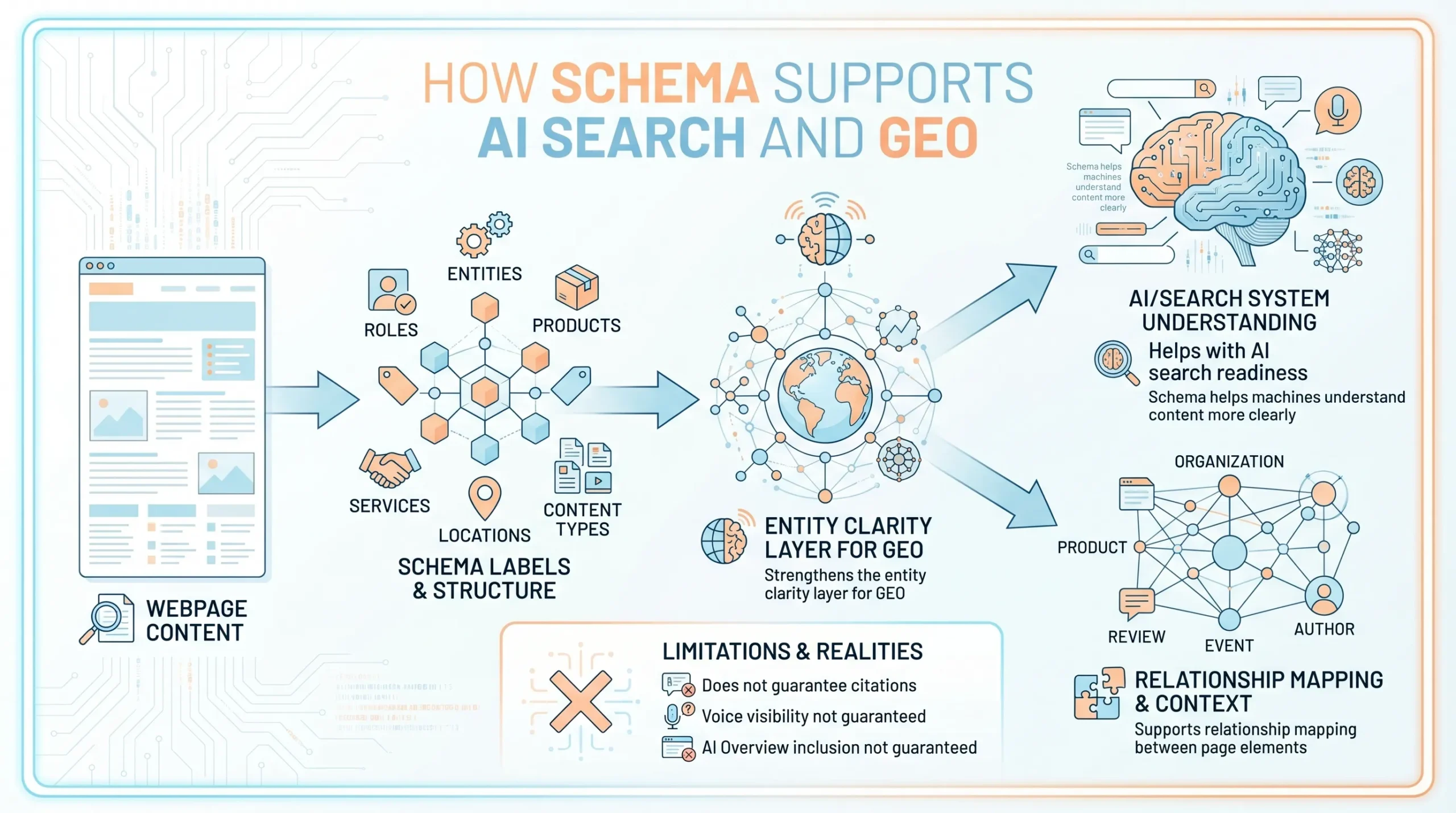
Schema markup helps search engines better understand your content by providing structure for key information such as your organisation, services, products, authors, articles, events, FAQs, reviews, and locations.
However, schema markup should not be treated as a shortcut to rankings. It supports SEO by improving clarity, consistency, and rich result eligibility, but it cannot replace strong content, sound technical SEO, relevant internal links, backlinks, and alignment with search intent.
When we implement the schema properly, we are not just adding code. We are helping search engines interpret your pages more accurately while making the website technically cleaner, more structured, and easier to understand.
If your site has useful content but weak search visibility, MediaOne can help you audit your structured data, fix schema issues, and strengthen the broader SEO foundation. Speak with our team to improve how search engines understand, process, and display your pages more effectively.
Frequently Asked Questions
Can schema markup be added without changing the page’s visible design?
Yes. Schema markup is usually added at the code level and does not affect how the page looks to users. It works behind the scenes to help search engines better interpret the content.
Is schema markup only useful for large websites?
No. Schema markup can be useful for both small and large websites if the content benefits from a clearer structure. Even a smaller site can improve machine readability and strengthen its technical SEO foundation with the right implementation.
What is the difference between schema markup and meta tags?
Meta tags mainly provide page-level information such as titles, descriptions, and indexing instructions. Schema markup gives more detailed, structured context about the entities and content on the page, such as products, services, articles, reviews, or organisations.
Can schema markup help pages get crawled or indexed faster?
Schema markup does not directly speed up crawling or indexing. Its main role is to improve understanding once search engines process the page, rather than acting as a shortcut for discovery.
Who should be responsible for implementing schema markup?
That depends on the site setup. On some websites, a developer handles the implementation. For others, it may be managed by an SEO specialist, a technical SEO team, or a CMS plugin. The key is that the person implementing it should understand both the page content and the structured data rules.
What pages usually benefit most from schema markup?
Pages that describe specific entities or structured information often benefit most, such as product, service, article, FAQ, local business, event, and video pages. The more clearly defined the content type is, the more useful the schema can be.
Should schema markup be part of a technical SEO audit?
Yes. Schema markup should be reviewed as part of a technical SEO audit because it affects how search engines interpret page content and whether structured data is implemented accurately. Auditing it helps identify missing markup, outdated fields, and implementation errors that may otherwise go unnoticed.