
The standard internal linking advice in 2026 assumes you have more website than most Singapore businesses actually do. It tells you to build a pillar page, surround it with cluster content, then wire the group together.
That model solves a scale problem.
It is the wrong starting point for a 40 to 80-page business site.
More links can also hide the real fault, such as an important service page sitting too deep or supporting content linking in only one direction.
The correct internal linking strategy starts with site size. Smaller sites need cleaner routes between pages that already exist. Once a site grows into hundreds of pages, recurring templates can reproduce one linking fault across the whole estate.
Pillar-cluster is the wrong internal linking strategy below fifty pages
Pillar-cluster advice begins by prescribing a shape. A small business should begin by asking if its existing pages already cover the useful commercial and informational intents.

IMDA reports that 95.1% of Singapore SMEs adopted at least one of six measured digital areas in 2025. That establishes the scale of digital adoption, not the scale of the average website. A digitally active SME can still operate a compact site with a service section and a modest content library.
A 35-page accounting site does not need a new ‘corporate tax pillar’ when its corporate tax service page already owns the broad commercial topic. The new hub would have to restate much of the same subject before pointing to filing guides and tax articles. The architecture diagram becomes cleaner while the intent map becomes worse.
Creating a pillar at that size creates four avoidable problems:
- The hub overlaps an existing service or category page.
- Supporting articles receive two plausible broad destinations.
- Editorial effort moves towards structural filler instead of stronger primary pages.
- The site adds another URL that must earn links and maintain a distinct purpose.
Google’s link best practices make a simpler demand. Important pages should receive links from other relevant pages, and anchor text should describe the destination. Google does not require a pillar page.
Before commissioning another hub, make two checks:
- Does an existing page already satisfy the broad intent?
- Would the proposed hub give the reader a distinct job that page cannot do?
If the first answer is yes and the second is no, the hub should not exist.
The mechanics of contextual links, navigational links and anchor placement belong in MediaOne’s internal link building best practices. The decision here comes earlier. The site needs to know if it has a structural gap before it creates a structural page.
Budget makes the same point from another angle. A thin hub costs money to plan, write and maintain. Improving a service page that already carries commercial intent uses the same budget against an existing asset, which is the more defensible trade-off for SEO work for Singapore SMEs on a tight budget.
On a small site, internal linking strategy starts with link debt, not link count
A small site can contain plenty of links and still route people badly. Raw link totals tell you almost nothing about which pages deserve attention or how readers move between related topics.
Google’s ecommerce site-structure guidance says it can use the number of links needed to reach a page and the number of links pointing to that page to infer relative importance. That is a better starting point than an arbitrary target for links per page.
The principle also has a longer history. Brin and Page’s original Google paper treated the web’s link structure as information rather than decoration. Internal linking work should do the same. A link exists because it clarifies relationship, priority or route.
What a 15-site Singapore crawl found
A manual public-site crawl conducted for this article on 18 August 2026 covered 15 Singapore accounting and corporate-services websites. The sample was selected because the sector contains many compact service sites with supporting compliance content. It is a convenience sample, not a market estimate.
Fourteen of the 15 were clearly multi-page sites in the public HTML available to the crawl. Of those 14, 13 exposed at least one individual service page directly from the homepage. Their visible top navigation contained between 3 and 15 distinct internal destinations, with a median of 8.5.
That result matters because the obvious commercial pages were rarely hidden behind elaborate hierarchies. The weaker pattern appeared when supporting content and service pages were checked together.
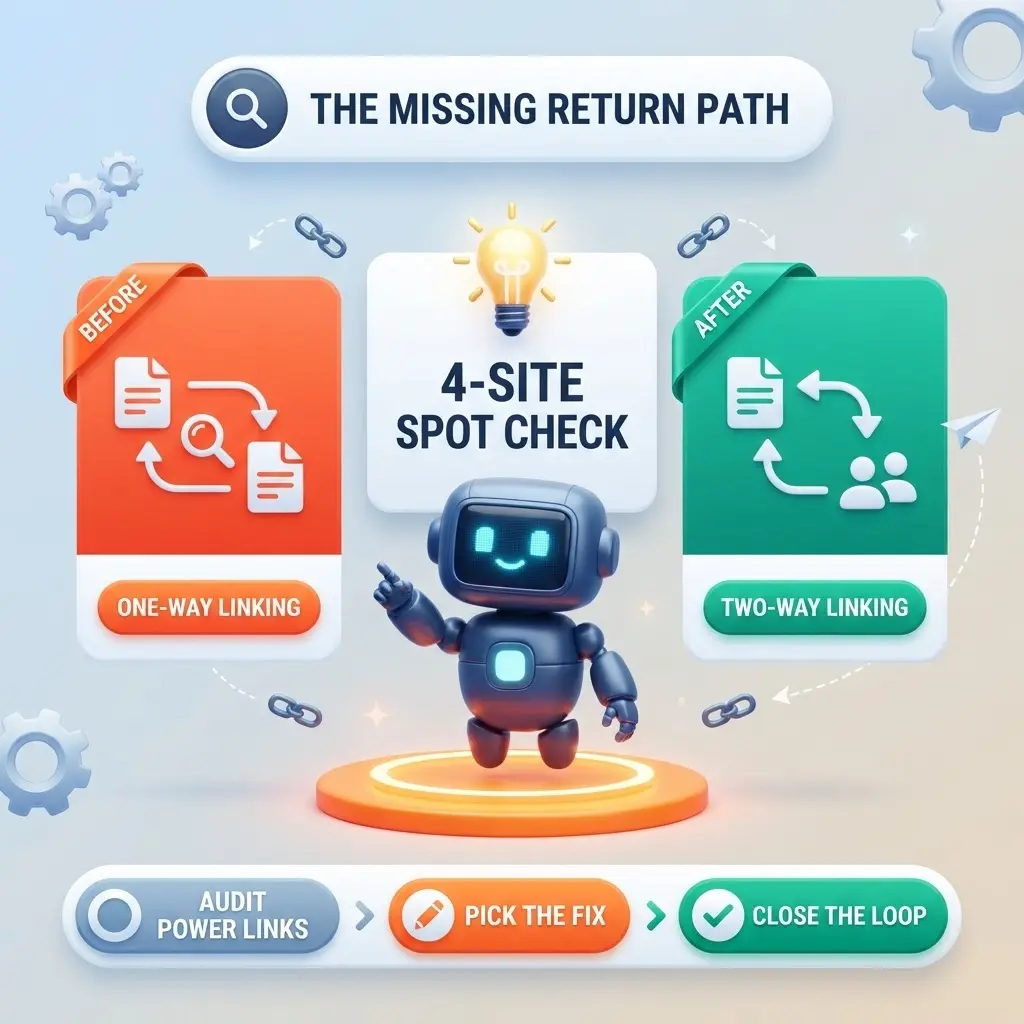
A four-site spot-check traced one relevant article and one related service page on each site:
- One site linked contextually from the article to the service page and from the service page back to the specific article.
- Two sites linked from the article to the service page but did not return a specific contextual link from the service page.
- One site relied on navigation or footer routes rather than a specific contextual pair.
- None of those observations requires a claim about Googlebot frequency or ranking impact.
The sample does not prove a Singapore-wide percentage. It does show why small-site audits should inspect reciprocity rather than assume the first problem is a lack of links.
Breadcrumbs also deserve more weight on compact sites because they preserve hierarchy as pages change. The W3C breadcrumb technique describes breadcrumbs as a route back through preceding pages. Nielsen Norman Group also notes that deeper navigation hierarchies add levels between homepages, listing pages and detail pages in its research on listing-page information architecture.
The first move on a link-heavy small site is therefore removal and repair. Reduce recurring links that have no reason to appear everywhere. Shorten routes to revenue pages. Then add contextual links where the relationship gives the reader a useful next step.
Site size should determine your internal linking strategy
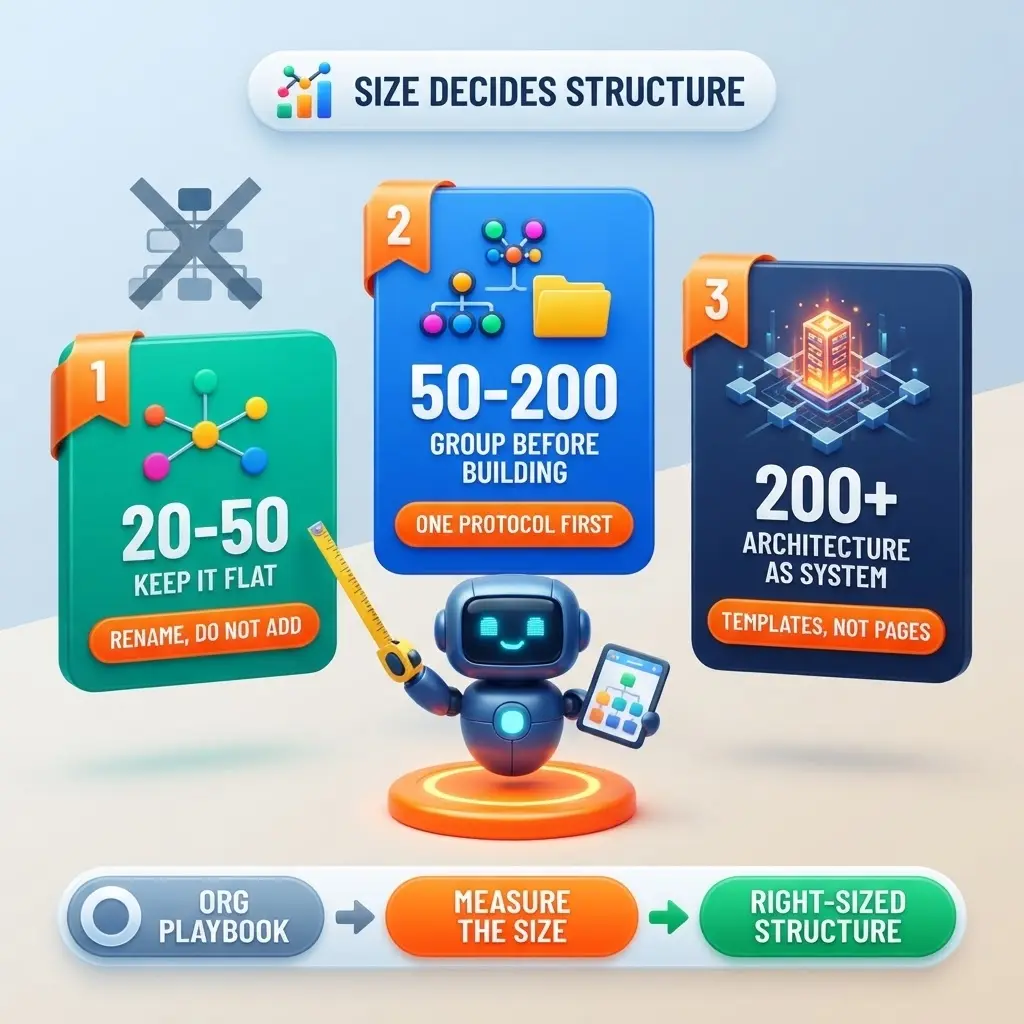
Site size changes the problem. A tactic that is sufficient on a 30-page site becomes inadequate when templates and category rules affect hundreds of URLs.
| Site size | Primary problem | Recommended structure | First move |
| Roughly 20 to 50 pages | Important pages are diluted by recurring links or weak page relationships | Flat hierarchy with breadcrumbs and selective contextual links | Remove unnecessary recurring links and repair routes between existing pages |
| Roughly 50 to 200 pages | Related content becomes harder to organise and maintain | Deliberate topic groups around existing primary pages | Map page purpose, then connect related groups in both directions |
| 200+ pages | Templates and category rules reproduce faults at scale | Formal architecture with defined category logic and ownership | Analyse patterns across templates before editing individual links |
Roughly 20 to 50 pages: keep the hierarchy flat
The goal is clarity. A small number of important commercial pages should remain easy to reach from sensible entry points.

- Keep revenue pages on short and understandable routes.
- Use breadcrumbs where the hierarchy needs to remain visible.
- Remove navigation links that do not deserve persistent prominence.
- Use descriptive anchors consistently when nearby services could otherwise blur together.
Roughly 50 to 200 pages: formalise groups before adding hubs
Manual linking becomes harder to maintain as the content library grows. Grouping starts to matter.
- Group pages by subject and user purpose.
- Give each group an obvious primary destination where the intent supports one.
- Link supporting pages back to that destination and connect useful adjacent pages.
- Review recurring template links so they do not drown out contextual relationships.
At this size, internal linking starts to overlap with technical SEO guidelines for site architecture because a template decision can affect a whole group rather than one page.
200+ pages: architecture becomes a system
Large sites create a different class of problem. Category structures, filters and recurring components can generate link patterns no editor can manage page by page.
A 100,000-page ecommerce site averaging 250 links per page creates roughly 25 million internal link instances. At that scale, the internal linking strategy depends on rules and ownership rather than individual editorial judgement.
- Define category routes before adding isolated body links.
- Inspect recurring template links before changing individual pages.
- Control parameter and faceted URLs that create avoidable crawl paths.
- Assign ownership for structural changes that affect multiple teams.
At this scale, the work becomes governance. MediaOne’s enterprise SEO site architecture covers scaled architecture and internal linking structures. Large-site fixes also cross into broader digital marketing services when implementation affects development, content or analytics functions.
MediaOne’s current SEO materials report more than 3,000 businesses served and describe its proprietary Digimetrics platform. The same materials describe technical audits covering more than 200 signals.
The Link Debt Index diagnoses the structure you already have
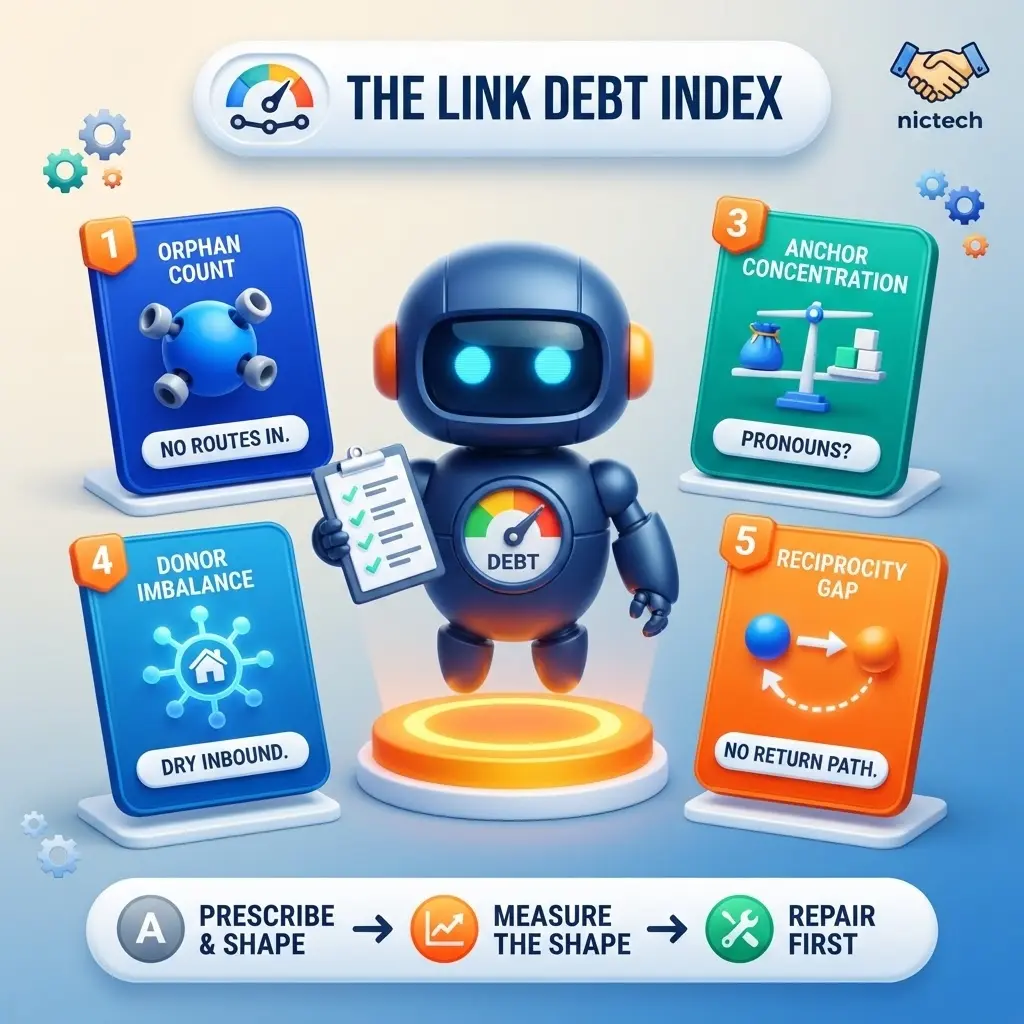
MediaOne’s Link Debt Index measures the structure a site already has instead of prescribing one it does not need.
It comes from the same discipline as our Revenue Intelligence Framework, built from more than 800 client audits across Singapore, Malaysia and the wider APAC region. That framework asks whether SEO spend produces profit. This one asks a narrower question: which structural fault should be repaired before a single new link gets added?
The crawl behind this article is a public one, and that boundary matters. A public crawl sees what a visitor sees. It cannot see orphan counts inside a site, what depth looked like before a fix, or what happened to a page after one. Those come from client work rather than from the outside.
The 15-site crawl above is why reciprocity earns a measure of its own. Commercial pages in that sample were rarely buried. The weak point sat in the return path between supporting content and service pages, which is the fault least likely to show up in a link count.
The diagnostic uses five measures:
- Orphan count: pages with zero internal inbound links from body content, counted separately from pages reachable only through global navigation.
- Depth ceiling: click distance from the homepage to the deepest revenue-generating page.
- Anchor concentration: the share of internal links carried by navigational anchors compared with contextual body anchors.
- Donor imbalance: the share of internal links originating from the homepage alone.
- Reciprocity gap: related content groups where links flow in one direction only.
It deliberately does not produce a universal ‘good score’. A 30-page site and a 30,000-page site should not be judged against the same thresholds. The purpose is to identify the dominant form of debt and then interpret it against site size.
| Diagnostic measure | What to inspect | What the fault reveals |
| Orphan count | Pages with no contextual inbound links | Content exists without a meaningful route from related pages |
| Depth ceiling | Deepest revenue page measured from the homepage | Commercial pages sit behind unnecessary layers |
| Anchor concentration | Navigation anchors compared with contextual anchors | The site depends on menus more than page relationships |
| Donor imbalance | Share of links originating from the homepage | Too much internal importance comes from one donor |
| Reciprocity gap | One-way linking inside related content groups | Supporting and primary pages fail to reinforce the relationship |
That is link debt. The site has content and the site has links, but the relationships are incomplete.
Audit the routes before expanding your internal linking strategy
Internal linking problems are easier to diagnose when the audit follows the same order every time. Start with reachability, then separate structural faults from linking gaps. New links come after that diagnosis.
Run the audit in four passes
Link addition can conceal faults that should have been removed first.
Step 1: Find the commercial depth ceiling
Screaming Frog’s free tier crawls up to 500 URLs, which covers any site in the first two bands. Four columns do most of the work, and each needs reading rather than glancing at.
- Crawl Depth counts clicks from your start URL. The homepage is 0 and anything linked from it is 1. Filter to revenue pages only, then compare them against each other rather than against a fixed cap. A site where four service pages sit at depth 2 and the fifth sits at depth 5 has a problem with that one page, not with its architecture.
- Unique Inlinks counts how many distinct pages link in. Sort ascending and read the bottom of the list. A page showing 1 or 2 unique inlinks on a site with a persistent menu is almost certainly reached from the menu alone.
- Link Position classifies each link as content, navigation, sidebar or footer. Enable it under Configuration before you crawl, because it does not apply retrospectively. This is the column that makes Step 2 possible. A page whose inlinks are all classified navigation is reachable without being supported.
One limitation worth knowing before you trust the output. A crawler finds pages by following links, so by definition it cannot find a page nothing links to. True orphans only appear once you connect Search Console, Analytics or an XML sitemap and run the Orphan Pages report. A crawl on its own will tell you your site has no orphans while the orphans sit there invisible.
A page in the main menu is reachable. That does not mean related pages support it contextually.
- Identify pages with zero body-content links pointing in.
- Separate them from pages receiving only global navigation links.
This distinction matters because a large menu can make a site look well connected while leaving topic relationships weak.
Step 3: Trace donors and reciprocity
Reciprocity is measure five of the Link Debt Index. This is where you test it.
Pick one service page and one article that should support it. Open the service page’s inlinks and check whether that article appears. Then open the article’s outlinks and check whether the service page appears. A pair that fails in one direction is the most common fault in the sample above.
Here is what a broken pair looks like. A corporate secretarial service page links out to an article on annual filing deadlines. The article links back to the homepage and to the services index, but never to the specific service page. A reader arriving on that article from search has to work out for themselves which service applies. The fix is one contextual link in the article body, placed at the point where the deadline creates the need, pointing at the service page rather than the index.
Then check donors. Flag any group where the homepage supplies most of the useful routes, and inspect the anchor text while you are in there. Google recommends descriptive, reasonably concise and relevant anchors, and consistency helps when it makes one destination unmistakable.
Step 4: Remove debt before creating structure
Fix existing routes before approving new hubs or navigation layers.
- Remove recurring links that do not deserve site-wide prominence.
- Repair orphaning and excessive depth.
- Restore useful two-way relationships between supporting content and primary pages.
- Recheck the route after template changes so the fix survives future publishing.
Start with the footer and the main menu, because those emit on every page. Count what a single page pushes out before any body content begins. A firm with 14 top-level menu items and a 28-link footer is emitting 42 site-wide links from every URL, and the two service pages it actually sells are competing for attention with a careers page and a cookie policy.
Removal here is not deletion. Menu items that exist for compliance or navigation courtesy can move to the footer, and footer links that nobody uses can move to a sitemap page. Nothing becomes unreachable. What changes is how much of each page’s outbound attention goes to pages that matter.
Then check what that freed up. If a service page previously sat at depth 4 because it was reachable only through a submenu, a single contextual link from the article that drives its traffic moves it to depth 2 without touching the navigation at all.
Only then should the site add a new structural page. On a 40-page site, the audit should normally end with fewer faults rather than more architecture.
Two internal linking strategy rules break on small sites
Some advice is sensible at scale and damaging when applied without a size check. Two rules deserve direct disagreement because they drive unnecessary work on compact sites.
Pillar-first planning puts architecture before intent
The orthodoxy is not stupid, and it is worth stating fairly before disagreeing with it. Semrush’s topic-cluster guidance defines a cluster around a pillar page with linked subpages. Ahrefs’ internal-linking guide, updated in March 2026, tells readers to think in topic clusters first. On a site with two hundred articles across eight themes, that advice is correct. The hub does organisational work no single article can do.
The failure is one of transfer. A 35-page service site has no organisational problem to solve. It has eight pages that already own their intents and a handful of articles supporting them.
That is backwards for a compact service website.
The sequence should be:
- Map the distinct search and user intents already served.
- Identify the existing page that owns each broad intent.
- Add a hub only when no current page can perform the required organisational job.
- Refuse a hub that would mainly rewrite an existing service page.
MediaOne’s digital marketing services guide illustrates the point. It already occupies a broad explanatory role. Another umbrella page above the same intent would need a genuinely different job to justify its existence.
Forced anchor variation makes small sites less clear

Advice to diversify anchor text is often carried over from external link building. Internal links have a different job. The site controls the vocabulary and knows exactly which page each anchor describes.
The rule should be narrower:
- Use the clearest descriptive anchor when the destination is unambiguous.
- Vary wording when the sentence or reader context genuinely requires it.
Google warns against keyword stuffing. It does not tell site owners to invent synonyms for every internal link. On a compact site, consistent terminology often makes service relationships easier to understand.
Fix Link Debt Before You Build More Structure
Most Singapore SME sites do not need another architecture diagram. They need an internal linking strategy based on the faults their existing pages already show.
The 15-site accounting and corporate-services crawl makes the distinction visible. Commercial pages were usually easy to reach from the homepage. The weaker pattern appeared in the contextual relationship between service pages and supporting content.
That is a repair problem before it is a content-production problem.
Audit the deepest revenue-generating page this week. Trace its shortest route from the homepage, then inspect which relevant pages point to it and which useful relationships fail to return.
If the route is weak, repair it before commissioning another pillar or cluster page.
Site size should decide how much structure comes next.
FAQs
The questions below come up in almost every conversation about internal linking on a small site.
How many internal links should a page have?
There is no useful universal number. A service page may need only a few contextual routes, while a category page can support more. Check page purpose and depth before counting links. Then inspect duplication. A fixed target creates noise when the additional links do not improve a route or explain a relationship.
Does a small business website need pillar pages?
Usually no below roughly fifty pages. If an existing service page or guide already owns the broad intent, another pillar duplicates its role. Add a hub when enough distinct supporting pages exist and the new page performs an organisational job that no current page can do without becoming bloated.
How deep should an important service page be?
Keep the route as short and logical as the site’s structure allows. Google does not prescribe one click-depth cap for every website. It does say link distance can contribute to its understanding of relative importance. Compare revenue pages with one another and investigate any important page that sits materially deeper than its peers.
No. Breadcrumbs preserve hierarchy and provide routes back through a site, but contextual links still matter when another page genuinely helps the reader. Use body links to explain meaningful relationships and next steps. Do not use them as a patch for confusing primary navigation or an unnecessarily deep commercial page.
Can exact-match internal anchor text hurt SEO?
Natural exact-match internal anchors are not automatically a problem. Google recommends descriptive and relevant link text while warning against keyword stuffing. The practical test is accuracy. If the anchor names the destination naturally, consistency can improve clarity. Forced repetition is unnecessary, but forced variation can make the link less precise.
When should a site rebuild its architecture instead of repairing links?
Rebuild when the fault comes from a system that keeps reproducing the problem. That is more common on larger estates where category rules or templates affect many URLs at once. A compact site should repair depth, navigation dependence and one-way relationships first. Rebuild only when those local fixes cannot remain stable.